FIFAワールドカップ決勝が近づくと、多くのサッカーファンが試合への想いを動画にしたくなります。Kling AIはテキストと写真から映像を作れ、生成モデルも選べます。自分の作風に合わせて動画を作れます。
最後まで読むと、使えるKling FIFAワールドカッププロンプト20本が手に入ります。これで、見栄えのいいサッカー動画をすぐに作れます。
パート1. バズりやすいKling AI FIFAワールドカッププロンプト20選
ディテールまで書いたKlingプロンプトが、サッカー動画の仕上がりを左右します。アイデアはあるのに、ツールへの入れ方がわからない人は多いです。以下の20本で、好きな試合の映像を生成できます。
スター選手紹介プロンプト
印象的な選手紹介動画は、キックオフ前から会場の熱を高めます。Kling AIなら、映画のような登場シーンが作れます。以下は、ワールドカップの舞台にふさわしいスター紹介用です。
1. トンネルからのヒーローショット
次の英語プロンプトをそのまま貼り付けてください: “Create a video of a world-famous football star walking through a stadium tunnel toward a packed World Cup arena. Use slow-motion footsteps, dramatic lighting, and roaring crowd reactions to build anticipation.”
2. 伝説のキャリアハイライト紹介
次の英語プロンプトをそのまま貼り付けてください: “Craft a video that showcases a football superstar's most iconic goals, assists, and trophy-winning moments. Blend dynamic transitions with cinematic slow-motion scenes for a powerful introduction.”
3. キャプテンがチームを率いて入場
次の英語プロンプトをそのまま貼り付けてください: “Generate a video of a national team captain leading teammates onto the World Cup ground. Capture intense expressions, waving flags, and an electrifying stadium atmosphere.”
4. ゴールデンブーツ候補の公開
次の英語プロンプトをそのまま貼り付けてください: “Design a video featuring a star striker preparing for a crucial World Cup match. Include close-up shots of training drills, focused eyes, and dramatic pre-game moments.”
5. 国民的ヒーローの登場
次の英語プロンプトをそのまま貼り付けてください: “Create a video introducing a young football prodigy entering a packed World Cup stadium. Combine spotlight effects with inspirational scenes highlighting their journey to success.”
ワールドカップ決勝ハイライトプロンプト
ハイライト動画は、FIFAワールドカップ決勝の緊張、ドラマ、感情を残します。これらのKling FIFAワールドカッププロンプトで、ゴールたっぷりのシネマティックなリールを作れます。
1. 終了のホイッスルのドラマ
次の英語プロンプトをそのまま貼り付けてください: “Create a video of the World Cup Final ending with the referee blowing the final whistle. Show exhausted players, roaring crowds, and emotional reactions in slow motion.”
2. 決勝点の瞬間
次の英語プロンプトをそのまま貼り付けてください: “Craft a video highlighting the decisive winning goal in the World Cup Final. Use slow-motion strike, net ripple effects, and explosive crowd celebration for cinematic impact.”
3. トロフィーを掲げる祝福
次の英語プロンプトをそのまま貼り付けてください: “Generate a video of the winning team captain lifting the FIFA World Cup trophy. Include confetti rain, flashing lights, and emotional teammates celebrating around them.”
4. 土壇場のスーパーセーブ
次の英語プロンプトをそのまま貼り付けてください: “Craft a video showing a goalkeeper making a dramatic last-minute save in the final. Focus on slow-motion dive, close-up reaction, and stadium-wide tension release.”
5. 番狂わせの優勝シーン
次の英語プロンプトをそのまま貼り付けてください: “Design a video of an underdog team shocking the world by winning the World Cup Final. Highlight disbelief, celebrations, and emotional storytelling in cinematic style.”
TikTokサッカー動画プロンプト
テンポの速いサッカー、ドラマチックな編集、映画的な語り口は、TikTokで一気に目を引きます。これらのKling FIFAワールドカッププロンプトで、短くてシェアしやすいクリップを作れます。
1. 5秒のゴール爆発
次の英語プロンプトをそのまま貼り付けてください: “Create a video of a footballer scoring a powerful last-second goal with ultra-fast cuts. Add slow-motion net ripple, stadium explosion reactions, and cinematic zoom-in effects.”
2. スキル集
次の英語プロンプトをそのまま貼り付けてください: “Craft a video showing a player performing insane football skills like stepovers, nutmegs, and dribbles. Use fast transitions, close-up footwork shots, and energetic music beats.”
3. ロナウド対メッシ風編集
次の英語プロンプトをそのまま貼り付けてください: “Generate a dramatic comparison video of two legendary players showcasing goals and celebrations. Use split-screen effects, glowing highlights, and hype-style TikTok editing.”
4. バズりやすいフリーキック
次の英語プロンプトをそのまま貼り付けてください: “Create a video of a perfect free kick curling into the top corner in slow motion. Add ball trajectory effects, crowd silence buildup, and explosive celebration.”
5. スタンドが沸くクリップ
次の英語プロンプトをそのまま貼り付けてください: “Design a video focusing on the stadium crowd reacting to a goal with waving flags and screaming fans. Use rapid cuts, zoom effects, and bass-drop synchronization.”
ワールドカップイベント告知プロンプト
スタジアムの熱、世界のファン、印象的なサッカーシーンでFIFAワールドカップの盛り上がりを作れます。以下のKling FIFAワールドカッププロンプトは、イベントやキャンペーン向けの告知動画用です。
1. 世界同時キックオフ発表
次の英語プロンプトをそのまま貼り付けてください: “Create a video announcing the FIFA World Cup kickoff with stadium lights turning on across the world. Add dramatic countdown visuals, cheering crowds, and cinematic music buildup.”
2. 開会式のハイプ
次の英語プロンプトをそのまま貼り付けてください: “Craft a video showing a grand World Cup opening ceremony with fireworks, national flags, and packed stadium visuals. Use sweeping camera movements and cinematic lighting effects.”
3. ワールドカップトロフィーの披露
次の英語プロンプトをそのまま貼り付けてください: “Generate a video highlighting the FIFA World Cup trophy under a dramatic spotlight. Add slow-motion camera rotation, golden glow effects, and emotional orchestral music.”
4. ファンフェスティバル告知
次の英語プロンプトをそのまま貼り付けてください: “Craft a video promoting global fan zones with cheering crowds, street celebrations, food stalls, and big screens showing matches. Use vibrant colors and fast-paced edits.”
5. 試合当日カウントダウン
次の英語プロンプトをそのまま貼り付けてください: “Create a video showing a countdown sequence to a World Cup match. Add ticking clocks, stadium transitions, and rising anticipation with cinematic tension.”
パート2. Kling AIのFIFAワールドカッププロンプトをMagicLight AIで動画にする
Kling AIは動画向きですが、一度に作れるのは数秒です。MagicLight AIが、その制約を補います。テキストプロンプトをリアルな動きのある動画にでき、最長約50分まで作れます。
登場人物の多い物語や脚本も、細部まで書けます。字幕も付けられるので、より多くの人に届きます。Kling FIFAワールドカッププロンプト1本から、サッカー動画の絵コンテまで MagicLight AIが作れます。
主な機能
- Story-to-Video: MagicLight AIは、簡単なサッカー脚本を一本の動画にできます。ワールドカップの試合物語を映像にするのに向いています。
- 多言語対応: 11以上の言語でコンテンツを作れます。現地語のボイスオーバーや語りもスムーズです。
- BGM生成: MagicLight AIは、ワールドカップ決勝の熱量に合うBGMを作れます。
- Generate とキャラクターカスタマイズ: テキストプロンプトでAIのサッカー選手を作り、見た目やスタイルを変えられます。
- 複数のAIモデル: Gemini OmniやSeedance 2.0など高度な動画生成モデルで、高品質なサッカー映像を作れます。動きが滑らかで、ワールドカップ動画も本格的に見えます。
MagicLight AIでワールドカップ動画を作る手順
前述のとおり、MagicLight AIのStory to Videoは、テキストプロンプトを一貫した動画にします。次の手順で使ってください。
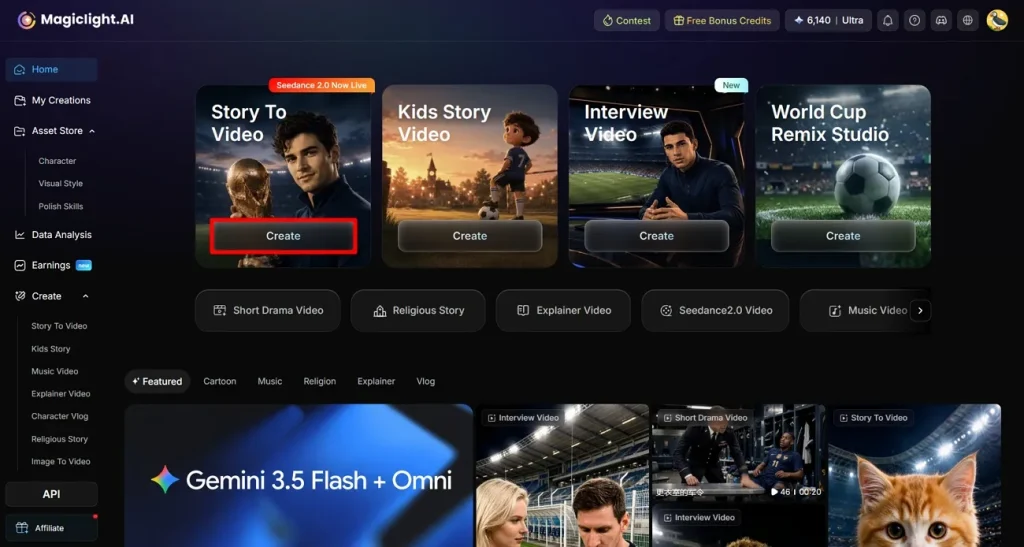
ステップ1. Createでプロジェクトを始める
ブラウザでMagicLight AIを開き、メインダッシュボードからStory to Videoへ進みます。Createをクリックして新規プロジェクトを始め、動画設定画面を開きます。
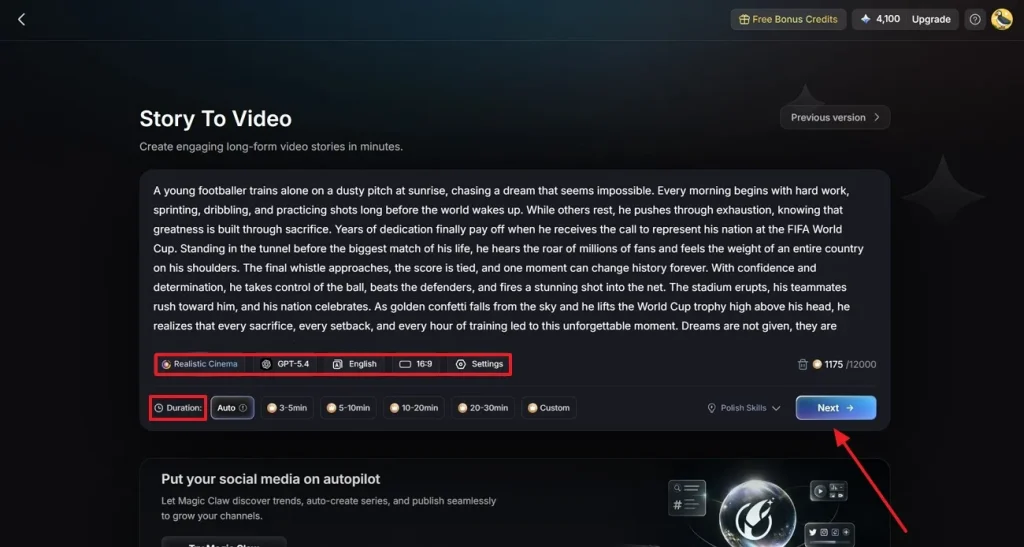
ステップ2. FIFA動画の設定を決める
動画作成パネルのText Boxに、FIFAワールドカップ向けの脚本を貼るか入力します。内容のスタイルに合うカテゴリを選び、AI Video Generation Modelで画質を決めます。Aspect RatioとVideo Durationを設定し、Nextを押します。
ステップ3. 生成されたストーリーシーンを見直す
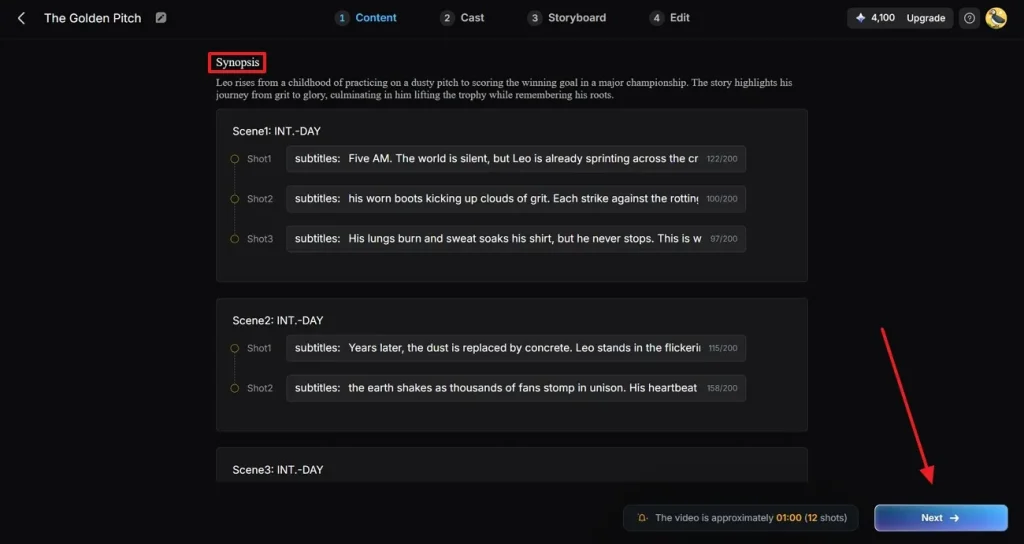
MagicLight AIが脚本を複数のシーンに分け、各セクションのビジュアルあらすじを作ります。説明と流れを確認し、細部や展開を整えてください。物語がしっくりきたら Nextで進みます。
ステップ4. 動画のサッカーキャラクターを選ぶ
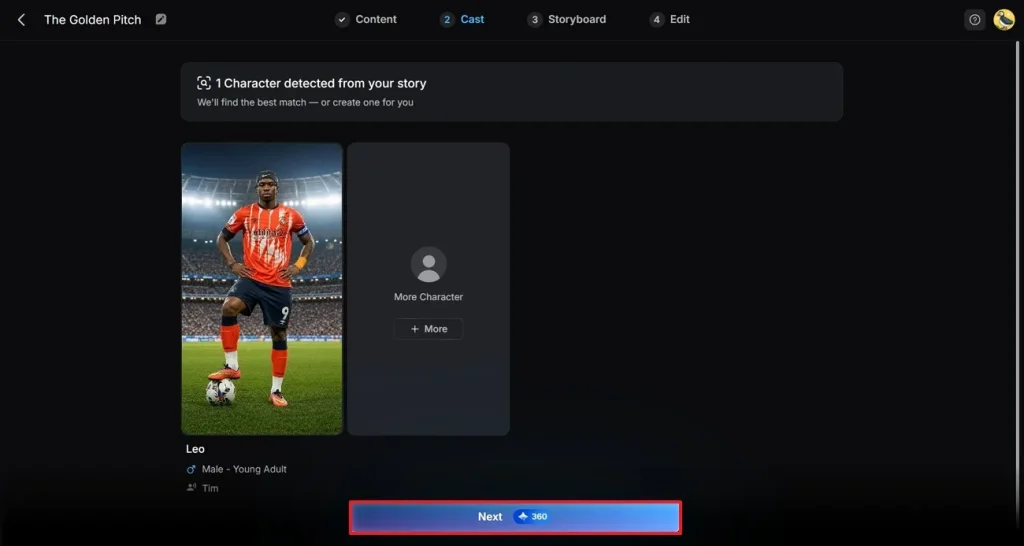
用意されたサッカーキャラクターから、FIFA動画に合う一人を選びます。物語に選手が足りなければMore Characterでキャストを増やします。ラインナップが決まったらNextでカスタマイズへ進みます。
ステップ5. 見た目と動きを整える
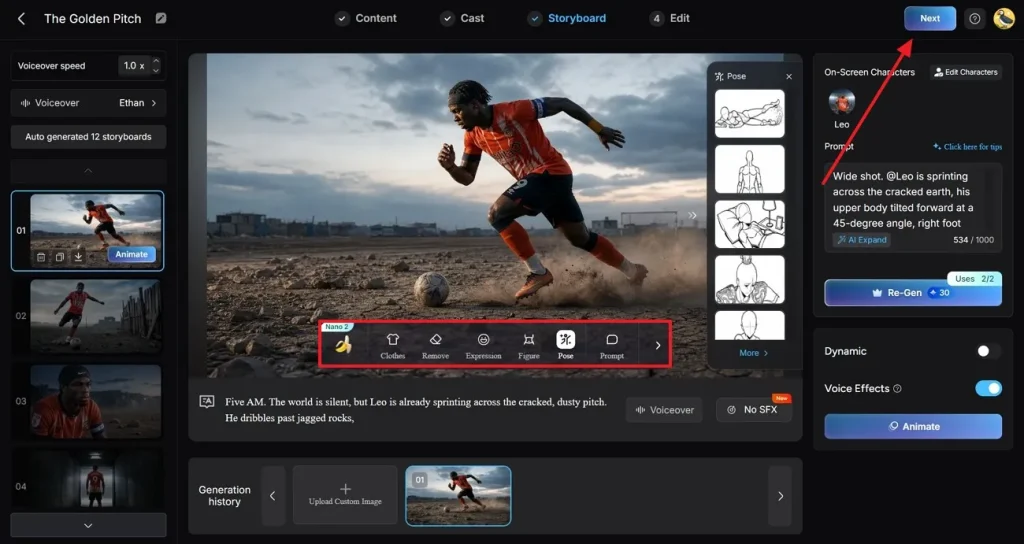
絵コンテをプレビューし、衣装、表情、ポーズを変更できます。特定のチームや物語に合わせて選手の見た目を調整してください。複数シーンで一貫しているか確認し、右上のNextを押します。
ステップ6. 字幕を付け、音楽で盛り上げる
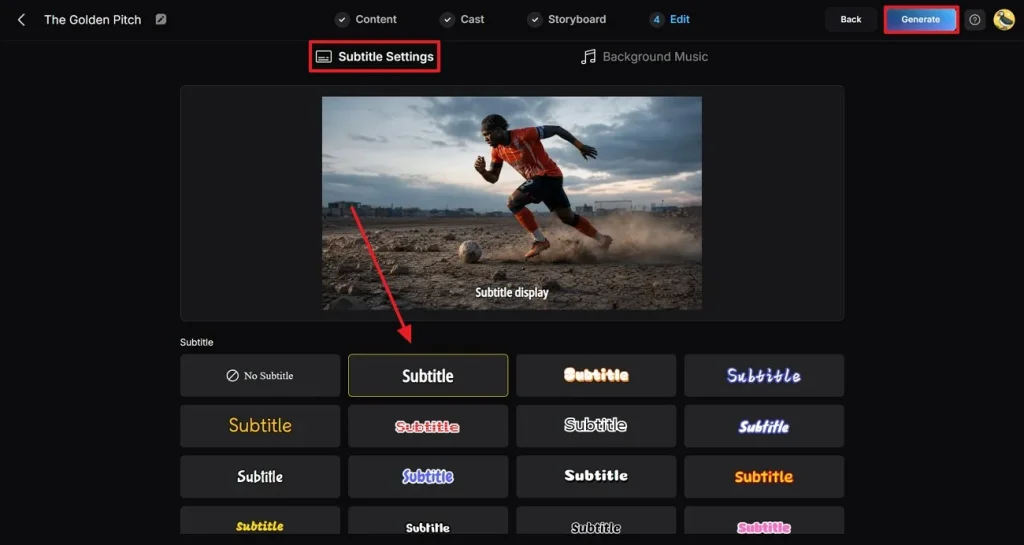
ツールのプリセットで、動画全体に出る字幕を整えます。Background MusicからFIFAストーリーの熱に合うSoundtrackを選び、右上のGenerateでAIレンダリングを開始します。
ステップ7. 完成動画をプレビューしてダウンロード
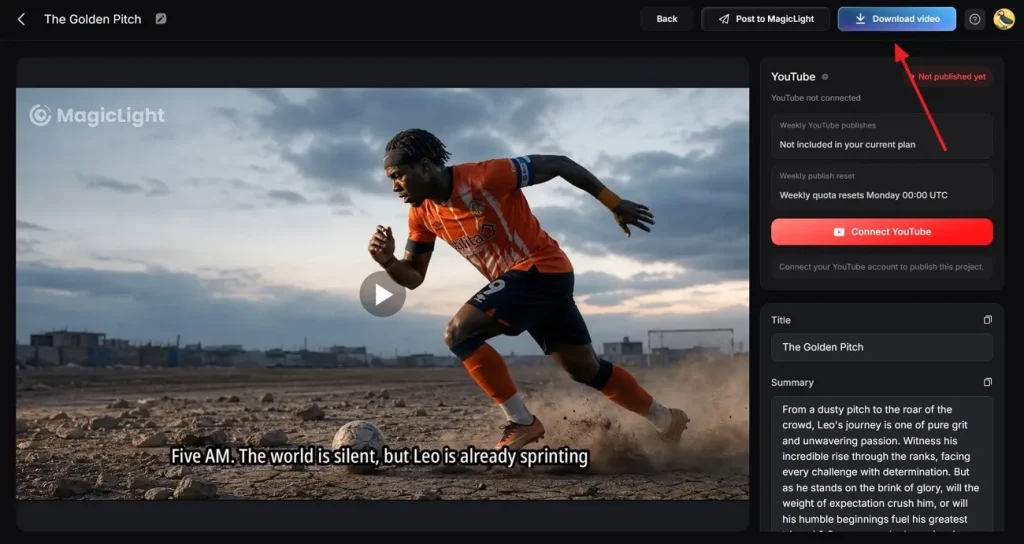
生成が終わると、MagicLight AIがFIFAテーマの動画プレビューを表示します。仕上がりに満足したらDownload Videoで端末に保存します。
まとめ
この記事では、Kling FIFAワールドカッププロンプトで動画を作る手順を詳しく紹介しました。テキストプロンプトで狙った結果を出せますが、Klingは短い尺に限りがあります。MagicLight AIなら、最長約50分まで作れます。
Kling AI FIFAワールドカッププロンプトに関するFAQ
1. Klingはプロンプトからサッカー動画をどう作りますか?
複数の人工知能モデルでサッカーなどの動画を作ります。テキストを動く映像に変える生成モデルを選べます。
2. Klingでリアルな試合シーンは作れますか?
用意されたモデルで、試合やその他のシーンをリアル寄りに生成できます。好みに合わせてよりリアルな動画を作りたい場合は、MagicLight AIも使えます。
3. Klingは短いサッカー動画に向いていますか?
短い尺が中心なので、ショート動画に向いています。最長約50分の長い動画が必要なら、MagicLight AIを使ってください。
4. なぜクリエイターはサッカー物語にMagicLight AIを使いますか?
簡単なプロンプトや写真をシネマティックな動画にできるからです。長尺と多言語に対応していて、安定して使いやすいです。
5. KlingのプロンプトはMagicLight AIに使えますか?
どちらも説明的なテキストプロンプトで動画を作るので、転用しやすいです。Kling FIFAワールドカッププロンプトに、シーン転換やキャラクター生成などの情報を足してMagicLight AIで広げられます。