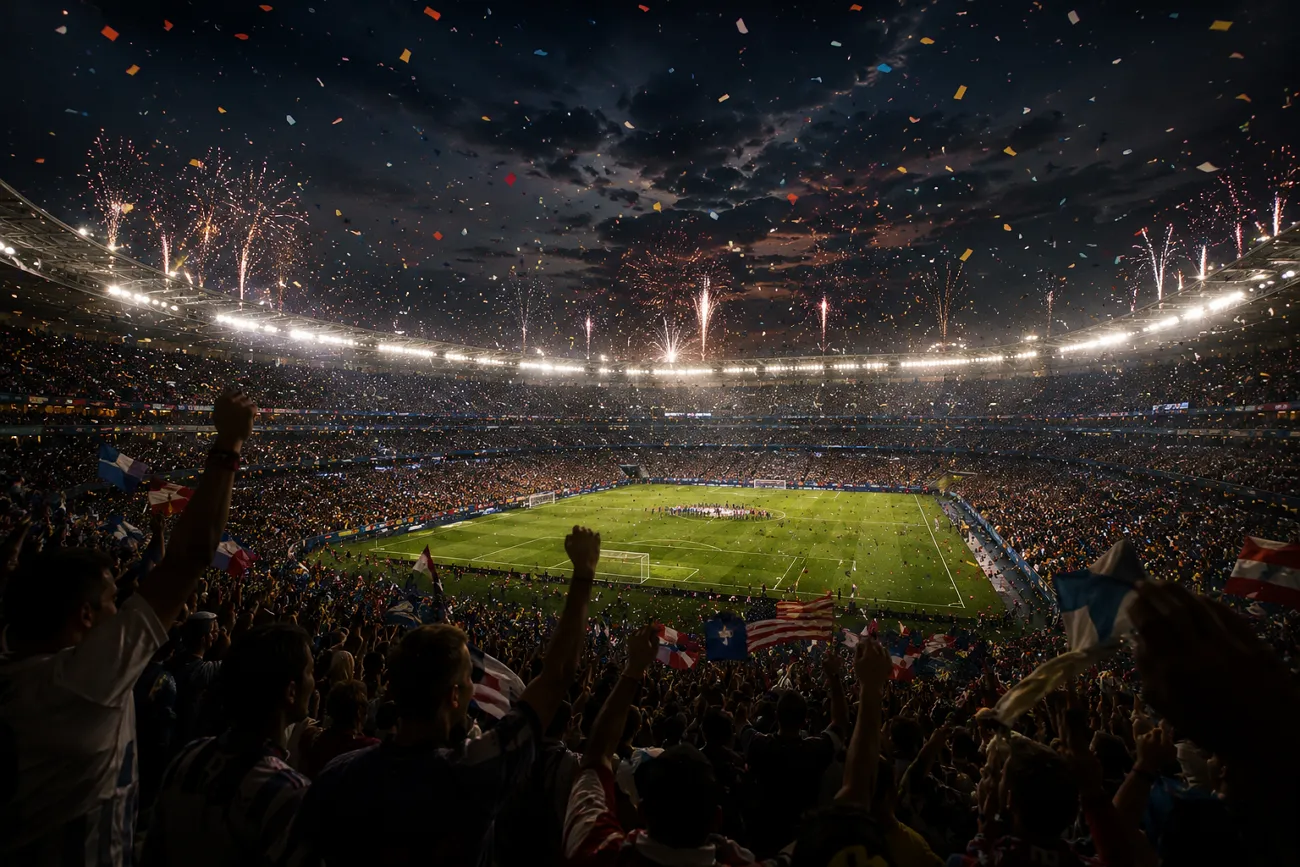
Many football fans want to create videos to show their love for the game as the FIFA World Cup final approaches. One of the tools that lets users generate visual content with text and photos is Kling AI. This tool provides users with different generation models to choose from. Users can create videos according to their creative style using the platform.
Read the article till the end to learn the top 20 Kling FIFA World Cup prompts. These prompts will help you create stunning football videos in no time.
Part 1. 20 Best Kling AI FIFA World Cup Prompts for Viral Videos
A well-written Kling prompt with all the details is important to generate football videos. Many users have the idea but do not know how to use it with the tool. Mentioned below are the top 20 Kling FIFA World Cup prompts that will help you generate videos of your favorite game:
Prompts for Star Player Introductions
A powerful player introduction video can instantly build excitement before a match. Users can create cinematic player reveal videos that feature dramatic entrances with Kling AI. The following prompts are designed to help you generate engaging star player introduction videos that feel worthy of the football stage:
1. Stadium Entrance Hero Shot
Create a video of a world-famous football star walking through a stadium tunnel toward a packed World Cup arena. Use slow-motion footsteps, dramatic lighting, and roaring crowd reactions to build anticipation.
2. Legendary Career Highlights Introduction
Craft a video that showcases a football superstar's most iconic goals, assists, and trophy-winning moments. Blend dynamic transitions with cinematic slow-motion scenes for a powerful introduction.
3. Captain Leading the Team
Generate a video of a national team captain leading teammates onto the World Cup ground. Capture intense expressions, waving flags, and an electrifying stadium atmosphere.
4. Golden Boot Contender Reveal
Design a video featuring a star striker preparing for a crucial World Cup match. Include close-up shots of training drills, focused eyes, and dramatic pre-game moments.
5. National Hero Introduction
Create a video introducing a young football prodigy entering a packed World Cup stadium. Combine spotlight effects with inspirational scenes highlighting their journey to success.
Prompts for World Cup Final Highlights
The highlight videos capture the intensity, drama, and emotion of a FIFA World Cup Final. These Kling FIFA World Cup prompts are designed to help you generate cinematic highlight reels filled with goals:
1. Final Whistle Drama
Create a video of the World Cup Final ending with the referee blowing the final whistle. Show exhausted players, roaring crowds, and emotional reactions in slow motion.
2. Winning Goal Moment
Craft a video highlighting the decisive winning goal in the World Cup Final. Use slow-motion strike, net ripple effects, and explosive crowd celebration for cinematic impact.
3. Trophy Lift Celebration
Generate a video of the winning team captain lifting the FIFA World Cup trophy. Include confetti rain, flashing lights, and emotional teammates celebrating around them.
4. Last-Minute Save Heroics
Craft a video showing a goalkeeper making a dramatic last-minute save in the final. Focus on slow-motion dive, close-up reaction, and stadium-wide tension release.
5. Underdog Victory Moment
Design a video of an underdog team shocking the world by winning the World Cup Final. Highlight disbelief, celebrations, and emotional storytelling in cinematic style.
Prompts for TikTok Football Videos
The videos grab attention instantly and go viral on TikTok by showcasing fast-paced football action, dramatic edits, and cinematic storytelling. These Kling FIFA World Cup prompts are designed to help you produce short, engaging, and highly shareable football clips:
1. 5-Second Goal Explosion
Create a video of a footballer scoring a powerful last-second goal with ultra-fast cuts. Add slow-motion net ripple, stadium explosion reactions, and cinematic zoom-in effects.
2. Skill Move Compilation
Craft a video showing a player performing insane football skills like stepovers, nutmegs, and dribbles. Use fast transitions, close-up footwork shots, and energetic music beats.
3. Ronaldo vs Messi Style Edit
Generate a dramatic comparison video of two legendary players showcasing goals and celebrations. Use split-screen effects, glowing highlights, and hype-style TikTok editing.
4. Viral Free Kick Moment
Create a video of a perfect free kick curling into the top corner in slow motion. Add ball trajectory effects, crowd silence buildup, and explosive celebration.
5. Stadium Crowd Hype Clip
Design a video focusing on the stadium crowd reacting to a goal with waving flags and screaming fans. Use rapid cuts, zoom effects, and bass-drop synchronization.
Prompts for World Cup Event Promotions
These videos build hype and excitement for the FIFA World Cup by showcasing stadium energy, global fan engagement, and epic football moments. The following Kling FIFA World Cup prompts are designed to help you produce powerful promotional videos for events and campaigns:
1. Global Kickoff Announcement
Create a video announcing the FIFA World Cup kickoff with stadium lights turning on across the world. Add dramatic countdown visuals, cheering crowds, and cinematic music buildup.
2. Stadium Opening Ceremony Hype
Craft a video showing a grand World Cup opening ceremony with fireworks, national flags, and packed stadium visuals. Use sweeping camera movements and cinematic lighting effects.
3. World Cup Trophy Showcase
Generate a video highlighting the FIFA World Cup trophy under a dramatic spotlight. Add slow-motion camera rotation, golden glow effects, and emotional orchestral music.
4. Fan Festival Promotion
Craft a video promoting global fan zones with cheering crowds, street celebrations, food stalls, and big screens showing matches. Use vibrant colors and fast-paced edits.
5. Countdown to Matchday
Create a video showing a countdown sequence to a World Cup match. Add ticking clocks, stadium transitions, and rising anticipation with cinematic tension.
Part 2. Convert Kling AI FIFA World Cup Prompts Into Videos With MagicLight AI
Kling AI works well for videos, but it only generates videos up to a few seconds in duration. MagicLight AI comes in as a powerful solution to overcome this limitation. It allows users to convert text prompts into dynamic videos with realistic motion effects. Users get the ability to generate long videos up to 50 minutes using this efficient tool.
Moreover, you can write the prompt story or script with a large number of characters, including all the details. The tool also provides the ability to generate captions for the videos and make them accessible to a larger audience. MagicLight AI also creates a complete storyboard for your football videos with a simple Kling FIFA World Cup prompt.
Key Features
- Story-to-Video: MagicLight AI can transform a simple football script into a complete video. This feature is perfect for turning World Cup match stories into visual narratives.
- Multiple Languages Support: The platform provides content creation in more than 11 languages. It can generate localized voiceovers and storytelling with ease.
- Background Music Generation: MagicLight AI can generate suitable background music that matches the intensity of a World Cup final.
- Generate and Customize Characters: Users can create AI football players using text prompts. These characters can then be customized with different appearances and styles.
- Various AI Models: The tool offers advanced video generation models such as Gemini Omni and Seedance 2.0 to create high-quality football content. These models help produce smoother motion and professional-looking World Cup videos.
Comprehensive Steps For Creating World Cup Videos With MagicLight AI
As discussed, the Story to Video feature of MagicLight AI allows users to convert the text prompts into consistent videos. Follow the steps mentioned below to learn how to use this feature:
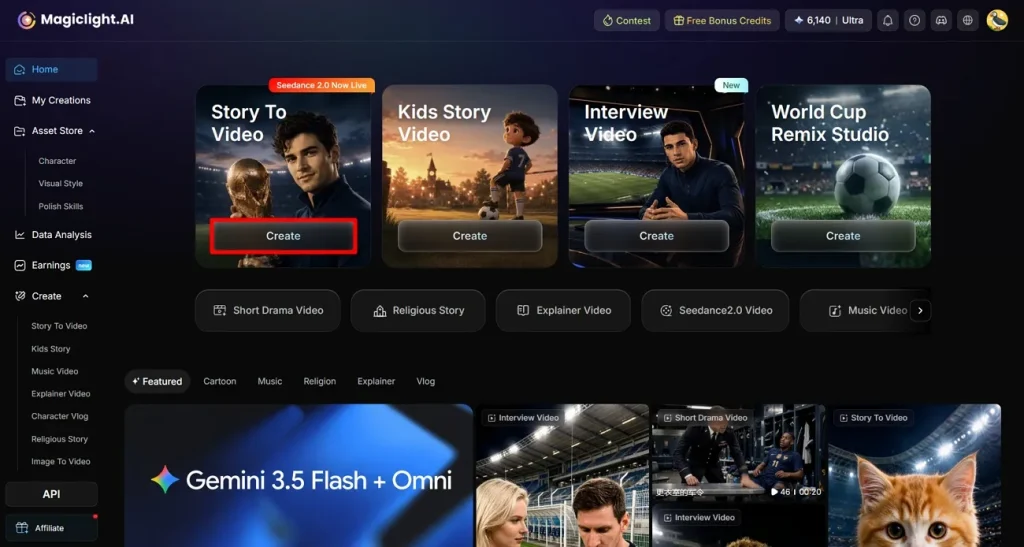
Step 1. Begin Your Project with the Create Button
Open MagicLight AI in your web browser and navigate to the Story to Video feature from the main dashboard. Click the Create button to start a new project and access the video setup interface.
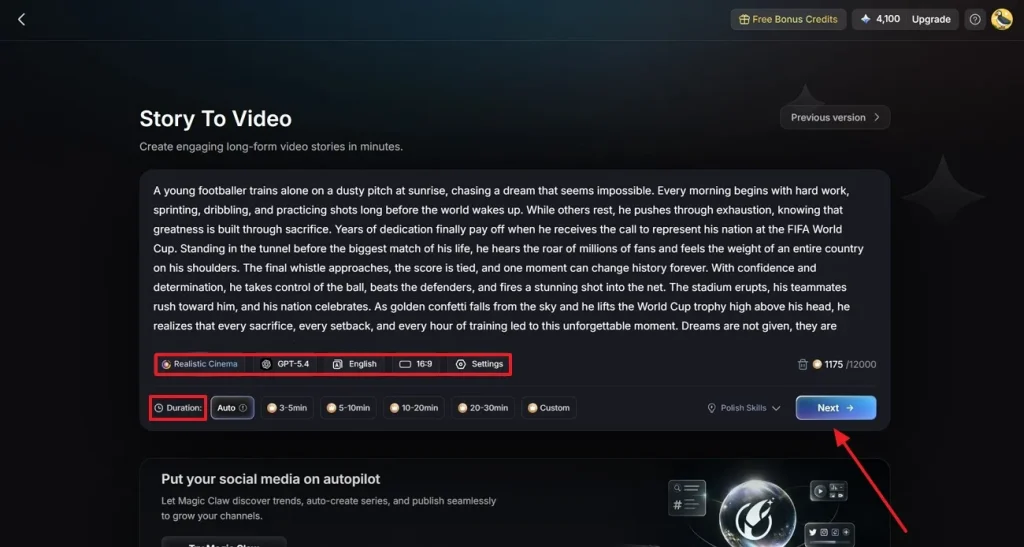
Step 2. Configure Your FIFA Video Settings
In the video creation panel, paste or type your FIFA World Cup-themed script into the provided Text Box. Next, choose the most suitable video category based on your content tyle. Select your preferred AI Video Generation Model to determine the visual quality. Set the video Aspect Ratio, specify the desired Video Duration, and click Next to proceed.
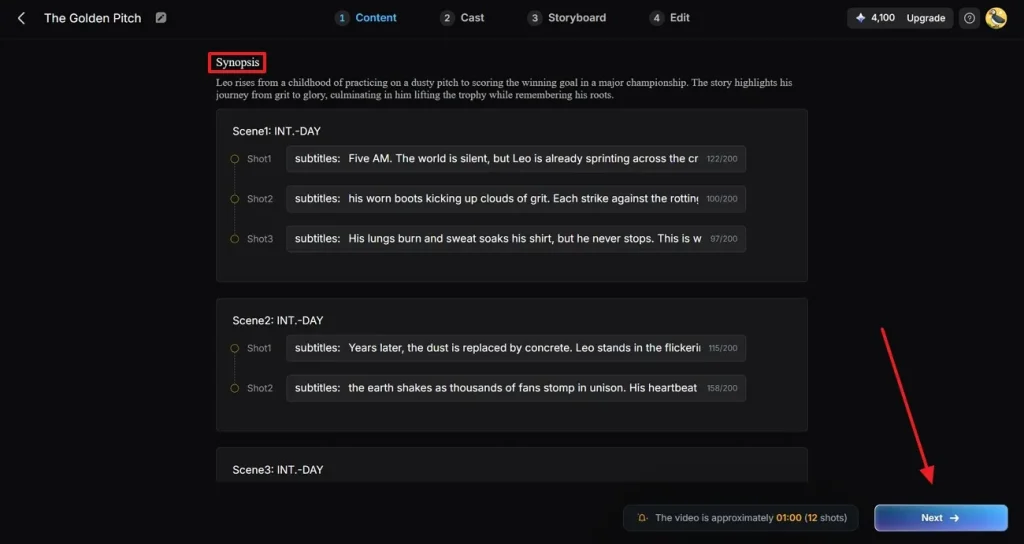
Step 3. Review and Improve the Generated Story Scenes
MagicLight AI will automatically break your script into multiple scenes and generate a visual synopsis for each section of the story. Carefully review the generated scene descriptions and flow. Edit the scene details or refine the progression of events to improve accuracy. Click Next to continue once the story looks perfect.
Step 4. Select a Football Character for Your Video
Browse through the available football characters and select the one that best fits your FIFA video. If your storyline requires additional players, use the More Character option to expand the cast. Once your character lineup is ready, click Next to proceed to the customization stage.
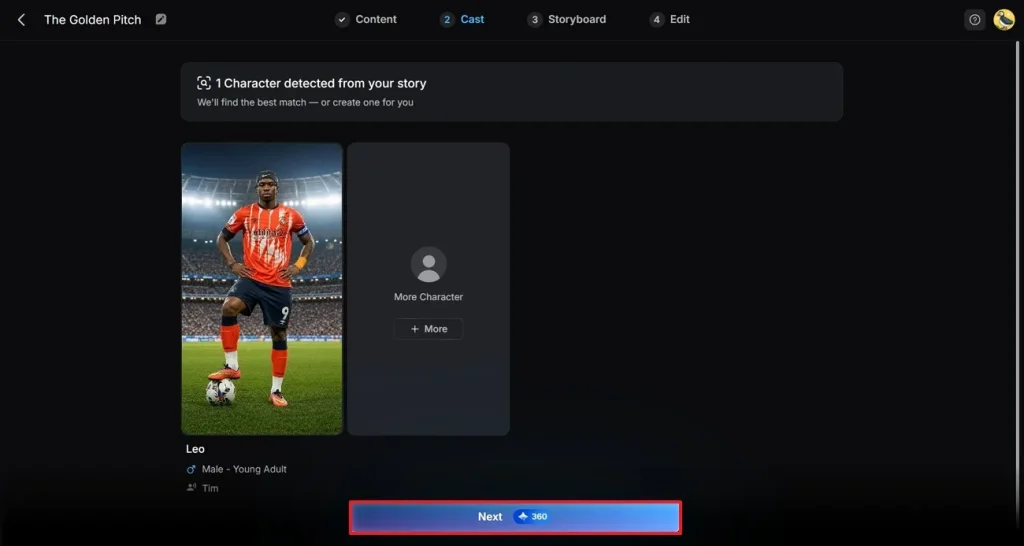
Step 5. Customize the Character Appearance and Actions
Preview the storyboard scenes and modify various character attributes, including outfits, facial expressions, and poses. You can tailor the footballer's appearance to match a specific team or storytelling theme. Review the character across multiple scenes to ensure consistency, then press Next in the top-right corner to move forward.
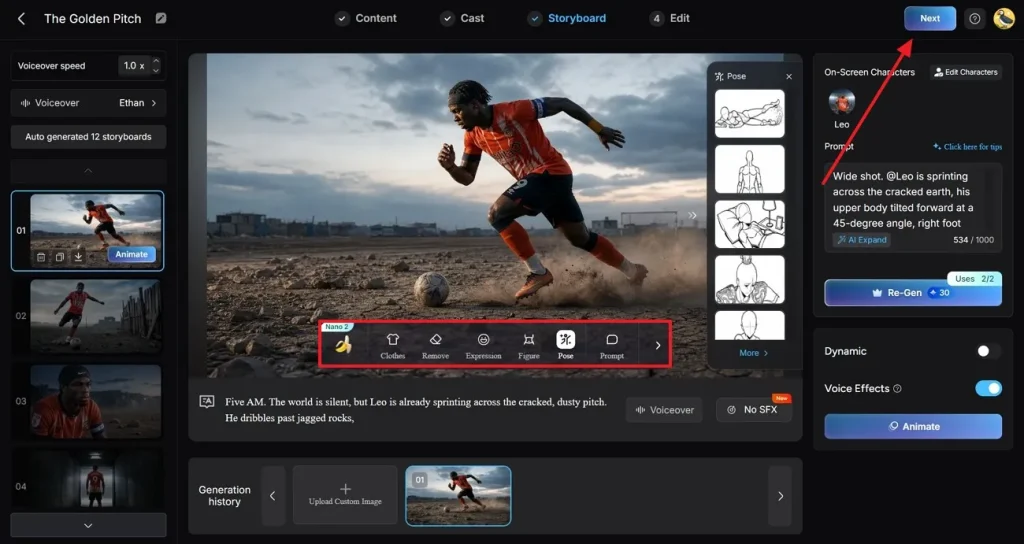
Step 6. Add Captions and Enhance the Video with Music
Customize the captions that will appear throughout the video with the presets provided by the tool. Additionally, explore the Background Music options and select a Soundtrack that complements the excitement and energy of your FIFA story. Click the Generate button located in the top-right corner to start the AI video rendering process.
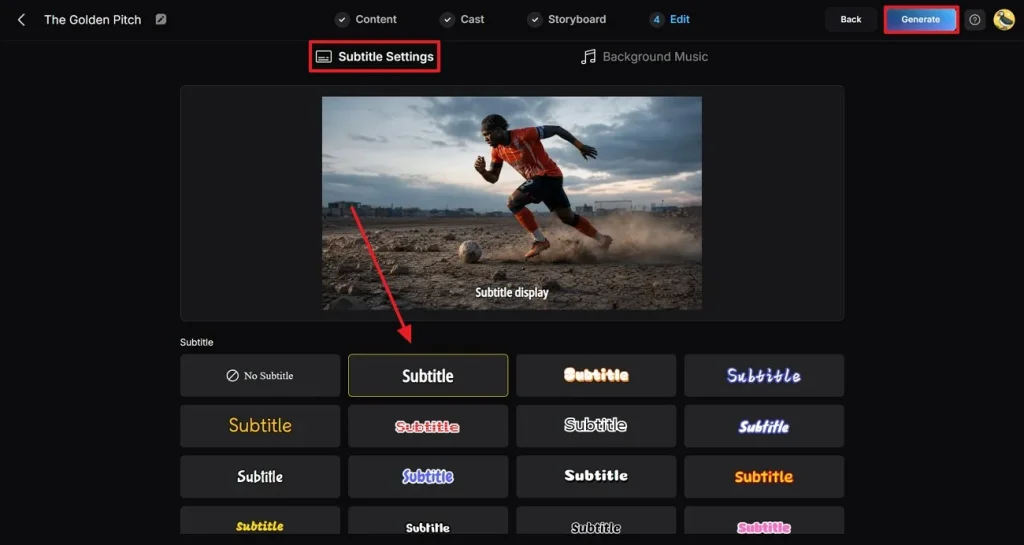
Step 7. Preview and Download the Finished Video
Once the generation process is complete, MagicLight AI will display a preview of your FIFA-themed video. When you are fully satisfied with the final output, click the Download Video button to save the completed video to your device.
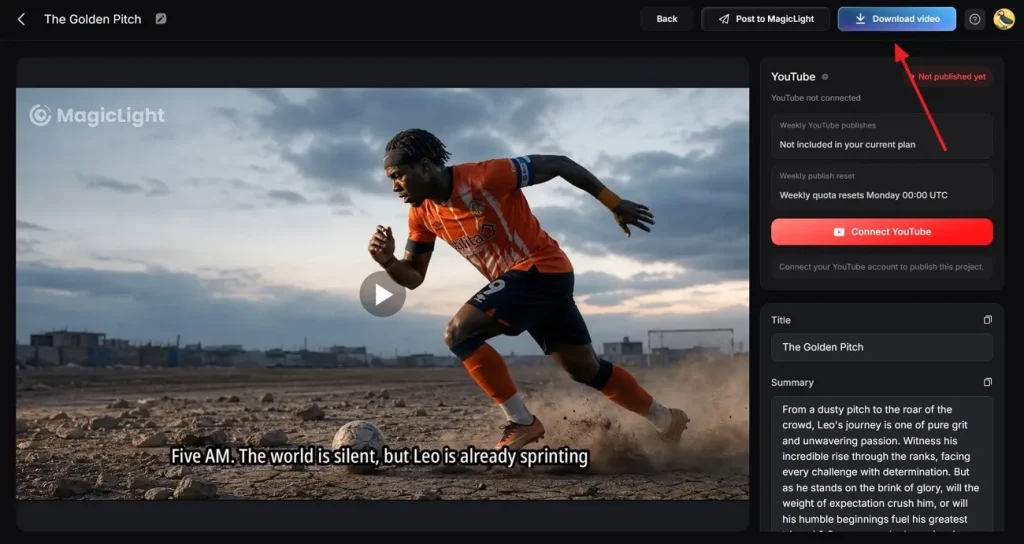
Conclusion
To sum it up, this article provided a detailed guide on the Kling FIFA World Cup prompts to generate videos. These text prompts will help you craft the results of your choice. However, Kling comes with limitations like short video duration. Tools like MagicLight AI can be used to overcome this issue. Users get the ability to generate videos up to 50 minutes using this tool.
FAQs on Kling AI FIFA World Cup Prompts
1. How does Kling create football videos from prompts?
It uses different artificial intelligence models to craft football and other videos. You get different generation models to convert the text into moving visuals.
2. Can Kling generate realistic football match scenes?
Users can generate realistic scenes for football matches and other scenarios using different models offered by the tool. However, MagicLight AI is one such tool that will let you generate realistic videos according to your preferences.
3. Is Kling suitable for short-form football videos?
The tool is suitable for short videos as it only provides support for short durations. You can use MagicLight AI if you want to generate longer videos up to 50 minutes.
4. Why do creators use MagicLight AI for football storytelling?
Creators use this tool for football storytelling because it transforms simple prompts and photos into cinematic videos. Its support for long-form video generation and support for different languages make it one of the reliable options.
5. Can Kling prompts be adapted for MagicLight AI?
The prompts can be easily adapted for MagicLight AI because both platforms rely on descriptive text prompts to generate videos. Users can take their Kling FIFA World Cup prompts and expand them with additional details such as scene transitions and character generations with MagicLight AI.