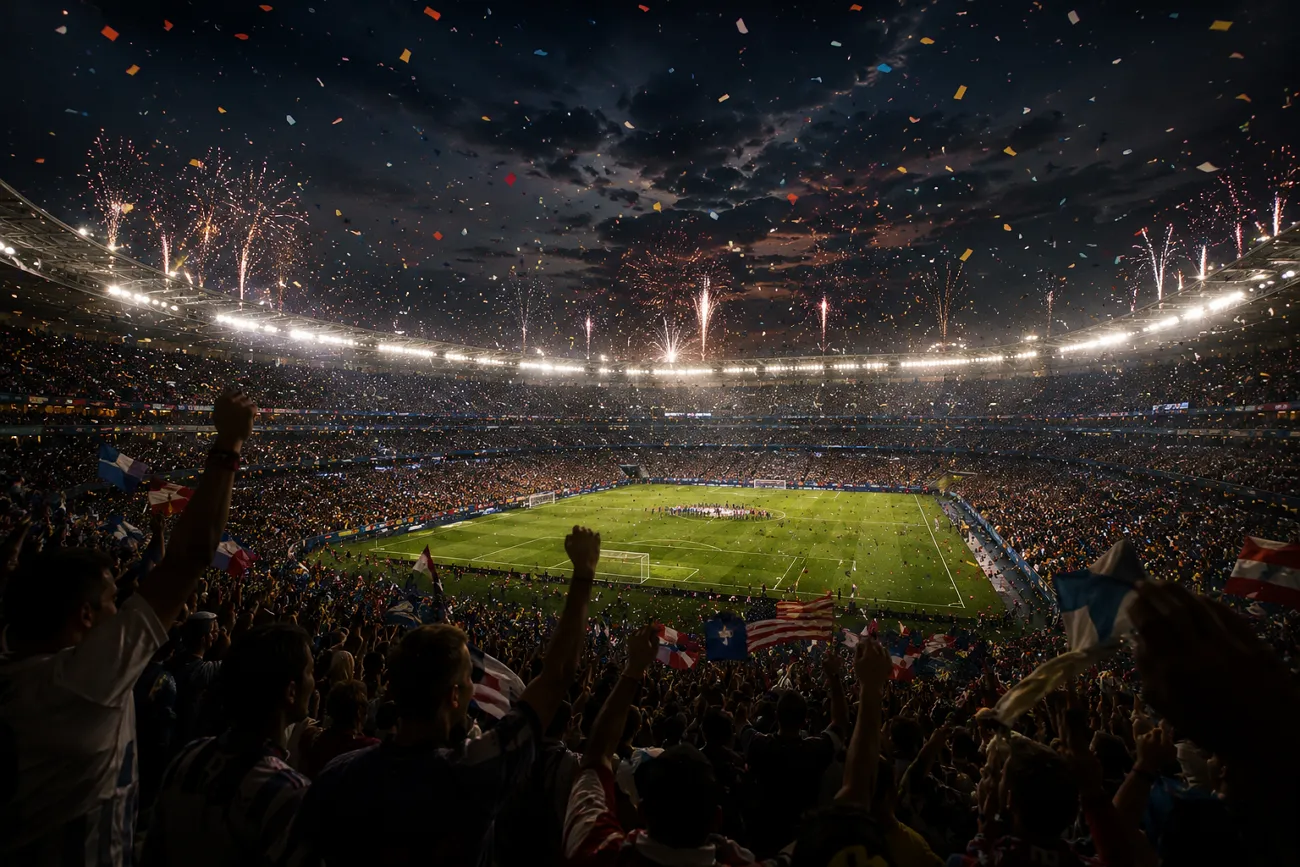
世界盃決賽臨近,很多球迷想做影片表達對足球的熱愛。Kling AI 可以用文字和照片生成畫面,也提供多種生成模型。你能按自己的風格出片。
把這篇看到最後,就能拿到 20 則最好用的 Kling FIFA 世界盃提示詞。用它們很快就能做出好看的足球影片。
第 1 部分. 20 則容易火的 Kling AI FIFA 世界盃提示詞
寫清楚細節的 Kling 提示詞,對生成足球影片很關鍵。很多人有想法,卻不知道怎麼餵給工具。下面這 20 則 Kling FIFA 世界盃提示詞,幫你做出喜歡的比賽畫面:
球星登場介紹提示詞
一則有衝擊力的球星介紹影片,開賽前就能把氣氛拉滿。用 Kling AI,你可以做電影感的球員登場。下面這些提示詞,專門用來生成配得上大賽舞台的球星介紹影片:
1. 球場通道英雄登場
把下面這段英文提示詞原樣貼上: “Create a video of a world-famous football star walking through a stadium tunnel toward a packed World Cup arena. Use slow-motion footsteps, dramatic lighting, and roaring crowd reactions to build anticipation.”
2. 傳奇生涯高光介紹
把下面這段英文提示詞原樣貼上: “Craft a video that showcases a football superstar's most iconic goals, assists, and trophy-winning moments. Blend dynamic transitions with cinematic slow-motion scenes for a powerful introduction.”
3. 隊長帶領全隊出場
把下面這段英文提示詞原樣貼上: “Generate a video of a national team captain leading teammates onto the World Cup ground. Capture intense expressions, waving flags, and an electrifying stadium atmosphere.”
4. 金靴熱門球員揭曉
把下面這段英文提示詞原樣貼上: “Design a video featuring a star striker preparing for a crucial World Cup match. Include close-up shots of training drills, focused eyes, and dramatic pre-game moments.”
5. 國家英雄登場
把下面這段英文提示詞原樣貼上: “Create a video introducing a young football prodigy entering a packed World Cup stadium. Combine spotlight effects with inspirational scenes highlighting their journey to success.”
世界盃決賽高光提示詞
高光影片能抓住 FIFA 世界盃決賽的強度、戲劇和情緒。這些 Kling FIFA 世界盃提示詞,幫你生成滿是進球的電影感集錦:
1. 終場哨的戲劇瞬間
把下面這段英文提示詞原樣貼上: “Create a video of the World Cup Final ending with the referee blowing the final whistle. Show exhausted players, roaring crowds, and emotional reactions in slow motion.”
2. 致勝進球時刻
把下面這段英文提示詞原樣貼上: “Craft a video highlighting the decisive winning goal in the World Cup Final. Use slow-motion strike, net ripple effects, and explosive crowd celebration for cinematic impact.”
3. 舉起大力神盃慶祝
把下面這段英文提示詞原樣貼上: “Generate a video of the winning team captain lifting the FIFA World Cup trophy. Include confetti rain, flashing lights, and emotional teammates celebrating around them.”
4. 最後一刻神撲
把下面這段英文提示詞原樣貼上: “Craft a video showing a goalkeeper making a dramatic last-minute save in the final. Focus on slow-motion dive, close-up reaction, and stadium-wide tension release.”
5. 黑馬奪冠瞬間
把下面這段英文提示詞原樣貼上: “Design a video of an underdog team shocking the world by winning the World Cup Final. Highlight disbelief, celebrations, and emotional storytelling in cinematic style.”
TikTok 足球短影片提示詞
快節奏的足球動作、戲劇剪輯和電影感敘事,最容易在 TikTok 上抓住人、傳開去。這些 Kling FIFA 世界盃提示詞,幫你做出短、好看、好分享的足球片段:
1. 五秒進球爆發
把下面這段英文提示詞原樣貼上: “Create a video of a footballer scoring a powerful last-second goal with ultra-fast cuts. Add slow-motion net ripple, stadium explosion reactions, and cinematic zoom-in effects.”
2. 花活集錦
把下面這段英文提示詞原樣貼上: “Craft a video showing a player performing insane football skills like stepovers, nutmegs, and dribbles. Use fast transitions, close-up footwork shots, and energetic music beats.”
3. 羅納爾多對梅西風格剪輯
把下面這段英文提示詞原樣貼上: “Generate a dramatic comparison video of two legendary players showcasing goals and celebrations. Use split-screen effects, glowing highlights, and hype-style TikTok editing.”
4. 容易火的任意球瞬間
把下面這段英文提示詞原樣貼上: “Create a video of a perfect free kick curling into the top corner in slow motion. Add ball trajectory effects, crowd silence buildup, and explosive celebration.”
5. 球場觀眾嗨起來
把下面這段英文提示詞原樣貼上: “Design a video focusing on the stadium crowd reacting to a goal with waving flags and screaming fans. Use rapid cuts, zoom effects, and bass-drop synchronization.”
世界盃賽事預熱提示詞
這些影片用球場能量、全球球迷互動和史詩足球瞬間,給 FIFA 世界盃造勢。下面這些 Kling FIFA 世界盃提示詞,幫你做出有衝擊力的活動和宣傳片:
1. 全球開賽宣布
把下面這段英文提示詞原樣貼上: “Create a video announcing the FIFA World Cup kickoff with stadium lights turning on across the world. Add dramatic countdown visuals, cheering crowds, and cinematic music buildup.”
2. 開幕式氛圍片
把下面這段英文提示詞原樣貼上: “Craft a video showing a grand World Cup opening ceremony with fireworks, national flags, and packed stadium visuals. Use sweeping camera movements and cinematic lighting effects.”
3. 大力神盃展示
把下面這段英文提示詞原樣貼上: “Generate a video highlighting the FIFA World Cup trophy under a dramatic spotlight. Add slow-motion camera rotation, golden glow effects, and emotional orchestral music.”
4. 球迷嘉年華預熱
把下面這段英文提示詞原樣貼上: “Craft a video promoting global fan zones with cheering crowds, street celebrations, food stalls, and big screens showing matches. Use vibrant colors and fast-paced edits.”
5. 比賽日倒數
把下面這段英文提示詞原樣貼上: “Create a video showing a countdown sequence to a World Cup match. Add ticking clocks, stadium transitions, and rising anticipation with cinematic tension.”
第 2 部分. 用 MagicLight AI 把 Kling AI FIFA 世界盃提示詞做成影片
Kling AI 做影片沒問題,但一次只能生成幾秒。MagicLight AI 正好補上這個短板。它能把文字提示詞做成帶真實運動效果的動態影片。用這個工具,最長可以做到約 50 分鐘。
你還可以把故事或腳本寫得很長,把細節都寫進去。工具也能給影片生成字幕,讓更多人看得懂。只要一則 Kling FIFA 世界盃提示詞,MagicLight AI 就能給足球影片排出完整分鏡。
核心功能
- Story-to-Video:MagicLight AI 能把一段簡單的足球腳本做成完整影片。很適合把世界盃比賽故事做成視覺敘事。
- 多語言支援:平台支援 11 種以上語言做內容。在地化配音和敘事都比較省事。
- 背景音樂生成:MagicLight AI 能生成貼合世界盃決賽強度的背景音樂。
- Generate 並自訂角色:你可以用文字提示詞建立 AI 足球球員,再改外觀和風格。
- 多種 AI 模型:工具提供 Gemini Omni 和 Seedance 2.0 等進階影片生成模型,做高品質足球內容。運動更順,世界盃影片也更像樣。
用 MagicLight AI 做世界盃影片的完整步驟
前面說了,MagicLight AI 的 Story to Video 能把文字提示詞做成連貫影片。按下面步驟使用這個功能:
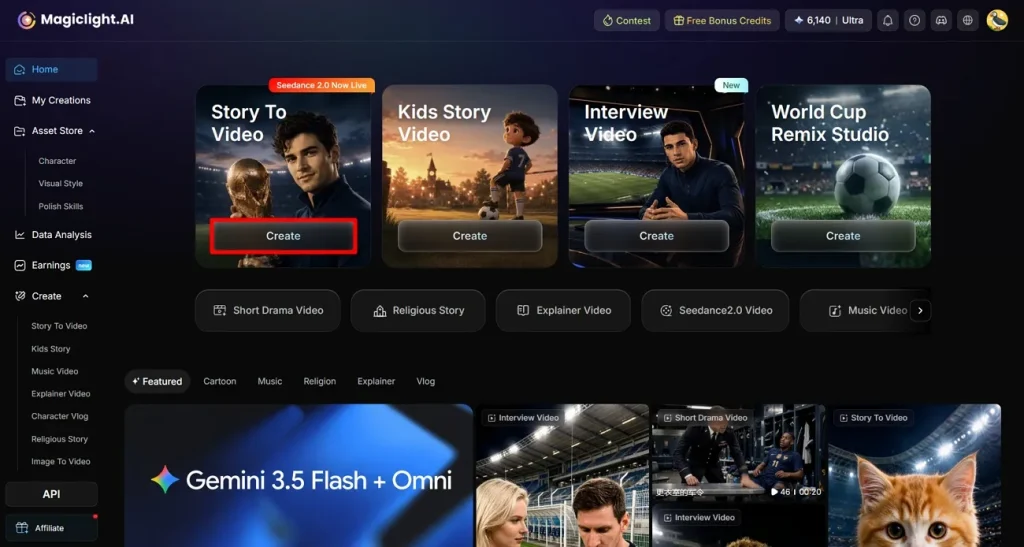
步驟 1. 點 Create 開始專案
在瀏覽器打開 MagicLight AI,從主面板進入 Story to Video。點 Create 開始新專案,進入影片設定介面。
步驟 2. 設定 FIFA 影片參數
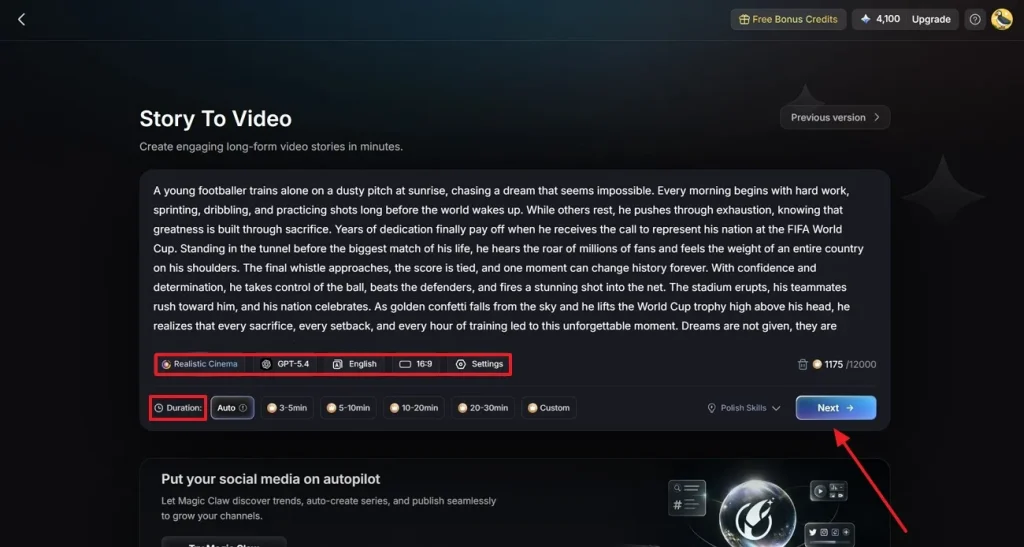
在影片建立面板裡,把 FIFA 世界盃主題腳本貼上或輸入到 Text Box。再按內容風格選最合適的影片分類。選擇你要用的 AI Video Generation Model 來定畫面品質。設定影片 Aspect Ratio,指定 Video Duration,然後點 Next。
步驟 3. 檢查並改好生成的故事分場
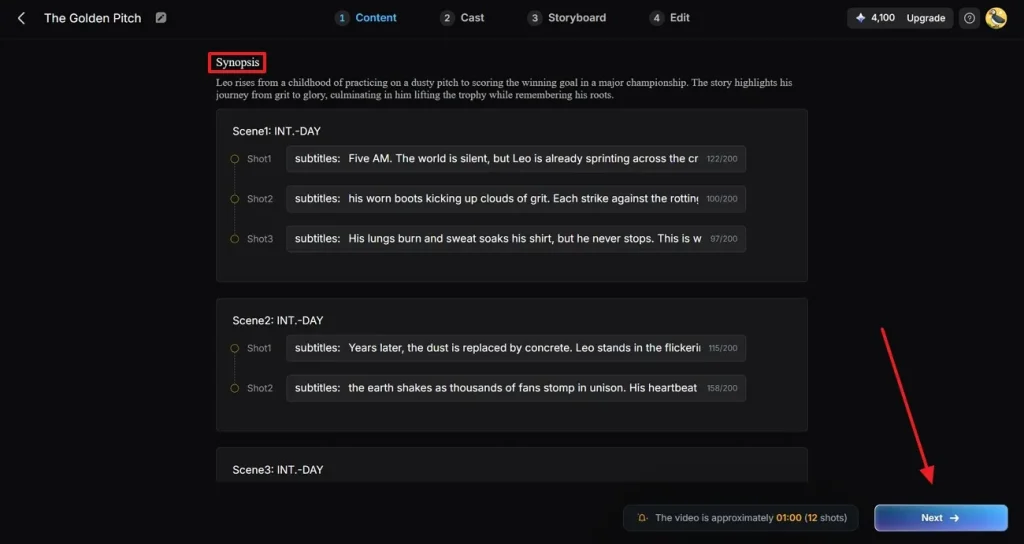
MagicLight AI 會自動把腳本拆成多個場景,並為每一段生成視覺提要。仔細看生成的場景描述和節奏。可以改場景細節,或把事件推進理順。故事看起來對了,再點 Next 繼續。
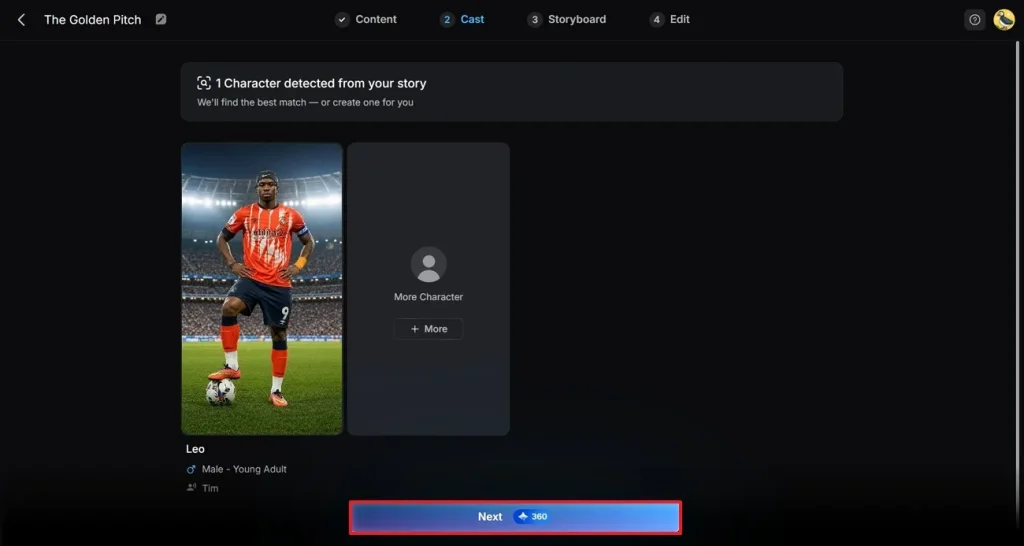
步驟 4. 為影片選一個足球角色
瀏覽現成的足球角色,選最適合你 FIFA 影片的那個。如果劇情還需要更多球員,用 More Character 擴充陣容。角色名單定了,點 Next 進入自訂。
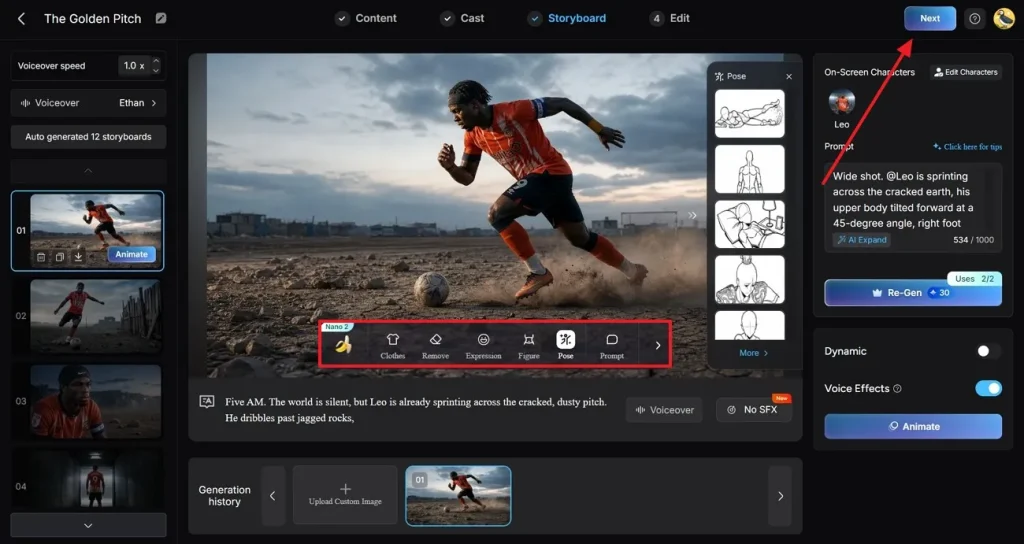
步驟 5. 自訂角色外觀和動作
預覽分鏡場景,改服裝、表情和姿勢。你可以把球員外觀調成某支球隊或某個故事主題。多看幾個場景,確認角色一致,然後點右上角 Next 繼續。
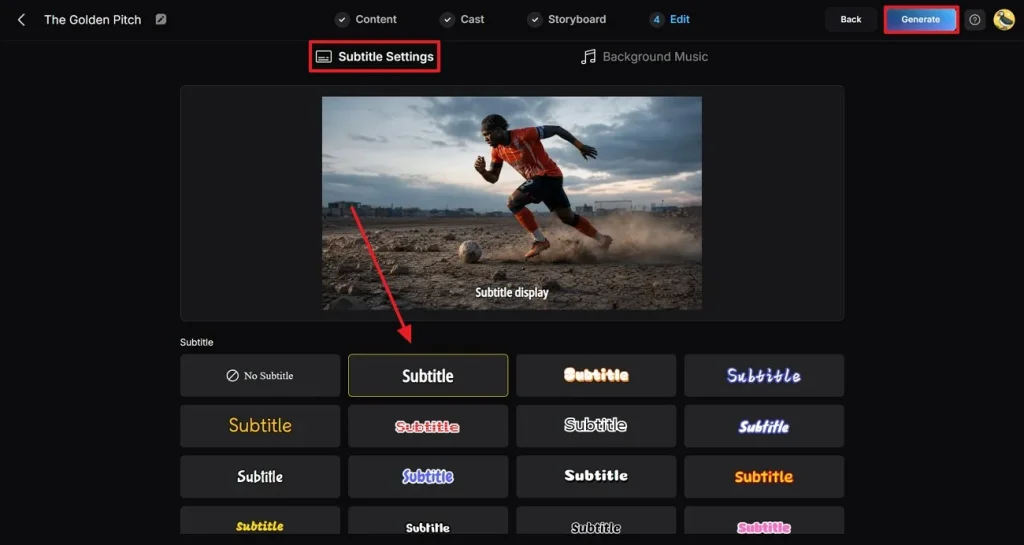
步驟 6. 加字幕,再用音樂把影片拉滿
用工具提供的預設,自訂影片裡會出現的字幕。再看 Background Music 選項,選一首貼合 FIFA 故事興奮感的 Soundtrack。點右上角 Generate,開始 AI 算圖。
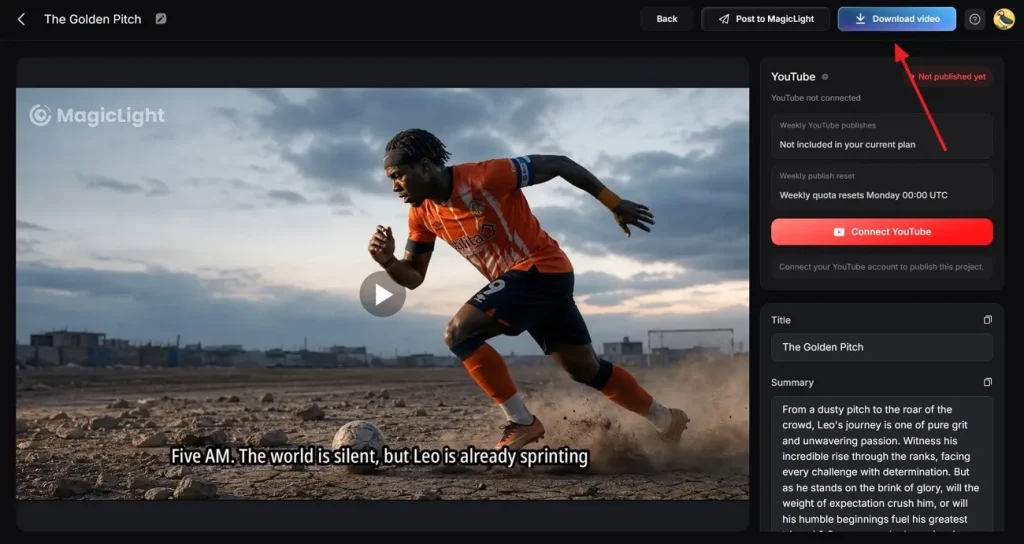
步驟 7. 預覽並下載成片
生成完成後,MagicLight AI 會展示 FIFA 主題影片預覽。你對成片滿意了,點 Download Video,把完成的影片存到裝置。
結語
總結一下,這篇詳細講了用 Kling FIFA 世界盃提示詞做影片。這些文字提示詞能幫你做出想要的效果。不過 Kling 有短時長限制。MagicLight AI 這類工具可以補上。用它最長可以生成約 50 分鐘的影片。
Kling AI FIFA 世界盃提示詞常見問題
1. Kling 怎麼用提示詞做足球影片?
它用不同的人工智慧模型來做足球和其他影片。你有多種生成模型,可以把文字變成動態畫面。
2. Kling 能生成真實的足球比賽場景嗎?
用工具提供的不同模型,你可以生成比較真實的足球比賽和其他場景。如果你想按自己的偏好做出更真實的影片,也可以用 MagicLight AI。
3. Kling 適合做短足球影片嗎?
適合,因為它主要支援短時長。如果你想做最長約 50 分鐘的更長影片,可以用 MagicLight AI。
4. 為什麼創作者用 MagicLight AI 做足球敘事?
創作者用它做足球敘事,是因為它能把簡單提示詞和照片做成電影感影片。它支援長影片,也支援多種語言,用起來比較穩。
5. Kling 提示詞能用在 MagicLight AI 上嗎?
可以,兩邊都靠描述性文字提示詞生成影片。你可以把 Kling FIFA 世界盃提示詞拿過來,再補上轉場和角色生成等細節,用 MagicLight AI 做出來。