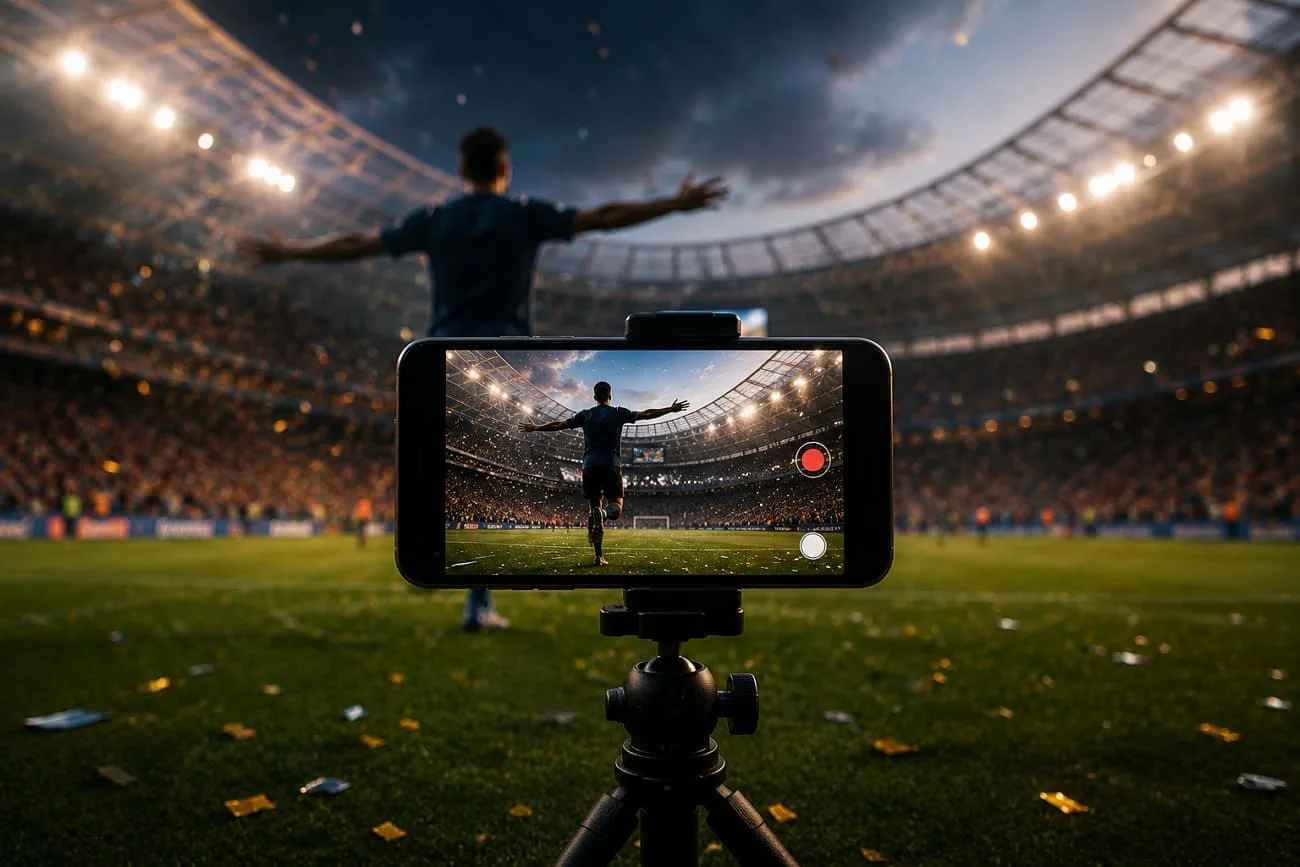
FIFA 월드컵은 흥미진진한 경기, 열정적인 팬, 잊을 수 없는 하이라이트를 가져와요. 사람들은 골 장면, 팀 세리머니, 축구 이야기를 온라인에 공유하는 걸 좋아해요. 이때 Runway 월드컵 프롬프트가 아이디어를 움직이는 클립으로 다듬는 데 도움이 돼요. 짧게 말해, 조금만 힘을 들이면 경기 장면과 스타디움 샷을 만들 수 있어요.
여러 아이디어를 실험하려면, Runway는 프롬프트로 영상을 만드는 AI 기반 생성 플랫폼이에요. 이 글에서 추천하는 FIFA 월드컵 프롬프트로 짧은 축구 편집을 생성해 보세요.
1부. 바이럴 영상을 위한 최고의 Runway FIFA 월드컵 프롬프트 20개
크리에이터라면 누구나 FIFA 월드컵이 기쁨, 흥분, 긴장처럼 팬이 사랑하는 강한 감정으로 가득하다는 걸 알아요. 아래 Runway 월드컵 프롬프트로 그 감정을 영상에 담아 보세요.
1. 스타 선수 소개 프롬프트
Prompt 1: 아래 영어 프롬프트를 그대로 붙여넣으세요: “Show a famous football player walking out of a dark tunnel into a bright World Cup stadium. The camera follows him slowly. The stadium is full of fans cheering loudly and waving flags. Bright lights shine on the player as he steps onto the field.”
Prompt 2: 아래 영어 프롬프트를 그대로 붙여넣으세요: “Visualize a close-up of a player during the national anthem. He is standing still with his hand on his chest. He looks proud and emotional. Fans behind him are waving flags.”
Prompt 3: 아래 영어 프롬프트를 그대로 붙여넣으세요: “Generate a video for a football star walking onto the pitch while digital stats and highlights appear around him. The camera follows him from the side. The stadium looks modern and bright.”
Prompt 4: 아래 영어 프롬프트를 그대로 붙여넣으세요: “Make the player tie his captain's armband tightly on his arm before the match. The locker room is calm and silent. The camera shows a close-up of his hands and determined face.”
Prompt 5: 아래 영어 프롬프트를 그대로 붙여넣으세요: “A cinematic shot of a star player doing light practice shots before the match. Each kick looks powerful. The stadium atmosphere is loud but focused.”
2. 팀 입장 영상 프롬프트
Prompt 1: 아래 영어 프롬프트를 그대로 붙여넣으세요: “FIFA football team walking out together from a dark tunnel into a bright World Cup stadium. The camera moves slowly from behind them. Fans are cheering loudly and waving flags. Bright stadium lights illuminate the players as they take the field.”
Prompt 2: 아래 영어 프롬프트를 그대로 붙여넣으세요: “Show a team entering the stadium while fireworks explode in the sky. The crowd is very loud and excited. The players walk in slow motion, wearing their national jerseys with pride.”
Prompt 3: 아래 영어 프롬프트를 그대로 붙여넣으세요: “Make a close-up shot of team players holding hands before entering the field. They look focused and motivated. The stadium noise grows louder in the background.”
Prompt 4: 아래 영어 프롬프트를 그대로 붙여넣으세요: “The national FIFA football team walking out as their anthem starts playing. Fans wave flags everywhere. The camera slowly zooms out to show the full stadium atmosphere.”
Prompt 5: 아래 영어 프롬프트를 그대로 붙여넣으세요: “Create a video showing a FIFA team captain leading the squad onto the pitch. The rest of the players follow closely behind. The camera focuses on their strong and confident expressions.”
3. TikTok 축구 영상 프롬프트
Prompt 1: 아래 영어 프롬프트를 그대로 붙여넣으세요: “Generate a clip for a football player dribbling the ball quickly on a bright stadium field. He uses skill moves to pass defenders. The crowd is cheering loudly in the background.”
Prompt 2: 아래 영어 프롬프트를 그대로 붙여넣으세요: “A player scoring a powerful goal in the World Cup match. The ball goes into the net and the crowd explodes with excitement. The player runs to celebrate with teammates.”
Prompt 3: 아래 영어 프롬프트를 그대로 붙여넣으세요: “Show a slow-motion video of a goalkeeper jumping high in slow motion to save a strong shot. The ball is stopped just before the goal line. Fans react loudly in the stadium.”
Prompt 4: 아래 영어 프롬프트를 그대로 붙여넣으세요: “Visualize a FIFA football player doing fast step-over tricks and beating two defenders easily. The grass is bright green, and the stadium is full of energy.”
Prompt 5: 아래 영어 프롬프트를 그대로 붙여넣으세요: “Generate a short TikTok highlight video showing fast football actions like passing, dribbling, and scoring goals. Quick cuts with excited stadium atmosphere.”
4. 감정적인 팬 내러티브 프롬프트
Prompt 1: 아래 영어 프롬프트를 그대로 붙여넣으세요: “A FIFA fan wearing his national team jersey in a crowded stadium. He is holding his flag tightly and watching the match with tears in his eyes.”
Prompt 2: 아래 영어 프롬프트를 그대로 붙여넣으세요: “Show a fan in a public viewing area celebrating a goal. People around him are jumping, hugging, and waving flags with happiness.”
Prompt 3: 아래 영어 프롬프트를 그대로 붙여넣으세요: “Create a video of a fan crying with happiness after his team wins the match. He hugs strangers around him in celebration.”
Prompt 4: 아래 영어 프롬프트를 그대로 붙여넣으세요: “A street full of fans watching the match on a big screen. The crowd reacts together with loud cheers, sadness, or joy depending on the game.”
Prompt 5: 아래 영어 프롬프트를 그대로 붙여넣으세요: “Generate a short clip of a group of friends watching the match at a café. They jump and shout together when their team scores.”
5. 골 세리머니 장면 프롬프트
Prompt 1: 아래 영어 프롬프트를 그대로 붙여넣으세요: “FIFA football player scores a winning goal in a packed World Cup stadium. He runs across the field with his arms wide open. Fans jump and cheer loudly while teammates run toward him to celebrate.”
Prompt 2: 아래 영어 프롬프트를 그대로 붙여넣으세요: “Show a striker scores a beautiful goal and slides on his knees across the grass. The crowd waves flags and shouts with excitement. Stadium lights shine brightly on the celebration.”
Prompt 3: 아래 영어 프롬프트를 그대로 붙여넣으세요: “Famous FIFA player scores in the final minutes of the match. He points to the sky and smiles with joy. Teammates surround him in a group hug while fans celebrate in the stands.”
Prompt 4: 아래 영어 프롬프트를 그대로 붙여넣으세요: “A team of football players scores and performs a signature celebration dance. The crowd copies his moves in the background while teammates clap and smile.”
Prompt 5: 아래 영어 프롬프트를 그대로 붙여넣으세요: “Generate a dramatic World Cup goal celebration video with players hugging, fans waving giant flags, confetti falling from the sky, and fireworks lighting up the stadium, creating a joyful and unforgettable moment.”
2부. 긴 FIFA 월드컵 스토리텔링에 크리에이터가 MagicLight AI를 고르는 이유
역사적인 승리부터 감정적인 순간까지, 모든 월드컵에는 나눌 가치가 있는 이야기가 있어요. Runway 월드컵 프롬프트를 활용하면 MagicLight AI가 최대 50분 길이의 롱폼 영상을 생성할 수 있어요. Story-to-Video 기능은 최대 12,000단어 스크립트를 받아, 한 영상 안에서 깊은 내러티브를 가능하게 해요. 스토리 아이디어부터 완성 영상까지 MagicLight AI는 완전한 제작 파이프라인을 제공해요.
플랫폼은 11개 언어와 37개 보이스오버를 지원해 월드컵 스토리가 글로벌 팬층에 맞을 수 있어요. 보이스오버는 억양과 성별로 필터링할 수 있고, 보이스 클로닝은 익숙한 해설 스타일에 가깝게 만들 수 있어요. MagicLight 2.0, 2.2, 3.0 스타일 팩과 Midjourney 기반 모델로 스타디움 리얼리즘부터 애니메이션 하이라이트까지 가능해요. 글로 쓴 월드컵 스토리에서 시각 프롬프트가 있는 완전한 스토리보드를 자동 생성해요.
핵심 기능
- Subtitles and Background Options: 16가지 자막 스타일과 40곡의 배경 음악으로 스토리 톤을 독특하게 만들어요.
- Flexible Aspect Ratio: TikTok이나 Instagram stories용으로 여러 화면비와 최대 1080p 해상도를 고를 수 있어요.
- Consistent Characters Look: 이름과 나이가 고정된 커스텀 캐릭터를 만들거나 골라 여러 에피소드에서 재사용하세요.
- Nano Storyboard for Match Moments: Nano Storyboard로 타임라인 컨트롤을 써서 각 샷을 여러 마이크로 스텝으로 나눌 수 있어요.
- Professional-Grade AI Models: MagicLight AI는 여러 고급 영상, 음성, 이미지 모델을 통합해 고품질 비주얼을 유지해요.
롱폼 FIFA 월드컵 영상 제작 가이드
처음부터 끝까지 마음을 사로잡는 롱폼 월드컵 영상을 만들려면 아래의 간단한 가이드를 따르세요.
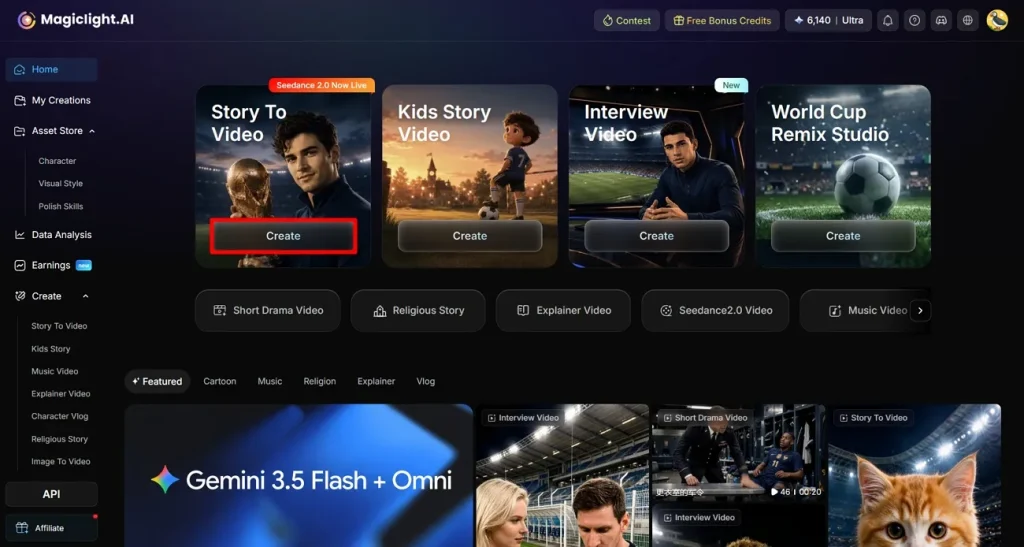
1단계. 메인 인터페이스에서 Story-to-Video 기능 선택
MagicLight AI를 연 뒤, 메인 페이지에서 Story-to-Video 기능의 Create 버튼을 누르세요.
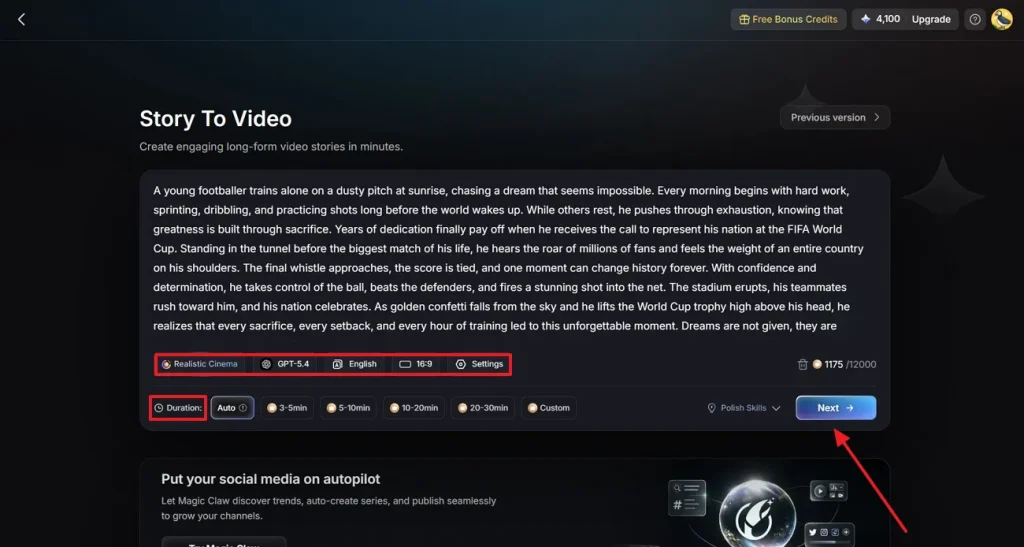
2단계. 월드컵 프롬프트를 넣고 영상 세부 설정
제공된 영역에 월드컵 스토리를 붙여넣고 AI Model 또는 Language 같은 세부 항목을 지정하세요. 이어서 Duration 같은 추가 Settings를 조절한 뒤 Next를 클릭하세요.
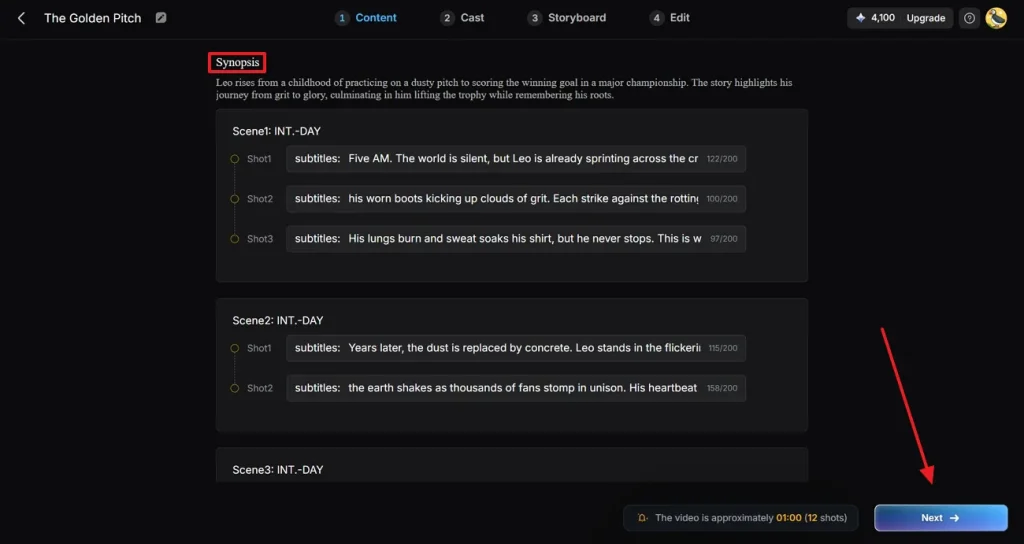
3단계. 생성된 영상 시놉시스 검토
다음으로 생성된 Synopsis를 읽고 필요에 맞게 수정하세요. 검토가 끝나면 Next를 눌러 다음 단계로 가세요.
4단계. 축구 영상에 맞는 캐릭터 선택
Cast 탭에서 More Character를 누르고, 방금 생성된 캐릭터 중 적합한 축구 선수를 고르세요. 이미 생성한 캐릭터가 있다면 My Character 폴더에서 선택한 뒤 Confirm을 누르세요.
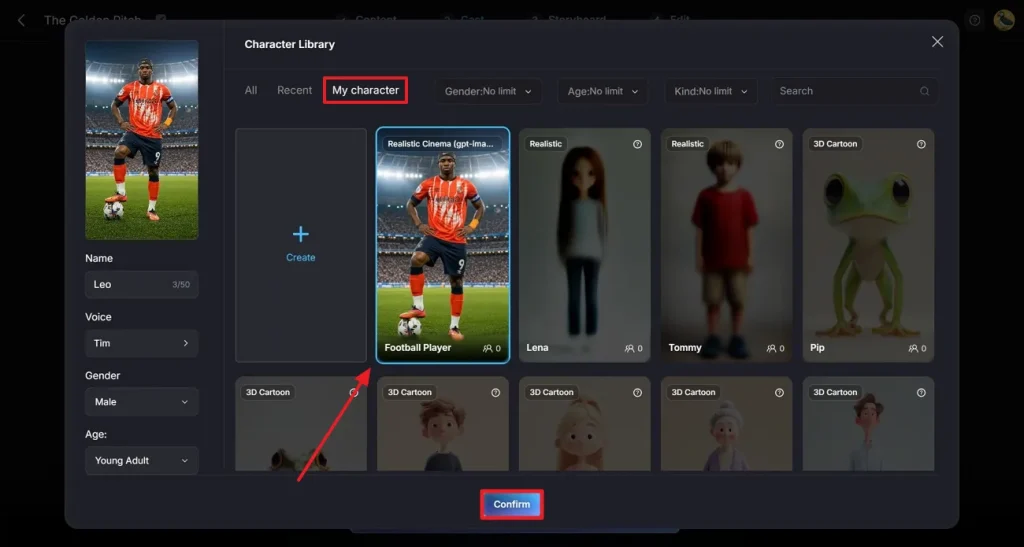
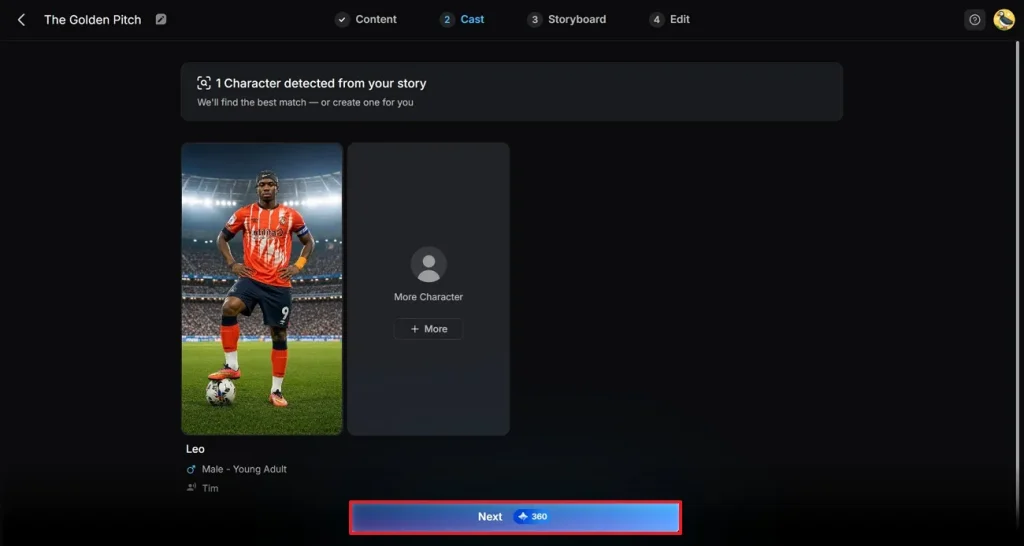
5단계. 캐스트 선택 확인
캐스트를 고른 뒤 Next를 눌러 영상 제작 과정을 완료하세요.
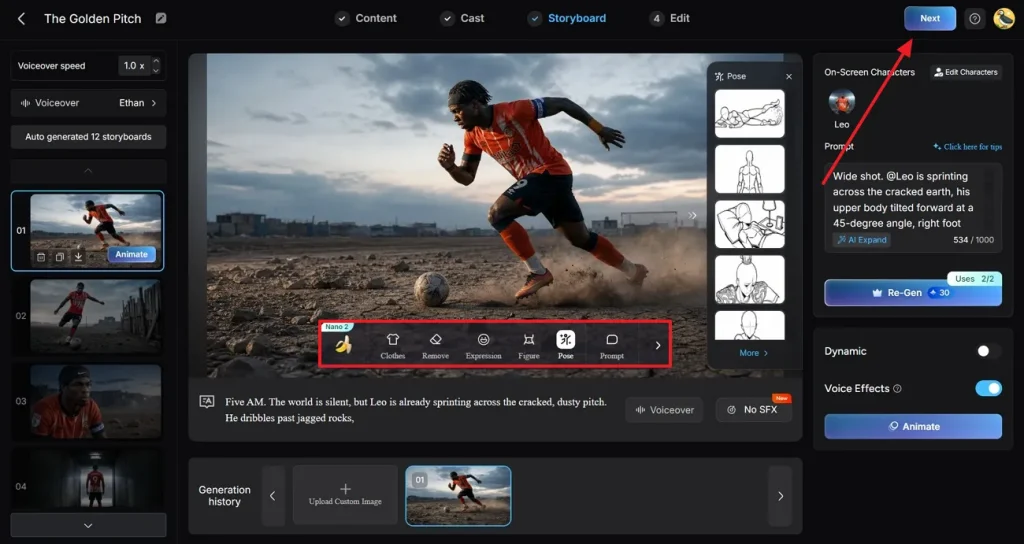
6단계. 영상 스토리 수정
스토리가 만들어지면 플로팅 툴바로 가서 필요한 변경을 하세요. 그다음 오른쪽 위 Next를 눌러 다음 단계로 진행하세요.
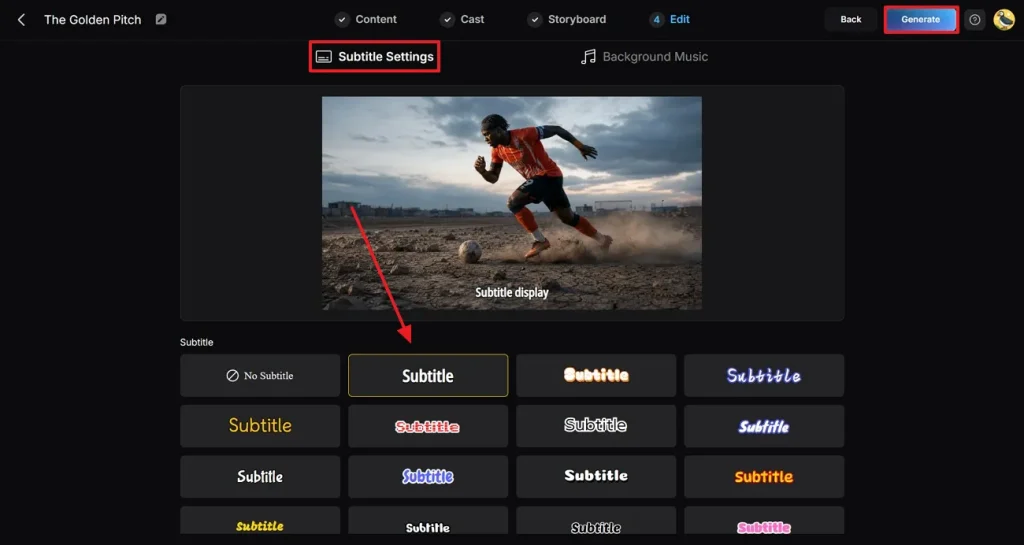
7단계. 영상에 자막 넣기
Subtitle Settings에 들어가 영상에 맞는 스타일을 고르세요. 마지막으로 Generate를 눌러 Runway World Cup prompt로 영상을 만드세요.
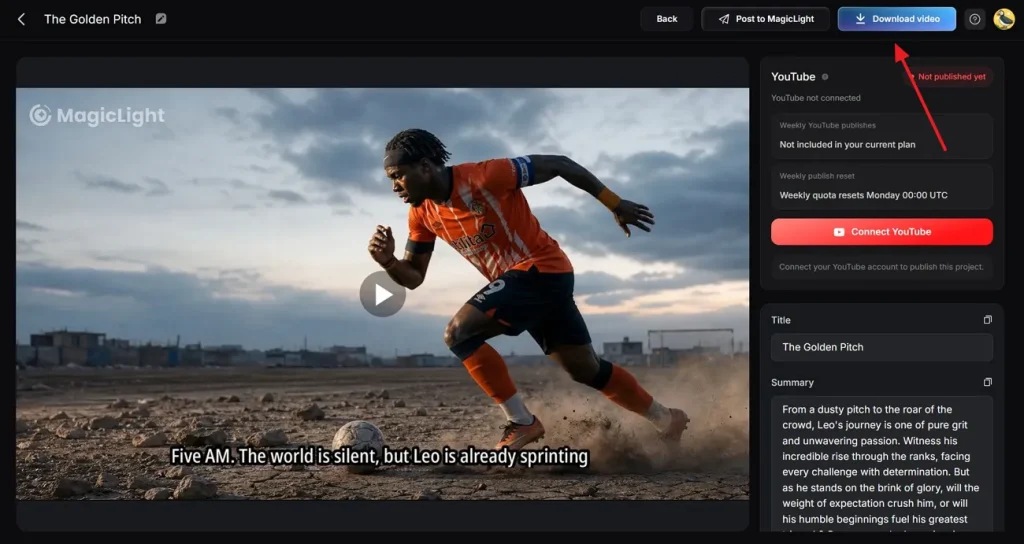
8단계. 생성된 영상 확인하고 다운로드
영상 생성이 끝나면 미리 보고 Download Video를 누르세요. 전용 버튼으로 소셜 미디어에 바로 게시할 수도 있어요.
마무리
결국 Runway 월드컵 프롬프트가 있으면 오래 고민하거나 몇 시간씩 편집할 필요가 없어요. 추천 프롬프트 하나를 써서 월드컵 순간 기반 FIFA 축구 영상을 빠르게 만들면 돼요. 더 나은 영상 제작을 원하면 MagicLight AI를 선택하세요. 최대 12,000단어 스크립트를 넣고 커스텀 캐릭터로 콘텐츠를 생성할 수 있어요.
Runway FIFA 월드컵 프롬프트 FAQ
1. Runway는 프롬프트로 축구 영상을 어떻게 생성하나요?
Runway의 Gen-3/Gen-4 모델은 텍스트 프롬프트를 짧은 영상 샷(보통 5–10초)으로 바꿔 줘요. 장면을 설명하면 Runway가 그 설명에 맞춰 시네마틱 클립 하나를 합성해요.
2. Runway가 현실적인 축구 경기 장면을 만들 수 있나요?
Runway의 최신 모델로는 물리감이 있고 움직임이 부드러우며 피사체가 더 일관된 장면을 만들 수 있어요. 더 정밀하게 가려면 MagicLight AI가 나아요. 축구 캐릭터를 만들고 여러 장면에서 재사용할 수 있어요.
3. Runway는 어떤 월드컵 콘텐츠를 생성할 수 있나요?
스타디움 인트로처럼 월드컵 콘텐츠의 일부가 될 짧고 시네마틱한 클립에 강해요. 비교하면 MagicLight AI는 롱폼 story-to-video나 해설형 전술 분석까지 한곳에서 더 많은 포맷을 다뤄요.
4. Runway는 숏폼 축구 영상에 좋은가요?
일반적인 숏폼 영상에 Runway 모델은 제역할을 해요. 잘 쓴 Runway 월드컵 프롬프트나 테마 템플릿으로 30–90초 짧은 에피소드를 쉽게 생성할 수 있어요. 내장 자막과 40곡의 배경 음악도 제공돼요.
5. 크리에이터가 축구 스토리텔링에 MagicLight AI를 쓰는 이유는?
내러티브 깊이, 일관된 캐릭터, 독립 샷이 아닌 완전한 에피소드를 중요하게 볼 때 MagicLight AI를 고르세요. 최대 50분 롱폼 생성, 클로닝이 있는 다국어 보이스오버, 스토리보드 컨트롤을 얻을 수 있어요.