Many people are already actively talking about the upcoming World Cup match. As the buzz grows, World Cup posts and videos are becoming a powerful way to join the conversation. It is now easier than before to create football-themed media content.
Thanks to smart AI tools, anyone can make eye-catching football visuals, videos, and stories to share with worldwide audiences. To celebrate the global spirit of the game, this article introduces reliable World Cup AI prompts designed to get stunning images every time.
Part 1. FIFA World Cup Media and Interview Prompts
Generating realistic football coverage images is simple with FIFA World Cup media and interview prompts. These prompts showcase highly realistic scenes such as stadium settings and player reactions. The following section includes example prompts that can be used to generate World Cup-themed images.
1. Football Commentator Prompts
- “Cinematic FIFA World Cup final moment with commentator booth overlooking glowing stadium. There is a last-minute goal, loud crowd, dramatic lighting, ultra-detailed broadcast scene.”
- “High-energy penalty shootout scene with intense commentator narration, packed stadium under floodlights, emotional players, crowd tension, cinematic sports broadcast realism”
- “Counterattack World Cup moment with commentator getting excited and players sprinting under stadium lights. Include motion blur, happy fans, dynamic angles, ultra-realistic sports scene.”
- “FIFA World Cup opening ceremony kickoff with commentator voiceover and vibrant stadium lights. Show waving flags, a large crowd, cinematic wide-angle broadcast shot.”
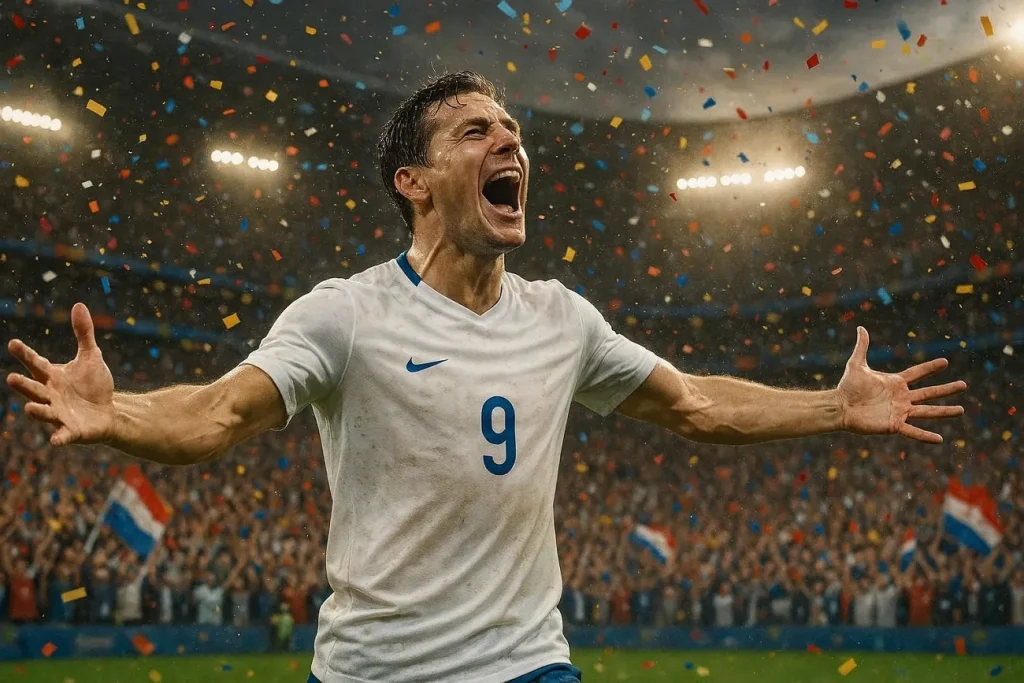
- “Iconic World Cup hat-trick moment with footballer, commentator in awe, confetti explosion, cheering fans, sharp lighting, sports broadcast style.”
2. Sports Analyst Prompts
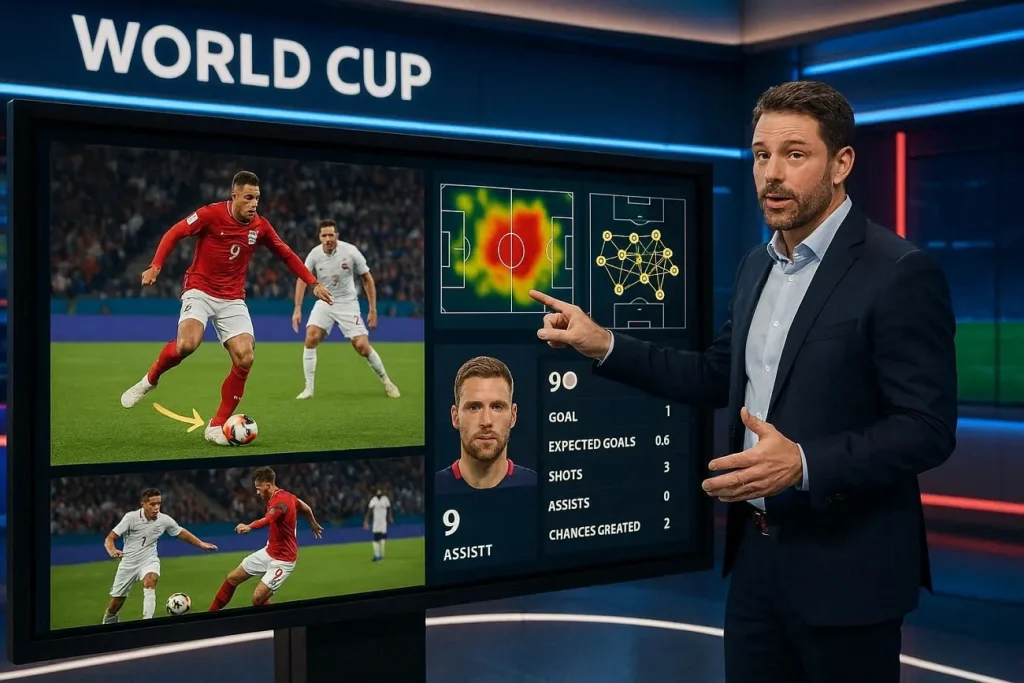
- “FIFA World Cup studio analysis scene with experts discussing tactics. Sleek broadcast set, dramatic lighting, ultra-realistic sports studio environment.”
- “Post-match World Cup analysis with analyst breaking down key moments, holographic pitch visuals, intense focus, modern studio lighting, cinematic broadcast realism.”
- “Tactical breakdown of World Cup clash with analyst pointing at dynamic formation graphics, glowing screens, professional studio atmosphere, ultra-detailed scene.”
- “World Cup pre-match analysis with experts comparing teams, large digital displays, player stats visuals, dramatic lighting, high-end sports broadcast studio.”
- “In-depth player performance review in World Cup studio, slow-motion highlights on screen, analyst explaining strategy, cinematic lighting, ultra-realistic setting.”
3. Sideline Reporter Prompts
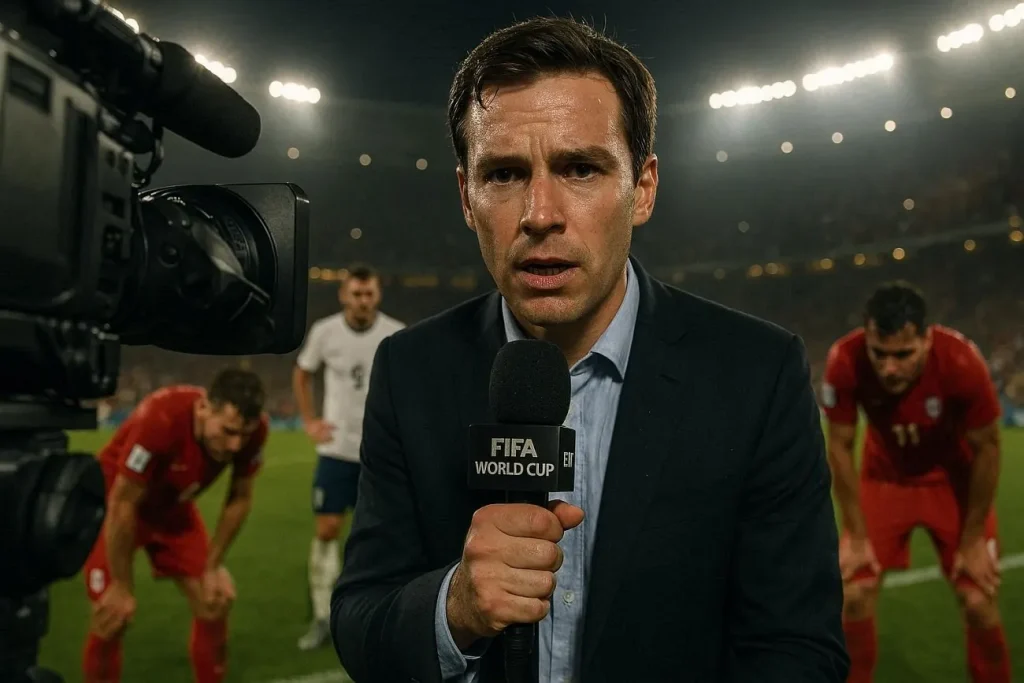
- “Sideline reporter for FIFA World Cup holding microphone, blurred players in background, with stadium lights and cinematic broadcast realism.”
- “Emotional post-match interview with player on World Cup field, sideline reporter capturing reactions, ultra-detailed scene.”
- “Halftime sideline reporting during intense World Cup match. The reporter has headset and massive crowd is roaring behind him, vibrant stadium lights, cinematic sports coverage.”
- “Injury update scene with sideline reporter near team bench and medical staff is assisting the player. Show off a tense atmosphere with worried expressions from players.”
- “Extra-time World Cup tension with sideline reporter updating live, players exhausted in background, glowing stadium lights, dramatic mood, ultra-realistic scene.”
Part 2. FIFA World Cup Poster and Artwork Prompts
Unlike the ones given above, these World Cup AI prompts are primarily focused on visual creativity. They craft attractive posters, creative artwork, and high-tension football scenes. You can bring World Cup moments to life with these bold, eye-catching visuals. Check out the prompts for the FIFA poster and artwork given below:
1. Trophy Celebration Artwork
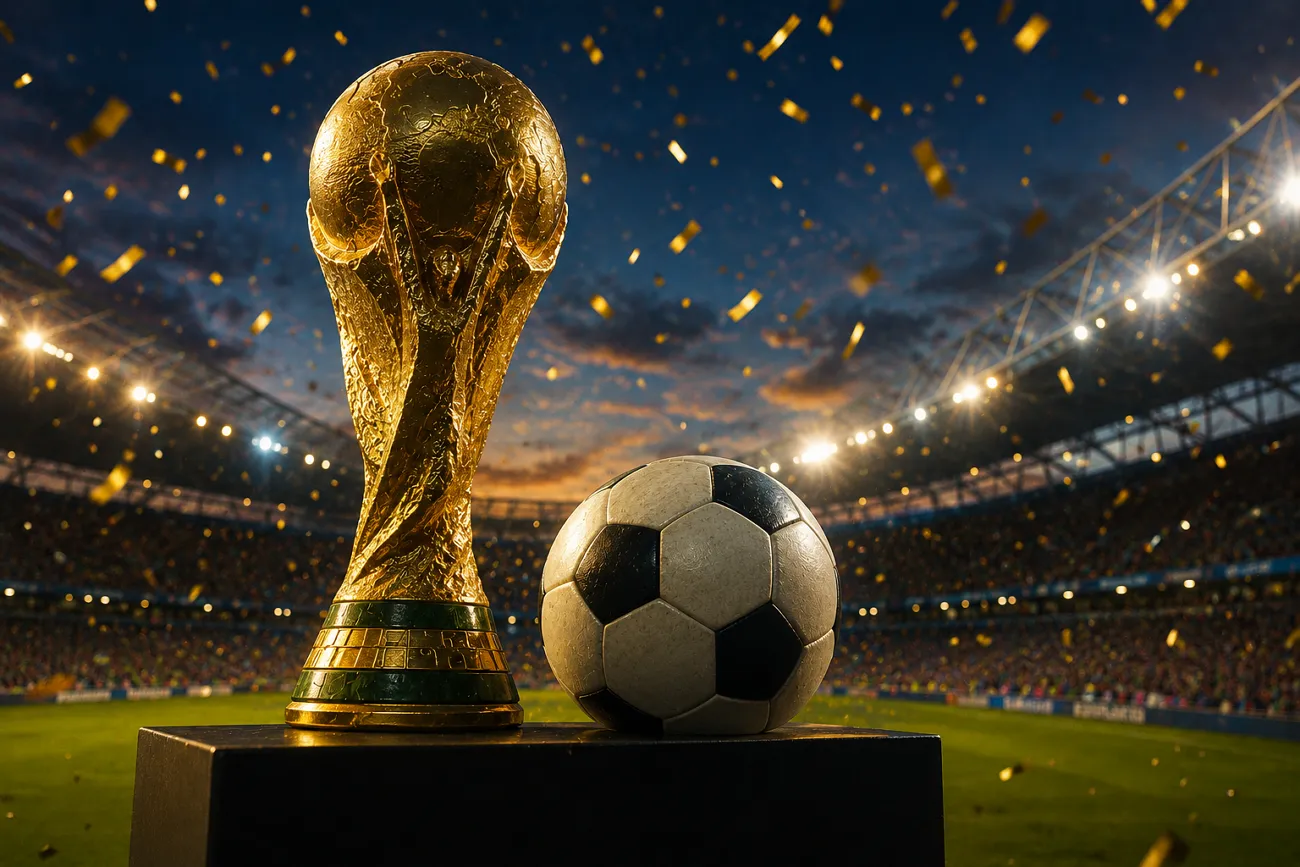
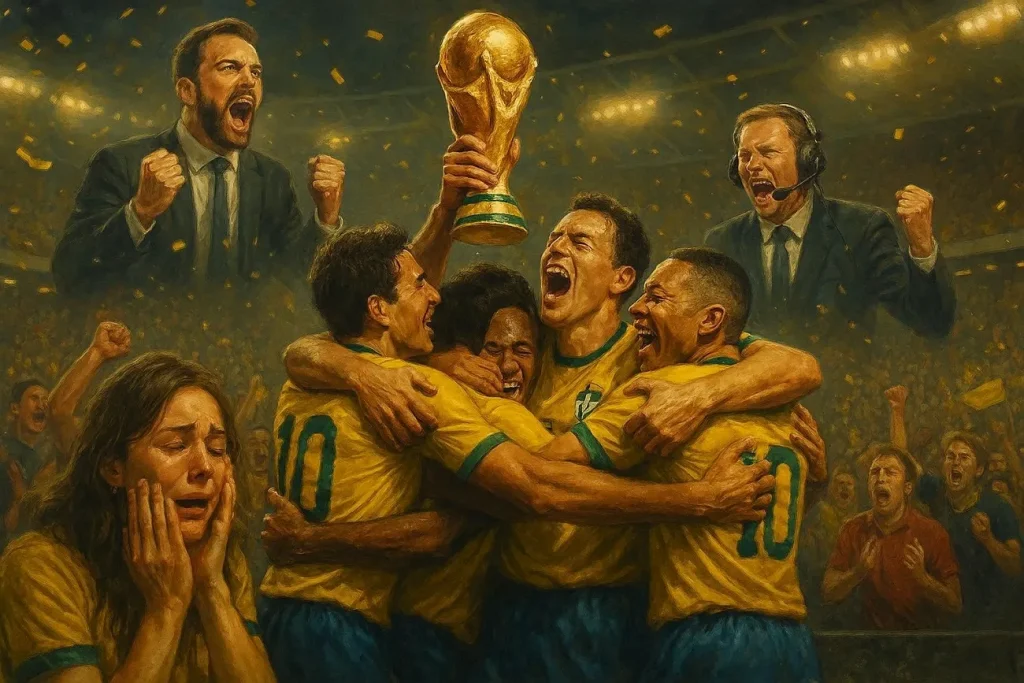
- “Football team lifting World Cup with golden confetti and bright stadium lights. The image should portray cinematic realism and be detailed.”
- “Champions celebrating with glowing World Cup trophy and a cheering crowd. Silver confetti rains over the players and the audience.”
- “Fireworks in the background as team holds up trophy, emotional players, vibrant stadium, golden lighting, detailed artwork.”
- “World Cup victory moment where players are hugging each other. Fans are crying and commentators celebrate, cinematic sports poster style.”
- “Winning team celebrating with trophy center stage, glowing lights, roaring fans, dramatic atmosphere, ultra-detailed artwork.”
2. Matchday Promotional Posters
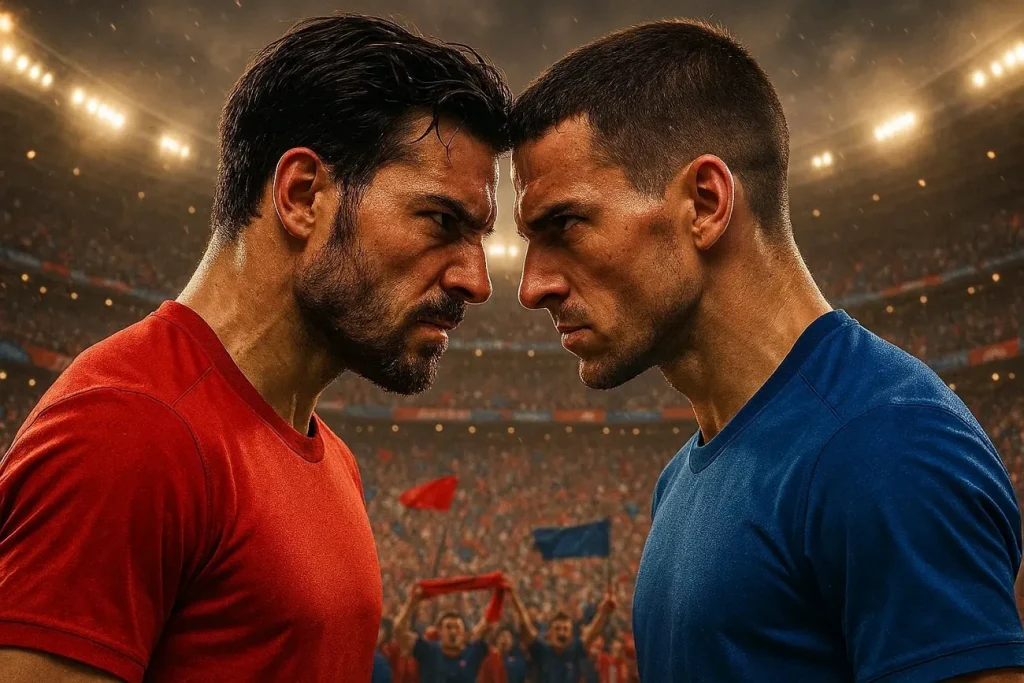
- “Matchday poster with two teams facing off, bright lighting, stadium backdrop, cinematic sports design.”
- “World Cup clash poster featuring rival teams, bold typography space, dynamic composition, ultra-detailed.”
- “Football matchday poster with players in action poses, vibrant colors, football flying, golden lighting, modern sports design.”
- “High-energy World Cup poster showing upcoming match, determined player expressions. There are glowing lights in the background with bold cinematic composition.”
- “FIFA World Cup promotional poster with two popular players butting heads. The crowd energy is high with cinematic realism and a sleek design.”
3. Football Legend Tribute Posters
- “Player tribute poster standing in a heroic pose with glowing stadium lights. Dramatic shadows, cinematic sports artwork, ultra-detailed.”
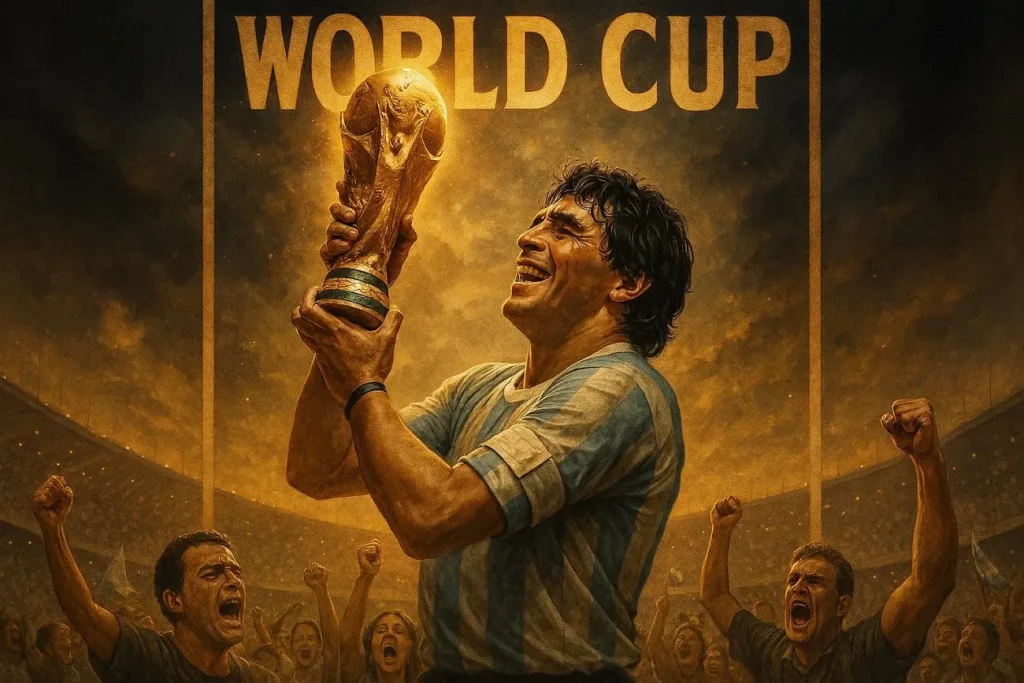
- “World Cup legend portrait of a player with trophy in hand and an emotional expression. The image consists of dramatic lighting and has a realistic poster design.”
- “Football legend tribute with hands above head pose and glowing effects. Show off a dramatic atmosphere, ultra-detailed cinematic artwork.”
- “Stylized tribute poster of famous footballer with bold lighting. Ensure player has a heroic stance and a smile on his face.”
- “World Cup legend artwork with iconic moment, glowing trophy, emotional crowd, dramatic lighting, ultra-realistic poster style.”
Part 3. Bring Your FIFA World Cup Characters to Life With MagicLight AI
A tool that takes your World Cup AI prompts to the next level is Magiclight AI. This platform is a powerful AI avatar generator, allowing users to create highly detailed characters. Most AI software stops after generating a still image. Meanwhile, Magiclight AI gives voice to characters, offering 37 voiceover options.
It offers 19 video models, such as Gemini Omni, Veo 4, and Seedance Pro, for animating videos. Furthermore, the tool can generate longer clips with up to 50 minutes of runtime. This allows for more complex and detailed videos to be formed. It helps transform simple prompts into dynamic football narratives and engaging scenes.
Key Features
- Stable Football Players: Maintains consistent character traits across multiple scenes for seamless storytelling.
- Lifelike Lip Sync: Give realistic lip-sync and voice cloning for more human-like football player avatars.
- Multilingual Voices: The tool supports 11 languages, including French and Korean to ensure worldwide accessibility.
- Define Characters with Prompts: Set your character’s name in 50 characters and change its appearance with a 1000-characters prompt.
- Stores Your Characters: You can save and reuse predefined characters for future content creation workflows.
A Comprehensive Guide to Creating Football Players inside Magiclight AI
Learning how to create characters and animate them for videos is quite easy. The workflow in Magiclight AI is lined with guided steps and choices. To use the tool properly, follow the steps given in the next section:
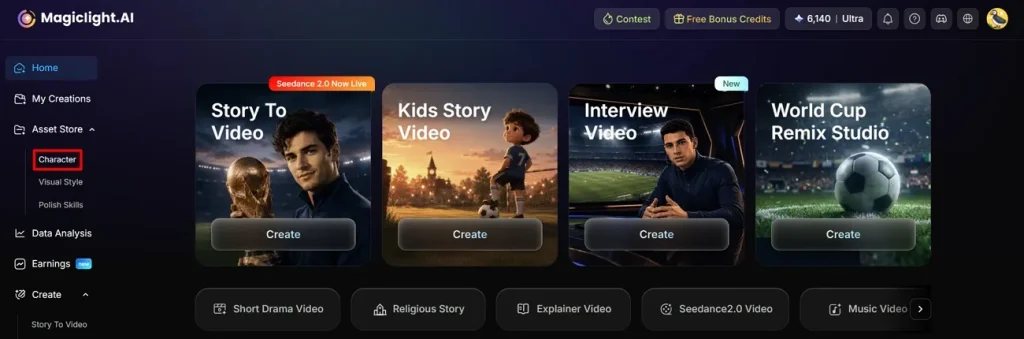
Step 1. Select Character Creation Tool
Initiate the process by selecting the Character tool in the left panel of the interface.
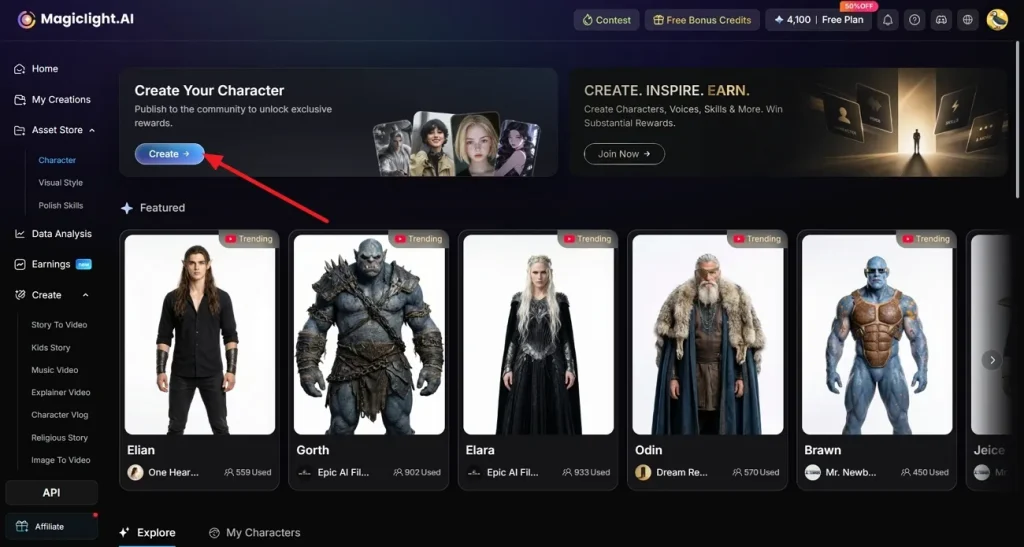
Step 2. Continue with Character Creation
A new page opens, click on the Create button to proceed with the character creation process.
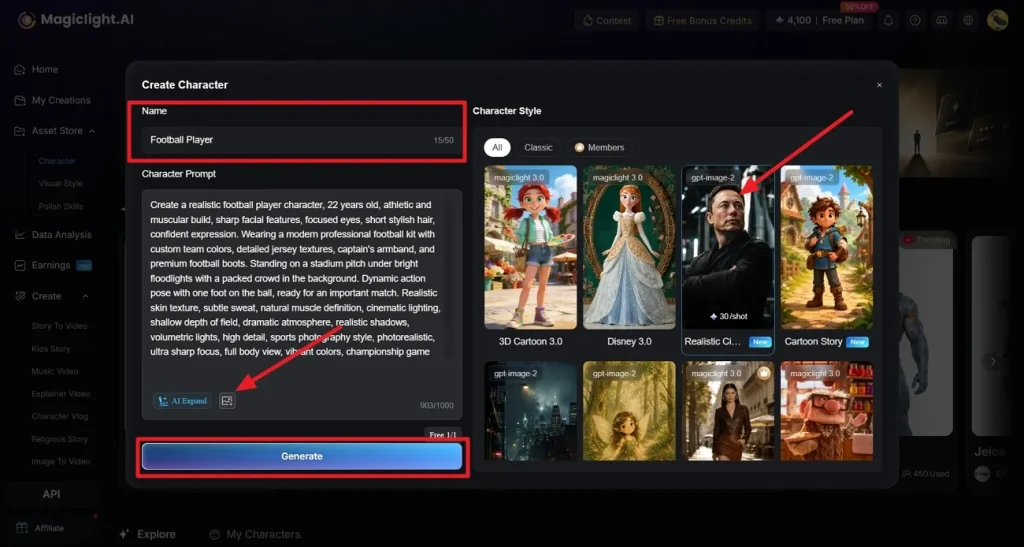
Step 3. Customize Your Character
Give a Name to your footballer and describe his appearance by typing text in the Character Prompt box. Optionally, you can choose to import a reference image by selecting the Upload option. End by picking a look from the Character Style tab and then click on the Generate option.
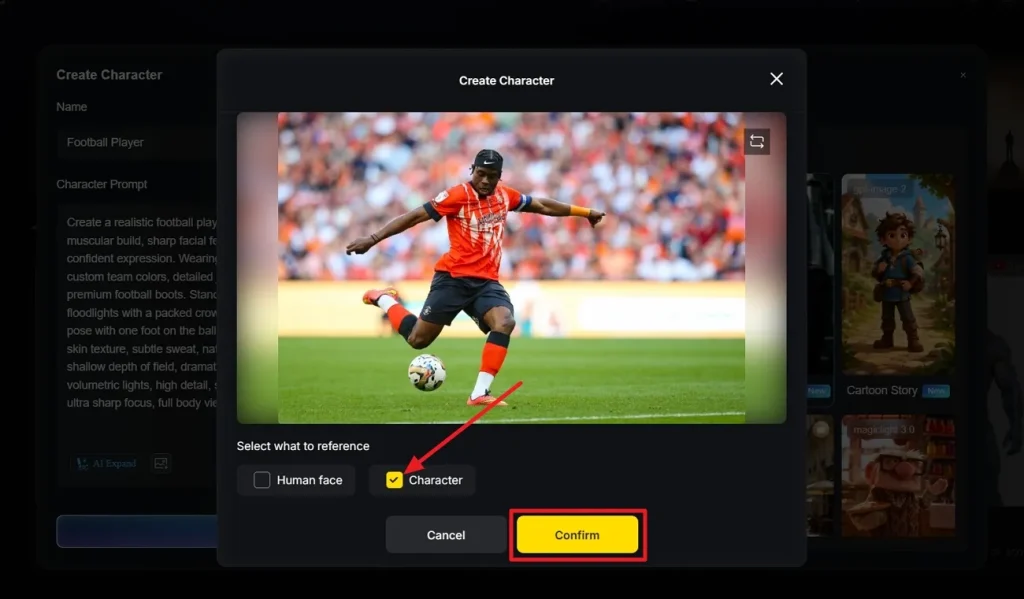
Step 4. Finalize Details from Reference Photo
Here, choose what to replicate from the image and select the Confirm option.
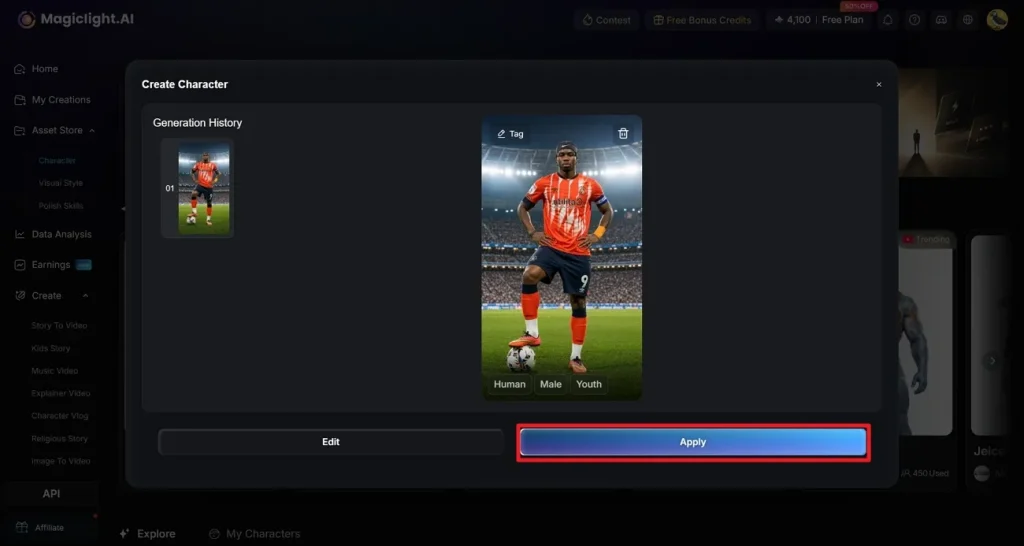
Step 5. Preview Your Character
Your footballer is now created, which you can check out. If no further edits are needed, click on the Apply option to save it.
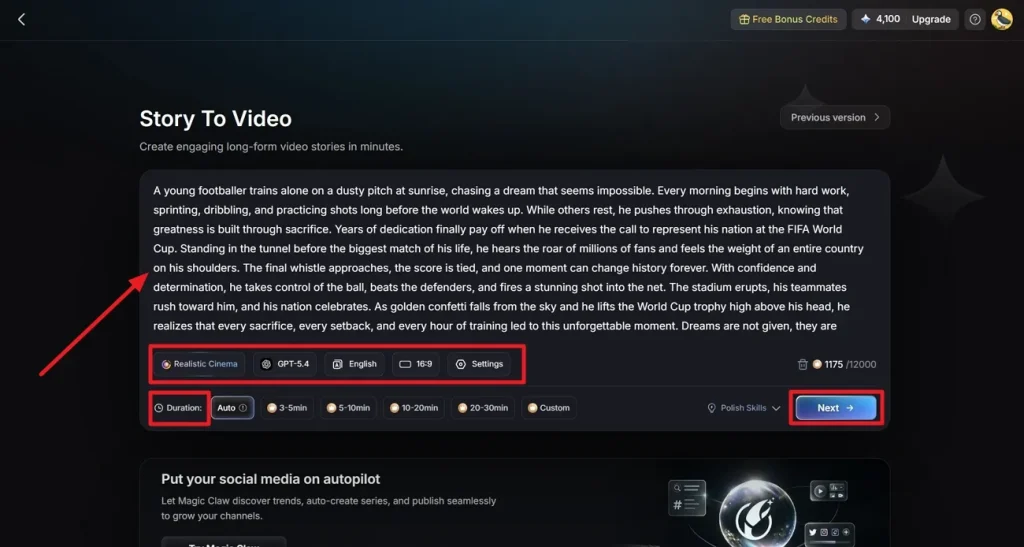
Step 6. Open Story to Video and Enter Prompt
Access the story-to-video tool, type your video description, and set the Duration. You can also opt for Polish Skills option that refines prompts. Customize the video's settings, such as Story Model, Video Style, and Aspect Ratio. Pick a target Language for the video, then click the Next option.
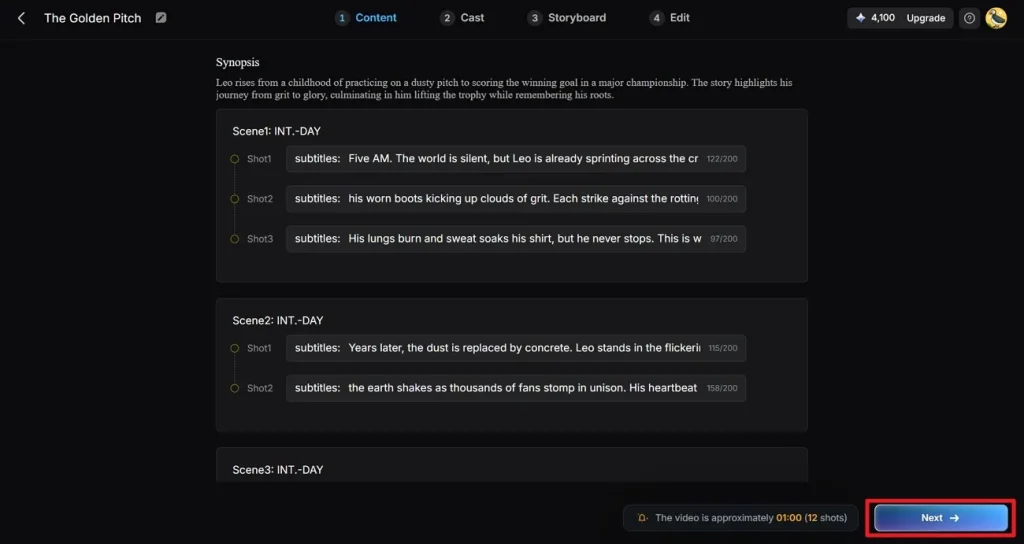
Step 7. Review Generated Shots from Script
The prompt description is converted into synopsis scenes, which you can check, edit, or delete, then click the Next button.
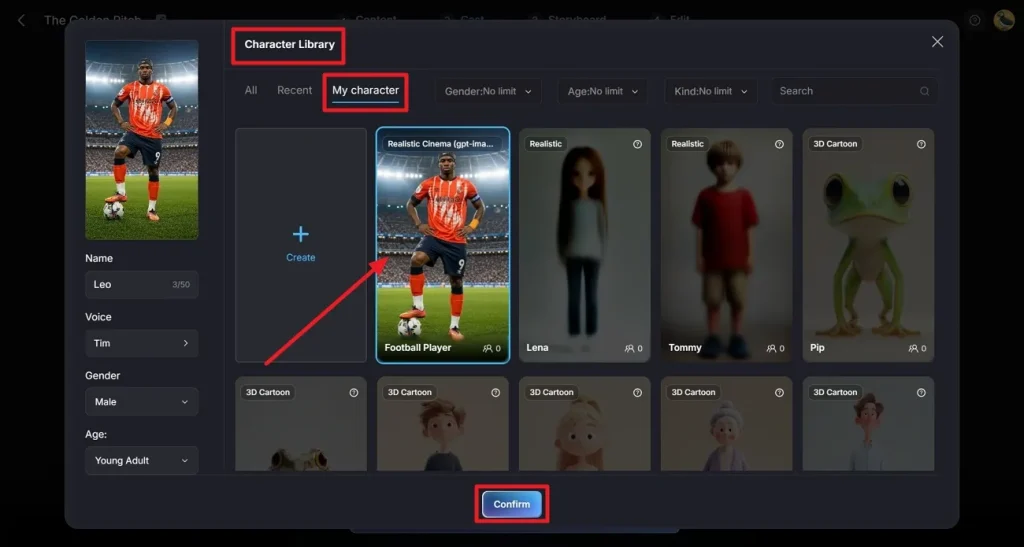
Step 8. Select Generated Character from Character Library
Instead of continuing with a character that Magiclight AI has provided, click on the character and go to the My Character tab. Click the Confirm button after picking the preferred character.
Step 9. Resume Video Creation Process
Subsequently, adjust the character’s voiceover by changing the accent, age, and gender. Choose the Next option to proceed to the Storyboard editor.
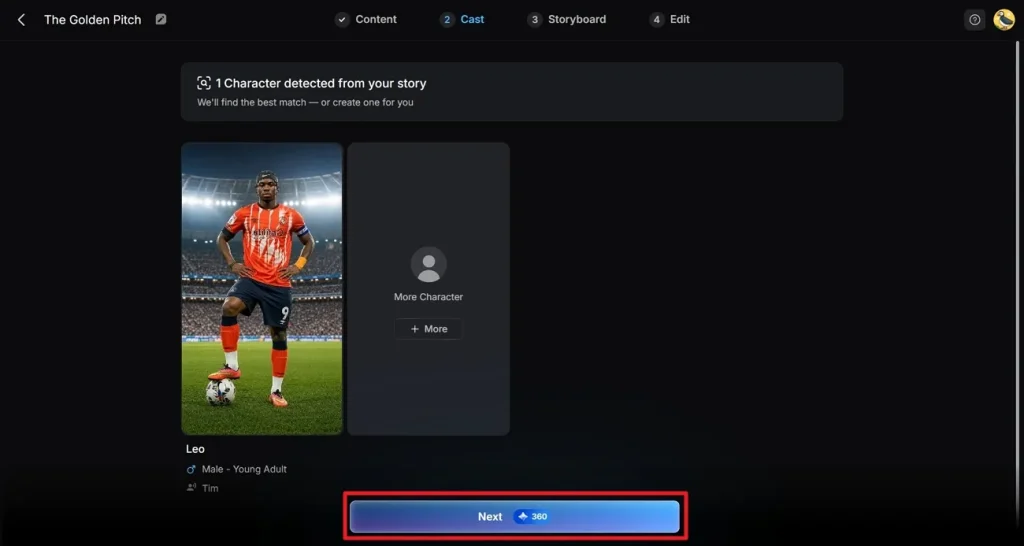
Step 10. Refine Scenes with Nano
Click on one of the options for Clothes, Poses, and Expressions to change or adjust them. You can also change the Voiceover Speed to match the scene’s pacing. After all scenes have been perfected, select the Next button.
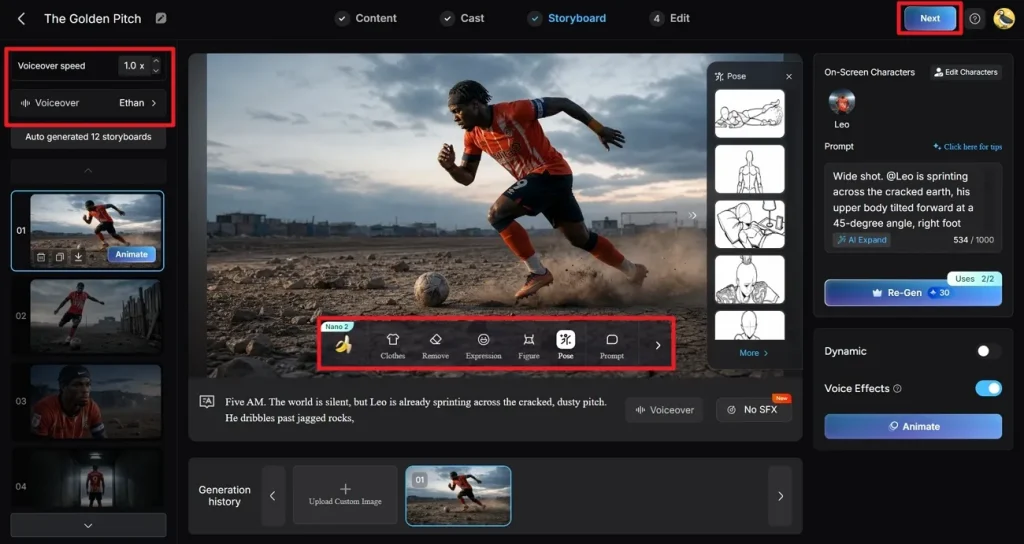
Step 11. Add Finishing Touches to Clip
Then, select a style for the captions from the choices in the Subtitle Settings tab. Access to the Background Music section to include audio tracks in the clip. Lastly, click on the Generate button to finalize both settings.
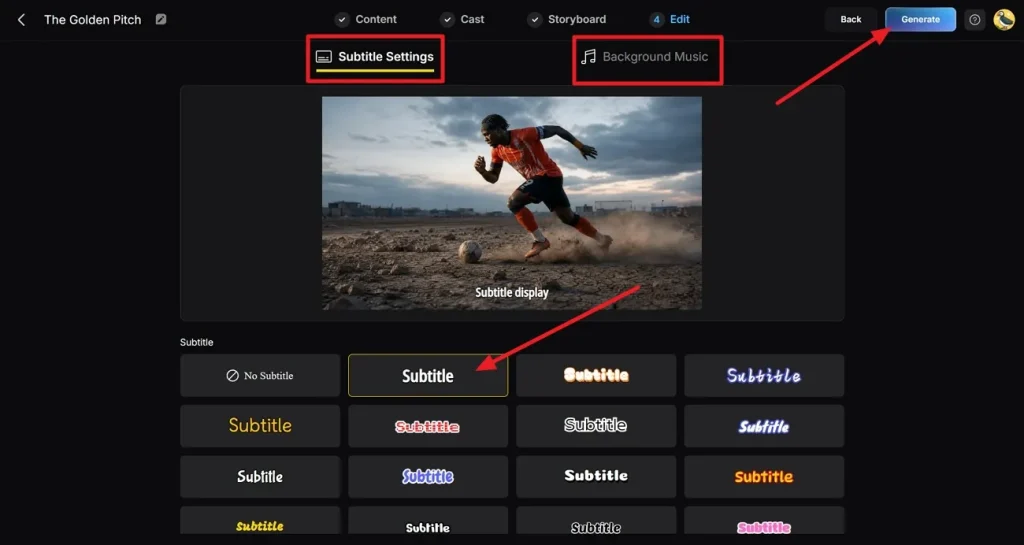
Step 12. Export and Publish to YouTube or Magiclight AI
Go through the final video carefully to ensure no drifts or awkward scenes. To download the video, click the Download button, or you can choose the Publish to Magiclight AI option. Additionally, you can choose the Connect with YouTube option to directly upload to the platform.
Conclusion
To sum it up, the article explored a range of World Cup AI prompts. Since the official match is just around the corner, everyone is trying to create football-themed content. The example prompts from our guide unlock creative possibilities for creators of all levels. The article also showed how Magiclight AI gives you more control over your characters and lets you animate them too.
FAQs on FIFA World Cup AI Prompts
1. How do I create realistic football characters with AI?
You can turn to MagicLight AI to design highly detailed and realistic football player avatars. It offers advanced customization, lip sync, and 20+styles for lifelike character creation.
2. Can I generate FIFA World Cup posters with AI?
Yes, Magiclight AI helps create visually stunning football posters with cinematic design elements. The tool transforms simple prompts into detailed posters using advanced visual generation tools.
3. What details should I include in a football prompt?
Include player appearance, emotions, lighting, environment, and action for better results. Using clear World Cup AI prompts in Magiclight AI improves accuracy and overall visual storytelling output.
4. Can I create both male and female football players?
Of course. You can customize features, outfits, and styles to match different player identities. Magiclight AI supports creating both male and female football players easily and accurately.
5. How does MagicLight help with FIFA World Cup storytelling?
The tool lets creators produce engaging scenes with characters, motion, and realistic visual flow. Simple ideas are changed into animated football stories using the story-to-video feature in Magiclight AI.
![How to Write a Script for a Short Film in 2026 [Beginner’s Guide]](https://magiclight.ai/wp-2/wp-content/uploads/short-film-screenplay-writing-guide-300x169.webp)