The FIFA World Cup brings exciting matches, passionate fans, and unforgettable highlights. People love to share match moments, team celebrations, and football stories online. For this, they might need Runway World Cup prompts that help them tune their ideas into moving clips. In short, you can create match scenes, stadium shots, and more with just a little effort.
To experiment with different ideas, Runway is an AI-based generation platform that allows prompts for video creation. Start generating short football edits through the top-recommended FIFA World Cup prompts discussed in the article.
Part 1. 20 Best Runway FIFA World Cup Prompts for Viral Videos
Every creator knows that the FIFA World Cup is full of strong emotions like joy, excitement, and tension that fans love to watch. In this context, use the listed Runway World Cup prompt and express your feelings in videos:
1. Prompts for Star Player Introductions
Prompt 1: “Show a famous football player walking out of a dark tunnel into a bright World Cup stadium. The camera follows him slowly. The stadium is full of fans cheering loudly and waving flags. Bright lights shine on the player as he steps onto the field.”
Prompt 2: “Visualize a close-up of a player during the national anthem. He is standing still with his hand on his chest. He looks proud and emotional. Fans behind him are waving flags.”
Prompt 3: “Generate a video for a football star walking onto the pitch while digital stats and highlights appear around him. The camera follows him from the side. The stadium looks modern and bright.”
Prompt 4: “Make the player tie his captain's armband tightly on his arm before the match. The locker room is calm and silent. The camera shows a close-up of his hands and determined face.”
Prompt 5: “A cinematic shot of a star player doing light practice shots before the match. Each kick looks powerful. The stadium atmosphere is loud but focused.”
2. Prompts for Team Entrance Videos
Prompt 1: “FIFA football team walking out together from a dark tunnel into a bright World Cup stadium. The camera moves slowly from behind them. Fans are cheering loudly and waving flags. Bright stadium lights illuminate the players as they take the field.”
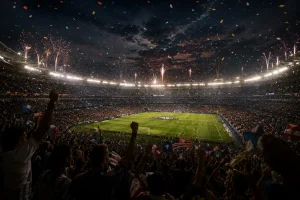
Prompt 2: “Show a team entering the stadium while fireworks explode in the sky. The crowd is very loud and excited. The players walk in slow motion, wearing their national jerseys with pride.”
Prompt 3: “Make a close-up shot of team players holding hands before entering the field. They look focused and motivated. The stadium noise grows louder in the background.”
Prompt 4: “The national FIFA football team walking out as their anthem starts playing. Fans wave flags everywhere. The camera slowly zooms out to show the full stadium atmosphere.”
Prompt 5: “Create a video showing a FIFA team captain leading the squad onto the pitch. The rest of the players follow closely behind. The camera focuses on their strong and confident expressions.”
3. Prompts for TikTok Football Videos
Prompt 1: “Generate a clip for a football player dribbling the ball quickly on a bright stadium field. He uses skill moves to pass defenders. The crowd is cheering loudly in the background.”
Prompt 2: “A player scoring a powerful goal in the World Cup match. The ball goes into the net and the crowd explodes with excitement. The player runs to celebrate with teammates.”
Prompt 3: “Show a slow-motion video of a goalkeeper jumping high in slow motion to save a strong shot. The ball is stopped just before the goal line. Fans react loudly in the stadium.”
Prompt 4: “Visualize a FIFA football player doing fast step-over tricks and beating two defenders easily. The grass is bright green, and the stadium is full of energy.”
Prompt 5: “Generate a short TikTok highlight video showing fast football actions like passing, dribbling, and scoring goals. Quick cuts with excited stadium atmosphere.”
4. Prompts for Emotional Fan Narratives
Prompt 1: “A FIFA fan wearing his national team jersey in a crowded stadium. He is holding his flag tightly and watching the match with tears in his eyes.”
Prompt 2: “Show a fan in a public viewing area celebrating a goal. People around him are jumping, hugging, and waving flags with happiness.”
Prompt 3: “Create a video of a fan crying with happiness after his team wins the match. He hugs strangers around him in celebration.”
Prompt 4: “A street full of fans watching the match on a big screen. The crowd reacts together with loud cheers, sadness, or joy depending on the game.”
Prompt 5: “Generate a short clip of a group of friends watching the match at a café. They jump and shout together when their team scores.”
5. Prompts for Goal Celebration Scenes
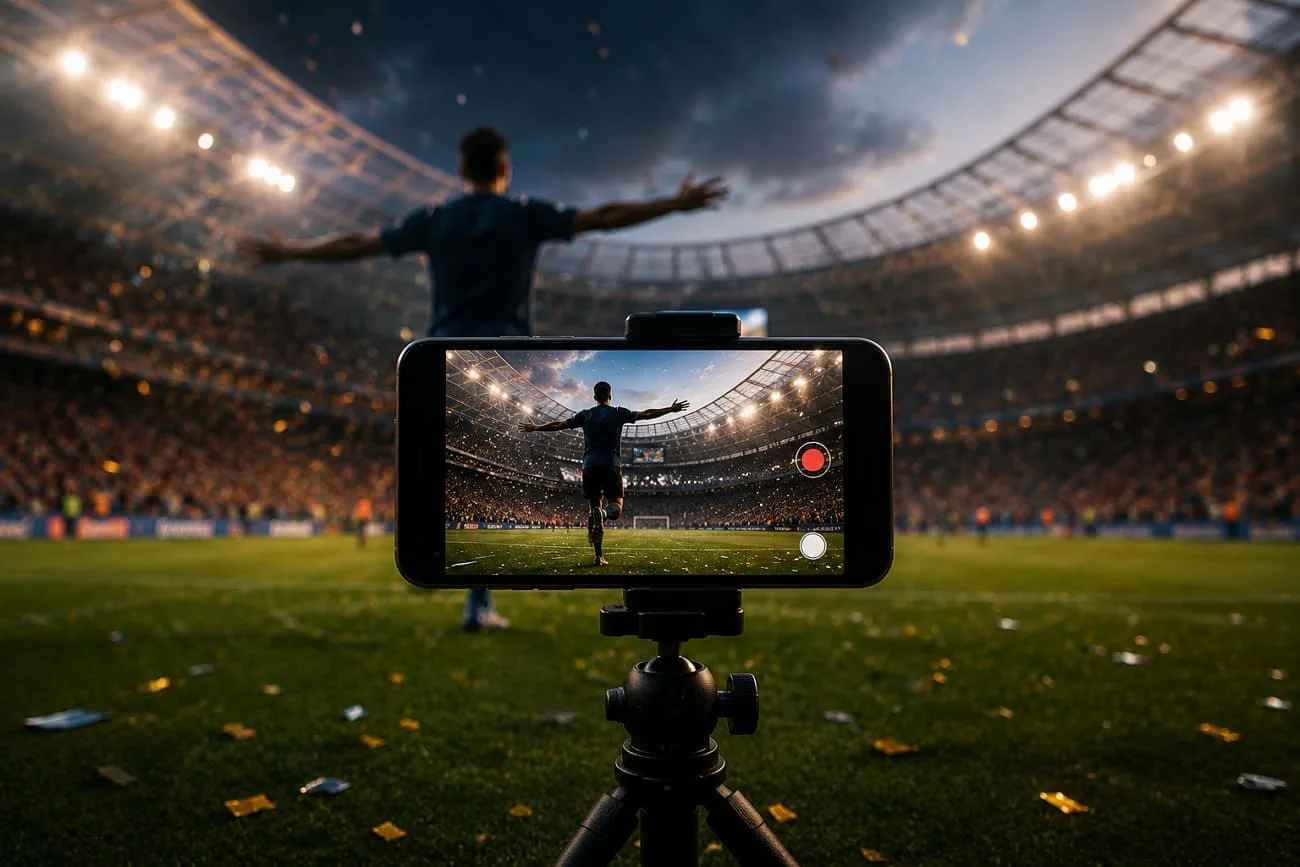
Prompt 1: “FIFA football player scores a winning goal in a packed World Cup stadium. He runs across the field with his arms wide open. Fans jump and cheer loudly while teammates run toward him to celebrate.”
Prompt 2: “Show a striker scores a beautiful goal and slides on his knees across the grass. The crowd waves flags and shouts with excitement. Stadium lights shine brightly on the celebration.”
Prompt 3: “Famous FIFA player scores in the final minutes of the match. He points to the sky and smiles with joy. Teammates surround him in a group hug while fans celebrate in the stands.”
Prompt 4: “A team of football players scores and performs a signature celebration dance. The crowd copies his moves in the background while teammates clap and smile.”
Prompt 5: “Generate a dramatic World Cup goal celebration video with players hugging, fans waving giant flags, confetti falling from the sky, and fireworks lighting up the stadium, creating a joyful and unforgettable moment.”
Part 2. Why Creators Choose MagicLight AI for Long-Form FIFA World Cup Storytelling
From historic wins to emotional moments, every World Cup has a story worth sharing. With the help of Runway World Cup prompts, MagicLight AI can generate long-form videos with a duration of up to 50 minutes. Its Story-to-Video feature easily accommodates a script of up to 12,000 words, enabling deep narratives in a single video. From story idea to a finished video, MagicLight AI offers a complete production pipeline.
The platform supports 11 languages and 37 voiceovers, so World Cup stories can match the global fanbase. Voiceovers are filterable by accent and gender, while voice cloning enables creators to approximate a familiar commentary style. MagicLight 2.0, 2.2, and 3.0 style packs, plus Midjourney-based models, allow everything from stadium realism to animated highlights. From a written World Cup story, it auto-generates a complete storyboard with visual prompts.
Key Features
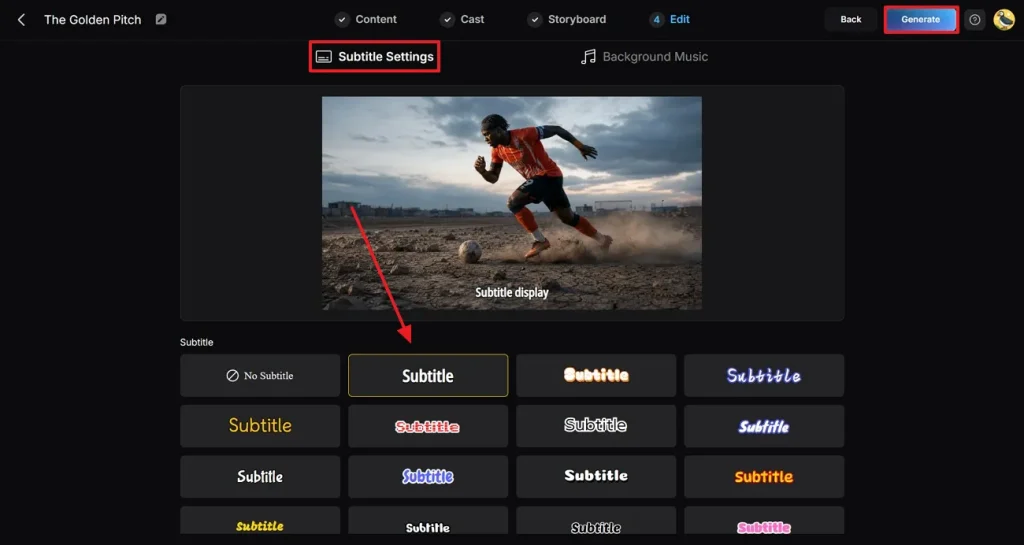
- Subtitles and Background Options: It includes 16 subtitle styles and 40 background music options to have a unique story tone.
- Flexible Aspect Ratio: Creators can choose multiple aspect ratios and resolutions up to 1080p for TikTok or Instagram stories.
- Consistent Characters Look: Build or select custom characters with fixed names and ages to use them across multiple episodes.
- Nano Storyboard for Match Moments: With Nano Storyboard, creators can break each shot into multiple micro steps using timeline controls.
- Professional-Grade AI Models: MagicLight AI integrates with several advanced video, voice, and image models to ensure high-quality visuals.
Guide to Create Long-Form FIFA World Cup Video
To generate a long-form World Cup video that wins hearts from start to finish, follow these simple guidelines:
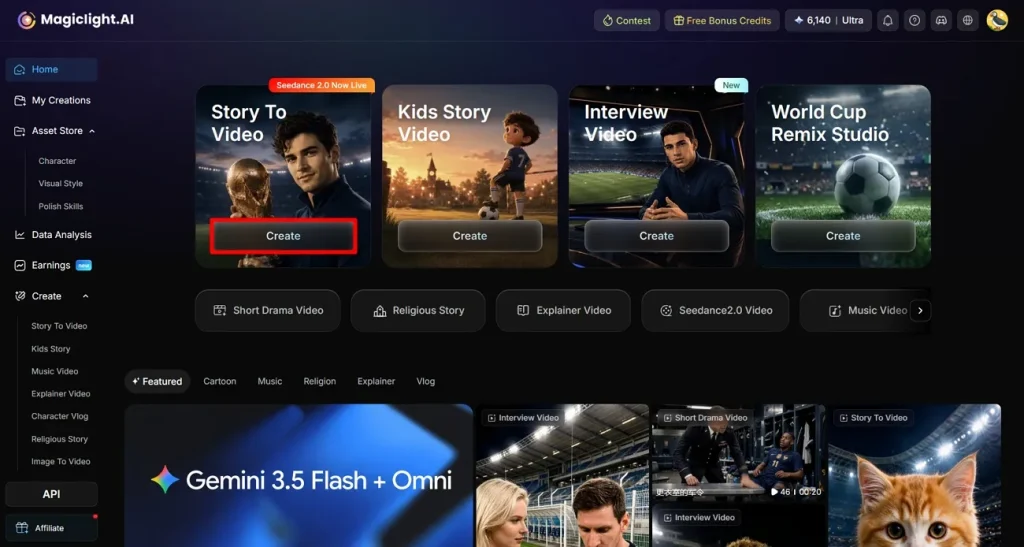
Step 1. Select Story-to-Video Feature from the Main Interface
Browse MagicLight AI, then press the Create button for the Story-to-Video feature from the main page.
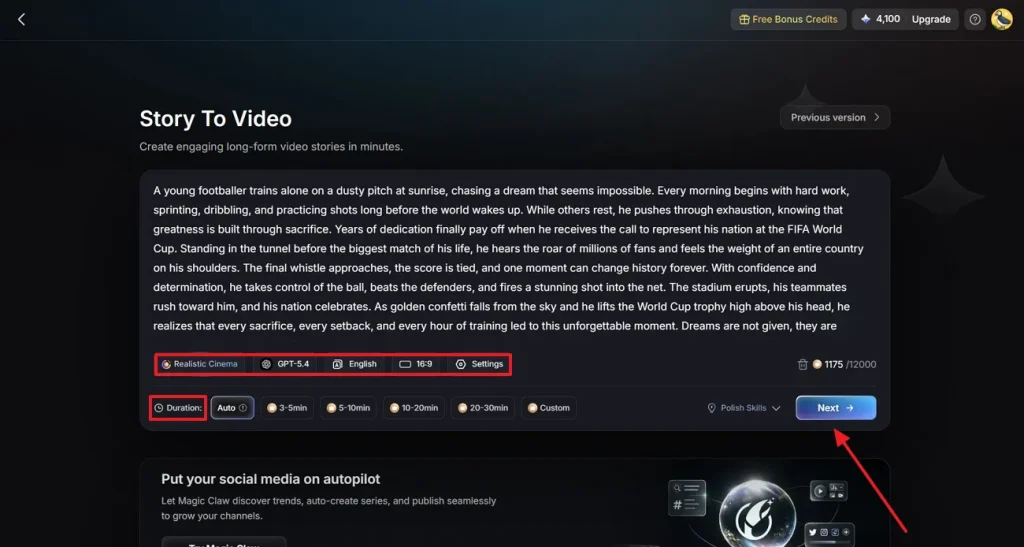
Step 2. Add a World Cup Prompt and Specify Video Details
In the provided area, paste your World Cup story, and specify details like AI Model or Language. Moving forward, adjust further Settings such as Duration, then click Next.
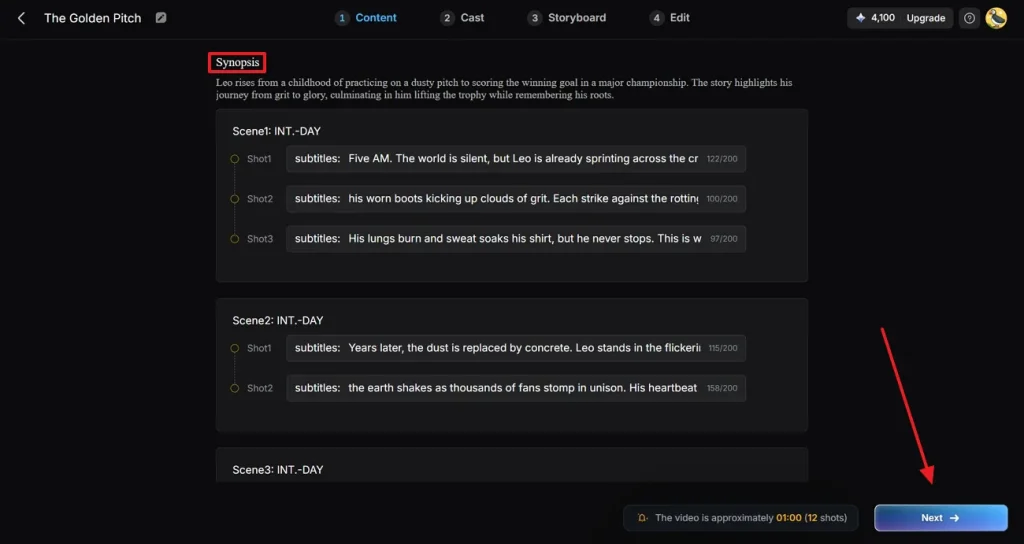
Step 3. Review the Generated Video Synopsis
Next, read the generated Synopsis and edit it according to your requirements. Once you’re done reviewing, click the Next button and proceed to the next step.
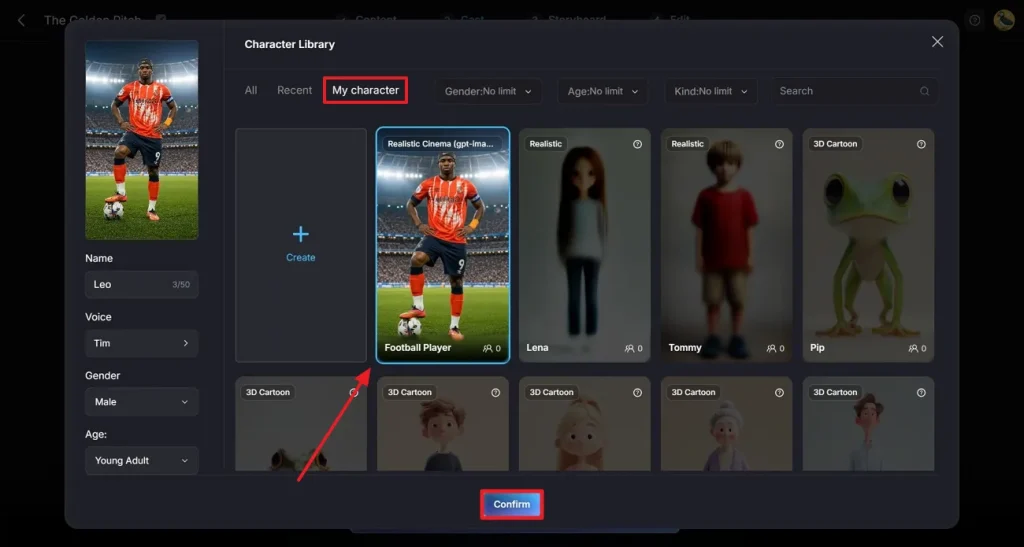
Step 4. Choose an Appropriate Character for the Soccer Video
From the Cast tab, press the More Character option and choose a suitable football player from the recently generated ones. If you’ve already generated a character, access My Character folder, select it, and click the Confirm button.
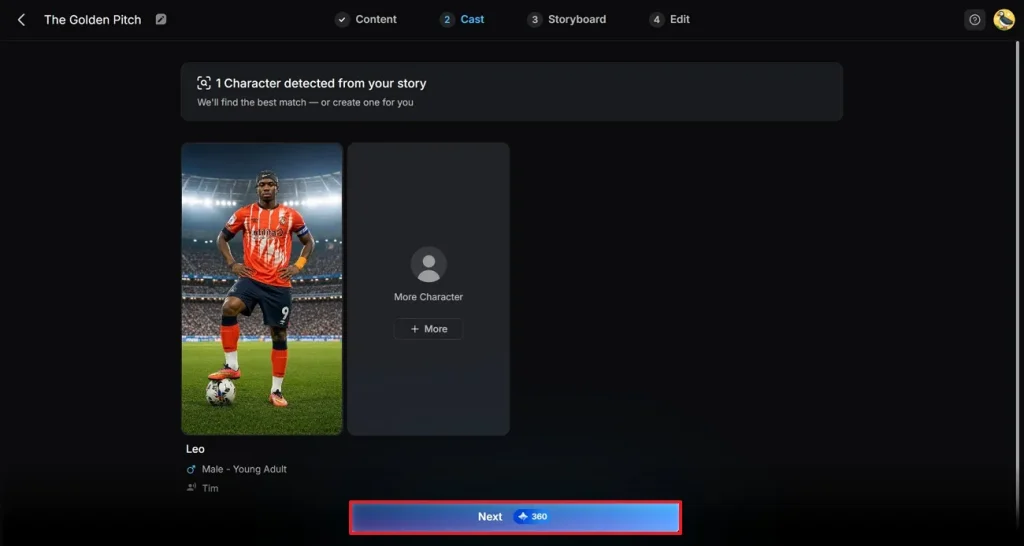
Step 5. Confirm the Cast Selection
Soon, after the cast selection, click the Next button and complete the video creation process.
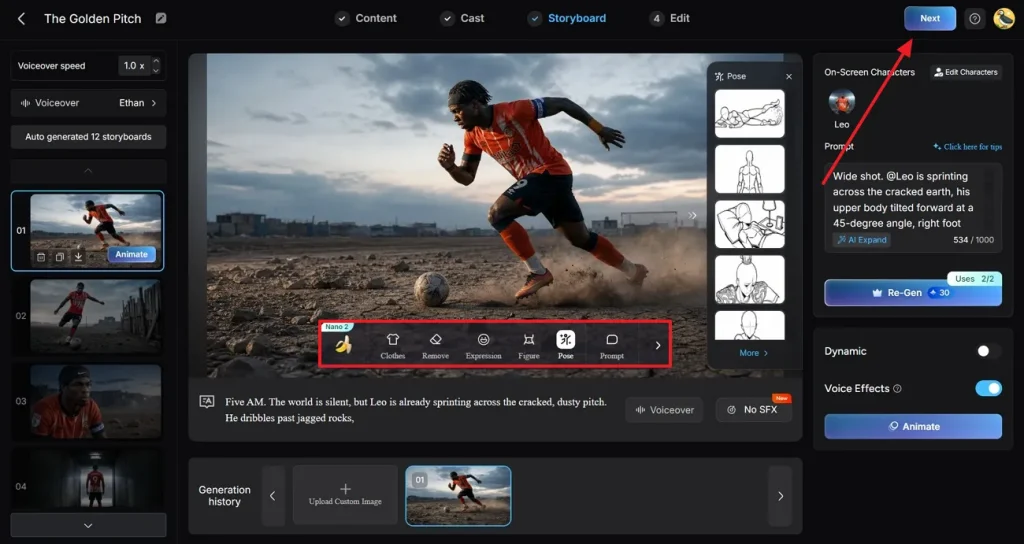
Step 6. Modify the Video Story
Once your story is created, go to the floating toolbar and make any necessary changes. After that, click the Next button in the top-right corner to proceed to the next step.
Step 7. Insert Subtitles to Your Video
Enter your Subtitle Settings and choose a suitable style for your video. Finally, press the Generate button to create the video with a Runway World Cup prompt.
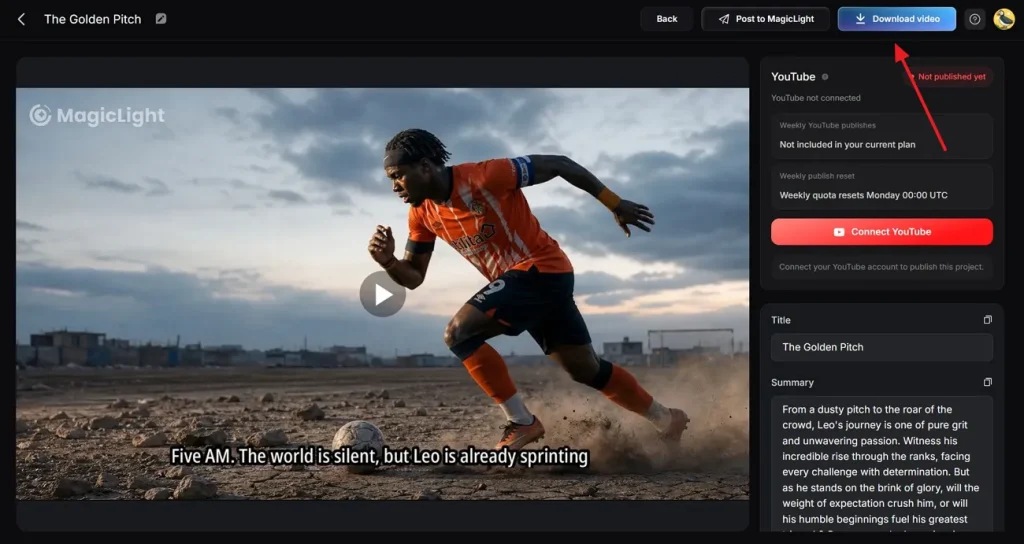
Step 8. Examine and Download the Generated Video
When the video creation comes to an end, preview it and press the Download Video button. Notably, you can even publish the video directly across social media via a dedicated button.
Conclusion
In the end, it's clear that with Runway World Cup prompts, you don't need to think much or spend hours editing. Just use a prompt from the suggested ones to quickly create FIFA football videos based on World Cup moments. For better video creation, opt for MagicLight AI to input up to a 12,000-word script and generate content with custom characters.
FAQs on Runway FIFA World Cup Prompts
1. How does Runway generate football videos from prompts?
Runway’s Gen‑3/Gen‑4 models turn text prompts into short video shots (5-10 seconds only). You describe the scene, and Runway synthesizes a single cinematic clip according to that description.
2. Can Runway create realistic football match scenes?
With Runway’s newer models, you can produce physics-aware scenes with smooth motion and consistent subjects. For more precision, it's better to use MagicLight AI, which allows you to build football characters and reuse them across scenes.
3. What types of World Cup content can Runway generate?
It's a strong choice for short, cinematic clips that can be part of World Cup content, such as stadium intros. In comparison, MagicLight AI covers more content formats in one place, including long-form story-to-video or explainer‑style tactical breakdowns.
4. Is Runway good for short-form football videos?
For general short-form videos, Runway models serve the right purpose. With well-written Runway World Cup prompts or theme templates, you can generate short episodes of 30-90 seconds easily. In fact, you’re offered built-in subtitles and 40 background music options for the videos.
5. Why do creators use MagicLight AI for football storytelling?
Creators choose MagicLight AI when they care about narrative depth, consistent characters, and full episodes rather than just standalone shots. They get long-form generations (up to 50 minutes), multilingual voiceovers with cloning, and storyboard controls.