世界盃總有讓人上頭的瞬間,但想出新的影片點子並不輕鬆。你還需要一條清楚的路徑,知道怎麼做 AI 影片。Luma 世界盃提示詞就是為此準備的:按步驟寫清場景,少走彎路。Luma AI 不用你空想幾個小時,這些提示詞已經把球員情緒、球場慶祝這類現成概念寫好了。
想更快做出內容,接著往下看,隨便挑一條提示詞去做 FIFA 影片。
第 1 部分. 給 AI 影片創作者的 15 條 Luma 世界盃提示詞
這 15 條 Luma 世界盃提示詞涵蓋心碎落敗、慢動作進球、球迷狂歡,還有更多:
比賽精華向:好用的 Luma 世界盃提示詞
提示詞 1:把下面這段英文提示詞原樣貼上: “Show a wide stadium view during a FIFA World Cup match kickoff, cheering crowd, players ready, dramatic lights, cinematic camera zoom in, realistic football atmosphere.”
提示詞 2:把下面這段英文提示詞原樣貼上: “Generate a video for a football player scoring the first goal in a World Cup match, slow-motion celebration, teammates running, crowd cheering loudly, flags waving, cinematic close-up shots.”
提示詞 3:把下面這段英文提示詞原樣貼上: “Make a video of a last-minute World Cup goal, dramatic stadium silence, then explosion of cheers, player scoring winning goal, teammates celebrating wildly, cinematic lighting.”
提示詞 4:把下面這段英文提示詞原樣貼上: “Goalkeeper making incredible diving save in World Cup match, slow motion action, grass flying, crowd shocked, zoom effect.”
提示詞 5:把下面這段英文提示詞原樣貼上: “A moment of clip when the whole football team is celebrating after a winning goal, hugging, jumping, waving national flags, stadium full of cheering fans, bright lights, emotional moment.”
球隊和賽事向:Luma 世界盃提示詞
提示詞 1:把下面這段英文提示詞原樣貼上: “Football team standing in line during national anthem, emotional faces, flag waving behind them, crowd silent, cinematic close-up and wide shots.”
提示詞 2:把下面這段英文提示詞原樣貼上: “Create a video for FIFA World Cup opening ceremony, fireworks in stadium sky, teams entering field, crowd cheering, colorful lights, big cinematic event.”
提示詞 3:把下面這段英文提示詞原樣貼上: “Show two strong national teams facing each other in a World Cup match, intense gameplay, aggressive tackles, dramatic camera angles, stadium tension.”
提示詞 4:把下面這段英文提示詞原樣貼上: “Visualize team lifting the World Cup trophy, fireworks, confetti falling, emotional celebration, players crying and hugging, cinematic close-up.”
提示詞 5:把下面這段英文提示詞原樣貼上: “Winning team celebrating on field after tournament victory, dancing, waving flags, joyful crowd, bright stadium lights, cinematic ending scene.”
社群 Reels 和 Shorts 向:Luma 世界盃提示詞
提示詞 1:把下面這段英文提示詞原樣貼上: “Quick FIFA World Cup goal moment, player shooting and scoring, fast cuts, slow motion finish, crowd cheering, energetic atmosphere.”
提示詞 2:把下面這段英文提示詞原樣貼上: “Show a famous FIFA player scoring a goal and running to celebrate, teammates jumping, fans cheering, confetti effect, slow motion celebration, social media reel style.”
提示詞 3:把下面這段英文提示詞原樣貼上: “Make an intense video of the final seconds of the match, player scoring winning goal, crowd explosion, players running in joy, dramatic slow motion, viral short video style.”
提示詞 4:把下面這段英文提示詞原樣貼上: “Stadium crowd reacting to big goal, fans screaming, waving flags, emotional faces, fast cuts, energetic World Cup atmosphere.”
提示詞 5:把下面這段英文提示詞原樣貼上: “Close-up of star player during World Cup match, intense focus, running with ball, shooting goal, cinematic lighting, short highlight format video.”
第 2 部分. 做世界盃敘事影片,還有更好的選擇
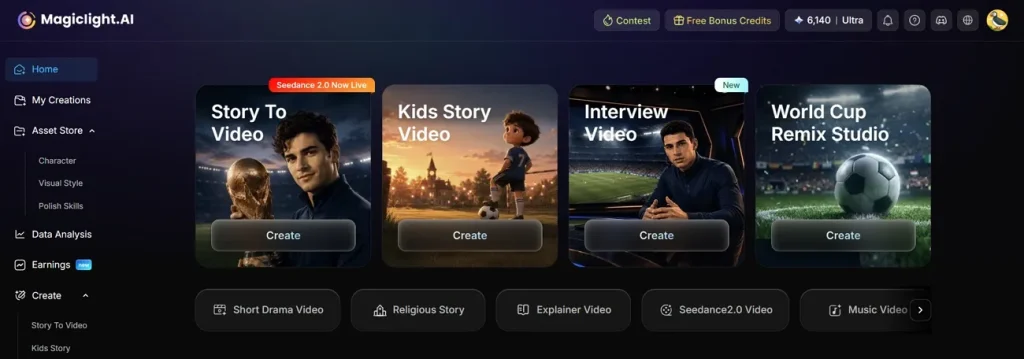
如果 Luma 的成片不滿意,可以換到 MagicLight AI,它對 Luma 世界盃提示詞更吃得開。Story-to-Video 能把你的世界盃故事做成完整動畫影片,球隊和球員都能自訂。你可以塞進最長約 12,000 詞的 FIFA 世界盃腳本,做長影片生成。成片最長可到 50 分鐘,夠講完一場比賽故事。
更方便的是,工具會按腳本自動出 storyboard,把故事拆成球員通道、進球這類場景。你還能改這些場景提示詞,重新生成關鍵鏡頭。Nano 控件可以調服裝、表情和姿勢,有 50 種選項。每個鏡頭都是微步驟拼起來的,運鏡和時序也能做成足球重播那種感覺。
核心功能
- 動畫和運動選項:平台提供 16 種動畫模型,方便選到貼合故事的運動風格。
- 音訊、字幕和解說:37 種配音加 40 首背景音樂,可以做成解說風旁白。
- 成片畫質和格式:可選畫幅,並按需要匯出 720p 或 1080p。
- 自訂球隊或球員角色:建立或選擇角色,設定名字、年齡和類型,對應特定球員或教練。
- 足球內容的視覺風格:多種風格模型可選,比如 3D cartoon 或 anime,做出你要的世界盃氣質。
教學:做出專業的 FIFA 世界盃影片
想做專業的 FIFA 世界盃影片,按下面示範走,幾分鐘就能出片:
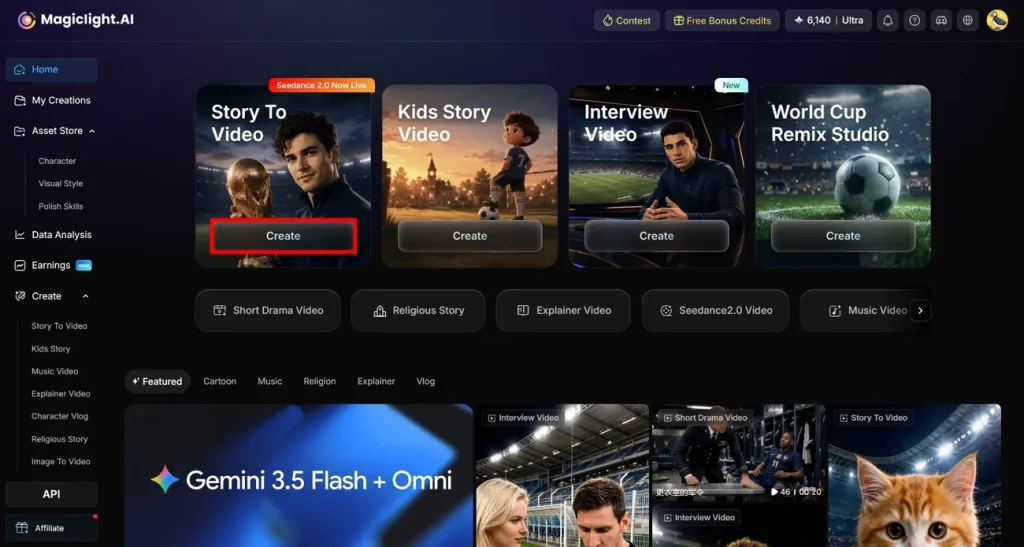
步驟 1. 選擇 Story-to-Video 功能
先打開 MagicLight AI,再點 Create,進入 Story-to-Video。
步驟 2. 貼上世界盃腳本並設定影片參數
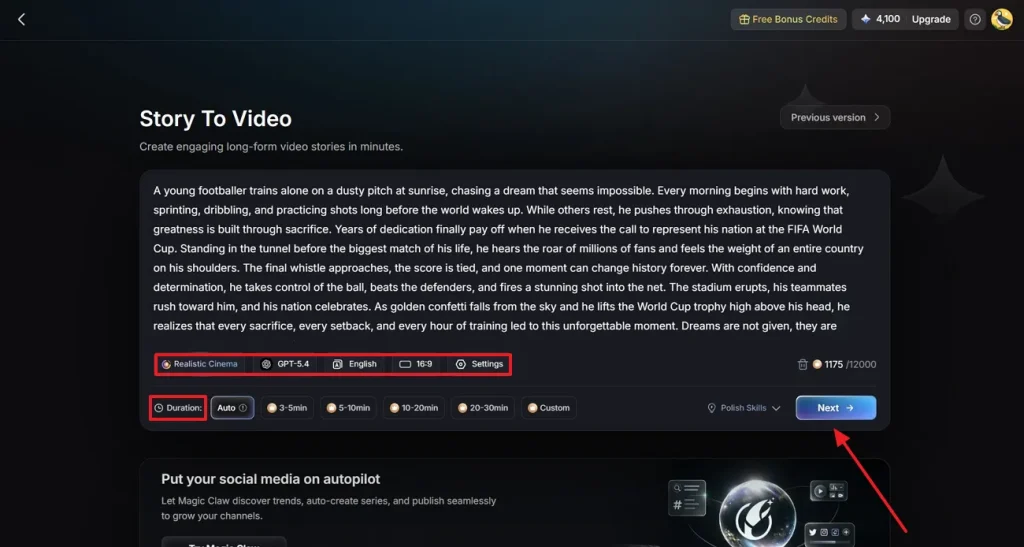
進去後,把複製好的 Luma 世界盃提示詞貼進輸入框,再設 Duration 等影片參數。繼續指定 Language 或 AI Model 這類 Settings,然後點 Next。
步驟 3. 閱讀影片 Synopsis
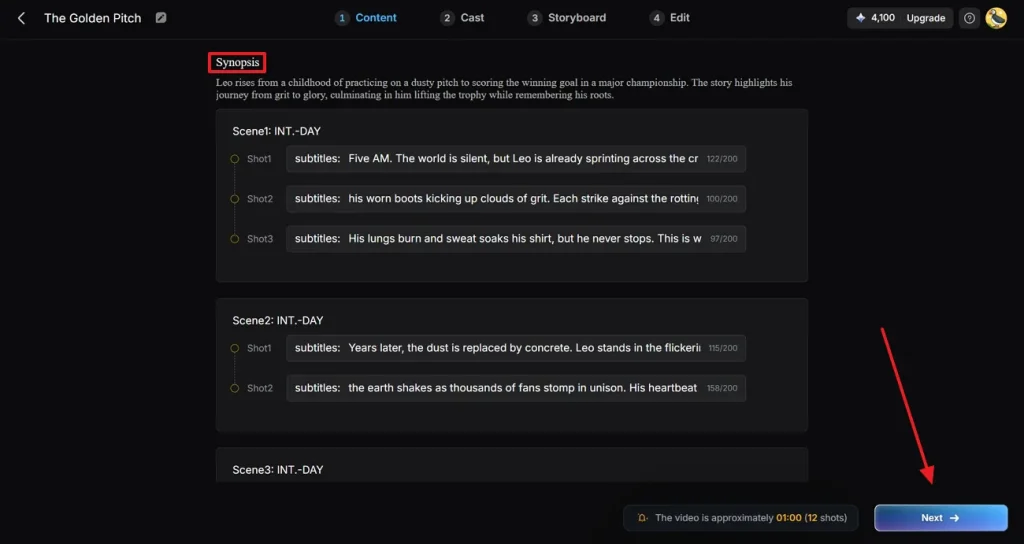
現在查看生成的 Synopsis,需要就改。接著點 Next,繼續做影片。
步驟 4. 為影片選合適角色
打開 Cast,點 More Character,從近期合集裡選一個合適的 FIFA 球員。如果角色已經生成過,打開 My Character 資料夾,選一個,再點 Confirm。
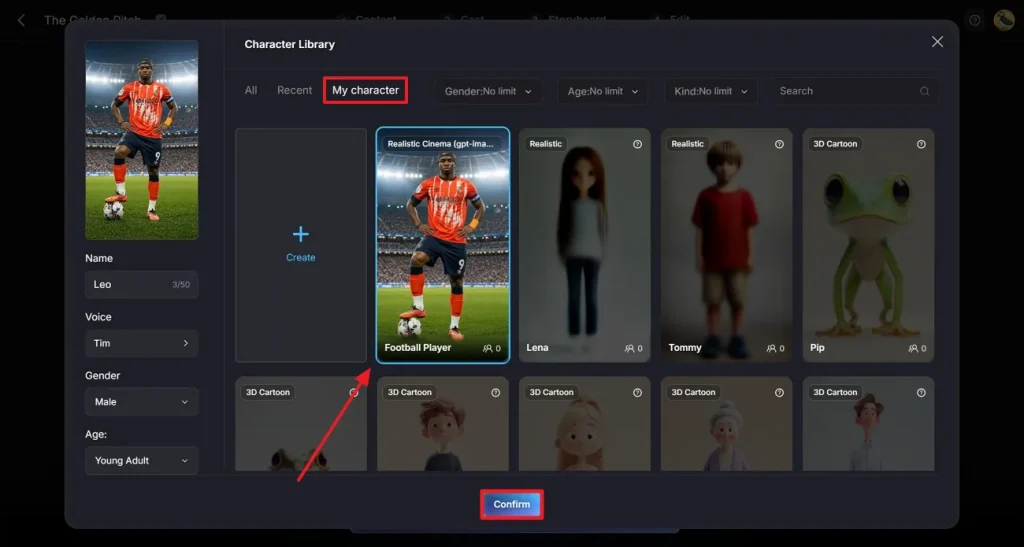
步驟 5. 完成 Cast 選擇
Cast 選完後,點 Next,進入下一步生成影片。
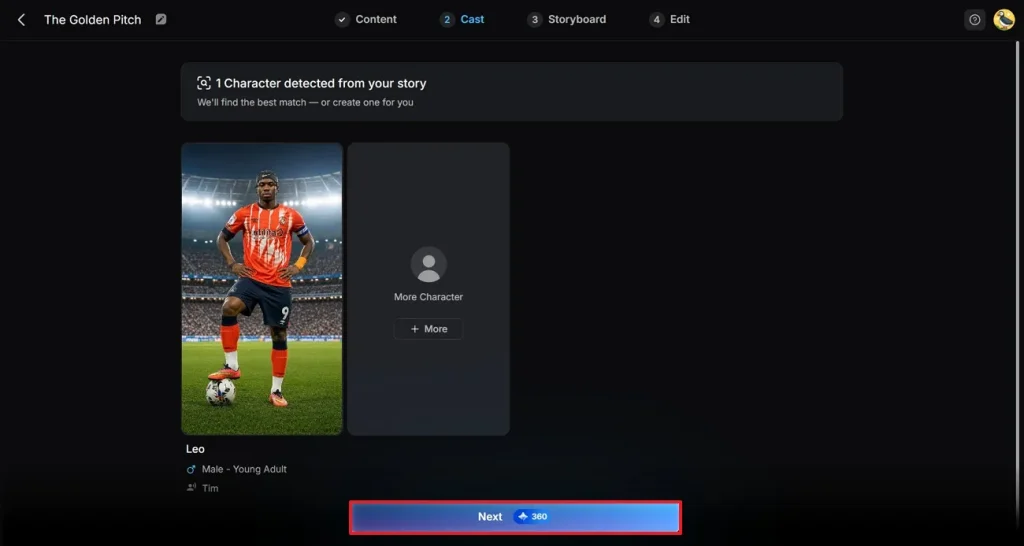
步驟 6. 調整影片故事
影片生成後,用浮動工具列改關鍵處。然後點右上角 Next,進入下一步。
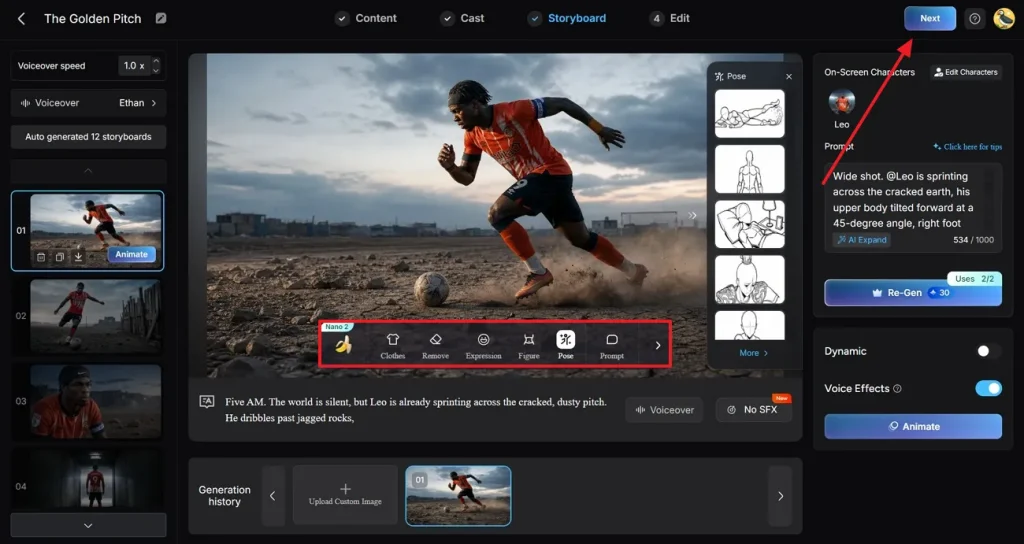
步驟 7. 給影片加字幕
最後一步,設定 Subtitle Settings,選字幕樣式。最後點 Generate,生成專業世界盃影片。
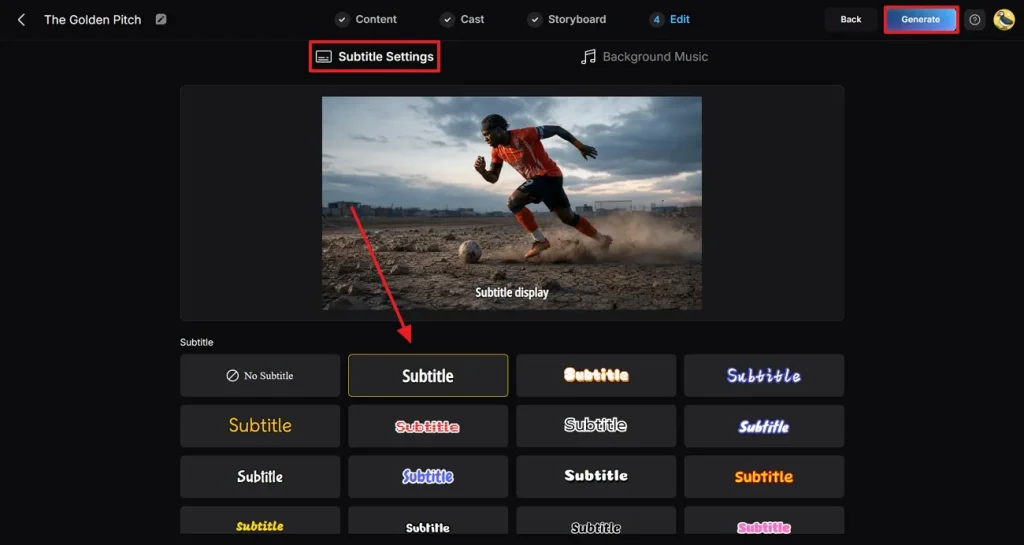
步驟 8. 預覽並儲存成片
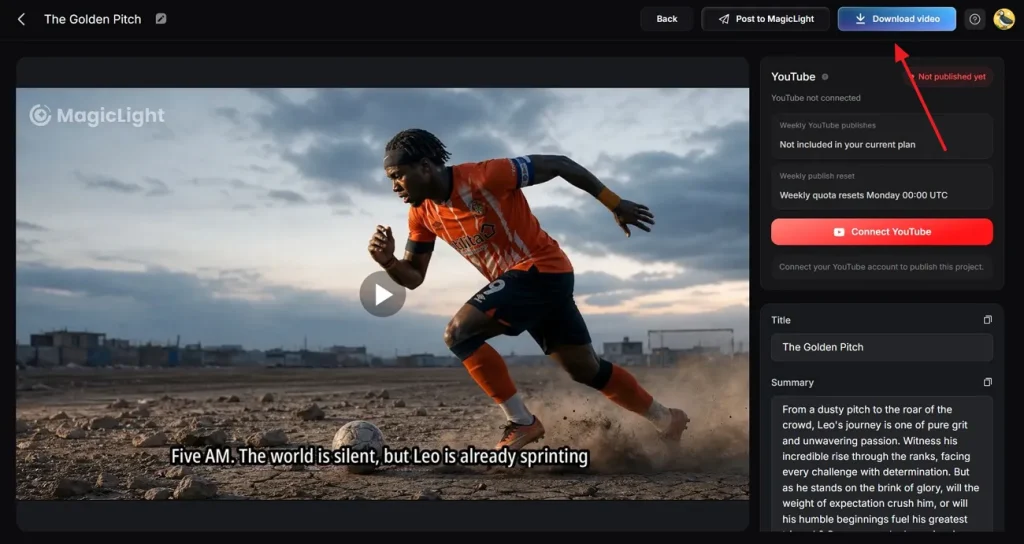
最後仔細預覽成片,再點 Download Video。也可以用合適設定,直接發到社群。
結語
總結一下,Luma 世界盃提示詞能把每個場景寫清楚,FIFA 影片更好做。新手也能用,因為不用花太多時間空想。想更順、更好看,用 MagicLight AI,靠風格模型和角色選擇做 FIFA 世界盃影片。
Luma 世界盃提示詞常見問題
1. Luma 怎麼用提示詞做足球影片?
Luma 會根據你的文字提示詞,猜測場景和動作,做成短足球片段。腳本寫得完整,模型就能理解 3D 空間或運動,並自動渲染幾秒影片。
2. Luma 能生成逼真的足球比賽場景嗎?
Luma 能做出自然的短片段,但每條提示詞通常只是一個單場景。相比之下,MagicLight AI 的 Story to Video 提供多種寫實、電影感模型,能把整場比賽故事做成角色更穩定的成片。
3. 怎麼提高 Luma AI 影片品質?
提高 Luma 影片,通常要把提示詞寫得更清楚,補上運鏡細節,並多試幾次生成。用 MagicLight AI 還能靠 storyboard 預覽和 Nano 控件改小細節。
4. Luma 能做哪些世界盃內容?
實際使用裡,Luma 世界盃提示詞適合精華風短片、進球瞬間或情緒鏡頭。而 MagicLight AI 的 Story to Video 能吃下約 12,000 詞的描述腳本,影片最長約 50 分鐘。
5. Luma 適合做社群足球影片嗎?
適合。Luma 做短足球片段很方便,夠在社群上抓住注意力。想更省事,用 MagicLight AI 調畫幅、解析度和背景音樂,印象會更久。