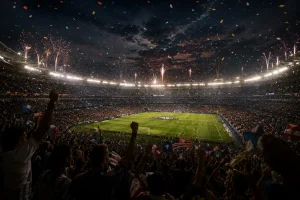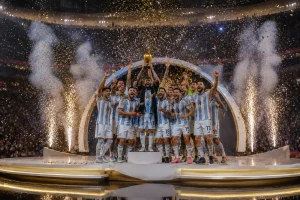
The FIFA World Cup creates many exciting moments, but coming up with fresh video ideas isn’t a piece of cake. You also need a clear guidance on how to make an AI video. To cater to such needs, Luma World Cup prompts offer clear, stepwise guidance for content creation without confusion. Luma AI doesn’t require hours of thinking because these prompts already give you ready-to-use concepts about player emotions or stadium celebrations.
To grow faster as a creator, keep reading the article and use any of the discussed prompts for FIFA video generation.
Part 1. 15 Luma FIFA World Cup Prompts for AI Video Creators
These 15 Luma FIFA World Cup prompts cover heartbreaking losses, slow-motion goals, fan celebrations, and much more:
Best Luma World Cup Prompts for Match Highlight Videos
Prompt 1: “Show a wide stadium view during a FIFA World Cup match kickoff, cheering crowd, players ready, dramatic lights, cinematic camera zoom in, realistic football atmosphere.”
Prompt 2: “Generate a video for a football player scoring the first goal in a World Cup match, slow-motion celebration, teammates running, crowd cheering loudly, flags waving, cinematic close-up shots.”
Prompt 3: “Make a video of a last-minute World Cup goal, dramatic stadium silence, then explosion of cheers, player scoring winning goal, teammates celebrating wildly, cinematic lighting.”
Prompt 4: “Goalkeeper making incredible diving save in World Cup match, slow motion action, grass flying, crowd shocked, zoom effect.”
Prompt 5: “A moment of clip when the whole football team is celebrating after a winning goal, hugging, jumping, waving national flags, stadium full of cheering fans, bright lights, emotional moment.”
Luma World Cup Prompts for Team and Tournament Videos
Prompt 1: “Football team standing in line during national anthem, emotional faces, flag waving behind them, crowd silent, cinematic close-up and wide shots.”
Prompt 2: “Create a video for FIFA World Cup opening ceremony, fireworks in stadium sky, teams entering field, crowd cheering, colorful lights, big cinematic event.”
Prompt 3: “Show two strong national teams facing each other in a World Cup match, intense gameplay, aggressive tackles, dramatic camera angles, stadium tension.”
Prompt 4: “Visualize team lifting the World Cup trophy, fireworks, confetti falling, emotional celebration, players crying and hugging, cinematic close-up.”
Prompt 5: “Winning team celebrating on field after tournament victory, dancing, waving flags, joyful crowd, bright stadium lights, cinematic ending scene.”
Luma World Cup Prompts for Social Media Reels and Shorts
Prompt 1: “Quick FIFA World Cup goal moment, player shooting and scoring, fast cuts, slow motion finish, crowd cheering, energetic atmosphere.”
Prompt 2: “Show a famous FIFA player scoring a goal and running to celebrate, teammates jumping, fans cheering, confetti effect, slow motion celebration, social media reel style.”
Prompt 3: “Make an intense video of the final seconds of the match, player scoring winning goal, crowd explosion, players running in joy, dramatic slow motion, viral short video style.”
Prompt 4: “Stadium crowd reacting to big goal, fans screaming, waving flags, emotional faces, fast cuts, energetic World Cup atmosphere.”
Prompt 5: “Close-up of star player during World Cup match, intense focus, running with ball, shooting goal, cinematic lighting, short highlight format video.”
Part 2. Better Option for World Cup Storytelling Videos
If you aren’t satisfied with Luma generations, switch to MagicLight AI because it can handle Luma World Cup prompts better. Its Story-to-Video feature can easily turn your World Cup stories into complete animated videos with custom teams or players. You can insert a complete FIFA World Cup script of up to 12,000 words for long-video generation. The video can be 50 minutes long, sufficient for a complete match storytelling.
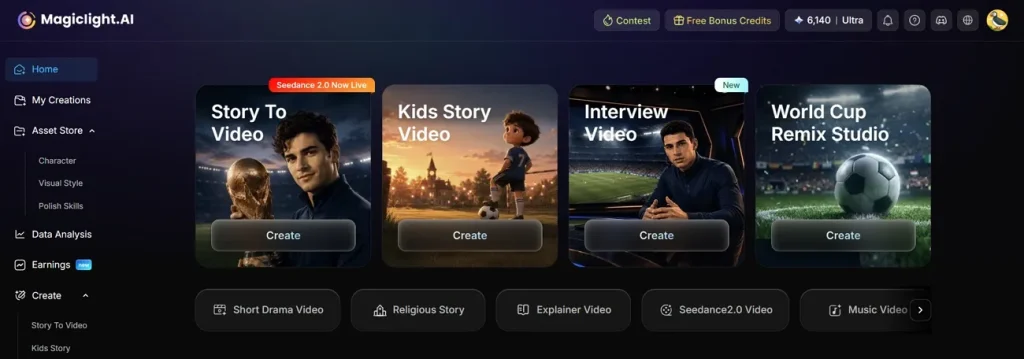
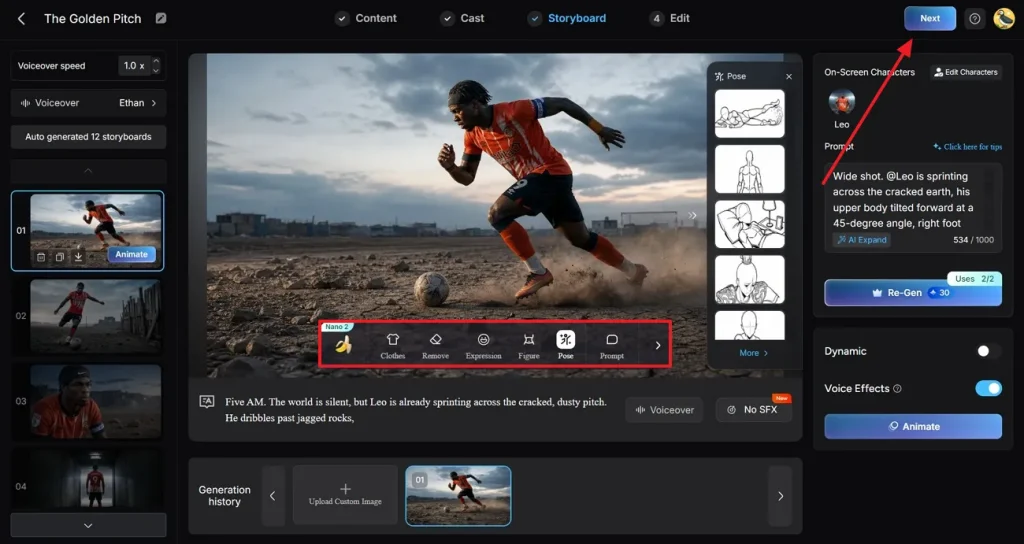
Notably, the tool auto-generates a storyboard from your script, breaking story into scenes like tunnel walk-outs or goals. Impressively, you can easily edit those scene prompts and regenerate them to modify the key moments. Nano controls further lets you adjust clothing, expressions, and poses with 50 options to choose from. As each shot is built from micro-steps, you can shape camera moves and timings to match football replays.
Key Features
- Animation and Motion Options: The platform offers 16 animation models to achieve the motion style that fits your story.
- Audio, Subtitles, and Commentary: You can pick from 37 voiceovers plus 40 background music options to create commentary-style narration.
- Output Quality and Formats: It enables creators to choose the aspect ratio and export at 720p or 1080p, depending on the requirement.
- Custom Team or Player Characters: Create or select characters and set their names, age, and type to represent specific players or coaches.
- Visual Styles for Football Content: Choose from multiple style models, such as 3D cartoon or anime to create the World Cup mood you want.
Tutorial to Generate a Professional FIFA World Cup Video
For a professional FIFA World Cup video, follow the guidelines demonstrated below and generate content in minutes:
Step 1. Choose the Story-to-Video Feature
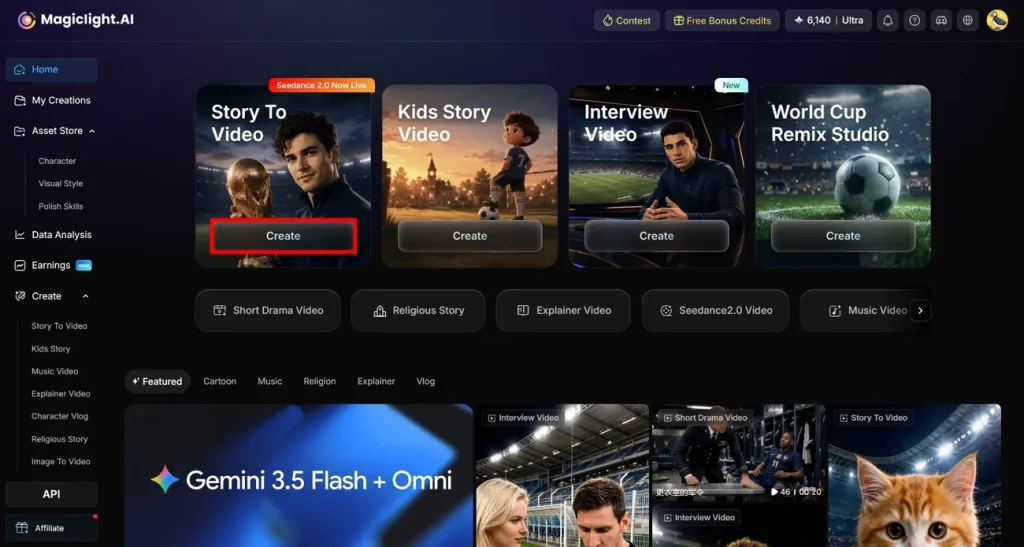
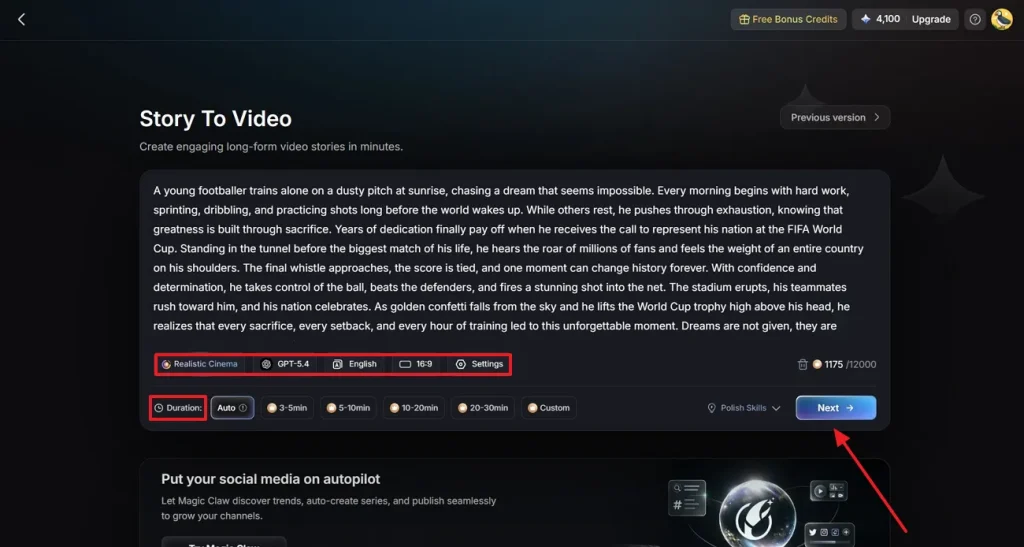
Visit MagicLight AI first, then click the Create button to access the Story-to-Video feature.
Step 2. Paste the World Cup Script and Choose Video Details
Once accessed, paste your copied Luma World Cup prompt into the provided space and set additional video details, such as Duration. Proceed, and specify further Settings like Language or AI Model, thenclick Next.
Step 3. Read the Video Synopsis
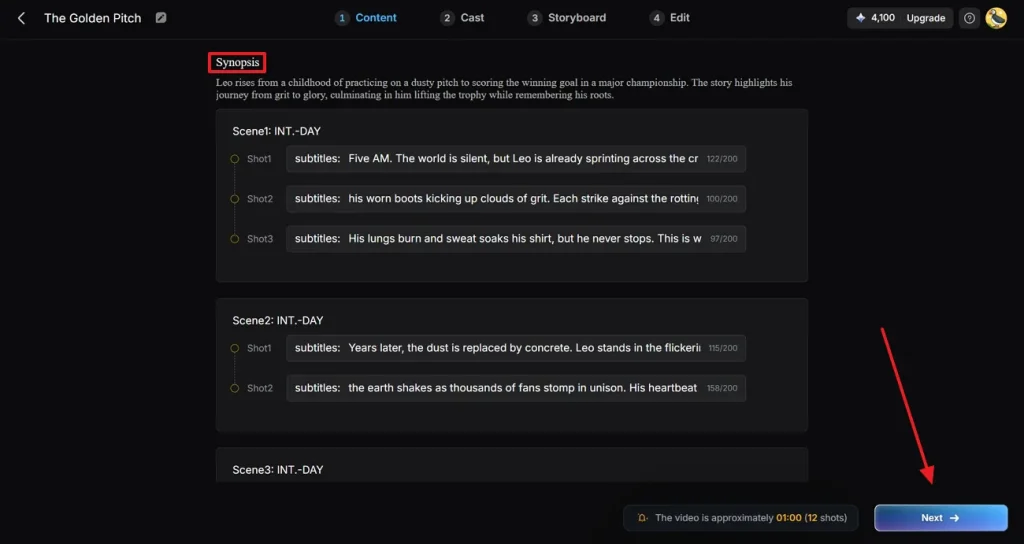
Now, review the generated Synopsis and modify it if any changes are needed. Moving forward, simply press the Next button and proceed with the video creation process.
Step 4. Select a Relevant Character for the Video
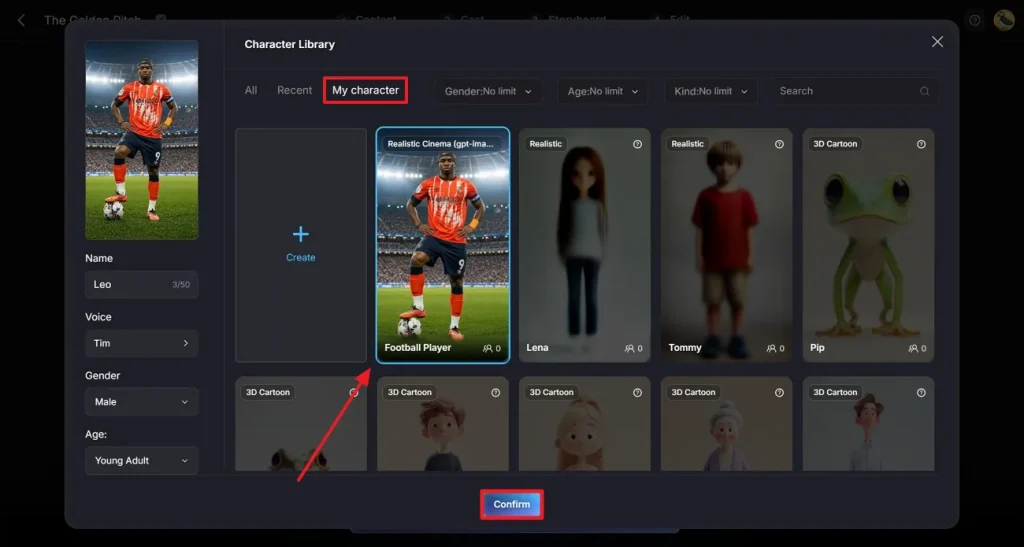
Access the Cast tab, click More Character, and select an appropriate FIFA player from the recent collection. For an already generated character, open the My Character folder, choose one, and press the Confirm button.
Step 5. Perform Cast Selection Step
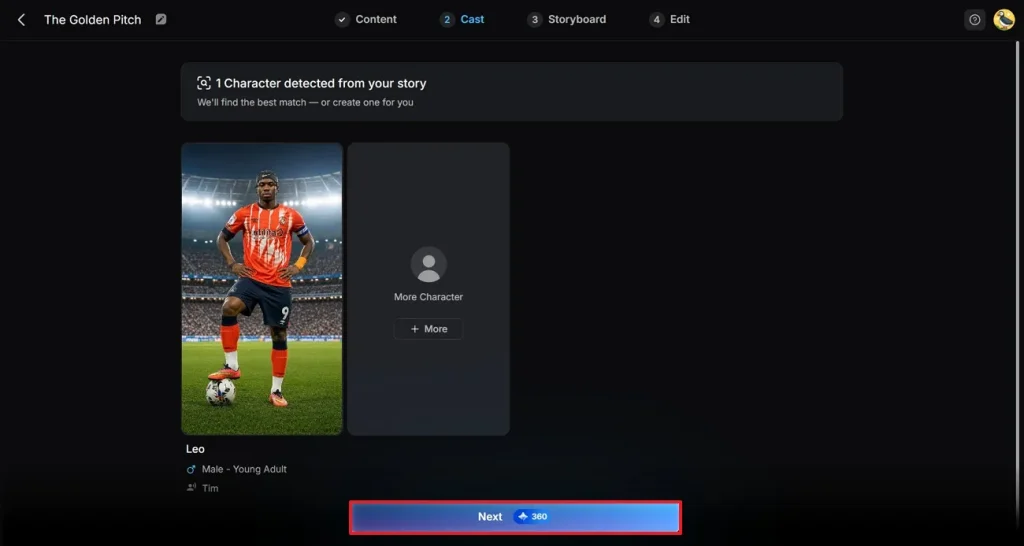
When the cast selection is complete, press the Next button to proceed to the next step for video generation.
Step 6. Adjust the Video Story
Soon after the video is created, navigate to the floating toolbar and perform any important changes. Later on, click the Next button in the top right corner and enter a new step.
Step 7. Add Subtitles to Your Video
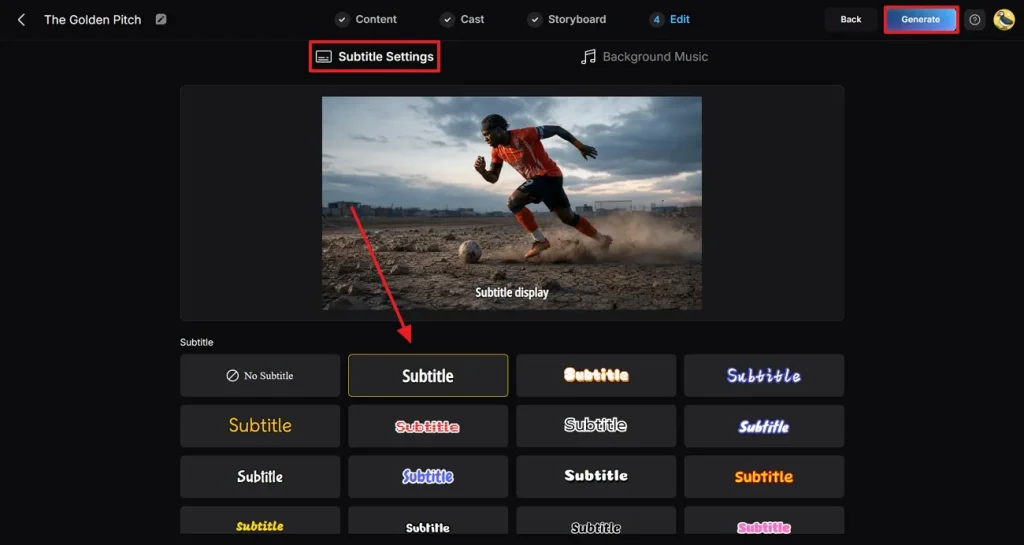
Coming to the last step, add your Subtitle Settings and select the subtitle style for your video. In the end, press the Generate button to generate a professional World Cup video.
Step 8. Review and Save the Generated Content
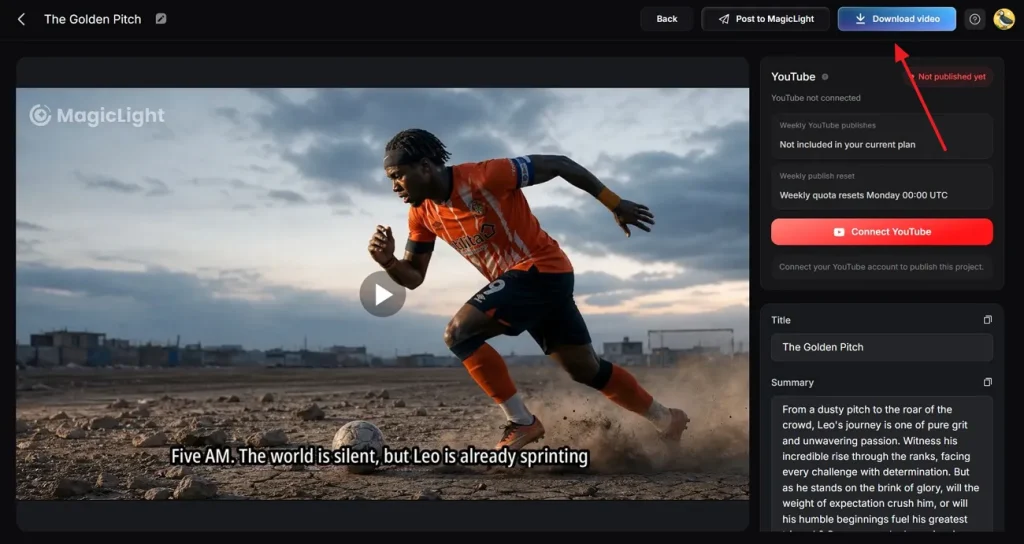
Finally, preview the generated content thoroughly and click the Download Video button. Alternatively, you can publish the video directly on social media with the appropriate settings.
Conclusion
In conclusion, Luma World Cup prompts offer an easy way to generate FIFA videos with a proper description of every scene. Even beginners can use them to create simple yet noteworthy football content because they don’t require much effort or time to think. For a smoother, better video-making experience, consider MagicLight AI to generate FIFA World Cup videos with proper style models and character selection.
FAQs on Luma FIFA World Cup Prompts
1. How does Luma create football videos from prompts?
Luma turns your text prompts into short football clips by guessing the scenes and actions from your description. With a complete descriptive script, the model understands 3D space, or motion, and automatically renders a few-second video.
2. Can Luma generate realistic football match scenes?
Even though Luma can create natural clips, each prompt is usually a short, single scene. On the other hand, MagicLight AI Story to Video gives you multiple realistic, cinematic models to build full-match stories with consistent players.
3. How do I improve the quality of Luma AI videos?
To improve Luma videos, you normally write clearer prompts, add camera details, and try different generations. With MagicLight AI, you can go further using its storyboard preview and Nano controls to address minor details.
4. What types of World Cup content can Luma generate?
Practically, the Luma World Cup prompts can create highlight-style clips, short goal moments, or quick mood shots. Whereas MagicLight AI Story to Video can handle a descriptive script of 12,000 words and video length up to 50 minutes.
5. Is Luma suitable for social media football videos?
Indeed, Luma is convenient for short football clips that are enough to gain attention on social media. For more convenience, use MagicLight AI to adjust aspect ratios, resolutions, and background music for lasting impressions.