많은 사람이 벌써 다가올 월드컵 이야기를 하고 있어요. 관심이 커질수록 월드컵 게시물과 영상은 그 대화에 끼어들기 좋은 방법이 돼요. 축구 테마 콘텐츠도 예전보다 훨씬 만들기 쉬워졌어요.
똑똑한 AI 도구 덕분에 누구나 눈길을 끄는 축구 비주얼, 영상, 스토리를 만들어 전 세계 시청자와 나눌 수 있어요. 경기의 글로벌한 분위기를 살리려고, 이 글에서는 매번 멋진 이미지를 뽑기 좋은 월드컵 AI 프롬프트를 소개해요.
1부. FIFA 월드컵 미디어·인터뷰 프롬프트
FIFA 월드컵 미디어와 인터뷰 프롬프트로 사실적인 축구 중계 이미지를 만드는 건 어렵지 않아요. 이 프롬프트는 경기장과 선수 리액션처럼 아주 사실적인 장면을 보여 줘요. 아래는 월드컵 테마 이미지를 만들 때 쓸 수 있는 예시 프롬프트예요.
1. 축구 해설 프롬프트
- 아래 영어 프롬프트를 그대로 붙여넣으세요: “Cinematic FIFA World Cup final moment with commentator booth overlooking glowing stadium. There is a last-minute goal, loud crowd, dramatic lighting, ultra-detailed broadcast scene.”
- 아래 영어 프롬프트를 그대로 붙여넣으세요: “High-energy penalty shootout scene with intense commentator narration, packed stadium under floodlights, emotional players, crowd tension, cinematic sports broadcast realism”
- 아래 영어 프롬프트를 그대로 붙여넣으세요: “Counterattack World Cup moment with commentator getting excited and players sprinting under stadium lights. Include motion blur, happy fans, dynamic angles, ultra-realistic sports scene.”
- 아래 영어 프롬프트를 그대로 붙여넣으세요: “FIFA World Cup opening ceremony kickoff with commentator voiceover and vibrant stadium lights. Show waving flags, a large crowd, cinematic wide-angle broadcast shot.”
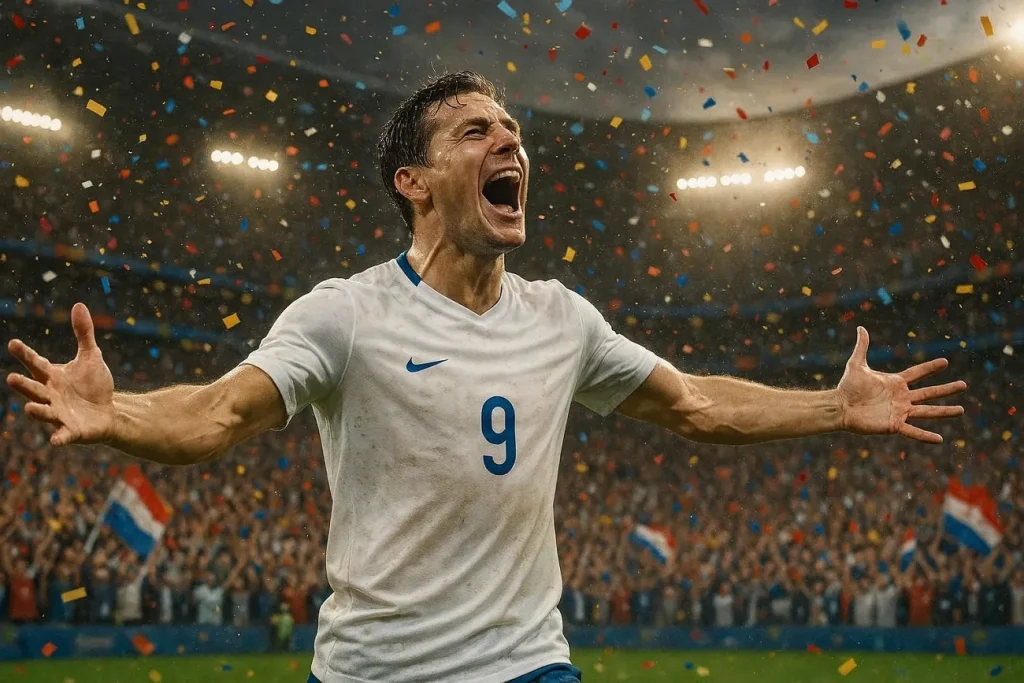
- 아래 영어 프롬프트를 그대로 붙여넣으세요: “Iconic World Cup hat-trick moment with footballer, commentator in awe, confetti explosion, cheering fans, sharp lighting, sports broadcast style.”
2. 스포츠 분석가 프롬프트
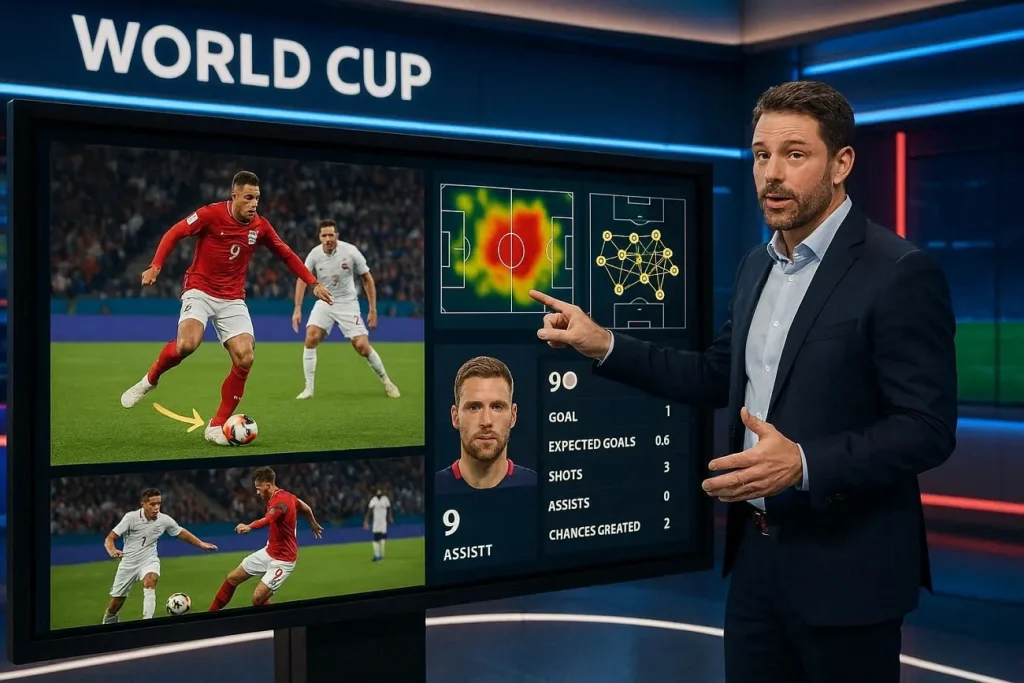
- 아래 영어 프롬프트를 그대로 붙여넣으세요: “FIFA World Cup studio analysis scene with experts discussing tactics. Sleek broadcast set, dramatic lighting, ultra-realistic sports studio environment.”
- 아래 영어 프롬프트를 그대로 붙여넣으세요: “Post-match World Cup analysis with analyst breaking down key moments, holographic pitch visuals, intense focus, modern studio lighting, cinematic broadcast realism.”
- 아래 영어 프롬프트를 그대로 붙여넣으세요: “Tactical breakdown of World Cup clash with analyst pointing at dynamic formation graphics, glowing screens, professional studio atmosphere, ultra-detailed scene.”
- 아래 영어 프롬프트를 그대로 붙여넣으세요: “World Cup pre-match analysis with experts comparing teams, large digital displays, player stats visuals, dramatic lighting, high-end sports broadcast studio.”
- 아래 영어 프롬프트를 그대로 붙여넣으세요: “In-depth player performance review in World Cup studio, slow-motion highlights on screen, analyst explaining strategy, cinematic lighting, ultra-realistic setting.”
3. 사이드라인 리포터 프롬프트
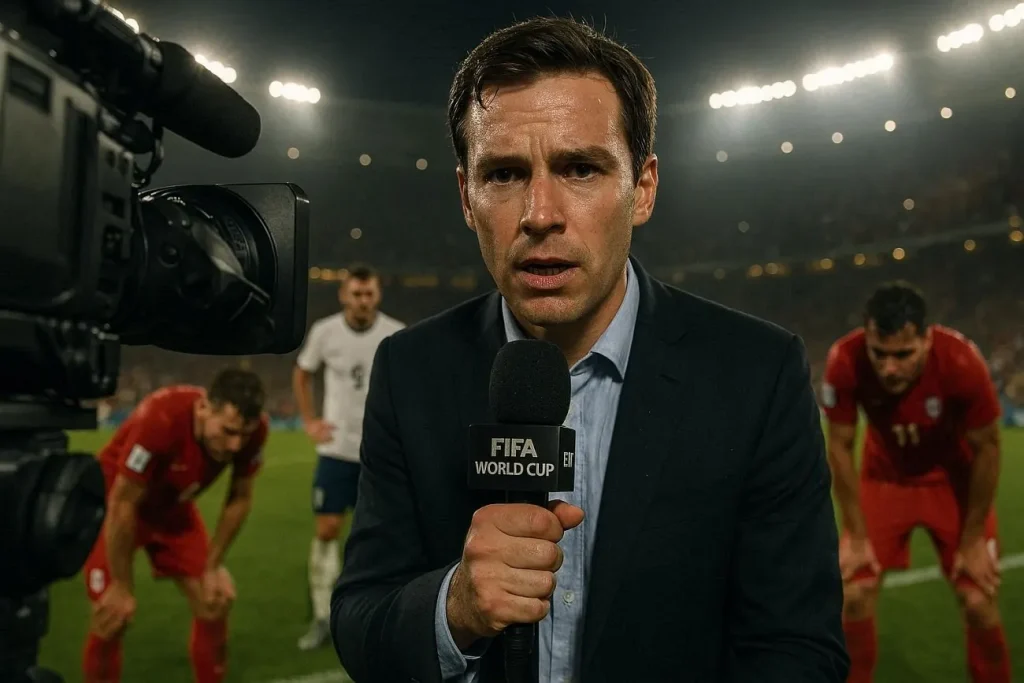
- 아래 영어 프롬프트를 그대로 붙여넣으세요: “Sideline reporter for FIFA World Cup holding microphone, blurred players in background, with stadium lights and cinematic broadcast realism.”
- 아래 영어 프롬프트를 그대로 붙여넣으세요: “Emotional post-match interview with player on World Cup field, sideline reporter capturing reactions, ultra-detailed scene.”
- 아래 영어 프롬프트를 그대로 붙여넣으세요: “Halftime sideline reporting during intense World Cup match. The reporter has headset and massive crowd is roaring behind him, vibrant stadium lights, cinematic sports coverage.”
- 아래 영어 프롬프트를 그대로 붙여넣으세요: “Injury update scene with sideline reporter near team bench and medical staff is assisting the player. Show off a tense atmosphere with worried expressions from players.”
- 아래 영어 프롬프트를 그대로 붙여넣으세요: “Extra-time World Cup tension with sideline reporter updating live, players exhausted in background, glowing stadium lights, dramatic mood, ultra-realistic scene.”
2부. FIFA 월드컵 포스터·아트워크 프롬프트
위 프롬프트와 달리, 이번 월드컵 AI 프롬프트는 시각적 창의성에 더 초점을 맞춰요. 매력적인 포스터, 크리에이티브 아트워크, 긴장감 높은 축구 장면을 만들 수 있어요. 대담하고 눈에 띄는 비주얼로 월드컵 순간을 살려 보세요. FIFA 포스터와 아트워크 프롬프트는 아래와 같아요:
1. 트로피 세리머니 아트워크
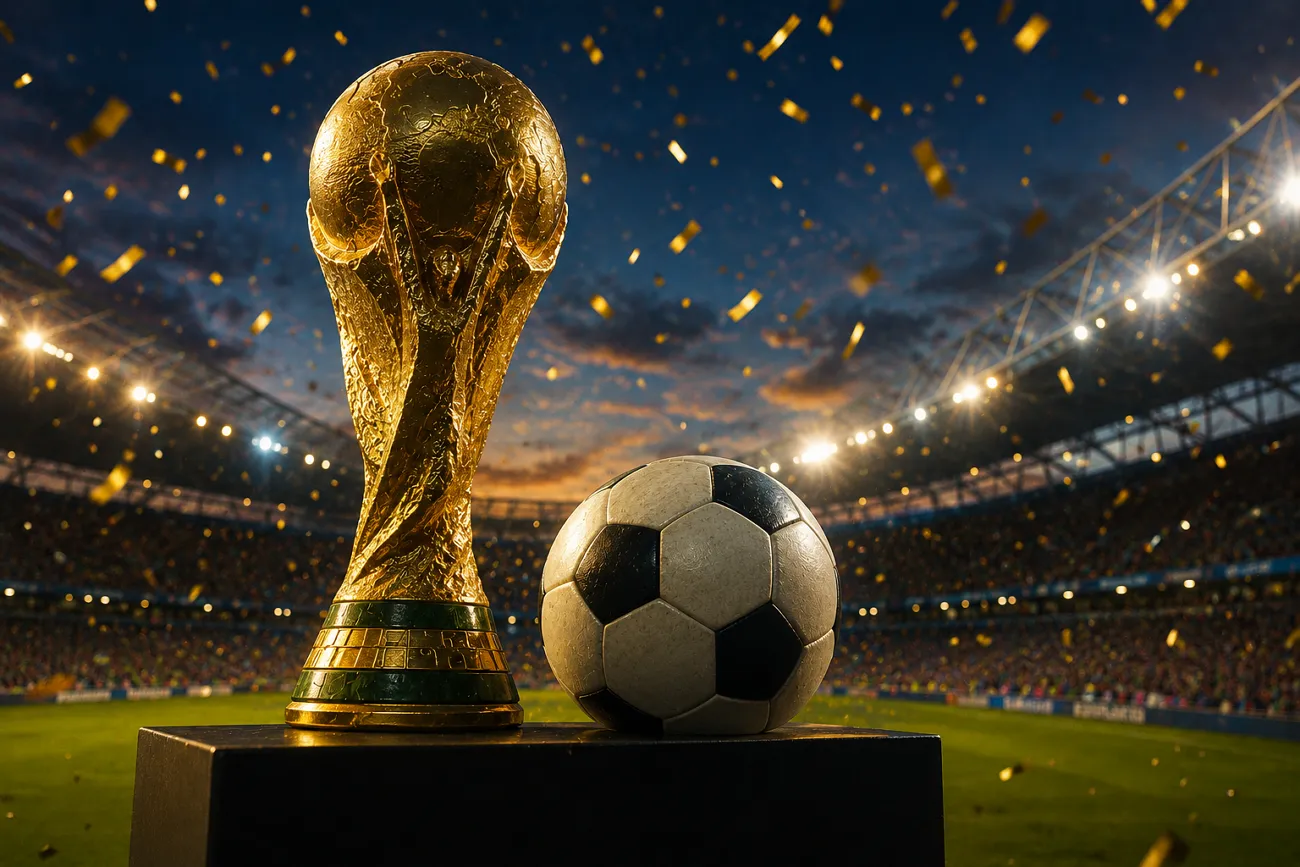
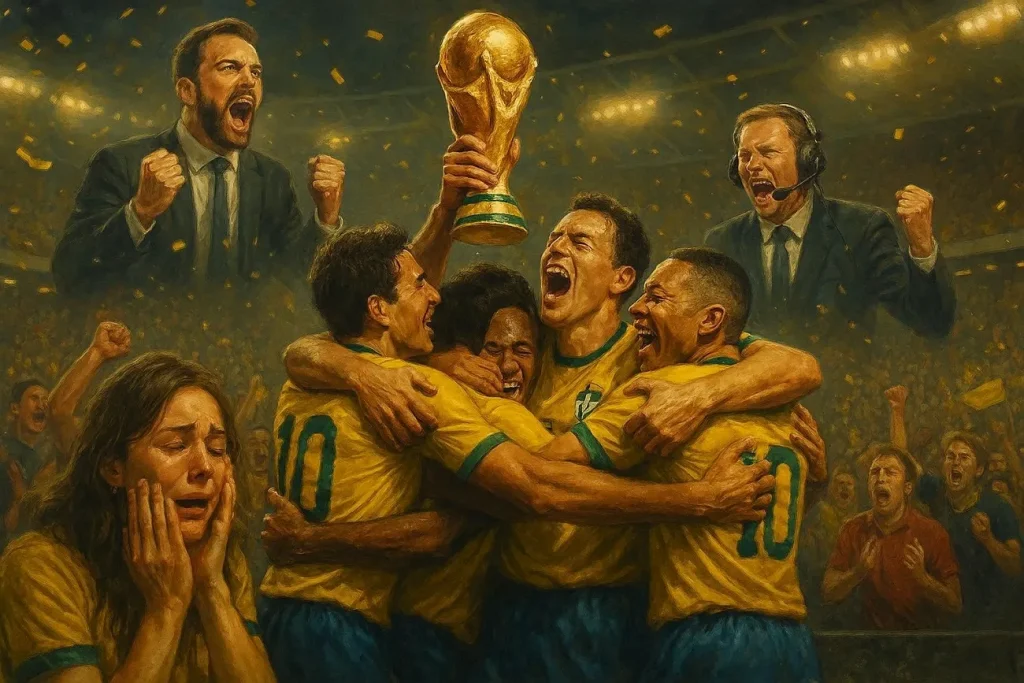
- 아래 영어 프롬프트를 그대로 붙여넣으세요: “Football team lifting World Cup with golden confetti and bright stadium lights. The image should portray cinematic realism and be detailed.”
- 아래 영어 프롬프트를 그대로 붙여넣으세요: “Champions celebrating with glowing World Cup trophy and a cheering crowd. Silver confetti rains over the players and the audience.”
- 아래 영어 프롬프트를 그대로 붙여넣으세요: “Fireworks in the background as team holds up trophy, emotional players, vibrant stadium, golden lighting, detailed artwork.”
- 아래 영어 프롬프트를 그대로 붙여넣으세요: “World Cup victory moment where players are hugging each other. Fans are crying and commentators celebrate, cinematic sports poster style.”
- 아래 영어 프롬프트를 그대로 붙여넣으세요: “Winning team celebrating with trophy center stage, glowing lights, roaring fans, dramatic atmosphere, ultra-detailed artwork.”
2. 매치데이 홍보 포스터
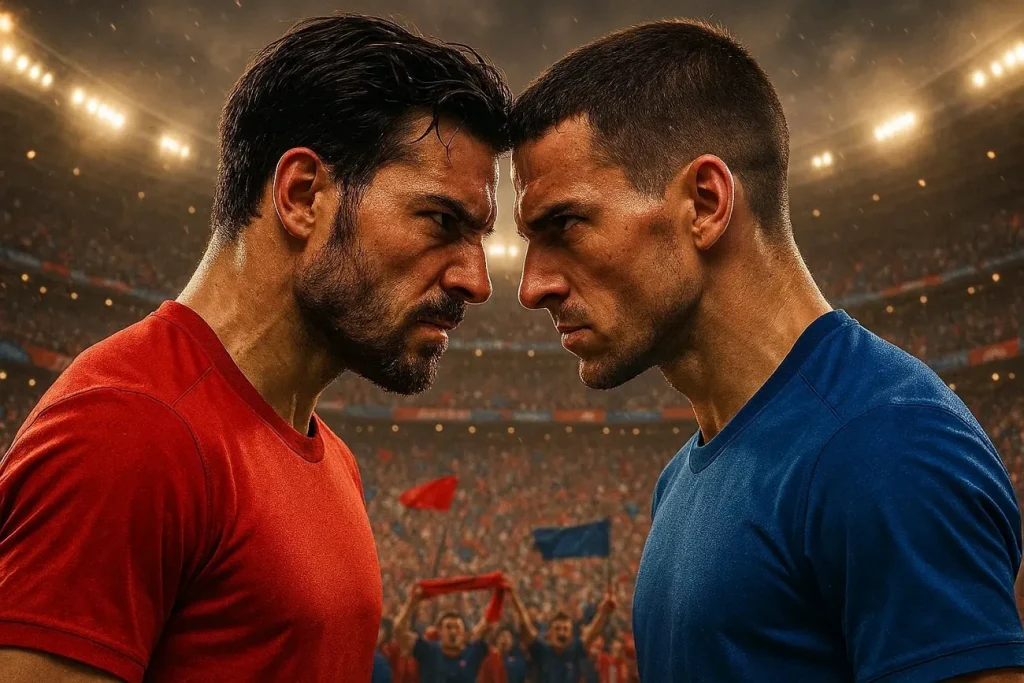
- 아래 영어 프롬프트를 그대로 붙여넣으세요: “Matchday poster with two teams facing off, bright lighting, stadium backdrop, cinematic sports design.”
- 아래 영어 프롬프트를 그대로 붙여넣으세요: “World Cup clash poster featuring rival teams, bold typography space, dynamic composition, ultra-detailed.”
- 아래 영어 프롬프트를 그대로 붙여넣으세요: “Football matchday poster with players in action poses, vibrant colors, football flying, golden lighting, modern sports design.”
- 아래 영어 프롬프트를 그대로 붙여넣으세요: “High-energy World Cup poster showing upcoming match, determined player expressions. There are glowing lights in the background with bold cinematic composition.”
- 아래 영어 프롬프트를 그대로 붙여넣으세요: “FIFA World Cup promotional poster with two popular players butting heads. The crowd energy is high with cinematic realism and a sleek design.”
3. 축구 레전드 헌정 포스터
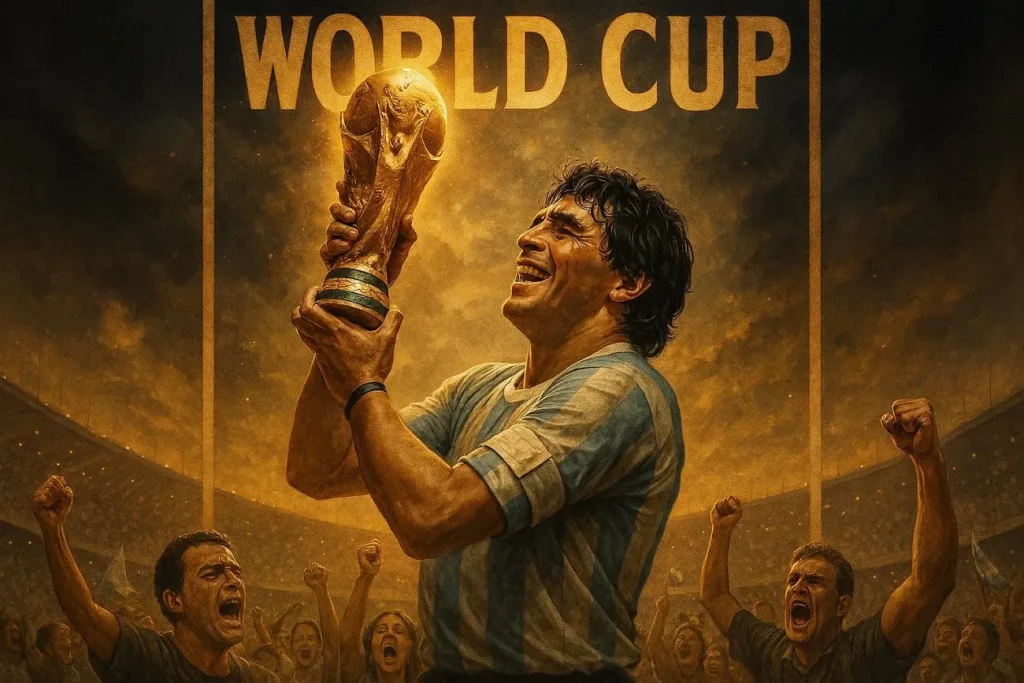
- 아래 영어 프롬프트를 그대로 붙여넣으세요: “Player tribute poster standing in a heroic pose with glowing stadium lights. Dramatic shadows, cinematic sports artwork, ultra-detailed.”
- 아래 영어 프롬프트를 그대로 붙여넣으세요: “World Cup legend portrait of a player with trophy in hand and an emotional expression. The image consists of dramatic lighting and has a realistic poster design.”
- 아래 영어 프롬프트를 그대로 붙여넣으세요: “Football legend tribute with hands above head pose and glowing effects. Show off a dramatic atmosphere, ultra-detailed cinematic artwork.”
- 아래 영어 프롬프트를 그대로 붙여넣으세요: “Stylized tribute poster of famous footballer with bold lighting. Ensure player has a heroic stance and a smile on his face.”
- 아래 영어 프롬프트를 그대로 붙여넣으세요: “World Cup legend artwork with iconic moment, glowing trophy, emotional crowd, dramatic lighting, ultra-realistic poster style.”
3부. MagicLight AI로 FIFA 월드컵 캐릭터를 살아 움직이게
월드컵 AI 프롬프트를 한 단계 끌어올리는 도구가 Magiclight AI예요. 디테일이 살아있는 캐릭터를 만들 수 있는 강력한 AI 아바타 생성기예요. 대부분의 AI 소프트웨어는 정지 이미지를 만들고 끝나요. Magiclight AI는 캐릭터에 목소리까지 입혀 주고, 37가지 보이스오버 옵션을 제공해요.
Gemini Omni, Veo 4, Seedance Pro 같은 영상 모델 19개를 제공해서 영상을 애니메이션으로 만들 수 있어요. 런타임 최대 50분짜리 긴 클립도 생성할 수 있어, 더 복잡하고 촘촘한 영상을 만들 수 있어요. 간단한 프롬프트가 역동적인 축구 내러티브와 몰입감 있는 장면으로 바뀌어요.
핵심 기능
- Stable Football Players: 여러 장면에서 캐릭터 특징을 일정하게 유지해, 스토리가 끊기지 않아요.
- Lifelike Lip Sync: 더 사람 같은 축구 선수 아바타를 위해 사실적인 립싱크와 voice cloning를 입혀 주세요.
- Multilingual Voices: 프랑스어와 한국어를 포함해 11개 언어를 지원해서, 전 세계 시청자에게 닿기 쉬워요.
- Define Characters with Prompts: 캐릭터 이름은 50자, 외형은 1000자 프롬프트로 바꿀 수 있어요.
- Stores Your Characters: 미리 만든 캐릭터를 저장하고 다시 써서, 이후 콘텐츠 작업에 바로 넣을 수 있어요.
Magiclight AI에서 축구 선수를 만드는 종합 가이드
캐릭터 만들기와 영상 애니메이션은 생각보다 쉬워요. Magiclight AI 워크플로는 안내 단계와 선택지로 이어져 있어요. 도구를 제대로 쓰려면 다음 섹션의 단계를 따라 주세요:
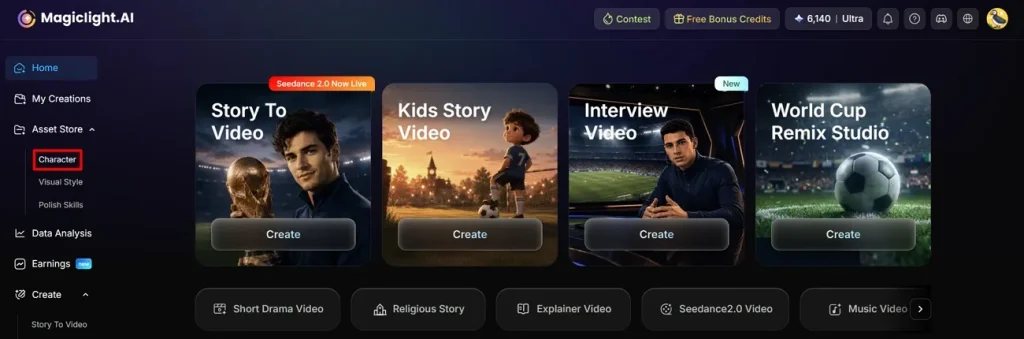
1단계. 캐릭터 생성 도구 선택하기
인터페이스 왼쪽 패널에서 Character 도구를 선택해 시작하세요.
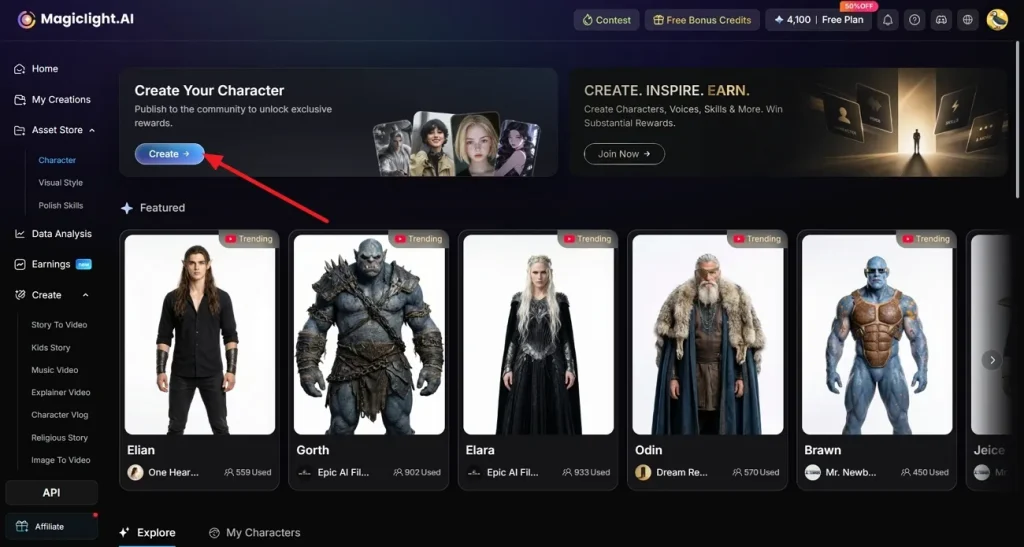
2단계. 캐릭터 생성을 이어가기
새 페이지가 열리면 Create 버튼을 눌러 캐릭터 생성을 진행하세요.
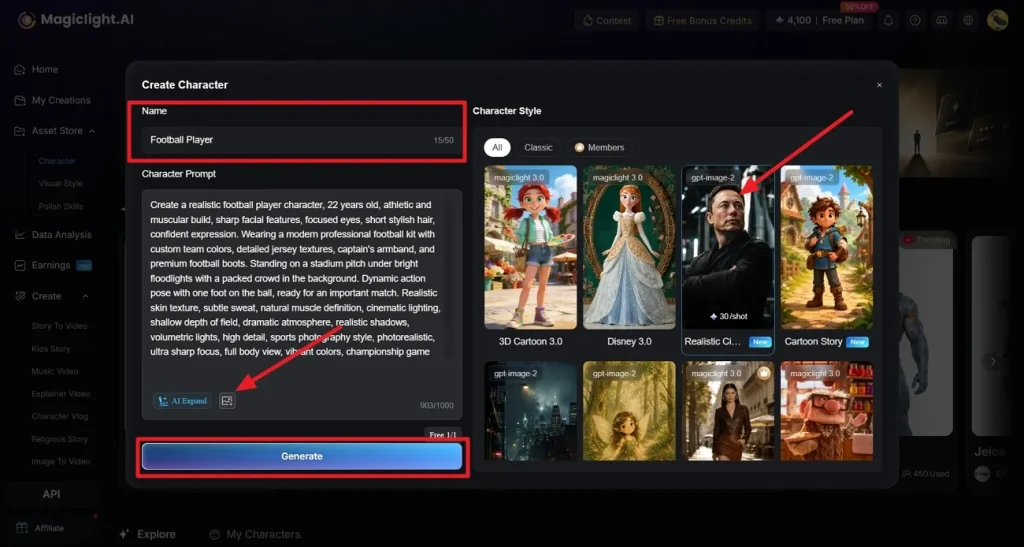
3단계. 캐릭터 맞춤 설정하기
선수에게 Name 을 주고, Character Prompt 칸에 외형을 적어 주세요. 원하면 Upload 로 참조 이미지를 가져올 수 있어요. Character Style에서 룩을 고른 뒤 Generate를 누르세요.
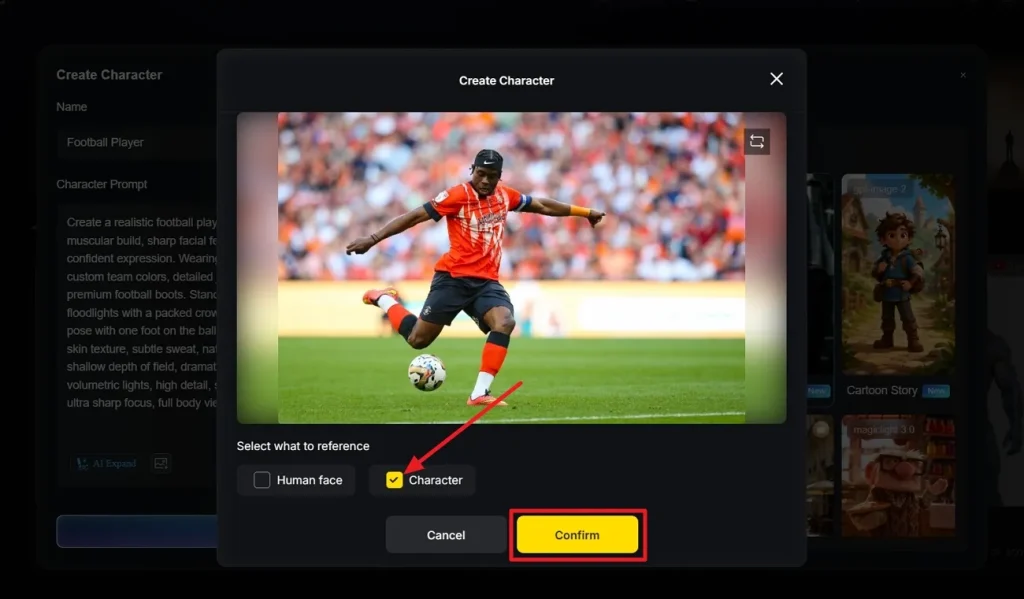
4단계. 참조 사진에서 디테일 확정하기
이미지에서 어떤 부분을 복제할지 고른 다음 Confirm 을 선택하세요.
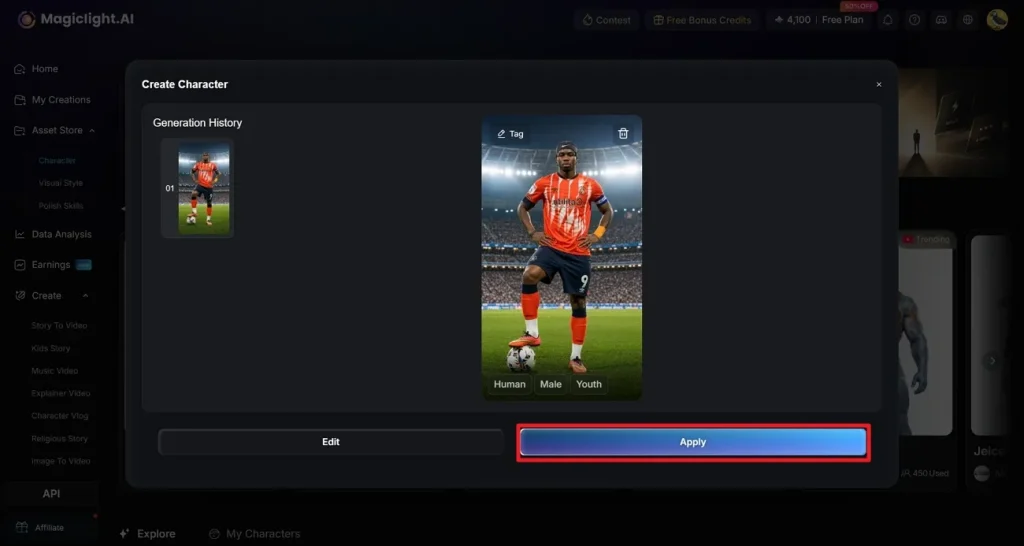
5단계. 캐릭터 미리보기
선수가 만들어졌으니 확인해 보세요. 더 고칠 게 없으면 Apply를 눌러 저장하세요.
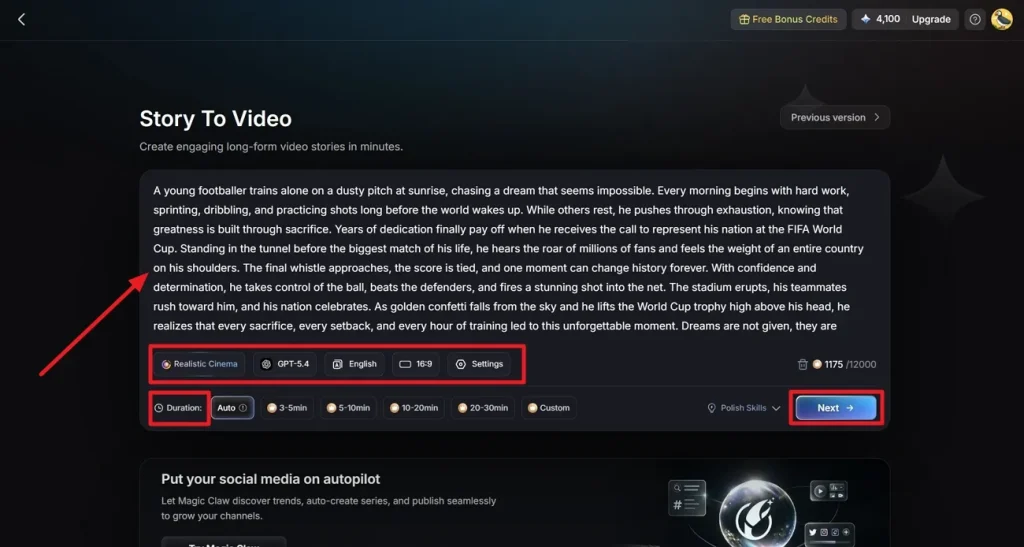
6단계. Story to Video를 열고 프롬프트 입력하기
story-to-video 도구에 들어가 영상 설명을 쓰고 Duration을 설정하세요. 프롬프트를 다듬는 Polish Skills 도 켤 수 있어요. Story Model, Video Style, 그리고 Aspect Ratio. 같은 설정을 맞추고, 영상의 목표 Language를 고른 뒤 Next 를 누르세요.
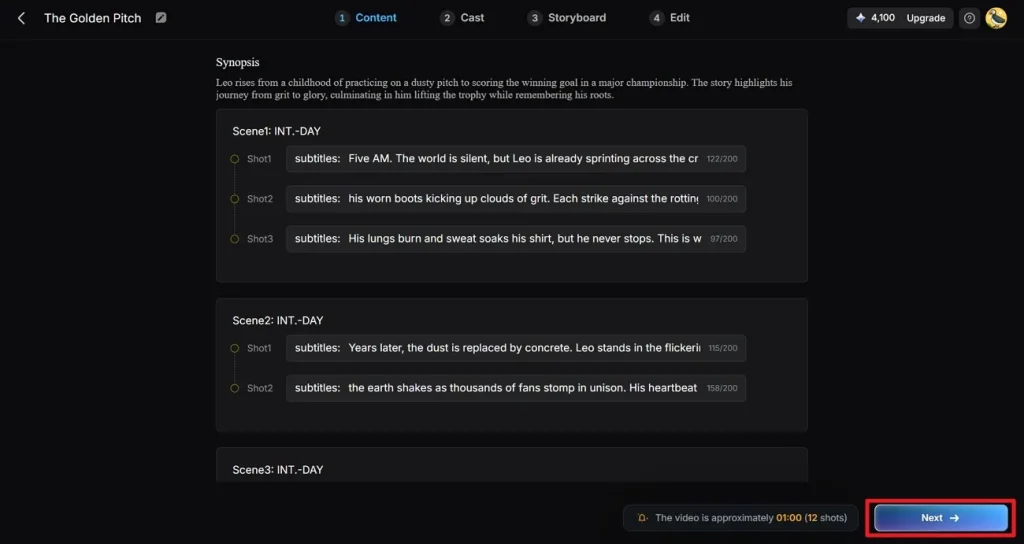
7단계. 스크립트에서 생성된 샷 검토하기
프롬프트 설명이 시놉시스 장면으로 바뀌어요. 확인하고 수정하거나 삭제한 다음 Next 버튼을 누르세요.
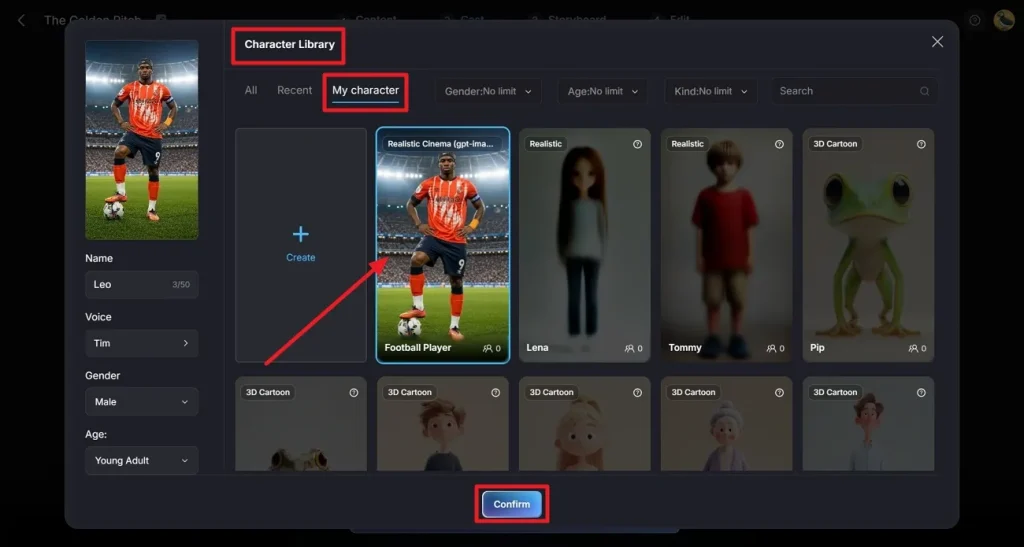
8단계. 캐릭터 라이브러리에서 생성한 캐릭터 고르기
Magiclight AI가 제안한 캐릭터 대신, 캐릭터를 클릭하고 My Character 탭으로 가세요. 원하는 캐릭터를 고른 뒤 Confirm 을 누르세요.
9단계. 영상 만들기를 이어가기
이어서 억양, 나이, 성별을 바꿔 캐릭터 보이스오버를 조정하세요. Next 를 눌러 Storyboard 편집기로 이동하세요.
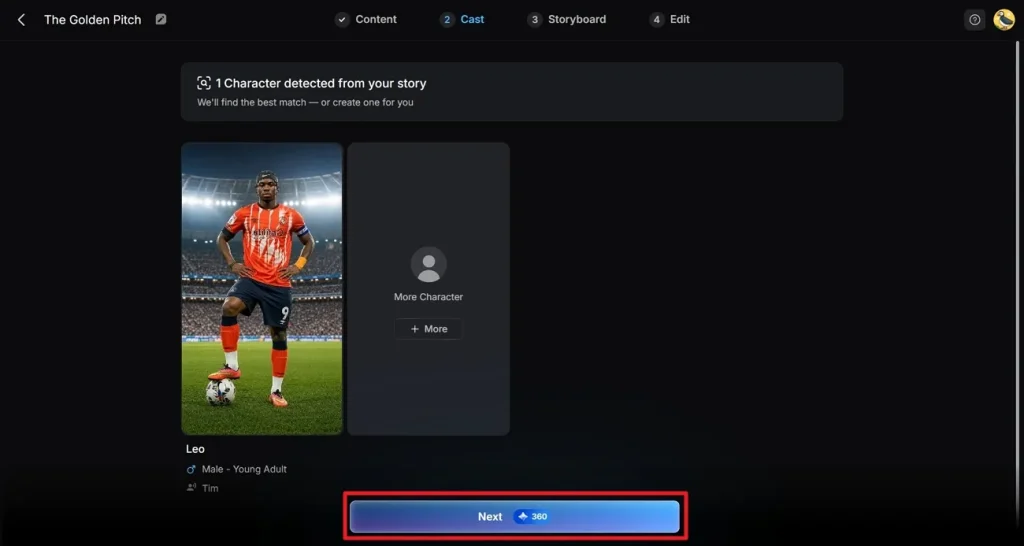
10단계. Nano로 장면 다듬기
Clothes, Poses, Expressions 옵션을 눌러 바꾸거나 조정하세요. 장면 호흡에 맞게 Voiceover Speed 도 바꿀 수 있어요. 모든 장면을 다듬었으면 Next 를 누르세요.
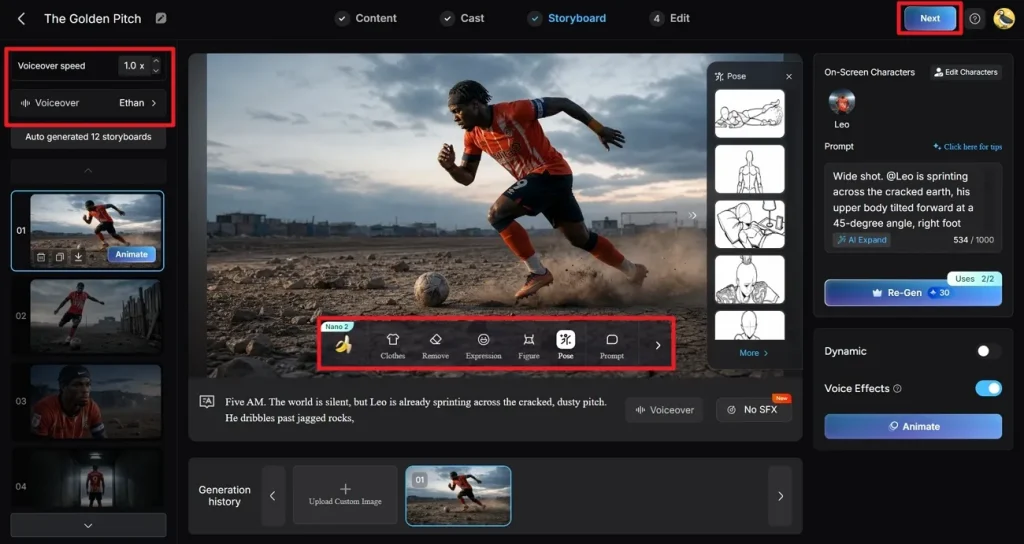
11단계. 클립에 마무리 손보기
Subtitle Settings에서 자막 스타일을 고르세요. Background Music에서 오디오 트랙을 넣고, 마지막으로 Generate를 눌러 두 설정을 확정하세요.
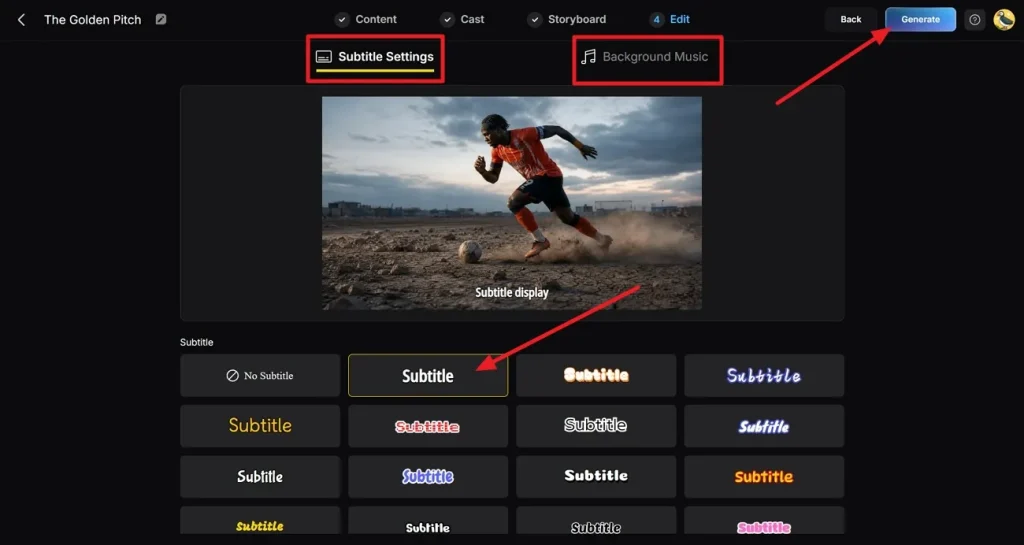
12단계. 내보내기 및 YouTube 또는 Magiclight AI에 게시하기
최종 영상을 꼼꼼히 보며 어색한 장면이 없는지 확인하세요. 영상을 받으려면 Download button을 누르거나 Publish to Magiclight AI 를 선택하세요. 또는 Connect with YouTube 로 플랫폼에 바로 올릴 수 있어요.
마무리
이 글에서는 다양한 월드컵 AI 프롬프트를 살펴봤어요. 본경기가 코앞이라 모두가 축구 테마 콘텐츠를 만들고 있어요. 가이드의 예시 프롬프트는 수준과 상관없이 창작의 폭을 열어 줘요. Magiclight AI가 캐릭터를 더 잘 다루고 애니메이션까지 입히는 방법도 보여 줬어요.
FIFA 월드컵 AI 프롬프트 FAQ
1. AI로 사실적인 축구 캐릭터를 만들려면?
MagicLight AI로 디테일이 살아있는 사실적인 축구 선수 아바타를 디자인할 수 있어요. 고급 커스터마이징, 립싱크, 20가지가 넘는 스타일로 사람 같은 캐릭터를 만들 수 있어요.
2. AI로 FIFA 월드컵 포스터를 만들 수 있나요?
네. Magiclight AI는 시네마틱 디자인 요소가 들어간 멋진 축구 포스터를 도와줘요. 간단한 프롬프트를 고급 시각 생성으로 디테일한 포스터로 바꿔 줘요.
3. 축구 프롬프트에 어떤 디테일을 넣어야 하나요?
선수 외형, 감정, 조명, 환경, 액션을 넣으면 결과가 좋아져요. Magiclight AI에서 월드컵 AI 프롬프트를 분명하게 쓰면 정확도와 시각 스토리텔링이 올라가요.
4. 남녀 축구 선수 모두 만들 수 있나요?
물론이에요. 이목구비, 의상, 스타일을 맞춰 다양한 선수 정체성을 표현할 수 있어요. Magiclight AI는 남녀 축구 선수를 쉽고 정확하게 만들어 줘요.
5. MagicLight는 FIFA 월드컵 스토리텔링을 어떻게 돕나요?
캐릭터, 움직임, 자연스러운 비주얼 흐름이 있는 장면을 만들 수 있어요. 간단한 아이디어는 Magiclight AI의 story-to-video 기능으로 애니메이션 축구 스토리가 돼요.
![역대 최고의 만화 캐릭터 15선 [최신 리스트]](https://magiclight.ai/wp-2/wp-content/uploads/top-cartoon-characters-300x168.webp)