很多人已經在熱聊即將到來的世界盃。討論越熱,世界盃貼文和影片就越能幫你加入這場全球對話。做足球主題的圖片和影片,現在也比以前容易得多。
靠智慧 AI 工具,誰都能做出抓眼球的足球畫面、影片和故事,發給全球觀眾。為了把這項運動的全球氣氛做出來,這篇整理了一批穩妥的世界盃 AI 提示詞,幫你每次都能出好看的圖。
第 1 部分. FIFA 世界盃媒體與採訪提示詞
用 FIFA 世界盃媒體和採訪提示詞,做逼真的足球轉播畫面並不難。這些提示詞適合球場、球員反應這類高真實感場景。下面給出可用來生成世界盃主題圖像的示例提示詞。
1. 足球解說提示詞
- 把下面這段英文提示詞原樣貼上: “Cinematic FIFA World Cup final moment with commentator booth overlooking glowing stadium. There is a last-minute goal, loud crowd, dramatic lighting, ultra-detailed broadcast scene.”
- 把下面這段英文提示詞原樣貼上: “High-energy penalty shootout scene with intense commentator narration, packed stadium under floodlights, emotional players, crowd tension, cinematic sports broadcast realism”
- 把下面這段英文提示詞原樣貼上: “Counterattack World Cup moment with commentator getting excited and players sprinting under stadium lights. Include motion blur, happy fans, dynamic angles, ultra-realistic sports scene.”
- 把下面這段英文提示詞原樣貼上: “FIFA World Cup opening ceremony kickoff with commentator voiceover and vibrant stadium lights. Show waving flags, a large crowd, cinematic wide-angle broadcast shot.”
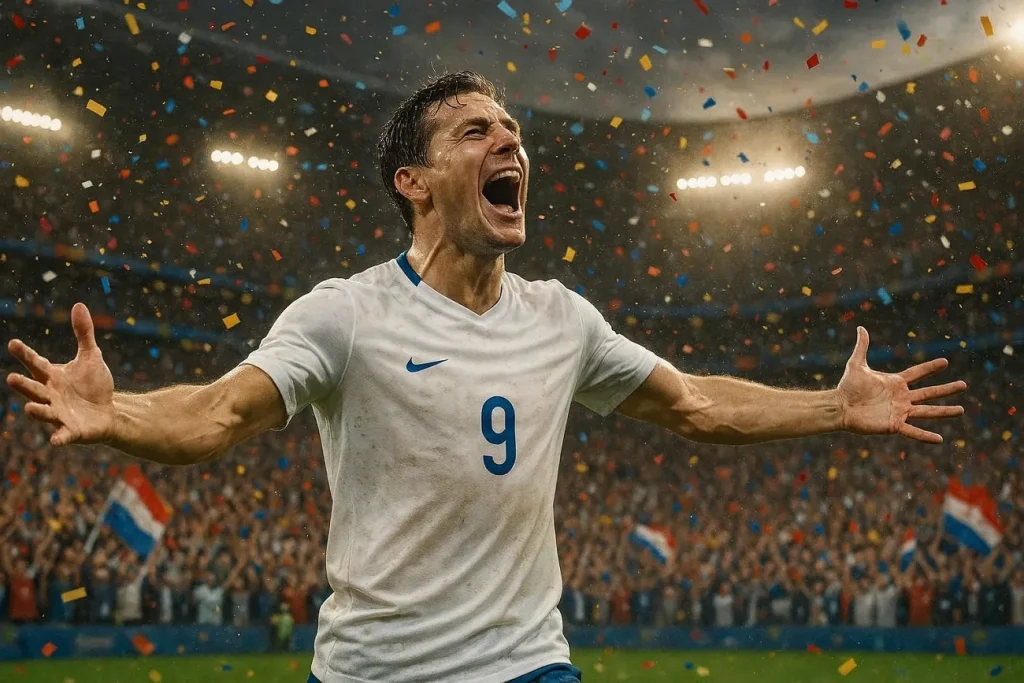
- 把下面這段英文提示詞原樣貼上: “Iconic World Cup hat-trick moment with footballer, commentator in awe, confetti explosion, cheering fans, sharp lighting, sports broadcast style.”
2. 體育分析師提示詞
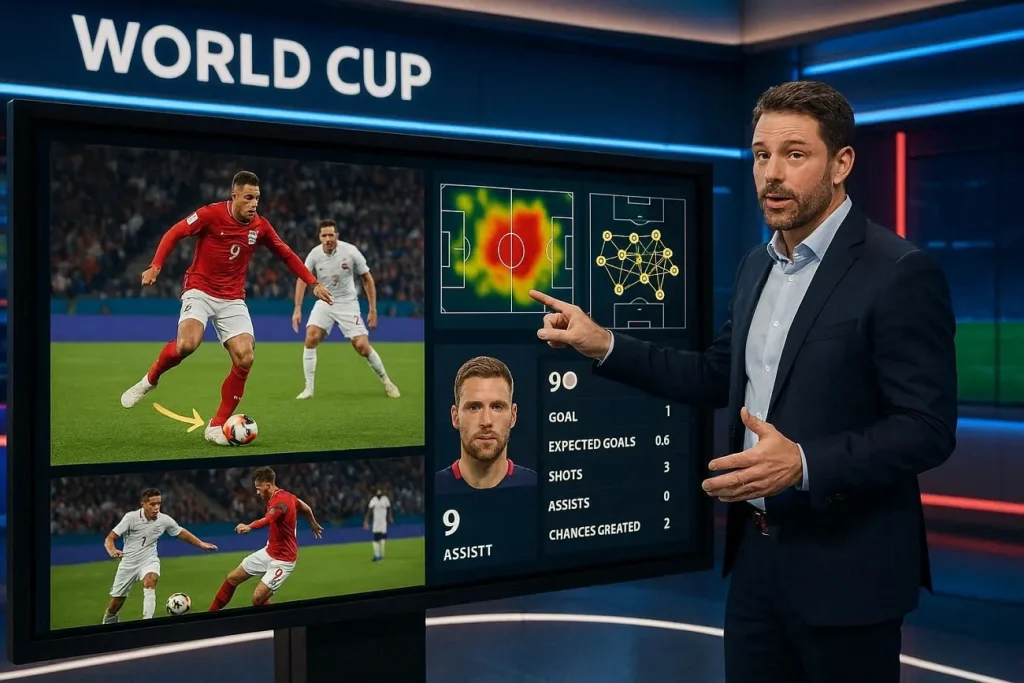
- 把下面這段英文提示詞原樣貼上: “FIFA World Cup studio analysis scene with experts discussing tactics. Sleek broadcast set, dramatic lighting, ultra-realistic sports studio environment.”
- 把下面這段英文提示詞原樣貼上: “Post-match World Cup analysis with analyst breaking down key moments, holographic pitch visuals, intense focus, modern studio lighting, cinematic broadcast realism.”
- 把下面這段英文提示詞原樣貼上: “Tactical breakdown of World Cup clash with analyst pointing at dynamic formation graphics, glowing screens, professional studio atmosphere, ultra-detailed scene.”
- 把下面這段英文提示詞原樣貼上: “World Cup pre-match analysis with experts comparing teams, large digital displays, player stats visuals, dramatic lighting, high-end sports broadcast studio.”
- 把下面這段英文提示詞原樣貼上: “In-depth player performance review in World Cup studio, slow-motion highlights on screen, analyst explaining strategy, cinematic lighting, ultra-realistic setting.”
3. 邊線記者提示詞
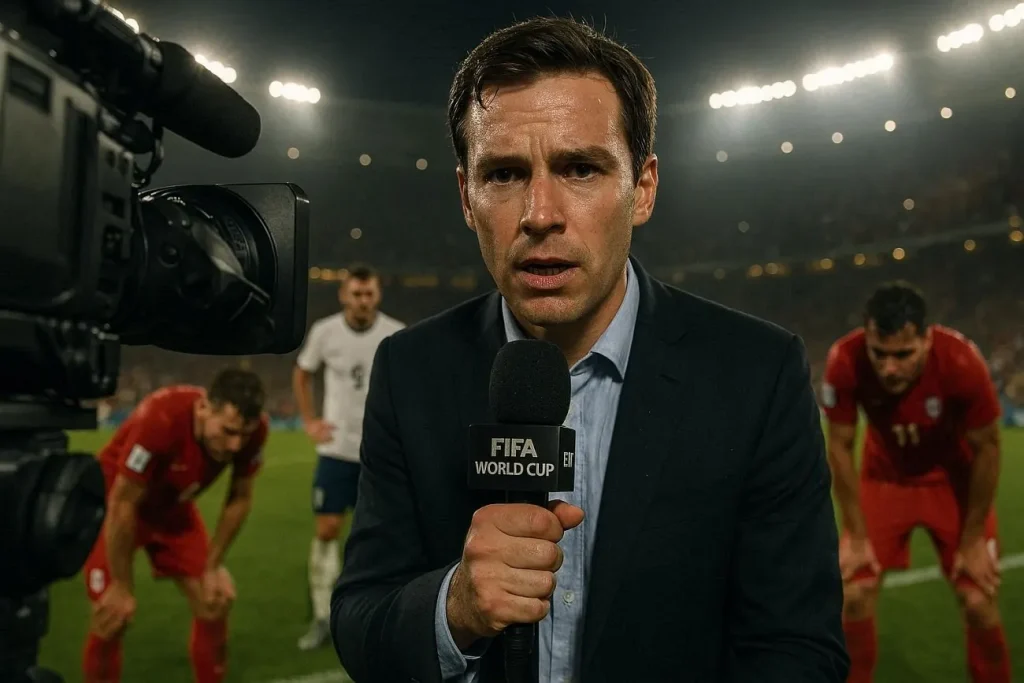
- 把下面這段英文提示詞原樣貼上: “Sideline reporter for FIFA World Cup holding microphone, blurred players in background, with stadium lights and cinematic broadcast realism.”
- 把下面這段英文提示詞原樣貼上: “Emotional post-match interview with player on World Cup field, sideline reporter capturing reactions, ultra-detailed scene.”
- 把下面這段英文提示詞原樣貼上: “Halftime sideline reporting during intense World Cup match. The reporter has headset and massive crowd is roaring behind him, vibrant stadium lights, cinematic sports coverage.”
- 把下面這段英文提示詞原樣貼上: “Injury update scene with sideline reporter near team bench and medical staff is assisting the player. Show off a tense atmosphere with worried expressions from players.”
- 把下面這段英文提示詞原樣貼上: “Extra-time World Cup tension with sideline reporter updating live, players exhausted in background, glowing stadium lights, dramatic mood, ultra-realistic scene.”
第 2 部分. FIFA 世界盃海報與藝術圖提示詞
和上面不同,這些世界盃 AI 提示詞更偏視覺創意。它們適合做吸睛海報、創意藝術圖,以及高張力的足球場面。你可以用這些大膽、抓眼的畫面,把世界盃瞬間做活。FIFA 海報和藝術圖提示詞如下:
1. 獎盃慶祝藝術圖
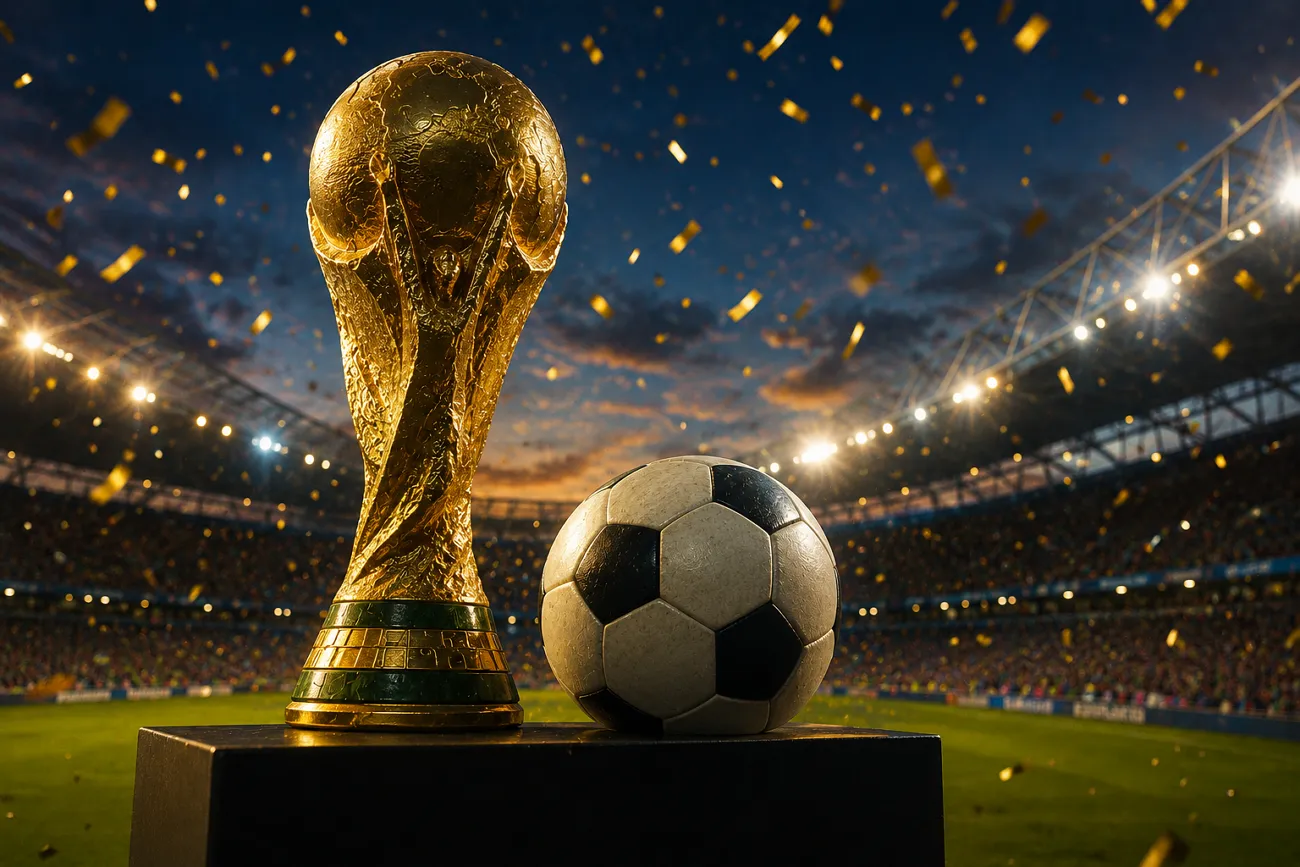
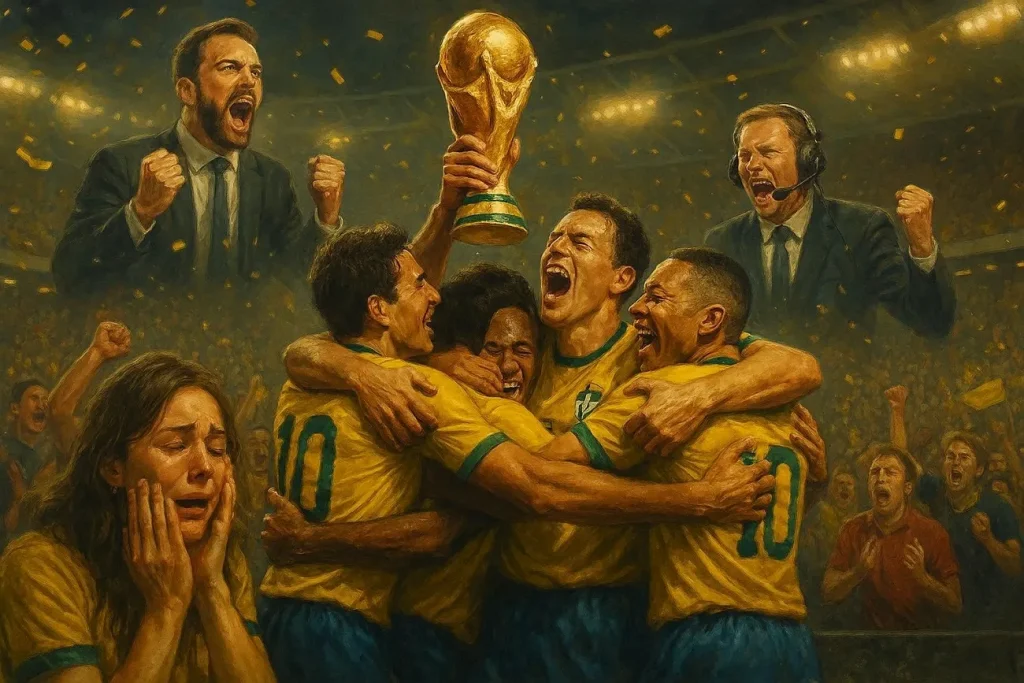
- 把下面這段英文提示詞原樣貼上: “Football team lifting World Cup with golden confetti and bright stadium lights. The image should portray cinematic realism and be detailed.”
- 把下面這段英文提示詞原樣貼上: “Champions celebrating with glowing World Cup trophy and a cheering crowd. Silver confetti rains over the players and the audience.”
- 把下面這段英文提示詞原樣貼上: “Fireworks in the background as team holds up trophy, emotional players, vibrant stadium, golden lighting, detailed artwork.”
- 把下面這段英文提示詞原樣貼上: “World Cup victory moment where players are hugging each other. Fans are crying and commentators celebrate, cinematic sports poster style.”
- 把下面這段英文提示詞原樣貼上: “Winning team celebrating with trophy center stage, glowing lights, roaring fans, dramatic atmosphere, ultra-detailed artwork.”
2. 比賽日宣傳海報
- 把下面這段英文提示詞原樣貼上: “Matchday poster with two teams facing off, bright lighting, stadium backdrop, cinematic sports design.”
- 把下面這段英文提示詞原樣貼上: “World Cup clash poster featuring rival teams, bold typography space, dynamic composition, ultra-detailed.”
- 把下面這段英文提示詞原樣貼上: “Football matchday poster with players in action poses, vibrant colors, football flying, golden lighting, modern sports design.”
- 把下面這段英文提示詞原樣貼上: “High-energy World Cup poster showing upcoming match, determined player expressions. There are glowing lights in the background with bold cinematic composition.”
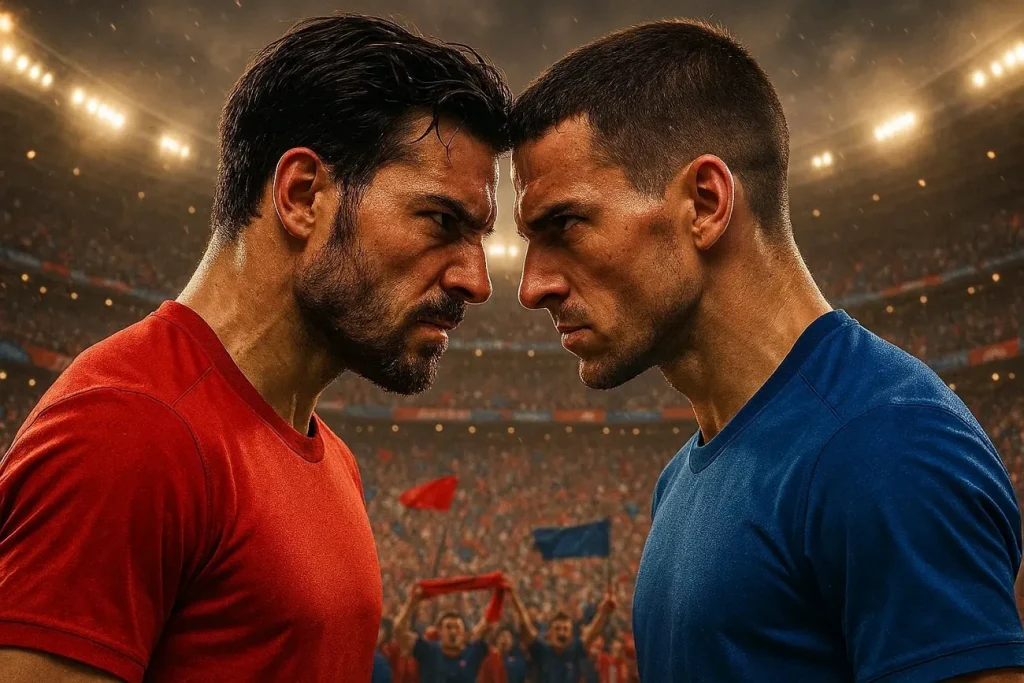
- 把下面這段英文提示詞原樣貼上: “FIFA World Cup promotional poster with two popular players butting heads. The crowd energy is high with cinematic realism and a sleek design.”
3. 足球傳奇致敬海報
- 把下面這段英文提示詞原樣貼上: “Player tribute poster standing in a heroic pose with glowing stadium lights. Dramatic shadows, cinematic sports artwork, ultra-detailed.”
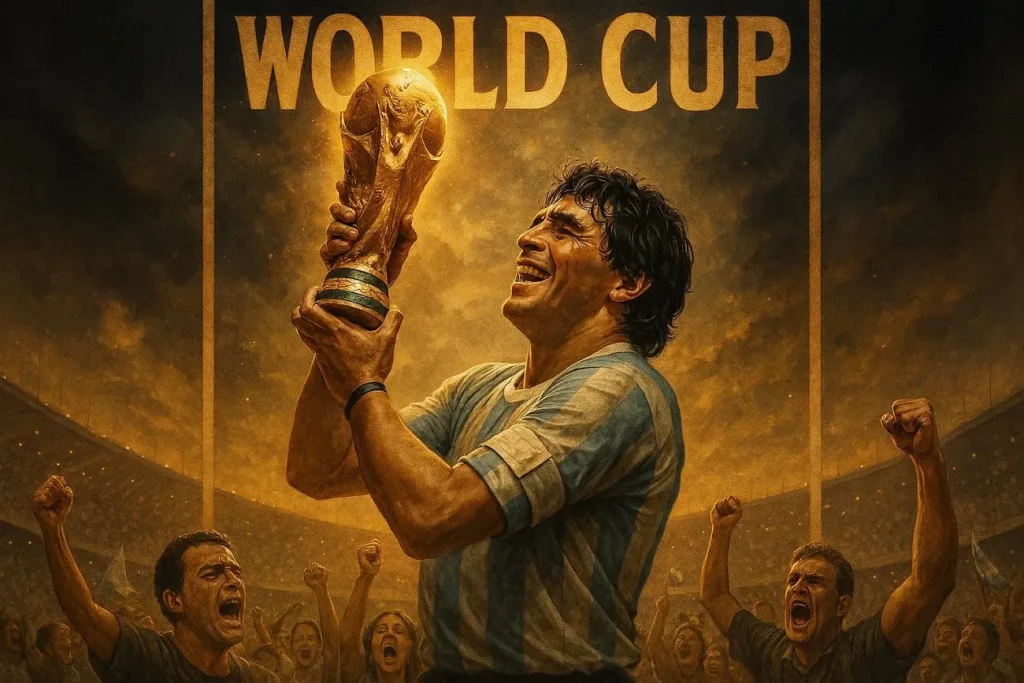
- 把下面這段英文提示詞原樣貼上: “World Cup legend portrait of a player with trophy in hand and an emotional expression. The image consists of dramatic lighting and has a realistic poster design.”
- 把下面這段英文提示詞原樣貼上: “Football legend tribute with hands above head pose and glowing effects. Show off a dramatic atmosphere, ultra-detailed cinematic artwork.”
- 把下面這段英文提示詞原樣貼上: “Stylized tribute poster of famous footballer with bold lighting. Ensure player has a heroic stance and a smile on his face.”
- 把下面這段英文提示詞原樣貼上: “World Cup legend artwork with iconic moment, glowing trophy, emotional crowd, dramatic lighting, ultra-realistic poster style.”
第 3 部分. 用 MagicLight AI 把 FIFA 世界盃角色做活
能把你的世界盃 AI 提示詞再往前推一步的工具,是 Magiclight AI。這是一個強大的 AI 虛擬人生成器,能做出細節很足的角色。多數 AI 軟體生成靜圖就停了。Magiclight AI 還能給角色配音,提供 37 種配音選項。
它提供 19 個影片模型,比如 Gemini Omni、Veo 4 和 Seedance Pro,用來給影片做動畫。工具還能生成最長約 50 分鐘的長片段,方便做出更複雜、更細的影片。簡單提示詞,也能變成有動態的足球敘事和抓人場面。
核心功能
- Stable Football Players: 在多個場景裡保持角色特徵一致,故事才能接得上。
- Lifelike Lip Sync: 給足球球員虛擬人做更像真人的口型和 voice cloning。
- Multilingual Voices: 支援 11 種語言,包括法語和韓語,方便面向全球觀眾。
- Define Characters with Prompts: 角色名最多 50 個字元,再用最多 1000 個字元的提示詞改外觀。
- Stores Your Characters: 你可以儲存並反覆呼叫預設角色,方便後面的內容工作流。
在 Magiclight AI 裡建立足球球員的完整指南
學習怎麼 建立角色 並做成影片動畫,其實不難。Magiclight AI 的流程有引導步驟和選項。要正確使用這個工具,按下一節的步驟來:
步驟 1. 選擇角色建立工具
先在介面左側面板選擇 Character 工具,開始流程。
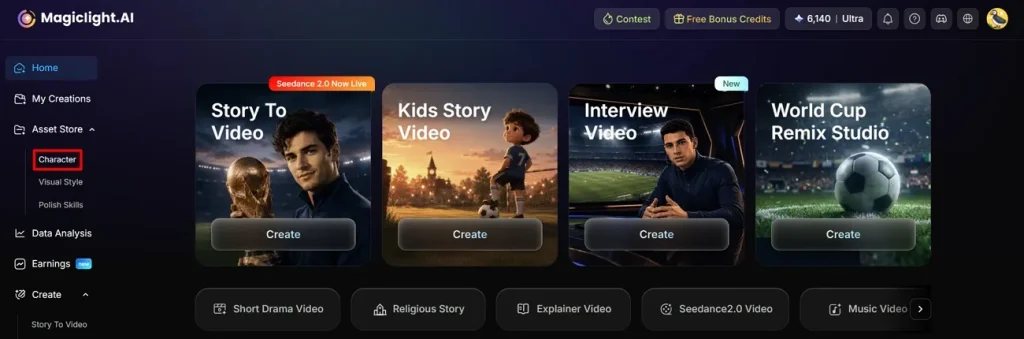
步驟 2. 繼續建立角色
會打開新頁面,點 Create 按鈕,進入角色建立。
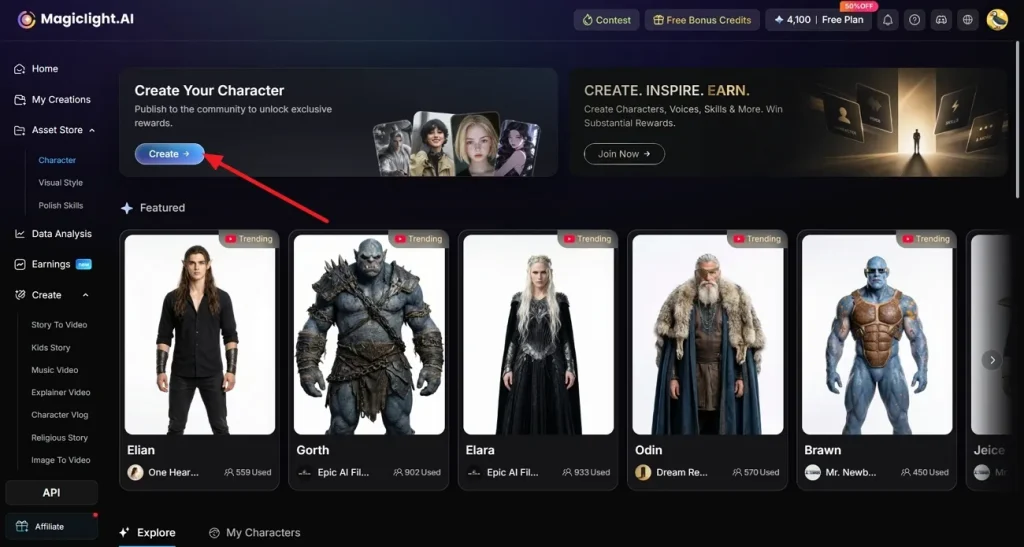
步驟 3. 自訂你的角色
給你的足球球員起一個 Name ,再在 Character Prompt 框裡用文字描述外觀。也可以選 Upload 匯入參考圖。最後在 Character Style 裡選外觀,再點 Generate。
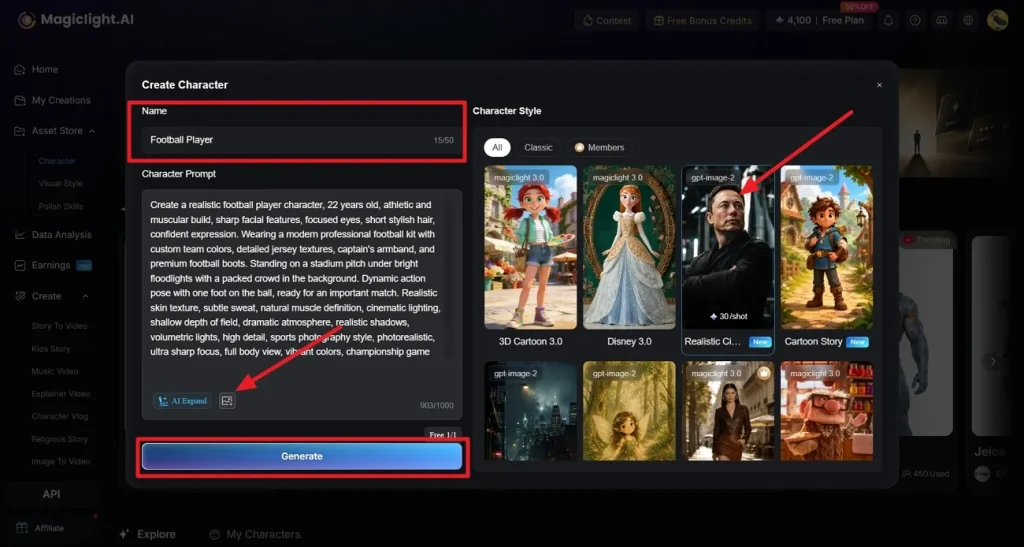
步驟 4. 從參考圖確認細節
在這裡選擇要從圖片裡複刻哪些部分,再選 Confirm 。
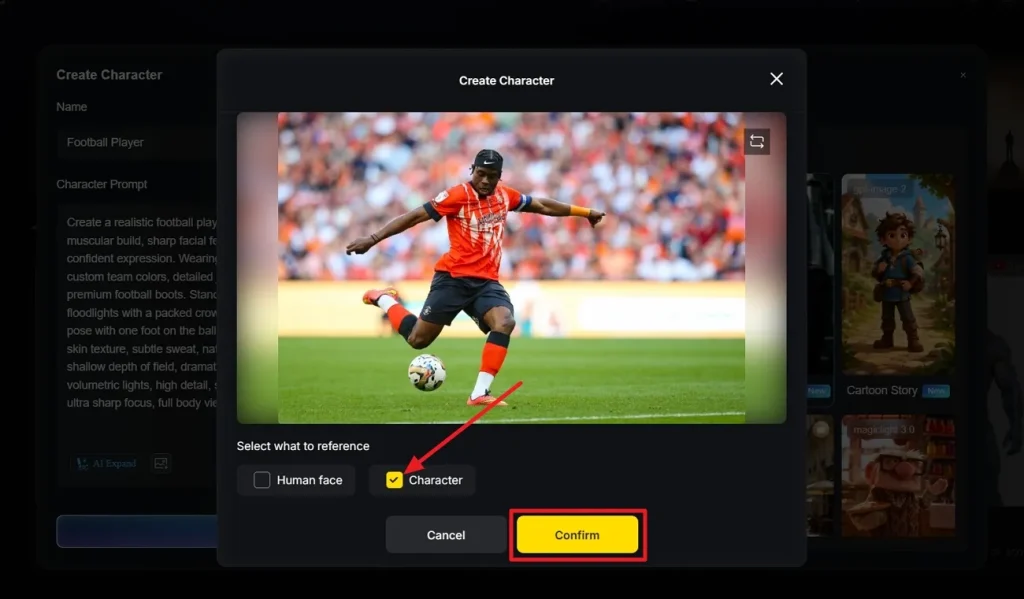
步驟 5. 預覽你的角色
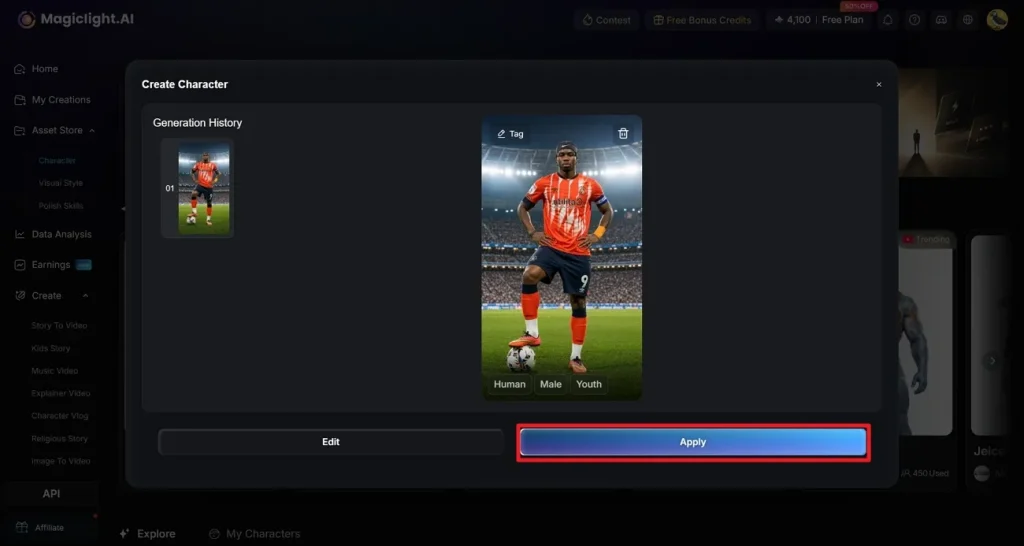
足球球員已經生成,你可以先看一眼。如果不用再改,點 Apply 儲存。
步驟 6. 打開 Story to Video 並輸入提示詞
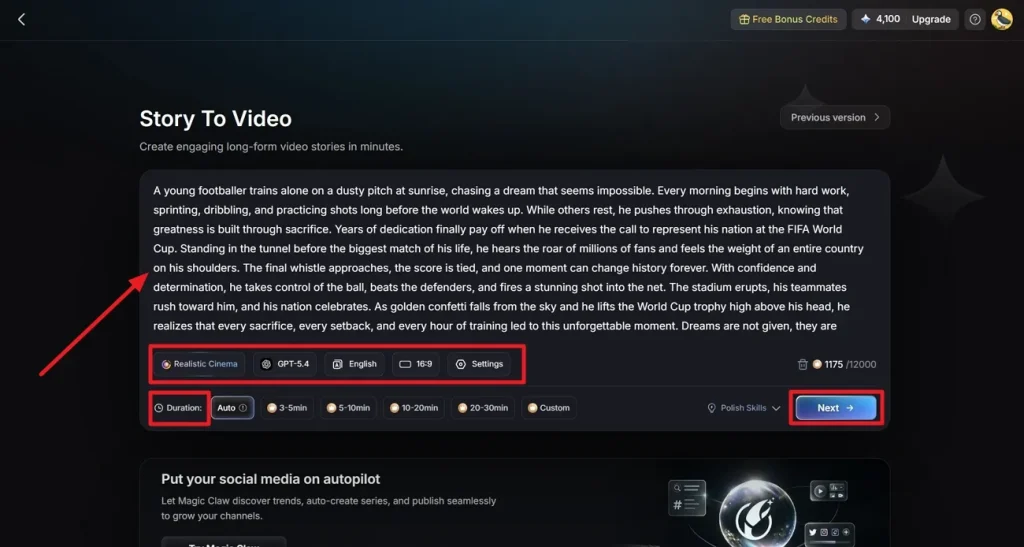
打開 story-to-video 工具,輸入影片描述,並設定 Duration。也可以選用 Polish Skills 來打磨提示詞。再調整影片設定,比如 Story Model, Video Style, 和 Aspect Ratio. 選好影片的目標 Language,然後點 Next 。
步驟 7. 檢查腳本生成的分鏡
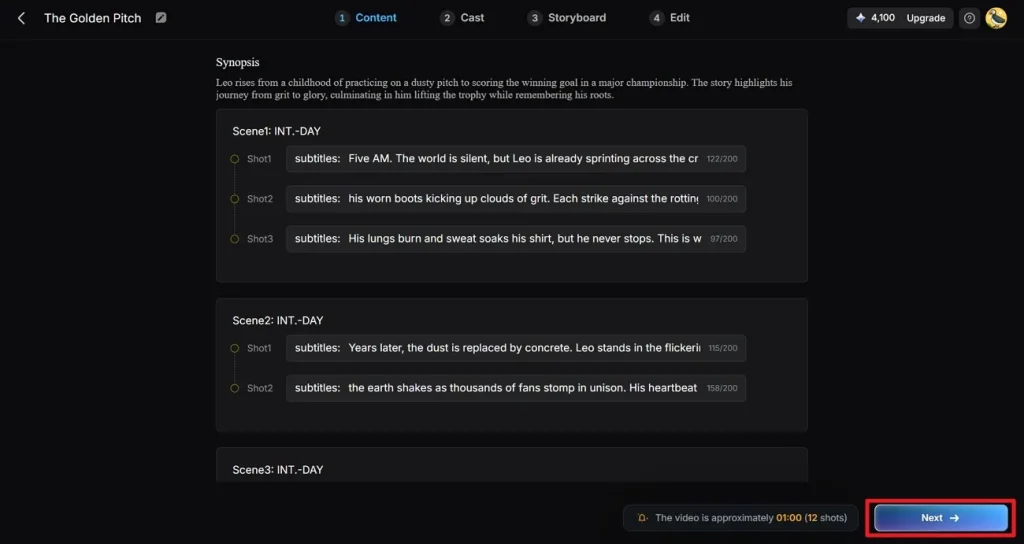
提示詞會被轉成一場場的劇情摘要,你可以查看、編輯或刪除,然後點 Next 按鈕。
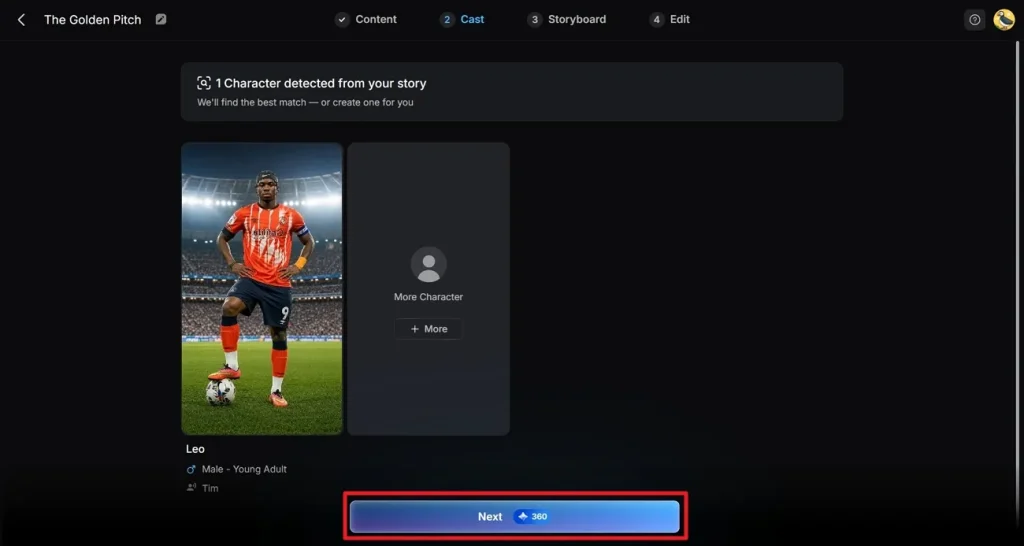
步驟 8. 從角色庫選擇已生成的角色
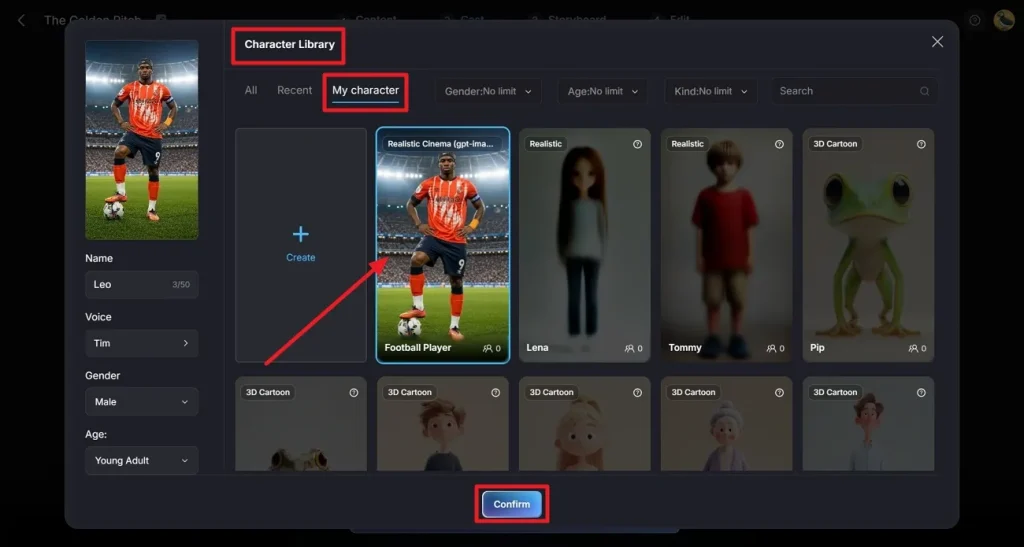
不想用 Magiclight AI 自動給的角色,就點角色,切到 My Character。選好之後點 Confirm 。
步驟 9. 繼續影片建立
接著透過口音、年齡和性別調整角色配音。選 Next ,進入 Storyboard 編輯器。
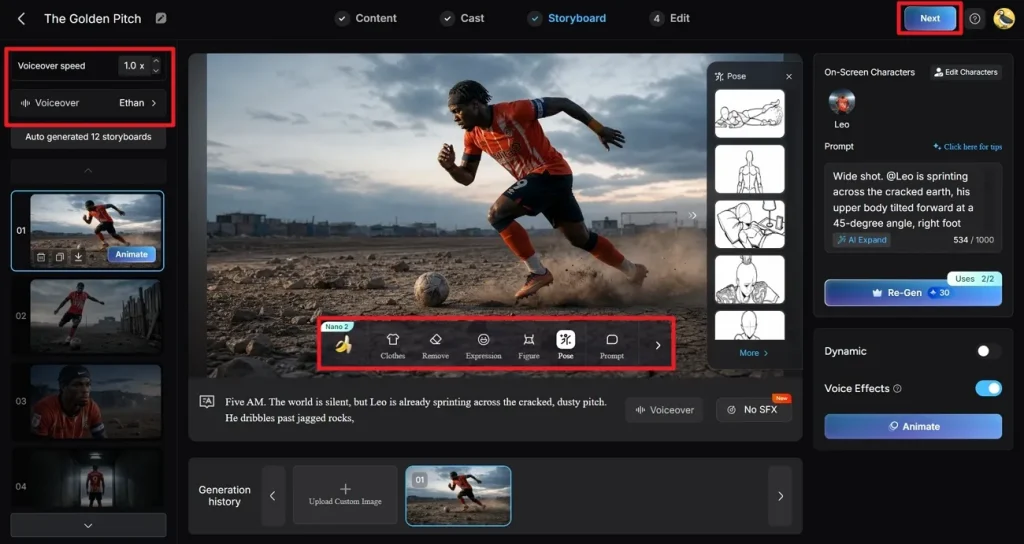
步驟 10. 用 Nano 打磨場景
點 Clothes、Poses 和 Expressions 裡的選項來調整。也可以改 Voiceover Speed ,讓配音跟上場景節奏。所有場景都打磨完後,點 Next 。
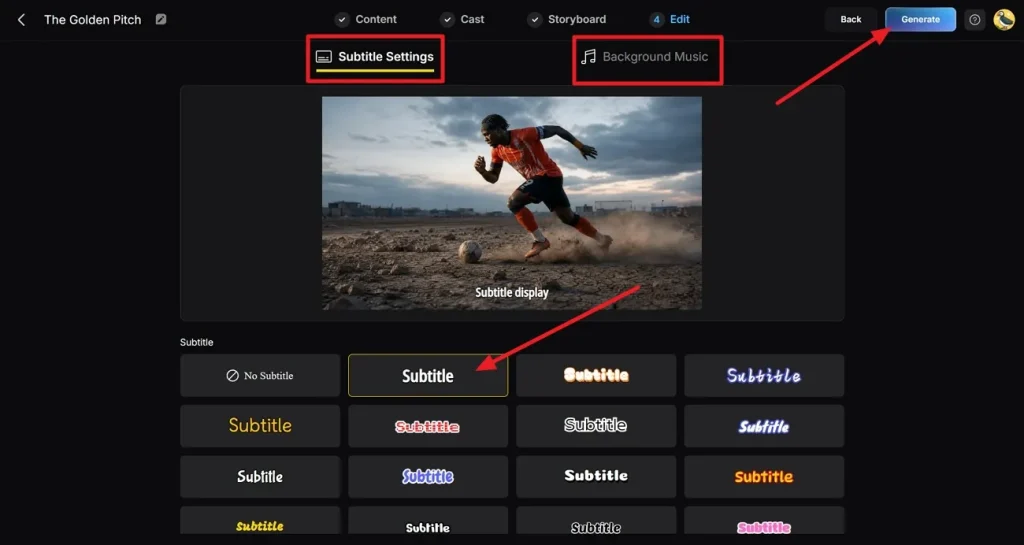
步驟 11. 給成片做最後修飾
然後在 Subtitle Settings 裡選字幕樣式。打開 Background Music,給片子加音軌。最後點 Generate,確認這兩項設定。
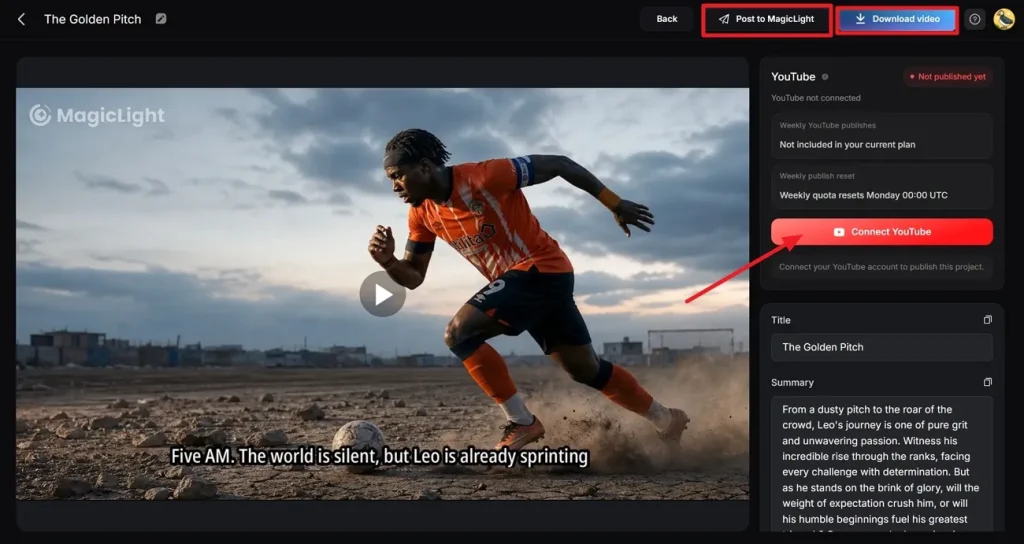
步驟 12. 匯出並發佈到 YouTube 或 Magiclight AI
仔細看一遍成片,確認沒有跑偏或彆扭的鏡頭。要下載影片,點 Download button,也可以選擇 Publish to Magiclight AI 選項. 另外還可以選 Connect with YouTube 直接上傳到平台。
總結
這篇把一批世界盃 AI 提示詞過了一遍。官方比賽臨近,大家都在趕足球主題內容。指南裡的示例提示詞,能給不同水平的創作者打開思路。文章也展示了 Magiclight AI 如何讓你更穩地控制角色,並把他們做成動畫。
FIFA 世界盃 AI 提示詞常見問題
1. 怎麼用 AI 做出逼真的足球角色?
可以用 MagicLight AI 設計細節足、看起來真的足球球員虛擬人。它提供深度自訂、口型同步,以及 20 多種風格,方便做出更像真人的角色。
2. 我能用 AI 生成 FIFA 世界盃海報嗎?
可以。Magiclight AI 能做出帶電影感設計元素的足球海報。工具會用進階視覺生成,把簡單提示詞變成細節豐富的海報。
3. 足球提示詞裡該寫哪些細節?
把球員外觀、情緒、光線、環境和動作寫進去,結果會更好。在 Magiclight AI 裡用清楚的世界盃 AI 提示詞,畫面會更準,故事也更完整。
4. 男球員和女球員都能做嗎?
當然。你可以自訂五官、服裝和風格,匹配不同球員身分。Magiclight AI 能輕鬆、準確地建立男球員和女球員。
5. MagicLight 怎麼幫 FIFA 世界盃說故事?
這個工具能讓創作者做出有角色、有運動、畫面流更自然的場景。簡單想法可以透過 Magiclight AI 的 story-to-video 功能,變成有動畫的足球故事。