About the Strategically Unavailable
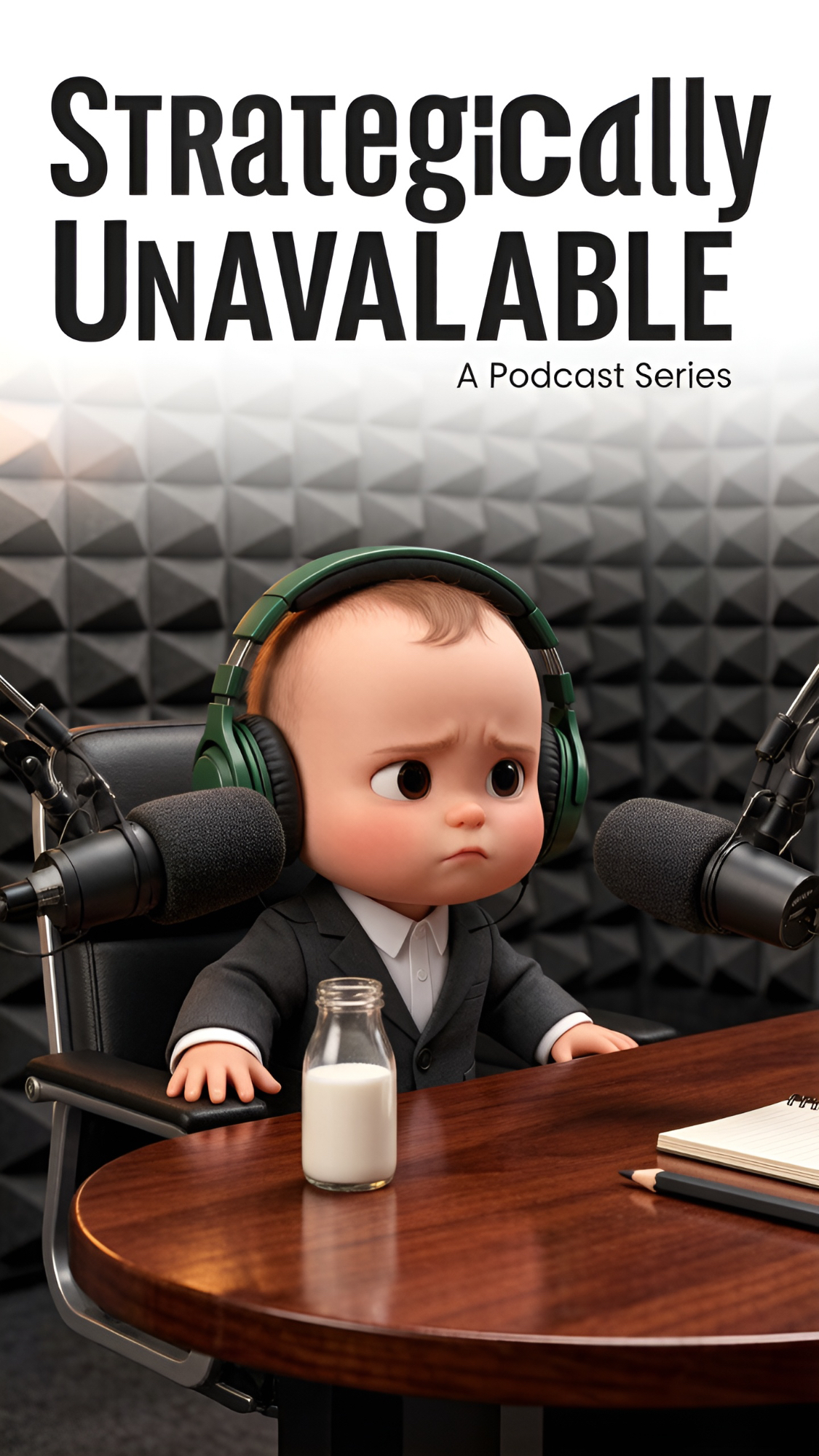
Ever feel like the corporate grind is just too much? Our little CEO, a baby with a briefcase and a podcast studio, knows the feeling all too well. He's here to share the exhausting realities of his professional life, from board meetings to nap times. But can even the most dedicated professional resist the call of slumber? Find out what happens when ambition meets exhaustion!
Video script prompt
Title: "This Could Have Been a Sleepy Moment" Type: Baby Podcast, Workplace Humor, Contrast Comedy Duration: Approximately 24 seconds Ratio: 9:16 Characters: Fictional baby, no use of real child photos Setting: Warm and professional podcast recording studio Structure: Quick hook → Continuous examples → Reversal of baby elements Character Design A fictional baby about ten months old, round and adorable but not overly childish or exaggerated, is wearing a dark grey mini suit and a white shirt, and is wearing oversized dark green podcast headphones. The baby was sitting in an elevated seat, with a professional black microphone in front of him. On the table were a small notebook, a short and thick pencil, and a milk bottle. Basic state: Expression: Serious Eyes are bright but slightly sleepy Speech sounds like that of an adult who has experienced many years in the workplace Actions mainly consist of eye contact, slight nodding, holding the microphone, and yawning No complex body movements Part 1 | Workload | 0–8 seconds The baby looked seriously at the microphone. Baby: “People think babies don’t understand workplace stress.” Please provide the Chinese text that needs to be translated accurately and fluently into English "People always think that babies don't understand the pressure of the workplace." The baby paused for a moment and then moved forward gently. Baby: “I had three meetings before breakfast.” Please provide the Chinese text that needs to be translated accurately and fluently into English "But I had three meetings before breakfast." Part 2 | The Meetings | 8 - 17 seconds The baby lowered his head and glanced at the small notebook on the table, as if checking the meeting notes. Baby: “One about nap scheduling.” “One about bottle inventory.” Please provide the Chinese text that needs to be translated accurately and fluently into English "A discussion about the arrangement for a nap." "A discussion about the inventory of baby bottles." The baby slowly raised its eyes and looked at the camera. Baby: “And one that absolutely could’ve been an email.” Please provide the Chinese text that needs to be translated accurately and fluently into English "Another one can be easily handled by sending an email." Part 3 | The Manager | 17 - 24 seconds The baby let out a gentle sigh and placed its palm beside the bottle. Baby: “My manager kept asking if I was tired.” Please provide the Chinese text that needs to be translated accurately and fluently into English "My manager has been asking me if I'm tired." Pause for half a second. Baby: “Mom, I’m not tired.” Please provide the Chinese text that needs to be translated accurately and fluently into English "Mom, I'm not tired." The baby tried to remain serious, and its eyelids gradually closed. Baby: “I’m just… strategically unavailable.” Please provide the Chinese text that needs to be translated accurately and fluently into English "I was just... strategically disconnected." Before the last word was finished, the baby slowly leaned against the seat and fell asleep. The baby bottle remained safely on the table, and the microphone stayed in place.
How to use this Cartoon video template
Template Name: Strategically Unavailable
Step 1
Click the "Use Template" button to load the "Strategically Unavailable" preset.
Step 2
Review the default settings. This template is pre-configured with the seedance1_5pro model and 3D Cartoon 3.0 style. Click "Run Script" to generate your initial draft.
Step 3
Enter your scene description in the text box. The One-Click engine is powered by seedance1_5pro to interpret complex prompts instantly. Toggle the Directing Modes if you need specific camera movements.
Step 4
Browse the Video Style carousel to pick a look. Ensure your Aspect Ratio is set correctly (9:16) for your target platform.
Step 5
Hit the "Create Video" button. The AI will process your script and style simultaneously to deliver a finished video.
Strategically Unavailable Video Template
Start to use this template
Template Specifications
Frequently Asked Questions
What kind of cartoons can I create with Magiclight?
You can create short animated stories, funny clips, and character-driven scenes using Magiclight's cartoon templates. Styles range from classic 2D animation to stylized digital cartoons.
Do I need animation experience to use these templates?
No experience is needed. Magiclight's cartoon templates are pre-built with animations, characters, and backgrounds, so you can create videos in minutes.
Can I customize characters and scenes in cartoon templates?
Yes! You can edit characters, change colors, add props, and adjust backgrounds to fit your story.
Are cartoon templates suitable for social media posts?
Absolutely. They are optimized for TikTok, Instagram Reels, YouTube Shorts, and more.
Can I add my own voiceovers to cartoon videos?
Yes. Magiclight allows you to add voiceovers, music, or sound effects to bring your cartoon to life.
You might also like
these trending designs