About the The Banana Striker's Spin
Ever wonder if your biggest weakness could be your greatest strength? Follow the incredible journey of a clumsy banana striker who turns his awkwardness into an unstoppable athletic advantage. Witness how he defies expectations and leads his team to an unforgettable championship victory. Can an unconventional style truly conquer all?
Video script prompt
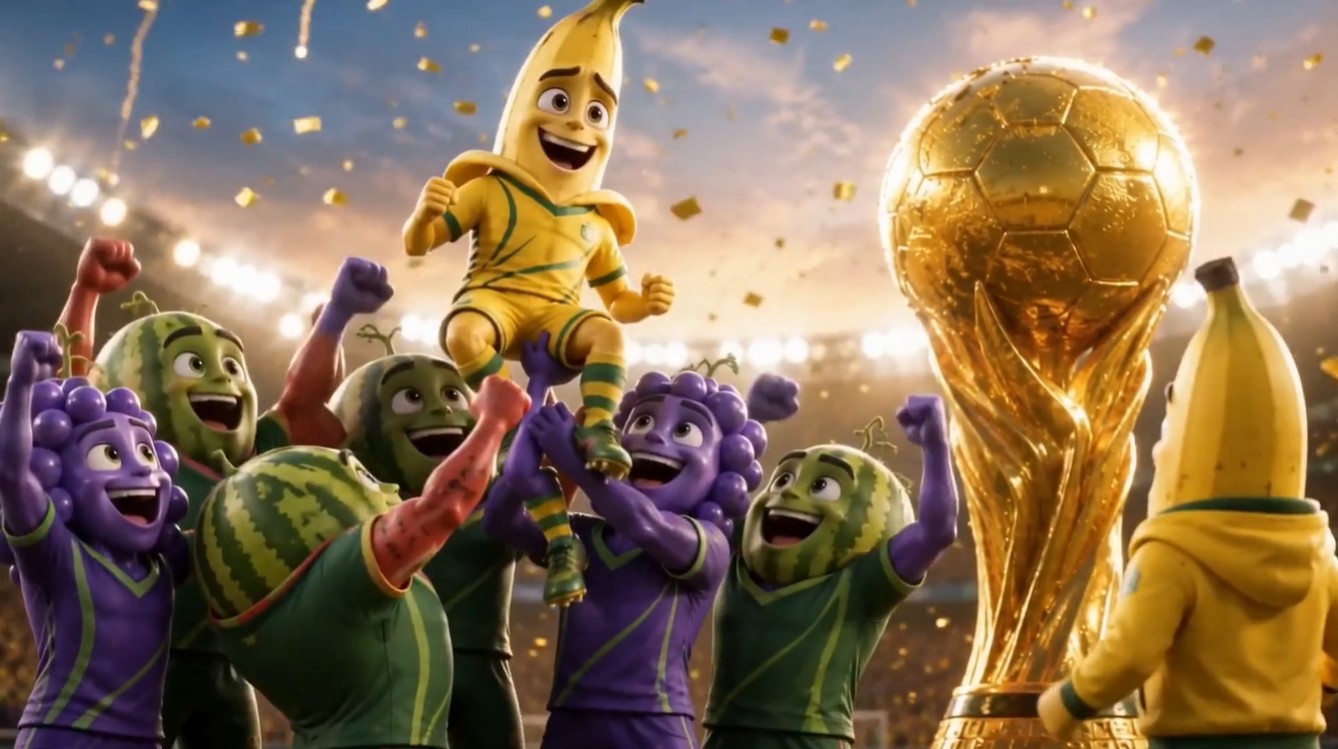
# Fruit World Cup: The Slippery Goal — 60s Shot List ## Shot 1|0–6s|Fruit World Cup Stadium A huge fruit-only football stadium at night, packed with anthropomorphic fruit fans. Bright stadium lights, colorful flags, giant trophy near the field, no humans. Camera: wide aerial stadium shot. Mood: exciting, World Cup final atmosphere. --- ## Shot 2|6–12s|The Banana Striker A young Banana Striker stands on the football field, nervous but determined. His fruit teammates watch from behind him. Camera: medium close-up on Banana Striker. Mood: pressure before the final moment. --- ## Shot 3|12–18s|He Slips The Banana Striker tries to sprint, but his feet slide on the grass. He falls awkwardly. Watermelon Defenders laugh in the background. Camera: side tracking shot, then quick close-up of his embarrassed face. Mood: comic failure, public pressure. --- ## Shot 4|18–24s|Remember the Coach The Banana Striker looks toward the glowing Fruit World Cup trophy. He remembers his coach’s words. Voiceover: “Don’t hide what makes you different. Use it.” Camera: close-up on his eyes, then trophy reflection. Mood: realization. --- ## Shot 5|24–32s|Final Pass A Grape Midfielder passes the ball forward. The ball rolls across the grass toward the Banana Striker. Watermelon Defenders rush in to block him. Camera: low field-level shot following the ball. Mood: final chance. --- ## Shot 6|32–42s|The Slippery Move The Banana Striker starts running. He slips again, but turns the slip into a fast spinning move. He slides, rotates, and kicks the ball mid-spin. Camera: slow-motion cinematic shot, clear body motion, readable action. Mood: surprise, skill, reversal. --- ## Shot 7|42–50s|The Goal The ball curves through the air, flies over the Watermelon Goalkeeper, and hits the net. Camera: ball-following shot, then net close-up. Mood: explosive victory. --- ## Shot 8|50–56s|Crowd Explosion The stadium erupts. Fruit fans jump and cheer. Strawberry fans, orange fans, grape fans, pineapple fans, and banana fans celebrate together. Camera: fast wide crowd shot, golden confetti falling. Mood: joyful, viral, celebratory. --- ## Shot 9|56–60s|Champion Moment The Banana Striker is lifted by his teammates. The Fruit World Cup trophy shines under the stadium lights. Final voiceover: “Sometimes the thing that makes you fall is the thing that helps you fly.” Camera: heroic slow push in on Banana Striker and trophy. Mood: emotional, funny, triumphant.
How to use this Cartoon video template
Template Name: The Banana Striker's Spin
Step 1
Click the "Use Template" button to load the "The Banana Striker's Spin" preset.
Step 2
Review the default settings. This template is pre-configured with the seedance1_5pro model and 3D Cartoon 3.0 style. Click "Run Script" to generate your initial draft.
Step 3
Enter your scene description in the text box. The One-Click engine is powered by seedance1_5pro to interpret complex prompts instantly. Toggle the Directing Modes if you need specific camera movements.
Step 4
Browse the Video Style carousel to pick a look. Ensure your Aspect Ratio is set correctly (16:9) for your target platform.
Step 5
Hit the "Create Video" button. The AI will process your script and style simultaneously to deliver a finished video.
The Banana Striker's Spin Video Template
Start to use this template
Template Specifications
Frequently Asked Questions
What kind of cartoons can I create with Magiclight?
You can create short animated stories, funny clips, and character-driven scenes using Magiclight's cartoon templates. Styles range from classic 2D animation to stylized digital cartoons.
Do I need animation experience to use these templates?
No experience is needed. Magiclight's cartoon templates are pre-built with animations, characters, and backgrounds, so you can create videos in minutes.
Can I customize characters and scenes in cartoon templates?
Yes! You can edit characters, change colors, add props, and adjust backgrounds to fit your story.
Are cartoon templates suitable for social media posts?
Absolutely. They are optimized for TikTok, Instagram Reels, YouTube Shorts, and more.
Can I add my own voiceovers to cartoon videos?
Yes. Magiclight allows you to add voiceovers, music, or sound effects to bring your cartoon to life.
You might also like
these trending designs