音樂影片提示詞就算生成畫面很精緻,也可能對不上。片段可能風格對了,但提示詞裡沒寫節奏、轉場和鏡頭方向,看起來就會脫節。把速度、鏡頭數和結構寫在開頭,模型才更容易跟上。
好用的音樂影片提示詞會先把這個框架定住,再說明鏡頭、運動或場景要怎麼跟著關鍵節拍和段落走。
第 1 部分. 2026 年值得試的 20 則音樂影片提示詞
好用的音樂影片提示詞,通常先寫實用參數,再寫創意方向。畫幅、時長、速度和鏡頭數,能給模型一個可執行的節奏框架。有了結構,場景更容易貼著歌曲走,而不是一堆互不相干的空鏡。
你要多鏡頭連貫時,負向指令也很重要。生成序列前,先標出變形、服裝閃爍、口型錯誤和顏色跳變。
舞台和現場演出提示詞
演出畫面要把藝人放在中心,燈光和機位距離決定情緒。下面這些音樂影片提示詞,用軍鼓或底鼓當切點,讓剪輯更貼表演:
下面這些英文提示詞請原樣貼上:
- 16:9 | 15s | 128 BPM | 8 shots. Artist performs under a single overhead light with cuts landing on the snare. Crowd silhouettes fill the foreground as the camera pushes in across the chorus.
- 9:16 | 12s | 140 BPM | 10 shots. Rooftop set at dusk with city lights behind. Handheld camera circles the vocalist, cutting faster as the drop approaches.
- 16:9 | 20s | 92 BPM | 6 shots. Empty concert hall with one performer at a grand piano. Wide static frames hold through the verse, then a slow push begins at the chorus.
- 9:16 | 15s | 150 BPM | 14 shots. Warehouse rave with strobe lighting and fog. Silhouetted figures, rapid cuts on every kick, black and white with red accents.
敘事和故事向提示詞
故事向影片,用小節來卡節奏,往往比猛切更穩。下面提示詞用 4 拍停留和下拍切換,讓每段都更好跟:
下面這些英文提示詞請原樣貼上:
- 16:9 | 25s | 85 BPM | 7 shots. A figure walks a coastal road at dawn carrying a suitcase. Each shot holds four beats, and the final frame reveals an empty road behind them.
- 16:9 | 20s | 100 BPM | 8 shots. Two people miss each other repeatedly across a train station. Cuts land on the downbeat, and they finally meet as the chorus resolves.
- 9:16 | 15s | 120 BPM | 9 shots. A late-night drive through neon streets seen from the back seat. Reflections move across the window in time with the hi-hats.
- 16:9 | 20s | 75 BPM | 5 shots. A room slowly fills with water while the occupant stays seated. Long holds through the verse, then one sharp cut on the bridge.
編舞和動作提示詞
舞蹈向的音樂影片提示詞,鏡頭數可以更高,腳步和表情才都拍得清。廣角和極特寫交替,每個樂句的畫面變化會更大。
下面這些英文提示詞請原樣貼上:
- 9:16 | 15s | 145 BPM | 14 shots. Hip-hop routine on a public street, wide shots cutting to extreme close-ups of footwork. Sharp kinetic movement matching a fast beat.
- 16:9 | 18s | 128 BPM | 10 shots. Contemporary dancers in an empty gallery with bare floors and white walls. Camera orbits slowly while cuts land on each phrase change.
- 9:16 | 12s | 160 BPM | 16 shots. Single dancer against a seamless backdrop, one shot per bar. Wardrobe color changes on every cut.
- 16:9 | 20s | 110 BPM | 8 shots. Group routine in a parking garage at night with headlights as the only source. Formation shifts on each chorus line.
抽象和視覺化提示詞
沒有表演者時,運動、顏色和節奏就成了主要視覺錨點。下面提示詞用速度驅動的變化,讓抽象序列更有組織、更好看:
下面這些英文提示詞請原樣貼上:
- 16:9 | 15s | 130 BPM | seamless loop. Geometric shapes pulsing to the beat in three-dimensional space. Neon lines against black, hypnotic and continuous.
- 9:16 | 12s | 150 BPM | 12 shots. Liquid ink blooming through water with color shifting on every kick. Macro lens, high contrast against a black field.
- 16:9 | 20s | 70 BPM | 4 shots. Slow smoke drifting through a single beam of light. Minimal movement, long holds, muted grade throughout.
- 9:16 | 15s | 140 BPM | seamless loop. Artist performing inside a room built from LED screens, visuals morphing around them. Ultraviolet and white palette.
場景和氛圍提示詞
慢歌更適合鋪氛圍,每個地點都要停夠,觀眾才記得住。這些音樂影片提示詞用克制的節奏,把場景、光線和調性變成主要視覺拉力:
下面這些英文提示詞請原樣貼上:
- 16:9 | 20s | 68 BPM | 5 shots. Empty desert highway at golden hour with heat haze rising. Static wide frames, each held for a full bar.
- 9:16 | 15s | 118 BPM | 9 shots. Rain on a city window at night with traffic blurred behind. Focus shifts on each snare hit.
- 16:9 | 18s | 95 BPM | 7 shots. Abandoned swimming pool at midday under harsh overhead sun. Slow dolly along the empty lanes.
- 9:16 | 12s | 135 BPM | 10 shots. Night market with hanging lanterns and rising steam. Handheld movement through the crowd, cuts on every second beat.
注意: 有一個習慣比多數提示詞微調都更能少返工。動筆前先標出第一拍、副歌進入和每次 drop,這樣每個鏡頭數都有明確的音樂提示。
第 2 部分. 用 MagicLight 把音樂影片提示詞做成 AI 影片
這 20 則紮實提示詞,仍然會產出 20 條各自依時速手寫對齊的片段。沒有同一位表演者貫穿其間,也沒有真正鎖到一首歌上。MagicLight AI 補上這個缺口:你可以先生成歌曲,再圍繞它做畫面。輸入歌曲想法、選曲風,先做出音軌,再定影片方向。
之後,這些音樂影片提示詞可以用來定風格、構圖、情緒和場景點子。MagicLight 會讀歌曲的速度、情緒和能量來鋪場面,同時讓角色在鏡頭之間保持一致。
MagicLight AI 的關鍵功能
當驅動輸出的是歌曲而不是腳本時,下面 5 項能力最關鍵。每一項都對應片段生成器留給你手工解決的環節。
- Suno Music Generation: MagicLight AI 用Suno 驅動的音樂生成把歌曲想法做成音軌,就在同一套影片流程裡。
- Genre and Song Prompting: 用最多 200 個字元描述歌曲,選曲風,或從 15 首預置歌曲起步。
- Reusable Character Profiles: 用最多 1,000 個字元的提示詞建立表演者,儲存後下次還能用同一套造型。
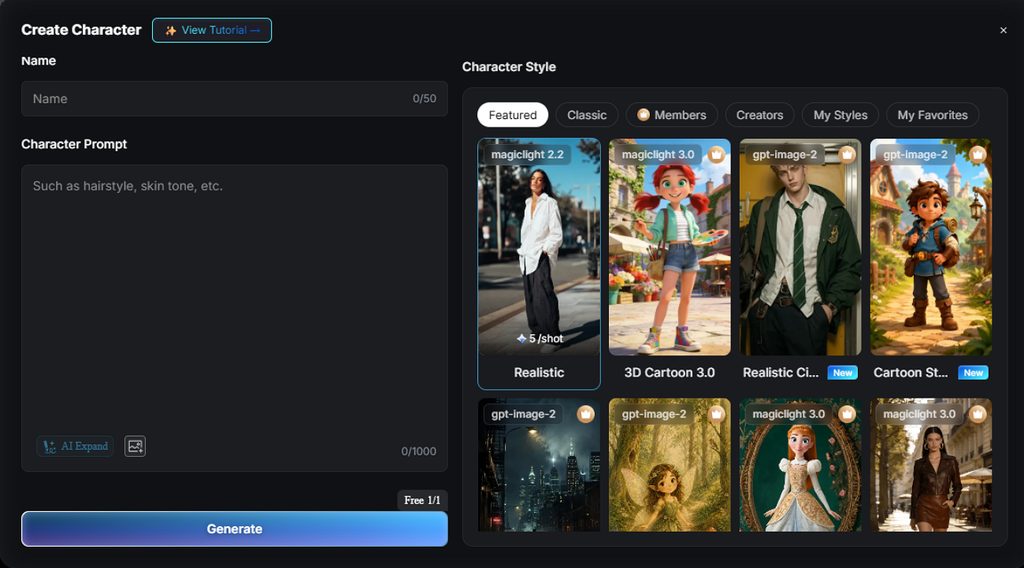
- Nano Storyboard Control: 生成每個鏡頭前,可改服裝、表情、動作和 50 種角色姿勢。
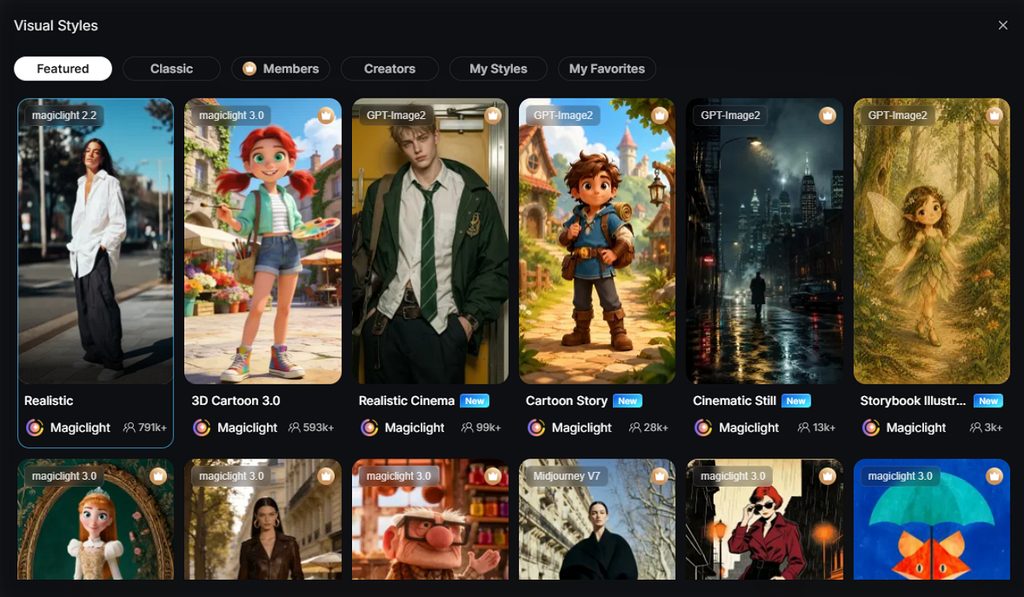
- Visual Style Library: 從四個模型組的 52 種風格裡選,包括 Anime、Realistic 和 3D Cartoon。
用 MagicLight 把音樂影片提示詞做成影片的詳細步驟
下面步驟帶你從歌曲設定走到成片。多數調整發生在分鏡階段,生成前就能改場景。
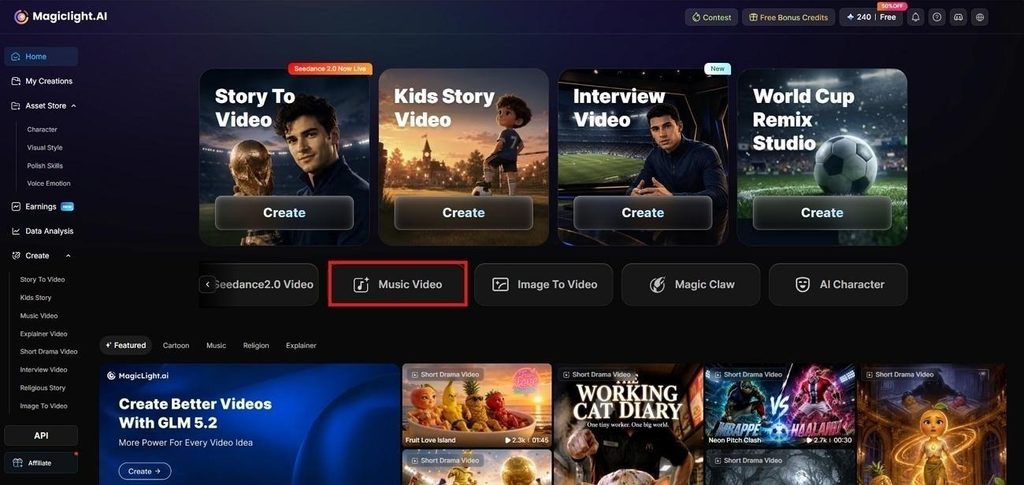
步驟 1. 打開 Music Video 工具
進入 MagicLight AI 控制台,選擇Music Video,開始新專案。
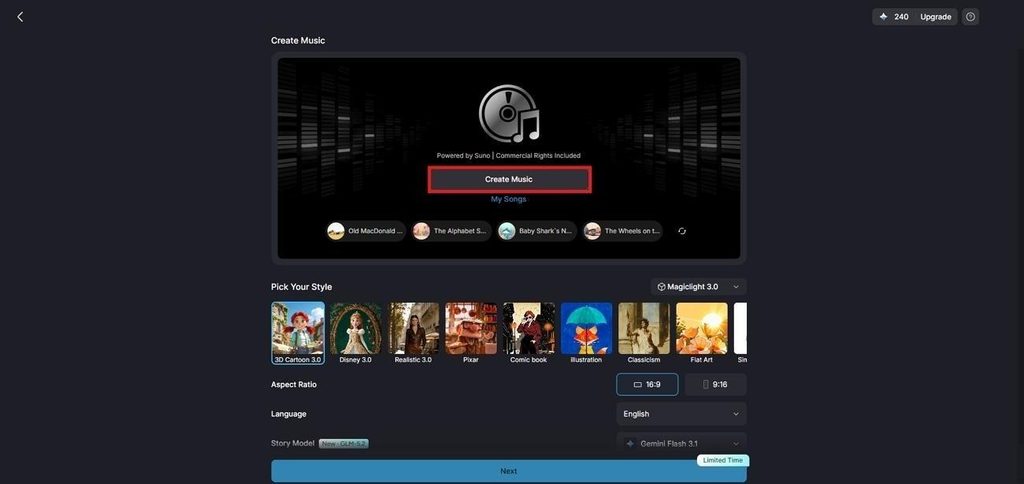
步驟 2. 開始創作音樂
點 Create Music,打開 MagicLight 由 Suno 驅動的音樂生成器,先做出配樂,再布置畫面。
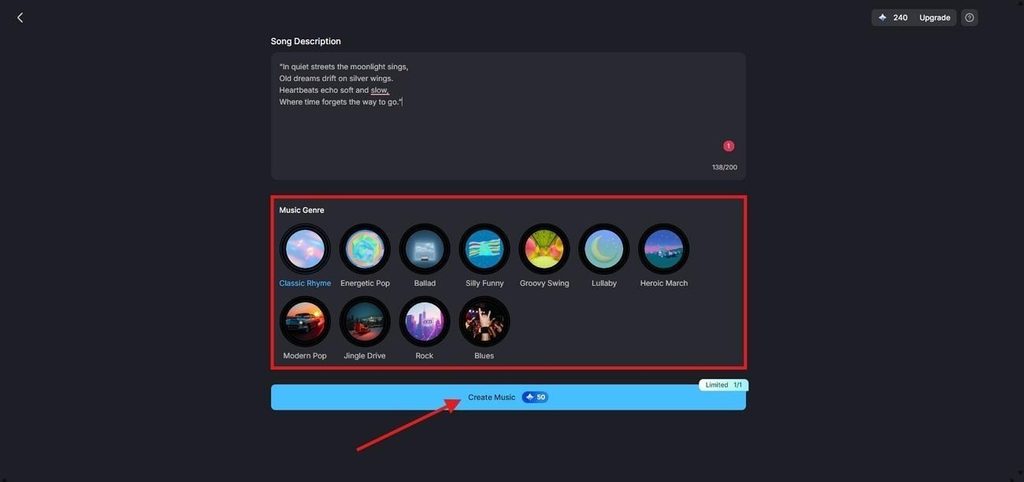
步驟 3. 填寫歌詞並選擇曲風
在提示詞框裡輸入歌詞,或描述你想要的歌。選擇 Music Genre,再點 Create Music 生成音軌。
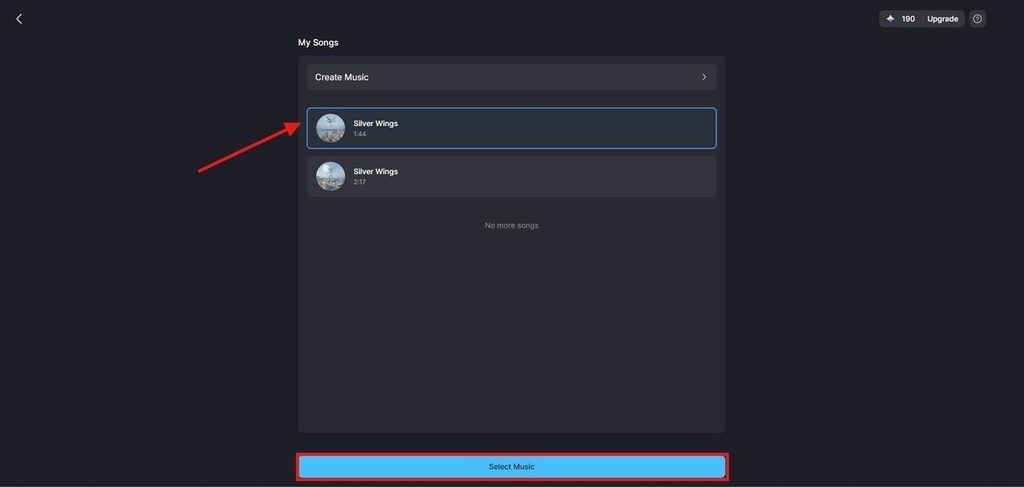
步驟 4. 選擇生成的歌曲
打開 My Songs,試聽生成版本。選中你更喜歡的那首,點 Select Music 繼續。
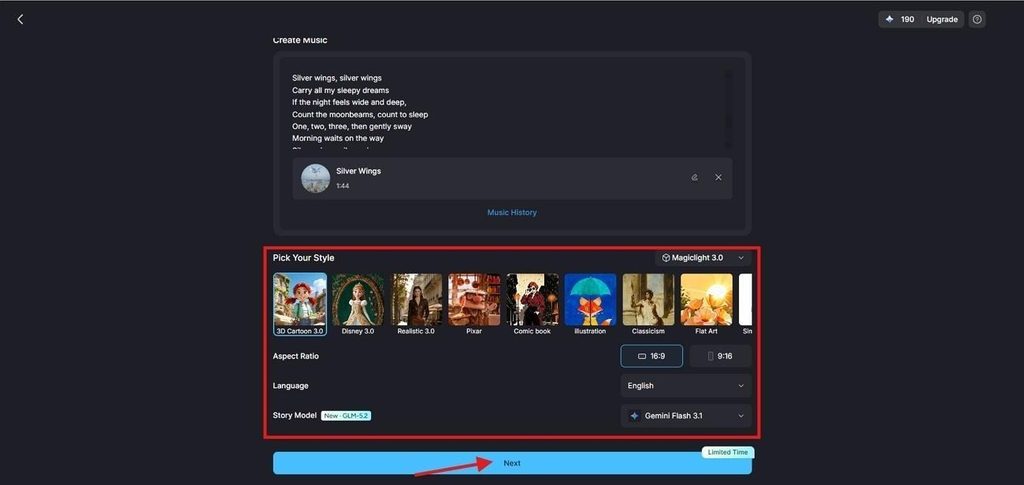
步驟 5. 設定影片風格
選擇匹配歌曲的 AI Story Model 和 Visual Style。設定 Aspect Ratio 和 Language,再點 Next。
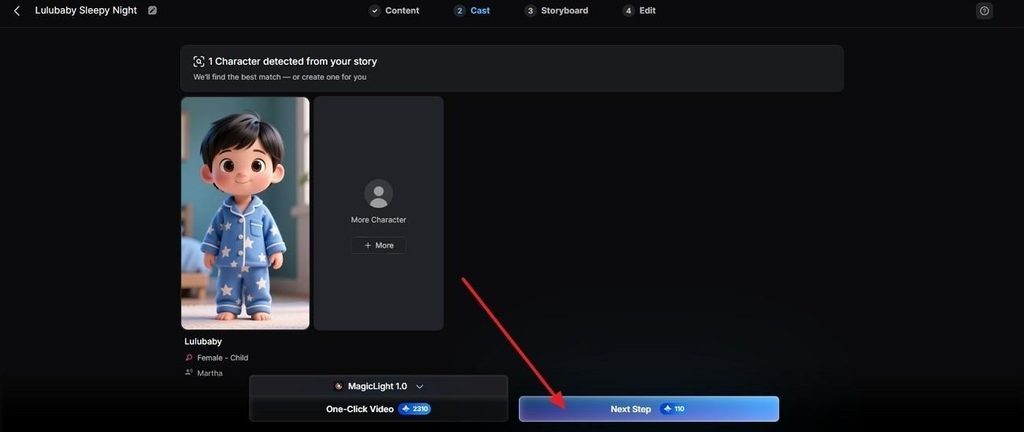
步驟 6. 選擇角色
查看 MagicLight 為專案建議的角色。選一個,打開 More Characters 看其他選項,或用已儲存角色,然後點 Next Step。
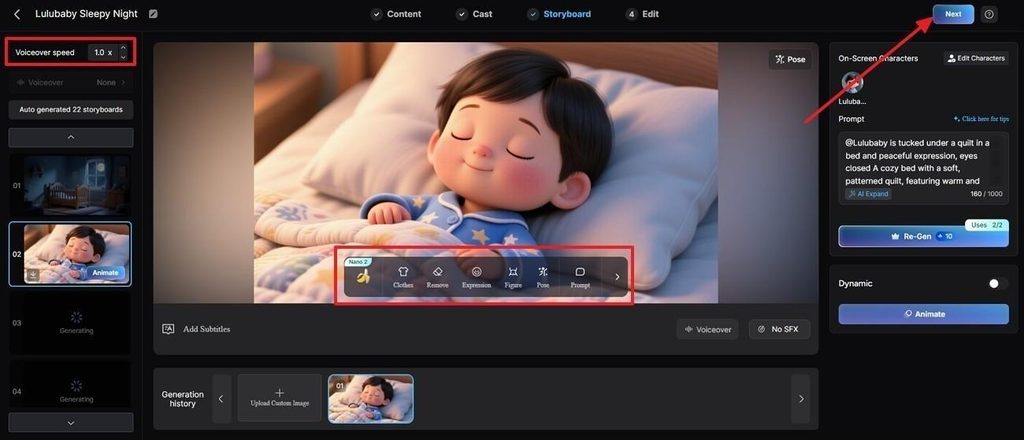
步驟 7. 打磨 Nano Storyboard
生成前在 Nano Storyboard 裡檢查每場。按需要調整服裝、表情、動作、場面方向,或從 50 種姿勢裡選。
第 3 部分. 為什麼用 MagicLight AI 做音樂影片?
好提示詞能引導單個鏡頭,但要把它們合成一支完整影片,光寫提示詞不夠。下面這些優勢,說明 MagicLight AI 如何把音樂影片提示詞從分散點子收成連貫成片。
1. 節奏來自歌曲本身
在提示詞裡寫一個 BPM,模型只拿到一個數字。MagicLight AI 會讀歌曲的節奏、情緒和能量,依真實音訊來卡場面時間。
2. 同一位表演者貫穿始終
分開生成的片段,角色的臉、服裝或其他細節容易換鏡頭就變。儲存過的角色跨場景可辨認,後續專案也能再出場。
3. 時長覆蓋整首歌
很多片段生成器只做短輸出,長歌就得拆成多次生成。支援最長 50 分鐘的影片,整首歌可以放進一個專案。
4. 匯出前就做完收尾
字幕、封面、畫幅和場面切換,都可以在匯出前處理。Nano Storyboard 也讓你能控姿勢、表情、音樂、時間和場面細節。
結語
好的音樂影片提示詞,節奏和描述一樣重要。先定畫幅、時長、速度和鏡頭數,再說明畫面怎麼跟著關鍵節拍變。這樣寫,這些提示詞就能輕鬆適配不同歌曲。要做整首歌專案,MagicLight AI 更實用,因為它直接從音訊出發。
音樂影片提示詞常見問題
1. 怎麼把一個音樂想法寫成影片提示詞?
從歌曲出發,而不是從畫面出發,先記下速度、情緒和副歌落點。把這些轉成格式頭,再寫主體,以及每個切點畫面怎麼變。
2. AI 音樂影片提示詞要寫多細?
細到覆蓋格式、主體、鏡頭和切點時間,通常 30 到 45 個詞就夠。再往後堆形容詞,只會互相搶權重,不會更精確。
3. 一則提示詞能做出完整音樂影片嗎?
很少能,因為多數生成器上限遠短於一首歌。MagicLight AI 從音軌出發,依音訊生成完整影片,而不是一串互不相干的片段。
4. 怎麼在 AI 音樂影片裡保持角色一致?
反覆提示每次都會換一張臉,所以一致性靠儲存,不靠描述。MagicLight AI 把表演者儲存一次,後續每場都用同一個人。
5. 用提示詞做音樂影片,最好用哪款 AI 工具?
MagicLight AI 最適合,因為場面時間是從歌曲本身讀出來的。提示詞仍然塑造單場畫面,這也是這些音樂影片提示詞繼續有用的原因。