Music video prompts can go wrong even when the generated footage looks polished. A clip may match the intended style but feel out of sync when the prompt lacks pacing, transitions, and visual direction. Putting tempo, shot count, and structure near the start makes those instructions easier to follow.
The top prompts for music videos define that framework first, then explain how shots, movement, or scenes should shift across important beats and sections.
Part 1. 20 Top Prompts for Music Videos to Try
The top prompts for music videos usually start with practical details before introducing the creative direction. Aspect ratio, duration, tempo, and shot count give the model a useful pacing framework. That structure can help scenes follow the track more closely without feeling like disconnected b-roll.
Negative instructions also matter when you want cleaner continuity across several generated shots. Flag morphing, costume flicker, lip-sync errors, and color shifts before generating the sequence.
Performance and Stage Prompts
Performance footage keeps the artist at the center, while lighting and camera distance shape the mood. The top prompts for music videos below use snare or kick cues to guide tighter, performance-led cuts:
- 16:9 | 15s | 128 BPM | 8 shots. Artist performs under a single overhead light with cuts landing on the snare. Crowd silhouettes fill the foreground as the camera pushes in across the chorus.
- 9:16 | 12s | 140 BPM | 10 shots. Rooftop set at dusk with city lights behind. Handheld camera circles the vocalist, cutting faster as the drop approaches.
- 16:9 | 20s | 92 BPM | 6 shots. Empty concert hall with one performer at a grand piano. Wide static frames hold through the verse, then a slow push begins at the chorus.
- 9:16 | 15s | 150 BPM | 14 shots. Warehouse rave with strobe lighting and fog. Silhouetted figures, rapid cuts on every kick, black and white with red accents.
Narrative and Story-Driven Prompts
With story-led videos, pacing works better when measured in musical bars rather than quick cuts. Prompts below use 4-beat holds and downbeat changes to keep each sequence easy to follow:
- 16:9 | 25s | 85 BPM | 7 shots. A figure walks a coastal road at dawn carrying a suitcase. Each shot holds four beats, and the final frame reveals an empty road behind them.
- 16:9 | 20s | 100 BPM | 8 shots. Two people miss each other repeatedly across a train station. Cuts land on the downbeat, and they finally meet as the chorus resolves.
- 9:16 | 15s | 120 BPM | 9 shots. A late-night drive through neon streets seen from the back seat. Reflections move across the window in time with the hi-hats.
- 16:9 | 20s | 75 BPM | 5 shots. A room slowly fills with water while the occupant stays seated. Long holds through the verse, then one sharp cut on the bridge.
Choreography and Movement Prompts
Dance-focused top prompts for music videos benefit from higher shot counts to capture both footwork and expression clearly. Alternating wide shots with extreme close-ups gives each musical phrase a greater visual change.
- 9:16 | 15s | 145 BPM | 14 shots. Hip-hop routine on a public street, wide shots cutting to extreme close-ups of footwork. Sharp kinetic movement matching a fast beat.
- 16:9 | 18s | 128 BPM | 10 shots. Contemporary dancers in an empty gallery with bare floors and white walls. Camera orbits slowly while cuts land on each phrase change.
- 9:16 | 12s | 160 BPM | 16 shots. Single dancer against a seamless backdrop, one shot per bar. Wardrobe color changes on every cut.
- 16:9 | 20s | 110 BPM | 8 shots. Group routine in a parking garage at night with headlights as the only source. Formation shifts on each chorus line.
Abstract and Visualizer Prompts
Without a performer, motion, color, and rhythm become the main visual anchors. The prompts below use tempo-led changes to keep abstract sequences organized and visually engaging:
- 16:9 | 15s | 130 BPM | seamless loop. Geometric shapes pulsing to the beat in three-dimensional space. Neon lines against black, hypnotic and continuous.
- 9:16 | 12s | 150 BPM | 12 shots. Liquid ink blooming through water with color shifting on every kick. Macro lens, high contrast against a black field.
- 16:9 | 20s | 70 BPM | 4 shots. Slow smoke drifting through a single beam of light. Minimal movement, long holds, muted grade throughout.
- 9:16 | 15s | 140 BPM | seamless loop. Artist performing inside a room built from LED screens, visuals morphing around them. Ultraviolet and white palette.
Location and Mood Prompts
Slower tracks leave more room for atmosphere, especially when each location holds long enough to register. These top prompts for music videos use measured pacing to turn setting, light, and tone into the main visual pull:
- 16:9 | 20s | 68 BPM | 5 shots. Empty desert highway at golden hour with heat haze rising. Static wide frames, each held for a full bar.
- 9:16 | 15s | 118 BPM | 9 shots. Rain on a city window at night with traffic blurred behind. Focus shifts on each snare hit.
- 16:9 | 18s | 95 BPM | 7 shots. Abandoned swimming pool at midday under harsh overhead sun. Slow dolly along the empty lanes.
- 9:16 | 12s | 135 BPM | 10 shots. Night market with hanging lanterns and rising steam. Handheld movement through the crowd, cuts on every second beat.
Note: One habit prevents more rework than most prompt adjustments. Mark the first downbeat, chorus entry, and each drop before writing, so every shot count has a clear musical cue.
Part 2. Turn Music Video Prompts Into AI Videos With MagicLight
The 20 strong prompts still produce 20 separate clips, each timed to a tempo written in by hand. No performer carries between them, and none is locked to a real track. MagicLight AI addresses that gap by letting you generate the song first, then create the visuals around it. Enter your song idea, choose a genre, and create the track before shaping its video direction.
From there, the top prompts for music videos can guide style, framing, mood, and scene ideas. MagicLight uses the track’s tempo, mood, and energy to shape scenes around the music while keeping characters consistent across shots.
Key Features of MagicLight AI
These 5 capabilities matter most when a song rather than a script drives the output. Each covers a stage that clip generators leave the user to solve manually.
- Suno Music Generation: MagicLight AI uses Suno-powered music generation to turn song ideas into tracks inside the same video workflow.
- Genre and Song Prompting: Describe the track in up to 200 characters, choose a genre, or start from 15 prebuilt songs.
- Reusable Character Profiles: Create performers with prompts up to 1,000 characters, save them, and use the same design again later.
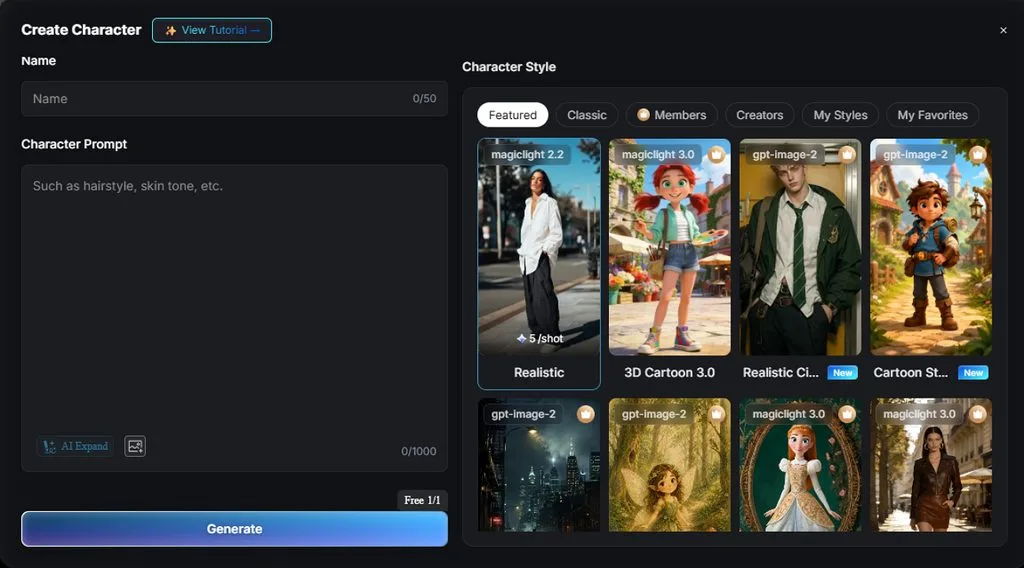
- Nano Storyboard Control: Change wardrobe, expressions, movement, and 50 character poses before generating each shot.
- Visual Style Library: Choose from 52 styles across four model groups, including Anime, Realistic, and 3D Cartoon.
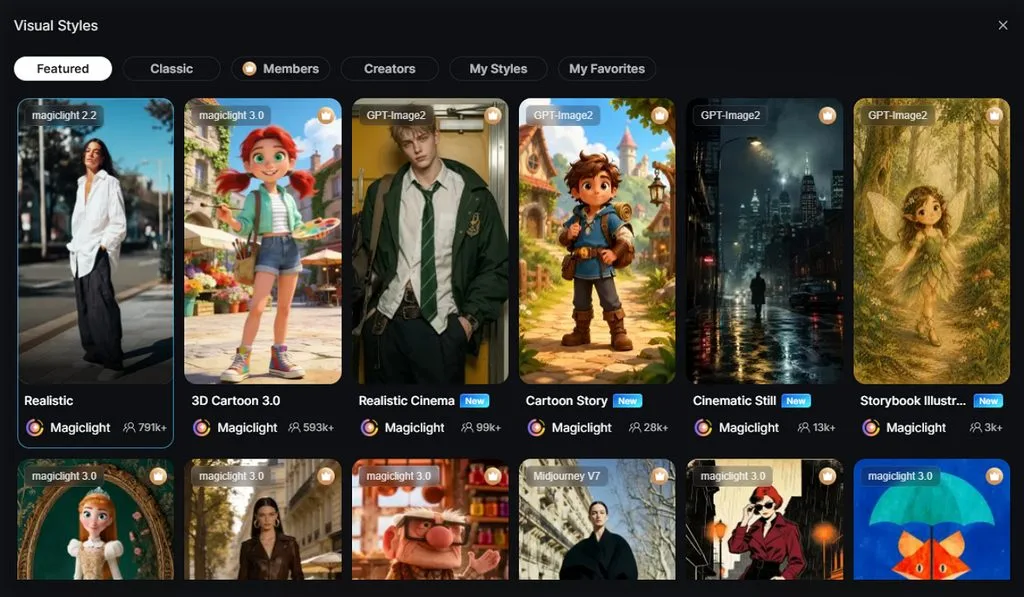
Detailed Guide to Turn Music Video Prompts Into Videos Using MagicLight
The steps below take your music video prompts from song setup to the final video. Most changes happen at the storyboard stage, where scenes can be adjusted before generation.
Step 1. Open the Music Video Tool
Go to the MagicLight AI dashboard and select Music Video to start a new project.
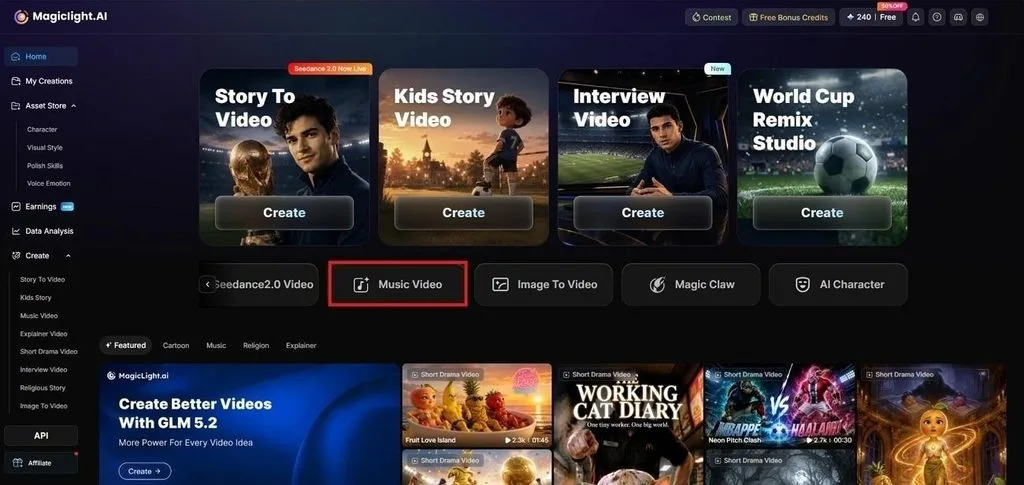
Step 2. Start Creating the Music
Click Create Music to open MagicLight’s Suno-powered music generator and create the soundtrack before setting up the visuals.
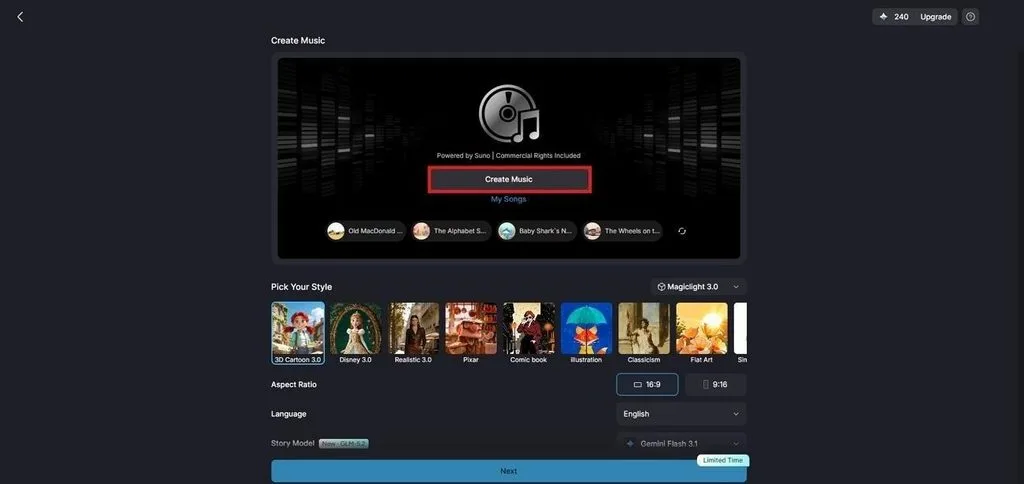
Step 3. Add Lyrics and Choose a Genre
Enter your lyrics or describe the song you want in the prompt field. Choose a Music Genre, then click Create Music to generate the track.
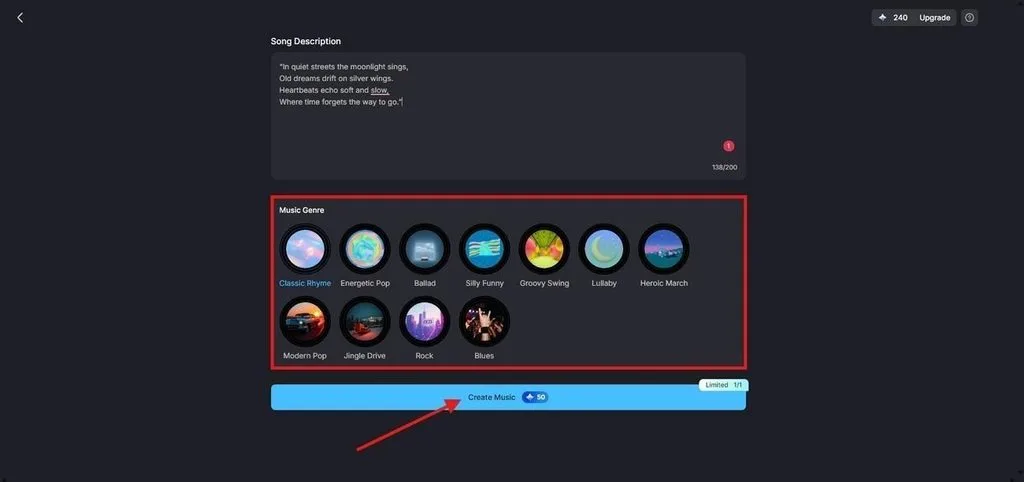
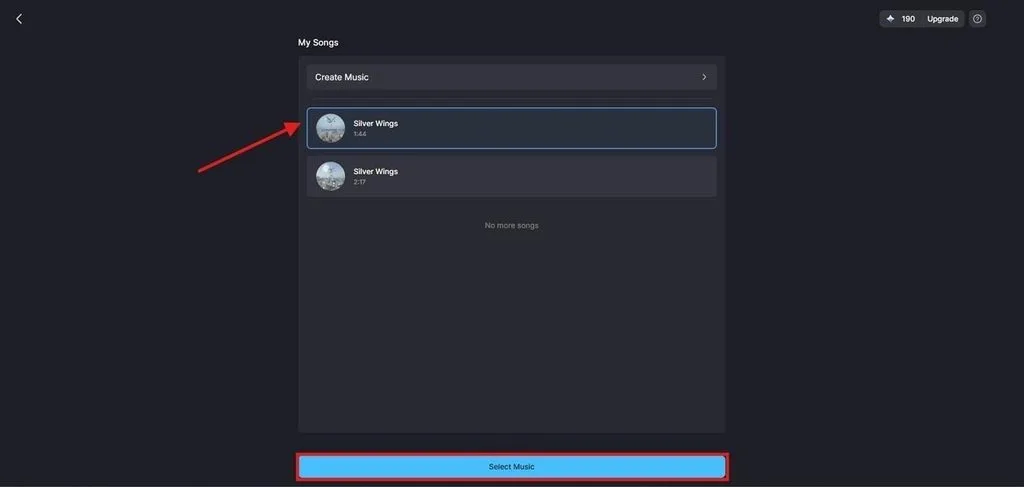
Step 4. Select a Generated Song
Open My Songs and listen to the generated versions. Choose the track you prefer, then click Select Music to continue.
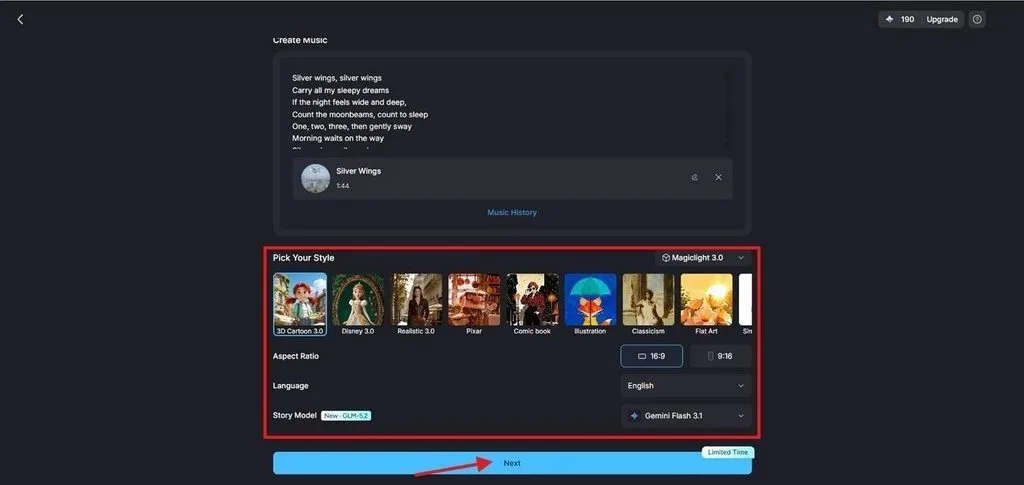
Step 5. Set the Video Style
Choose an AI Story Model and Visual Style that match the track. Set the Aspect Ratio and Language, then click Next.
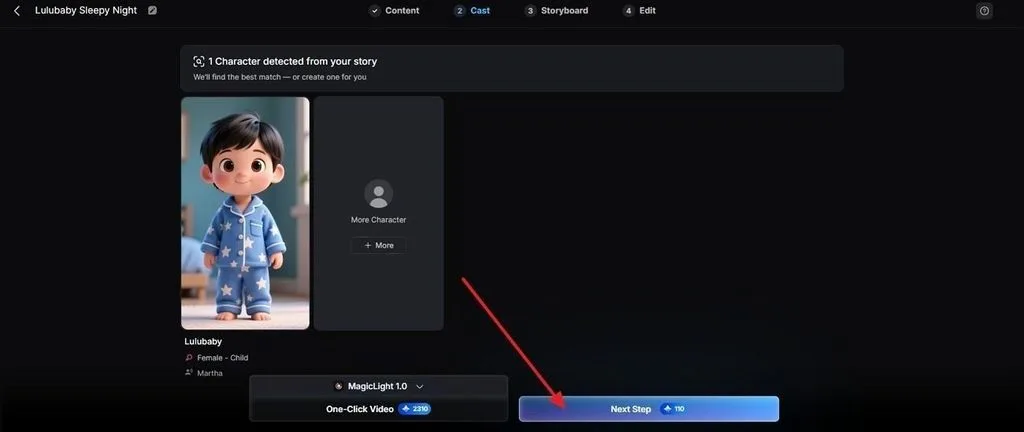
Step 6. Choose a Character
Review the characters MagicLight suggests for the project. Select one, open More Characters for other options, or use a saved character before clicking Next Step.
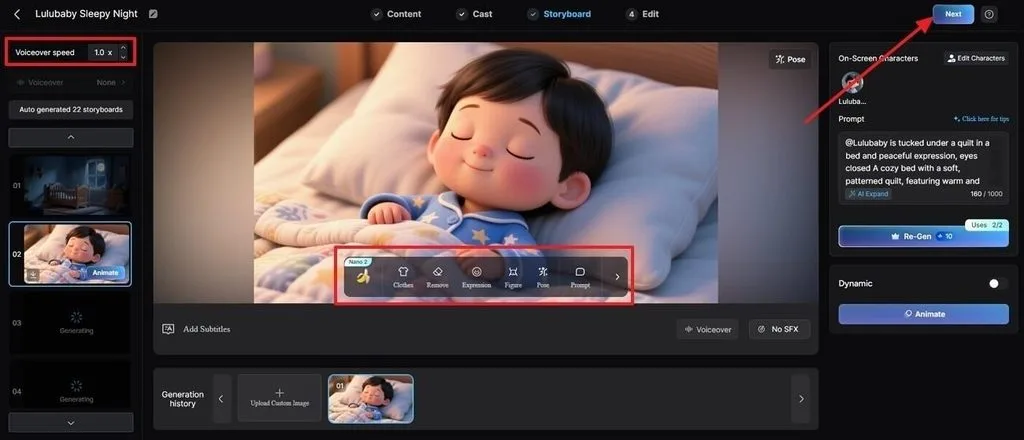
Step 7. Refine the Nano Storyboard
Review each scene in the Nano Storyboard before generation. Adjust clothing, expressions, movement, scene direction, or choose from 50 poses where needed.
Part 3. Why Use MagicLight AI for Music Video Creation?
Strong prompts can guide individual shots, but turning them into one complete video takes more than prompt writing. The advantages below show how MagicLight AI helps the top prompts for music videos move from separate ideas into a connected final video.
1. Timing Comes From the Track
Writing a BPM into a prompt only gives the model a number to interpret. MagicLight AI reads the song’s rhythm, mood, and energy to guide scene timing around the actual audio.
2. One Performer Throughout
Separate clip generations can change a character’s face, clothing, or other details between shots. Saved characters stay recognizable across scenes and can return in later projects.
3. Runtime That Covers a Song
Many clip generators focus on short outputs, forcing longer tracks into several separate generations. Support for videos up to 50 minutes gives a full song enough room inside one project.
4. Finishing Applied Before Export
Subtitles, cover art, aspect ratio, and scene changes can all be handled before export. Nano Storyboard also gives you control over poses, expressions, music, timing, and other scene details.
Conclusion
Strong music video prompts depend on timing as much as description. Set the aspect ratio, duration, tempo, and shot count first, then explain how visuals change across key beats. Written this way, the top prompts for music videos can adapt easily to different tracks. For full-song projects, MagicLight AI is a practical option because it works from the audio itself.
FAQs About Music Video Prompts
1. How do I turn a music idea into a video prompt?
Start from the track rather than the visuals, noting tempo, mood and where the chorus lands. Convert those into a format header, then describe the subject and what changes at each cut point.
2. How detailed should an AI music video prompt be?
Detailed enough to cover format, subject, camera and cut timing, which usually lands between 30 and 45 words. Extra adjectives past that point compete with each other rather than adding precision.
3. Can I use one prompt to create a full music video?
Rarely, since most generators cap well below a song's length. MagicLight AI works from the track instead, generating a complete video timed to the audio rather than a series of separate clips.
4. How can I keep characters consistent in an AI music video?
Repeated prompting produces a different face each time, so consistency needs storage rather than description. MagicLight AI saves a performer once and returns that exact figure in every later scene.
5. What is the best AI tool for creating music videos from prompts?
MagicLight AI suits the job best, since scene timing is read from the song itself. Prompt wording still shapes individual scenes, which is where the top prompts for music videos continue to earn their place.

![How to Make a Reaction Video with AI Tool [Guide 2026]](https://magiclight.ai/wp-2/wp-content/uploads/ai-faceless-reaction-video-guide-300x169.webp)