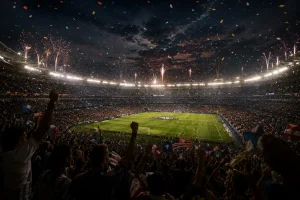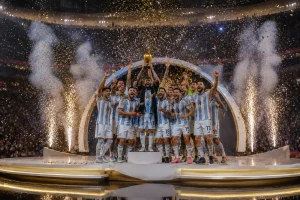
You are watching a football match when the final whistle blows, and your favorite team lifts the World Cup trophy in a storm of celebrations. Now imagine turning that exact moment into a cinematic video that looks like a professional sports broadcast. Creating such content has now become easier with tools that transform simple ideas into stunning visuals.
Most users want to create such videos but do not know how to give commands to the tool. They struggle with writing prompts that define their needs and requirements. In this article, you will learn 15 of the best World Cup victory video prompts that will help you generate videos in no time.
Part 1. 5 FIFA World Cup Victory Video Prompts for Final Match Wins
By carefully structuring your ideas, you can turn ordinary match highlights into viral videos. Provided below are the top 5 prompts for generating final match win videos. Use these World Cup victory video prompts to generate visual content according to your customization:
1. Dramatic Last-Minute Winning Goal Scene
Create a cinematic World Cup final moment where a striker scores a decisive goal in the dying seconds of the match. The stadium erupts instantly as fans wave flags and celebrate wildly. Confetti explodes into the air as players rush toward the scorer in emotional celebration.
2. Trophy Lift Celebration in Slow Motion
Craft a powerful slow-motion scene showing the winning captain lifting the World Cup trophy above his head. Golden lights reflect across the stadium while teammates gather around in joy. The moment feels emotional, grand, and unforgettable.
3. Stadium Explosion After Final Whistle
Generate a high-energy post-match scene immediately after the referee blows the final whistle. Players drop to their knees in disbelief and joy as fireworks light up the night sky. The entire stadium becomes a wave of celebration and sound.
4. Emotional Player Victory Reaction Scene
Create a close-up emotional shot of a footballer crying tears of joy after winning the World Cup. Teammates quickly surround him with hugs and cheers. The scene captures raw emotion, relief, and pure happiness.
5. National Team Parade Celebration Scene
Craft a vibrant victory parade featuring the winning team riding through streets on an open-top bus. Crowds line the roads, waving flags and chanting their names. The entire city is filled with music and celebration.
Part 2. 5 FIFA World Cup Victory Video Prompts for Team Celebrations
The real magic begins with team celebrations that capture unity after a win. These moments are perfect for cinematic storytelling because they show players sharing their victory with teammates. The following prompts are designed to help you generate powerful World Cup victory video prompts scenes focused on team celebrations:
1. Locker Room Victory Celebration Scene
Create a cinematic locker room scene where the winning team celebrates their World Cup victory with loud cheers and music. Players spray water, hug each other, and dance in pure joy. The atmosphere is energetic, emotional, and full of unforgettable excitement.
2. Coach and Team Emotional Hug Moment
Craft a heartfelt moment where the coach embraces every player after winning the final match. Tears of pride and relief are visible as the entire squad gathers around him. The scene reflects leadership, teamwork, and emotional connection.
3. Team Flag Celebration on the Pitch
Generate a powerful on-field celebration where players wrap themselves in their national flag after victory. They walk together around the stadium waving to fans. The moment feels patriotic, proud, and deeply emotional.
4. Victory Dance Circle Celebration Scene
Create a joyful scene where players form a circle and perform a spontaneous victory dance on the pitch. The stadium echoes with cheers while teammates laugh and celebrate together. The energy feels vibrant, fun, and unforgettable.
5. Team Photo with World Cup Trophy Scene
Craft a cinematic team photo moment where all players gather around the World Cup trophy on the field. Cameras flash as they pose with smiles, hugs, and raised hands. The scene captures unity, pride, and historic achievement.
Part 3. 5 FIFA World Cup Victory Video Prompts for Player Focus Moments
Individual player moments often become the most memorable highlights of a World Cup victory. These scenes capture personal emotions and the reactions of players who have worked for years. Provided below are the World Cup victory video prompts for player-centered moments:
1. Star Player Holding the Trophy Alone
Create a cinematic scene of the tournament's star player standing alone on the pitch while holding the World Cup trophy. Stadium lights shine brightly as confetti slowly falls around him.
2. Emotional Tears of Victory Moment
Craft a close-up shot of a player shedding tears of joy after securing the World Cup title. His face reflects years of hard work, sacrifice, and determination.
3. Captain's Inspirational Celebration Scene
Generate a powerful scene featuring the team captain celebrating with raised arms in front of thousands of supporters. The crowd chants his name as he proudly displays the trophy.
4. Golden Ball Winner Recognition Moment
Create a dramatic award ceremony where the tournament's best player receives the Golden Ball trophy. Bright lights illuminate the stage while photographers capture the historic moment.
5. Victory Lap Around the Stadium
Craft a cinematic sequence showing a player carrying the World Cup trophy while jogging around the stadium. Fans reach out and wave flags as he acknowledges their support.
Part 4. Generate FIFA World Cup Victory Videos With MagicLight AI
MagicLight AI is a powerful AI-powered video creation platform designed to transform simple ideas and scripts into cinematic-quality videos within minutes. It is especially useful for creating engaging sports content like FIFA World Cup victory video prompts edits, where storytelling needs to work. Its Story-to-Video function allows creators to turn football match narratives into dynamic visual stories.
Plus, it supports 11 different languages to make content for global audiences. The built-in background music generation adds emotional depth to recreate the emotional intensity of the stadium. Users can simply input a text script or prompt, and the tool automatically generates a complete video sequence with scenes.
Key Features
- Multiple Generation Models: This feature allows users to select different generation models such as Gemini 3 and Veo 4. Each model enhances visuals differently to make moments impactful.
- Caption Generation: The tool adds text overlays to important football moments. This makes the World Cup Victory Video more engaging and easier for global audiences to follow.
- Character Generation and Customization: Users can design players with detailed customization options. It lets users adjust facial expressions and other attributes according to their preferences.
- AI Voiceover: This feature converts scripts into energetic football commentary. It can mimic live match excitement or emotional post-match narration with accuracy.
- Aspect Ratio Selection: Users get the ability to select different orientations according to their choice. It ensures your World Cup Victory Video fits perfectly on different platforms.
Comprehensive Steps to Generate FIFA World Cup Victory Videos
MagicLight AI allows users to create videos from photos and text prompts. Follow the steps mentioned below to learn how to create videos with realistic scenes and characters using MagicLight AI:
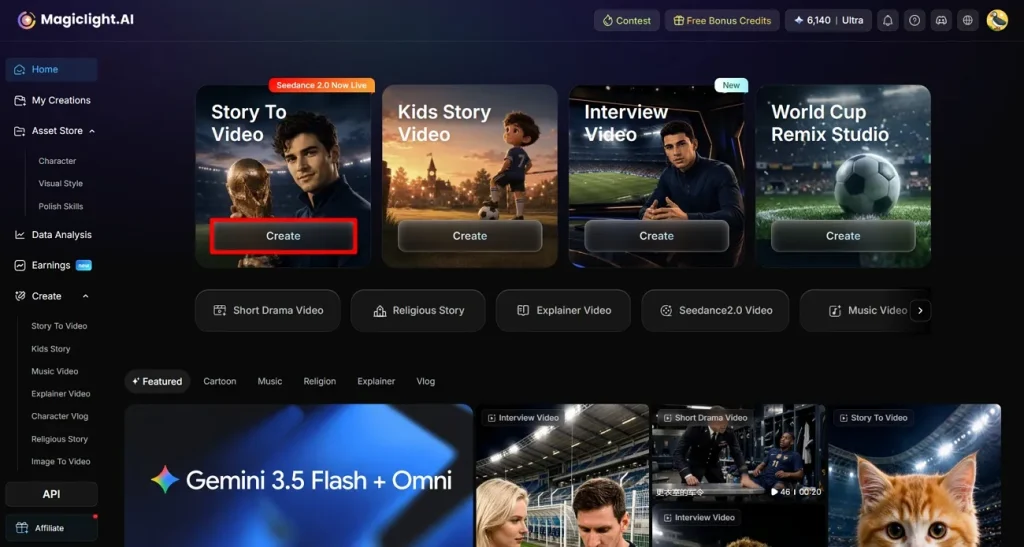
Step 1. Start a New Project Using the Create Option
Launch MagicLight AI in your browser and open the Story to Video section from the main dashboard. Tap on the Create button to initiate a fresh project.
Step 2. Set Up Your FIFA Video Preferences
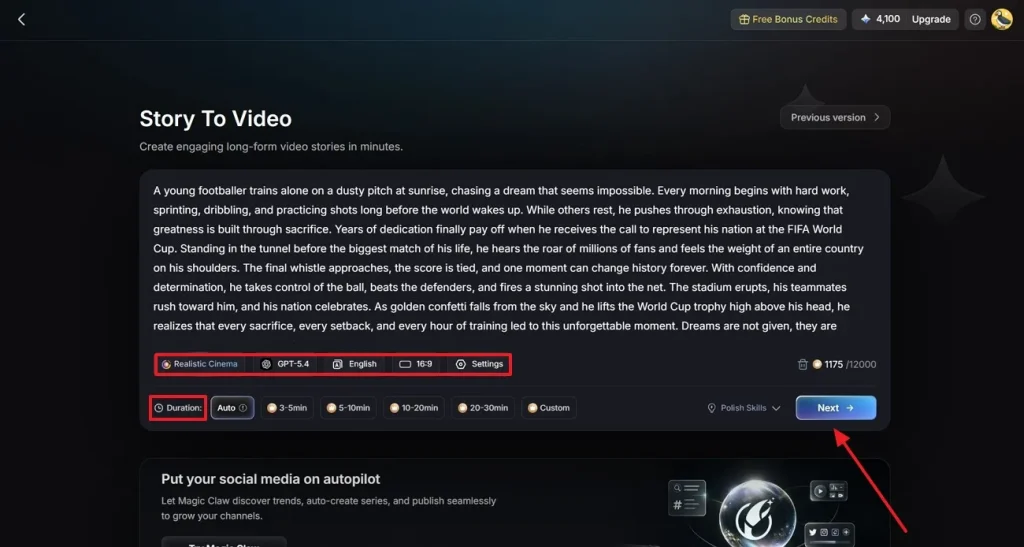
Enter your FIFA World Cup script into the text input area provided. Choose a suitable content type that matches your video style. Select an AI generation model and adjust the aspect ratio according to your preferences. Define the video length and press the Next button once all the settings are configured.
Step 3. Review and Refine Generated Story Scenes
The tool will break your script into multiple scenes and create a visual breakdown of the entire story. Carefully review each scene to ensure the flow of events matches. Click the Next button once the storyline feels smooth.
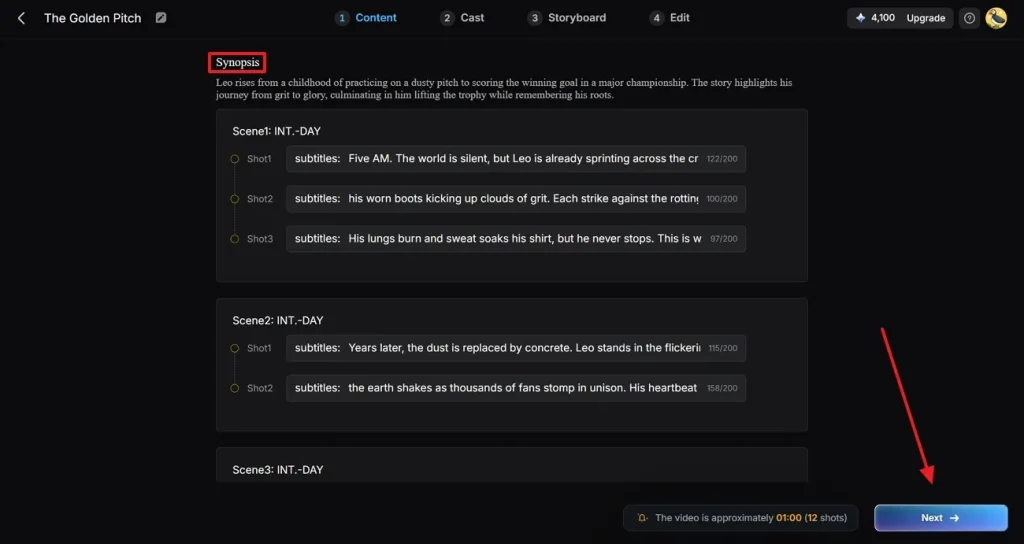
Step 4. Select and Add Football Characters
Choose a football character that aligns with your FIFA video concept from the available library. You can also access your saved characters or edit them in the My Character section for a more personalized look. If your story involves multiple players or crowd scenes, add additional characters using the More Character option. Once done, click the Next button to continue.
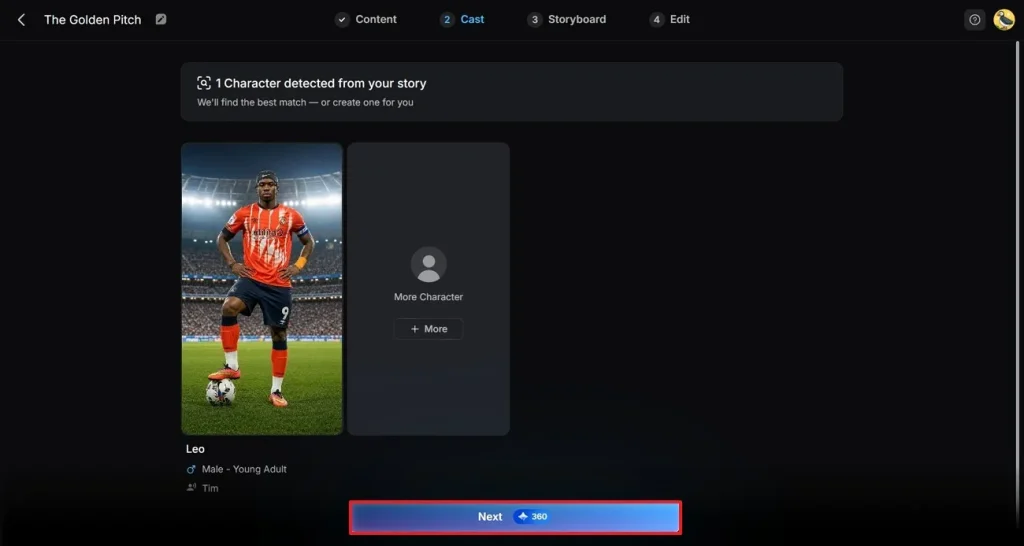
Step 5. Modify Character Look and Movements
Review the look of the character and make changes to its clothes according to your preferences or remove any unwanted objects. You can also add voice effects to give the video a more immersive touch. Review how characters appear across all scenes to ensure consistency throughout the video. Click the Next button in the top-right corner once you are satisfied with the character and scenes.
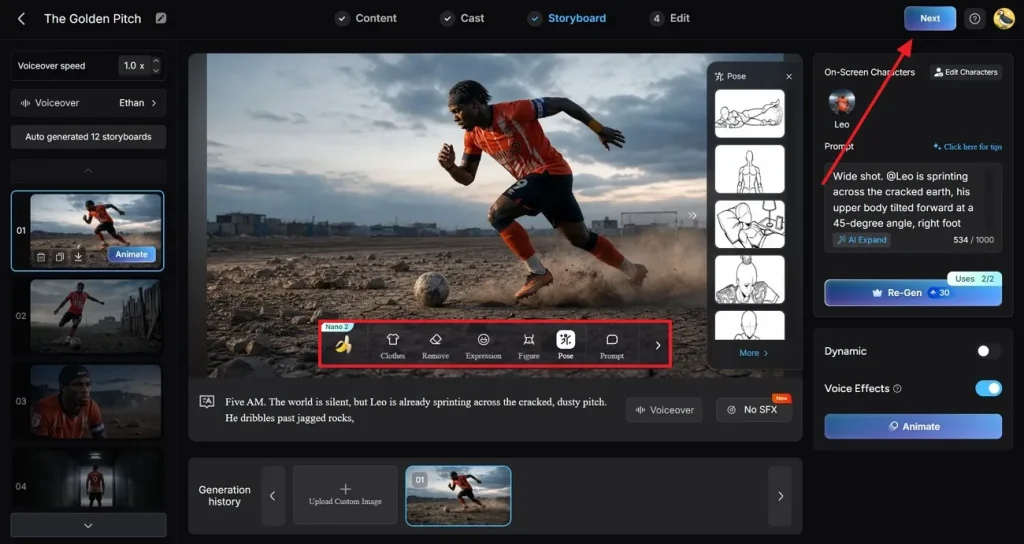
Step 6. Add Captions and Background Music
In the following interface, insert the captions for the spoken words in the video. Pick from available caption styles to match the tone of your FIFA World Cup Victory Video. Then select a suitable background music track to boost excitement. Click the Generate button to let the tool execute the process.
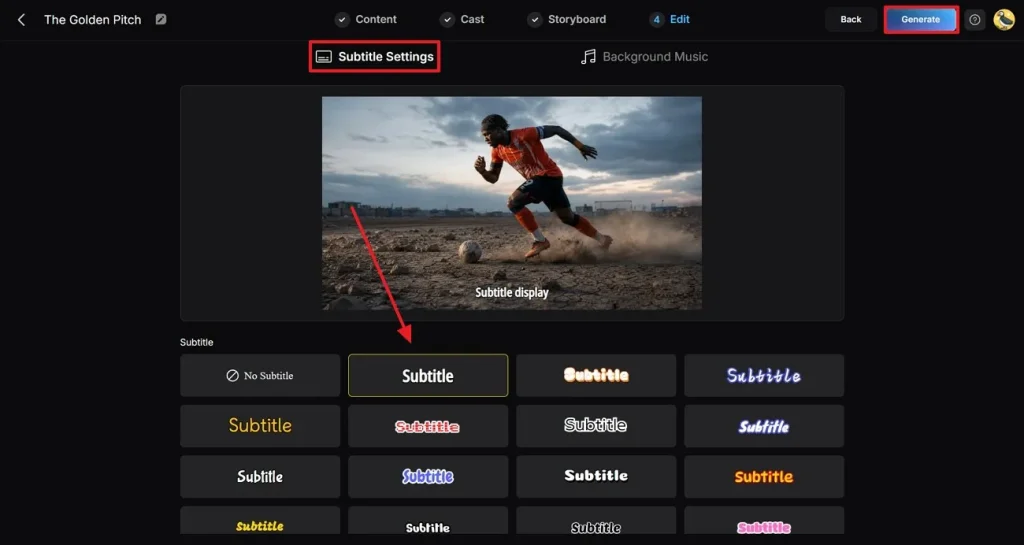
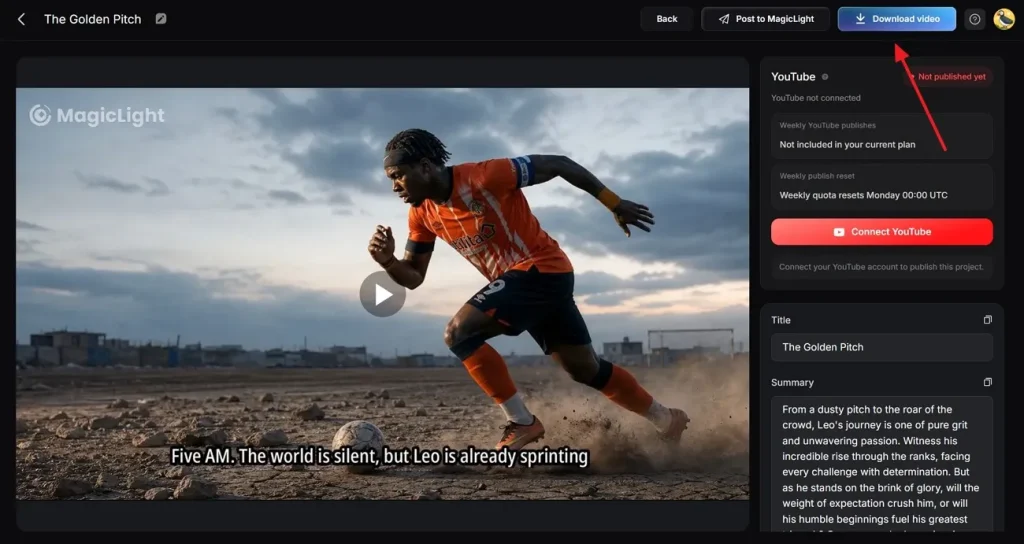
Step 7. Review Final Output and Download Video
Preview the finished video to check all elements including visuals and audio. Press the Download button located at the top-right corner of the interface once you are satisfied with the results.
Conclusion
To conclude, this article discussed the top World Cup victory video prompts that you can use to generate videos. These prompts help you craft content when you do not know where to start. One such tool that will help you convert these prompts into videos is MagicLight AI. The story-to-video feature of the tool allows users to convert their text prompts into compelling visual content.
FAQs on FIFA World Cup Victory Video Prompt
1. What tools are best for World Cup video generation?
MagicLight AI is one of the best tools for creating World Cup video content because it turns scripts into cinematic football scenes. It offers story-to-video generation and customizable characters for realistic match storytelling. This makes it ideal for producing high-quality World Cup Victory Video edits quickly.
2. Can MagicLight AI create multi-scene victory videos?
The platform can easily generate multi-scene videos by breaking your script into structured segments. This allows you to build full World Cup celebration videos with goals and trophy moments.
3. What types of World Cup victory videos perform best online?
Videos that include strong storytelling and crowd reactions get the most attention online. Using tools like MagicLight AI helps create visually rich and shareable football content. Users can generate videos with different aspect ratios and durations according to the platform.
4. How do I create AI-generated football celebration videos?
Start by writing a football-themed script and entering it into MagicLight AI. Choose your video style and other attributes like duration. Generate the character using the advanced technology of the tool and export your video to your device.