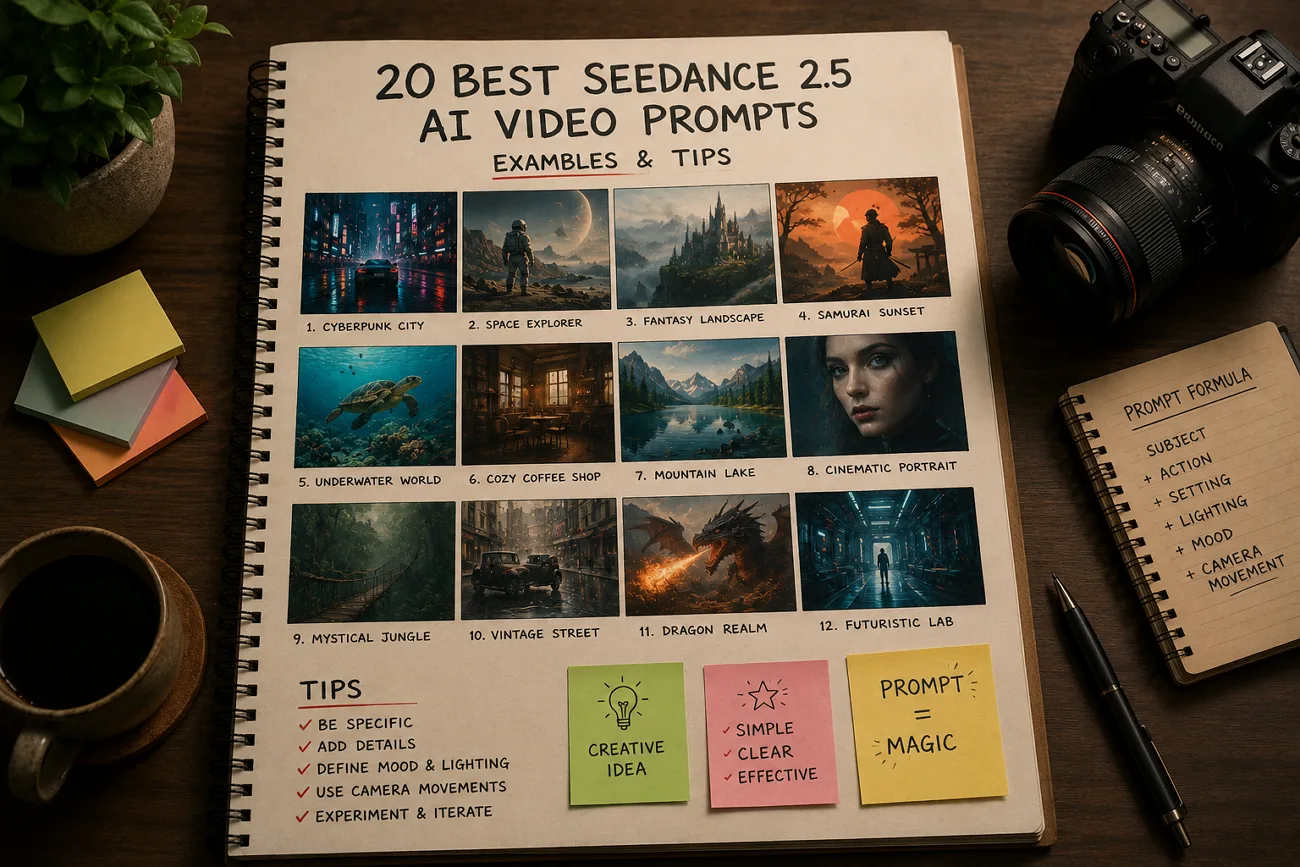
30秒の動画生成は5秒版よりコストが高く、弱いプロンプトは高くつきます。Seedance 2.5 は Seedance 2.0 のプロンプト文法を引き継ぎますが、情報が厚いほど結果は良くなりやすいです。このガイドでは、コピーもカスタムもできる Seedance 2.5 AI動画プロンプトを5カテゴリ・20本紹介します。モデルがプロンプトをどう読むか、生成を無駄にしがちな失敗もあわせて解説します。
パート1. Seedance 2.5 プロンプトの仕組み
Seedance 2.5 でも、AI動画づくりの基本的なプロンプト文法は以前と近いです。ただし、より正確で良い結果を出すには、各プロンプトにもう一段のディテールが必要です。
Seedance 2.5 のプロンプトが Seedance 2.0 と違う点
基本構造と参照システムは同じなので、Seedance 2.0 向けのプロンプトの多くは Seedance 2.5 でも使えます。新しいモデルは、その上にいくつかの改善を重ねています。
- 時間構造:30秒の動画は、ひとつの総論より、シーンや段階ごとに書いた方がうまくいきます。
- 参照の役割:参照素材は最大50点まで使えます。説明なしで足すのではなく、それぞれに目的を持たせましょう。
- 編集指示:選んだワークフローの編集機能に応じて、変更内容をより精確に指定できます。
強いプロンプトの核になる要素
Seedance 2.5 のAI動画プロンプトが失敗するのは、言葉が足りないからではなく、重要な情報が抜けている場合がほとんどです。次の5要素を、この順で毎回入れてください。
- 被写体:主役やシーンをはっきり書き、映像の一貫性を保ちます。
- 動き:何が、どの速さで動くかを、形容詞ではなく動作として書きます。
- カメラ:dolly-in や locked-off のように、動きはひとつだけ、名前で指定します。
- 照明:光の方向、質、色を書いて、雰囲気をつくります。
- タイミング:10秒を超える動画では、各シーンや動作がいつ起きるかを示します。
パート2. カテゴリ別 Seedance 2.5 プロンプト例
各カテゴリは、まずスタイルを説明し、コピーできる Seedance 2.5 プロンプトを4本紹介します。被写体と舞台は自由に変えてください。構造が結果を支えます。
シネマティック/ストーリー系プロンプト
30秒の長めの動画は、プロンプトで各シーンを先にはっきり書くと、物語がより伝わります。
次の英語プロンプトはそのまま貼り付けてください:
プロンプト 1: 0-10s: a lone figure walks a rain-soaked alley, neon reflections underfoot. 10-20s: they stop and look up as the light shifts. 20-30s: slow pull back reveals the empty street.
プロンプト 2: 0-10s: sunlight crosses a dusty archive room. 10-20s: a hand lifts one folder from a shelf. 20-30s: camera holds as the page turns and dust catches the beam.
プロンプト 3: 0-10s: two figures sit across a diner booth in silence. 10-20s: one slides an envelope forward. 20-30s: the other leaves, the bell chiming as rain starts.
プロンプト 4: A continuous handheld shot following a dancer through a warehouse, dust in the light beams, camera circling as the tempo builds, ending on a held pose in silhouette.
商品/EC向けプロンプト
Seedance 2.5 で商品動画を出すときは、製品のディテールをはっきり書くほど画面がきれいになります。表面、光の向き、カメラワークはひとつに絞りましょう。
次の英語プロンプトはそのまま貼り付けてください:
プロンプト 1: 0-10s: slow dolly-in on a matte black smartwatch rotating on a stone pedestal, studio haze. 10-20s: the display wakes. 20-30s: rim light sharpens across the case edge.
プロンプト 2: A ceramic coffee cup on a linen surface, steam rising, morning light from the left, camera drifting slowly right as a hand enters frame and lifts it away.
プロンプト 3: 0-10s: a sneaker suspended against a seamless coral backdrop. 10-20s: it rotates to reveal the sole. 20-30s: it drops and settles, a small puff of dust catching the light.
プロンプト 4: Macro shot traveling across a perfume bottle, refracted light moving through the glass, background falling into soft bokeh, camera easing back to reveal the full silhouette.
キャラクター/セリフ系プロンプト
Seedance 2.5 は、同じプロンプトから映像と音声を同時に生成します。セリフを引用符に入れると、対話がはっきりし、結果も良くなります。
次の英語プロンプトはそのまま貼り付けてください:
プロンプト 1: Close-up of a woman in a control room, lit by monitor glow. She says, 'We are not going to make the window.' Ambient hum, no music, tight framing.
プロンプト 2: Two colleagues walk a hospital corridor. One says, 'The results came back this morning.' Camera tracks alongside at shoulder height, fluorescent light, footsteps and distant paging audible.
プロンプト 3: A chef faces the camera in a busy kitchen and says, 'Everything here is made the same day.' Warm overhead light, background staff blurred, natural room noise throughout.
プロンプト 4: 0-10s: an older man settles into a workshop chair. 10-20s: he says, 'I built this bench in 1974.' 20-30s: camera drifts across the worn surface.
自然・旅・シネマティックBロールのプロンプト
自然や旅のBロールは、カメラワークをひとつに、照明をはっきり書くだけで見栄えが上がります。
次の英語プロンプトはそのまま貼り付けてください:
プロンプト 1: Aerial shot drifting over a pine valley at dawn, mist sitting between the ridges, slow forward push, cool blue light warming as the sun clears the treeline.
プロンプト 2: Waves breaking against black volcanic rock in slow motion, spray catching low afternoon light, static locked-off camera, deep contrast between water and stone, horizon held level.
プロンプト 3: Handheld walk through a night market, lanterns overhead, camera moving past food stalls, faces passing in and out of focus, warm ambient glow and steam rising from griddles.
プロンプト 4: 0-10s: wide of a desert road at golden hour. 10-20s: a car passes camera left to right. 20-30s: the dust settles and the road empties again.
参照素材と動画編集のプロンプト
動画プロンプトを書く前に、各参照素材の目的をはっきりさせてアップロードしてください。シーンとカメラを書く前に、それぞれが何を制御するかを説明します。
次の英語プロンプトはそのまま貼り付けてください:
プロンプト 1: Use the uploaded product image as the hero object and the uploaded clip as a motion reference. Match its camera speed exactly while keeping the product centered throughout the shot.
プロンプト 2: @ref1 as the lead character, @ref2 as the environment, @ref3 for lighting mood. Place the character walking through that space, camera tracking behind at waist height.
プロンプト 3: Edit at the 18-second mark only: change the character's jacket from gray to burgundy. Leave camera movement, lighting, and every other element in the take unchanged.
プロンプト 4: Swap the background reference for the newly uploaded image and regenerate only what depended on it. Keep the character performance, framing, and audio exactly as approved.
パート3. Seedance 2.5 プロンプトでよくある失敗
Seedance 2.5 のAI動画プロンプトを良くするには、まずよくある失敗を避けることです。それぞれの問題と直し方を見ていきましょう。
- 1本のプロンプトに指示を詰め込みすぎる:カメラ、照明、スタイルの指示が多すぎると、モデルが混乱し、画質も落ちます。被写体・動き・シーンのスタイルは、各プロンプトでひとつずつにしましょう。
- 動きの動詞が曖昧:moves や interacts では、何が起きるのか伝わりません。reaches、tilts、steps back、sets down のように具体的な動作を使ってください。
- 矛盾するカメラ指示を混ぜる:1本のプロンプトに異なるカメラワークがあると、モデルは衝突した指示を受け取ります。生成ごとに動きはひとつ選び、別の動きは別バージョンに回します。
- 役割を付けずに参照を上げる:生成前に、すべての参照へ目的を与えてください。最大50点まで使えるので、ラベルのないファイルは誤読されやすくなります。
プロのヒント:MagicLight AI の Storyboard で Seedance 2.5 プロンプトを設計する
シーンの多い長尺動画で、Seedance 2.5 のプロンプトを一貫させるのは簡単ではありません。MagicLight AI は Seedance 2.5 をはじめ複数のAI動画モデルを同じ流れにまとめます。プロンプトは最大12,000文字まで対応するので、細かい指示も書きやすくなります。
最長50分の長いAI動画も、シーンを手作業で分割せずに作れます。Storyboard が最初から完成映像まで、キャラクター、シーン、カメラワークを整理します。
MagicLight AI で Seedance 2.5 動画をより完成させる
次の簡単な手順で、手間を減らしつつ、より安定した結果を出せます。
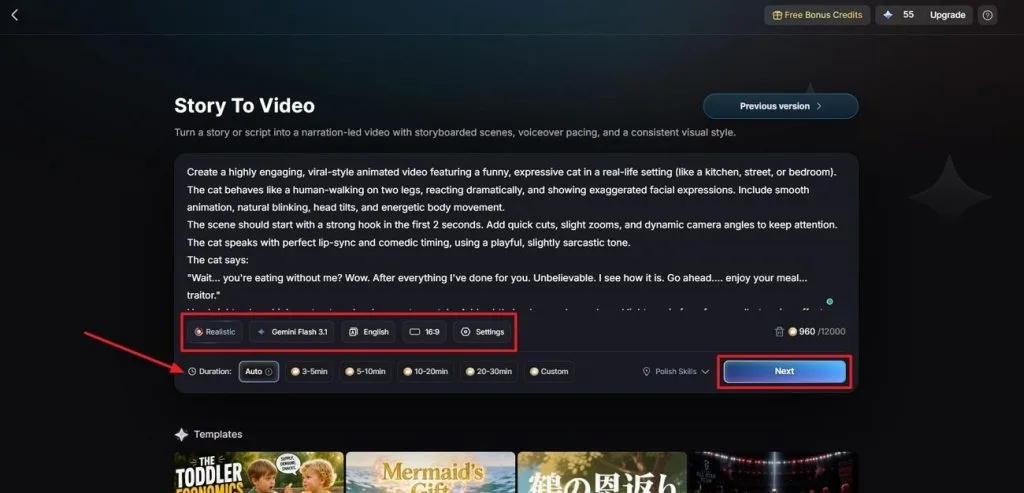
ステップ1. プロンプトを書き、設定を決める
Story to Video で、まず動画プロンプトを Text Box に入力します。Visual Style Model と AI Story Model を選び、Video Language と Aspect Ratio を設定してください。最後に Video Duration を調整し、Next をクリックします。
ステップ2. 生成されたシーン構成を確認する
次へ進む前に、生成されたシーンと Synopsis を確認します。上部の Controls で必要な修正を行い、Next をクリックしてください。
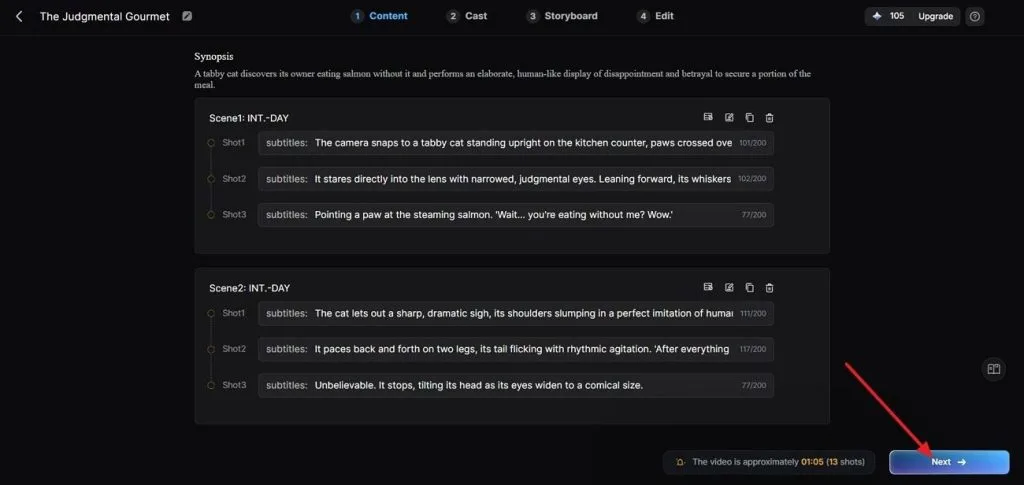
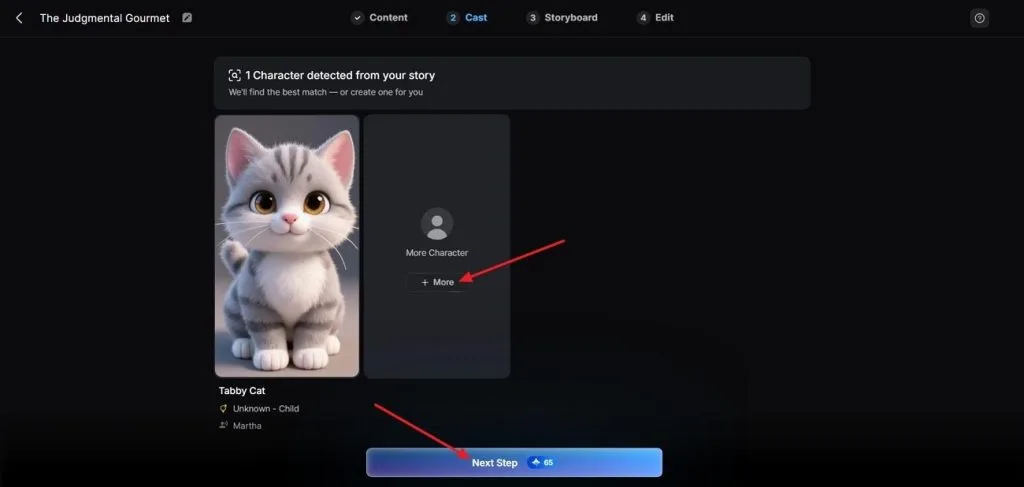
ステップ3. シーンごとにキャラクターを選ぶ
続いて MagicLight AI が脚本を分析し、合うキャラクターを自動提案します。More で追加オプションを見て、選んだら Next Step をクリックします。
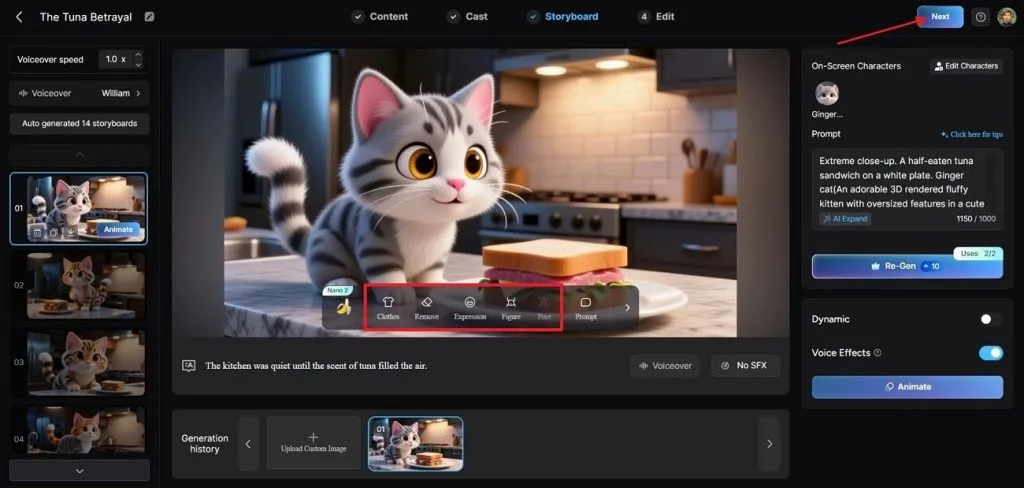
ステップ4. 完成した Storyboard をプレビューする
進む前に、生成された Storyboard の全シーンを確認します。必要なら下の Controls で Clothes、Poses、Expressions を調整してください。Storyboard が整ったら、上部の Next をクリックします。
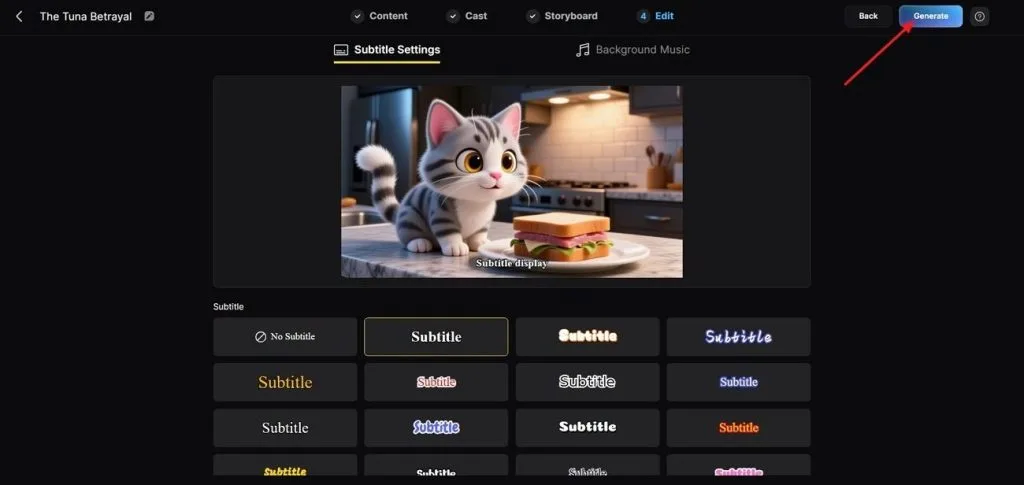
ステップ5. 字幕の見た目を整える
用意された選択肢から Subtitle Style を選びます。右上の Generate をクリックして、最終動画を作成してください。
ステップ6. 完成動画をプレビューして保存する
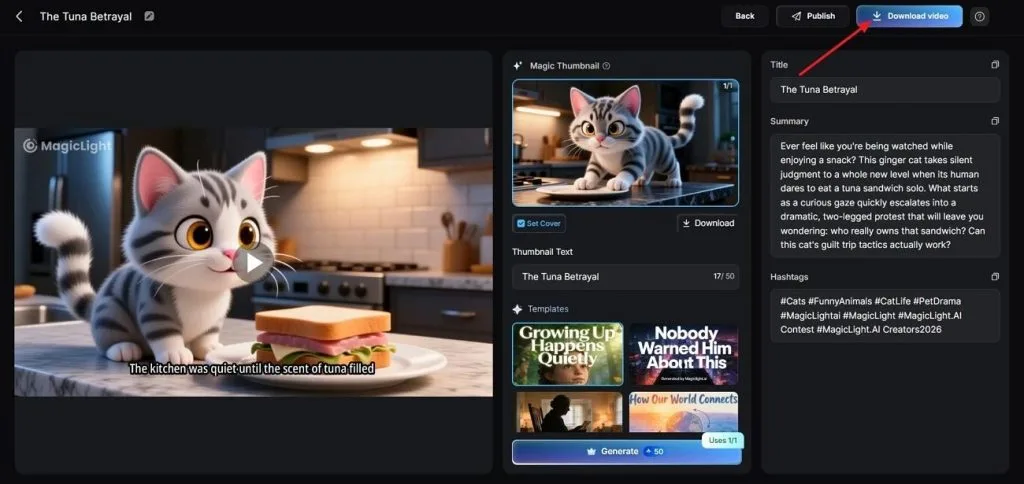
ツールが動画を作ったら、最終結果を丁寧にプレビューします。その後 Cover、Thumbnail、Hashtags を確認し、問題なければ Download Video をクリックして保存します。
まとめ
要するに、Seedance 2.5 のAI動画プロンプトは、構造がはっきりして指示が具体的なときに最もよく働きます。カメラワーク、参照の役割、シーンの順番を明確にすると、品質も安定します。より長いAI動画の企画・生成・管理には、MagicLight AI を試してみてください。
Seedance 2.5 AI動画プロンプトのFAQ
- Seedance 2.5 のプロンプトは、どこまで詳しく書くべきですか?
被写体、動き、カメラ、照明、タイミングを、そのシーンに必要な分だけ書けば十分です。それ以上の形容詞は精度を足すより、互いに打ち消し合います。
- 1本のプロンプトで複数ショットとカメラアングルをどう組み立てますか?
尺をラベル付きの区間に分け、それぞれにカメラの動きをひとつだけ与えます。0-10s、10-20s、20-30s と拍を分ける方が、一文に複数アングルを書くより切り替わりがきれいになります。
- 参照画像は Seedance 2.5 プロンプトにどう影響しますか?
参照画像は、生成前に割り当てた役割に従います。キャラクターの身元指定は顔を保ち、ラベルのない画像は意図せずスタイル参照になることがあります。
- Seedance 2.5 プロンプトはセリフとボイス指定に対応していますか?
はい。音声と映像は同じ生成過程で一緒に作られます。セリフを引用符に入れると、口の動きもその台詞に追従します。
- Seedance 2.0 のプロンプトを Seedance 2.5 で再利用できますか?
はい。プロンプト構造と参照構文は変わっていないので、古いプロンプトも使えます。より長い動画と、より多くの参照を活かす指示を足してください。