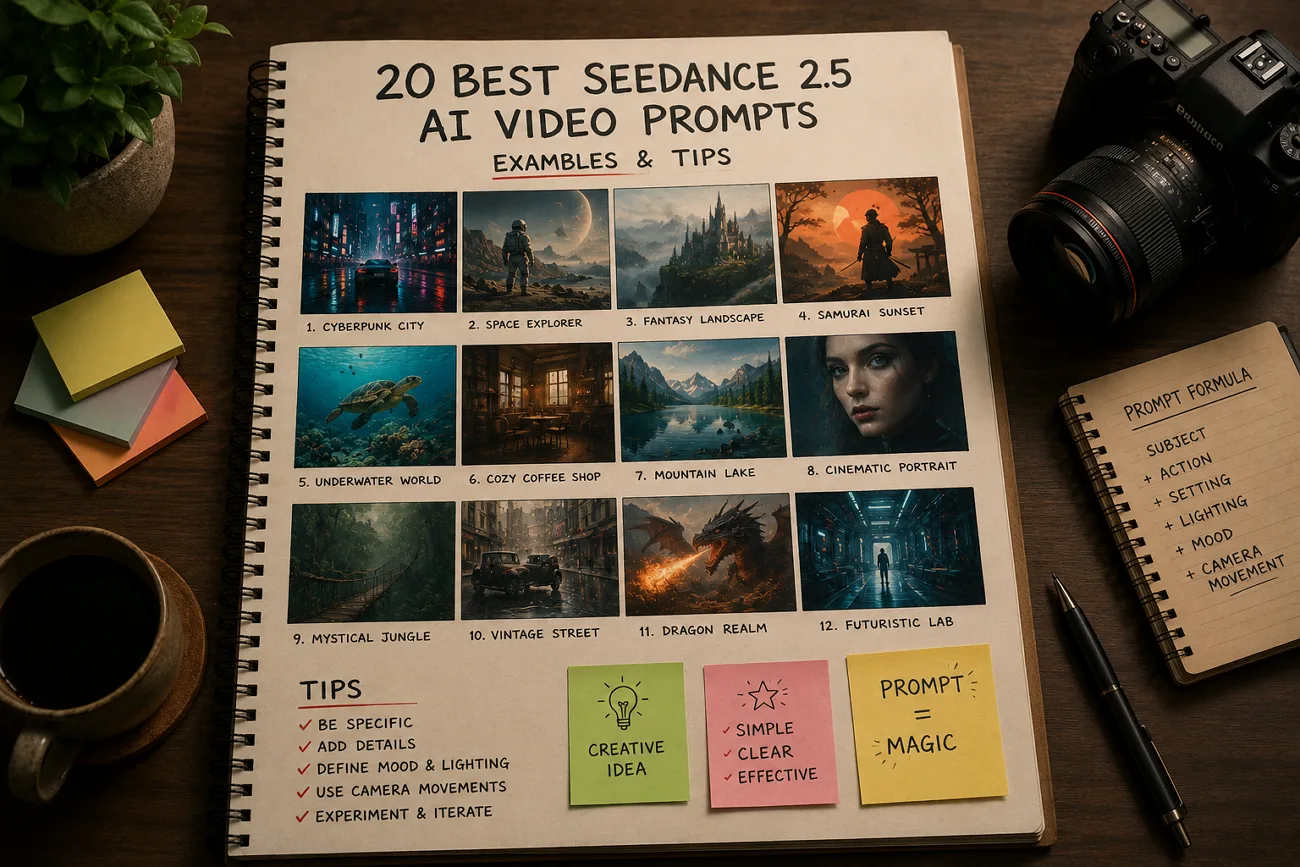
生成30 秒影片比 5 秒更貴,提示詞寫糊了就會白白燒掉額度。Seedance 2.5 沿用了 Seedance 2.0 的提示寫法,但資訊更完整時,畫面通常會更穩。這篇按 5 個類別整理了 20 條 Seedance 2.5 AI 影片提示詞,你可以原樣複製,也可以改主體和場景。同時會說明模型怎麼讀提示,以及哪些常見錯誤最容易浪費生成次數。
第 1 部分. Seedance 2.5 提示詞怎麼生效
用 Seedance 2.5 做 AI 影片,提示詞的基本語法和以前差不多。現在每條提示都需要更多細節,結果才會更準、更好看。
Seedance 2.5 和 Seedance 2.0 提示寫法有什麼不同
大多數為 Seedance 2.0 寫的提示,在 Seedance 2.5 裡也能用,因為基礎結構和參考系統沒變。新模型是在這些能力上往前推了幾步:
- 時間結構:做 30 秒影片時,提示詞最好按場次或階段寫,而不是只用一句總述。
- 參考角色:最多可放 50 個參考素材,每個都要有明確用途,別當裝飾隨便丟進去。
- 編輯指令:改畫面時可以把變化寫得更具體,具體能改到哪一步,取決於你選的工作流程。
一條強提示詞的核心要素
Seedance 2.5 的 AI 影片提示詞失敗,多半不是字數不夠,而是漏了關鍵資訊。按這個順序把 5 個要素寫進每條提示:
- 主體:把主要人物或場景寫清楚,影片才不容易跑偏。
- 運動:寫清什麼在動、速度多快,用動作而不是形容詞。
- 鏡頭:只指定一種運鏡,直接點名,例如 dolly-in 或 locked-off。
- 光線:寫明光的方向、質感和顏色,氣氛才會立住。
- 時間:影片超過十秒時,寫清每場或每個動作發生在哪一段。
第 2 部分. 按類別整理的 Seedance 2.5 提示詞示例
每個類別先講風格,再給 4 條可複製的 Seedance 2.5 提示詞。主體和場景你可以隨便換,結構本身已經能撐住畫面。
電影感和敘事類提示詞
做 30 秒長影片時,先把每場寫清楚,故事才會更完整。
下面這些英文提示詞請原樣貼上:
提示詞 1: 0-10s: a lone figure walks a rain-soaked alley, neon reflections underfoot. 10-20s: they stop and look up as the light shifts. 20-30s: slow pull back reveals the empty street.
提示詞 2: 0-10s: sunlight crosses a dusty archive room. 10-20s: a hand lifts one folder from a shelf. 20-30s: camera holds as the page turns and dust catches the beam.
提示詞 3: 0-10s: two figures sit across a diner booth in silence. 10-20s: one slides an envelope forward. 20-30s: the other leaves, the bell chiming as rain starts.
提示詞 4: A continuous handheld shot following a dancer through a warehouse, dust in the light beams, camera circling as the tempo builds, ending on a held pose in silhouette.
產品和電商類提示詞
用 Seedance 2.5 做產品影片時,把產品細節寫清楚,畫面會更乾淨。寫材質、光的方向,再加一種運鏡就夠。
下面這些英文提示詞請原樣貼上:
提示詞 1: 0-10s: slow dolly-in on a matte black smartwatch rotating on a stone pedestal, studio haze. 10-20s: the display wakes. 20-30s: rim light sharpens across the case edge.
提示詞 2: A ceramic coffee cup on a linen surface, steam rising, morning light from the left, camera drifting slowly right as a hand enters frame and lifts it away.
提示詞 3: 0-10s: a sneaker suspended against a seamless coral backdrop. 10-20s: it rotates to reveal the sole. 20-30s: it drops and settles, a small puff of dust catching the light.
提示詞 4: Macro shot traveling across a perfume bottle, refracted light moving through the glass, background falling into soft bokeh, camera easing back to reveal the full silhouette.
角色和對白類提示詞
Seedance 2.5 會從同一條提示裡同時生成畫面和聲音。把臺詞放進引號裡,對白會更清楚,口型也更容易跟上。
下面這些英文提示詞請原樣貼上:
提示詞 1: Close-up of a woman in a control room, lit by monitor glow. She says, 'We are not going to make the window.' Ambient hum, no music, tight framing.
提示詞 2: Two colleagues walk a hospital corridor. One says, 'The results came back this morning.' Camera tracks alongside at shoulder height, fluorescent light, footsteps and distant paging audible.
提示詞 3: A chef faces the camera in a busy kitchen and says, 'Everything here is made the same day.' Warm overhead light, background staff blurred, natural room noise throughout.
提示詞 4: 0-10s: an older man settles into a workshop chair. 10-20s: he says, 'I built this bench in 1974.' 20-30s: camera drifts across the worn surface.
自然、旅行和電影感空鏡提示詞
自然和旅行空鏡,一種運鏡加上清楚的光線描述,通常就夠好看。
下面這些英文提示詞請原樣貼上:
提示詞 1: Aerial shot drifting over a pine valley at dawn, mist sitting between the ridges, slow forward push, cool blue light warming as the sun clears the treeline.
提示詞 2: Waves breaking against black volcanic rock in slow motion, spray catching low afternoon light, static locked-off camera, deep contrast between water and stone, horizon held level.
提示詞 3: Handheld walk through a night market, lanterns overhead, camera moving past food stalls, faces passing in and out of focus, warm ambient glow and steam rising from griddles.
提示詞 4: 0-10s: wide of a desert road at golden hour. 10-20s: a car passes camera left to right. 20-30s: the dust settles and the road empties again.
參考圖和影片編輯類提示詞
寫影片提示前,先給每張參考圖明確用途。先說明每張參考控制什麼,再寫場景和運鏡。
下面這些英文提示詞請原樣貼上:
提示詞 1: Use the uploaded product image as the hero object and the uploaded clip as a motion reference. Match its camera speed exactly while keeping the product centered throughout the shot.
提示詞 2: @ref1 as the lead character, @ref2 as the environment, @ref3 for lighting mood. Place the character walking through that space, camera tracking behind at waist height.
提示詞 3: Edit at the 18-second mark only: change the character's jacket from gray to burgundy. Leave camera movement, lighting, and every other element in the take unchanged.
提示詞 4: Swap the background reference for the newly uploaded image and regenerate only what depended on it. Keep the character performance, framing, and audio exactly as approved.
第 3 部分. Seedance 2.5 提示詞常見錯誤
想把 Seedance 2.5 的 AI 影片提示詞寫好,先避開這幾個常見坑。下面逐條看問題,以及正確寫法:
- 一條提示裡塞太多指令:運鏡、光線和風格堆在一起,模型容易亂,畫質也會掉。每條提示只留一個主體、一種運動、一種場景風格。
- 動作動詞太含糊:moves、interacts 這類詞說不清到底發生了什麼。改成 reaches、tilts、steps back、sets down 這類具體動作。
- 互相打架的運鏡寫在一起:一條提示裡混幾種鏡頭運動,模型會拿到衝突指令。每次生成只選一種運鏡,另一種放到下一版。
- 上傳參考卻不說明用途:生成前,每份參考都要有明確角色。最多支援 50 個參考素材,沒標註的檔案很容易被模型理解錯。
進階技巧:用 MagicLight AI 的 Storyboard 流程規劃 Seedance 2.5 提示詞
長影片場次一多,Seedance 2.5 的提示詞就很難保持一致。MagicLight AI 把Seedance 2.5和其他多種 AI 影片模型放進同一套流程。提示詞最長支援 12,000 個字元,細指令更好寫。
你也可以做最長 50 分鐘的 AI 影片,不用把每場都手工拆開。Storyboard 會從開頭到成片,把角色、場次和運鏡收在一起。
用 MagicLight AI 做出更完整的 Seedance 2.5 影片
按下面幾步走,工作量更少,結果也更穩:
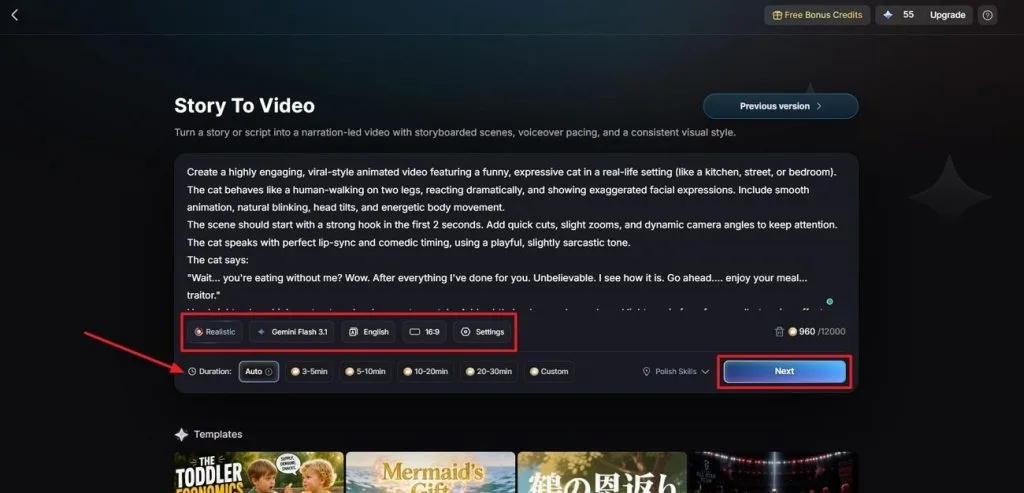
步驟 1. 寫提示詞並設定偏好
在Story to Video裡,先把影片提示詞填進 Text Box。選擇 Visual Style Model 和 AI Story Model,再設定 Video Language 和 Aspect Ratio。最後調整 Video Duration,點 Next 繼續。
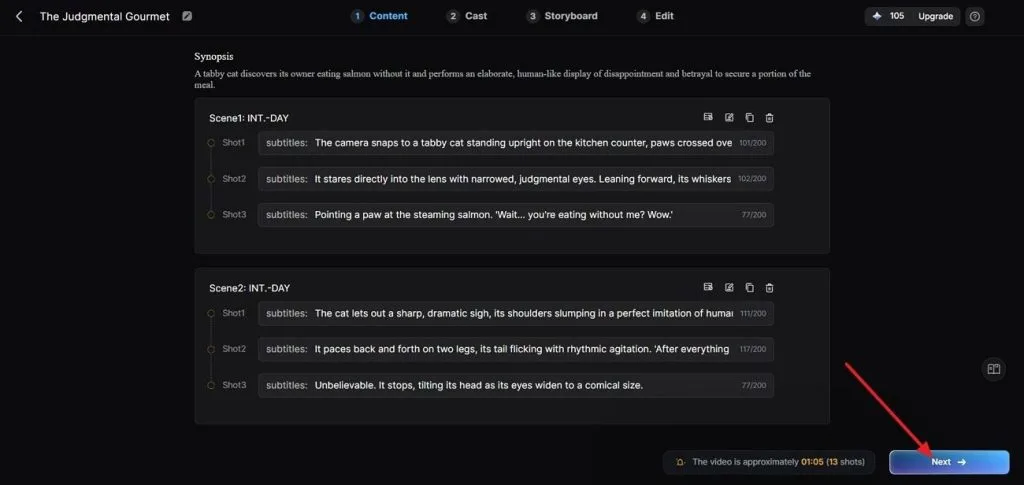
步驟 2. 檢查生成的場次結構
進入下一步前,先看生成的場次和 Synopsis。需要改的地方,用頂部 Controls 調整,再點 Next。
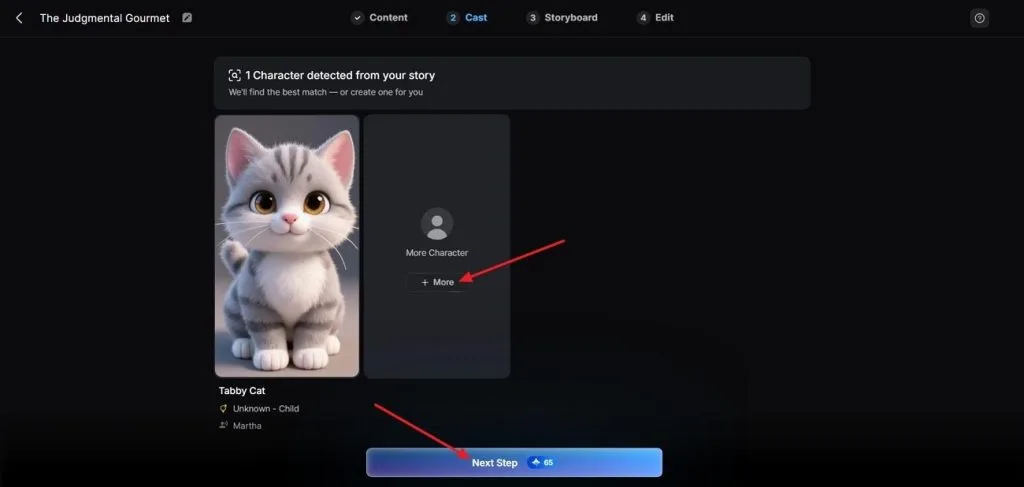
步驟 3. 為每場選擇角色
隨後 MagicLight AI 會分析腳本,並自動給出匹配角色。點 More 看更多選項。選好角色後,點 Next Step 繼續。
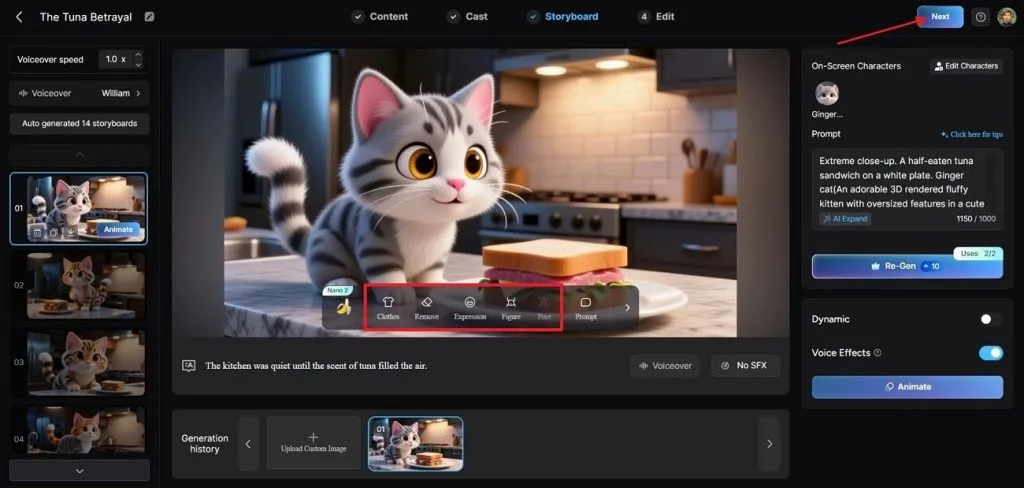
步驟 4. 預覽完整 Storyboard
繼續前先把生成的 Storyboard 逐場看一遍。需要的話,用下方 Controls 調整 Clothes、Poses 和 Expressions。Storyboard 就緒後,點頂部 Next。
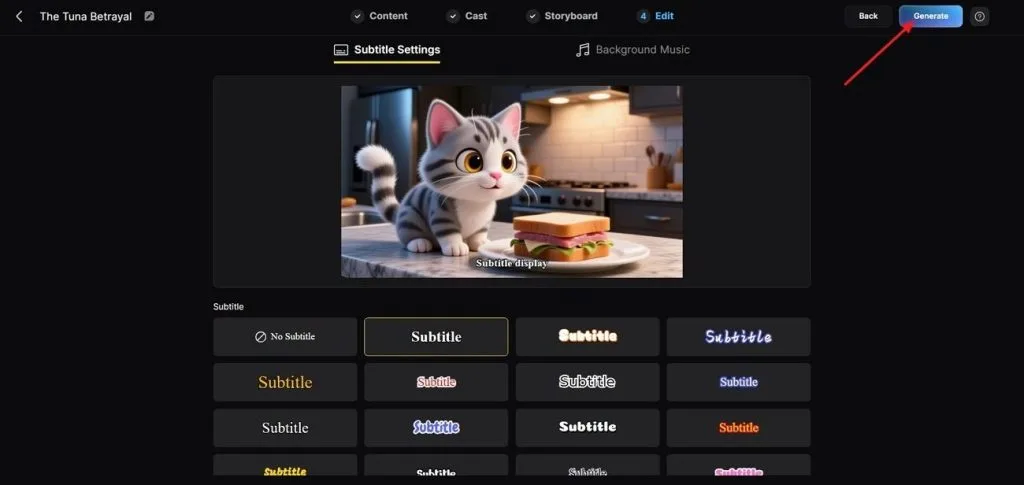
步驟 5. 自訂字幕樣式
從可選方案裡選一個 Subtitle Style。然後點右上角 Generate,生成成片。
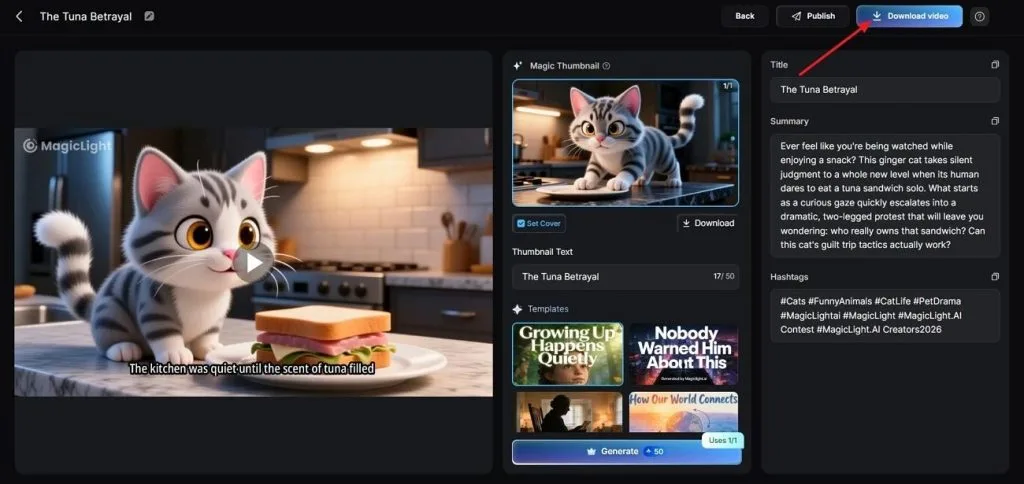
步驟 6. 預覽並儲存成片
影片生成後,先仔細預覽成片。再檢查 Cover、Thumbnail 和 Hashtags。確認無誤後,點 Download Video 儲存。
結語
總的來說,Seedance 2.5 的 AI 影片提示詞,結構清楚、指令具體時效果最好。運鏡、參考用途和場次順序寫明白,影片品質會更穩。用 MagicLight AI 來規劃、生成和管理更長的 AI 影片,也會更省事。
Seedance 2.5 AI 影片提示詞常見問題
- Seedance 2.5 的提示詞要寫多細?
一條提示應涵蓋主體、運動、鏡頭、光線和時間,細到夠支撐這場戲即可。再往後堆形容詞,只會互相搶權重,不會更精確。
- 一條提示裡怎麼安排多個鏡頭和機位?
把時長拆成帶標記的段落,每段只給一種運鏡。寫成 0-10s、10-20s、20-30s 這樣的節拍,過渡會比一句裡塞好幾個角度更乾淨。
- 參考圖會怎麼影響 Seedance 2.5 提示詞?
參考圖會按你生成前指定的角色來用,結果才準。指定角色身分能鎖住臉,沒標註的圖則可能被當成風格參考。
- Seedance 2.5 提示詞支援對白和聲音提示嗎?
支援。聲音和畫面是一起生成的。把臺詞放進引號裡,口型會跟著說出來的句子走。
- Seedance 2.0 的提示詞能用在 Seedance 2.5 上嗎?
可以。提示結構和參考語法沒變,舊提示仍然相容。若要用更長影片和更多參考,再補上 Seedance 2.5 的新指令即可。