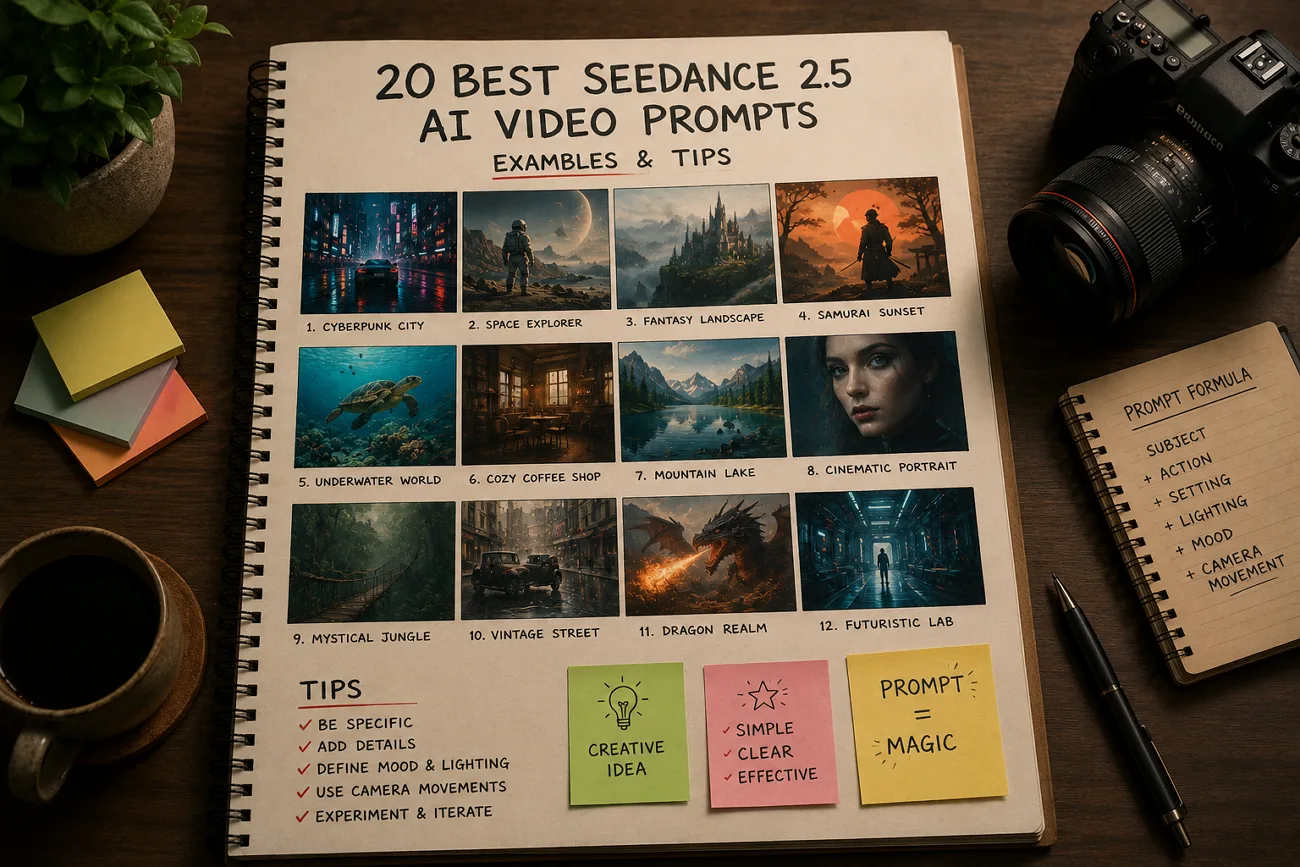
30초 영상 생성은 5초보다 비용이 커서, 프롬프트가 약하면 손해가 커요. Seedance 2.5는 Seedance 2.0의 프롬프트 문법을 이어가지만, 정보가 풍부할수록 결과가 더 좋아져요. 이 글은 5개 카테고리에서 복사하거나 바꿔 쓸 수 있는 Seedance 2.5 AI 영상 프롬프트 20개를 모았어요. 모델이 프롬프트를 어떻게 읽는지, 어떤 실수가 생성을 낭비하는지도 짚어요.
1부. Seedance 2.5 프롬프트가 작동하는 방식
Seedance 2.5도 예전과 비슷한 프롬프트 문법으로 AI 영상을 만들어요. 다만 더 정확하고 좋은 결과를 내려면, 이제 각 프롬프트에 디테일이 더 필요해요.
Seedance 2.5 프롬프트가 Seedance 2.0과 다른 점
기본 구조와 레퍼런스 시스템이 같아서, Seedance 2.0용 프롬프트 대부분은 Seedance 2.5에서도 작동해요. 새 모델은 그 위에 몇 가지를 더 다듬었어요:
- 시간 구조: 30초 영상은 한 줄 요약보다, 장면이나 단계별로 나눠 쓰는 편이 좋아요.
- 레퍼런스 역할: 레퍼런스는 최대 50개까지 넣을 수 있으니, 설명 없이 넣지 말고 각각의 목적을 밝혀요.
- 편집 지시: 선택한 워크플로의 편집 기능에 맞춰, 바꾸고 싶은 점을 더 구체적으로 적을 수 있어요.
강한 프롬프트의 핵심 요소
Seedance 2.5 AI 영상 프롬프트가 실패하는 이유는 말이 부족해서가 아니라, 중요한 정보가 빠져서인 경우가 많아요. 아래 5가지를 이 순서대로 넣으세요:
- 피사체: 주인공이나 장면을 분명히 써서 영상이 흔들리지 않게 해요.
- 움직임: 무엇이, 어떤 속도로 움직이는지 형용사가 아니라 동작으로 적어요.
- 카메라: dolly-in이나 locked-off처럼, 한 가지 움직임을 이름으로 지정해요.
- 조명: 빛의 방향, 질감, 색을 써서 분위기를 만들어요.
- 타이밍: 영상이 10초를 넘으면, 각 장면이나 동작이 언제 일어나는지 보여 주세요.
2부. 카테고리별 Seedance 2.5 프롬프트 예시
각 카테고리는 스타일을 먼저 설명한 뒤, 복사할 수 있는 Seedance 2.5 프롬프트 4개를 줘요. 피사체와 배경은 자유롭게 바꿔도, 구조가 결과를 받쳐 줘요.
시네마틱·스토리텔링 프롬프트
30초 긴 영상은 프롬프트에서 각 장면을 먼저 분명히 적을 때 이야기가 더 잘 살아나요.
아래 영어 프롬프트를 그대로 붙여넣으세요:
프롬프트 1: 0-10s: a lone figure walks a rain-soaked alley, neon reflections underfoot. 10-20s: they stop and look up as the light shifts. 20-30s: slow pull back reveals the empty street.
프롬프트 2: 0-10s: sunlight crosses a dusty archive room. 10-20s: a hand lifts one folder from a shelf. 20-30s: camera holds as the page turns and dust catches the beam.
프롬프트 3: 0-10s: two figures sit across a diner booth in silence. 10-20s: one slides an envelope forward. 20-30s: the other leaves, the bell chiming as rain starts.
프롬프트 4: A continuous handheld shot following a dancer through a warehouse, dust in the light beams, camera circling as the tempo builds, ending on a held pose in silhouette.
제품·이커머스 프롬프트
Seedance 2.5 제품 영상은 디테일을 분명히 쓸수록 더 깔끔해져요. 표면, 빛 방향, 카메라 움직임 하나만 적으면 충분해요.
아래 영어 프롬프트를 그대로 붙여넣으세요:
프롬프트 1: 0-10s: slow dolly-in on a matte black smartwatch rotating on a stone pedestal, studio haze. 10-20s: the display wakes. 20-30s: rim light sharpens across the case edge.
프롬프트 2: A ceramic coffee cup on a linen surface, steam rising, morning light from the left, camera drifting slowly right as a hand enters frame and lifts it away.
프롬프트 3: 0-10s: a sneaker suspended against a seamless coral backdrop. 10-20s: it rotates to reveal the sole. 20-30s: it drops and settles, a small puff of dust catching the light.
프롬프트 4: Macro shot traveling across a perfume bottle, refracted light moving through the glass, background falling into soft bokeh, camera easing back to reveal the full silhouette.
캐릭터·대사 프롬프트
Seedance 2.5는 같은 프롬프트에서 영상과 오디오를 함께 만들어요. 대사는 따옴표 안에 넣으면 더 분명하고 결과도 좋아져요.
아래 영어 프롬프트를 그대로 붙여넣으세요:
프롬프트 1: Close-up of a woman in a control room, lit by monitor glow. She says, 'We are not going to make the window.' Ambient hum, no music, tight framing.
프롬프트 2: Two colleagues walk a hospital corridor. One says, 'The results came back this morning.' Camera tracks alongside at shoulder height, fluorescent light, footsteps and distant paging audible.
프롬프트 3: A chef faces the camera in a busy kitchen and says, 'Everything here is made the same day.' Warm overhead light, background staff blurred, natural room noise throughout.
프롬프트 4: 0-10s: an older man settles into a workshop chair. 10-20s: he says, 'I built this bench in 1974.' 20-30s: camera drifts across the worn surface.
자연·여행·시네마틱 B-roll 프롬프트
자연·여행 B-roll은 카메라 움직임 하나와 분명한 조명만으로도 더 좋아 보여요.
아래 영어 프롬프트를 그대로 붙여넣으세요:
프롬프트 1: Aerial shot drifting over a pine valley at dawn, mist sitting between the ridges, slow forward push, cool blue light warming as the sun clears the treeline.
프롬프트 2: Waves breaking against black volcanic rock in slow motion, spray catching low afternoon light, static locked-off camera, deep contrast between water and stone, horizon held level.
프롬프트 3: Handheld walk through a night market, lanterns overhead, camera moving past food stalls, faces passing in and out of focus, warm ambient glow and steam rising from griddles.
프롬프트 4: 0-10s: wide of a desert road at golden hour. 10-20s: a car passes camera left to right. 20-30s: the dust settles and the road empties again.
레퍼런스·영상 편집 프롬프트
영상 프롬프트를 쓰기 전에, 각 레퍼런스를 분명한 목적과 함께 올려요. 장면과 카메라 움직임을 적기 전에, 각 레퍼런스가 무엇을 제어하는지 설명하세요.
아래 영어 프롬프트를 그대로 붙여넣으세요:
프롬프트 1: Use the uploaded product image as the hero object and the uploaded clip as a motion reference. Match its camera speed exactly while keeping the product centered throughout the shot.
프롬프트 2: @ref1 as the lead character, @ref2 as the environment, @ref3 for lighting mood. Place the character walking through that space, camera tracking behind at waist height.
프롬프트 3: Edit at the 18-second mark only: change the character's jacket from gray to burgundy. Leave camera movement, lighting, and every other element in the take unchanged.
프롬프트 4: Swap the background reference for the newly uploaded image and regenerate only what depended on it. Keep the character performance, framing, and audio exactly as approved.
3부. Seedance 2.5 프롬프트에서 흔한 실수
더 나은 Seedance 2.5 AI 영상 프롬프트는 흔한 실수를 피하는 데서 시작해요. 각 실수와 고치는 방법을 살펴볼게요:
- 한 프롬프트에 지시를 과하게 넣기: 카메라, 조명, 스타일 지시가 너무 많으면 모델이 헷갈리고 화질이 떨어져요. 프롬프트마다 피사체 하나, 움직임 하나, 장면 스타일 하나만 남기세요.
- 모호한 동작 동사: moves나 interacts 같은 말은 무슨 일이 일어나는지 분명히 못 해요. reaches, tilts, steps back, sets down처럼 구체적인 동작을 쓰세요.
- 충돌하는 카메라 지시를 섞기: 한 프롬프트에 서로 다른 카메라 움직임이 있으면 모델이 엇갈린 지시를 받아요. 생성마다 움직임은 하나만 고르고, 다른 움직임은 별도 버전으로 넣으세요.
- 역할 없이 레퍼런스 올리기: 영상을 만들기 전에 모든 레퍼런스에 분명한 목적을 주세요. 최대 50개까지 지원되니, 라벨 없는 파일은 잘못 해석되기 쉬워요.
프로 팁: MagicLight AI Storyboard 워크플로로 Seedance 2.5 프롬프트 짜기
장면이 많은 긴 영상에서 Seedance 2.5 프롬프트를 일정하게 유지하기는 어려워요. MagicLight AI가 Seedance 2.5와 다른 AI 영상 모델을 한 흐름에 묶어 줘요. 프롬프트는 최대 12,000자까지 지원해서, 자세한 지시를 쓰기 쉬워요.
최대 50분짜리 긴 AI 영상도 장면을 일일이 나누지 않고 만들 수 있어요. Storyboard가 처음부터 최종 영상까지 캐릭터, 장면, 카메라 움직임을 정리해 줘요.
MagicLight AI로 Seedance 2.5 영상을 더 완성도 있게 만들기
아래 간단한 단계를 따르면, 일은 줄고 결과는 더 일정해져요:
1단계. 프롬프트를 쓰고 설정을 고르기
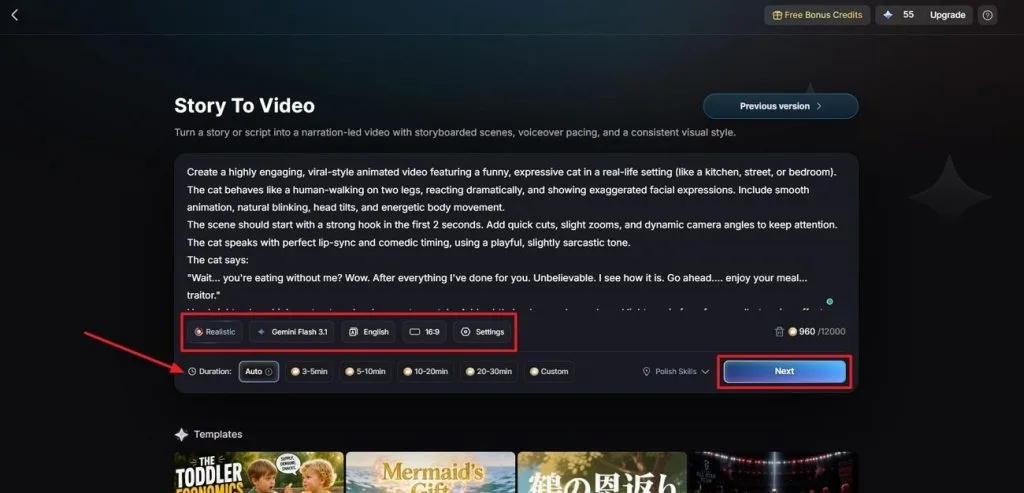
Story to Video에서 영상 프롬프트를 Text Box에 입력하세요. Visual Style Model과 AI Story Model을 고르고, Video Language와 Aspect Ratio를 설정해요. 마지막으로 Video Duration을 맞춘 뒤 Next를 누르세요.
2단계. 생성된 장면 구성 확인하기
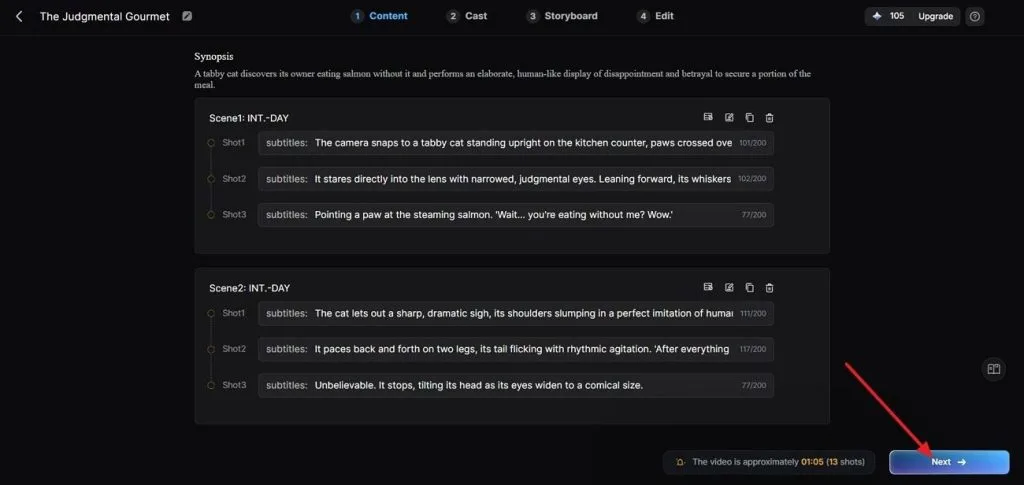
다음으로 넘어가기 전에 생성된 장면과 Synopsis를 검토하세요. 위쪽 Controls로 필요한 수정을 한 뒤 Next를 누르세요.
3단계. 장면마다 캐릭터 고르기
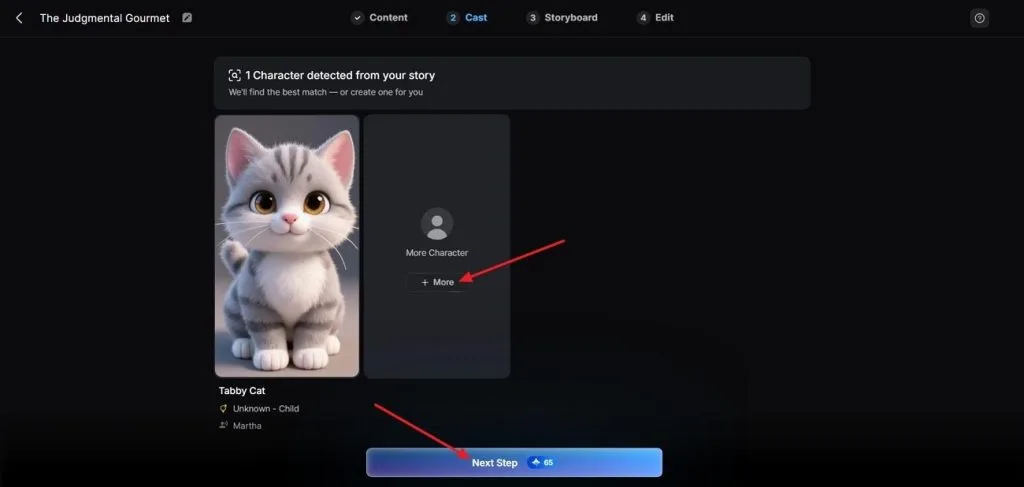
이어서 MagicLight AI가 스크립트를 분석하고 맞는 캐릭터를 자동으로 제안해요. More를 눌러 다른 옵션을 보고, 캐릭터를 고른 뒤 Next Step을 누르세요.
4단계. 완성된 Storyboard 미리보기
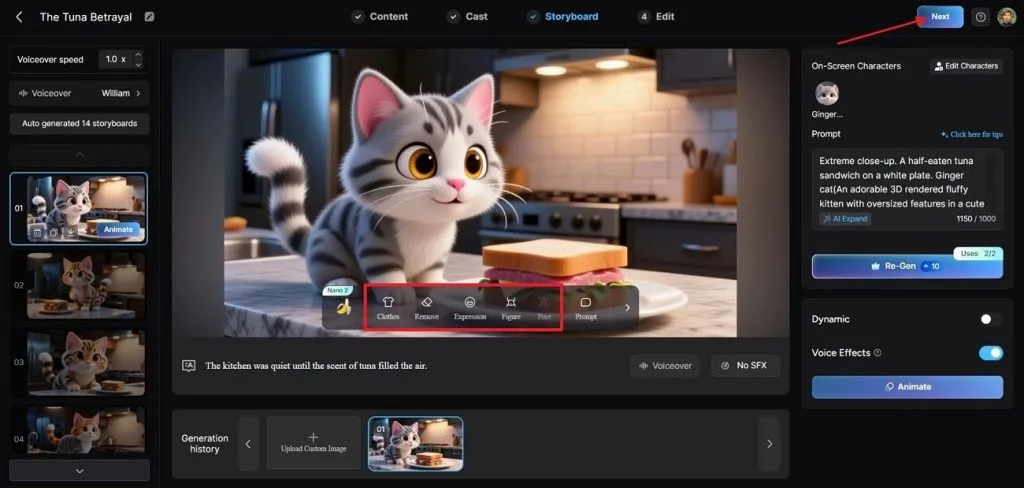
계속하기 전에 생성된 Storyboard의 모든 장면을 확인하세요. 필요하면 아래 Controls로 Clothes, Poses, Expressions를 조정해요. Storyboard가 준비되면 위쪽 Next를 누르세요.
5단계. 자막 스타일 맞춤 설정
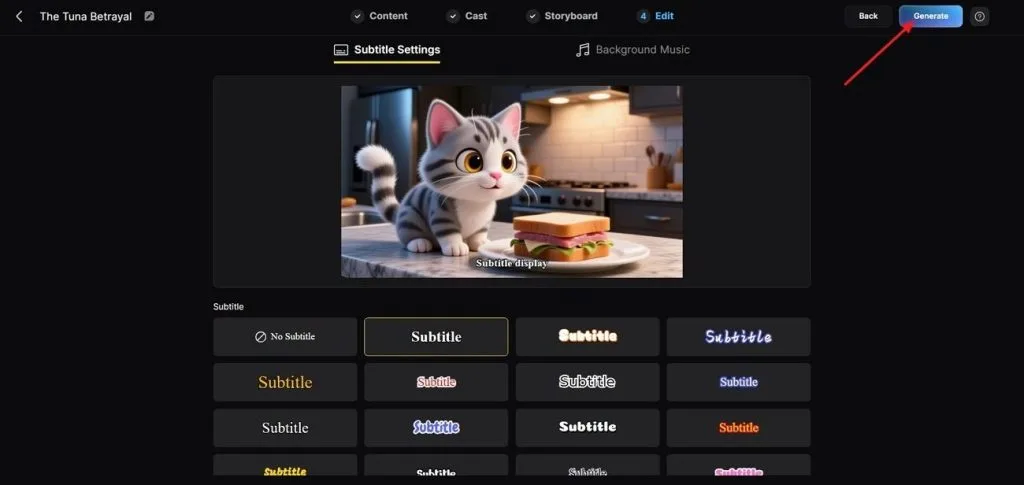
영상용 Subtitle Style을 고른 뒤, 오른쪽 위 Generate를 눌러 최종 영상을 만들어요.
6단계. 완성 영상을 미리보고 저장하기
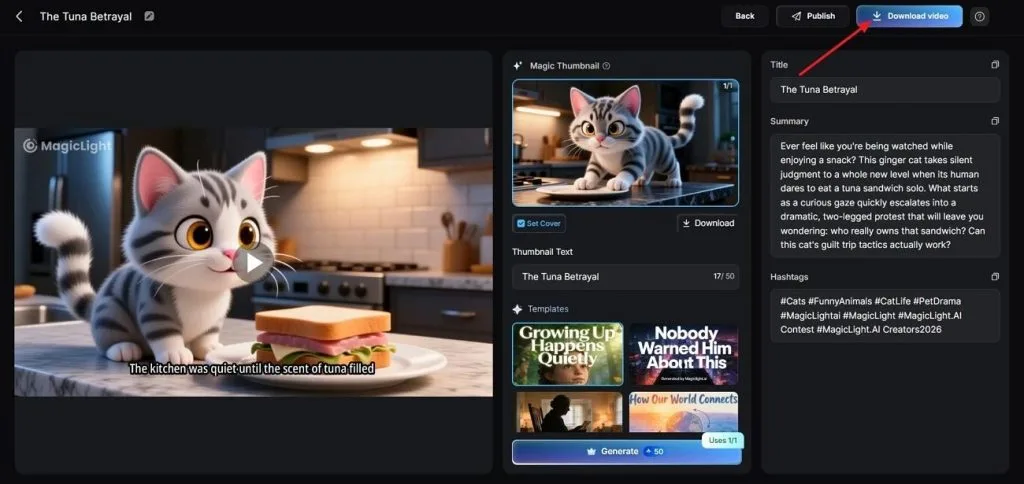
도구가 영상을 만든 뒤 최종 결과를 꼼꼼히 미리보세요. 그다음 Cover, Thumbnail, Hashtags를 확인해요. 문제없으면 Download Video를 눌러 저장하세요.
마무리
정리하면, Seedance 2.5 AI 영상 프롬프트는 구조가 분명하고 지시가 구체적일 때 가장 잘 작동해요. 카메라 움직임, 레퍼런스 역할, 장면 순서를 분명히 쓰면 품질이 더 일정해져요. 더 긴 AI 영상을 기획·생성·관리하려면 MagicLight AI를 써 보세요.
Seedance 2.5 AI 영상 프롬프트 FAQ
- Seedance 2.5 프롬프트는 얼마나 자세해야 하나요?
피사체, 움직임, 카메라, 조명, 타이밍을 담되, 그 장면에 필요한 만큼만 적으면 돼요. 그 이상으로 형용사를 더하면 정밀도가 아니라 서로 경쟁만 해요.
- 한 프롬프트에서 여러 샷과 카메라 각도를 어떻게 구성하나요?
러닝타임을 구간으로 나누고, 각 구간에 카메라 행동 하나만 주세요. 0-10s, 10-20s, 20-30s처럼 나누면, 한 문장에 여러 각도를 넣는 것보다 전환이 깔끔해요.
- 레퍼런스 이미지는 Seedance 2.5 프롬프트에 어떤 영향을 주나요?
레퍼런스 이미지는 생성 전에 지정한 역할을 따라가요. 캐릭터 정체성은 얼굴을 유지하고, 라벨 없는 이미지는 뜻밖에 스타일 레퍼런스가 될 수 있어요.
- Seedance 2.5 프롬프트는 대사와 보이스 큐를 지원하나요?
네. 오디오와 영상이 같은 생성 과정에서 함께 만들어져요. 대사를 따옴표 안에 쓰면, 입 모양도 그 대사를 따라가요.
- Seedance 2.0 프롬프트를 Seedance 2.5에서 다시 쓸 수 있나요?
네. 프롬프트 구조와 레퍼런스 문법이 같아서 예전 프롬프트도 호환돼요. 더 긴 영상과 더 많은 레퍼런스를 쓰려면 Seedance 2.5용 지시를 추가하면 돼요.
![역대 최고의 만화 캐릭터 15선 [최신 리스트]](https://magiclight.ai/wp-2/wp-content/uploads/top-cartoon-characters-300x168.webp)