小镇影院的万圣节午夜场即将开始。电影放映前,一位幽灵引座员带观众经历了一场离奇遭遇。想呈现这样的场景,就需要清晰的 Seedance 万圣节提示词,捕捉每个令人毛骨悚然的瞬间。
你可以描述角色动作和镜头运动,为每个镜头提供指引。不过,要把几段短片串成一个完整的万圣节故事,还需要多花些心思。本文准备了 15 个惊悚提示词,并介绍如何用 MagicLight AI 制作更长的视频。
第一部分:15 个值得一试的 Seedance 万圣节提示词
这 15 个 Seedance 万圣节提示词包含各场景的时间安排和具体细节,帮助你制作惊悚视频。你也可以使用 Seedance 2.5 ,通过 MagicLight AI 将万圣节创意变成视频。
带时间标记的多镜头提示词
随着时间推移,画面中不断出现变化,万圣节场景就会更有看头。把视频划分为几个短时段,能让每个瞬间都有充分展开的空间。下面的提示词通过不同的拍摄角度,捕捉每个诡异时刻。
- 午夜汽车影院: 0-5s, wide shot of an abandoned drive-in at midnight, fog over rusted speaker posts, crickets. 5-10s, slow push-in as the blank screen flickers on with a projector whir. 10-15s, a speaker post crackles with a whisper. Grainy 16mm look.
- 空谷车站的末班列车: 0-6s, empty night platform under a buzzing lamp, a low hum. 6-12s, tracking shot beside an arriving train with every window dark. 12-15s, one door slides open on a floating lantern, a soft chime. Cold blue grade.
- 失控的南瓜雕刻比赛: 0-5s, overhead shot of a village pumpkin-carving table at dusk, cheerful chatter. 5-10s, the prize pumpkin’s grin slowly widens as the crowd goes quiet. 10-15s, crash zoom on the judge as every candle snuffs out. Warm autumn palette.
角色参考提示词
你的女巫可能在一段视频里形象恰到好处,到了下一段却完全变了样。Seedance 万圣节提示词可以通过带标记的参考图,让不同场景中的角色保持相同的面容或服装。试试下面三个示例,看看角色参考图如何用于惊悚视频。
- 幽灵引座员: @Image1 is the usher’s pale face and burgundy uniform, and @Image2 is his brass flashlight. He walks down a dark cinema aisle, stops at row F, and shines the light at the camera. Dolly back, dust in the beam, a creaking seat.
- 女巫药铺店主: @Image1 sets the witch’s face and patched green shawl. She weighs a glowing mushroom on brass scales, then winks. Medium close-up, candlelight from the left, a ticking clock and clinking jars.
- 骷髅守夜人: @Image1 is the skeleton’s cap and lantern, and @Image2 is the cemetery gate. He pushes the gate open, swings the lantern toward a rustling hedge, and freezes. Low-angle tracking shot, ankle-high mist, jangling keys.
以声音营造氛围的万圣节提示词
空房间里传来脚步声,恐怖场景的氛围立刻就不一样了。使用 Seedance 万圣节提示词,你可以添加与画面动作相配的人声和音效。下面的示例展示了声音如何为你的 万圣节视频增添悬念。
- 引座员的欢迎词: The ghost usher from @Image1 lifts his flashlight under his chin and says, “Phones off, and please keep all hands inside the theater.” Slow push-in, cold blue light, an organ chord swelling behind him.
- 跟随特雷门琴节拍切镜: Cut to the beats of @Audio1, a 15-second theremin loop. A bubbling cauldron, a swinging lantern, and a bat leaving a belfry each hold for one beat. High contrast, handheld energy.
- 阁楼里的脚步声: No music. A kitchen at 2 a.m., camera locked off on a swaying ceiling light. Slow footsteps cross the attic, stop, and a single knock answers from inside the wall. Dim amber light, 10 seconds.
变形与转场提示词
一颗普通南瓜,只需几秒就能变成发光的南瓜灯。以一张普通南瓜图片作为起点,再用一张雕出发光面孔的南瓜图片作为终点。下面的提示词将这一思路用在了不同的万圣节场景中。
- 南瓜变成南瓜灯: @Image1 opens on a plain pumpkin on a porch step, and @Image2 closes on the same pumpkin carved and glowing. Time-lapse carving at dusk, locked-off shot, knife scrapes and a match strike.
- 房屋变鬼宅: @Image1 is a tidy suburban house at noon, and @Image2 is the same house at midnight with broken shutters. Slow crane down as daylight drains and vines climb the walls, wind rising into a howl.
- 逐渐腐朽的肖像: @Image1 is a painted portrait of a young duchess, and @Image2 shows a skull above the same gown. The paint cracks and peels as candles gutter, slow push-in, a faint music-box waltz.
适用于 Seedance 2.5 的一镜到底与视频延长提示词
有些万圣节场景,用镜头不间断地跟随动作,会更引人入胜。Seedance 万圣节提示词也能帮助你续接之前的视频片段,同时保持角色和场景一致。下面的示例涵盖长镜头拍摄,以及延续惊悚场景的方法。
- 一镜到底穿过闹鬼走廊: A single 30-second take follows a candle down a manor hallway, past portraits whose eyes track it, into a ballroom of waltzing ghosts. Steadicam at walking pace, no cuts, footsteps fading into a string quartet.
- 延续引座员的巡逻: Extend the video. The usher from @Video1 climbs to the projection booth and finds the projector running on its own. His uniform, the lighting, and the film grain match @Video1, with a rising projector clatter.
- 换个角度拍坩埚: Keep the characters, timing, and style of @Video1 unchanged. Re-shoot the cauldron scene from a low angle through the steam, the camera circling slowly. Bubbling sound and dialogue stay as they are.
第二部分:用 MagicLight AI 将 Seedance 万圣节提示词制作成完整视频
Seedance 万圣节提示词很适合制作恐怖短片,但较长的故事需要多个相互衔接的场景。使用 Story to Video 功能,你可以在 MagicLight AI 中将最长 12,000 字符的故事制作成视频。
付费套餐还支持制作最长 50 分钟的视频。你可以从 14 个故事模型中选择,包括 Gemini Flash 3.1 和 GPT-5.6,并为你的万圣节视频搭配 50 多种视觉风格。MagicLight AI 还提供 Seedance 2.0 作为可选的视频模型之一。
MagicLight AI 的主要功能
- AI 角色创建: 你可以用最长 1,000 字符的描述,在 MagicLight AI 中设计你的 万圣节角色 。为幽灵设定苍白的面孔,或给女巫披上绿色斗篷。
- 角色保存: 只需保存一次幽灵引座员,就能在整个万圣节视频中反复使用。随着故事推进,他的面容和制服都会保持一致。
- 旁白与音乐: 从 37 种声音中选择,为每个万圣节角色赋予独特的嗓音。你还可以使用 40 首音乐,为场景营造氛围。
- 多语言视频: MagicLight AI 支持 11 种语言,方便你为不同国家的观众创作故事。你可以将万圣节视频分享给使用不同语言的观众。
- AI 视频模型: MagicLight AI 提供 20 个视频模型,适合不同的万圣节场景和故事。制作下一个视频时,你可以试试 Seedance 2.5 或 Kling 3.0 。
分步教程:用 MagicLight AI 将 Seedance 万圣节提示词制作成视频
想象一下,幽灵引座员正在迎接观众,而影院里即将接连发生怪事。接下来,按照以下步骤,用 MagicLight AI 将这些 Seedance 万圣节提示词制作成完整视频:
第 1 步:从 Seedance 提示词开始
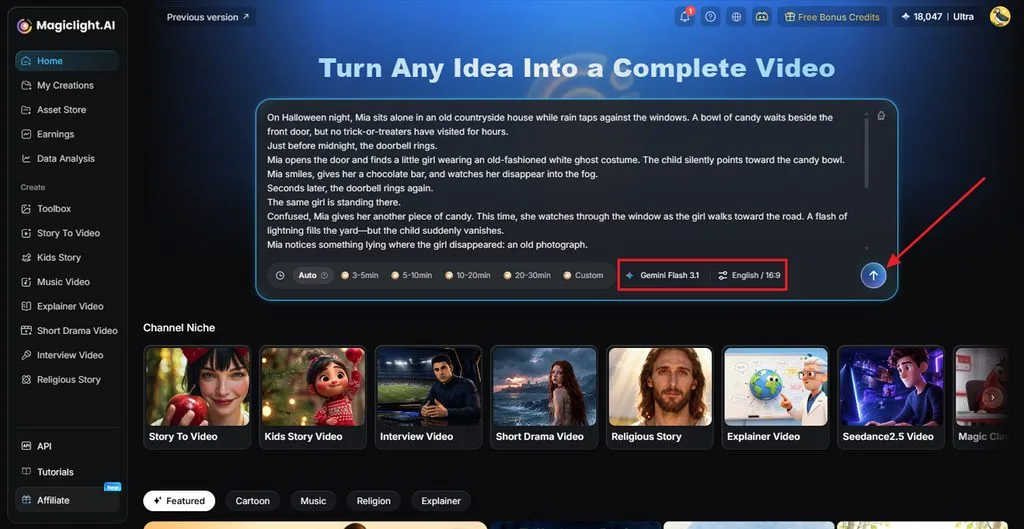
访问 MagicLight AI,结合选好的 Seedance 提示词,写下你的万圣节创意。选择一个 Story Model 并设置视频时长。选好语言和画面比例后,点击 Send。
第 2 步:通读故事
接下来,通读故事脚本,检查是否遗漏了重要细节。你可以直接让 MagicLight Agent 修改脚本中的部分内容,确认后点击 Confirm Script。
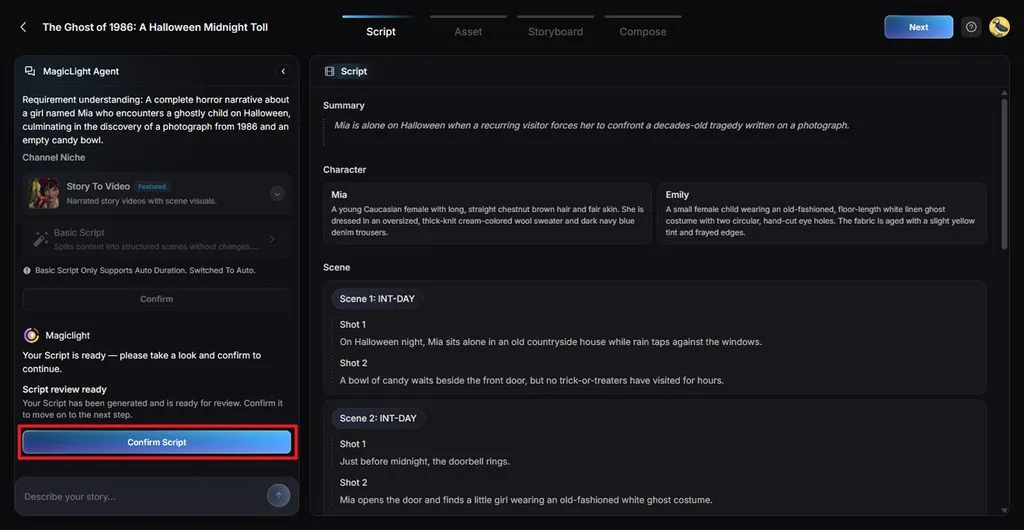
第 3 步:为视频打造万圣节风格
挑选一种 Visual Style ,让它符合你想制作的恐怖视频类型。选择 Video Motion 类型,然后点击 Confirm。
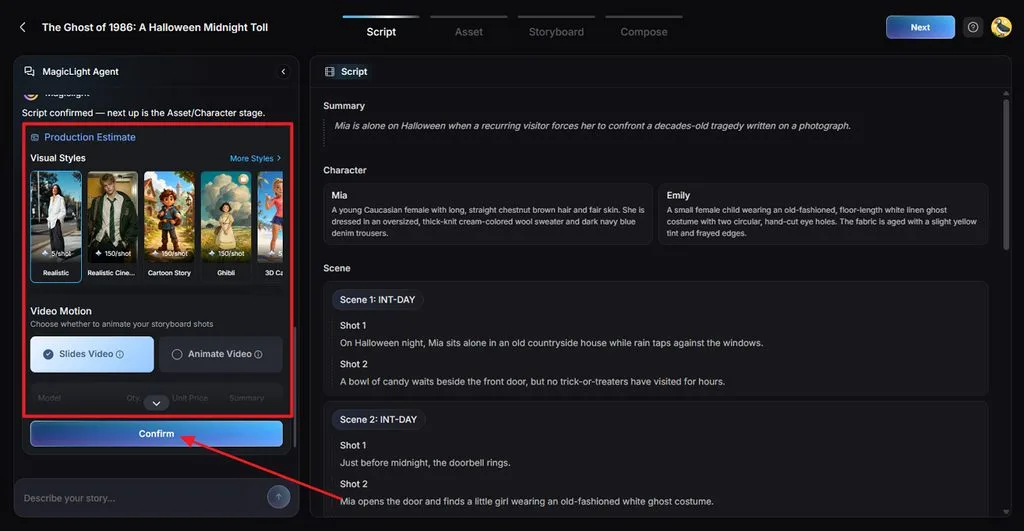
第 4 步:设定每个角色的外观
脚本中的角色会显示出来,供你查看。继续之前,先检查他们的服装和面容。你可以通过 Character Library添加其他角色或创建新角色。完成后,点击 Continue to Storyboard。
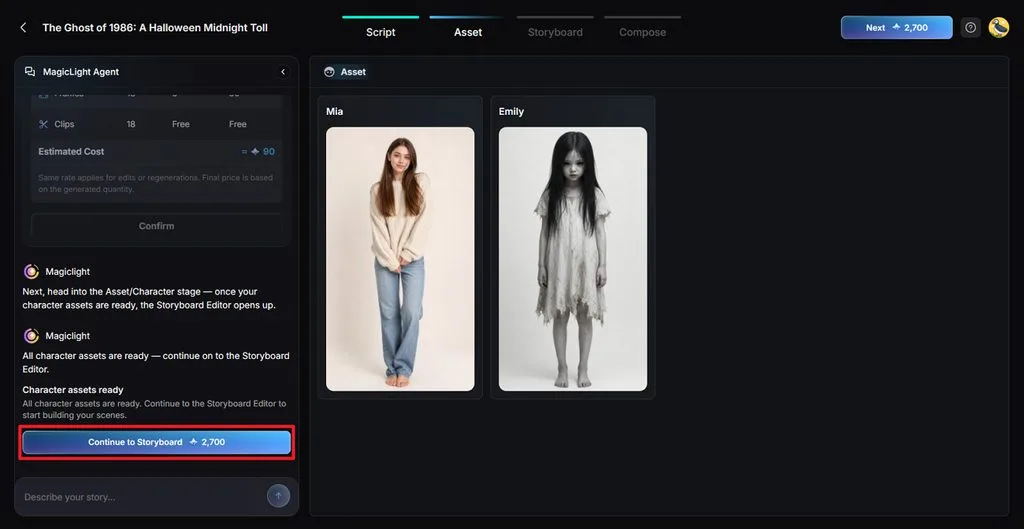
第 5 步:检查视频镜头
每个镜头都会单独显示在 Nano Storyboard 中。逐一查看,并根据需要修改 Clothes、 Expression、 Figure、 Pose或 Prompt 。检查完所有镜头后,点击 Next 。
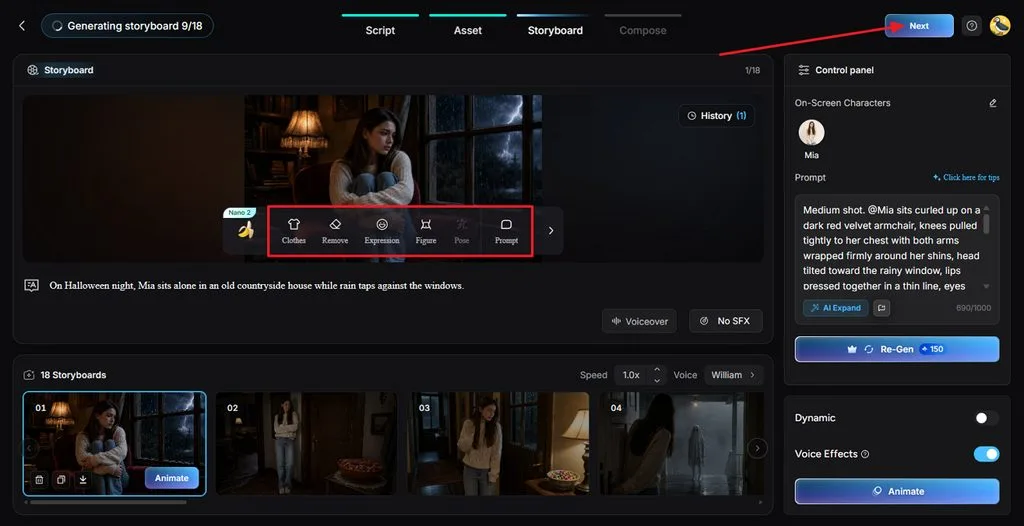
第 6 步:为视频搭配合适的声音
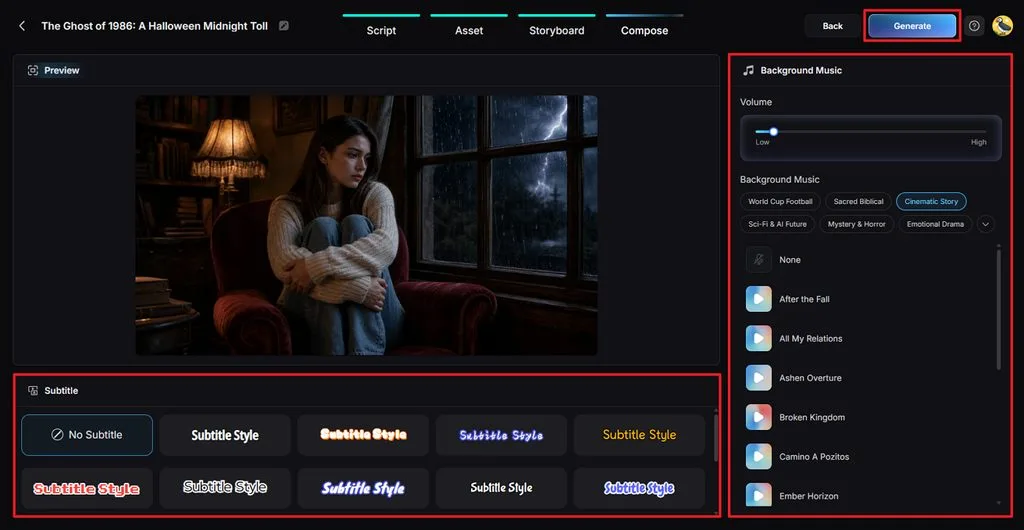
播放预览,听听各个场景衔接起来的效果。添加 Background Music 来烘托万圣节氛围,并选择清晰易读的 Subtitle Style。点击 Generate 开始生成视频。
第 7 步:观看并保存成片
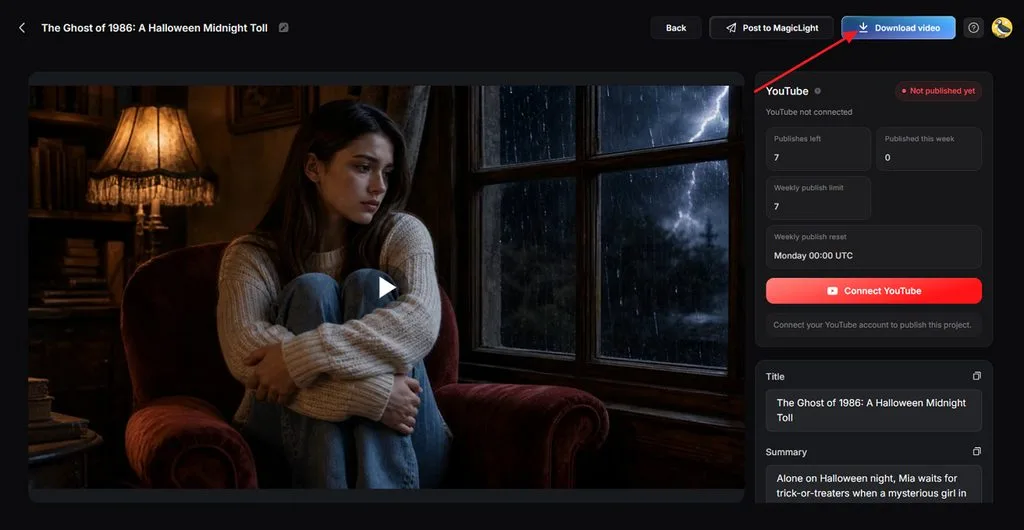
生成完成后,就可以观看你的万圣节视频了。检查场景顺序是否正确,音乐是否合适。点击 Download Video ,将视频保存到你的设备。
第三部分:为什么用 MagicLight AI 制作 Seedance 万圣节视频
Seedance 万圣节提示词很适合制作短片,但较长的视频还需要更多支持。MagicLight AI 能帮助你保持角色一致,并为不同场景添加人声和音乐。以下是使用 MagicLight AI 制作万圣节视频的主要理由:
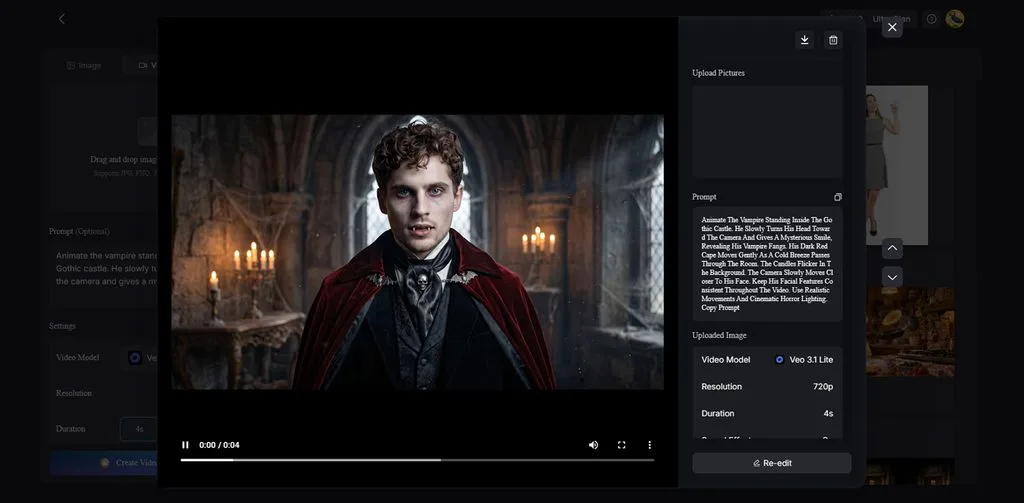
- 将图片制作成视频: Image to Video 支持输入最长 1500 字符的提示词,并添加 5 张参考图,用于制作万圣节场景。
- 辅助故事创作: MagicLight Agent 可以将你的万圣节创意转化为脚本,你也能通过聊天修改其中的内容。
- 无水印视频: 使用 MagicLight AI 付费套餐下载万圣节视频时,画面不会出现多余的标识,让观众清楚看到每个场景。
结语
Seedance 万圣节提示词能让你轻松尝试各种恐怖视频创意,享受创作的乐趣。从闹鬼的房屋到古怪的角色,有许多场景值得探索。清晰描述镜头运动和声音,有助于获得你想要的效果。如果你构思了一个较长的万圣节故事,MagicLight AI 可以将它制作成配有旁白和音乐的视频。
Seedance 万圣节提示词常见问题
1. 怎样写出有效的 Seedance 万圣节提示词?
明确告诉 Seedance,你希望万圣节场景中发生什么。写清每个动作的时间安排,以及你想加入的背景声音。
2. 如何在 Seedance 万圣节提示词中加入运镜和电影感细节?
你可以要求镜头缓慢靠近角色,或跟随角色移动。描述光线来自哪个方向,也有助于呈现你设想的画面效果。
3. 能把多个 Seedance 万圣节片段串成一个完整故事吗?
可以,你可以使用 MagicLight AI,将万圣节创意制作成较长的视频。它的 Story to Video 功能支持添加不同场景,并配上旁白和背景音乐。
4. 如何让不同万圣节场景中的角色和视觉风格保持一致?
每次编写 Seedance 万圣节提示词时,都使用相同的角色图片和视觉细节。MagicLight AI 还支持保存角色,方便你在较长的万圣节视频中持续使用。
5. 哪款 AI 工具最适合将万圣节短片扩展成较长的视频?
MagicLight AI 是一款 AI 恐怖视频生成工具 ,支持制作配有旁白的长篇故事。使用 MagicLight AI 付费套餐,你可以制作最长 50 分钟的万圣节视频。