Creating videos from text is becoming very popular for online creators today. Many beginners struggle to write clear prompts for AI video tools. Yet, a good prompt helps turn simple ideas into engaging video scenes quickly online. Nowadays, AI tools like MagicLight AI are getting smarter with advanced features.
Its ability to make diversifying videos with simple prompts makes it an effective option in this ecosystem. For those who are reluctant in writing the prompt themselves, this guide explains AI video generator prompt examples for beginners and creators.
Part 1. 20 Best AI Video Generation Prompt Examples
Creators often rely on AI video generation prompt examples to get better results. In this particular section, you will explore 20 structured prompts for AI video generation:
Prompt 1. Cinematic Neon Tokyo Street
A stylish woman walks through rainy Tokyo streets filled with glowing neon lights. The camera uses slow motion with cinematic 4K and shallow depth of field. Wet roads reflect colorful lights that create an emotional and realistic city atmosphere.
Prompt 2. Astronaut Floating in Space
An astronaut drifts slowly in deep space surrounded by floating debris. Earth reflection appears clearly inside the shiny helmet's glass surface. The camera uses close-up shots with soft lighting and smooth cinematic movement.
Prompt 3. Dragon Over Snow Mountains
A powerful dragon flies above snowy mountains during a bright sunrise sky. The camera shows wide aerial movement with epic cinematic fantasy storytelling visuals. Fog fills valleys below while detailed dragon scales shine in light.
Prompt 4. Tech Website UI Animation Scene
Floating UI panels appear over a gradient background with smooth motion effects. Clean icons and text elements animate with a calm, professional tech style, generated using MagicLight AI for seamless cinematic motion design. Camera parallax movement creates a modern website hero section explainer video feel.
Prompt 5. Snowy Tokyo Street Scene
Snowy Tokyo street shows crowds walking under falling snow and petals. The camera moves in a handheld style, giving a natural and realistic street life feeling. Soft lighting and cinematic depth create an emotional and peaceful winter scene.
Prompt 6. Cozy Winter Town Square
A warm town square glows with lights during falling, gentle snow. People enjoy hot drinks while shops shine with golden cozy lighting. A slow camera move from above makes the whole town look very warm.
Prompt 7. Latte Art Close-Up Shot
The barista pours latte art and creates a heart shape in slow motion. Steam rises softly under warm café lighting and smooth camera zoom. Cinematic 4K detail makes a satisfying and realistic modern café experience video.
Prompt 8. Fitness Transformation Hook Video
A phone screen shows bold transformation text with neon glitch effects. Fast cuts show gym scenes with energetic beat-synced motion graphics. High contrast visuals create a strong attention-grabbing social media hook video.
Prompt 9. Toy Robots Assembly Loop
Toy robots assemble colorful gadgets on a moving conveyor belt in a workshop scene. Bright colors and smooth motion create a playful looping animation environment. The camera pans sideways, showing detailed mechanical movement and fun energy flow.
Prompt 10. Neon Cyberpunk City Flight
A cyberpunk city glows with neon lights and futuristic tall buildings. The camera flies between skyscrapers, showing a purple, cyan glowing night atmosphere scene. VHS-style effects and fast motion create an immersive futuristic city feel.
Prompt 11. Travel Montage Clips
Travel montage shows markets, mountains, and food clips in a fast rhythm. Handheld camera style adds realism with vibrant colors and quick transitions. Social captions appear on screen, enhancing storytelling and viewer engagement flow.
Prompt 12. Premium Smartphone Showcase
A black smartphone rotates slowly on a pedestal in a dark studio setup. Soft lighting highlights the edges and premium design details of the device clearly. The camera circles smoothly, creating a high-end cinematic product advertisement video style.
Prompt 13. Coffee Brand Cinematic Shot
Coffee beans transform into a steaming cup placed on a wooden sunrise table. Soft light and shallow depth create a warm and cozy emotional tone. The camera slowly moves forward, showing a cinematic brand storytelling visual experience scene.
Prompt 14. Skincare Product Flat Lay
Skincare products are arranged neatly on a pastel background with soft shadow lighting. Overhead camera shows minimal design with smooth sliding transitions between items. Calm ambient music style visuals create a clean, modern, beautiful brand feeling.
Prompt 15. Futuristic Running Sneakers
A runner in glowing shoes sprints through a dark and shiny blue tunnel. The camera follows the feet to show the details of the new sneakers. Punchy music and bold lights make this commercial look very fast and strong.
Prompt 16. Robot Planting on Mars
A cute robot waters a small plant on the red Mars rocky landscape surface. Soft Pixar-style animation gives a friendly and emotional storytelling atmosphere. The camera gently orbits, showing a calm and hopeful futuristic space environment scene.
Prompt 17. Toy Factory Animation Loop
Tiny robots build toys inside a colorful and isometric factory with moving gears. Bright, playful colors create smooth, looping animation with cheerful motion design. The camera angle stays steady, showing detailed mechanical teamwork and rhythm flow.
Prompt 18. Wizard Cat Fantasy Walk
A cat wearing a wizard hat walk through a glowing, enchanted forest path. Floating magical particles and soft lights create a dreamy, fantasy atmosphere. Slow side camera movement enhances a calm, mystical storytelling visual experience tone.
Prompt 19. Zen Glass Sphere Scene
A glass sphere contains a miniature zen garden with soft sand patterns. The camera slowly zooms in, showing reflections and calming studio lighting effects. Ambient sound design creates a peaceful meditation-style, relaxing visual experience.
Prompt 20. Wolf Cubs Nature Scene
Five wolf cubs play on a grassy road under a golden sunlight sky. Wildlife camera captures natural movement with soft depth and realistic textures. Environmental sounds and warm lighting create an emotional nature documentary video scene.
Part 2. Best Tool to Create AI Videos from Prompts
As discussed above, writing prompts are easy, but turning them into videos remains challenging. A good prompt alone cannot create videos without the right supporting tools. Here, MagicLight AI applies AI video generator prompt examples to build high-quality videos. The tool has a Smart Script feature that enhances your prompt with advanced AI with up to 12,000 characters.
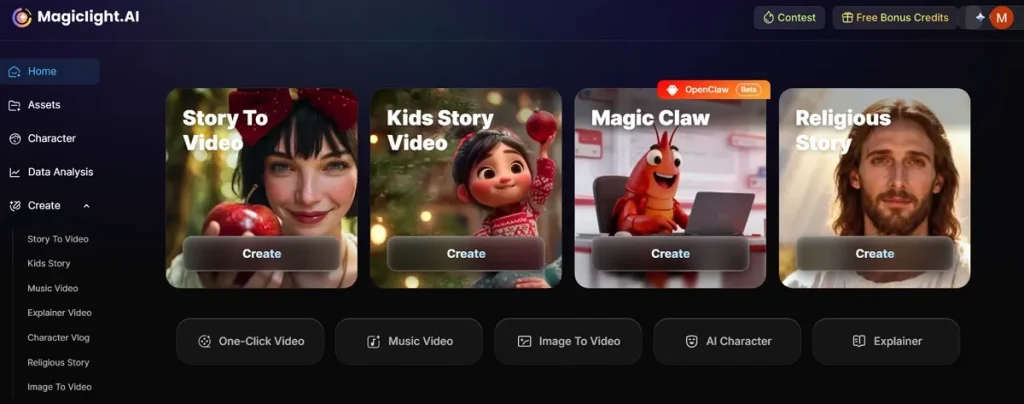
Whether you want to generate long storytelling videos, it allows a duration of up to 50 minutes. Along with that, this dedicated tool includes 8 director modes for controlling cameras and storytelling style effects. MagicLight AI even generates full story narratives automatically without manual script-writing effort. To create content for global users, it supports 11 languages to attract more viewers.
Why Choose MagicLight AI for Generating AI Videos
This particular section explains to you why creators prefer this advanced tool to generate AI videos:
- One-Click Generation: It allows instant video generation using 14 models with just one click. This saves time and removes the need for manual editing or long processes.
- Voice Audio: Voiceover tools provide 37 voices with emotions and language options available. Moreover, audio tools add music and effects for better storytelling results and quality output.
- Visual Quality: The tool also supports 720p and 1080p resolution to enhance video for clear and sharp videos. High-quality output helps creators produce professional-looking content without extra effort.
- Audio Control: MagicLight AI provides 40 background music options to improve mood and engagement. Users can choose music that matches scenes and enhances the storytelling experience effectively.
- Style Variety: Multiple style models give flexibility to create different video looks and themes. You can select styles that match your content tone and creative requirements.
Conclusion
In summary, learning the ability to write good scripts is the best way to grow as a creator. This guide on AI video generator prompt examples shows you how to turn thoughts into films. However, prompts alone are not enough to achieve realistic results without proper tools. So, creators need a reliable solution for smooth video generation. Therefore, MagicLight AI easily and efficiently transforms prompts into high-quality videos.
FAQs on AI Video Generation Prompt Examples
1. What type of prompts work best in MagicLight AI?
Clear and detailed prompts work best for generating accurate AI videos. It is also recommended to include mood, characters, and camera style for better output results. Still, simple structured prompts help MagicLight AI understand your video idea clearly.
2. How does MagicLight AI turn prompts into videos?
The AI analyzes your text and breaks it into visual storytelling scenes. Each scene is generated with characters, background, and cinematic motion effects included. Finally, it combines everything into a smooth and complete video output.
3. How do I improve AI video prompt quality?
Use clear instructions with specific details like lighting and camera style. Add examples and a structured format so AI understands your vision easily. Furthermore, keep improving prompts step-by-step for better and more realistic results.
![How to Write a Script for a Short Film in 2026 [Beginner’s Guide]](https://magiclight.ai/wp-2/wp-content/uploads/short-film-screenplay-writing-guide-300x169.webp)