



Coming up with a fresh story every week can become difficult for content creators. A good AI story generator helps turn simple ideas into stories worth sharing. Some tools even remember your characters, so their stories feel connected each time.
Finding the best free AI story generator depends on how you plan to use it. This guide covers 6 free tools that can help you write better stories. You will also learn how MagicLight AI turns your written stories into videos.
Part 1. How to Choose the Best AI Story Generator
A good story can lose direction when the tool forgets important character details. The best AI story generator helps maintain consistency throughout the entire writing process. Before choosing a free tool, consider these 5 features for your writing needs.
- Story Memory: Familiar characters should remember past experiences and maintain their personalities throughout different chapters.
- Plot Control: Unexpected changes in the storyline should remain easy to adjust during the story writing process.
- Writing Style: Every story needs language that matches its theme and creates the intended mood.
- Free Access: Some platforms restrict chapter length and require payment after reaching their free limits.
- Video Support: Certain platforms turn written stories into narrated videos with matching scenes and characters.
Part 2. 6 Best Free AI Story Generators for Beginners
A free story AI generator can turn a rough idea into something worth developing. These 6 tools approach storytelling differently depending on the kind of content you create.
Best For: Creating narrated story videos with consistent characters.
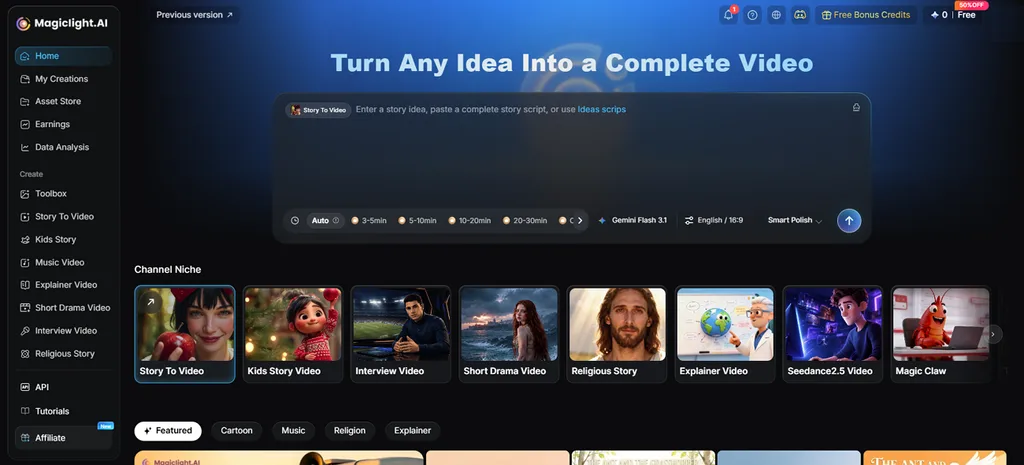
Turning a short story idea into a complete narrated video becomes possible through MagicLight AI. The platform accepts up to 12,000 characters and develops your initial concept into detailed storytelling scenes. MagicLight Agent helps shape the script before arranging character details alongside numbered shots for scenes.
Through Story to Video, creators can produce videos lasting up to 50 minutes with consistent characters. These features make MagicLight AI the best story generator AI option for creators producing narrated videos.
Key Features
- AI Story Models: MagicLight AI offers 14 writing models including GPT-6 Astra for cinematic storytelling. GPT-5.6 gives creators another choice when developing stories with different writing needs.
- Smart Polish and Basic Script: Smart Polish adds meaningful details to rough story ideas without changing their main direction. Basic Script keeps the original text exactly as written throughout the creation process.
- Story Templates: Religious Story templates help build stories around faith with a meaningful message. Short Drama Video templates shape emotional stories through conflicts between characters.
- Visual Styles: MagicLight AI includes more than 52 visual styles suited to different story themes. Creators can match the appearance of each scene with the mood of their story.
- Multilingual Scripts: MagicLight AI supports scripts and narration in 11 languages for different audiences. Creators can reach viewers in their preferred language without rewriting every story manually.
Pros
- Edit story scripts before generating any video scenes.
- Turns written stories into narrated videos with matching visuals.
- Characters maintain consistent appearances throughout the entire video.
Con
- Allows you to export videos up to 1080p resolution, with no 4K option.
- Sudowrite
Best For: Novelists building longer fiction through detailed chapter outlines.
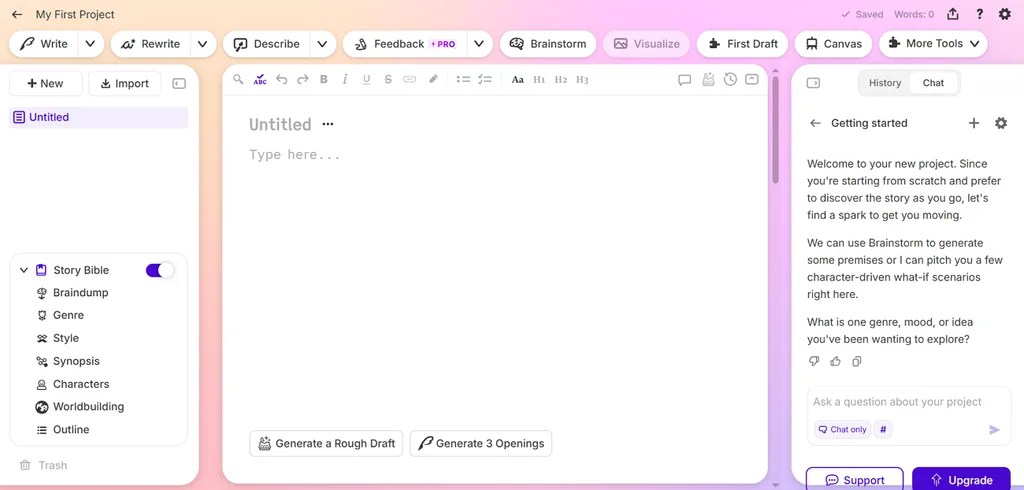
Sudowrite keeps earlier chapters within reach as your novel grows beyond its original outline. Its Muse model focuses on fiction writing and develops scenes around the characters you introduce. For anyone comparing the best free AI story generator options, its chapter planning deserves attention.
Key Features
- Draft can produce chapters exceeding 3,000 words from your prepared story outline.
- Describe brings sensory details into passages that feel empty during early drafts.
- Match My Style studies writing samples before adapting prose to your personal voice.
Pros
- Canvas suggests unexpected plot twists alongside hidden character secrets.
- Feedback identifies 5 areas that need attention during revision.
Cons
- Character details must appear in notes before generating scenes.
- Finished stories remain written manuscripts without built-in video creation.
- Squibler
Best For: Beginners creating complete fiction drafts from prompts.
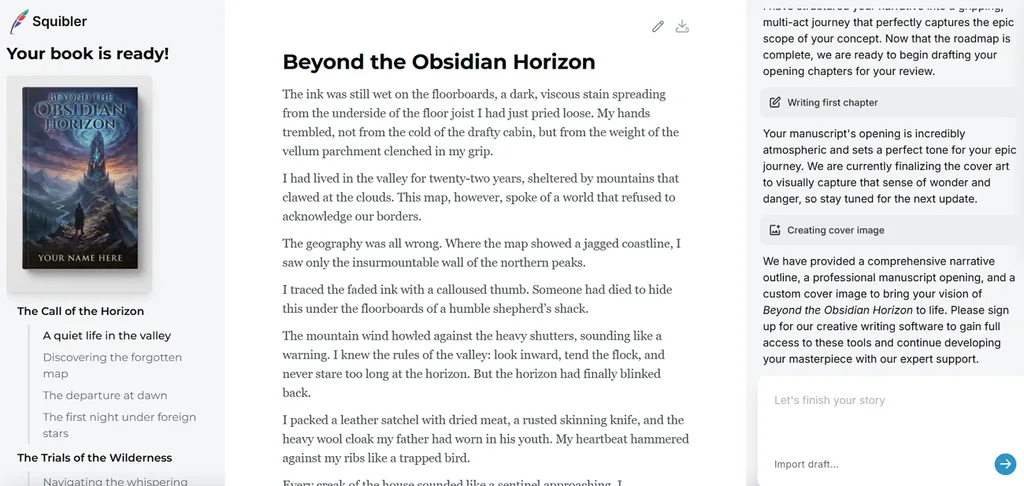
Starting a complete story from scratch becomes less intimidating when Squibler handles the initial draft. Its generator takes a brief description and lets writers decide how their story should end. Anyone exploring the best AI story generator free options can try its beginner-friendly writing approach.
Key Features
- The generator includes 15 genres with dedicated options for historical fiction writing.
- Generated chapters open inside an editor where dialogue can be rewritten.
- Different story endings can be compared before settling on the final version.
Pros
- Brief ideas develop into complete books with editable chapters.
- Writers retain full ownership of stories created through Squibler.
Cons
- Uploading existing manuscripts requires creating an account with Squibler.
- Longer projects require writers to review and refine the generated plot.
- Perchance
Best For: Writers developing stories through gradual paragraph generation.
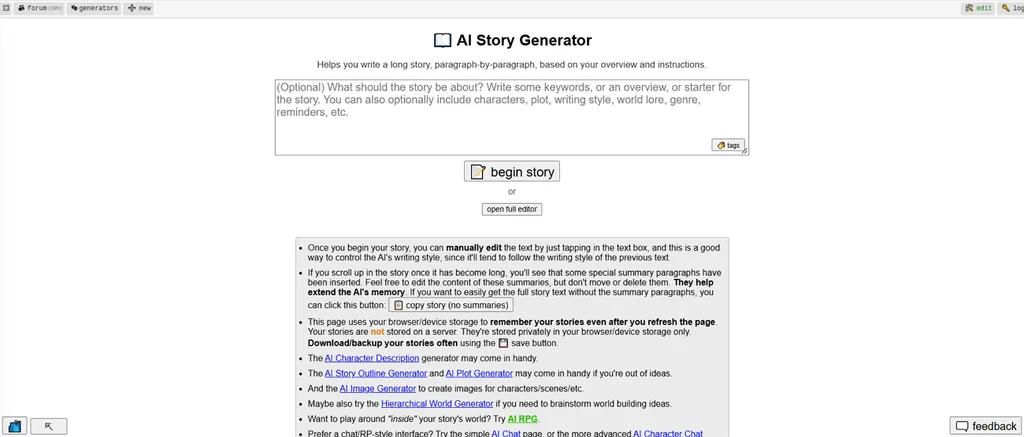
Perchance lets you build stories gradually without planning every chapter from the beginning. Each new paragraph follows your instructions and continues from the previous story events. Its flexible writing approach makes Perchance a best AI story generator for experimentation.
Key Features
- Short notes before each paragraph help guide what happens in the upcoming scene.
- Story summaries preserve earlier events as your writing develops into longer fictional chapters.
- Separate generators help prepare plot outlines before you begin writing the actual story.
Pros
- Change the plot between paragraphs without losing previous writing.
- Create short stories and longer books using identical tools.
Cons
- Clearing browser storage can permanently erase your saved drafts.
- Longer stories require repeated generations to complete individual chapters.
- NovelAI
Best For: Fantasy writers managing detailed worlds with recurring characters.
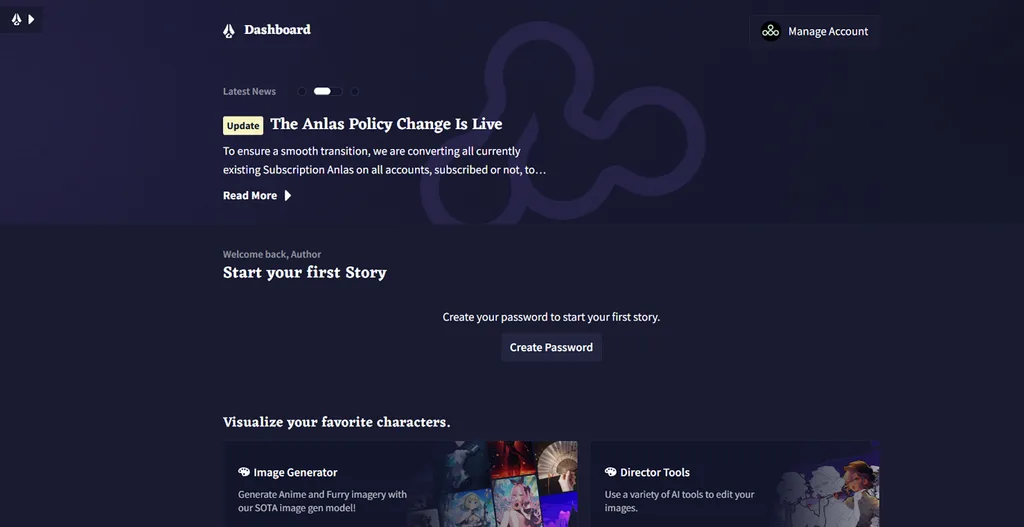
Keeping track of a growing fantasy world becomes difficult when characters keep returning. NovelAI handles these details through its Lorebook that remembers important characters and locations. Its Xialong model builds upon GLM-4.6 with additional training focused on fictional storytelling.
Key Features
- Lorebook recalls saved character details whenever their assigned keywords appear in recent text.
- An Author Note helps guide upcoming passages without rewriting the entire story outline.
- Text Adventure mode turns your typed responses into actions within the ongoing story.
Pros
- NovelAI Diffusion V5 creates character portraits within your account.
- Export finished stories as text files for future use.
Cons
- Stories remain stored locally without enabling Remote Storage.
- Advanced generation settings require practice before becoming comfortable using.
- AI Dungeon
Best For: Players shaping adventures through their own choices.
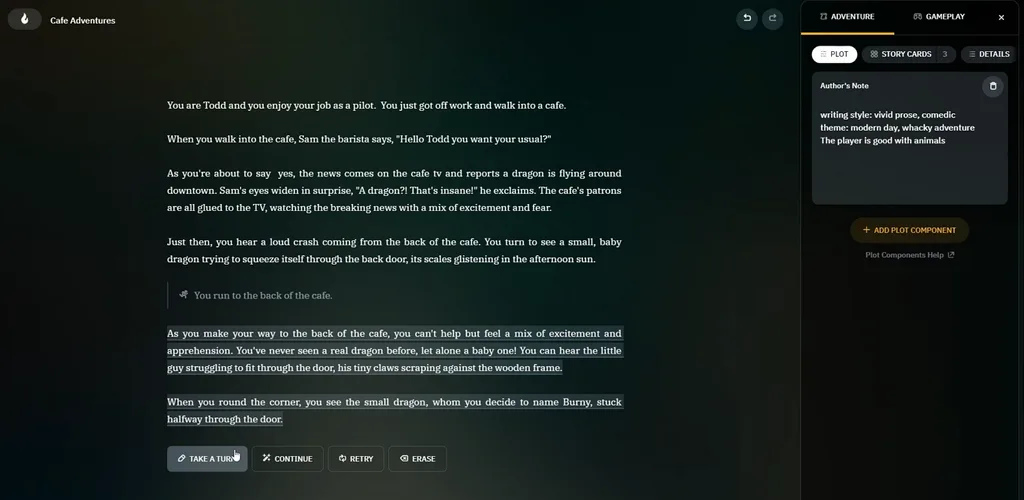
AI Dungeon puts you inside the story instead of making you watch events unfold. Every action you take changes what happens next and gives the adventure another direction. Among the best free AI story generators, it makes your decisions part of the story.
Key Features
- The “See action” generates an image showing what happens during your current adventure.
- Story Cards remember important character details until those facts become relevant during gameplay.
- AI Instructions help maintain the intended atmosphere throughout your interactive story experience.
Pros
- Retry generates alternative responses without changing your previous actions.
- Add up to 4,000 characters of personal story narration.
Cons
- Adventures mainly follow second-person narration through player action commands.
- Player actions and generated responses require editing after completion.
Part 3. How to Turn AI-Generated Stories into Videos with Magiclight AI
Stories written in Sudowrite and Squibler still need visuals before becoming complete narrated videos. MagicLight AI brings these elements together using scripts from any free story AI generator. Its Agent works with pasted story text and prepares scenes without requiring manual formatting.
- Recurring Characters: MagicLight AI remembers approved characters across projects to maintain their familiar appearance in future episodes.
- AI Video Models: The Image to Video feature includes 20 AI video models for turning images into animated scenes.
- Episode Length: Paid plans support videos lasting up to 50 minutes through the Long Video Generator.
Guide: How to Turn a Story into a Video with Magiclight AI
MagicLight AI stands among the best story generator AI tools to create storytelling video content. You can turn your written ideas into narrated videos by following the steps below:
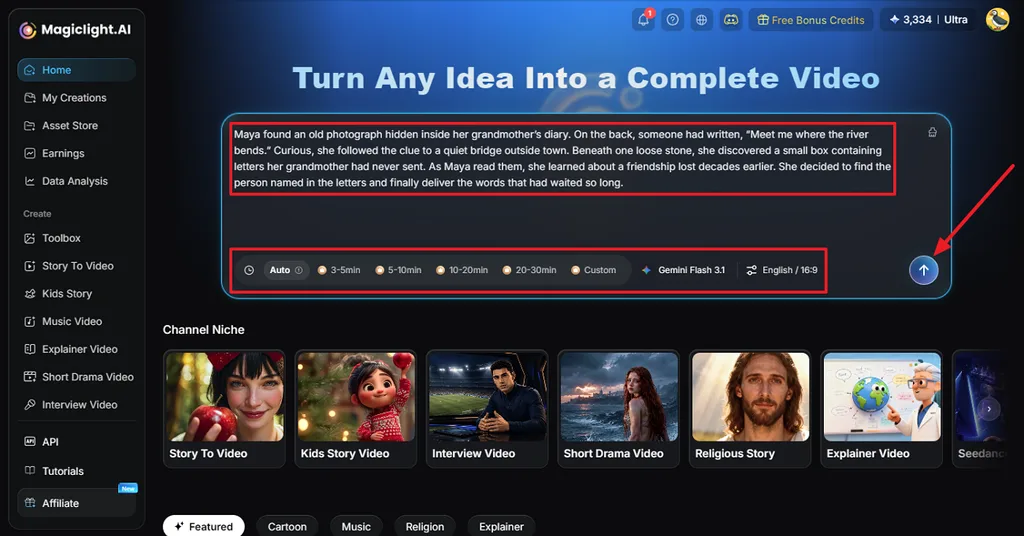
Step 1. Paste Your Story Idea
Once you enter MagicLight AI, choose the Story to Video tool and enter your story idea. Select a video duration, aspect ratio, and language, then press the Send button.
Step 2. Review your Story Script
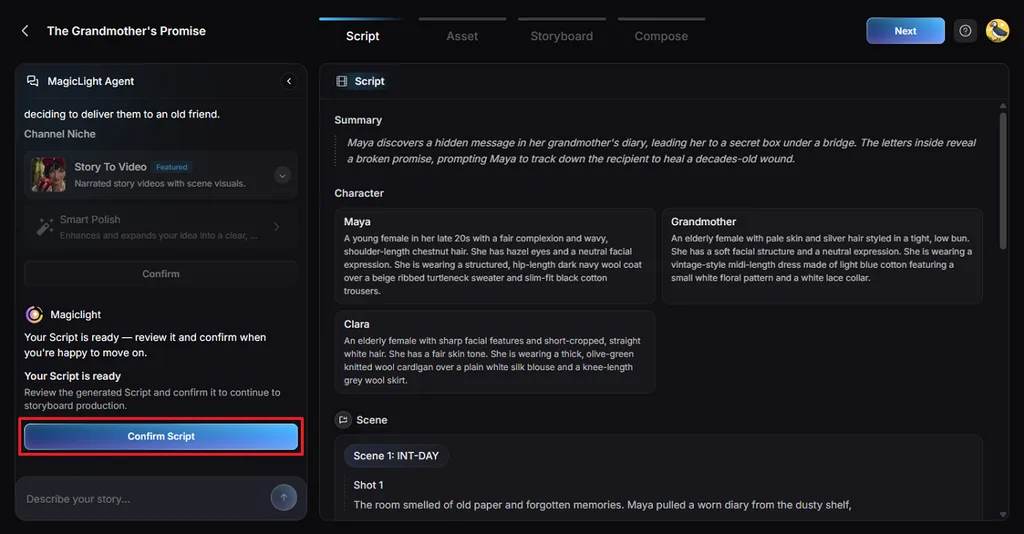
Next, review the summary and shots that MagicLight Agent generates based on your story idea. Ask the Agent chat if any amendments are needed. If the summary is finalized, press Confirm Script.
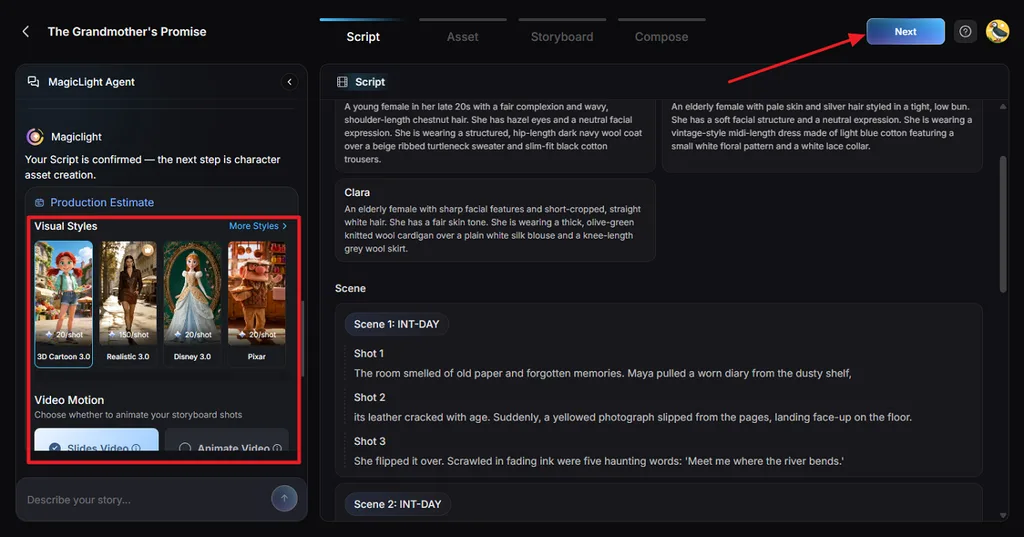
Step 3. Choose a Story Video Style
In the Visual Style section, choose a style that matches your story mood and select a Video Motion option that you want for your video. After that, press Confirm to finalize the settings.
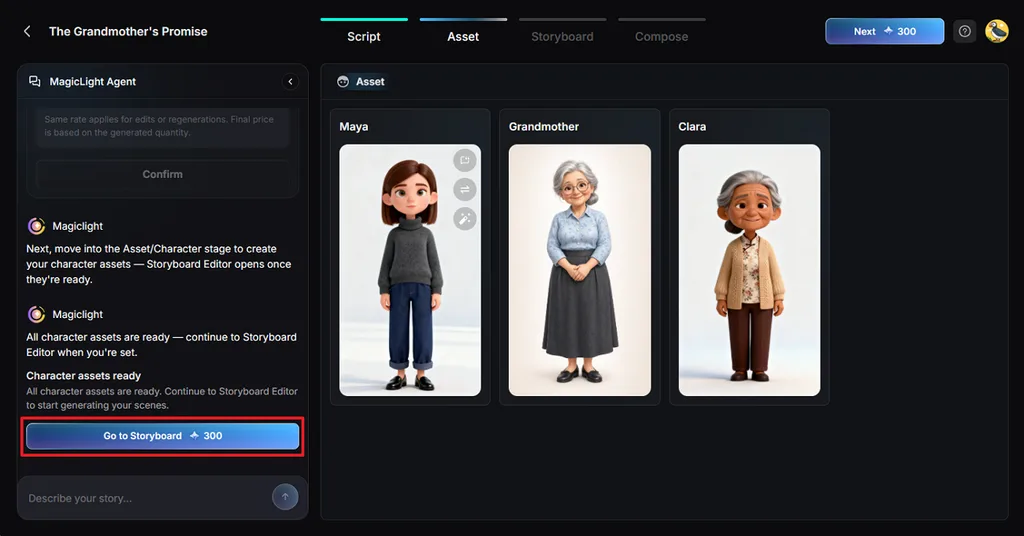
Step 4. Select The Cast for Your Story
Then, MagicLight AI suggests some characters based on your story. Choose a suitable character or create a new one by accessing the Character Library. Once the characters are finalized, click Go to Storyboard.
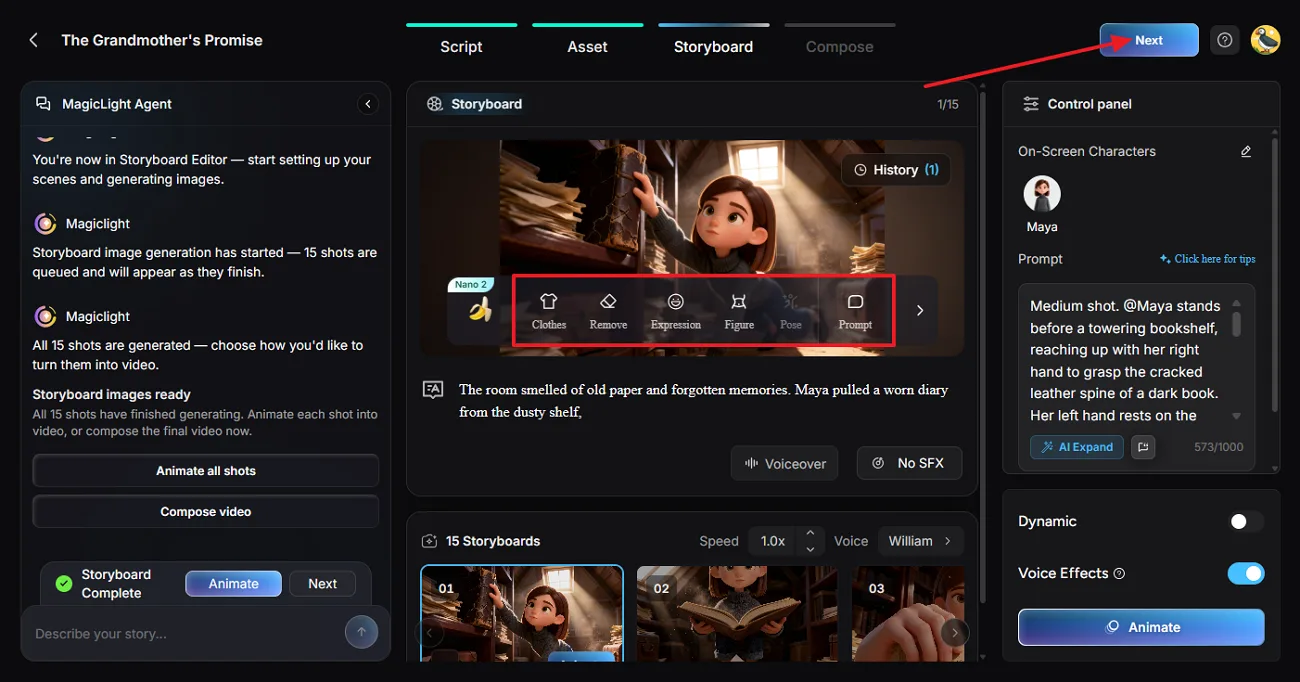
Step 5. Refine the Story Scenes
In Nano Storyboard, check each shot generated and adjust the Clothes, Poses, and Expressions for each scene. Press Next after the storyboard is ready for the video creation.
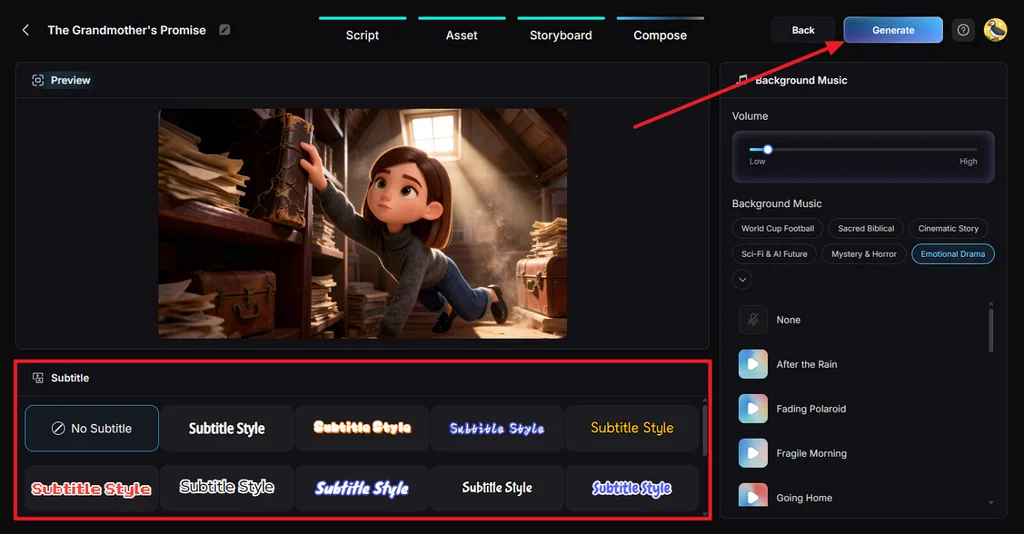
Step 6. Add Subtitle and Background Music
Next, choose a Subtitle Style from the 16 given options if your video has dialogue. Pick a background music from the 40 free options and press the Generate button.
Step 7. Preview and Download the Final Video
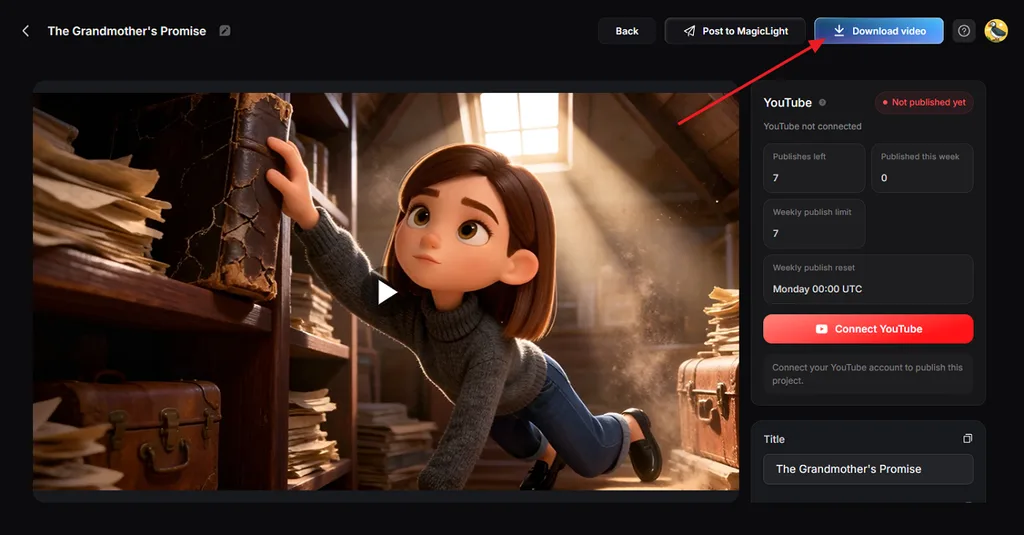
Once the video is generated, play the video in the Preview panel and see if the scenes align with your story. Next, press Download Video to save the final file.
Conclusion
Finding the best free AI story generator depends on the stories you want to create. Sudowrite handles longer fiction through detailed planning, and NovelAI keeps recurring characters familiar across chapters. Squibler helps develop complete drafts, and Perchance gives writers control over each new paragraph. For creators planning to share narrated story videos, MagicLight AI brings written stories onto the screen.
FAQs About AI Story Generators
- What is the best free AI story generator?
MagicLight AI works well for creators who want narrated videos alongside their written stories. Its Story to Video feature develops scripts into animated scenes with consistent character appearances.
- Can I generate stories with AI for free?
Yes, a free story AI generator can help you develop your initial ideas. Perchance provides free story writing, and MagicLight AI offers starter credits for video creation.
- How do I write a better story with AI?
Start with a clear character background and explain what makes the main conflict important. Adding details about previous events helps the generator maintain consistency throughout your story chapters.
- Can I turn an AI-generated story into a video?
MagicLight AI lets you turn written stories into narrated videos through its dedicated feature. Your script becomes a sequence of animated scenes featuring characters with consistent visual appearances.

![How to Write a Script for a Short Film in 2026 [Beginner’s Guide]](https://magiclight.ai/wp-2/wp-content/uploads/short-film-screenplay-writing-guide-300x169.webp)



![How to Make a Product Video for Marketing With AI [Guide 2026]](https://magiclight.ai/wp-2/wp-content/uploads/product-video-marketing-guide-1-300x198.webp)