


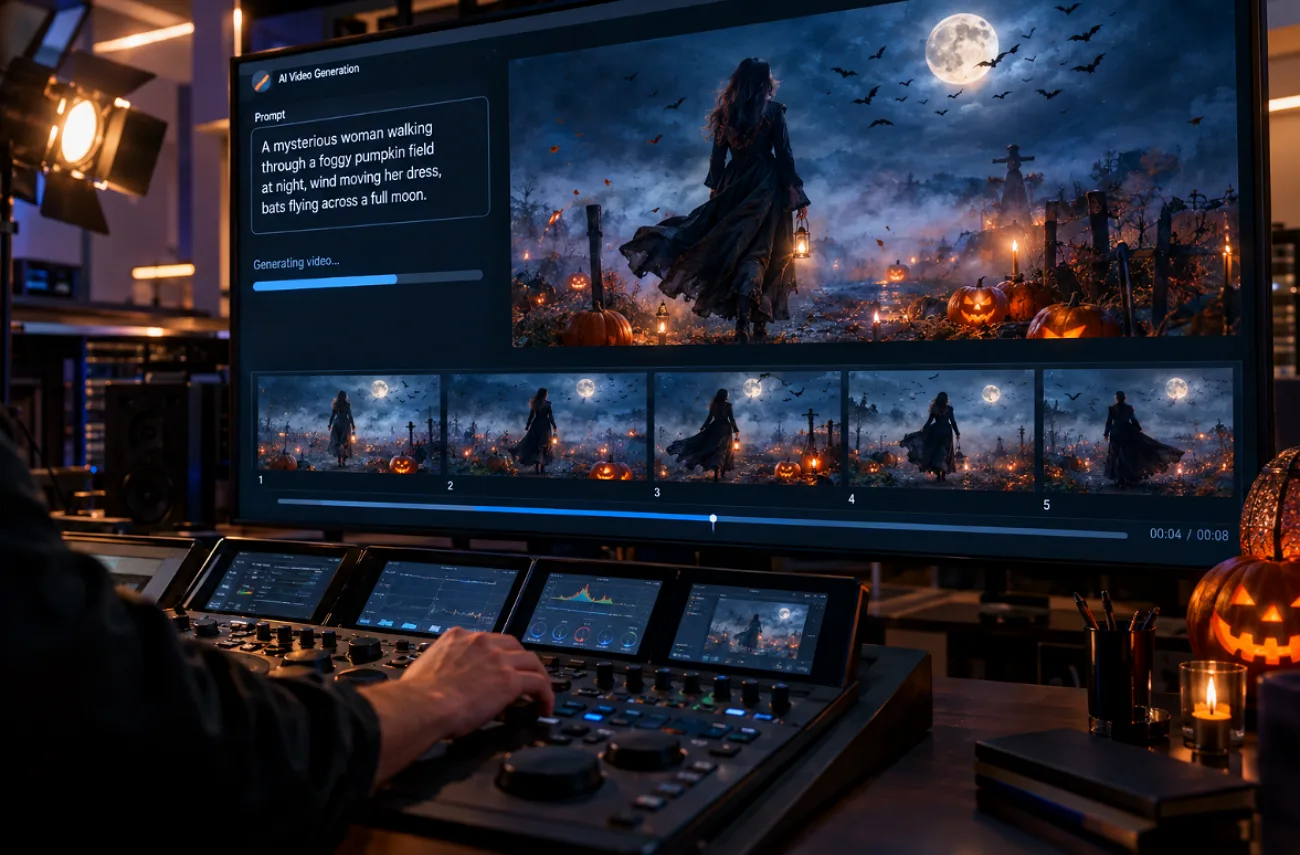
Halloween content fills social feeds every October, and AI video tools now turn a spooky idea into a short clip in minutes. The results depend on wording, since vague requests tend to produce generic pumpkins and blurry ghosts.
A detailed Halloween video prompt sets the scene, light, camera move, and format before the model starts guessing. Haunted houses, classic monsters, cute characters, and product promos all benefit from that structure, for fun posts or brand campaigns alike.
Part 1. 20 Best Halloween Video Prompts for Social Media
A strong Halloween video prompt opens with the format, then names one spooky subject, its setting, the light, and one camera move. Vertical 9:16 clips of 8 to 15 seconds suit TikTok, Instagram Reels, and YouTube Shorts.
These prompts suit most AI video generators, and MagicLight AI can turn any of them into a finished video for social media. Its AI Reels Maker adds captions, voiceover, and music to each vertical cut.
Haunted Places and Spooky Scenery Prompts
Setting-led clips stop the scroll because fog, flicker, and slow reveals read instantly on a phone screen. Naming one light source, such as a lantern or lightning, keeps the mood under control.
- 9:16 | 10s | Slow push-in. A creaking front door swings open on an abandoned Victorian house at midnight. Moonlight cuts through dust as one candle flickers at the top of the stairs.
- 9:16 | 8s | Low tracking shot. Thick fog rolls between crooked gravestones in a hillside cemetery under a full moon. Bare branches creak, and a lantern glows beside an open iron gate.
- 9:16 | 12s | Handheld walk-through. An abandoned carnival at dusk, with a stopped carousel and flickering string lights. The camera drifts closer as one painted horse starts turning on its own.
- 1:1 | 8s | Static wide shot. A cornfield maze on Halloween night, its path lined with glowing jack-o’-lanterns. Crows lift off a scarecrow as purple storm clouds gather overhead.
Classic Monster and Character Prompts
Familiar monsters give viewers an instant cue, so a strong Halloween video prompt spends its words on texture, costume, and one clear action. Keeping the creature in a single shot also helps AI models hold its face steady.
- 9:16 | 10s | Slow orbit. A witch in a tattered cloak stirs a bubbling green cauldron in a stone cottage. Sparks rise to the rafters as a black cat watches from a shelf.
- 9:16 | 8s | Low-angle push-in. A pale vampire rises slowly from a velvet-lined coffin in a candlelit crypt. Red light spills across the stone walls as bats scatter overhead.
- 16:9 | 12s | Wide shot. A werewolf howls from a cliff edge under a huge full moon, silver fur rippling in the wind. Distant thunder rolls as clouds race across the sky.
- 9:16 | 10s | Medium shot. Three skeletons in top hats perform a jerky swing dance on a moonlit graveyard stage. Their bones click in rhythm as orange lanterns sway above them.
Cute and Family-Friendly Halloween Prompts
Family audiences respond to charm rather than fright, so bright palettes, soft lighting, and playful motion do most of the work. A 3D cartoon or picture-book style keeps the tone friendly for all ages.
- 9:16 | 8s | Gentle close-up. A tiny fluffy ghost peeks out from behind a smiling jack-o’-lantern on a porch. Warm light and falling autumn leaves, rendered in soft 3D cartoon style.
- 1:1 | 10s | Top-down time-lapse. Hands carve a grinning face into an orange pumpkin, then set a candle inside. The glow flickers on as the kitchen lights dim.
- 9:16 | 12s | Tracking shot. Trick-or-treaters in homemade costumes walk up a leaf-covered street lined with glowing pumpkins. Picture-book style, warm streetlights, and paper bats on every porch.
- 9:16 | 8s | Slow zoom-out. A black kitten in a tiny witch hat tumbles out of a candy bowl. Fairy lights, pastel orange and purple tones, and a soft music-box melody.
Social Media Trend Prompts
Trend formats such as POV clips, costume transitions, and pet reveals work well because viewers recognize the setup immediately. A strong Halloween video prompt can add a surprising transformation or reveal within the first few seconds, helping the clip grab attention and keep viewers watching.
- 9:16 | 10s | First-person view. A flashlight beam sweeps down a pitch-black mansion hallway. It lands on a portrait whose eyes slowly follow the camera as floorboards creak.
- 9:16 | 8s | Snap transition. A creator in a gray hoodie snaps their fingers and turns into a vampire in a velvet cape. Purple neon light floods the bedroom right on the cut.
- 9:16 | 10s | Slow pan. A golden retriever in a pumpkin costume sits proudly beside carved jack-o’-lanterns. Leaves drift down as it tilts its head at the camera.
- 1:1 | 12s | Overhead close-up. Gloved hands mix a glowing purple potion as dry-ice fog spills across the table. Crisp ASMR sounds of bubbling liquid and clinking glass.
Halloween Brand and Product Prompts
Seasonal campaigns work best when the product stays sharp while the Halloween mood surrounds it. Leave logos and sale text out of the prompt and add them in editing, since AI video models often garble lettering.
- 9:16 | 8s | Slow macro orbit. A pumpkin spice coffee steams on a rustic café table among tiny carved gourds. Candlelight and low fog give it a cozy seasonal ad look.
- 9:16 | 10s | Unboxing close-up. Hands open a black gift box, and purple smoke spills out to reveal a limited-edition candle. Paper bats flutter upward as the wick lights by itself.
- 16:9 | 12s | Dolly shot. A boutique window fills with cobwebs at night as pumpkins light up around dressed mannequins. Cool blue streetlight meets a warm orange glow inside.
- 9:16 | 8s | Quick zoom. A baker dusts powdered sugar over ghost-shaped cookies on a flour-covered counter. Trays of orange pumpkin cupcakes sit behind her in bright, cozy bakery light.
Part 2. Best Way to Convert Halloween Video Prompts to Spooky AI Videos
A Halloween video prompt can create a spooky clip, but a single generation often lacks a connected story, narration, or consistent scenes. MagicLight AI expands the idea through Story to Video, turning it into a complete production with structured scenes, recurring characters, narration, subtitles, and music while keeping the original Halloween concept at the center.
You can also start without a written prompt by using MagicLight Agent. After discussing the goal, it selects a suitable niche and format, writes the script, and prepares a scene-by-scene storyboard. It can create from still images to full animation, while long videos can extend the finished story to 50 minutes.
How to Create a Spooky Halloween Video in MagicLight AI
Whether you begin with your own Halloween prompt or a script created by MagicLight Agent, both routes lead into the Story to Video workflow. Choosing a vertical format early also prepares the final video for Reels, TikTok, and Shorts. Below are the steps to develop the idea, configure the video, and generate your spooky Halloween story:
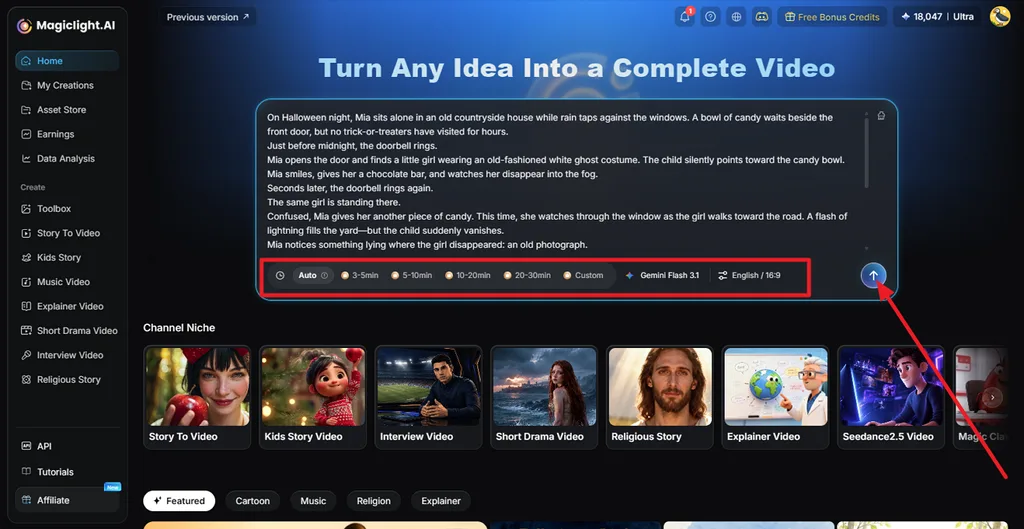
Step 1. Add Your Halloween Story
Open MagicLight AI’s homepage and paste your Halloween story or prompt into the main input box. Choose the preferred duration and language settings, then submit it so MagicLight AI can structure the idea into a complete script, and press Arrow.
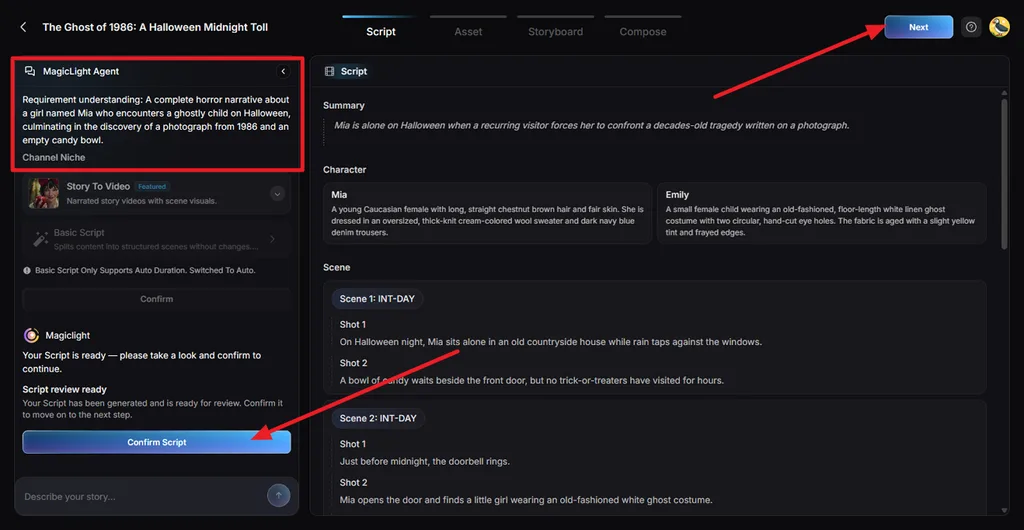
Step 2. Review and Confirm the Script
Check the generated Summary, character descriptions, scenes, and individual shots. MagicLight Agent also shows its understanding of your story in the left panel. Make any necessary changes, then click Confirm Script to continue.
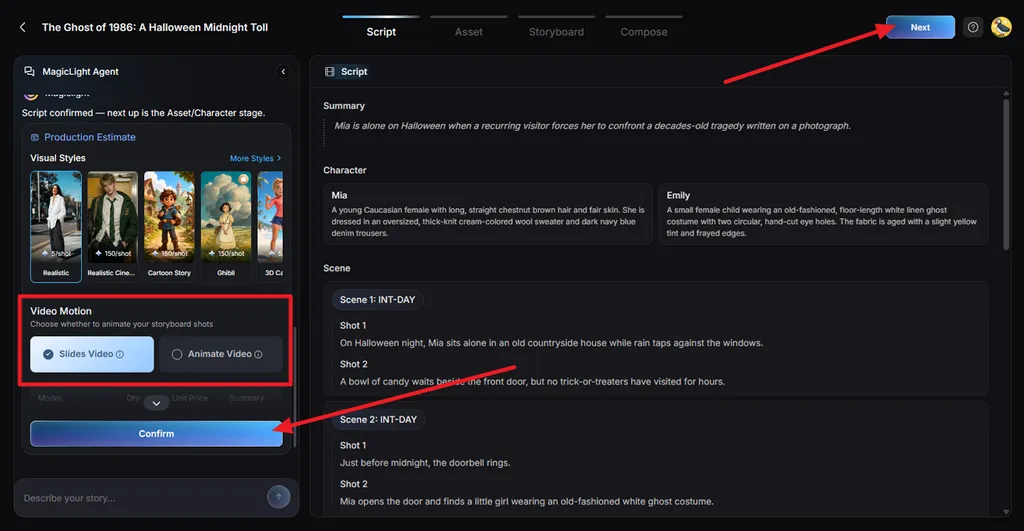
Step 3. Choose the Visual Style and Motion
Select a Visual Style that suits the Halloween atmosphere, such as Suspense for a darker cinematic look. Choose Slides Video or Animate Video, review the production estimate, and choose Confirm.
Step 4. Review the Character Assets
MagicLight AI generates visual assets for the main characters based on the approved script. Check that their appearance fits the story and remains suitable for later scenes, then select Continue to Storyboard to proceed.
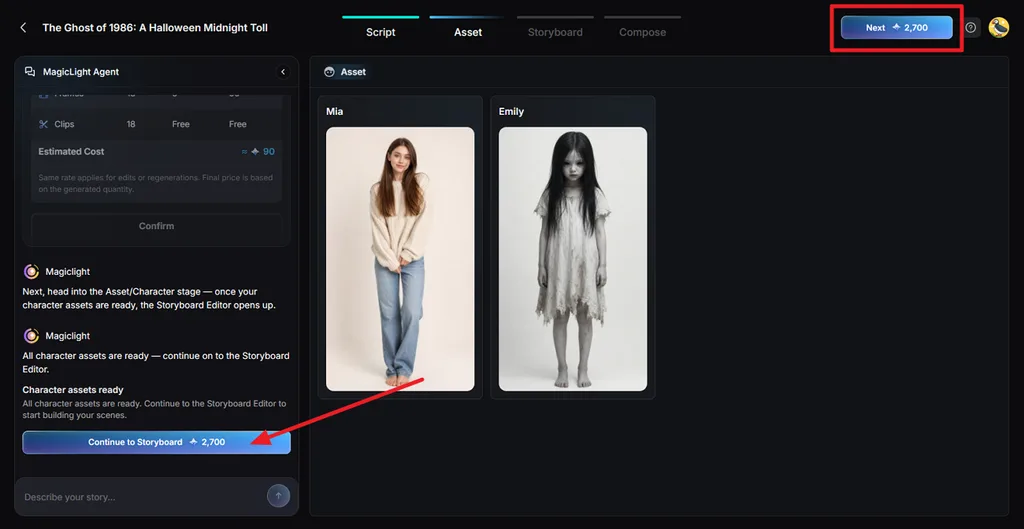
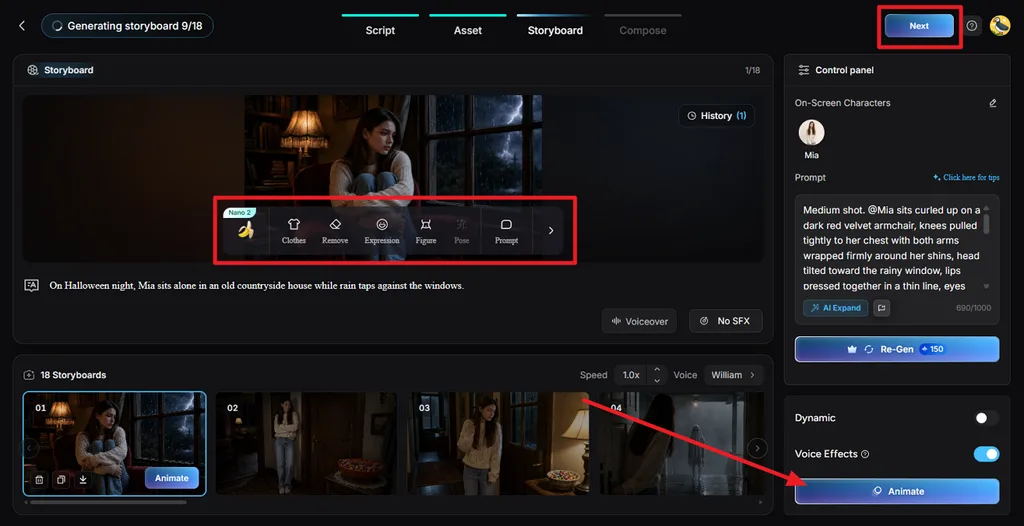
Step 5. Refine and Animate the Storyboard
Review each storyboard shot and use Clothes, Remove, Expression, Figure, Pose, or Prompt to adjust individual scenes. You can also change voice effects or regenerate a shot. Choose Animate when the storyboard is ready.
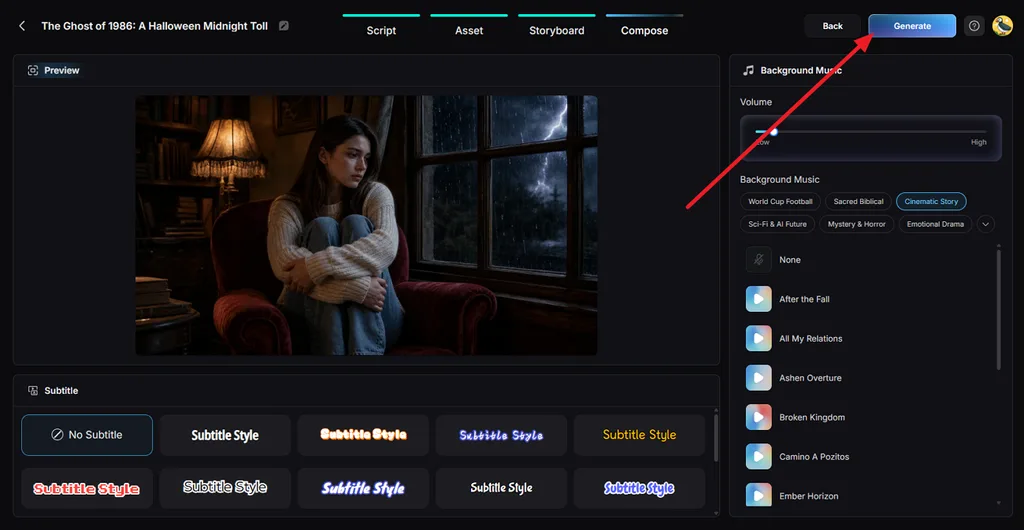
Step 6. Add Music and Subtitles
Move to Compose and preview the assembled Halloween story. Choose suitable Background Music, adjust its volume, and select a readable Subtitle Style for darker scenes. Once the presentation looks right, click Generate.
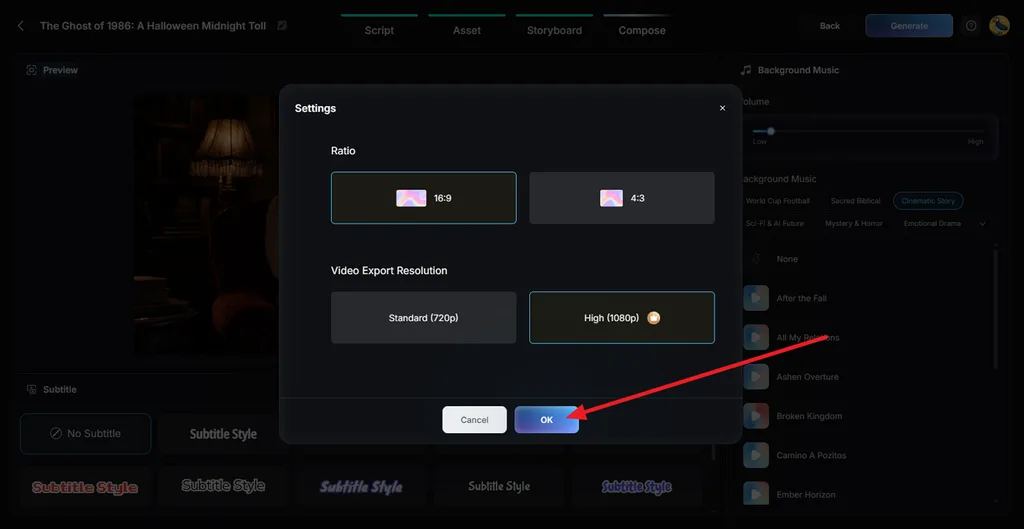
Step 7. Set the Export Quality
Choose the final Ratio and Video Export Resolution in the export settings. Select 720p for a standard export or 1080p for higher quality, then press OK to generate the finished video.
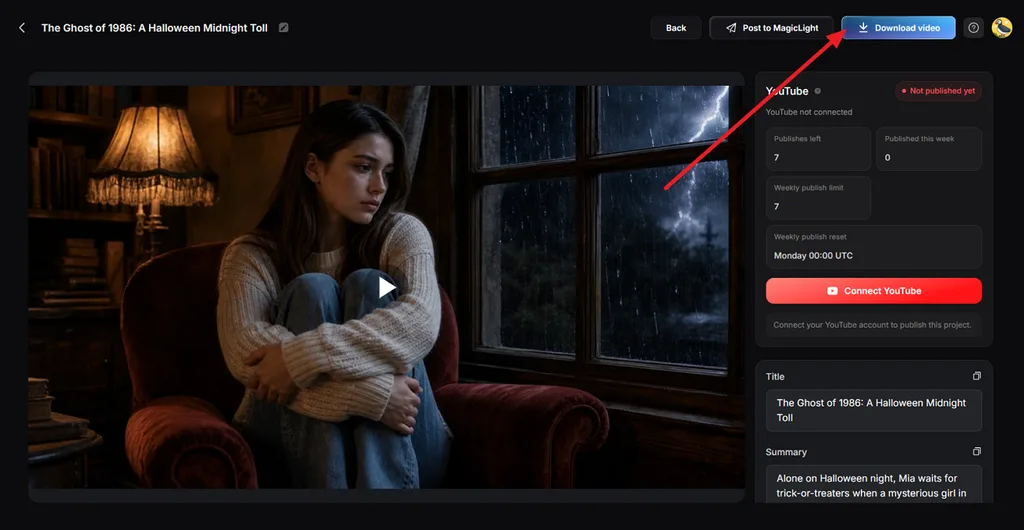
Step 8. Preview and Download the Video
Watch the completed video and check its visuals, narration, music, and story flow. Click Download Video to save the finished file. For longer Halloween stories, long videos can extend the concept into videos lasting up to 50 minutes.
Part 3. What Makes a Good Halloween Video Prompt?
A strong Halloween video prompt gives the model clear visual and cinematic direction instead of relying on vague words like “scary” or “spooky.” Subject, setting, lighting, camera movement, color, and sound all shape the final atmosphere. Here are 6 elements that help you create a more focused, cinematic Halloween scene:
- Focus on One Main Action: Give one subject a clear, visible action, such as a witch stirring a cauldron, to keep movement natural and easy to follow.
- Build the Spooky Atmosphere: Define the setting and its main light source, whether moonlight, candles, lightning, or glowing jack-o’-lanterns.
- Choose a Halloween Color Scheme: Use orange, purple, black, or eerie green for a classic Halloween look, while cold teal can create darker suspense.
- Direct One Camera Movement: Choose a slow push-in, low-angle tilt, or handheld walk-through rather than combining several movements in one shot.
- Add Atmospheric Sound: Include creaking doors, distant howls, footsteps, thunder, or whispers when using a model that supports generated audio.
- Create Suspense Without Gore: Create fear through shadows, silence, obscured figures, and slow reveals rather than relying on graphic imagery.
Conclusion
The best Halloween video prompt ideas pair one spooky subject with a clear setting, moody light, a single camera move, and a vertical format. Haunted scenery, classic monsters, cute characters, trends, and product promos all fit the same structure. MagicLight AI turns any of them into a finished spooky video, and MagicLight Agent can create one without a prompt.
FAQs on Halloween Video Prompts
1. What is a good Halloween video prompt?
A good Halloween video prompt names one spooky subject, a specific setting, the light source, one camera move, and the format. For example, a 9:16, 8-second slow push-in on a jack-o’-lantern glowing on a foggy porch at midnight covers every element.
2. How do you write a Halloween AI video prompt?
Start with the aspect ratio and clip length, then describe the subject and its action in plain words. Add the setting, light, color palette, and one camera move, and finish with sound cues. Test a draft, then change one detail at a time.
3. What AI tool can create Halloween videos?
MagicLight AI can create complete Halloween videos with scenes, consistent characters, narration, subtitles, and music, including spooky Suspense and 3D cartoon styles. Its MagicLight Agent can even create a video without a prompt by choosing the niche and writing the script itself.


![How to Write a Script for a Short Film in 2026 [Beginner’s Guide]](https://magiclight.ai/wp-2/wp-content/uploads/short-film-screenplay-writing-guide-300x169.webp)


