


Cinematic camera movements, from slow dolly-ins to sudden crash zooms, once depended on costly equipment and a full production crew. Higgsfield AI simplifies the process by turning those techniques into selectable presets applied directly to generated clips. This review examines its core features, pricing, strengths, and practical limits. It also compares Magiclight AI, a stronger fit for creators who want a complete, connected video instead of one short, stylized scene.
Part 1. What Is Higgsfield AI?
So, what is Higgsfield AI exactly? At its core, this is a platform built around direct camera control, producing both video and still images. Instead of building a single proprietary model, it licenses access to more than a dozen external engines, including Sora 2 and Kling 3.0. All of that gets bundled into one subscription alongside its own Soul model.
The platform is best known for its cinematic camera presets, including dolly ins, crash zooms, bullet-time, and orbit shots. Each one gets built directly into a generated clip. Founded in 2023 and backed by more than $130 million in funding, Higgsfield AI has become popular with filmmakers and social media creators. Marketers who want a directed, camera-aware look without a physical rig make up another core audience.
Core Key Features
- Cinematic Camera Presets: A library of more than 70 camera moves, including dolly, crash zoom, bullet-time, and 360 orbit, gets applied directly to a generation. This preset library is the signature strength of the Higgsfield AI video generator.
- Multi-Model Access: Provides 15+ underlying engines inside one subscription, from Kling 3.0 and Veo 3.1 to Sora 2 and its own Soul model.
- Cinema Studio: A dedicated tool for planning multi-angle scenes, useful for shots that need to cut between different camera positions.
- Character Tool: Creates a reusable avatar from a creator's own photos, so the same face can appear across multiple generations.
- Product Placement: Inserts a real product into an AI-generated scene for brands seeking styled product visuals.
- Claude and MCP Integration: Connects the platform to Claude through an MCP server, letting technical teams trigger generation from an agent workflow.
Pros
- Offers rare camera control with presets covering many cinematic movements.
- One subscription provides access to more than twelve generation models.
- Character tools help maintain the same face across separate generations.
- Canvas places real products inside styled AI-generated scenes for brands.
- A free plan lets newcomers test the platform before subscribing.
Cons
- No separate app exists, and browser-based controls may overwhelm beginners.
- Premium models consume more credits than lower-cost options like Kling 3.0.
- Frequent pricing changes make long-term costs difficult to predict accurately.
- Free exports include watermarks and limited credits, restricting serious project use.
- The platform suits cinematic content better than high-volume eCommerce advertising.
Pricing
Review the table below to see how Higgsfield AI’s free and paid credit-based plans compare:
| Plan | Monthly Price | Credits | Main Features | Limitations | Best For |
| Basic | $9/month | 120 credits | Selected models, Supercomputer, Seedance Fast and Mini | No advanced-feature access, unlimited marketplace, or lowest credit cost | First-time AI content creators |
| Plus | $49/month | 1,000 credits | All models, 4K access, advanced tools, seven free models | Fixed monthly credit allowance and no customizable credit pool | Consistent and regular AI content creation |
| Max | $79/month | 1,800 credits | Custom credit pool, lowest credit cost, all Plus features | Highest monthly subscription cost | Creators building larger AI projects |
Paid tiers have shifted more than once since launch, and premium models like Veo 3.1 use up credits faster than lighter options such as Kling 3.0. Anyone testing Higgsfield AI free access first should still check the official pricing page for current paid numbers.
Part 2. Quick Start Guide to Higgsfield AI
Understanding how to use Higgsfield AI starts with picking a model and a camera preset before generating anything. The steps below cover that whole process from signup to generating.
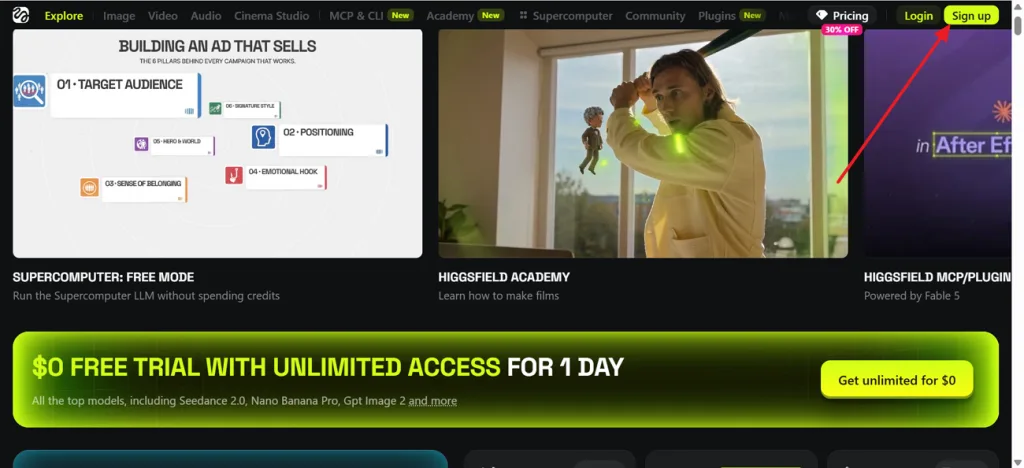
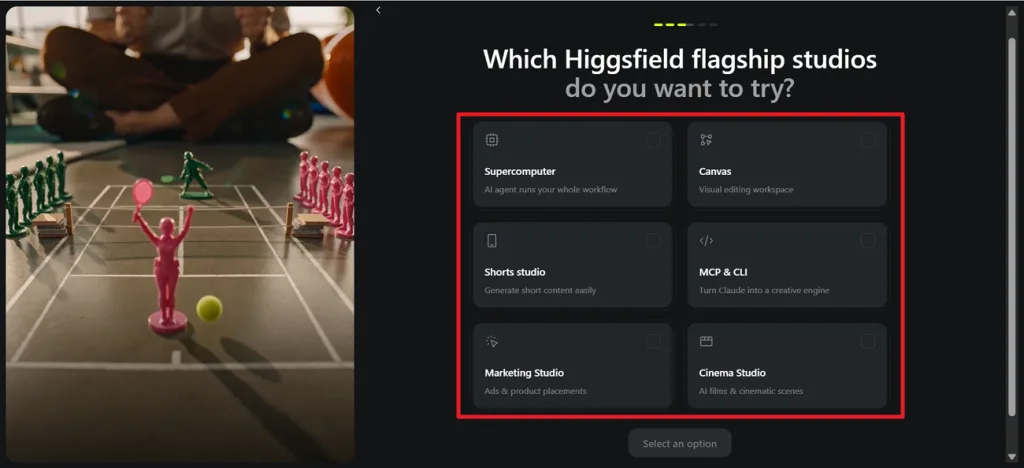
Step 1. Click Sign up in the top-right corner, then create your Higgsfield AI account. After logging in, continue until the platform displays its available flagship studios.
Step 2. Choose Cinema Studio for cinematic videos or explore Canvas and Marketing Studio for other projects from Higgsfield flagship studios.
Step 3. Open the model menu, then select Cinema Studio 3.5 or another model suited to your project.
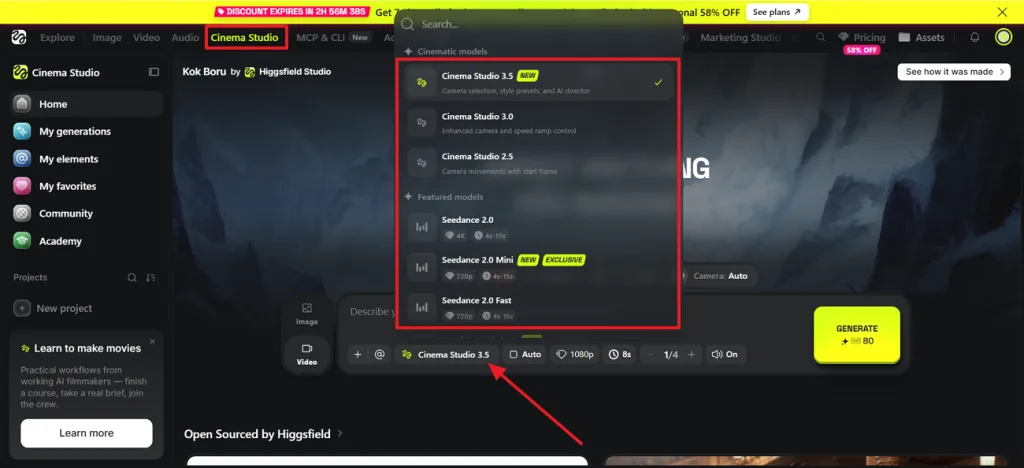
Step 4. Describe the video, choose resolution, duration, quality, and sound, then click Generate. Higgsfield AI will use those settings to render your selected scene inside Cinema Studio.
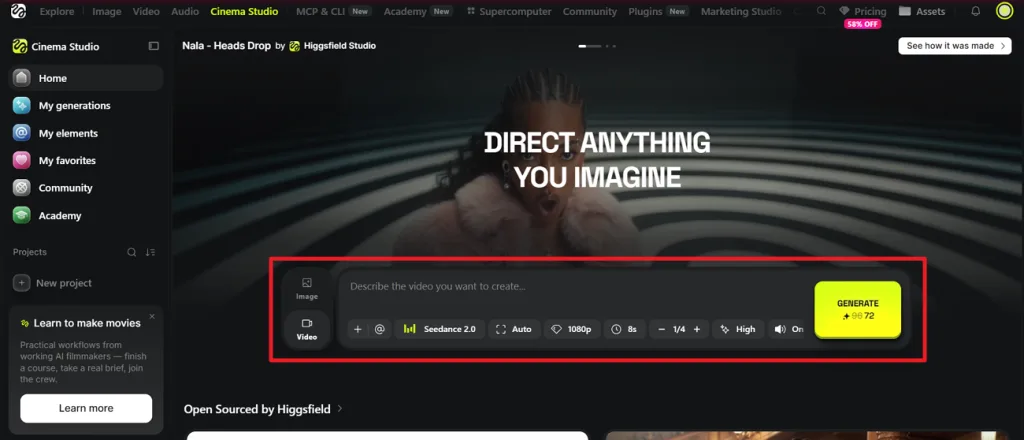
That covers the full Higgsfield AI tutorial, from creating an account to generating a clip.
Part 3. An Alternative Worth Trying for AI Video Creation
Anyone looking for a Higgsfield AI alternative designed for long-form storytelling should consider Magiclight AI. Higgsfield AI's camera presets are genuinely distinctive, but the platform is still built around short, styled clips rather than a complete story. Multiple models, credit costs, and a fairly involved interface also mean new users spend real time learning the platform before producing something polished.
Magiclight AI, on the other hand, generates a single project that can stretch to 50 minutes. Scripting, storyboarding, character design, and voice work all happen within the same continuous pipeline, rather than in a clip shaped around a single camera move.
Key Features That Set Magiclight AI Apart
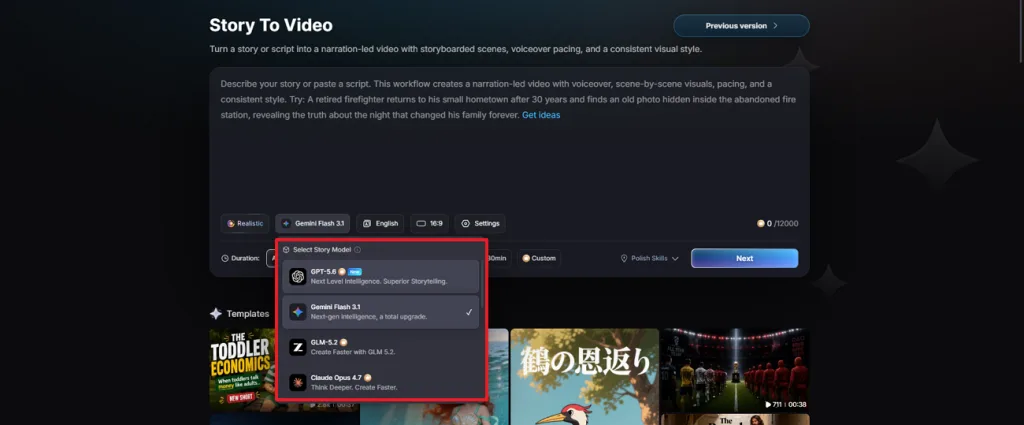
1.Write the Script With AI: Use story models such as GPT-5.6 or Gemini Flash 3.1 to develop the creature’s plot, dialogue, and scene flow before creating the video.
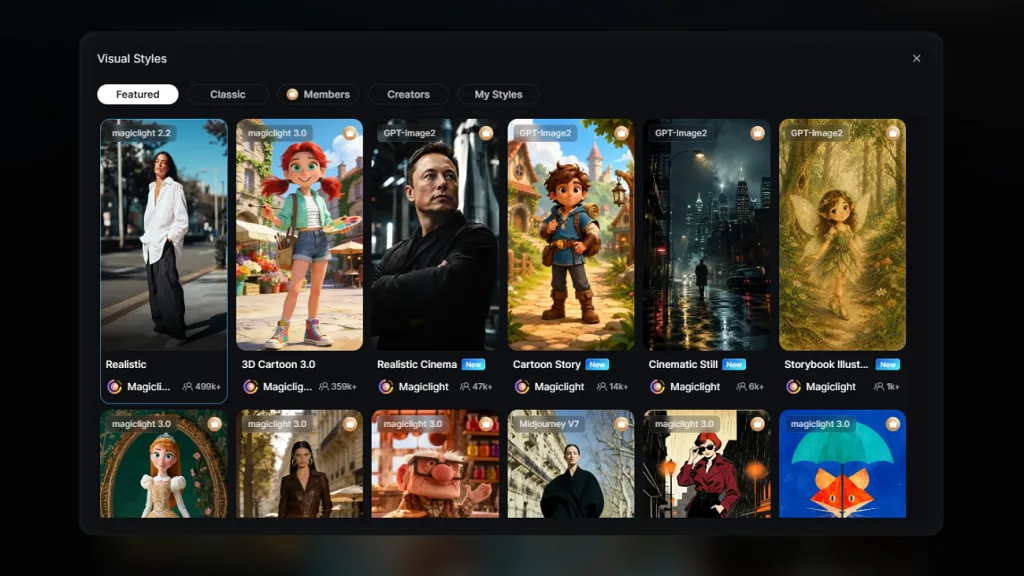
- Visual Style Selection: Choose from 13 visual styles, including Realistic and 3D Cartoon, to shape the character’s final look before generating the video.
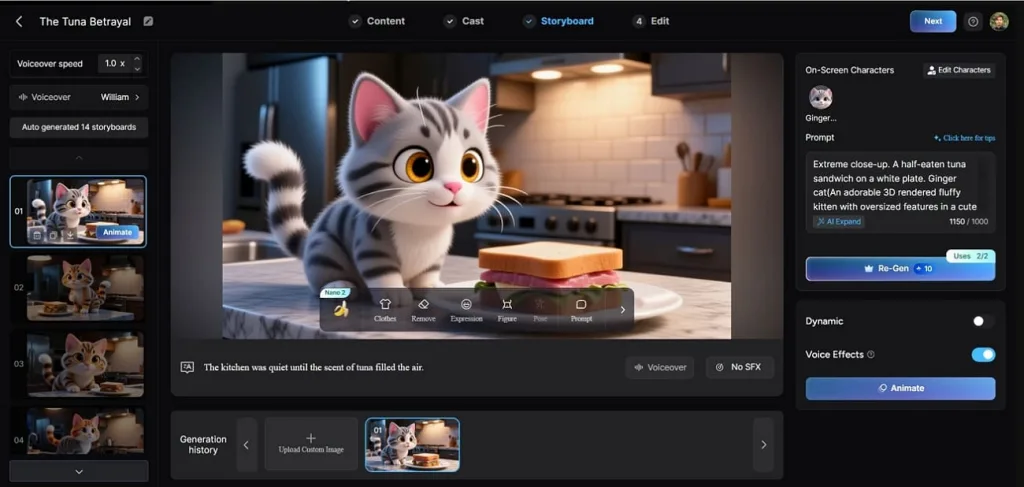
- Nano Storyboard Adjustments: Lets creators fine-tune a scene's pose, expression, and timing at the shot level before anything gets finalized.
- Create Videos in 11 Languages: Rebuilds the same project in 11 different languages without starting the work over, while allowing support for a wider audience.
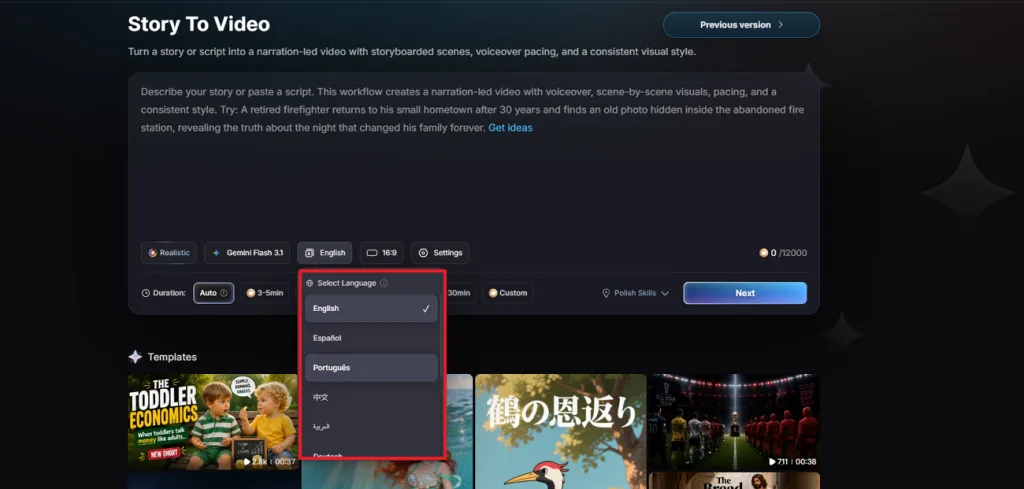
4.Consistent Characters: The same design and voice stay in place across an entire project, not just for one generation. Create characters with basic 1000-character prompts and use them in multiple video projects.
5.37 Voiceovers and Cloning: Adds narration from a built-in voice library or clones a voice for a consistent host across projects. Utilize the 37 options to present your voice in different modes with no limitations.
Part 4. Comparison Table Between Higgsfield AI and Magiclight AI
The table below shows how both tools differ in features, workflow, customization, and output:
| Factor | Higgsfield AI | Magiclight AI |
| Primary Focus | Short, styled clips with cinematic camera control | Complete, original stories from idea to finished video with a 12,000-character prompt. |
| Ease of Use | Many models and settings, some learning curve for beginners | Guided workflow that walks a project from idea to export |
| AI Capabilities | 15+ aggregated models plus its own Soul model | 19 video models, 9 story models including GPT-5.6, Claude Opus 4.7, and Gemini 3.5 Flash |
| Customization | 70+ camera presets, Character avatars, product insertion via Canvas | Built-in scripting, Nano Storyboard editing, consistent characters, and 37 voiceovers with cloning. |
| Output Length | Short clips, typically a few seconds each | A full-length project can run as long as 50 minutes. |
| Pricing | Free plan; paid tiers have shifted, recently from about $9/month | Free tier; paid plans start at $6/month billed annually |
| Speed | Fast per clip, though premium models cost more credits | One continuous render covers an entire long project |
| Best For | Cinematic shots, social ads, and styled visual moments | Long-form storytelling: kids' content, explainers, YouTube series |
| Platform Support | Web, plus Claude and MCP integration for developers | Web, Android, and iOS |
| Overall Strengths | Strong camera control and model variety in one subscription | A full production system built for complete, original stories |
FAQs on Higgsfield AI
1. Does Higgsfield AI offer free credits?
Yes, in a limited way. Higgsfield AI includes a free plan with limited daily credits, though generations from the free tier are watermarked. It is enough to test the interface and camera presets before deciding whether a paid plan is worth it.
2. What can I create with Higgsfield AI?
Higgsfield AI is designed for short, camera-driven clips: product shots with real camera moves, social ads, stylized character scenes, and cinematic visual effects. For a longer, story-driven video rather than a single styled clip, Magiclight AI covers that use case.
3. How long does generation take in Higgsfield AI?
A single clip on Higgsfield AI typically renders within a couple of minutes. The exact time depends on the model chosen and how busy that model's queue is. Longer or more complex projects take longer overall since multiple clips need to be generated and combined by hand. Magiclight AI, by comparison, produces a full-length project as one uninterrupted generation.
Conclusion
Higgsfield AI earns its reputation through camera control that most AI video tools do not attempt, backed by a wide range of models in one subscription. Magiclight AI picks up from there, turning an idea into a full, original video with consistent characters across the whole runtime. Creators chasing a specific cinematic look have good reason to try Higgsfield AI; those building a complete story will find more in Magiclight AI.


![How to Write a Script for a Short Film in 2026 [Beginner’s Guide]](https://magiclight.ai/wp-2/wp-content/uploads/short-film-screenplay-writing-guide-300x169.webp)


