



Every commercial begins with an idea that gives people a reason to notice your product. A good script turns that idea into simple scenes that keep viewers interested throughout. Strong dialogue and a direct call to action help viewers understand what comes next. MagicLight AI can then transform your finished commercial script into engaging visual scenes for viewers. This guide explains how to write a commercial script with simple steps plus useful tips.
Part 1. How to Write a Commercial Script: Step-by-Step Guide
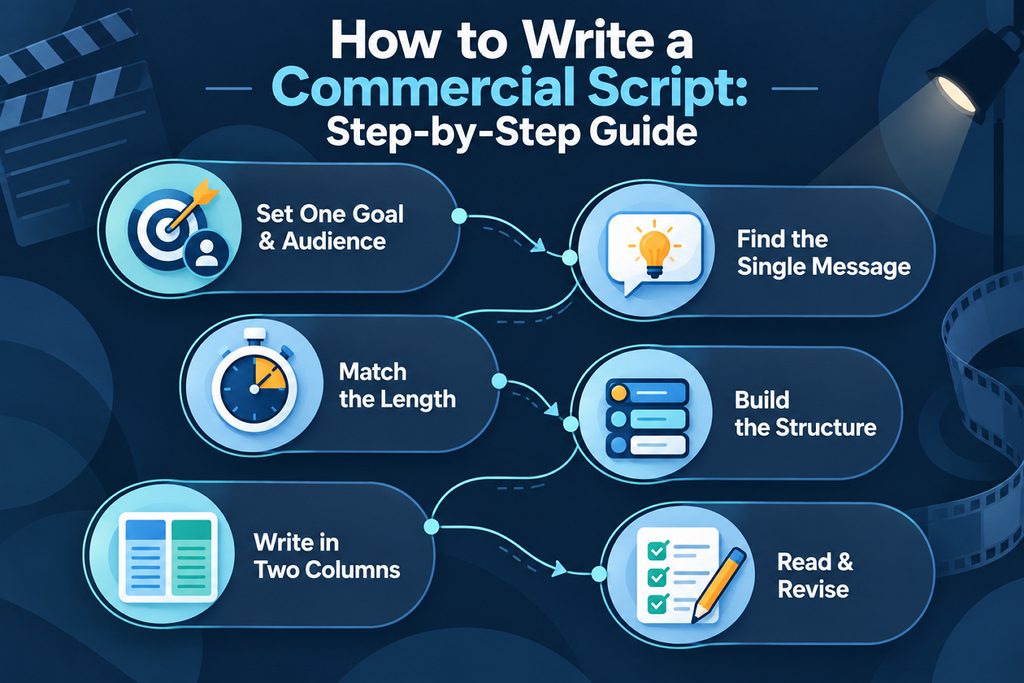
Writing a strong commercial requires planning each message before building scenes around your idea. Each step helps shape your goal, audience, message, structure, dialogue, and final call. The steps below show how to build your commercial script from idea to final draft:
Step 1. Set One Goal and One Audience
Before writing anything, be clear about what this commercial needs people to do afterward. Picture the person watching it, then think about the problem your product solves best.
Step 2. Find the Single Message
Give viewers one useful reason to remember your product after the commercial is over. Keep everything focused on that message so viewers know exactly what the commercial means.
Step 3. Match the Length to the Placement
TV commercials often run 30 seconds, while YouTube bumper ads usually last only 6 seconds. Knowing how to write a script for a TV commercial helps you use seconds wisely.
Step 4. Build the Structure
Open with something worth watching, then let the product enter the story naturally afterward. Close by giving viewers one simple action they can take after seeing the advertisement.
Step 5. Write in Two Columns
Use 2 columns to keep the visuals and audio easy to follow while writing. Each row should show what viewers see, what they hear, and how long it lasts. Here is a 15 second example showing how a simple phone case commercial can look:
| Video | Audio | Time |
| Runner Notices Cracked Phone Screen Mid Jog | SFX: Sneakers Hitting Pavement | 0 to 3 sec |
| Woman Fits Rugged Case Then Drops Phone | VO: “Drops happen. Cracks don’t have to.” | 3 to 10 sec |
| Product Appears Beside Logo + Price | VO: “ToughShell cases, from $19. Tap to shop.” | 10 to 15 sec |
Step 6. Read It Aloud and Revise
Read your script aloud with a timer because it may sound longer than expected. Remove unnecessary words, make sure your claims are accurate, then ask someone to review them.
Part 2. Best Way to Turn a Commercial Script Into AI Videos
Learning how to write a commercial script is only the first part of creating advertisements. MagicLight AI turns your finished commercial script into a complete video without requiring traditional filming. Its Story to Video workflow breaks your script into separate scenes following the original sequence.
Choose from 14 story models, including GPT-5.6 and GPT-6 Astra, to shape your commercial video. MagicLight AI also provides 37 voices, voice cloning, and 40 music tracks for your commercial. Finish your video with captions across 16 subtitle styles and support for 11 different languages.
Guide to Convert a Commercial Script Into an AI Video
Now, go through the steps below to turn your commercial script into an AI video:
Step 1. Bring Your Script Into MagicLight AI
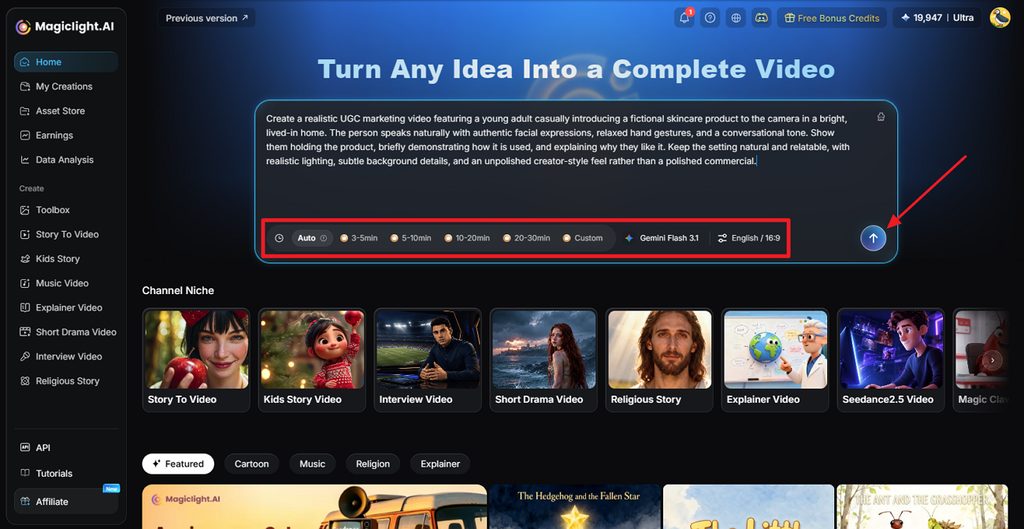
Paste your commercial script into MagicLight AI’s homepage to begin building the video. Select the Duration, Model, Language, and Aspect Ratio that suit your commercials, then click Send.
Step 2. Shape the Generated Story
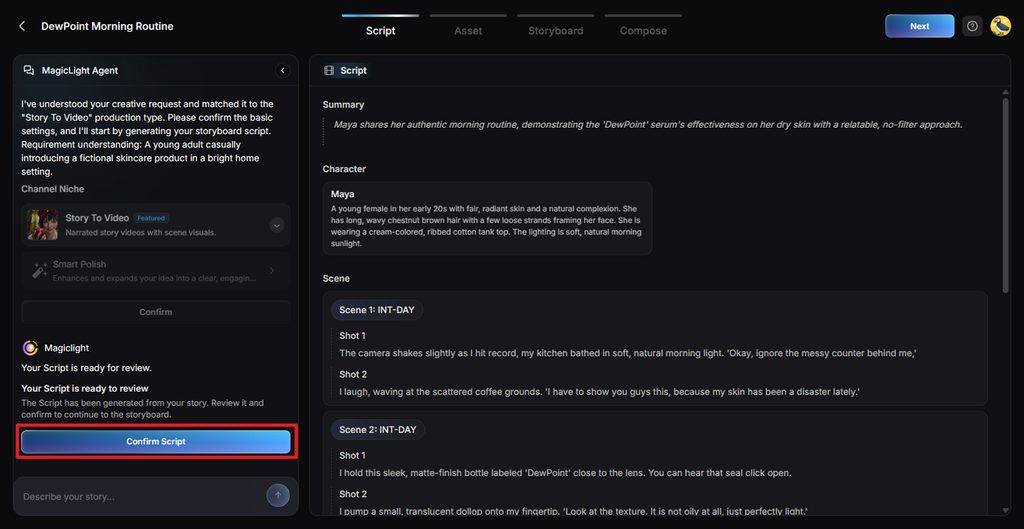
Your script becomes a complete video plan after MagicLight Agent processes the commercial idea. Review how each scene supports your message, fix anything that feels out of place, then click Confirm Script.
Step 3. Give Your Commercial a Visual Style
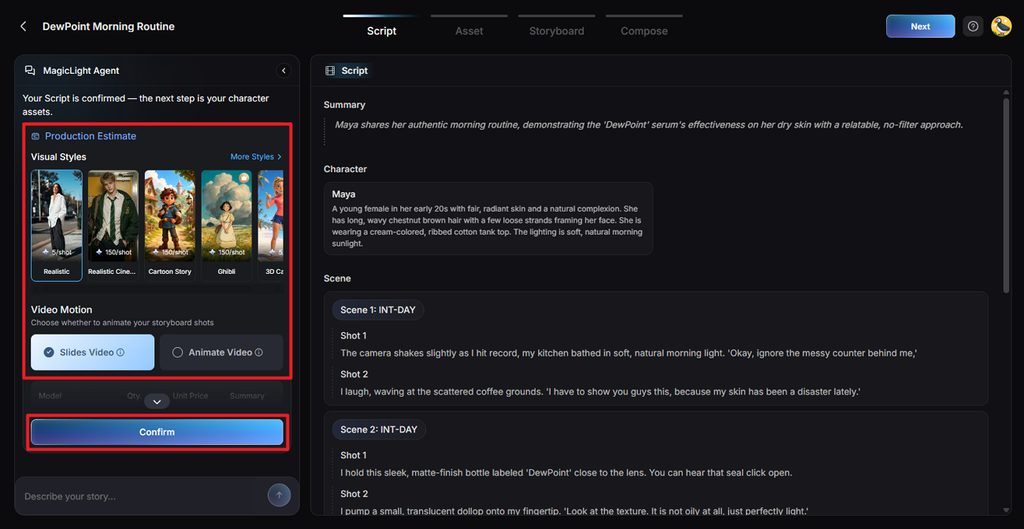
Decide how the commercial should look when your script becomes visual. Pick a suitable Visual Style, choose either slide-based or animated video. Then, press Confirm.
Step 4. Finalize Who Appears in the Video
MagicLight AI creates a character based on the details found in your commercial. Review the character design, make any needed appearance changes, then select Go to Storyboard.
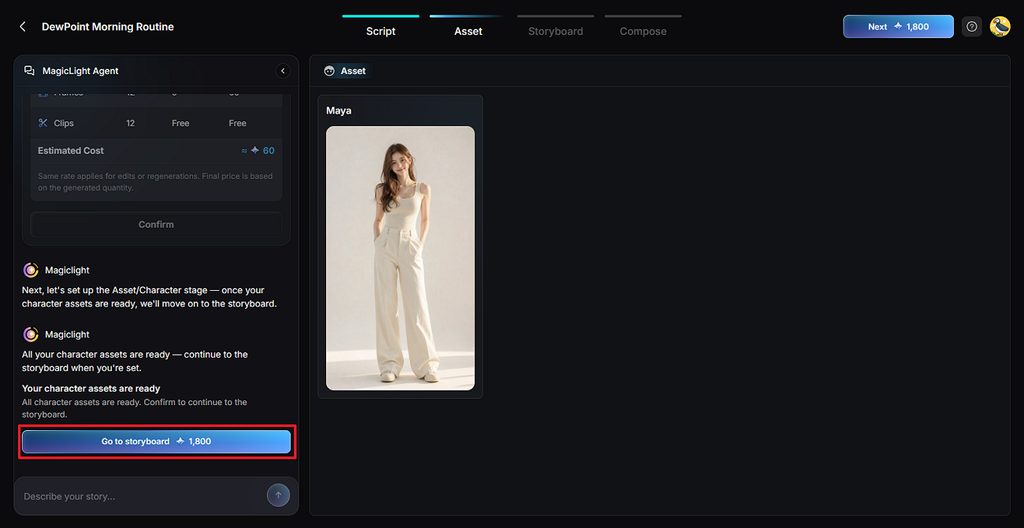
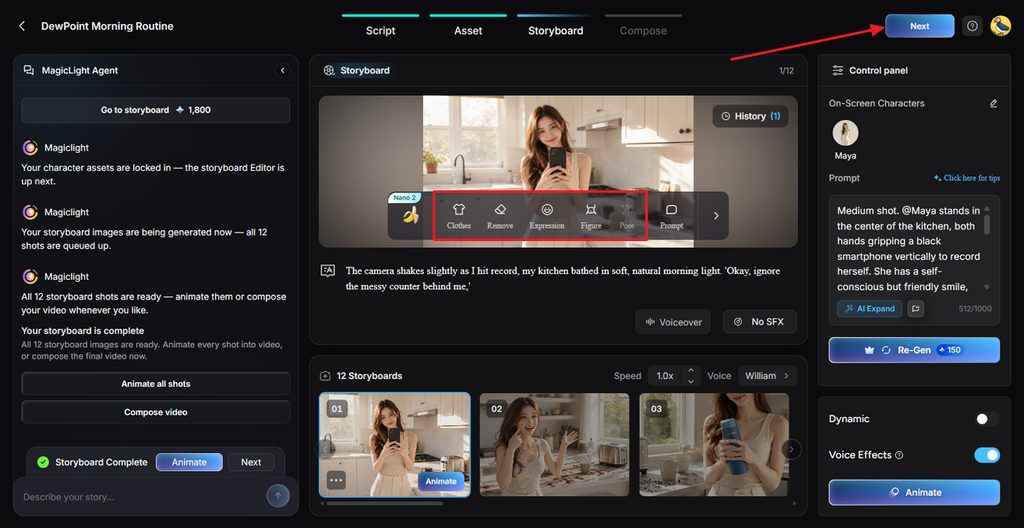
Step 5. Match the Storyboard With Your Script
Compare the generated shots with the scenes you originally planned in your commercial script. Adjust Clothes, Expression, Figure, Pose, or Prompt wherever a shot feels wrong, then click Next.
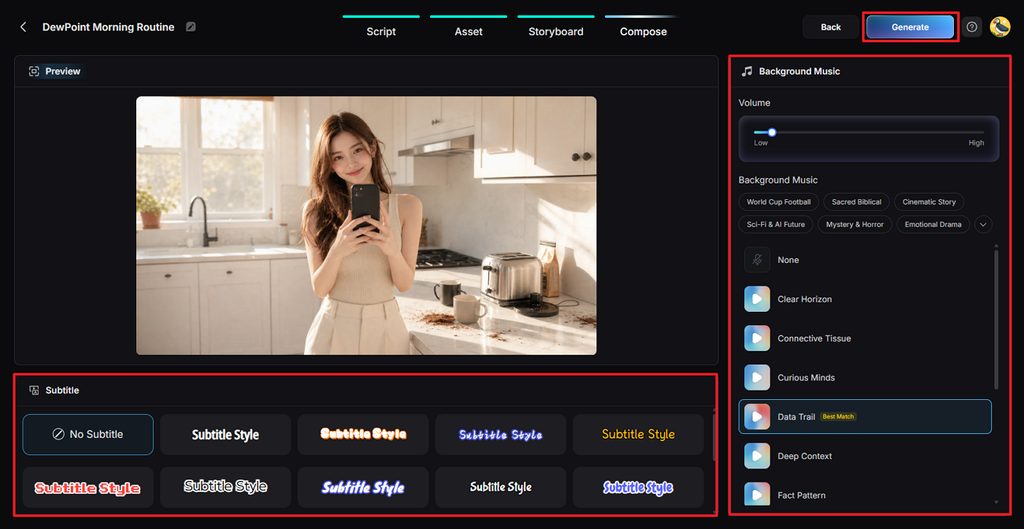
Step 6. Bring Audio Into the Commercial
Choose a Subtitle Style that fits your commercial, then set the background music and volume. Once the audio and captions are ready, click Generate to create the video.
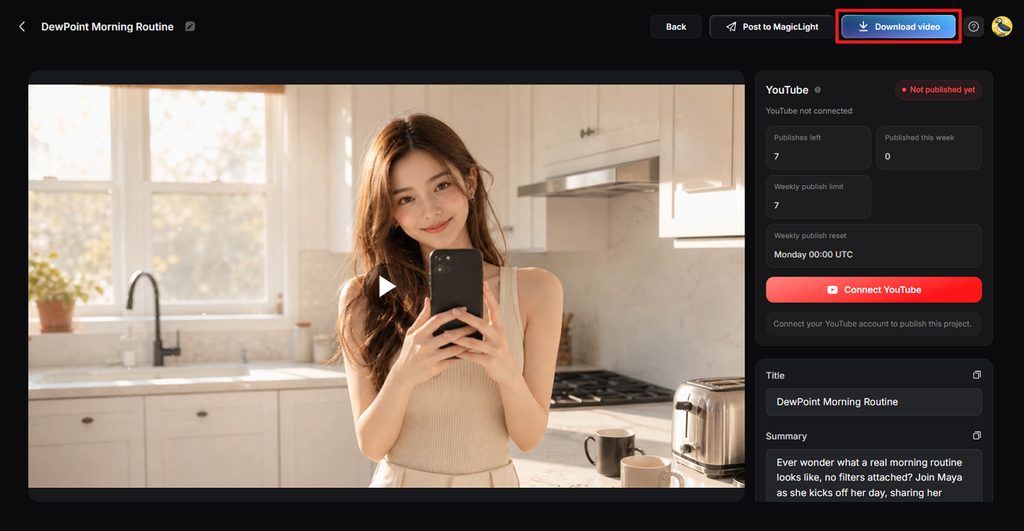
Step 7. Preview and Save the Final Video
Preview the finished commercial once to make sure its scenes, audio, and message work together. Make any final changes you need, then click Download video to save your commercial.
Part 3. Tips for Writing a Commercial Script
Small details in your script can change how people understand and remember the whole commercial. These tips explain how to write a television commercial script that feels natural:
- Hook Before the Skip: Give viewers something interesting early, so they have a reason to continue watching your commercial.
- Write for the Ear: Keep sentences short with familiar words, so every spoken line sounds smooth.
- Show Instead of Telling: Use visuals to show what your product does, keeping the spoken message short and focused.
- Say the Brand Early: Bring in the brand early instead of waiting until the commercial ends.
- Keep Claims Provable: Do not promise anything about the product unless you can prove it.
- Plan for Sound Off Viewing: Add clear screen text so viewers can understand your commercial without hearing the audio.
Conclusion
In summary, learning how to write a commercial script starts with keeping your message focused. Keep the words simple, plan each scene carefully, then read your finished script aloud once. MagicLight AI can take your finished pages into Script to Video for easier video creation. From there, you can shape the scenes, add audio, then finish your commercial for publishing.
FAQs
- What makes a commercial script effective for its target audience?
A commercial speaks to one audience using words that feel familiar to them. It focuses on one useful benefit, then gives viewers a reason to act.
- What are the key elements of a commercial script?
Most commercial scripts need a hook, product message, proof, brand, and clear action. Visual notes, spoken lines, sound cues, and timing keep scenes easy to follow.
- How should a commercial script change between YouTube, social media, and TV?
TV commercials follow fixed lengths, while YouTube ads need attention within opening seconds. Social videos usually need vertical framing plus captions for people watching without sound.
- How do you start writing a commercial script?
Begin with your audience, their problem, product benefit, and the action you want. Use that brief when understanding how to write a script for a TV commercial.





![How to Make a Memorial Video in 2026 [Step-by-Step Guide]](https://magiclight.ai/wp-2/wp-content/uploads/create-memorial-video-for-loved-ones-300x198.png)