


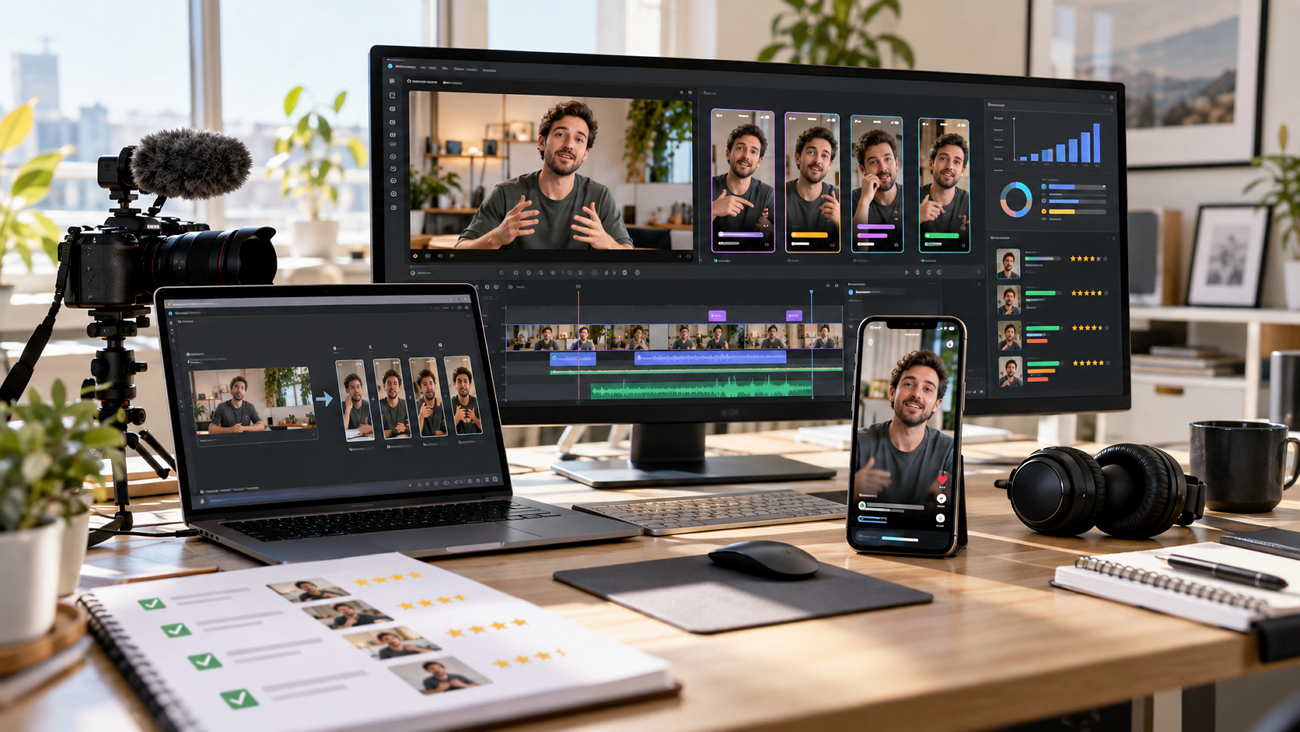
Creators convert long footage into short clips for TikTok, Shorts, and Reels to expand channel reach. Klap AI identifies engaging moments, ranks them with a Virality Score, reframes speakers for phone screens, and adds animated captions in 52 languages. This review tests the tool's performance, workflow speed, and output quality. It evaluates MagicLight AI as a robust alternative for custom video projects, helping teams pick the right platform for growth.
Part 1. What are Klap AI Features and Video Creation
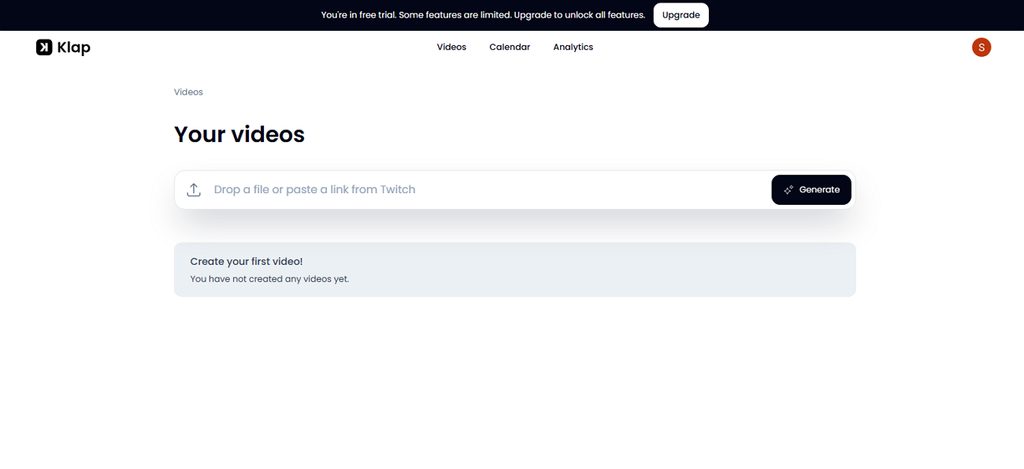
Klap AI is a video repurposing tool that turns existing long videos into short clips for TikTok, Reels, and YouTube Shorts. You can upload a video or paste a link, and Klap finds useful moments. It reframes them vertically, adds captions, and prepares clips for posting. The tool works with existing footage rather than creating videos from a text prompt.
Key Features
For a useful Klap AI review, these 6 features explain most of the workflow:
- Smart Clipping and Virality Score: Klap finds highlights in long videos and turns them into short clips. Each result receives a 0-100 Virality Score to help compare clips before posting.
- Reframing and Speaker Tracking: AI Reframe 2 converts footage to vertical 9:16 and tracks the active speaker. It also supports split-screen, picture-in-picture, gaming, and multi-person layouts.
- Captions and Transcript Editing: Klap generates animated captions in 52 languages with keyword highlights. The transcript editor lets you trim clips by editing text instead of using a timeline.
- Translation and Dubbing: The platform supports video translation and multilingual dubbing in 29+ languages, allowing creators to reach broader audiences.
- Brand Styling Presets: Creators can save custom fonts, colors, logos, and styles as reusable presets. This keeps visual branding consistent across all clips from the same channel.
- Flexible Import and Export: Videos can be uploaded directly or imported via links like YouTube. Klap provides clean, watermark-free exports in up to 4K resolution, even on the free option.
Klap AI Video Creation Workflow
The Klap AI tool follows 4 simple stages to turn podcasts, webinars, and interviews into short clips:
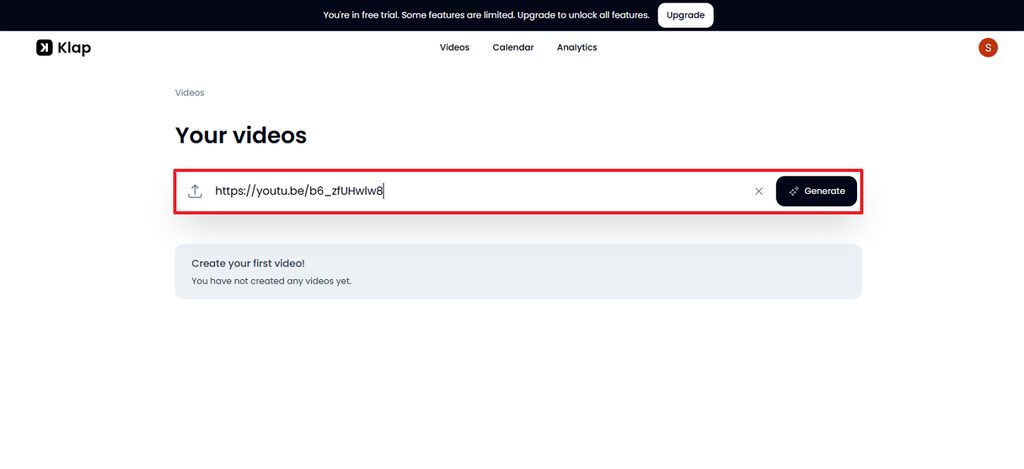
Step 1. Add the Video
Paste a YouTube link or upload a video file from a computer and tap on Generate.
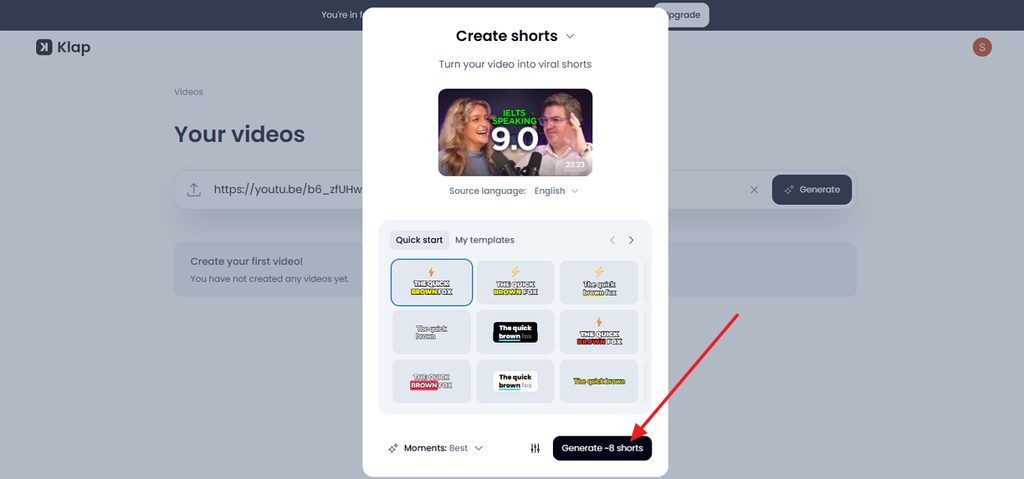
Step 2. Pick the Settings
Choose caption styling, emoji use, and the reframing layout, then tap on Generate (-) Shorts.
Step 3. Generate the Clips
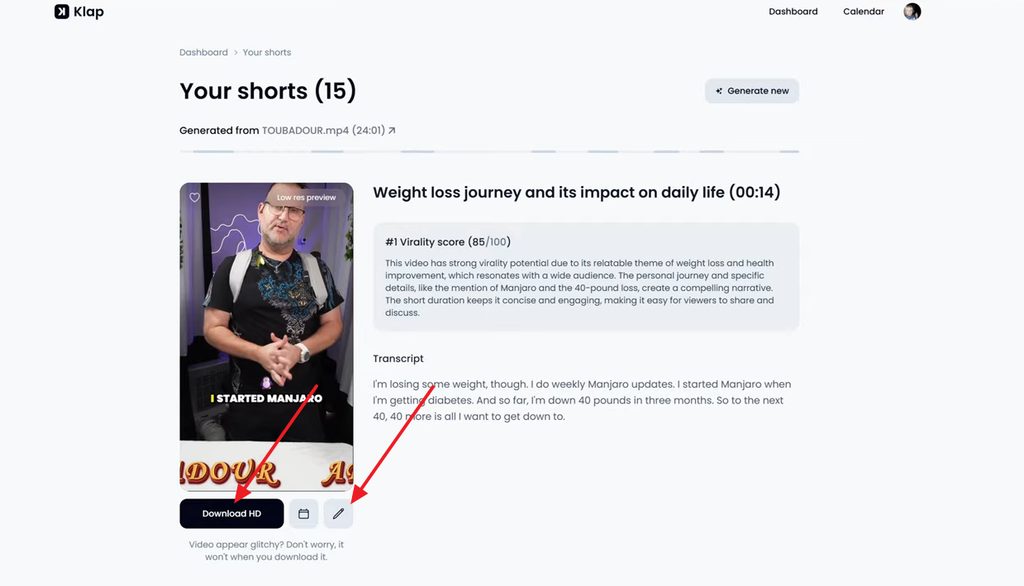
Klap transcribes the recording, finds self-contained topics, and scores each clip for viral potential. Choose the Download icon to save the short or press the Pencil icon to edit further.
Step 4. Edit and Publish
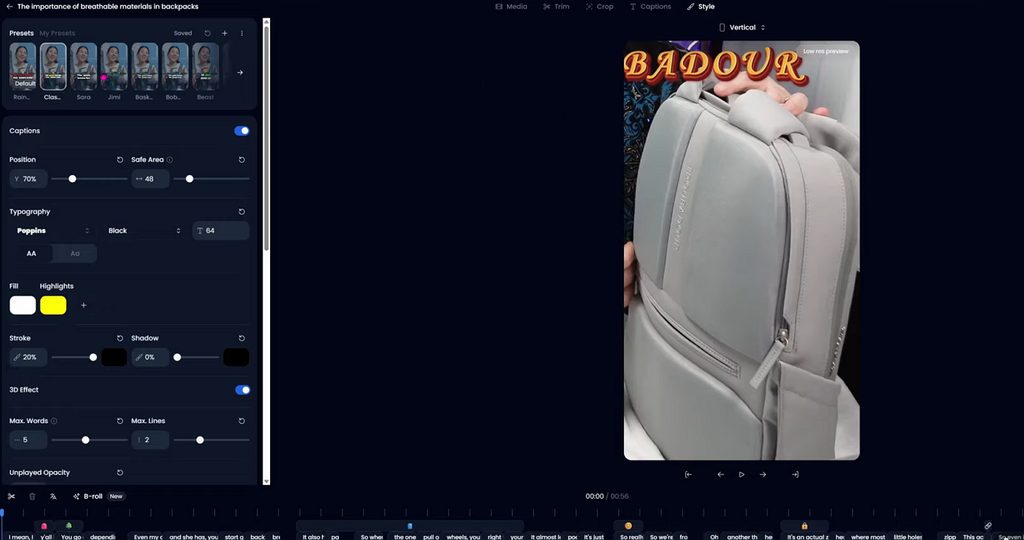
Trim boundaries and fix captions in the web editor, then download the clips or schedule them to connected accounts.
User Experience
First impressions of “Klap video AI” are usually positive, since the web interface is minimal and needs no training. Results depend heavily on the footage, and reviewers consistently report the best output from interviews, podcasts, and talking-head videos.
Positive Reviews
- Great clipping tool and it is one of the rarest that has the arabic language included. highly recommend it! – El Begache
- So powerful, i recently found it through a youtube video, very simple to use and performant, i love it. - Healsha
Negative Reviews
- It has great potential but the devs don't seem to care about it. I've joined their Discord server (which, to be honest, isn't great for support) and asked. No one from Klap's team answers… - Alessio Dam
- ...There is no free trial. It takes 10 minues to generate the TikTok but forces you into a $29 month subscriotion to download. Very poor experience… - Chow Mein
Pricing and Free Access
Anyone asking “is Klap AI free” will find only a trial, since Klap lets new users create one video without a credit card. For a better idea, the complete subscription plan for Klap AI has been shared as follows:
| Plan | Monthly Billing | Yearly Billing (per Month) | Clips per Month | Max Video Length |
| Basic | $29 | $14 | 100 | 45 minutes |
| Pro | $79 | $39 | 300 | 2 hours |
| Pro+ | $189 | $94 | 1,000 | 3 hours |
Part 2. Best Klap AI Alternative to Create AI Videos
Klap only works with footage that already exists, so it cannot help a channel that has no long videos to cut. Creators seeking a Klap AI alternative often need original content instead, such as animated stories, explainers, or a series built from a script. MagicLight AI generates videos from ideas and scripts rather than cutting existing footage, so it requires no camera or recording.
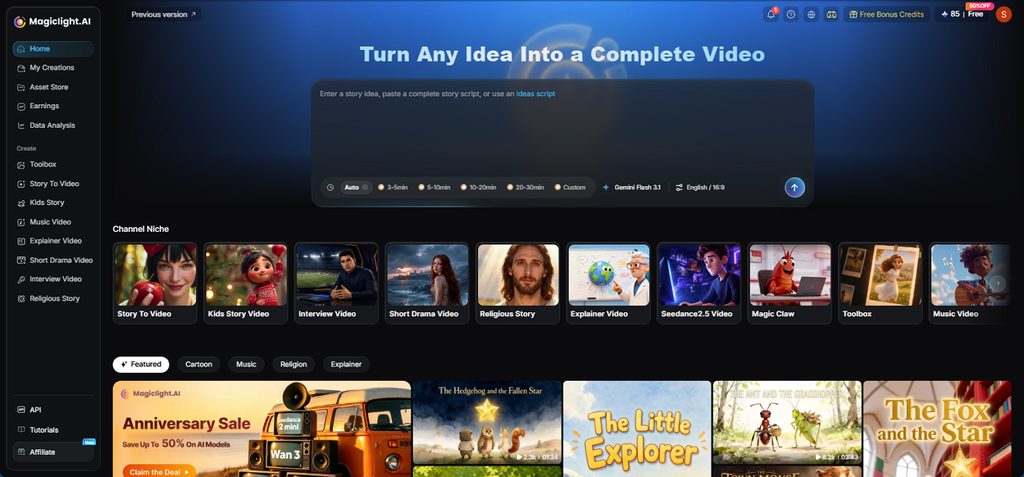
MagicLight Agent expands a one-line pitch into a full script and automatically settles the niche. Format ideas come with the script, from short dramas to interviews and explainers. Story to Video turns that plan into animated scenes. Visual styles range across more than 50 presets, from anime to realistic looks. Upgrading through the pricing page brings 1080p exports without a watermark, plus a general commercial license.
Key Features of MagicLight AI
- Long Script Input: Story to Video accepts scripts up to 12,000 characters for longer videos easily.
- 14 Story Models: Choose from 14 story models to better shape scripts, scenes, pacing, and overall video structure.
- Voice and Caption Options: Pick from 37 voiceovers, 16 caption styles, and 11 languages for each video project setup. Lip Sync lets characters speak their own lines.
- Flexible Production Plans: Choose a production plan based on budget and video quality before MagicLight prepares assets first.
- Short and Long Formats: The AI TikTok Video Generator produces vertical clips for TikTok and Reels. Paid accounts can stretch a single episode to 50 minutes through its story video generation facility.
How to Create AI Videos with MagicLight AI?
Unlike Klap AI, MagicLight needs no uploaded footage, only an idea. Provided next are the steps that help you lead from that idea to a finished, downloadable video.
Step 1. Pitch the Idea
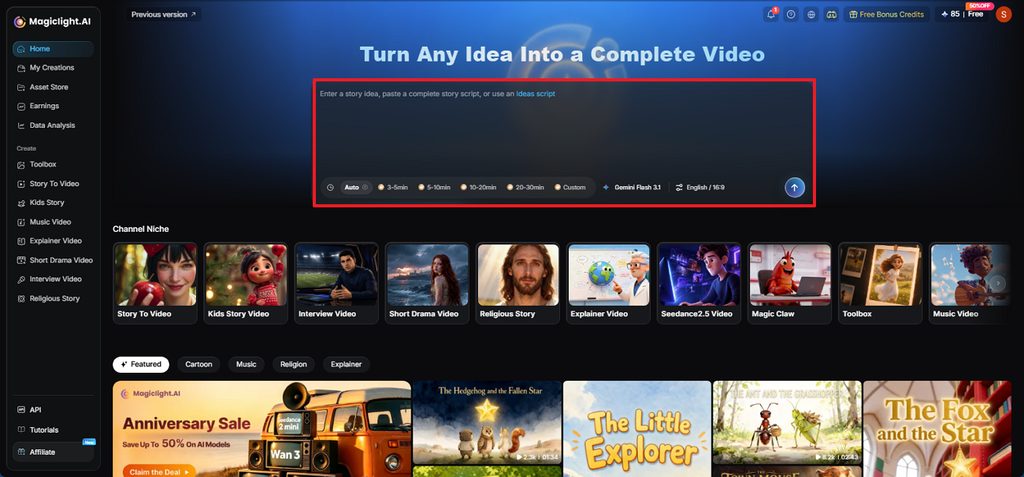
Tell MagicLight Agent what the video covers, such as “a three-minute explainer on solar panels, hosted by a cartoon owl.” Under Aspect Ratio, vertical 9:16 fits Shorts, and widescreen 16:9 fits YouTube. Confirm AI Story Model, Video Language, and Video Duration, and tap the Send icon.
Step 2. Check Scenes and Cast
MagicLight Agent reviews the idea and gives you two choices: Expand Into A Full Story or Keep Editing My Idea. Choose the first when the concept is ready, or keep refining it before moving ahead. Tap Confirm and review the suggested video type, script mode, story summary, characters, and scene order before continuing.
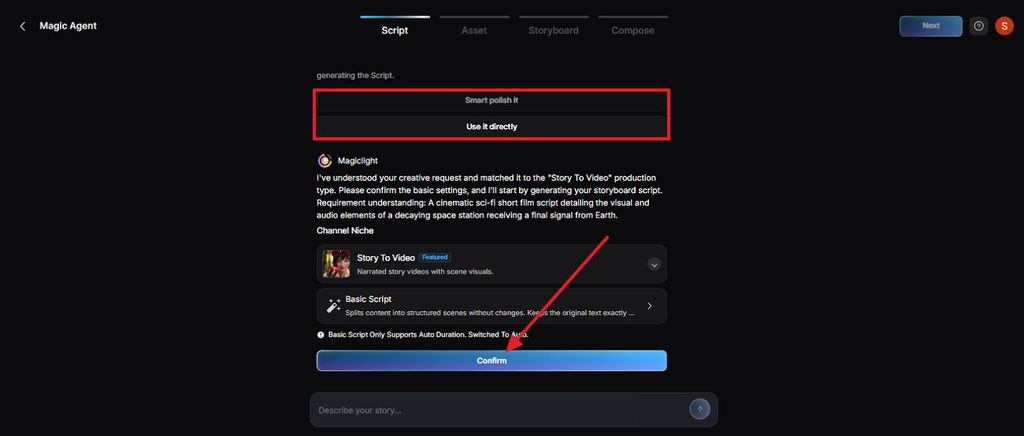
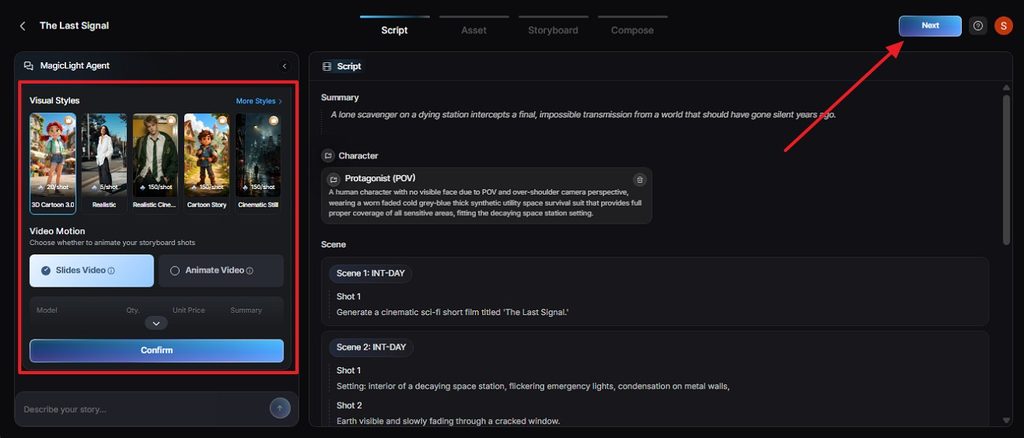
Step 3. Pick Motion and Check the Assets
Choose a Visual Style, then select Slides Video or Animate Video depending on how much movement you want.
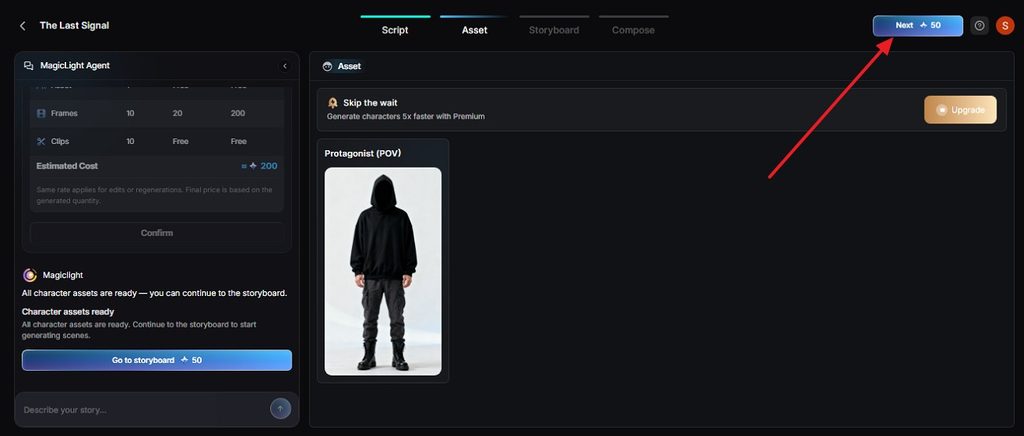
Step 4. Review Character and Choose Next
Check the prepared characters and visual assets, make any needed changes, and move to the storyboard as you tap Next.
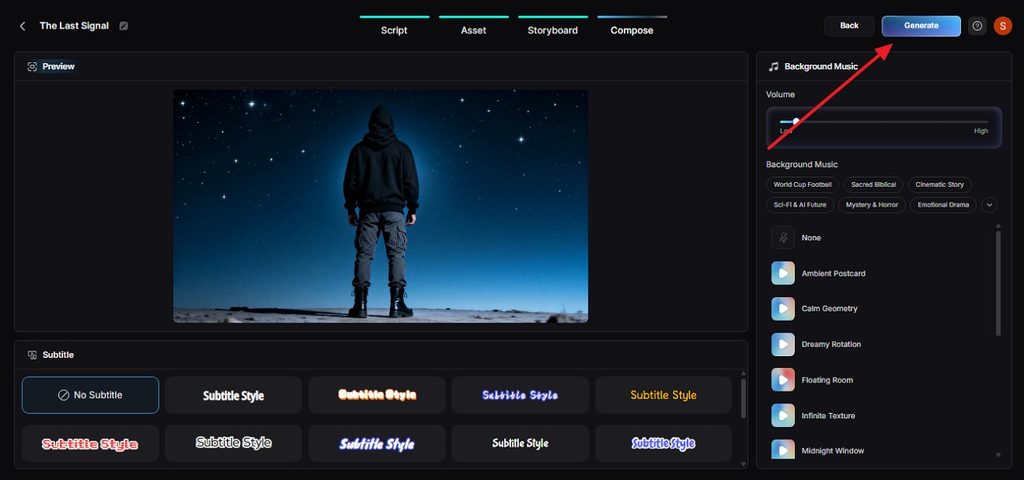
Step 5. Refine and Generate
Edit each storyboard shot by changing Clothes, Poses, and Expressions, then choose a subtitle style and click Generate.
Step 6. Preview and Download
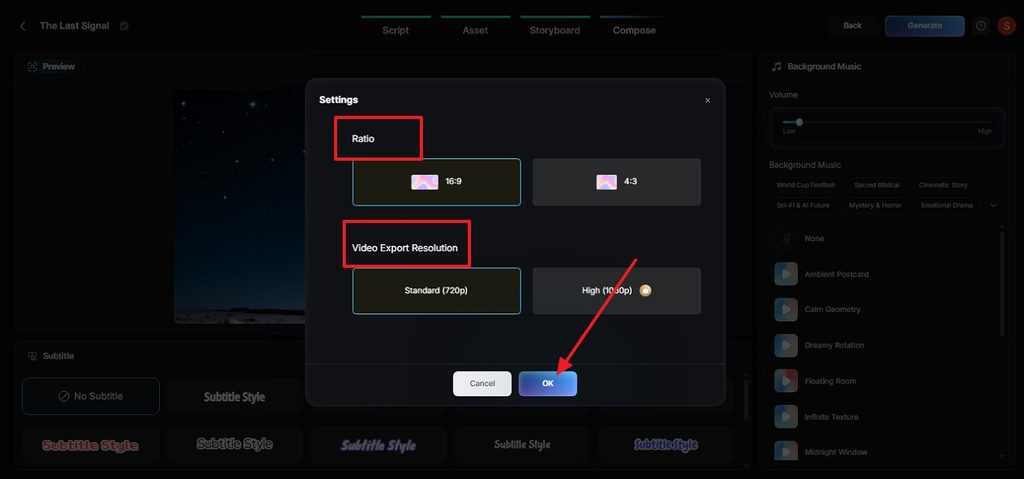
Set the final ratio and resolution, review the thumbnail, cover, and hashtags, then select OK > Download Video to save.
Klap AI vs. MagicLight AI
Both tools speed up social video, but they start from opposite ends. Klap AI cuts footage that already exists, whereas MagicLight generates new scenes from a script, and the project decides which fits:
| Feature | Klap AI | MagicLight AI |
| Starting Point | An existing long video or YouTube link | An idea, brief, or written script |
| Core Workflow | Upload, auto-clip, edit, and publish | Agent plan, storyboard, generate, and download |
| Output Length | Short vertical clips | Vertical shorts to 50-minute episodes |
| Characters | Real people from the source footage | Saved AI characters with consistent looks |
| Languages | Captions in 52 languages, dubbing in 29 | Voices in 11 languages |
| Mobile Apps | Web only | Web, iPhone, and Android |
| Best For | Podcasters, webinar hosts, and interview channels | Storytellers, educators, and faceless channels |
Conclusion
For podcasters, webinar hosts, and interview channels, Klap AI earns its place by turning long recordings into a steady stream of shorts. Tutorials and screen-heavy videos still need manual cleanup, and the free trial is limited. For original videos without source footage, MagicLight AI offers a script-first path from idea to finished episode.
FAQs
- What types of long videos work best for repurposing with Klap AI?
Klap works best with podcasts, interviews, webinars, and talking-head videos with clear speech. Tutorials, gaming, and screen recordings may need more manual trimming and reframing.
- How much editing is still needed after Klap AI creates short clips?
Most clips still need a quick check before posting. Review captions, names, jargon, and clip boundaries, especially when several people speak at once.
- What should creators consider before using AI to repurpose their entire video library?
Check your plan limits, video rights, guest permissions, and licensed music before processing older content. Moreover, review old clips for outdated information before reposting them.
- When should you use a different tool instead of Klap AI?
A Klap AI alternative makes more sense when you have no long footage or want original videos. MagicLight can build animated scenes, narration, characters, music, and captions from a written idea.


![How to Write a Commercial Script in 2026 [Full Guide]](https://magiclight.ai/wp-2/wp-content/uploads/commercial-script-writing-full-guide-300x169.png)

![How to Make a Memorial Video in 2026 [Step-by-Step Guide]](https://magiclight.ai/wp-2/wp-content/uploads/create-memorial-video-for-loved-ones-300x198.png)