


Nowadays, social media growth demands engaging videos that grab attention quickly online. Many creators struggle to produce content that keeps viewers interested in a long time online. Tools like InVideo AI help simplify video creation but still have some limitations. So, users need tools that match different content goals and creative styles. Thus, this guide explains the features, pros, and cons along with better alternatives for everyone.
Part 1. What Is InVideo AI?
InVideo AI is a modern video creation platform that turns text prompts or ideas into complete videos. The tool specializes in handling things like script generation, visuals, voiceovers, subtitles, music, and editing. Moreover, it supports AI UGC ads using AI actors and customizable digital clones. Along with custom template creation, this tool supports 7000+ ready-made templates for video production.
Users can generate and edit videos directly from any online webpage with the InVideo AI video generator. With AI-driven accuracy, the tool breaks the text-to-video script into easy, logical sections. The platform lets users organize video, audio, text, and graphics across multiple timeline layers. Recently, it launched the Video V4 agent that can create up to 30 minutes of video from a single prompt.
Key Features of InVideo AI
- Media Matching: AI automatically matches visuals and assets to maintain consistent video storytelling.
- Audio Control: Adjust music sound effects and audio balance inside one unified editing workspace.
- Smart Commands: Edit scenes, subtitles, timing, and tone using simple text-based instructions.
- Prompt Refining: Improve rough ideas into clearer video instructions for stronger content generation results.
- Content Pacing: AI balances scene timing and pacing for more engaging and watchable video content.
InVideo AI Pricing Explained
In this specific section, you will review InVideo AI’s pricing for a better viewpoint:
| Plan | Monthly Price | Monthly Credits |
| Plus | $17/month | 75 Credits |
| Max | $85/month | 390 Credits |
| Generative | $170/month | 800 Credits |
| Elite | $900/month | 4250 Credits |
Part 2. InVideo AI Video Generator Review [Pros & Cons]
This InVideo AI video maker has features worth examining before making any decision. So, below are the notable pros and cons affecting overall performance and usability:
Pros
- Access to over 16 million stock assets reduces dependence on external media sources.
- AI actors help produce engaging promotional videos without live filming.
Cons
- Generated videos can appear repetitive without strong manual adjustments.
- Limited creative flexibility affects highly customized video production needs.
Part 3. How InVideo AI Works?
Many users find the InVideo AI video creator easy once they understand the flow. Thus, go through the given steps to see the complete creation process clearly:
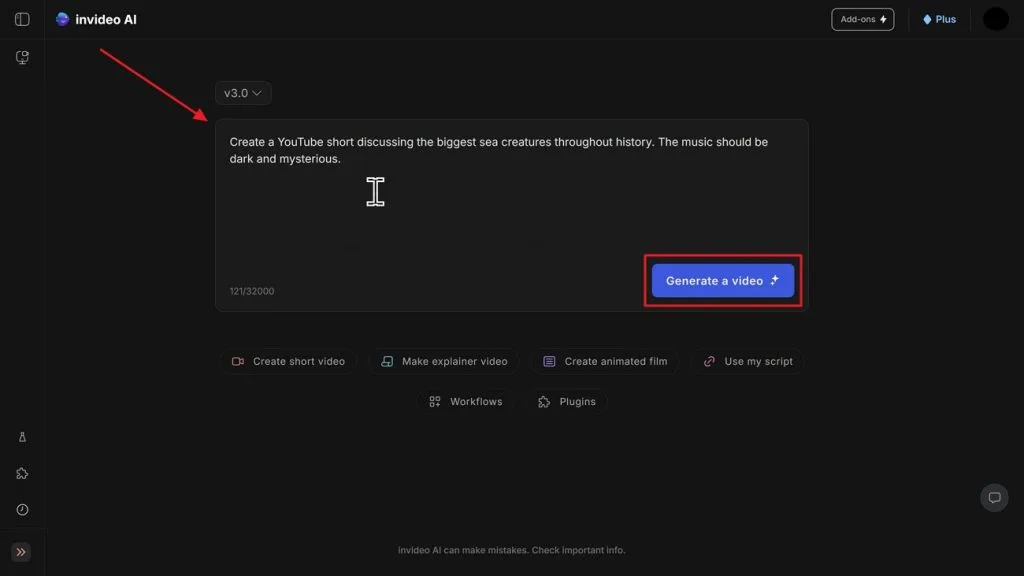
Step 1. To start, open the authentic webpage of InVideo AI to describe your idea in the given Prompt Box and opt for Generate a Video.
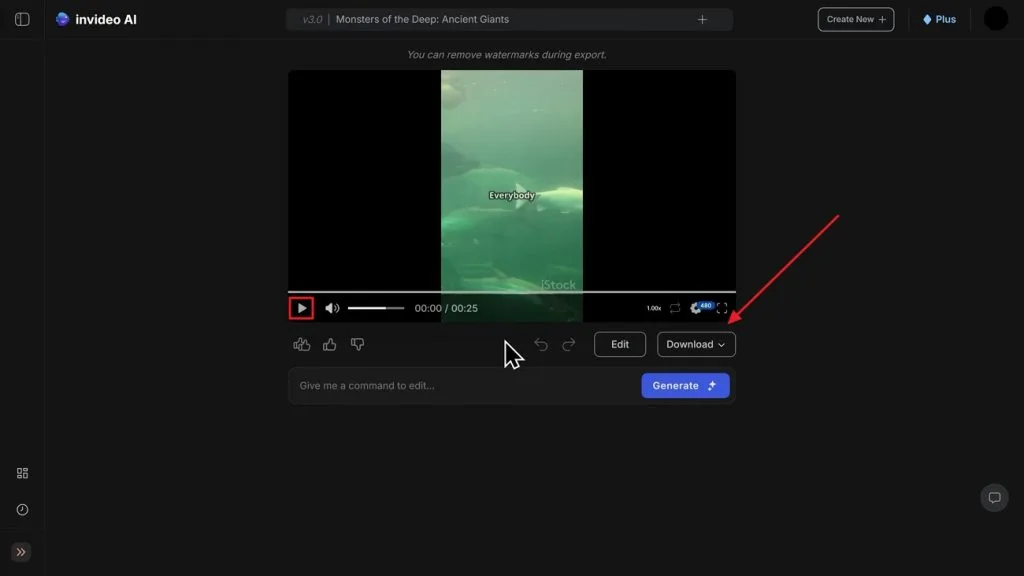
Step 2. The tool automatically generates your video according to your idea and previews it for clarity. If you are happy with the output, press the Download button to save the generated video.
Part 4. Why MagicLight AI Is the Best InVideo AI Alternative
This InVideo AI review shows that repetitive outputs remain a consistent problem for creators. Without stronger customization options, many creators are left searching for a more powerful solution. MagicLight AI is the most reliable and feature-rich alternative for professional and high-quality video production. Instead of short videos, this tool generates videos up to 50 minutes in duration. It offers multiple visual styles, including Pixar, Disney, anime cinematic, and illustration modes.
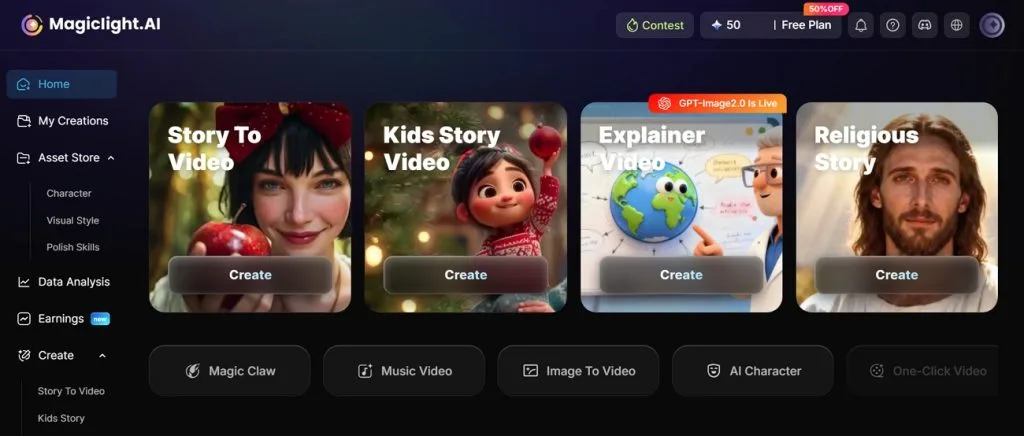
Before generating the final video, each scene can be edited individually to improve storytelling and visual flow. Moreover, MagicLight AI supports ElevenLabs and MiniMax speech models for realistic audio narration generation. Its AI expands short prompts into full and structured scripts and detailed scenes. Additionally, the tool supports controlled animation movements across scenes for realistic video generation output.
Top Reasons Magiclight AI is the Best Option Against InVideo AI
MagicLight AI clearly outperforms InVideo AI across several important video creation aspects. In this part, you'll explore the top reasons that make MagicLight AI the smarter choice overall:
- Story Builder: MagicLight AI develops full narrative structures using built-in automated storytelling intelligence. This ensures creators receive an organized story flow without needing manual script planning effort.
- Language Reach: The tool supports 11 languages, helping creators produce videos for global audiences. Plus, it improves accessibility and allows content to reach viewers across different regions.
- Character Stability: Characters remain visually consistent across all scenes, ensuring smooth and professional storytelling continuity. This also reduces visual breaks and helps maintain audience engagement throughout longer video sequences.
- Background Music: Users get access to 40 background music tracks for emotional video enhancement. Music selection improves storytelling impact without needing external audio platforms.
- Script Capacity: Supports extremely long scripts up to 12000 characters for detailed storytelling projects. This allows creators to build documentaries or extended narrative-style videos.
Head-to-Head Comparison of MagicLight AI and InVideo AI
Review the comparison table below for selecting the most suitable video creation tool:
| Feature | InVideo AI | MagicLight AI |
| Video Length | Up to 30 minutes | Up to 50 minutes |
| Story Building | Basic script structure | Advanced story builder |
| Language Support | Multiple languages supported | 11 global languages |
| Character Consistency | Limited scene stability | Strong character consistency |
| Storytelling System | Manual structuring needed | Automated storytelling engine |
| Background Music | Limited audio library | 40 music options |
| Voice Integration | Standard AI voices | ElevenLabs, MiniMax support |
| Animation Control | Standard motion editing tools | Advanced animation control |
Conclusion
To wrap up, this review covered every major aspect of InVideo AI in clear detail. It handles text prompts well and simplifies the basic editing process for users. Still, video length restrictions can reduce flexibility for more demanding creative workflows. For this reason, users will eventually require a more powerful tool for massive multi-scene projects. Thus, MagicLight AI becomes the better option with improved storytelling and flexibility tools.
FAQs on InVideo AI
1. Does InVideo AI add watermarks?
Free plan videos usually include a watermark on the exported final output content. Paid plans remove the watermark and provide cleaner, professional-looking video results. Watermark policy depends on the selected subscription plan and the usage level chosen.
2. Can InVideo AI create image-to-video content?
Yes, InVideo AI image-to-video generation using uploaded images. Users can combine prompts and visuals to create simple animated videos easily. For cinematic quality, creators often choose MagicLight AI for better results.
3. What are the limitations of the InVideo AI free plan?
The free plan has limited credits, restricting the number of video generations available. Export options and resolution quality are also reduced in the free version. Moreover, advanced features remain locked behind paid subscription plans for users.
4. What are the best InVideo AI alternatives?
Several competitive tools offer excellent automated text and video creation capabilities today. However, MagicLight AI stands out as the absolute best choice for creators. It provides superior animation control, stronger scene continuity tools, and endless creative freedom.
5. Is InVideo AI good for YouTube Shorts?
Yes, InVideo AI works well for creating short and engaging videos. It provides templates and fast editing tools suitable for short content. However, longer creative control may be limited for advanced creators' needs. Switching to MagicLight AI gives your short clips a highly unique style.


![How to Write a Script for a Short Film in 2026 [Beginner’s Guide]](https://magiclight.ai/wp-2/wp-content/uploads/short-film-screenplay-writing-guide-300x169.webp)


