
The production of high-quality videos is now essential for brands, educators, and online content creators. Nevertheless, many individuals struggle with complex editing applications, costly software, and lengthy processes. This is where AI tools come in to simplify and make the creative process.
MagicLight AI reviews show how it transforms text into engaging story-based animations in minutes. Its Magic Claw feature even lets users build and publish videos through simple chat commands. With automated voiceovers, storyboards, and multilingual output, it saves hours of repetitive manual effort. This article explores a complete breakdown of MagicLight AI reviews, pricing, and features in 2026.
Part 1. What Is MagicLight AI? How MagicLight AI Turns Text Into Videos
MagicLight AI is an AI video platform built for story-based content creation. This MagicLight AI review shows how it turns written ideas, scripts, and concepts into structured visual narratives. The platform supports long-form videos, recurring characters, storyboard control, voice tools, and subtitles. That makes MagicLight AI useful for creators needing faster production with less manual work.
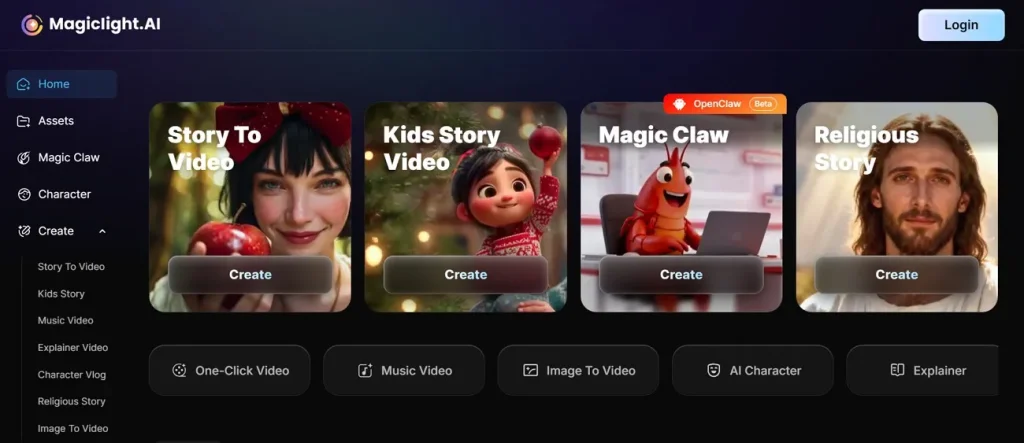
How MagicLight AI Turns Text Into Videos
MagicLight AI moves the project from setup to export through a guided interface. Each stage helps you shape the story, review scenes, refine details, and finalize the video.
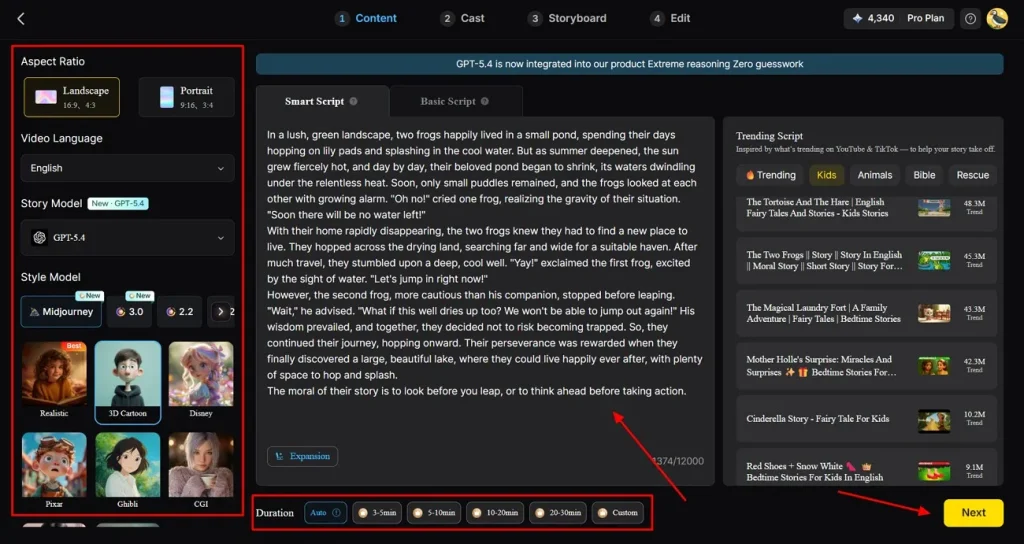
Step 1: Configure the Core Story Settings
From the left panel, choose the Aspect Ratio, Video Language, Story Model, and Style Model first. After that, add or refine the story inside Smart Script, choose the preferred Duration, and click Next to continue.
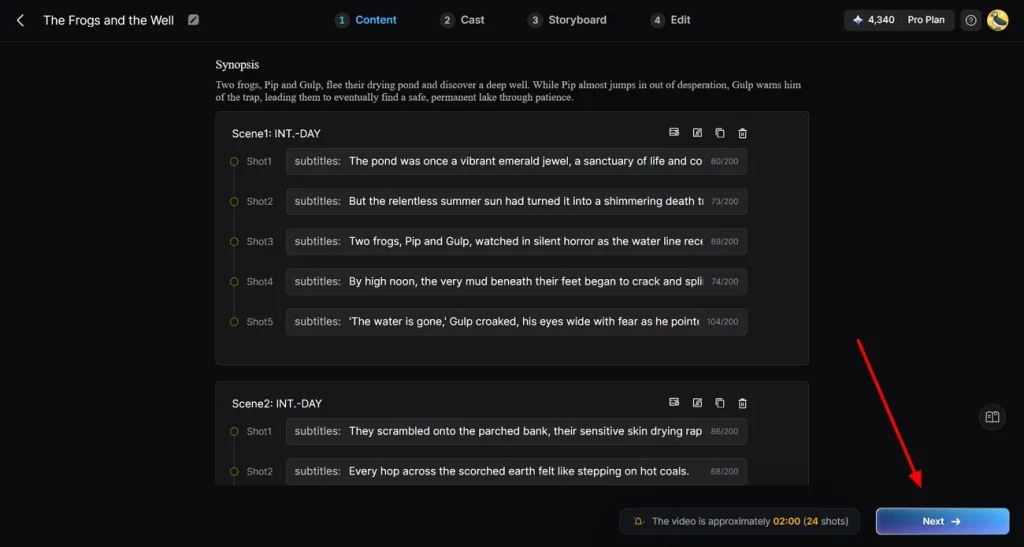
Step 2: Review the Generated Scene Structure
After processing, check the generated Synopsis and the full scene-by-scene structure displayed underneath. Review each shot carefully, confirm the pacing and overall flow, then press Next to move forward.
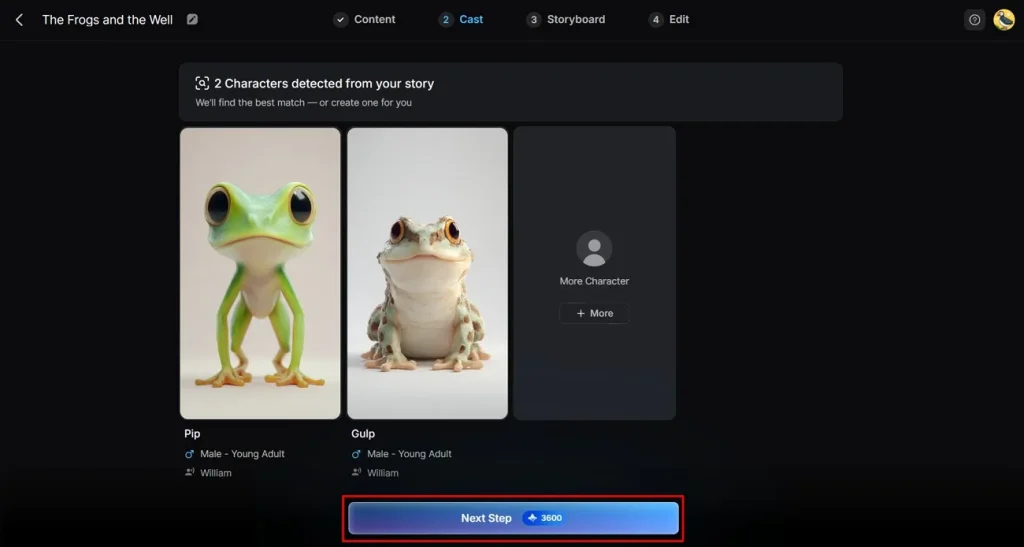
Step 3: Choose the Right Story Characters
At the Cast stage, review the characters detected automatically from the story and see whether they fit the narrative properly. Keep the suggested options or add another through More, then continue with Next Step.
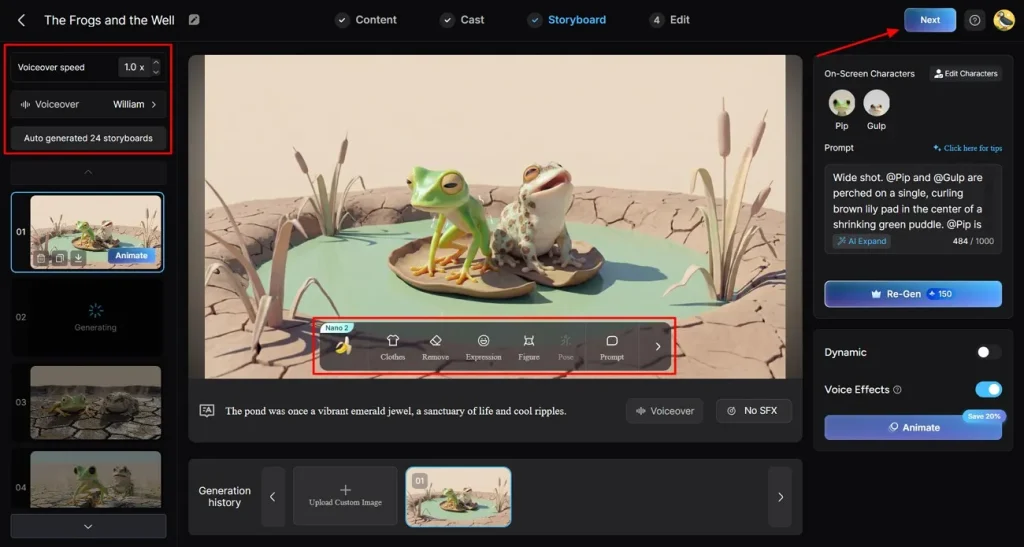
Step 4: Fine-Tune the Storyboard Frames
Within the storyboard, go through each generated frame and use the controls to adjust clothes, remove, expression, figure, pose, or prompt. You can also change Voiceover speed, select Voiceover, regenerate scenes, and then click Next.
Step 5: Set the Subtitle and Audio Style
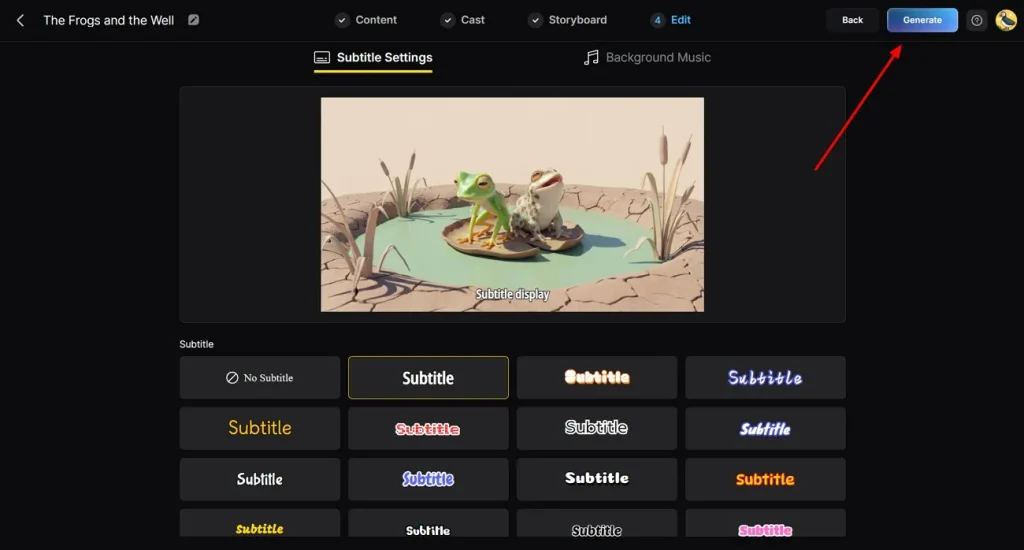
In the edit window, open Subtitle Settings and review how the text appears across the video. Pick the subtitle style that matches the visual tone, switch to Background Music if needed, and then click Generate.
Step 6: Preview and Export the Final Video
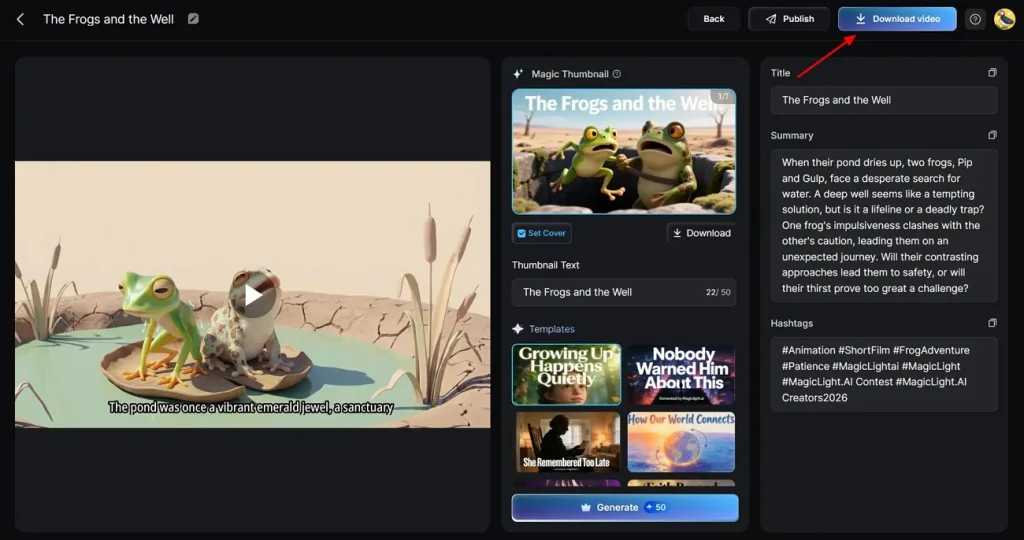
When rendering finishes, review the final preview together with the Magic Thumbnail, Title, Summary, and Hashtags shown on the right. Once everything looks ready, click Download video to save the finished project.
Part 2. Key Features in MagicLight AI
A closer MagicLight AI review shows where the platform offers more than basic generation. The following features highlight stronger storytelling, greater editing control, and deeper publishing in a single workflow:
- Magic Claw Workflow: Magic Claw keeps video creation, publishing, and performance tracking in one workflow. That makes it easier to manage the full posting process without switching tools.
- Kids Story Video: For children’s content, MagicLight AI offers a separate mode built around shorter animated storytelling. Users can shape videos up to 10 minutes, with editable characters, 37 voiceovers, background music, subtitles, and cover options.
- AI Character Creation: When a project needs an original cast, MagicLight AI lets users build AI characters from prompts or uploaded images. It supports name input, prompt expansion, and style models, including Midjourney V7, Sora, and MagicLight versions 2.0, 2.2, and 3.0.
- Music Video Generator: Music comes first here, which gives the workflow a different creative starting point. The tool can generate music by genre, includes 15 prebuilt songs, and pairs them with storyboard editing, style selection, subtitles, and cover generation.
- Story to Video: Built for longer storytelling, Story to Video turns full scripts into structured multi-scene productions. It offers scripts up to 12000 characters, durations up to 50 minutes, with Nano scene refinement.
Part 3. How MagicLight AI Pricing Works
Understanding MagicLight AI review pricing helps users choose a suitable plan easily. Explore subscription tiers and check features below before selecting the best option available:
Free vs. Paid Plan Comparison
Review the pricing table below to decide which plan fits your needs according to your budget:
| Plan Name | Pricing | Key Features |
| Free Plan | $0/month | 1 character creation, limited regenerations, ChatGPT-4 access |
| Standard | $12/month | 6,000 credits, 120 min video, HD 1080P, no watermark, commercial use |
| Pro | $35/month | 35,000 credits, 620 min video, Nano tools, voice cloning, HD export |
| Ultra | $90/month | 120,000 credits, 2000 min video, advanced models, Sora & Veo access |
| Ultimate | $150/month | 180,000 credits, 3000 min video, VIP speed, top-tier AI models, full features |
Is MagicLight AI Worth the Money
MagicLight AI feels more worthwhile when its standout features solve several production steps together. Instead of vague savings claims, it focuses on capabilities that many simpler tools still lack.
- Nano Scene Editing: Nano storyboard breaks each shot into micro-steps, providing clear control over timing. Users can refine clothing, expressions, body type, prompts, and up to 50 poses before rendering starts.
- Broader Style Range: MagicLight AI offers style models like Midjourney V7, Sora, and multiple in-house versions. That wider range gives creators more visual flexibility than many basic video generators provide.
- Long Story Support: MagicLight accepts 12000-character scripts and supports videos reaching up to 50 minutes total. Longer storytelling becomes easier when a single platform handles structure, pacing, and output.
- Specialized Creation Modes: Dedicated modes excel at kids' stories, explainers, music videos, vlogs, and religious projects. More targeted workflows give users better starting points than generic video generators usually do.
- Character Continuity Tools: Easily create custom characters with names, ages, types, voice options, and reusable profile details. That helps recurring stories stay more stable across episodes and visual changes.
Part 4. Who Should Use MagicLight AI?
This MagicLight AI review shows who should consider using this AI tool. Below are the groups that can improve content creation using this tool:
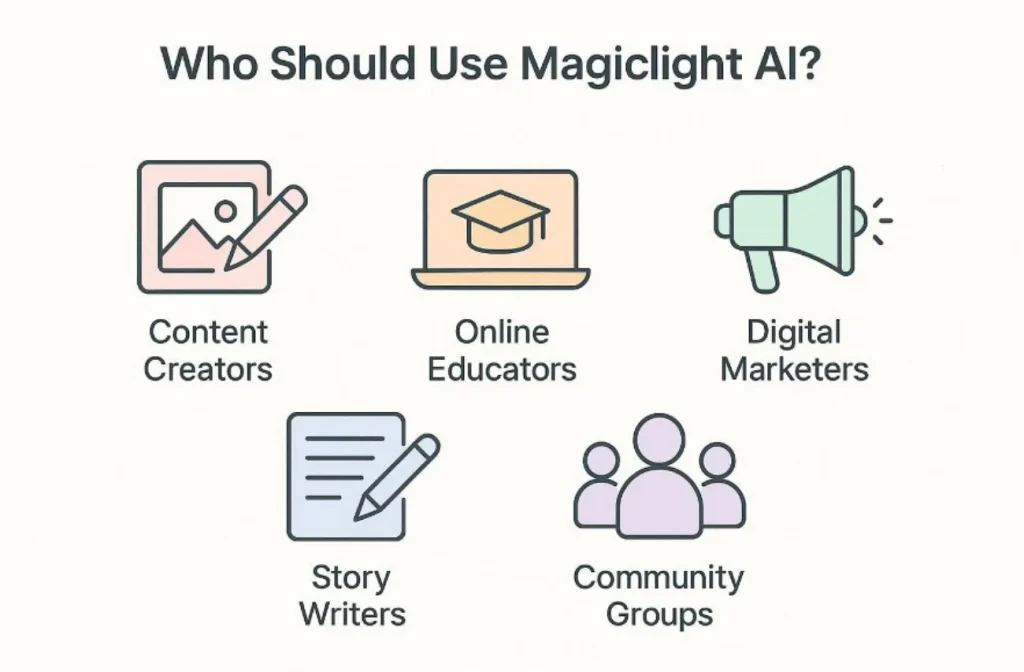
- Content Creators: MagicLight AI works well for creators producing faceless YouTube videos, TikToks, and Reels at scale. Story to Video, One-Click Video, voice cloning, subtitle settings, and cover generation help speed up the process from script to publish.
- Online Educators: Teachers and trainers can turn lessons into clearer visual explainers without manually building every scene. Explainer Video supports voiceovers, subtitles, storyboard editing, and up to 1080p export for structured learning content.
- Digital Marketers: Marketing teams can benefit most from Magic Claw when regular publishing matters across campaigns. Scheduling, publishing, and performance tracking keep content workflows more connected after creation is finished.
- Story Writers: Authors and storytellers get more value from long-form generation and stable recurring characters. As Story to Video supports scripts up to 12000 characters, 50-minute duration, voice cloning, and Nano scene refinement.
- Community Groups: Nonprofits and community-led teams can use animated storytelling to clarify their missions. Multilingual support, voiceovers, subtitles, and long-form structure make message-driven videos easier to produce.
Conclusion
To conclude, this MagicLight AI review highlights a platform built for structured, story-driven video production rather than basic clip generation. Long-form support, Nano storyboard control, broader style models, and Magic Claw publishing tools add stronger practical value for recurring content workflows across education, marketing, and storytelling. For creators who need depth, continuity, and scalable output, MagicLight AI is worth considering.
FAQs on MagicLight AI Review
1. Is MagicLight AI good for beginners?
Yes, MagicLight AI is perfect for beginners who have no editing experience. It helps turn scripts into videos easily without requiring complex skills or tools. Users can quickly create content and learn while exploring the simple AI features.
2. Is MagicLight AI free or paid?
This platform offers a free plan and several paid tiers for its users. The free version has limits, while paid plans offer long videos and tracking. You can choose a plan that fits your budget and your project goals.
3. Does MagicLight AI work for YouTube videos?
It is a great choice for making faceless YouTube channels and short clips. The system creates long videos that keep viewers interested in your new stories. Creators save time compared to filming or manually editing content from scratch.
4. Is MagicLight AI better than traditional animation tools?
MagicLight AI is simpler and quicker for users than conventional animation tools. It automates scenes, voiceovers, and storytelling, which saves time and effort. However, high-end studios may prefer manual animation for complete control over details.
5. Should I use MagicLight AI for professional projects?
You should use it if you need to produce a high volume of content. The character consistency feature makes your videos look polished and stable. It is an ideal tool for marketers running campaigns and storytelling to grow their brands.


![How to Write a Script for a Short Film in 2026 [Beginner’s Guide]](https://magiclight.ai/wp-2/wp-content/uploads/short-film-screenplay-writing-guide-300x169.webp)