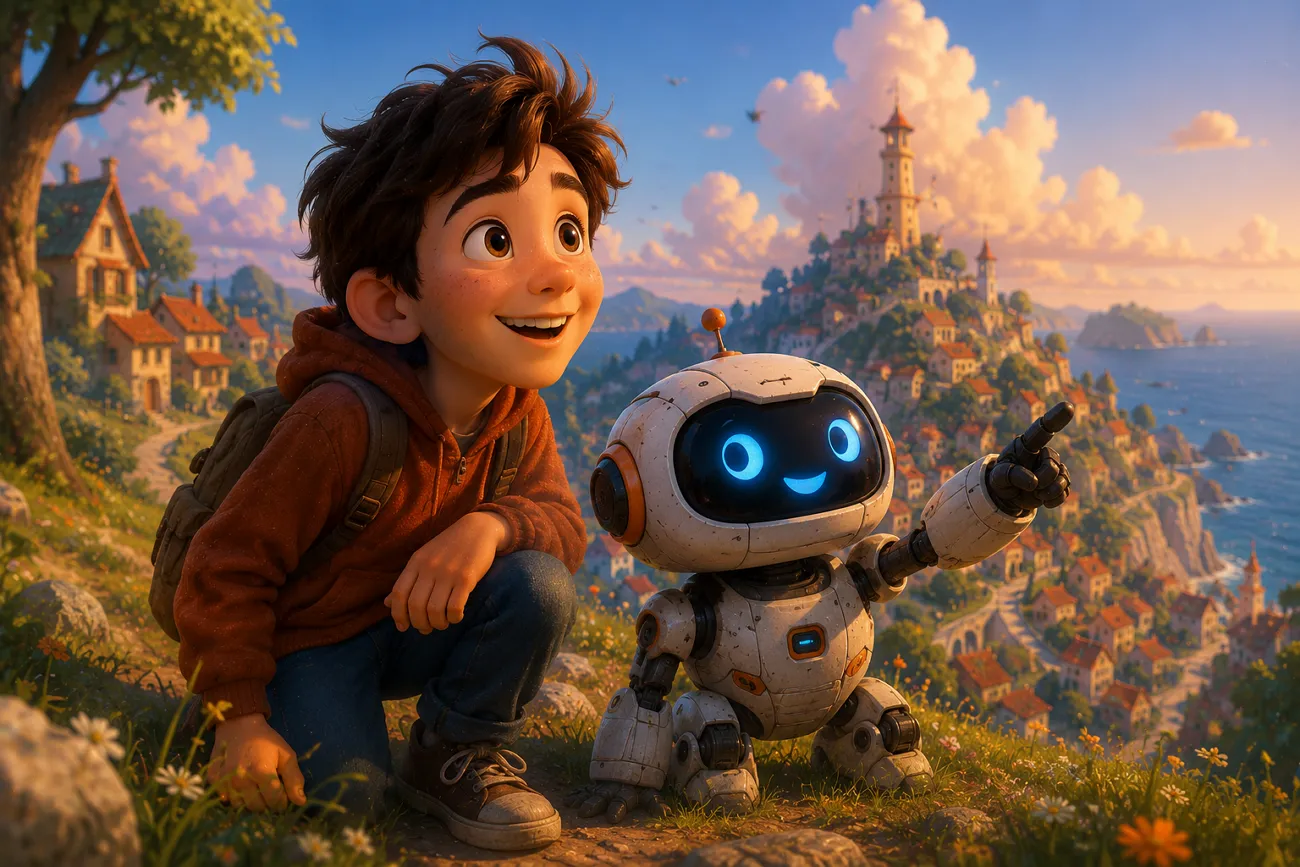
3D computer animation now shapes modern movies with realistic stories and strong visual effects. Creators are shifting toward tools that simplify the entire animation creation workflow. Trending tools like Seedance 2.0 help users build Pixar-level animation with some limitations. Thus, this guide explains Pixar-Level Animation Seedance 2.0 in a clear and simple way. It also shows how its alternative tool can turn images into animated clips for better results.
Part 1. How Seedance 2.0 Creates Pixar-Level Animation
Seedance 2.0 uses a smart system called multimodal architecture that converts text or images into smooth video scenes. Instead of manually drawing every frame, the system predicts motion, lighting, and character behavior automatically. It focuses on creating natural movement and storytelling style visuals that feel close to animated films. The tool analyzes input content, then builds a sequence of frames that simulate real cinematic motion.
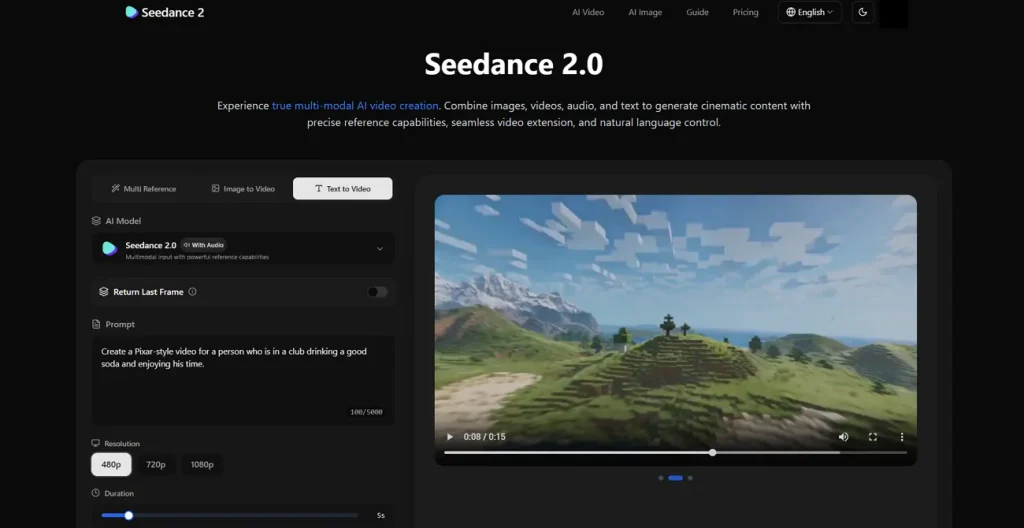
This includes cinematic motion, camera angles, depth effects, and facial expressions to make the animation more realistic. The Seedance 2.0 animation generation process ensures smoother visual quality and better motion control. It uses a special engine to make sure objects fall or bounce with realistic physics. This makes the characters feel heavy and real, just like in your favorite 3D films.
Why Seedance 2.0 Is Compared to Pixar-Level Animation
Seedance 2.0 animation 2D produces strong visual depth and emotional storytelling scenes. In this part, you will explore some key reasons behind its comparison with Pixar's level of animation style:
- Cinematic Look: Seedance 2.0 creates strong 3D visuals with lighting depth and color grading effects. This gives short clips a Pixar-level polish and film-quality appearance.
- Shot Consistency: Character design and environment stay stable across different angles and short sequences. It helps maintain visual continuity even when the camera perspective changes during scenes.
- Audio Sync: Sound effects and music align perfectly with character movement and scene timing. Thus, emotional moments feel more impactful with synchronized audiovisual storytelling flow.
- Motion Physics: Realistic movement is achieved with gravity-based animation and stable object interaction behavior. These scenes feel grounded even when actions are highly exaggerated.
- Media Control: Multiple inputs like text, images, video, and audio guide the full animation generation process. Therefore, users act like directors controlling scenes through simple creative prompts.
Part 2. Why Choose MagicLight AI for Seedance 2.0 Animation Generation
Many times, Seedance 2.0 animation generation produces inconsistent visuals across different generated scenes. For these repeated problems, users seek a platform that reduces effort and improves creative speed. So, MagicLight AI becomes a strong alternative for a consistent and Pixar-style animation workflow. This tool specializes in rendering narratives into 3D animations with Pixar-level physics, emotive characters, and rich textures.
It has 17 AI video models, including Seedance 2.0 and Kling, that help you to generate videos in different styles. While generating videos, MagicLight AI keeps the original image style clarity and textures while adding motion effects. Moreover, the system accepts prompts within 1500 words for detailed animation scene generation. Creators can upload JPG, PNG, and JPEG up to 10MB to generate motion.
Key Features
- Duration Options: Users can create animated clips with selectable durations up to 15 seconds.
- Background Control: The background settings allow users to customize scenes for a more cinematic animation appearance easily.
- Re-Edit Support: You can re-edit animations during generation for faster corrections and smoother final output.
Complete Guide to Create Pixar-Level Animation AI Video Using Magiclight AI
Now that you understand MagicLight AI video creation features, follow the guide below to generate an AI video with this tool:
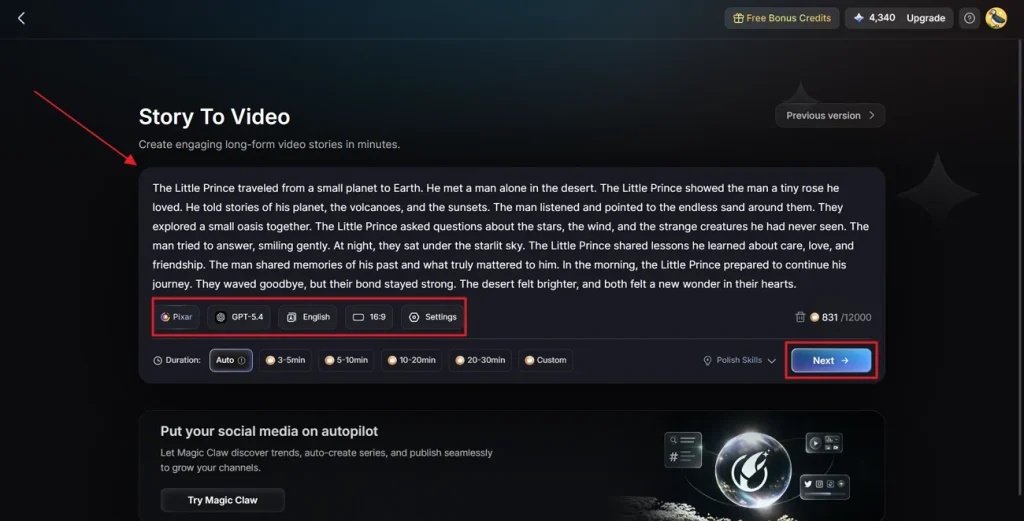
Step 1. Access the MagicLight AI to Create Video
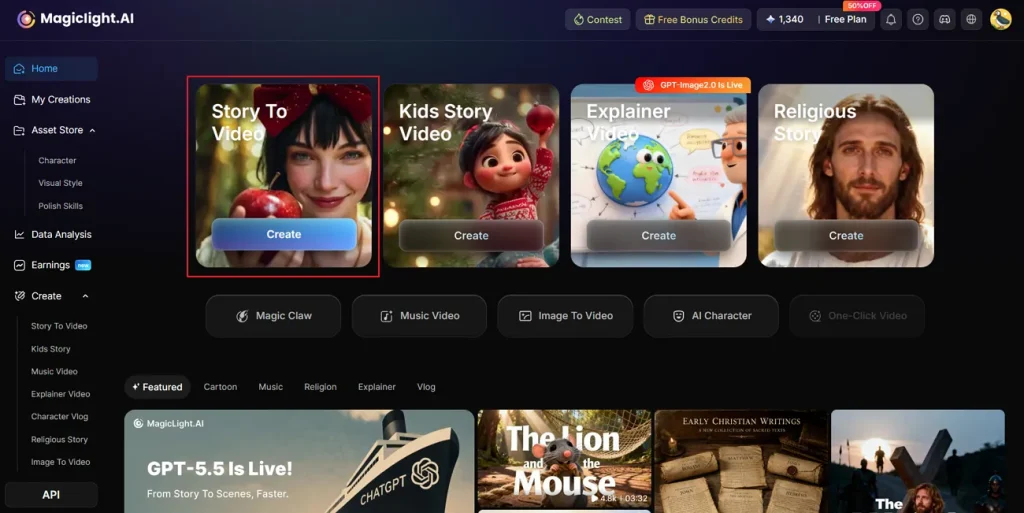
To start, open the MagicLight AI and opt for the Story to Video feature.
Step 2. Add Prompt and Customize Video Settings
After that, enter your story idea inside the provided Text Box and choose the preferred Video Language. Using its provided options, select the Video Style, such as Pixar, and adjust the Aspect Ratio according to the video content. Next, select the AI Story Model like GPT-5.4 and set the Video Duration. Once it is done, opt for the Next button to move forward.
Step 3. Review Generated AI Video Scenes
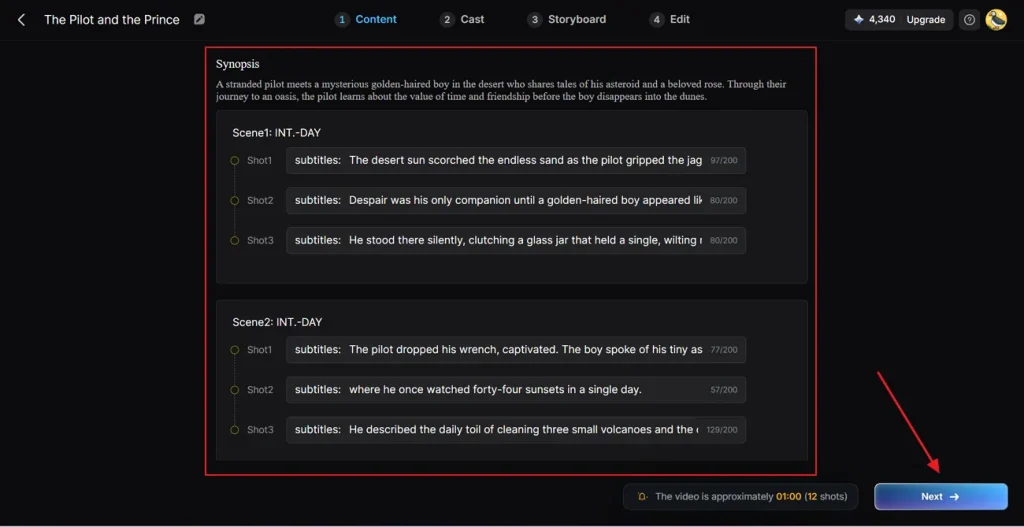
Moving forward, MagicLight AI generates a complete scene flow and video summary for careful preview. If all generated scenes are accurate, click the Next button to proceed further.
Step 4. Choose or Generate AI Characters
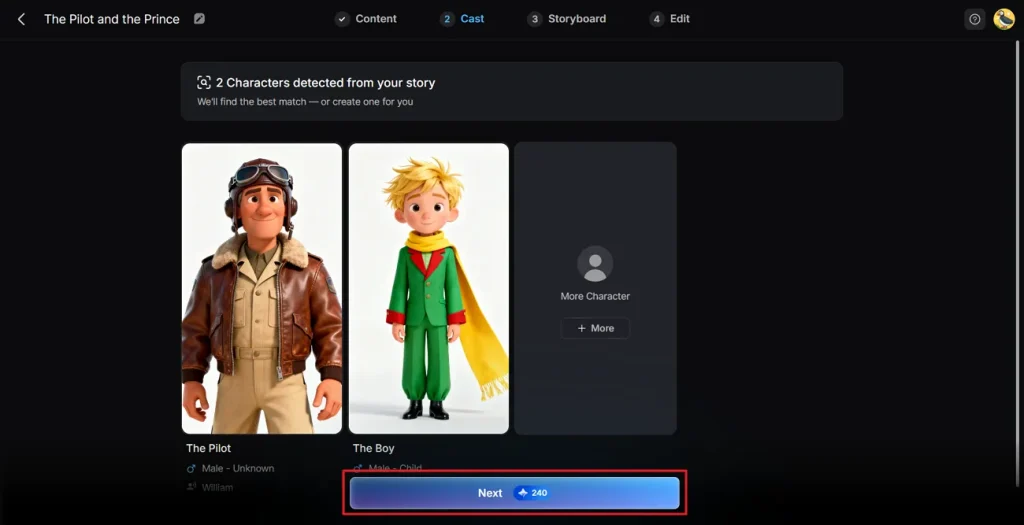
Next, the tool suggests characters based on your selected story theme and visual style preferences. You may select characters from the available library or create a custom one through the More Character option. After confirming your character selection, press the Next button to continue.
Step 5. Customize Character Appearance Settings
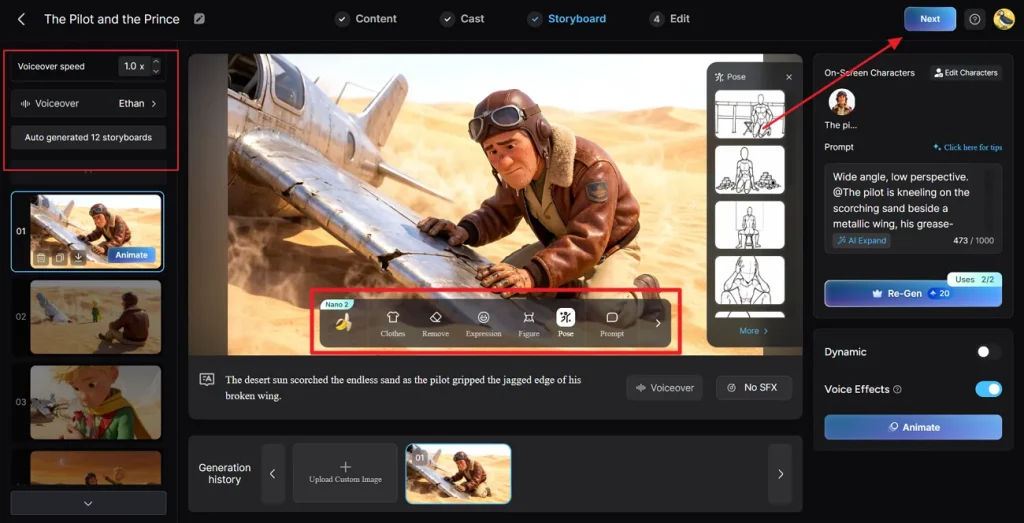
Inside the Storyboard section, users can adjust Voiceover Speed and modify generated scenes individually. The platform also allows changing Outfits, Expressions, Poses, and complete character appearances without difficulty. Once all customizations are finalized, opt for the Next button to continue.
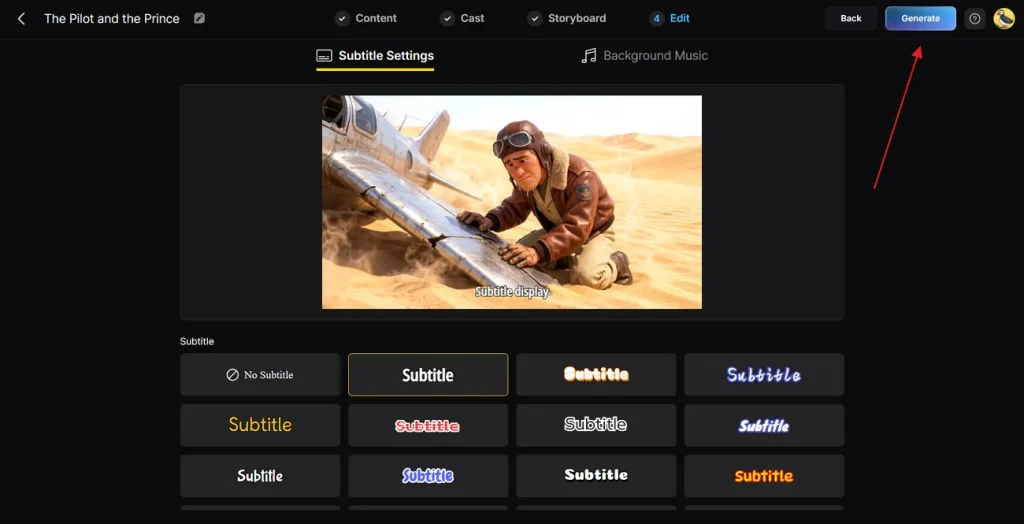
Step 6. Insert Background Music and Subtitle
Now, access the Subtitle Settings section to add captions to your AI-generated video. Next, navigate toward the Background Music option and choose music matching the video's mood carefully. After confirming every setting properly, opt for Generate to create the final AI video.
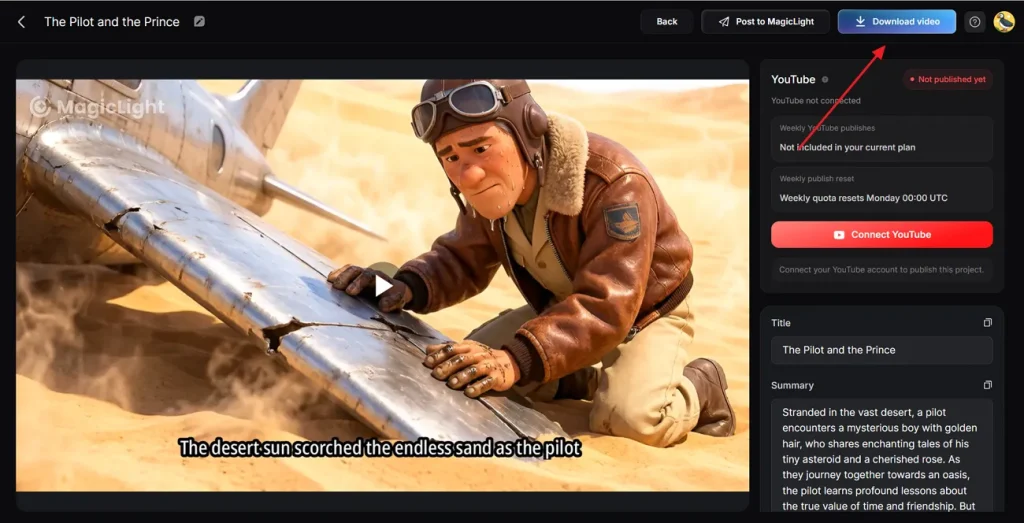
Step 7. Preview and Download Final AI Video
At last, preview the generated AI video using the prebuilt playback feature available on the platform. Once the final edits are checked successfully, click the Download Video button to save your video on your device. Users can additionally insert custom Thumbnail text or a preferred trending Hashtag before exporting output.
Conclusion
To sum it up, Pixar-Level Animation Seedance 2.0 is changing modern animation with smoother motion and cinematic storytelling features. It helps creators generate realistic animated scenes without requiring advanced editing or drawing experience. Even then, maintaining smooth output and fast editing becomes difficult in extended projects. For this, MagicLight AI becomes a useful alternative for generating stable image-to-video animations with improved cinematic quality and creative control features.
FAQs on Pixar-Style Animations Seedance 2.0
1. Is Seedance 2.0 good for 2D animation?
Yes, Seedance 2.0 supports 2D animation with smooth motion and expressive character movement effects. It converts simple images into animated scenes without advanced drawing skills. In contrast, you can also use MagicLight AI that changes these 3D scenes into beautiful flat 2D styles.
2. Can beginners use Seedance 2.0?
Beginners can use Seedance 2.0 because the platform offers simple creation tools. Users only need prompts or images to generate smooth animated videos. However, many new creators prefer MagicLight AI for simpler controls and faster animation workflow management.
3. What are the best alternatives to Seedance 2.0?
Various AI animation platforms offer cinematic video generation capabilities similar to Seedance 2.0. Some alternatives focus on faster rendering, easier controls, and better animation customization options available. Yet, MagicLight AI remains a top choice for reliable image-to-video animation generation.
4. Can Seedance 2.0 create cinematic animated videos?
Yes, Seedance 2.0 creates cinematic animated videos using realistic motion and lighting effects together. The platform supports camera movement and synchronized sound for storytelling visuals. For better depth and advanced effects, many creators use MagicLight AI for smoother cinematic animation workflows.
5. Is AI animation replacing traditional animation?
AI animation helps creators produce videos faster, but traditional animation still remains highly important. Professional studios continue using manual animation techniques for detailed storytelling and artistic creative control. Yet, for animation fans and creators, tools such as MagicLight AI make the animation workflow easier.
![How to Write a Script for a Short Film in 2026 [Beginner’s Guide]](https://magiclight.ai/wp-2/wp-content/uploads/short-film-screenplay-writing-guide-300x169.webp)