


Renderforest began as a template-based platform for videos, logos, and websites, long before today’s AI video tools appeared. It has since added AI features to that familiar system, but the core question remains: is it now a true AI video generator or still mainly a design platform? This review looks at its strengths, limitations, and where Magiclight AI offers more freedom for creators seeking original results without templates.
Part 1. What Is Renderforest?
Renderforest is not built like the newer prompt-first video generators. Its workflow still begins with templates, and there are more than 1,200 of them across video, logo, website, and mock-up projects. You pick a format, replace the sample material, then shape the result around your brand. AI mainly speeds up that process, including script-to-video creation with narration and branded visuals.
For a small business or a creator without editing experience, that setup is practical. A single account can handle promo videos, YouTube intros, logo animations, explainers, websites, and other routine marketing work. That range is the main reason Renderforest AI still attracts users, even as newer generative platforms continue to enter the market.
Core Key Features
- Template Library: More than 1200 professionally designed templates cover intros, promos, logo reveals, and social videos, each customizable without starting from scratch.
- AI Text-to-Video: Renderforest AI turns a pasted script or key message into a templated video with matching visuals, pacing, and voiceover.
- Multilingual Auto-Translation: Converts a finished video's narration and captions into dozens of languages with a single click.
- Logo and Mock-up Generator: Builds a custom logo from a prompt, then drops it directly into realistic product or brand mock-ups.
- Website Builder: Extends the same account into AI-assisted website creation, useful for brands that need a matching site alongside their videos.
- Brand Kit Consistency: Applies saved colors, fonts, and logos across every template automatically, keeping output on-brand without manual adjustment.
Pros
- Covers many use cases with practical, ready-made video starting points.
- Script-to-video automation saves time compared with manual template editing.
- Multilingual translation helps brands publish content across different regional markets.
- Combined video, logo, and website tools support consistent brand presentation.
- Independent reviews often describe customer support as helpful and responsive.
Cons
- Template-based workflows can make finished videos feel less original overall.
- Some reviewers report rendering times of 10 to 20 minutes.
- Pricing may feel restrictive for occasional or single-video projects.
- Mid-tier plans limit video length to only a few minutes.
- The free plan mainly offers watermarked videos at 360p resolution.
Pricing
Renderforest offers free and paid plans with different limits on exports, quality, and features. See how the Renderforest free plan compares with its paid tier below.
| Plan | Price | Included | Limitations |
| Free | $0 | Basic templates, 360p export | Visible watermark, about 500MB storage |
| Lite | $9/month | 400 credits, HD720 template exports, full AI model access | Limited monthly credits and HD720 exports only |
| Pro/Pro AI | $39/month | 1,600 credits, unlimited HD1080 template exports, premium website, stock assets | Credit-based AI generation despite unlimited template exports |
| Business | $59/month | 3,000 credits, unlimited 4K template exports, premium website, stock assets | Highest monthly cost for occasional users |
Beyond the free tier, exact costs shift depending on billing cycle and current promotions. Anyone chasing free Renderforest access long-term should still expect real limits once actual projects start piling up. It is worth checking Renderforest's own pricing page for current numbers before committing.
Part 2. How to Get Started With Renderforest
Renderforest organizes its tools around different project types, so the first choice shapes the rest of the workflow. The steps below show how to get started with Renderforest:
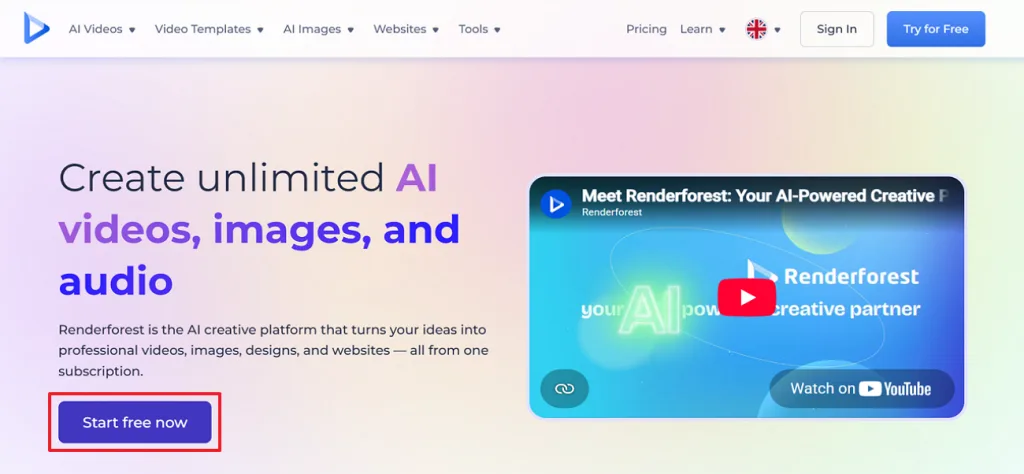
Step 1. Open the Renderforest homepage and click Start Free Now to access the AI creation tools.
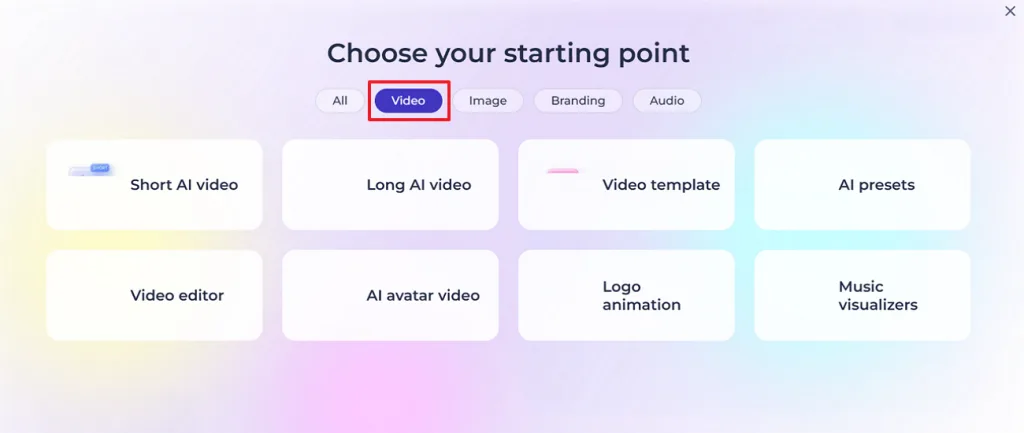
Step 2. On the Choose your starting point screen, select the Video tab, then click Short AI Video to open the AI video generator.
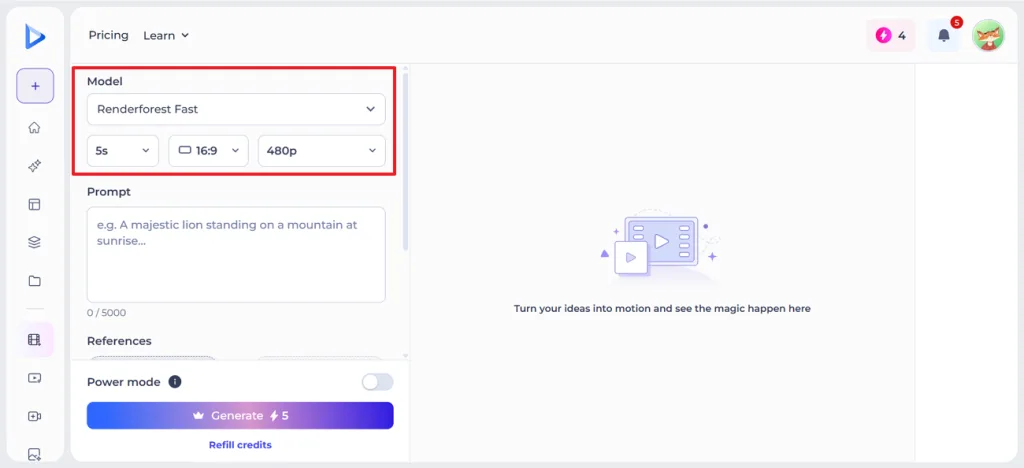
Step 3. Choose the Renderforest Fast model, then set the video duration, aspect ratio, and resolution using the options displayed above the prompt field.
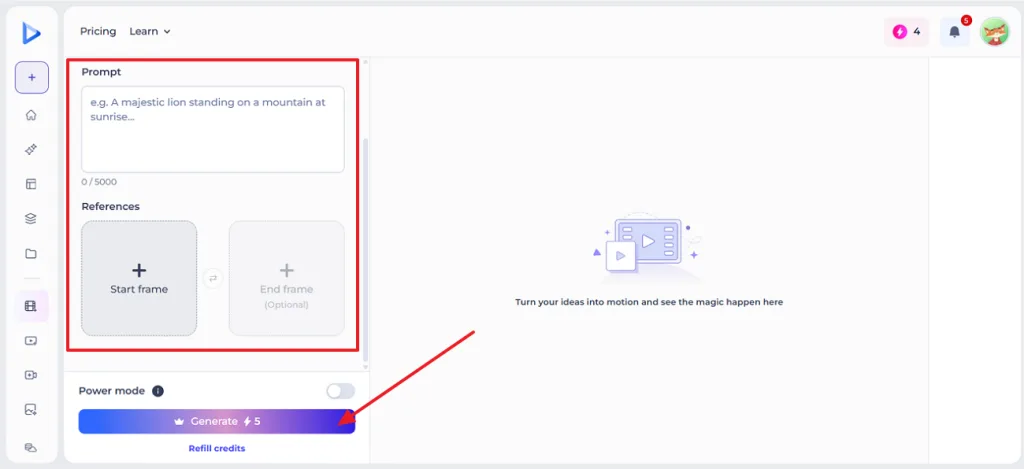
Step 4. Type your Prompt, optionally upload Start Frame and End Frame reference images, then click Generate to create the AI video.
Part 3. Explore Another Option for AI Video Creation
Renderforest's template system is a real strength for fast, on-brand output, but it is also the source of its biggest limitation. Every video still traces back to a pre-built structure. Creators who want something built specifically around their own idea, rather than adapted from a template, run into that ceiling quickly.
Magiclight AI begins with the idea rather than a template. A creator describes the concept to its Agent, then uses story models such as GPT-5.6, Gemini, or Claude Opus 4.6 to develop a stronger script, structure, and dialogue. From there, the Agent plans the format and storyboard, while the finished project can run for up to 50 minutes when the story needs more space.
Key Features Worth Knowing
- Magiclight Agent: Turns a plain-language idea into a full production plan through conversation, recommending a format and drafting the script and storyboard. There is no fixed template to start from.
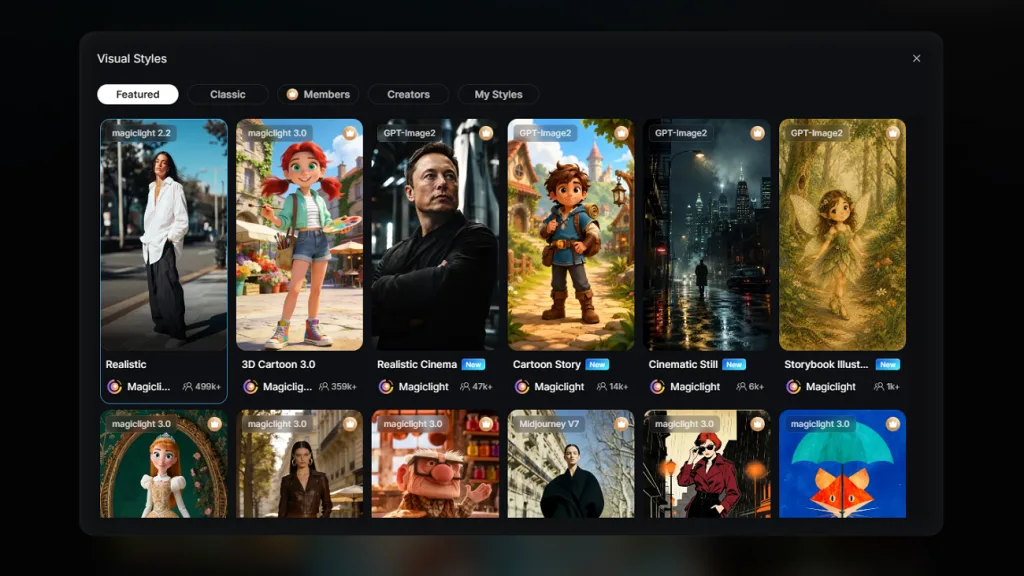
- Visual Style Selection: Magiclight AI offers 20+ visual styles, including Comic and Realistic, for matching different genres and creative directions.
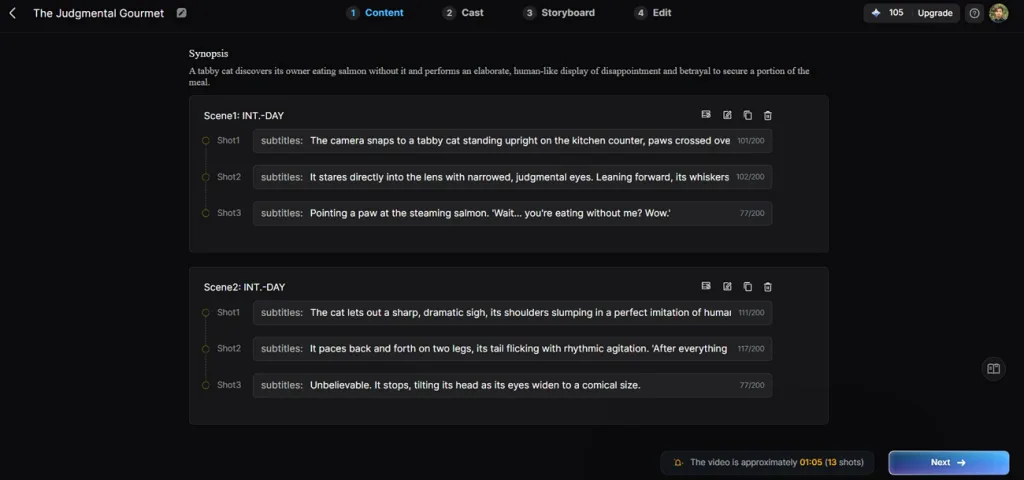
- Scene-by-Scene Script Control: Breaks the story into editable scenes and shots, letting creators refine subtitles, pacing, dialogue, and narrative flow before moving to the storyboard.
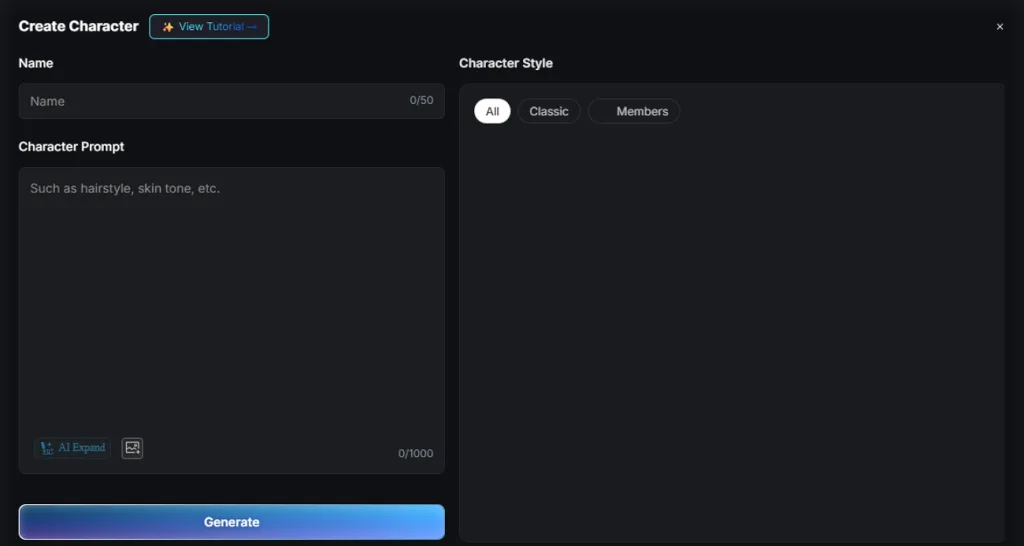
- AI Character Customization: Allows you to shape a character’s appearance, personality, clothing, and other details through a prompt of up to 1,000 characters.
- Consistent Characters and Voice: A character's look and narration voice stay locked in for the full duration of a project, not just one clip.
- 37 Voice Library Options: Draws narration from a built-in set of voices, or clones one so the same host carries across a whole series.
- Multiple Language Output: Generates the same project again in 11 different languages, a sharper version of the translation Renderforest already offers.
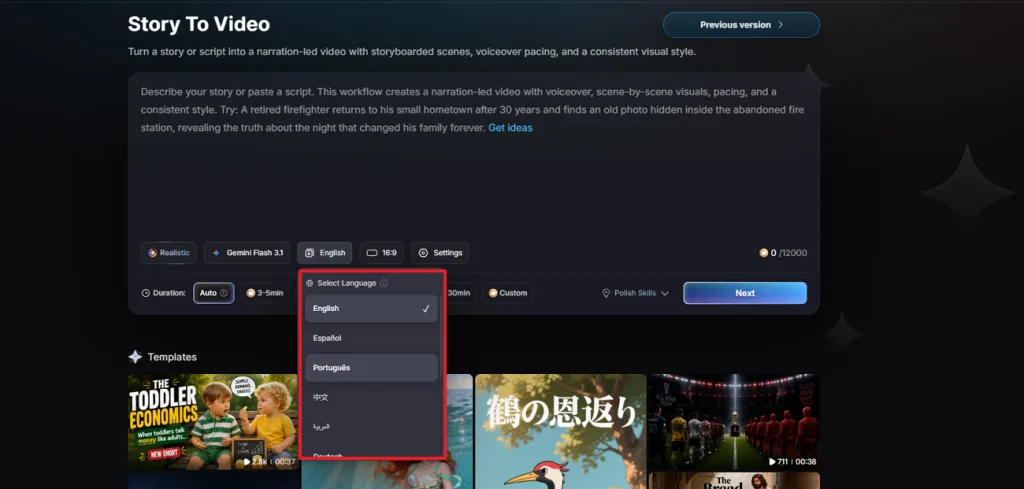
- Creator Asset Marketplace: Publishes reusable characters, styles, and voices to the Asset Store. Other creators can use them, and the original creator earns from that use.
Part 4. Comparison Table Between Renderforest and Magiclight AI
The two platforms serve fairly different jobs, which shows clearly once the details sit next to each other:
| Factor | Renderforest | Magiclight AI |
| Core Approach | Template-based customization | Original AI generation built from an idea |
| AI Capabilities | Script-to-video, auto-translation, logo and mockup generation | Agent-guided script, storyboard, character, and voice generation with 9 Story Models |
| Customization | Limited to what the chosen template allows | Scene-level Nano Storyboard control, including 50+ pose options |
| Output Length | A few minutes on most plans | Up to 50 minutes |
| Render Speed | Can stretch to 10-20 minutes on some plans | One continuous render for the full project |
| Pricing | Free tier with watermark; paid plans from about $9/month | Free tier; paid plans start at $6/month billed annually |
| Best For | On-brand marketing videos, logos, and websites | Turn Ideas into Long-Form Stories |
| Overall Strengths | Fast, template-driven consistency across formats | A complete production system for one original story |
FAQs on Renderforest
1. Does Renderforest have a free plan?
Yes, though it comes with real limits. The free plan caps export at 360p, adds a visible watermark, and restricts storage to around 500MB. Testing Renderforest for free this way is enough to try the templates before deciding on a paid tier.
2. Does Renderforest have a video maker tool?
Yes, video creation is Renderforest's core product, ahead of its logo and website tools. Magiclight AI approaches video from a different angle, generating something original rather than adapting a template.
3. Can I create AI-generated videos with Renderforest?
Yes. Renderforest's AI tools can turn a script or key message into a templated, voiced video with matching visuals, then auto-translate the result into other languages. Magiclight.AI takes a more original approach, generating a full video from an idea rather than adapting a template.
Conclusion
Renderforest remains a practical choice for creating branded videos, logos, websites, and other marketing assets from ready-made templates. However, creators seeking Renderforest alternatives for original storytelling may prefer Magiclight AI. It generates long-form videos with consistent characters, custom scenes, and AI-driven narratives from a simple idea, making it better suited for projects built entirely from scratch.


![How to Write a Script for a Short Film in 2026 [Beginner’s Guide]](https://magiclight.ai/wp-2/wp-content/uploads/short-film-screenplay-writing-guide-300x169.webp)


