


Long YouTube videos take days to research, script, voice, and edit, which makes a steady upload schedule hard for small teams. Vidrush AI turns one brief into a narrated documentary or Top 10 video with visuals and music in about an hour.
The platform targets faceless channels on research-heavy subjects, with saved Brand Profiles and a chat-based agent that edits drafts on request. Pricing, output formats, and footage quality decide how well it serves a given channel compared with other AI video tools.
Part 1. What Is Vidrush AI?
Vidrush is an AI video production platform built mainly for long-form YouTube content. Users can begin with a topic, script, voiceover, talking-head recording, avatar, or a “Persona I” host. The platform can research topics, write narration, select visuals, add captions and music, then assemble everything into an editable video project.
The 3 production models determine how those visuals appear throughout the finished video. Deep Video v1 Mini combines images with motion graphics, while Pro adds Storyblocks video B-roll. Persona I instead creates scenes around a photorealistic avatar host using generated footage. Finished videos can render as horizontal 1080p MP4 files at 30 fps. A few additional controls shape the research, narration, and editing workflow:
- Research and Script Depth: Low prioritizes speed and cost, Medium uses deeper research, while Experimental tests VidRush’s newest research and scripting pipeline.
- AI Voice Options: The library includes 100+ ElevenLabs voices, Cartesia voices, and 25 VidRush-exclusive options. Public ElevenLabs voice clones can also be selected inside VidRush.
- Rush Agent Editing: The early-beta assistant can replace footage, regenerate voiceover sections, source new media, and handle smaller editing changes through plain-language instructions.
Part 2. Vidrush AI Pros and Cons
Before choosing Vidrush AI, compare the main advantages and limitations below to see how its workflow fits your video production needs.
Pros
- One prompt can produce scripts, narration, visuals, music, and editing.
- Every paid plan includes core models, voices, and editing features.
- Storyblocks footage remains licensed after canceling your VidRush subscription.
- Whitelists can prioritize up to 5 preferred sources per profile.
Cons
- No free trial exists, so testing requires paid access.
- Videos remain horizontal 16:9, excluding Shorts, Reels, and TikTok.
- Creative Commons footage may require attribution and carries user responsibility.
- Narrow topics can repeat scarce visuals when available footage is limited.
Part 3. How to Use Vidrush AI?
New users sign in through the web app at Vidrush, although access still depends on an invitation for now. Setup involves only a few choices, and most of the waiting happens during cloud rendering. Follow the steps below to use Vidrush
Step 1. Enter your video title or idea, choose the Deep Video model, video format, and duration, then submit the prompt and press the Generate icon.
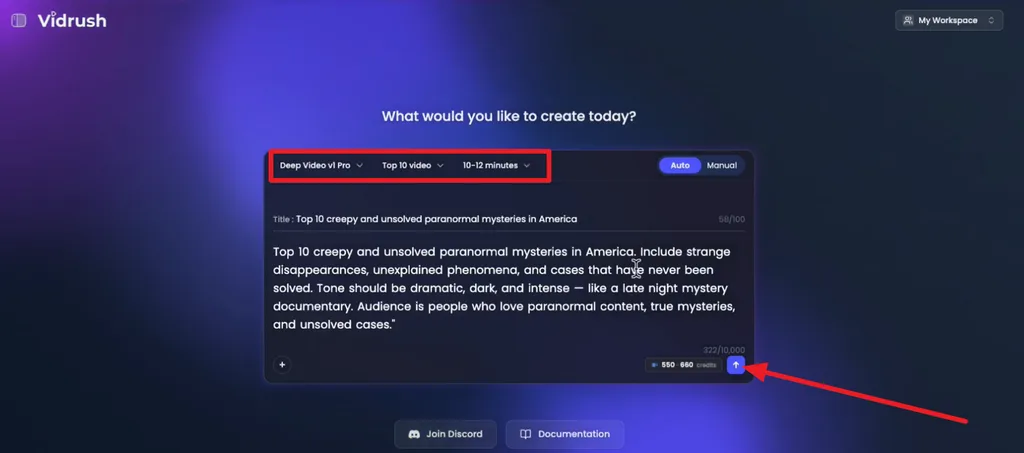
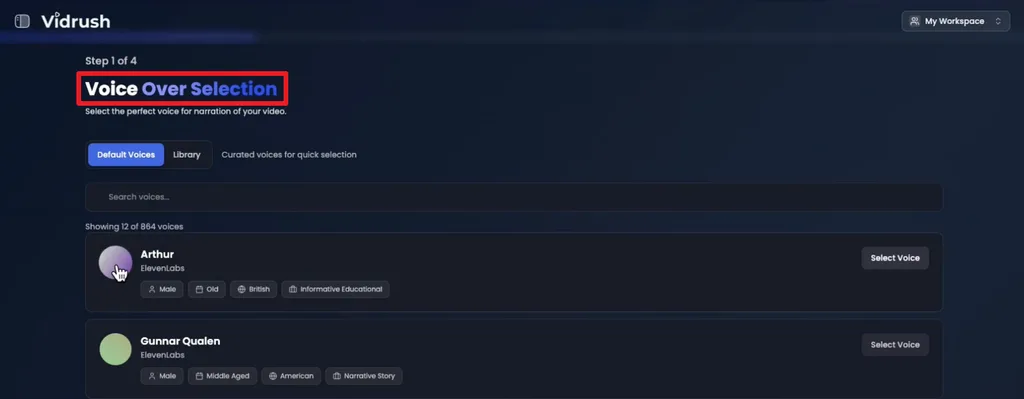
Step 2. Select a narration voice from the available Voice Over Selection options. Preview different voices and choose the one that best matches your video style.
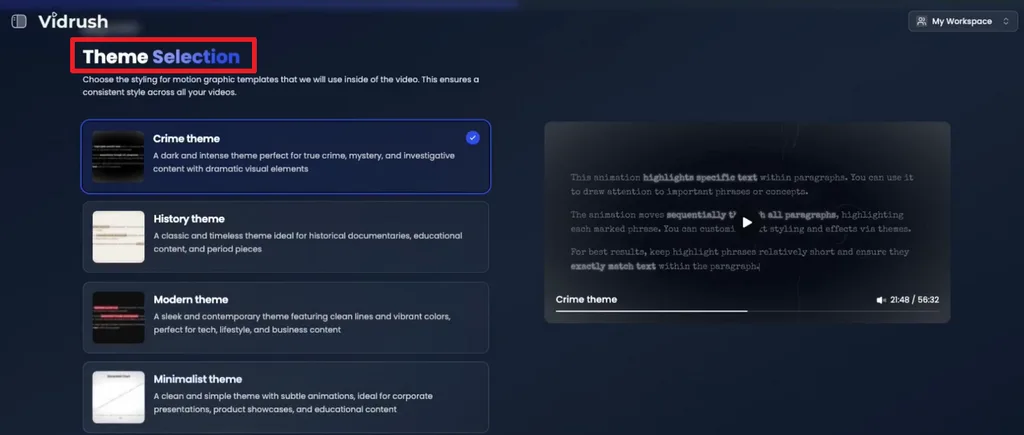
Step 3. Pick a Theme for the motion graphics and overall visual treatment. Options shown include Crime, History, Modern, and Minimalist themes.
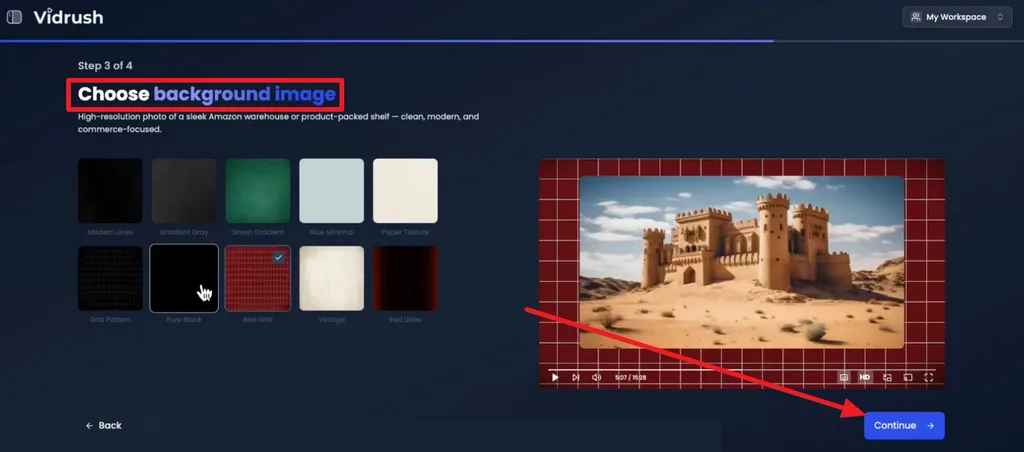
Step 4. Choose a Background Image or visual style for the video, preview how it looks in the player, then click Continue to proceed.
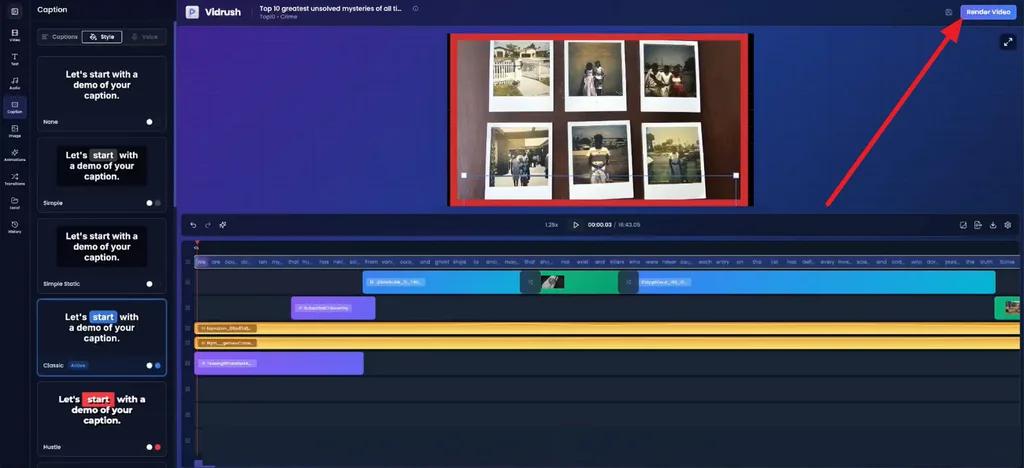
Step 5. Review the completed project inside the editor, adjust captions, visuals, audio, animations, or transitions if needed, then click Render Video to export the final result.
Part 4. Is Vidrush AI Free to Use?
Vidrush offers no free plan or trial, and its FAQ describes the service as being in a controlled-access phase. Every video draws on monthly credits, and finished footage costs roughly $1.46 to $2.18 per minute depending on the plan.
| Plan | Monthly Price | Included | Limitations |
| Starter | $99 | 2,000 credits, about 36 minutes of video | One video at a time, no team seats |
| Creator | $239 | 6,000 credits, about 110 minutes | 1 team seat, 2 concurrent generations |
| Pro | $639 | 18,000 credits, about 330 minutes, 3 team seats | 3 team seats, 3 concurrent generations |
| Scale | $1,750 | 50,000 credits, 910 minutes | 10 team seats, 5 concurrent generations |
| Studio | $4,990 | 150,000 credits, 2730 minutes | 15 team seats, 10 concurrent generations |
These figures are the current values listed in VidRush’s official pricing documentation. Estimated minutes are calculated using the Pro model with Medium reasoning, so actual usage varies with the model and reasoning level selected.
Yearly billing costs 10 times the monthly rate, effectively providing two months free while credits still refresh monthly. VidRush also supports Pay-As-You-Go and credit top-ups once plan credits run out.
Part 5. Best Alternative to Vidrush AI for Video Creation
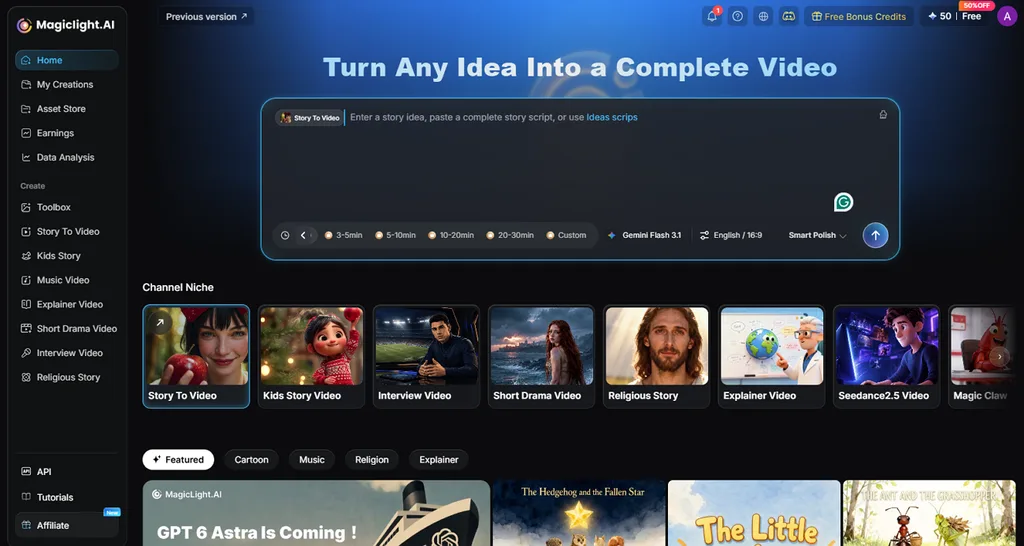
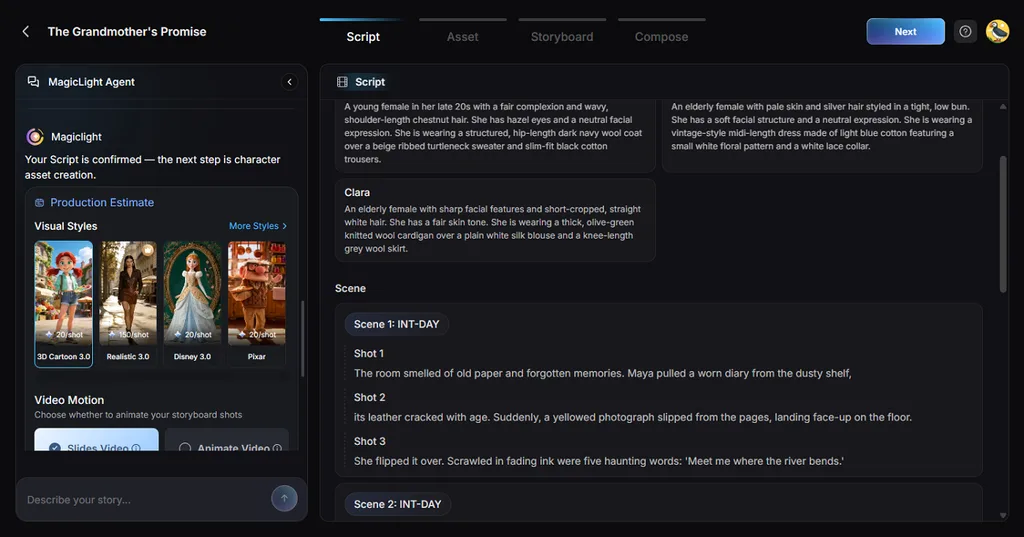
Vidrush creates many scenes from stock footage, images, and motion graphics, so the final video depends on available source material. That can limit recurring characters, original story settings, and vertical formats for narrative channels. MagicLight AI takes a different approach by helping creators plan the concept, script, storyboard, quality, and budget before production begins.
Once the plan is approved, Story to Video generates original scenes rather than matching narration to existing stock clips. Characters can stay visually consistent across scenes, while projects support both 16:9 and 9:16 formats for YouTube, Shorts, and Reels. MagicLight AI also supports 11 languages and gives new users starter credits without requiring a card.
Key Features of MagicLight AI
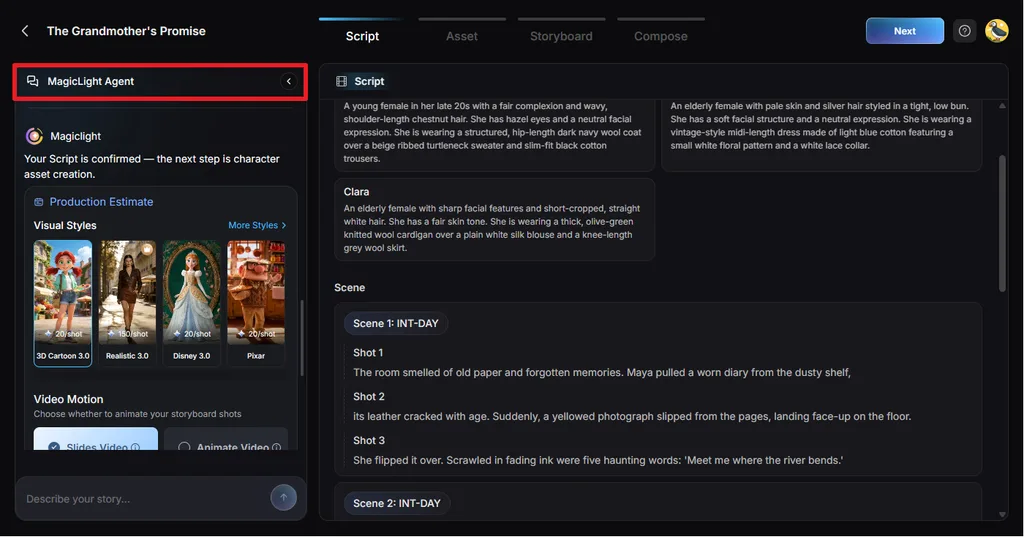
- MagicLight Agent: Briefs return format suggestions such as Explainer Video, Kids Story, or Religious Story, with character visuals and voices set up after approval.
- Long-Form Story Generation: A 12,000-character script limit and 14 AI story models support narration-heavy episodes, and the long video generator handles projects up to 50 minutes.
- Visual Styles: The 4 style models hold more than 50 presets, including a Midjourney set and MagicLight’s own 3.0, 2.2, and 2.0 collections.
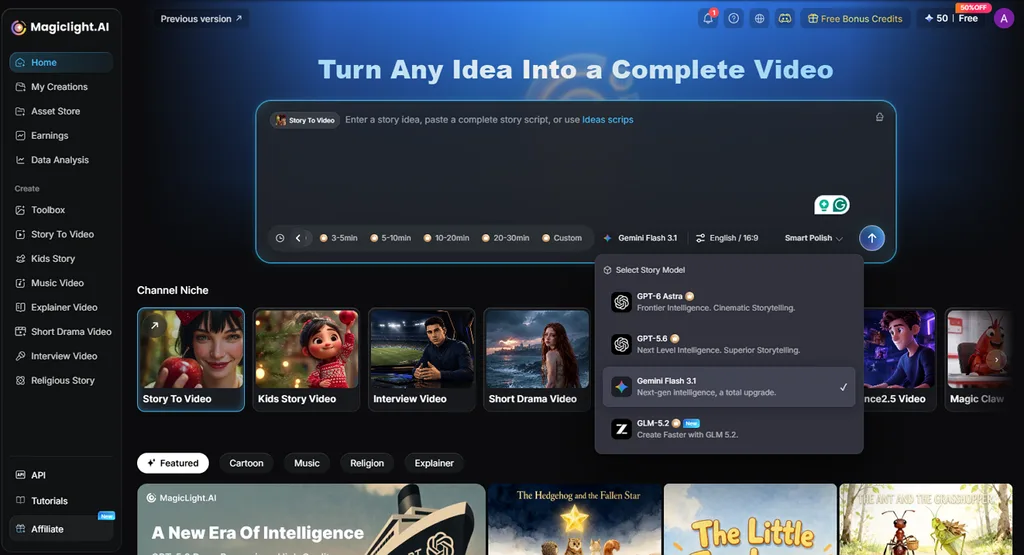
- AI Story Models: Choose from 14 story models, including GPT-5.6 and Gemini Flash 3.1, to control script development, pacing, scene structure, and storytelling style.
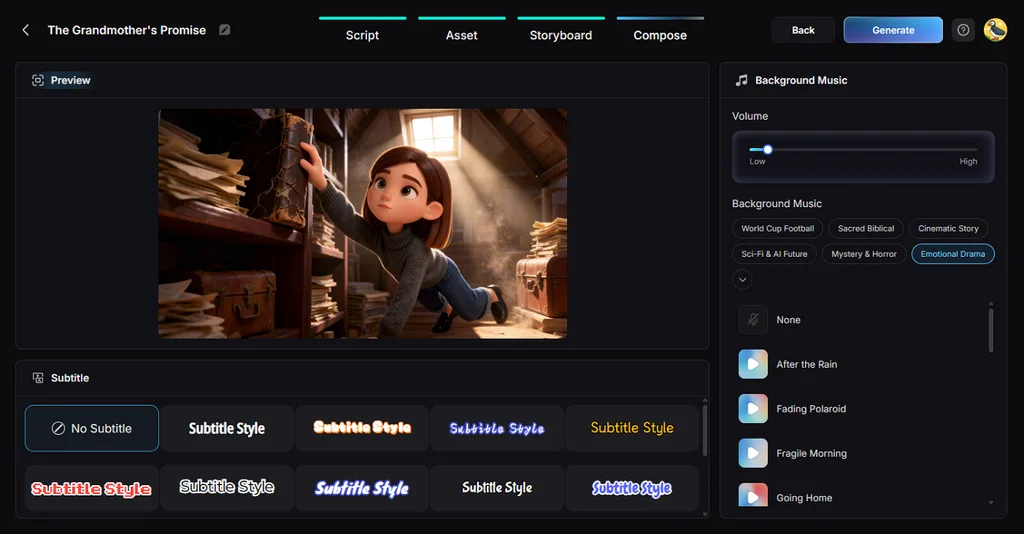
- Voices and Captions: Narration uses 37 AI voices or a creator’s own voice through voice cloning, and 16 caption designs finish each episode.
Vidrush AI vs. MagicLight AI
Vidrush AI and MagicLight AI both use AI agents, but they support different stages of video production. Rush Agent focuses on revising an existing draft, while MagicLight Agent helps shape the script, storyboard, and budget before generation begins. The table below compares how their workflows, formats, scene creation, and editing options differ:
| Feature | Vidrush AI | MagicLight AI |
| AI Agent | Rush Agent edits finished drafts, in early beta | MagicLight Agent plans each video before rendering |
| Visual Source | Storyblocks B-roll, images, graphics, and web footage | Original animation from 20 AI video models |
| Character Consistency | A consistent avatar host in Persona I videos | Recurring characters held across every scene |
| Video Length | 6 to 60 minutes, as listed on its site | Up to 50 minutes per project |
| Aspect Ratios | Horizontal 16:9 only | Widescreen 16:9 and vertical 9:16 |
| Languages | English, German, and Spanish | 11 video languages |
| Free Access | No free plan or trial | Free credits at sign-up, no card required |
| Pricing Plans | Starter, Creator, Pro, Scale, and Studio | Free start, then Standard, Plus, Pro, Ultra, or Ultimate |
| Best For | English faceless channels on stock-friendly topics | Story-led animation in long or short formats |
Part 6. Who Should Use Vidrush AI?
Vidrush AI serves a narrow group of creators well, and its pricing and format limits rule out many others. The best match is a channel that publishes long English videos on fact-driven topics and adds its own commentary. That commentary matters, since YouTube’s monetization rules exclude mass-produced AI content lacking the creator’s original insight.
- Faceless Documentary Channels: History, geopolitics, and finance channels can turn a topic list into full episodes without filming or recording narration.
- Multi-Channel Operators: Brand Profiles, up to 15 team seats, and as many as six parallel generations suit agencies managing several channels.
- Not Ideal for Short-Form or Non-English Channels: Vertical-first creators, reaction channels, and markets outside English, German, and Spanish need a different tool.
Conclusion
Vidrush AI suits English faceless channels that need long documentaries or Top 10 videos and can spend $99 or more monthly. Its missing trial, horizontal-only output, and uneven stock footage make it a specialist tool rather than a general video maker. For original animation, vertical formats, and Agent-led planning with free credits, MagicLight AI is the more flexible choice.
FAQs on Vidrush AI
1. Is Vidrush AI free to use?
Vidrush has no free tier or trial, and new accounts still need an invitation while the platform remains in controlled access. The lowest-cost option is the $99 Starter plan, whose 2,000 monthly credits cover about 45 minutes of finished video.
2. What is the best alternative to Vidrush AI?
MagicLight AI is the best alternative for creators who want original animation over stock footage. Its Agent plans the script, storyboard, and budget before Story to Video renders a consistent cast in 16:9 or 9:16. Free sign-up credits cover a short first test project.
3. What videos can Vidrush AI create?
Vidrush creates long-form YouTube videos, mainly documentaries and Top 10 countdowns, along with explainers, news recaps, and avatar-led episodes. True crime, science, and transportation topics suit its footage libraries, while Shorts, reaction videos, and clip compilations with original audio are not supported.


![How to Write a Script for a Short Film in 2026 [Beginner’s Guide]](https://magiclight.ai/wp-2/wp-content/uploads/short-film-screenplay-writing-guide-300x169.webp)


