In 2026, many creators look for simple tools that turn short ideas into clear video content. Platforms like Viewmax promise to handle scripting and captions to keep your focus on the main message. However, limits on export counts and support quality can affect how smoothly your daily workflow runs.
This guide walks you through what the platform offers and where it may fall short for active creators. You will also see a trusted free alternative for AI video creation and a comparison to decide.
Part 1. What is Viewmax.io?
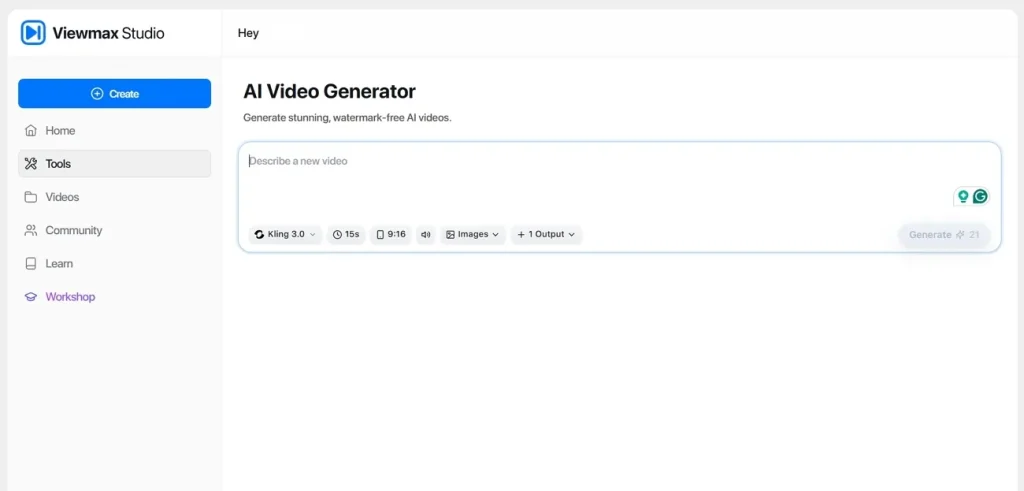
An AI tool suite focused on video creation features for fast, short, social‑ready clips built from different media sources. Viewmax.io lets you switch aspect ratios in one project, testing vertical or horizontal versions. You can import existing clips, combine them with AI‑generated scenes, and quickly assemble faceless or talking‑style videos.
The system creates videos using AI models like Kling 3.0, giving you more dynamic motion, smoother scenes, and higher visual quality. It also allows users to trim and add captions to make each export fit TikTok and Shorts.
Is Viewmax.io Free?
It does not offer a completely free plan for new or existing users. Its Basic plan starts at $19 per month, charged as a straightforward subscription for creators. This Basic plan is suitable for casual creators who post less frequently on their preferred social platforms. You receive 200 credits and 100 video exports with its Basic plan.
Viewmax.io Limitations
- No unlimited plan exists, and each tier imposes strict usage caps.
- When generations fail, credits are still deducted from the user’s account.
- No built‑in analytics, so content results must be tracked manually.
- Users cannot fine‑tune the bitrate due to limited control over render settings.
- Viewmax struggles with longer documentary projects and detailed, scene‑by‑scene edits.
Part 2. Best Viewmax Free Alternative for AI Video Creation
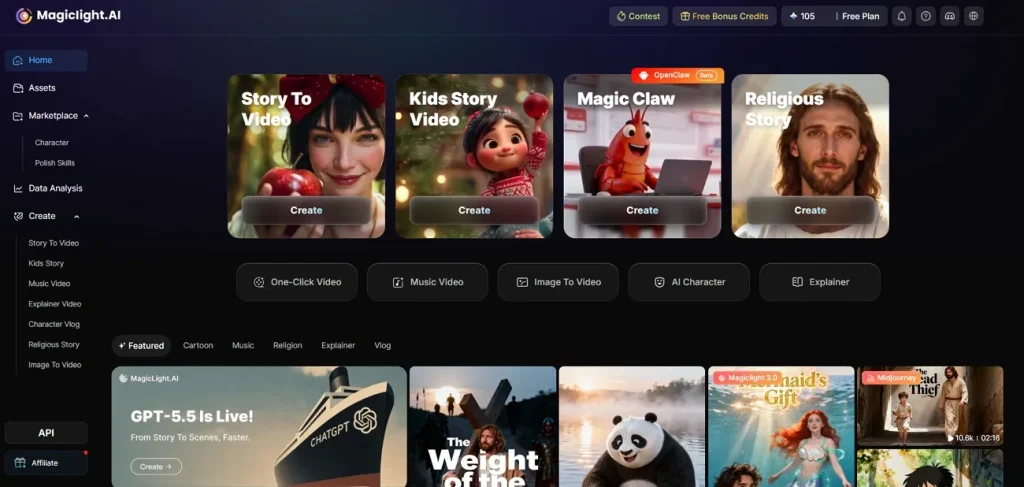
Many creators try Viewmax Studio and quickly realize they need more flexibility, control, and fair usage limits. This is where Magiclight.AI comes in, offering a more open, creator‑friendly toolkit for modern video workflows. It supports text‑to‑video, script‑based projects, and strong long‑form support to help you build full stories instead of clips.
You can keep characters and visual style consistent across scenes to make your videos feel more professional and unified. With a simple interface and clear controls, Magiclight.AI focuses on creative freedom instead of strict caps and confusing limits. Moreover, its image-to-video tools let you turn single frames or designs into smooth-motion animated scenes.
Key Features
- Long‑form video creation for extended content, supporting projects of up to about 50 minutes.
- A complete workflow that guides you from first idea through scripting, production, and final export.
- Generate characters with consistent looks, keeping faces, clothing, and proportions stable across all scenes.
- Storytelling tools that expand simple prompts into full narrative structures with clear beginnings and endings.
Why Choose It
Many creators reading Viewmax io reviews still want fewer limits, better control, and more flexible video options. Look at the reasons this alternative often feels fairer and more future‑proof for creators:
- Lip Sync: Aligns animated character lips with your audio, helping conversations feel smoother and more realistic.
- Commercial‑Ready Output: Full commercial usage rights, so your videos work for client projects, ads, courses, and social campaigns.
- Story‑to‑Video Conversion: Transform written stories or scripts into complete videos with matching scenes, visuals, and AI narration.
- Flexible Visual Controls: Adjust camera moves and pacing so each scene matches your exact creative direction and goals.
- Project‑Friendly Workspace: Organize scripts, assets, drafts, and final exports in one place, making bigger video projects easier to manage.
Part 3. Comparison Table: Viewmax AI vs Magiclight.AI
Some people, after exploring both platforms, still need a simple side‑by‑side comparison of Viewmax.io and Magiclight.AI. Check the comparison below to see which option better fits your style, budget, and video goals:
| Feature | Viewmax.io | Magiclight.AI |
| Primary Focus | AI tool suite for short viral clips and social posts | AI video platform for stories, lessons, and long content |
| Max Video Length | Short videos, around one minute per project | Long‑form videos, up to 50 minutes per project |
| Supported Languages | Supports 9 distinct languages for voice and text | Supports 11 languages for scripts and voices |
| Image/Story Input | Text prompts, uploads, YouTube links for short edits | Text, stories, and images for full story‑style videos |
| Pricing | No free usage, starting from $19/month | Free usage, starting from $12/month |
| Best Suited For | Quick social clips and testing viral formats | Longer story videos, tutorials, and client‑ready projects |
Conclusion
In conclusion, Viewmax helps with short clips, but its strict caps and one‑minute focus limit serious growth. For creators planning long AI videos for social media, you usually need more runtime, control, and predictable pricing. After comparing features, pricing, and limits, Magiclight.AI is better suited to longer stories, lessons, and campaigns, making it the stronger long‑term choice.
FAQs on Viewmax.io
1. How does the Viewmax AI video generator work?
Viewmax AI takes your scripts, clips, or links and builds short social videos with AI tools. Features include Sora 2 video generation, AI voiceovers, scripts, captions, and watermark or caption removal.
2. Can beginners use Viewmax AI easily?
Beginners can follow templates and simple menus, but credits and limits may still feel confusing. If you want something simpler to start with, Magiclight.AI is often easier to understand.
3. Is Viewmax AI safe and legit?
Some scanners say the site seems technically safe, with HTTPS and no obvious malware flags. Still, new domain age, hidden ownership, and unclear refund details mean you should proceed carefully.
4. What are the best Viewmax free alternatives?
Several guides recommend other AI video tools with looser limits or free plans. Magiclight.AI is often suggested for longer videos, generous free usage, and clear commercial rights.
5. Does Viewmax AI support high‑quality video output?
Paid tiers can export HD videos, especially social formats around 720p and 1080p. For long HD videos and more control, many creators prefer Magiclight.AI instead.


![How to Write a Script for a Short Film in 2026 [Beginner’s Guide]](https://magiclight.ai/wp-2/wp-content/uploads/short-film-screenplay-writing-guide-300x169.webp)