A social media manager needs a quick video to keep their content calendar on track. Instead of spending hours editing clips, AI tools now promise to create videos automatically. Medeo AI is emerging as a notable platform in 2026, offering chat-to-video capabilities that transform prompts into engaging visual stories.
By combining AI scripting, scene generation, and automated editing, the tool aims to simplify video production for beginners and professionals alike. However, many creators wonder whether it can truly replace traditional editing workflows. This review takes a closer look at Medeo AI’s features, benefits, and limitations to evaluate its real value.
Part 1. What is Medeo AI Video Generator
Medeo AI Video Generator is an AI-powered platform that allows users to create videos simply by chatting with an AI or providing text prompts. The tool can transform ideas, scripts, blog posts, URLs, or images into complete videos with visuals, voiceovers, and scenes automatically. Designed for creators, marketers, and educators, Medeo removes the need for complex editing software and helps produce professional-quality videos in minutes.
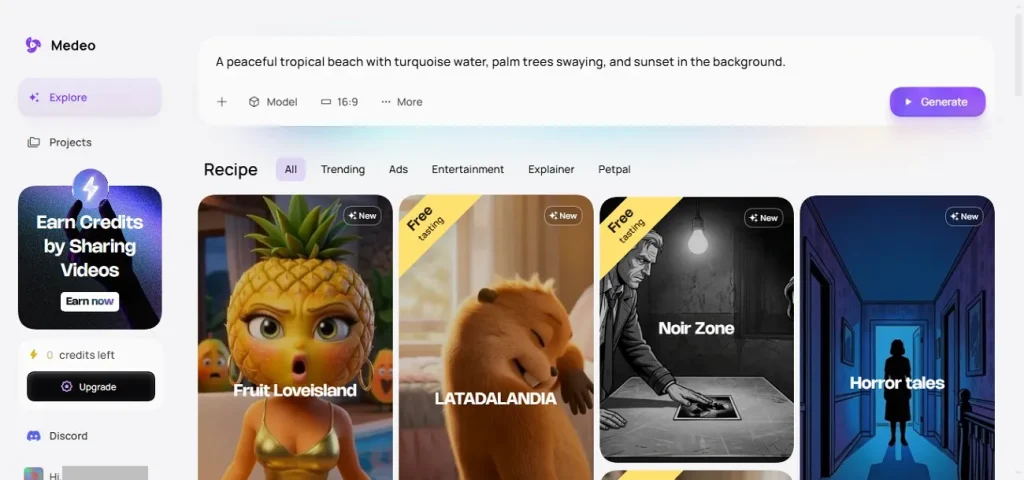
Key Features
- Trending Video Templates: Medeo offers a wide range of ready-to-use templates that help users quickly create trending social media, marketing, and entertainment videos.
- Multiple AI Models: The platform integrates multiple AI technologies, such as Nano Banana and Sora 2, to generate visuals, voiceovers, and video scenes efficiently.
- Built-in Video Editor: Medeo includes an integrated video editor where users can adjust scenes, subtitles, audio, and assets directly within the video timeline.
- Multiple Language Support: The tool supports multi-language video creation with AI voiceovers, allowing users to produce content for global audiences.
Pros
- Medeo AI allows users to select different aspect ratios to optimize videos for different social platforms.
- Users can choose the desired video length up to 60 seconds, enabling quick creation of short clips or longer content.
- The tool provides access to various asset sources, including AI-generated visuals to enhance video scenes.
Cons
- Video generation speed can vary, especially when creating longer videos.
- The platform uses a credit-based system, which may require frequent upgrades.
- AI-generated visuals may occasionally misinterpret prompts or create slightly unrealistic results.
Part 2. Best Alternative to Medeo AI Video Generator
Magiclight.AI is an advanced AI video creation platform designed to transform ideas, scripts, and prompts into fully produced videos with minimal effort. This Medeo alternative offers a complete production workflow, allowing users to generate story-based videos, kids’ stories, explainer content, and religious storytelling projects. Magiclight.AI supports multiple AI models, style engines, and 11 languages, making it suitable for global creators, educators, and marketers.
Users can design consistent AI characters with customizable voices, including voice cloning, and control scenes through its Nano Storyboard system that enables detailed adjustments to actions, expressions, and camera movements. The platform also provides automated storyboards, subtitle tools, and background music. With its end-to-end workflow and long-form generation capabilities, Magiclight simplifies professional video production for both beginners and professionals.
Comprehensive Steps for Creating Videos Using Magiclight
After exploring the platform’s capabilities, the next step is understanding how to actually create a video using Magiclight’s Image-to-Video feature. The process of using this Medeo AI alternative is straightforward and requires only a few simple steps:
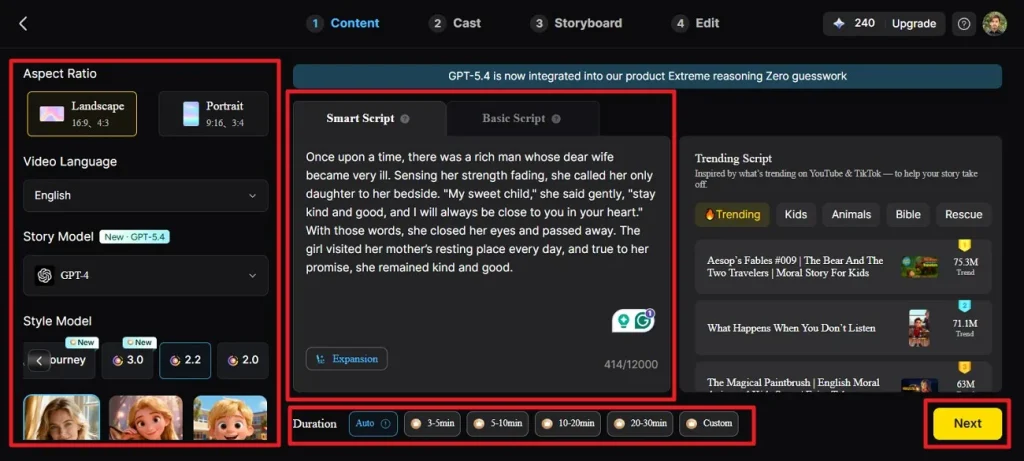
Step 1. Create a New Project
Launch the Story to Video tool and choose your preferred aspect ratio and duration. Then select the video language, story model, and style model before entering your script in the Smart Script tab for AI optimization. Click Next after finishing the configuration process.
Step 2. Examine the Scene Breakdown
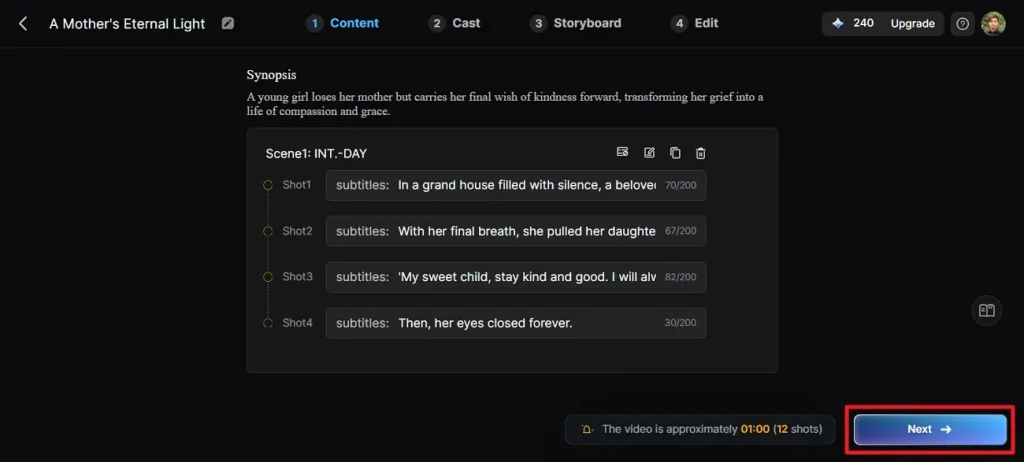
Review the automatically generated scene-by-scene synopsis carefully to ensure everything matches your story. Use the control options at the top to adjust scenes if needed, then press Next.
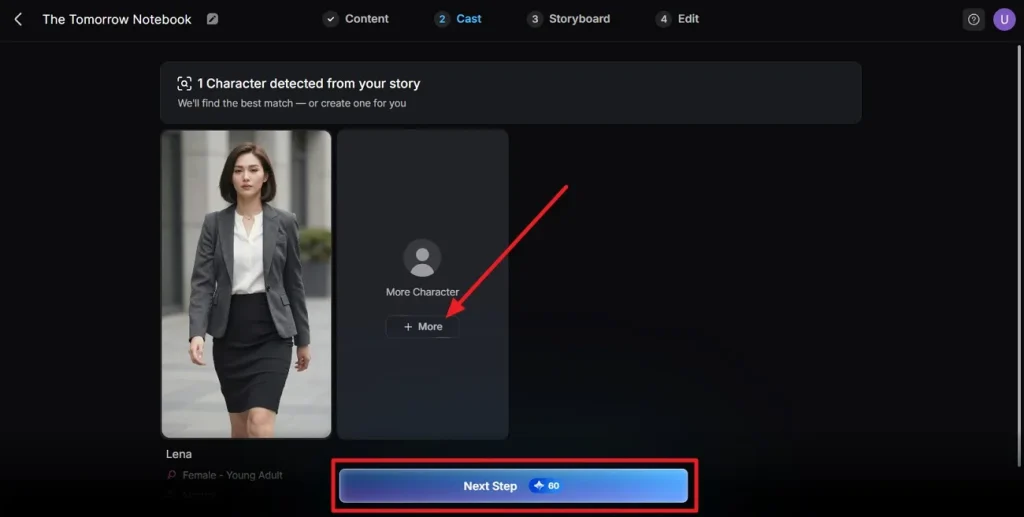
Step 3. Choose Characters for the Video
The platform will automatically identify characters mentioned in your script and present suitable options. Browse additional choices if necessary or confirm the selections and click Next Step.
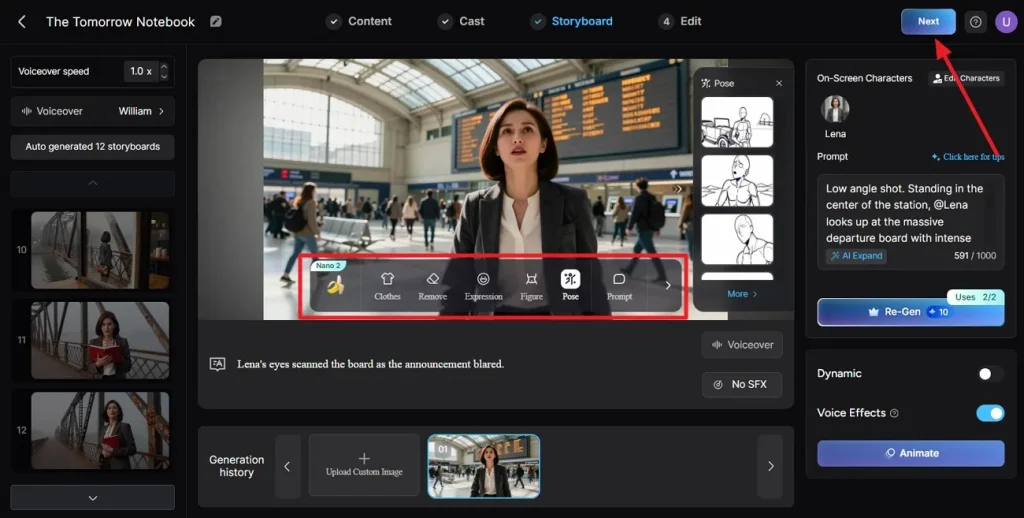
Step 4. Adjust the Storyboard
Go through every scene in the generated storyboard and verify the visual flow. Modify clothing, facial expressions, or character poses using the controls, then click Next.
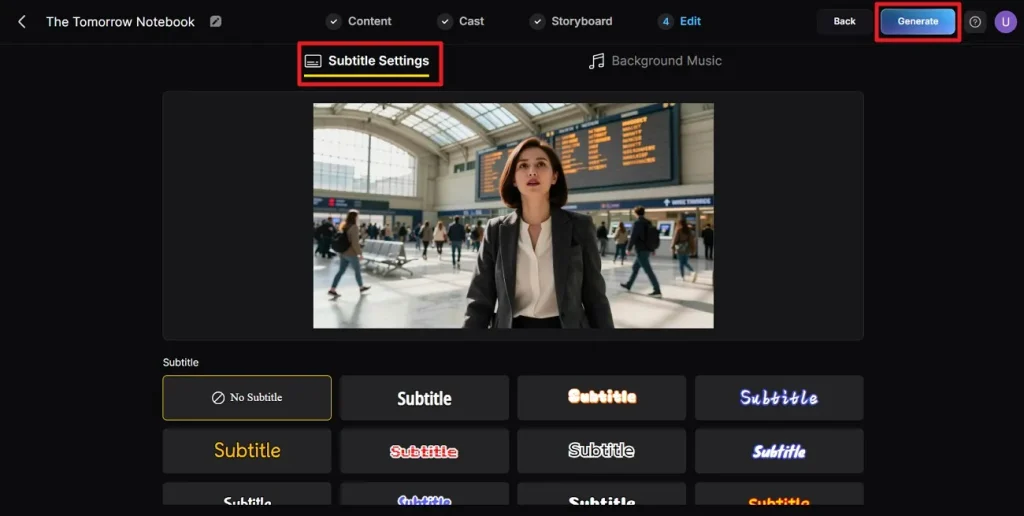
Step 5. Configure Subtitles Across Magiclight.AI
If your video includes dialogue or narration, select a subtitle style that matches your design. Once the subtitles are configured correctly, click Generate to begin creating the video.
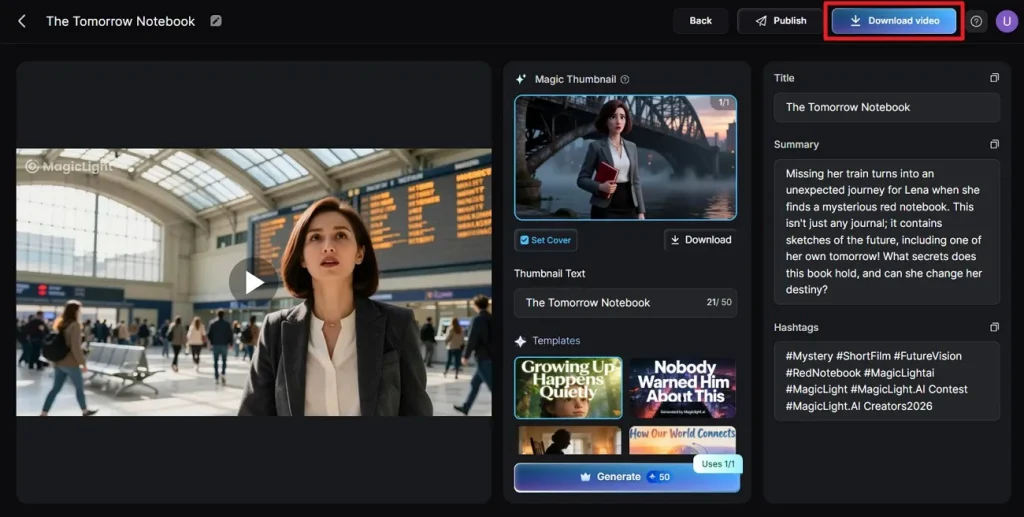
Step 6. Review and Download the Video
After generation finishes, play the video and check the cover image, thumbnail, and hashtags. When everything looks correct, press Download Video to save the final file.
Part 3. Comparison Table Between Medeo AI Video Generator and Magiclight.AI
With a clear look at both platforms’ strengths, here’s a side‑by‑side comparison showing how Medeo AI Video Generator stacks up against Magiclight:
| Feature | Medeo AI Video Generator | Magiclight.AI |
| Core Creation Method | Chat‑based text‑to‑video generation with AI editing and manual timeline options | Full script/story‑to‑video creation with structured storyboards, cohesive narrative flow, and a complete production pipeline. |
| Video Length Support | Typically short to mid‑length videos up to 60 seconds | Create long‑form content up to 50+ minutes. |
| Editing Features | Chat‑led edits plus visual track adjustments; good for quick refinements. | Integrated advanced editing tools, storyboard view, and smooth transitions throughout sequences. |
| Templates & Use Cases | Broad content types, including social clips, explainer, and marketing videos. | Extensive templates for stories, kids' videos, music, educational, or religious content. |
Conclusion
To conclude, this article provided a detailed review of the Medeo AI video generator and its alternative. However, both Medeo AI Video Generator and Magiclight simplify video creation with AI, but Magiclight stands out with its long-form support, advanced storyboarding, and consistent character continuity. For those looking to produce engaging, polished, and versatile content efficiently, Magiclight is the recommended choice for 2026 and beyond.
FAQs on Medeo AI Video Generator
1. Is Medeo AI Video Generator free?
Medeo AI Video Generator offers a limited free tier with credits, but full features require paid subscriptions. For more extensive usage and long-form video creation, Magiclight is a better option.
2. Is Medeo AI totally free?
No, Medeo is not completely free; extended features and longer videos require payment. Magiclight provides more generous capabilities with flexible plans.
3. What is the best alternative to Medeo AI Video Generator?
Magiclight is the top alternative, offering advanced story-to-video workflows, long-form support up to 50 minutes, and detailed narrative control. It’s ideal for creators seeking professional-quality videos.
4. Is the Medeo app free?
The Medeo app includes a free tier but limits usage and advanced tools behind paid credits. Magiclight offers broader features and fewer restrictions for creators.




![How to Write a Commercial Script in 2026 [Full Guide]](https://magiclight.ai/wp-2/wp-content/uploads/commercial-script-writing-full-guide-300x169.webp)