Creating engaging videos often feels challenging when you have a great idea but lack advanced editing skills. This is where tools like MindVideo come into the picture to offer video creation features. The tool offers video generation through text and photo prompts. We will look into how the platform works and its different aspects in this review. Read the article till the end to learn if the platform is worth it.
Part 1. What is MindVideo?
Known as an online platform, MindVideo helps users generate photos and videos using advanced technology. The platform aids users in transforming basic text prompts and images into video content without any editing. MindVideo AI provides content creators a motive to speed up their production workflow. Users also get the ability to generate AI avatars using this tool.
Key Features Offered By MindVideo
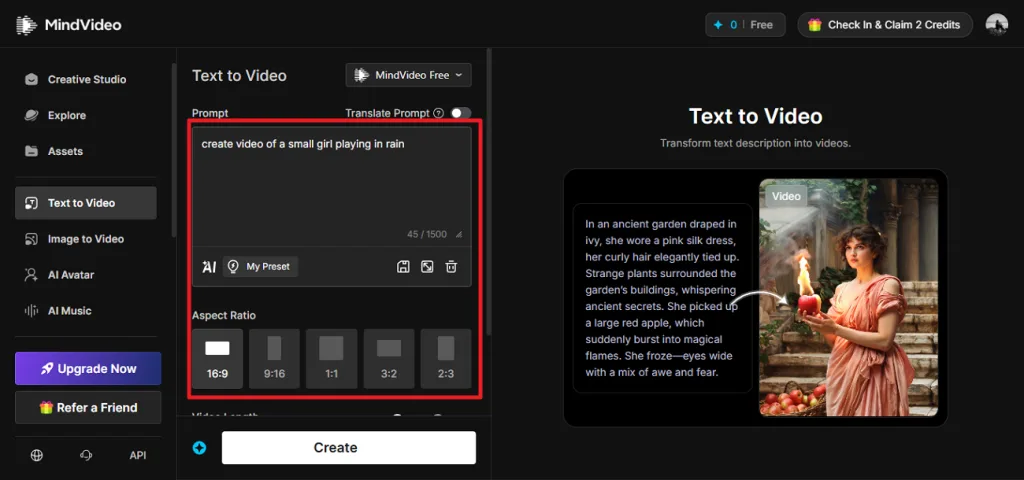
- Text-to-Video Generation: MindVideo allows users to generate videos simply by entering a text prompt. Users can add prompts up to 1500 characters for video generation.
- Multi-Aspect Ratio Options: The platform supports different aspect ratios for various publishing needs and devices. Users can select from various landscape and portrait orientation options.
- Save Creations as Presets: MindVideo lets users save successful settings and creative configurations as presets. This makes it easier to maintain consistency and speed up future video generation projects.
- Copyright Protection: The platform offers a copy protection option to protect your created content. This can reduce concerns about using copyrighted materials in commercial or personal projects.
Pros
- Users get the ability to select the duration of the video from different options.
- You can enable and disable the public visibility for your generated content.
- It also allows users to generate music for their music using advanced technology.
- The platform also features the ability to generate voices and sound effects.
Cons
- MindVideo is not ideal for long videos as it only generates videos up to 10 seconds.
- Credit-based features can become costly for frequent content creators.
- Advanced users may find customization options limited for complex projects.
Part 2. A Comprehensive Guide to Using MindVideo AI For Video Generation
After learning about this tool in detail, let us have a look at the step-by-step guide on how to use it. The steps below give you a clear overview of its AI abilities:
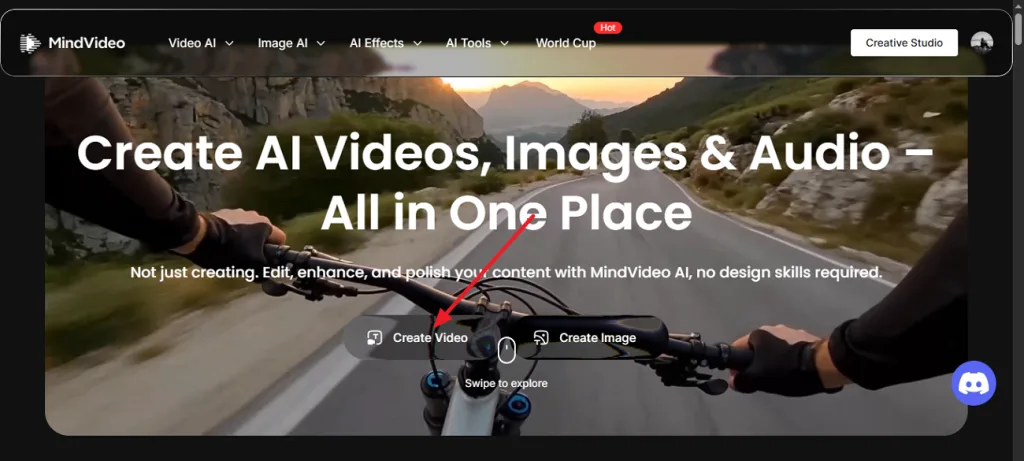
Step 1. Choose the Create Video Option
Start the process by launching the tool on your web browser. Select the Create Video option located at the bottom to begin the process.
Step 2. Input Prompt and Select Aspect Ratio
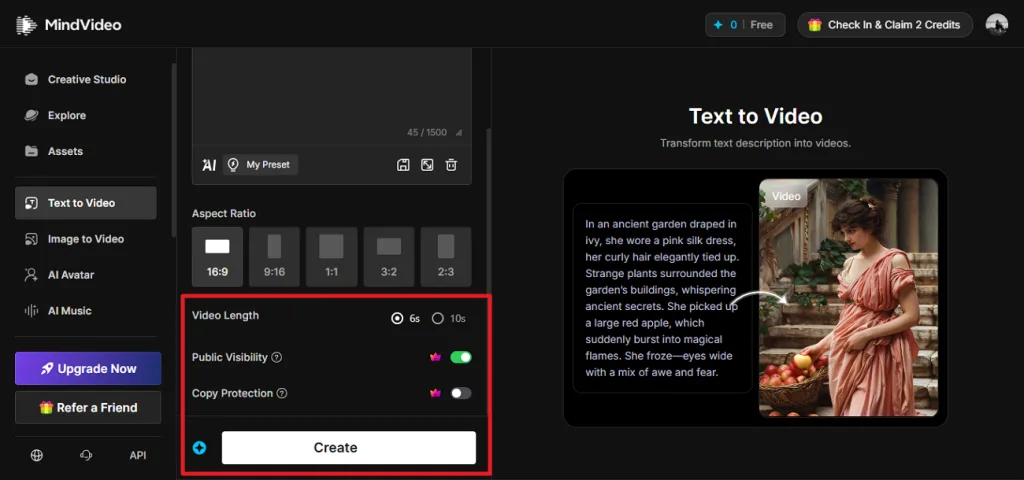
In the following interface, input your text prompt in the designated field. Now, select the aspect ratio for the video from the options provided.
Step 3. Choose Duration and Configure Settings
Moving forward, select the duration for the video by clicking on the desired radio button. Next, enable the copy protection and public visibility toggles according to your preferences. Tap Create to initiate the video creation, after which you can preview and save it with ease.
Part 3. Best Alternative to MindVideo for Exclusive AI Video Creation
While MindVideo AI image-to-video and text-to-video offer a range of AI-powered tools for generating videos, creators may need a platform that provides more advanced storytelling capabilities. MagicLight AI is worth considering if you are looking for an alternative that goes beyond simple prompt-based video creation. It is an AI video generation platform designed to transform ideas and stories into complete videos.
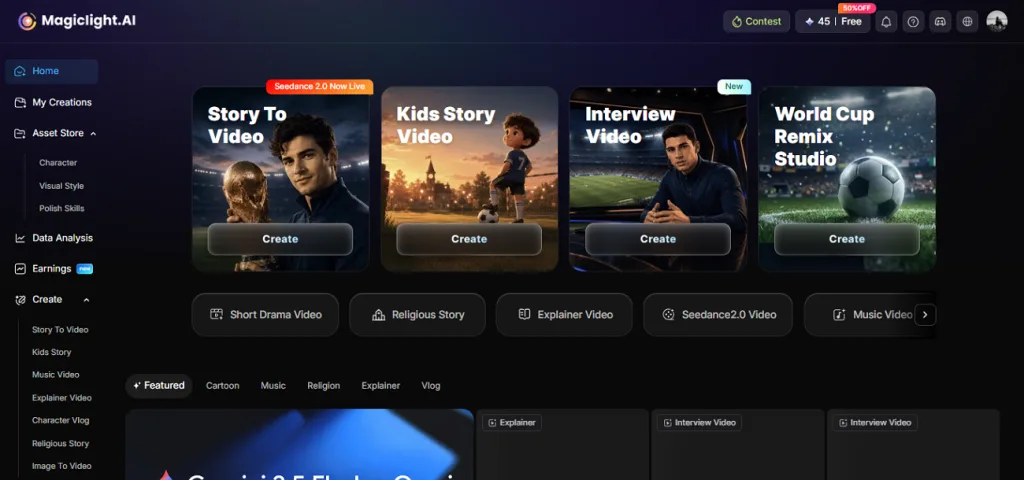
The platform supports both short-form and long-form video creation. You can generate videos up to 50 minutes in duration with complete character and scene consistency. The platform also offers access to multiple advanced AI video models such as Veo 4 and Seedance 2.0.
Coherent Features Offered by MagicLight AI
- Story to Video: The Story to Video feature transforms written ideas, scripts, or stories into complete AI-generated videos. Users can add a script of up to 12,000 characters to create detailed video narratives with structured scenes.
- Auto Storyboard With Scene: It builds a storyboard by organizing your story into structured scenes. You can edit individual scenes, adjust visuals, and refine the flow to match your creative direction.
- Subtitle Styles: MagicLight AI helps make videos more accessible with customizable subtitle styles. Creators can adjust subtitle appearance to match their content style and improve audience engagement.
- AI Lip Sync: The platform uses AI lip-sync technology to match character movements with generated voiceovers. This creates more realistic conversations and improves the overall viewing experience.
- Consistent Characters in All Scenes: MagicLight AI maintains character appearance and identity throughout different scenes. This helps create smooth storytelling with characters that remain visually consistent.
Part 4. Comparison Between MindVideo and Magiclight AI: Which Serves Best
When comparing MindVideo AI and MagicLight AI, both platforms serve different purposes. Provided below is a detailed comparison table between the two tools to help you make the right choice:
| Features | MindVideo | MagicLight AI |
| Maximum Video Length | Short clips only, 10 seconds maximum duration | Up to 50 minutes per video |
| Character Consistency | Basic facial preservation is inconsistent across scenes | Advanced feature-locking technology with character profiles that maintain facial features, proportions, and clothing across all scenes. |
| Scene Transitions | No intelligent transition system | Seamless cinematic transitions with automatic lighting and perspective adjustments |
| Voice & Audio | AI Music Generator | AI Voice Cloning + Lip Sync with accurate mouth-to-audio synchronization, background music generator for videos |
| Animation Quality | Choppy motion, single disconnected clips | Smooth, multi-scene animations with natural character movement |
| Best For | Social media influencers, short ads | YouTube storytellers, kids' content, brands, educators |
FAQs on MindVideo
1. Is MindVideo free to use?
MindVideo does not provide unlimited free video generation, as creating videos requires credits. Users need to use available credits or choose a suitable plan to access its features.
2. What is the best alternative to MindVideo AI?
MagicLight AI is a strong alternative to MindVideo AI. It offers advanced AI video creation features like Story to Video for video generation. It helps creators produce engaging videos for storytelling and other purposes.
3. What videos can MindVideo create?
MindVideo can create AI-generated videos from text prompts and images. You can make short AI videos for social media content using this tool. However, MagicLight AI is the right tool if you want to generate long videos with consistent elements and characters.
Conclusion
To conclude, this article provided a detailed MindVideo review for users looking for a video generator. The article discussed its features, pros, and cons to give you a better insight into the tool. The tool generates videos with text and photos; however, it comes with restrictions like limited video duration. That is where tools like MagicLight AI provide a solution by offering long video generation.


![How to Write a Script for a Short Film in 2026 [Beginner’s Guide]](https://magiclight.ai/wp-2/wp-content/uploads/short-film-screenplay-writing-guide-300x169.webp)