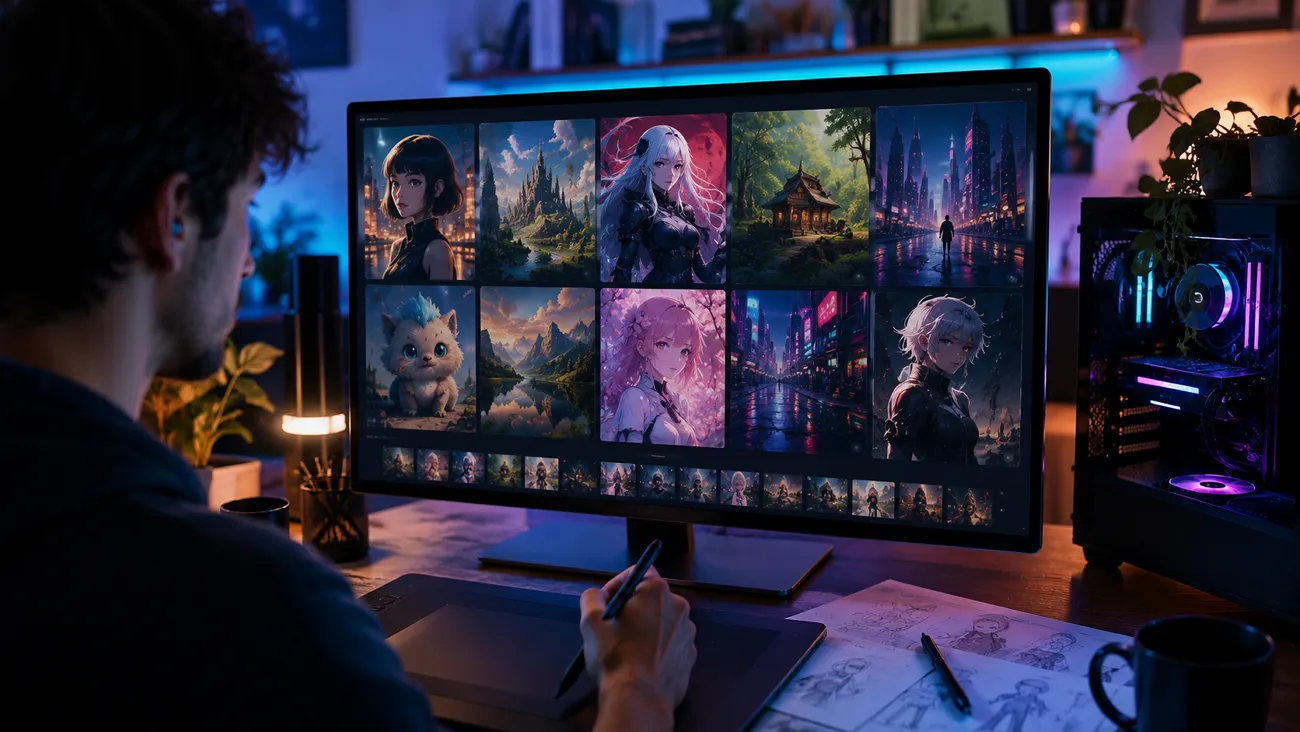
Animated images and videos are effective sources of entertainment and product endorsement. Modern AI tools come equipped with algorithms that prevent the need to create cartoon media from scratch. PixAI is among the top anime media generators, creating engaging images and videos with minimal effort. Before investing in this tool, it is important to know if it is even worth it. This article is an elaborate overview of PixaAI, its pros and cons.
Part 1. What Is PixAI?
Users who need to make short anime videos for various purposes can use PixAI to make automated media. This platform uses your reference images and transforms them into a short, engaging animated clip. It provides users with various AI models to help them create a video tailored to their needs. This tool gives you the choice to make a video with or without speech.
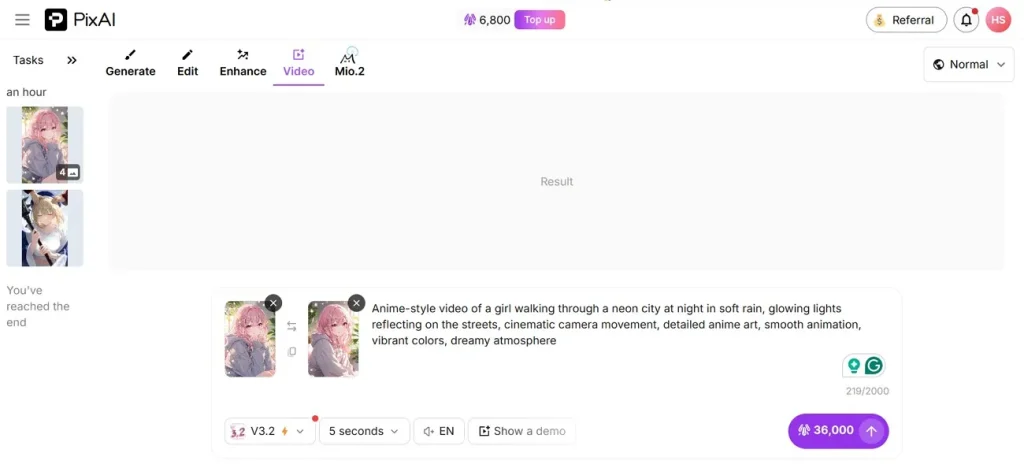
You can generate a talking video in 5 languages and cater to your international audience. Before using this tool to make a video, use the Demo preview feature to preview the video generation capabilities of this tool.
How to Use PixAI?
PixAI art brings a straightforward method to make a short video using your pictures. Follow this guide and learn how to use the Image-to-Video feature of this tool:
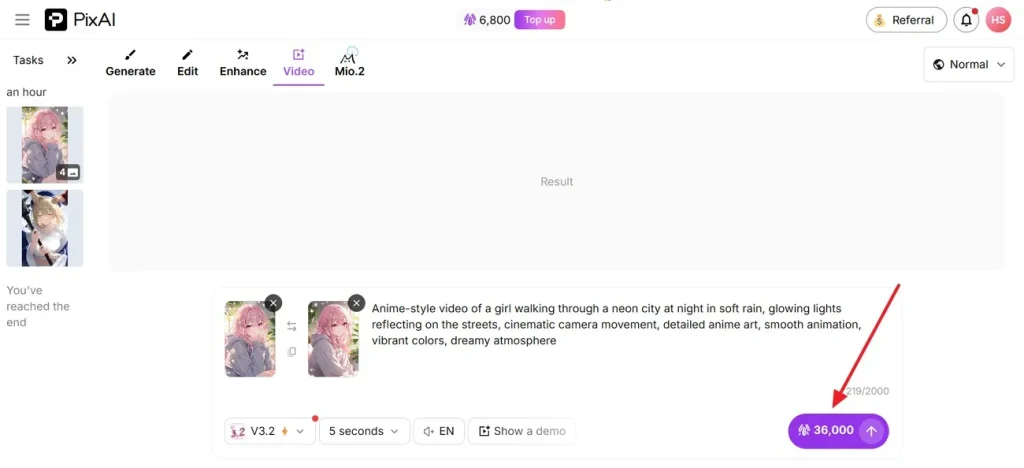
Step 1. To start the process, enter the Video mode from the top section and type a prompt. Now, upload Start Frame and End Frame images from your device as reference images for the video. Using the bar at the bottom, select the model, video duration, and language.
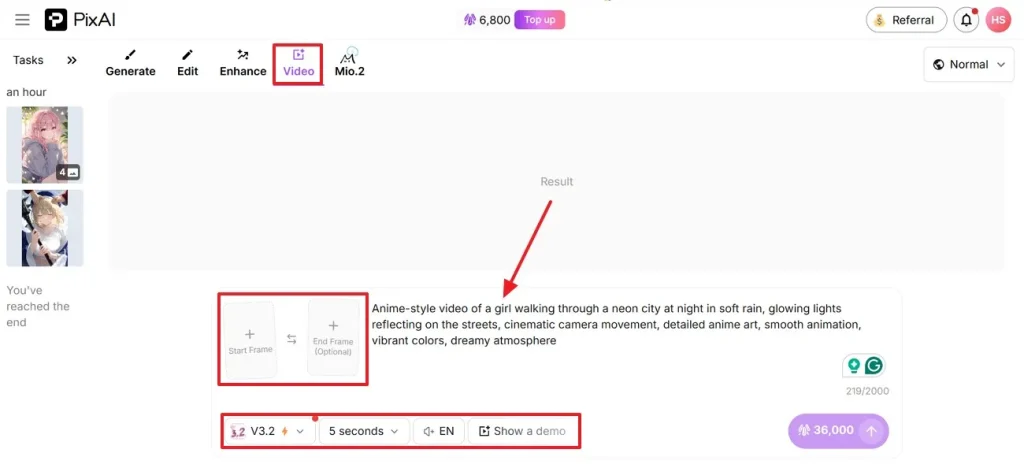
Step 2. After you are done specifying your video needs, press the Start button to get the results.
Is PixAI Safe to Use?
Using the official platform of PixAI.art for anime image and video generation is safe; however, you must read the terms and conditions before using it.
Pros and Cons of Using PixAI’s Image-to-Video Feature
Evaluation of a tool’s strengths and weaknesses helps a user make a decision about investing in it. Go through the following pros and cons of PixAI’s video generator to land a decision:
Pros
- Users can select the preset aspect ratio to generate platform-specific media.
- This tool also allows a custom aspect ratio setting for special projects.
- Choose basic or professional modes to generate media for specific needs.
- You can also generate an anime-style image using PixAI.
Cons
- PixAI can generate videos with a maximum duration of 10 seconds.
- The language support is limited to 5 languages only.
- It requires start and end images instead of generating videos independently.
- PixAI offers less user control than most competitors.
Part 3. Why Creators Prefer Magiclight AI Over PixAI?
After exploring the capabilities of PixAI AI, it can be seen that you cannot tell a story in 10 seconds. Therefore, you will need an alternative for more elaborate storytelling. Magiclight AI is a story generator that enables users to generate lengthy videos for extended entertainment and effectiveness. Users can create a video of up to 50 minutes and generate long-form content for social media or filmmaking projects.
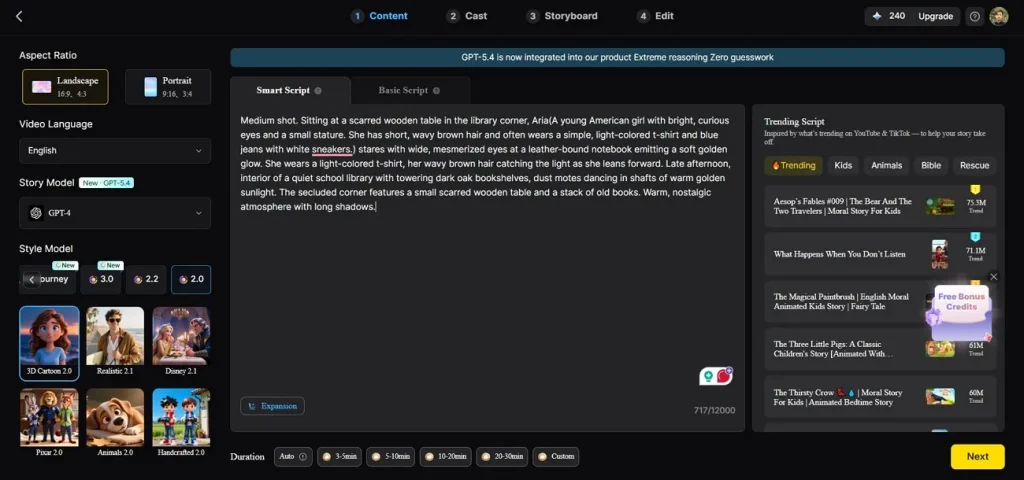
Using Magiclight, you can generate a video fully tailored to your preferences. It enables you to set a character name with its age and type to build a personality. For further customization, users can assign an AI voice to the character from the collection of 37 AI speakers.
Key Features
- Various Story Models: Magiclight offers 9 strong video generation models like Gemini 3.5 Flash and Claude Opus 4.6.
- Multilingual Support: Users can generate stories in over 11 languages to cater to international audiences.
- Storyboard Preview: This tool enables users to preview the storyboard and edit or regenerate it for a refined outcome.
- Script Input: You can enter a prompt of 12,000 characters to enter a detailed script for the anime story.
A Guide to Using Magiclight AI’s Story-to-Video Feature
Magiclight AI is an easy-to-use AI anime generator with clear navigations. Follow the guide below and learn how to use this PixAI alternative for making animated videos:
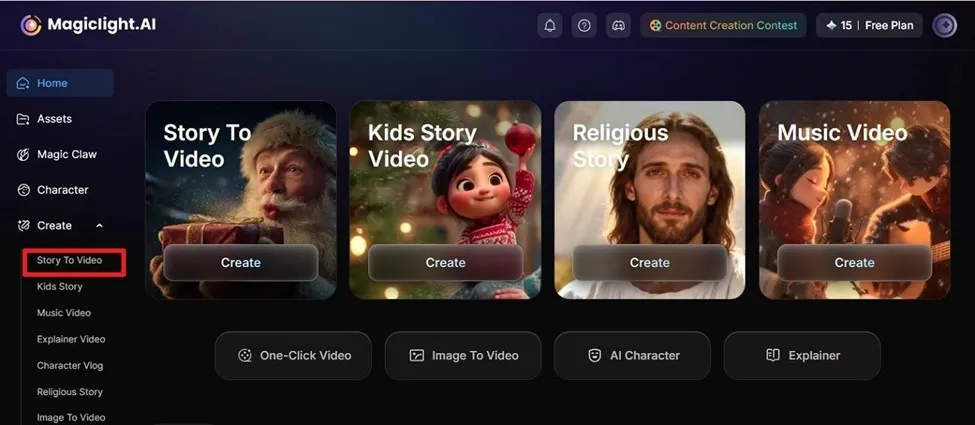
Step 1. Select the Story to Video Feature to Start
To start, select the Story to Video option from the left sidebar and wait for the next interface.
Step 2. Enter the Video Script and its Details
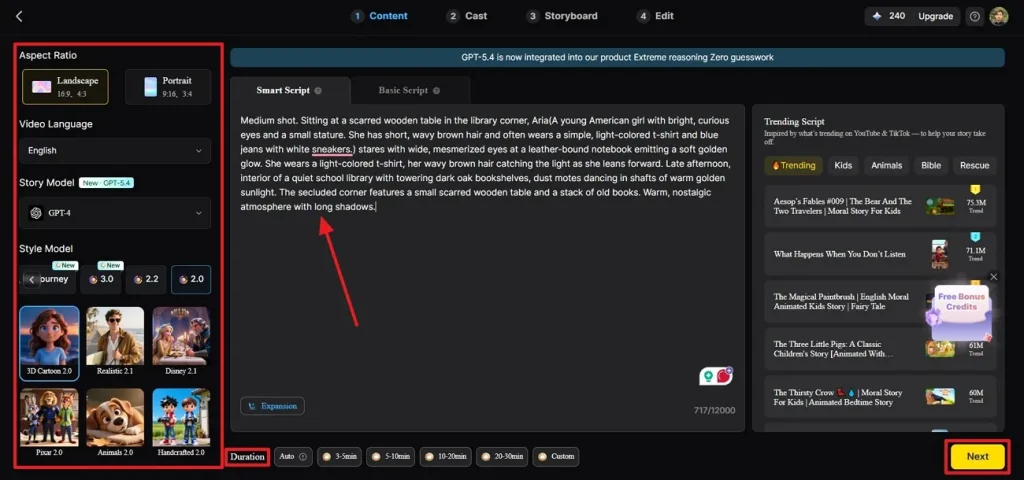
From the next page, enter the video script and refer to the left panel. Using this panel, choose your desired Aspect Ratio and the Video Language to continue. Now, pick the Story Model and Style Model to generate need-specific videos. In the end, choose the video Duration and press the Next button to proceed.
Step 3. Explore or Edit the Synopsis and Continue
As the story’s synopsis is displayed, edit it shot-by-shot and click Next to move forward.
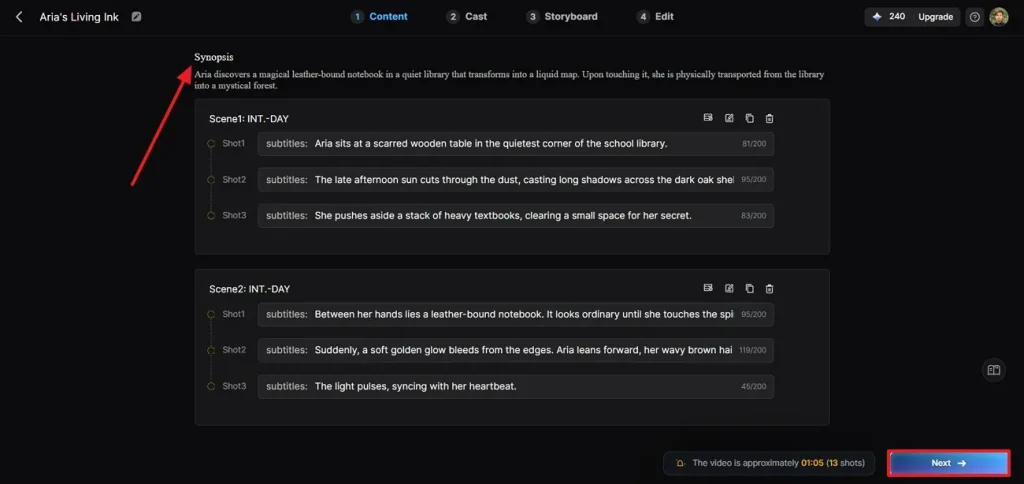
Step 4. Select and Customize the Character
Now, select a character and modify it by its age, gender, and more. Once done, press the Next Step button and move forward.
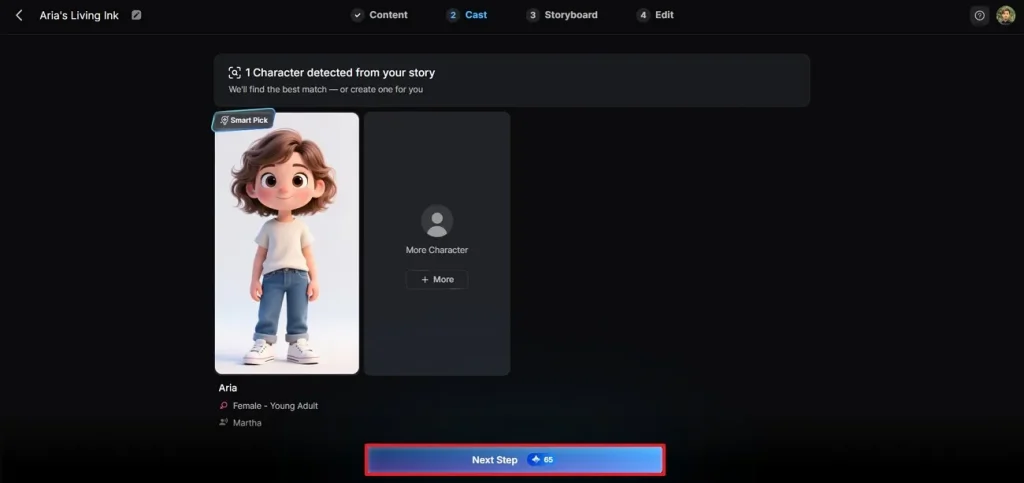
Step 5. Modify the Scene as Needed
Once you have reached the storyboard preview page, customize the Clothes, Expression, and Pose in each scene by selecting them from the preview window. After making the desired adjustments, click the Next button to move to the next step.
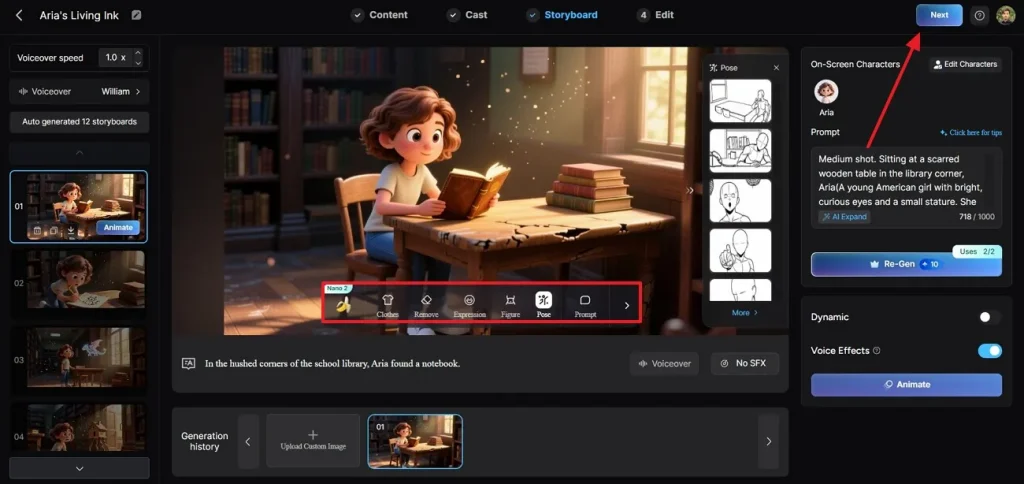
Step 6. Enter Your Preferred Subtitle and Background Music Settings
Using the Edit tab, switch between the Subtitle Settings and Background Music tabs to make relevant video adjustments. Click Generate from the top right corner to find the video results on the next page.
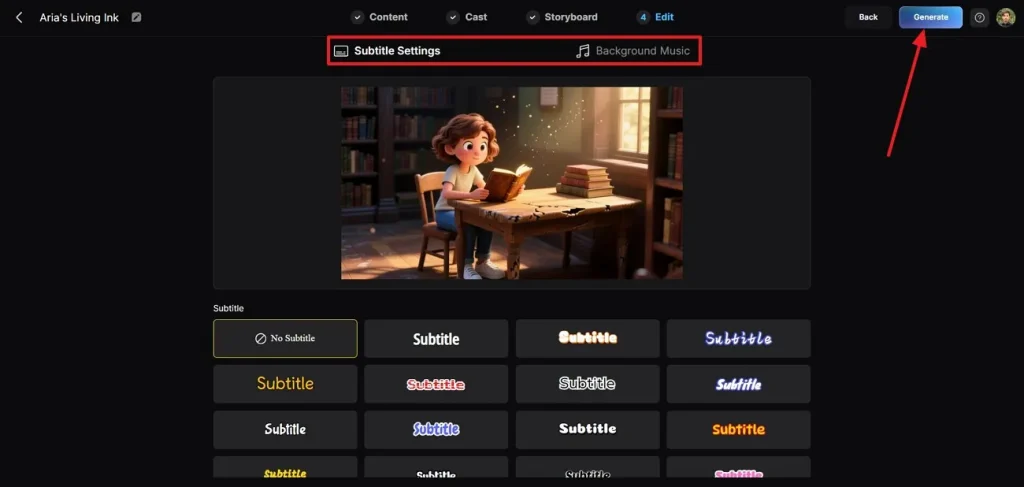
Step 7. Download or Publish the Video
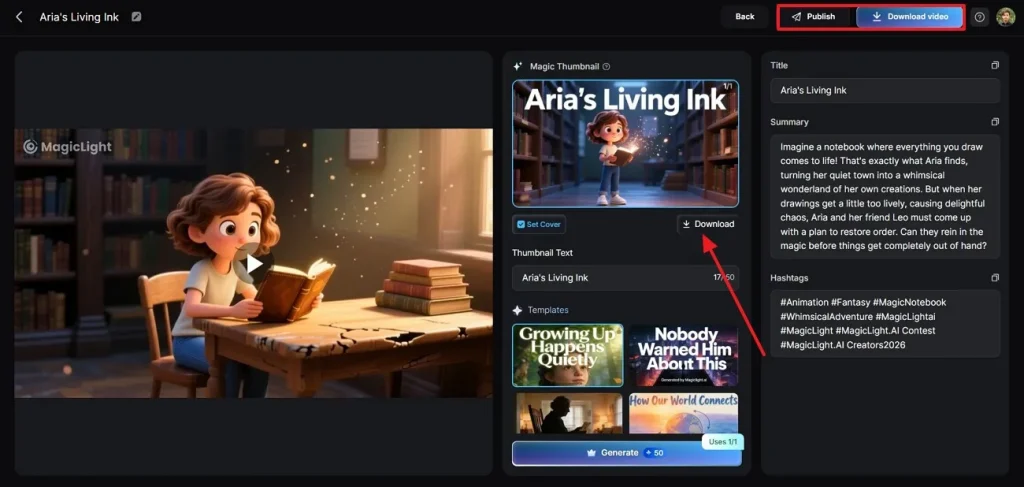
As the video is generated in the final page, click the Download button below the thumbnail to save it on your device. To download or publish the video online, select the Publish or Download Video buttons on the top right of the page.
Comparing the Video Generation Features of PixAI and Magiclight AI
A side-by-side comparison helps the potential users to get an idea of various tools. The following table puts PixAI art and Magiclight AI in comparison to help you find the better option:
| Feature | PixAI | Magiclight AI |
| Anime Video Generation | Requires start and end frame images for video creation | Generates videos with simpler prompt-based workflows |
| Video Length | Up to 10 minutes long | Better suited for creating longer-form AI content |
| Character Consistency | Often depends on LoRAs and model tuning | Easier to maintain consistent characters without advanced setup |
| Style Focus | Primarily anime and manga-style outputs | Supports anime plus broader visual styles |
| Language Support | 5 languages, like Korean, Japanese, English, and more | 11 languages, like Korean, Mandarin, Hindi, Dutch, and more |
| Pricing Plans | Starting at $7.99/month billed annually | 300 free credits and plans start from $72 annually |
Conclusion
To sum up, generating an anime-style video is fun, but the results depend on the AI tool used. You can use PixAI for making short-form videos and precise messages through anime art. Whereas Magiclight AI can be used for extensive video making with the help of advanced AI models.
FAQs on PixAI
1. Does PixAI add watermarks to images?
Images can be watermarked as per the plan or setting selected. For premium users or exported images there may be less restrictions, depending on the factors, but best to check the latest policies of the platform.
2. What are the best PixAI alternatives?
For those seeking the simplest and most innovative method for creating videos using AI, Magiclight AI may be a top choice to consider. For creating images in a quick time and for people who desire user friendly, it is useful.
3. How long does PixAI take to generate images?
The time for the image generation is about 2 to 3 seconds to a few minutes depending on the server’s traffic and the complexity of the image. A high detail prompt or peak usage time will require a little more time to wait.
4. Are there apps like PixAI for mobile devices?
You might want to consider Magiclight AI instead of PixAI if you are seeking a mobile-friendly image creation service. With many AI art tools now compatible with mobile devices, you can produce content on the go, even with your cell phone.
5. Can beginners use PixAI easily?
While PixAI.art is great for beginners, there are some more advanced features that may take a bit of time to master at first. If you are looking for a more straightforward way to create AI images, Magiclight AI may be a more convenient solution.

![How to Write a Script for a Short Film in 2026 [Beginner’s Guide]](https://magiclight.ai/wp-2/wp-content/uploads/short-film-screenplay-writing-guide-300x169.webp)