


Visual content has become the most important factor for growing an online audience. However, most traditional video creation tools require years of practice and skills. Fortunately, a tool called PixVerse AI makes it easy to create videos quickly. Still, it may not always give users full control over the final video output. That is why this guide explains its features, limitations, and better alternatives for easy selection.
Part 1. What Is PixVerse AI?
PixVerse is an AI video company based in Singapore and founded in 2023. It is an AI-powered platform that turns text prompts and images into dynamic videos. The tool uses advanced AI models up to version 5.6 to create high-quality video results. Its flagship model supports 1080p output and up to 15-second single-pass videos.
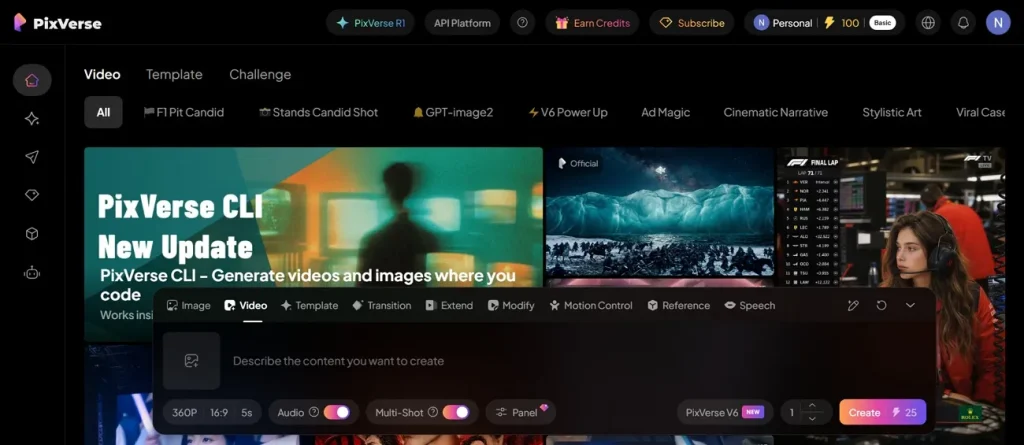
PixVerse AI video generator also allows multi-shot sequences and includes integrated audio for better results. This tool is known for its camera control, character performance, physics effects, and realistic motion. It is integrated with 10 AI video models, including Grok Imagine, to improve performance and results. PixVerse AI image-to-video feature also helps generate videos with start and end frames.
Key Features of PixVerse AI
- Motion Smoothing: Refines movement between frames to make animations look natural and less robotic overall.
- Prompt Control: Users can refine video output by adding detailed instructions for better visual storytelling results.
- Scene Consistency: Maintains visual continuity across frames so videos look smooth and naturally connected overall.
- Lighting Adjustments: Automatically enhances lighting balance to improve visual clarity and cinematic appearance in videos.
- Object Tracking: Keeps focus on moving subjects accurately throughout scenes for stable and professional results.
Is PixVerse AI Free?
Many users ask, “Is PixVerse AI free?” when exploring its features. PixVerse AI is not fully free, but it offers a free plan that lets users try limited video-generation features, including speed and resolution. Users who need more usage can upgrade to paid plans for extra credits and benefits. Read the given PixVerse AI pricing table that helps users pick the plan that best suits their needs:
| Plan | Monthly Price | Monthly Credits | Key Features |
| Basic | $0/month | 30 daily credits | Basic video generation, watermark |
| Standard | $10/month | 1200 Credits | Fast generation, 720p resolution |
| Pro | $30/month | 6000 Credits | Ad-free, 5 concurrent generation, 4k resolution |
| Premium | $60/month | 15000 Credits | Batch Creation, 8 concurrent generation, 4k resolution |
| Team Premium | $99/month | 20000 Credits | Off-Peak Mode, 4K resolution, ad-free, 12 concurrent generation |
Pros and Cons of PixVerse AI
Users frequently question, “Is PixVerse AI safe?” when using video generation tools. Thus, below are clear advantages and drawbacks that explain its real performance details:
Pros
- Produces smooth transitions between multiple scenes in single prompt outputs.
- Delivers ready-to-use creative templates for trending video styles and effects.
- Generates short cinematic videos with strong visual storytelling flow.
Cons
- Sometimes fails to accurately follow detailed or complex user prompts.
- Occasional inconsistencies appear in character appearance across generated video frames.
- Motion quality may feel unnatural in highly complex scene animations.
Part 2. How to Use PixVerse AI?
The PixVerse AI app enables quick video generation from text and images for creators. In this section, you will discover how to generate visuals with PixVerse AI easily:
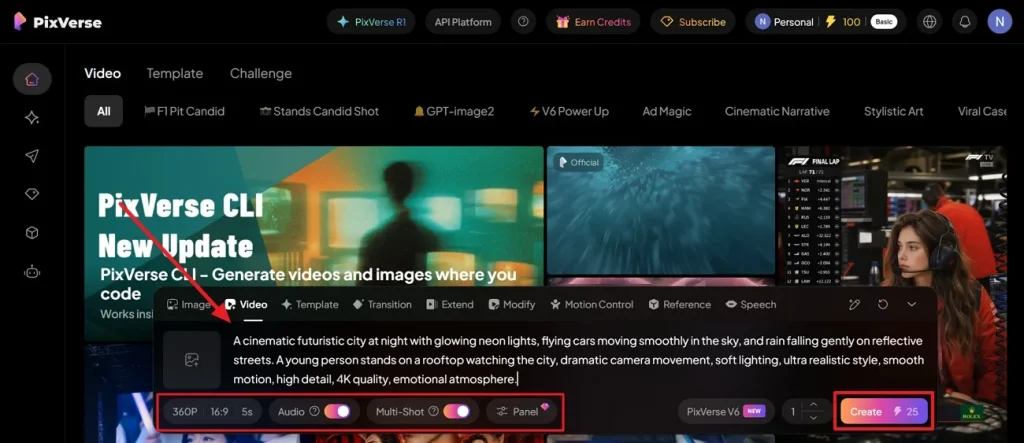
Step 1. To initiate, access the official website of PixVerse AI and type your text into the given Prompt Box. Using the provided options, set the Video Resolution and adjust the Aspect Ratio. Next, set the Video Duration and enable the Auto toggle to generate a video with audio. Once it is done, opt for the Generate button to proceed.
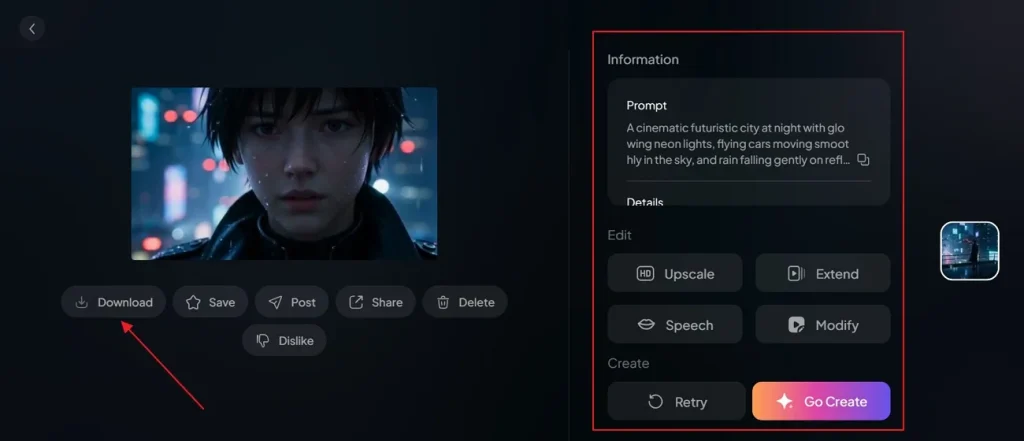
Step 2. At last, watch your video using the prebuilt preview feature for clarity. If you are satisfied with the output, opt for the Download option to save it. In addition, you can edit your generated AI video by using the customization option.
Part 3. Why Magiclight AI Is the Best Alternative to PixVerse AI
Even though PixVerse AI video helps generate content quickly, it sometimes struggles with prompt accuracy and limited control. Therefore, creators look for smoother workflows and more reliable cinematic video generation. In such cases, MagicLight AI is introduced here as a stronger alternative for modern creators. This modern tool supports long-form video creation of up to 50 minutes using prompts of up to 12,000 characters for detailed storytelling projects.
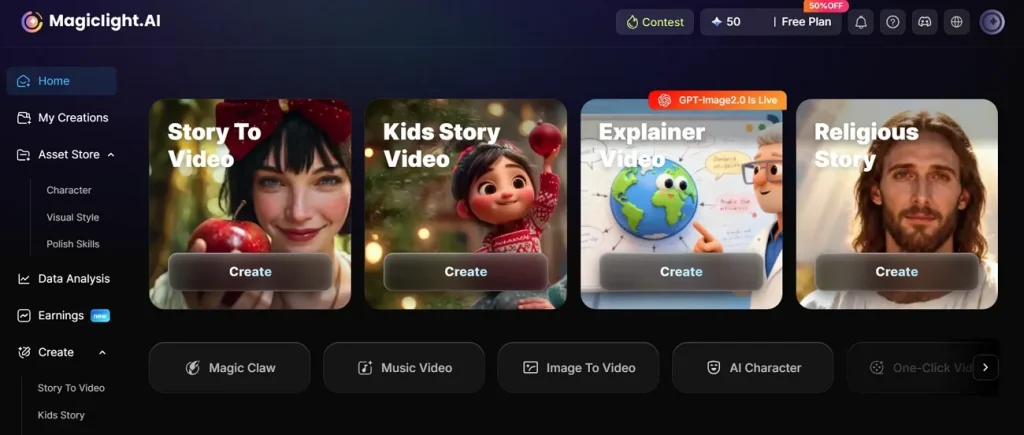
Moreover, it maintains the same character appearance across multiple scenes for stable storytelling videos. MagicLight AI supports 12 AI video models for versatile and diverse video generation. The platform enables detailed micro scene adjustments for precise video control and storytelling refinement. By using the 37 voiceover options, users can create diverse character tones and storytelling styles.
Key Features
- Storyboard Preview: Generates editable storyboard previews before final video rendering for better creative control.
- Scene Control: Allows users to modify clothing expressions, poses, and actions within generated scenes.
- Animation Conversion: Converts storyboards into animated videos using 16 different animation model styles.
- Template System: Provides ready-made templates for faster video creation across different content types.
- Language Support: Supports 11 languages that enable global video creation and multilingual storytelling accessibility options.
Detailed Comparison of PixVerse AI and MagicLight AI Capabilities
Users exploring App PixVerse AI often compare its capabilities with MagicLight AI. So, review the given table to understand the key differences between the platforms clearly:
| Feature | PixVerse AI | MagicLight AI |
| Video Length | Up to 15 seconds | Up to 50 minutes |
| Story Structure | Basic scene flow | Full story automation |
| Character Consistency | Sometimes inconsistent | Stable across scenes |
| Video Models | 10 integrated models | 12 advanced models |
| Storyboard Preview | Basic preview option | Editable storyboard system |
| Animation Conversion | Not fully supported | 16 animation models |
| Voiceover Options | Limited integration | 37 voiceover styles |
Conclusion
To sum up, PixVerse AI is a helpful tool for quick video generation and simple editing tasks. It works well for fast content but still has limitations in advanced customization and consistency. Therefore, many creators look for more professional tools for better results and control. In such cases, MagicLight AI offers improved features for longer videos, more stable storytelling performance, and better creative freedom for users.
FAQs on PixVerse AI
1. Can PixVerse AI turn images into videos?
Yes, PixVerse AI can turn images into short, animated videos easily. It also uses AI motion effects to create movement from still pictures. Alternatively, MagicLight AI offers longer storytelling and more advanced image animation control.
2. Does PixVerse AI have an app?
PixVerse AI offers both a mobile app and a web platform. Users can create videos directly using their phone or browser easily. In contrast, MagicLight AI also provides more advanced tools for professional video creation.
3. What are the limitations of PixVerse AI's free plan?
The free plan has limited credits, and restricted video generation features daily. Additionally, users also face lower resolution and a watermark on the exported video output. You also receive a restricted number of daily creation credits for testing.
4. What are the best PixVerse AI alternatives?
MagicLight AI is the top alternative because it offers better motion control. This powerful tool maintains excellent character consistency across separate video generation clips. Plus, it gives users more features and clearer results for video creation.
5. Is PixVerse AI good for beginners?
Yes, PixVerse AI is beginner-friendly with a simple prompt-based interface. Users can quickly create videos without needing advanced editing knowledge. If you want an even simpler workflow, choose MagicLight AI for automated storytelling.


![How to Write a Script for a Short Film in 2026 [Beginner’s Guide]](https://magiclight.ai/wp-2/wp-content/uploads/short-film-screenplay-writing-guide-300x169.webp)


