


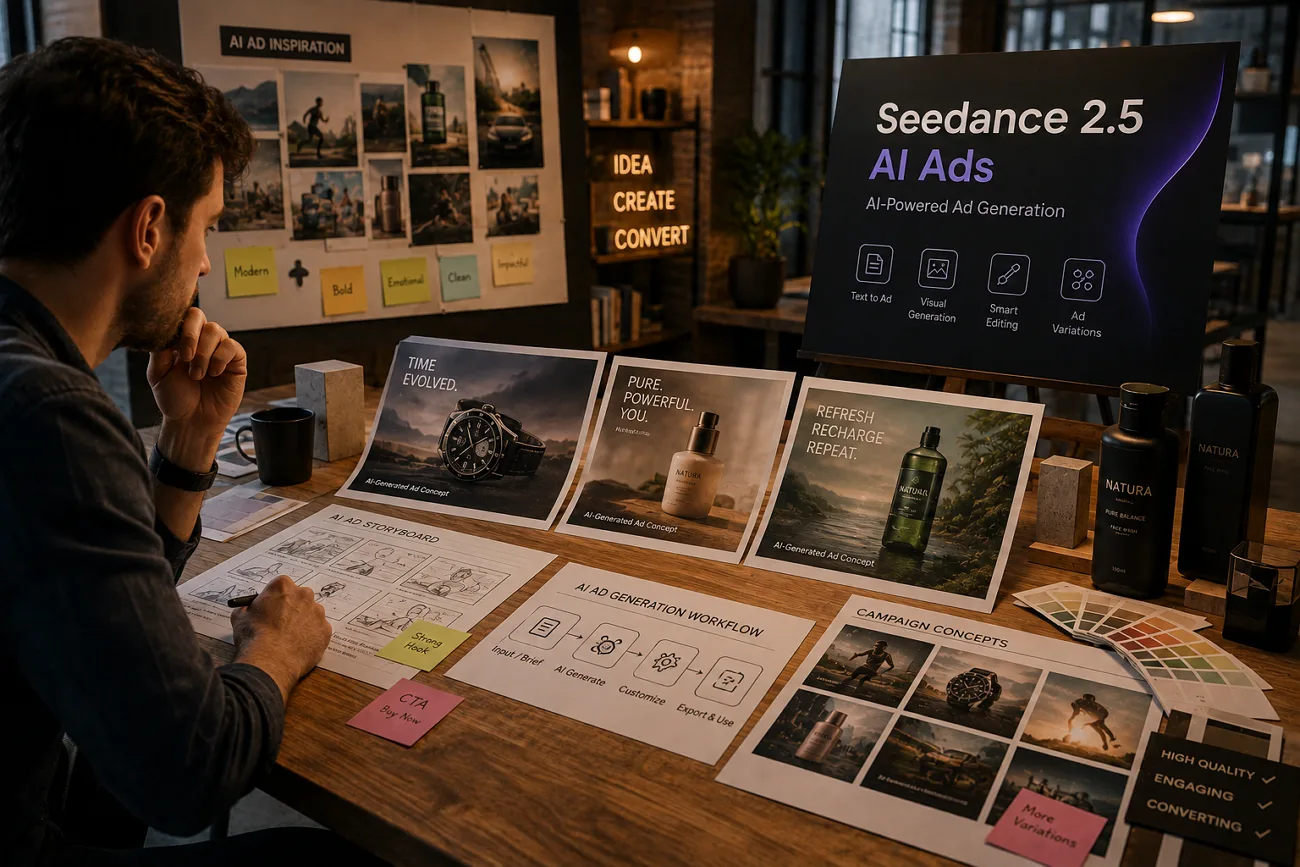
Creating AI advertisements is easier, yet keeping products accurate remains a major challenge for many creators. Small changes in packaging and logos can make advertisements look inconsistent and less trustworthy overall. Many users also struggle to write prompts that produce engaging and reliable advertising videos.
This guide explains Seedance 2.5 for AI ads with simple prompt tips and practical examples throughout. You will also learn product consistency methods and campaign creation steps for better advertising results every time.
Part 1. What Seedance 2.5 Offers for Ad Creation
Let's explore 4 key features that improve product consistency and simplify ad production workflows:
Native 30-Second Clip Length
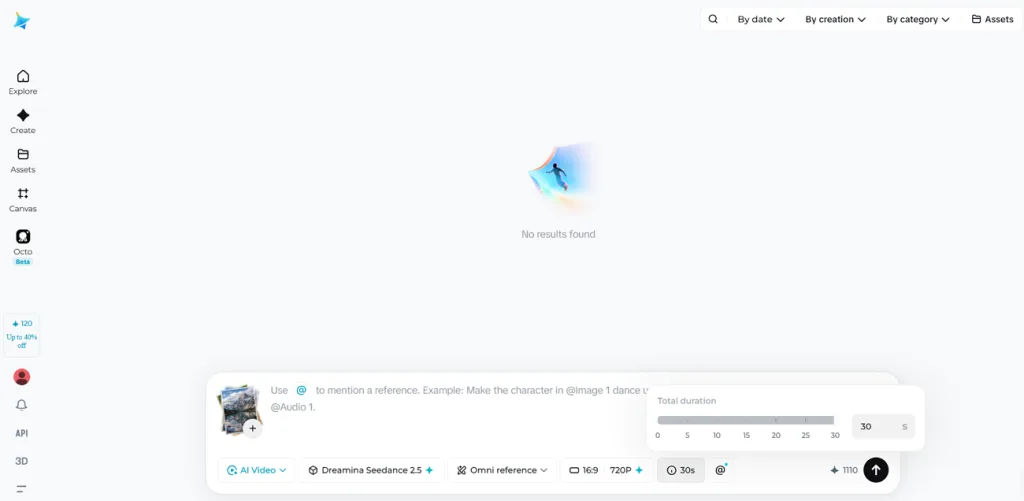
Seedance 2.5 can generate most common ad formats in a single pass, making video production more consistent. The table below shows how different ad lengths fit within its generation limits:
| Ad Format | Length | Seedance 2.5 Coverage |
| Bumper | 6 seconds | Single generation |
| Skippable Pre-roll | 15 seconds | Single generation |
| Standard Spot | 30 seconds | Single generation |
Up to 50 Reference Inputs for Product and Brand Assets
Commercial advertising requires consistent product and brand details, making reference assets an important part of the workflow. Seedance 2.5 supports up to 50 reference inputs, allowing you to include assets such as:
- Product images from multiple angles, including packaging details, labels, and important design elements.
- Lifestyle or campaign images matching the desired style, lighting, composition, and overall brand appearance.
- Company branding including logos, colors, and other brand visuals.
- Reference videos showing preferred camera movement, product interactions, pacing, and visual storytelling.
Native Audio Generation
Audio is an important part of many advertisements, and Seedance 2.5 generates it alongside the video. Narration and background audio are created together to reduce the need for separate editing.
The main advantage is better synchronization between audio and visuals. Voiceovers and sound effects stay naturally aligned instead of being adjusted manually after generation.
Region-Level Editing for Post-Generation Fixes
Most advertisements need revisions before they are ready for publishing across platforms. Region-level editing lets you change only a selected part of the video while keeping the rest of the generated content unchanged. This feature is useful for common advertising updates, including:
- A price or promotional offer that changes after the video is generated.
- Legal text that must be updated for different regions or markets.
- Product packaging changes introduced during an active campaign.
Without region-level editing, these updates could require regenerating the entire video and repeating the approval process.
Part 2. How to Structure an Ad Prompt in Seedance 2.5
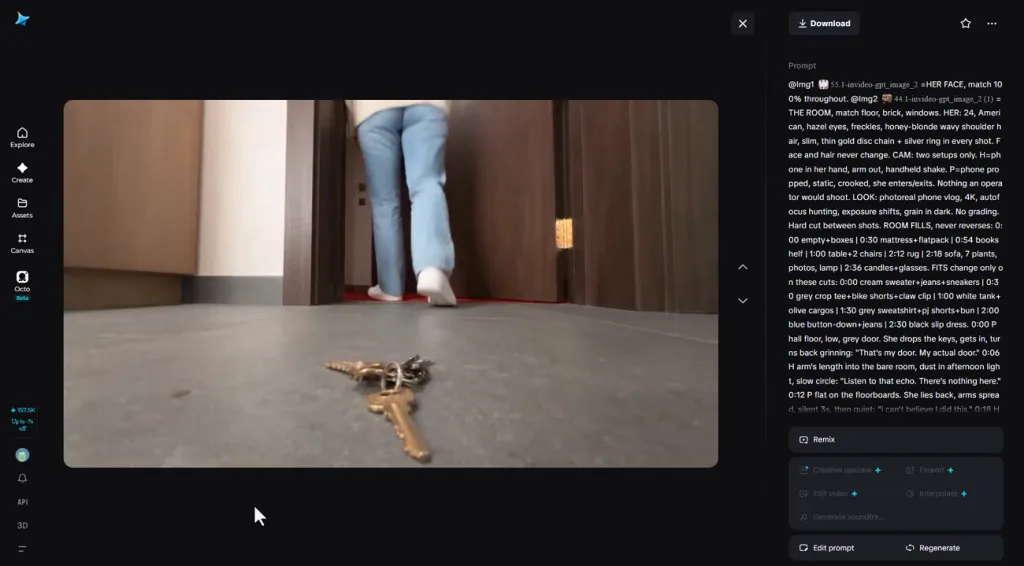
A well-structured prompt helps keep a 30-second advertisement clear, engaging, and focused from beginning to end. This simple framework improves Seedance 2.5 for AI ads by giving every scene a clear purpose.
Writing the Hook, Action, Benefit, and CTA in One Prompt
Organizing prompts into clear sections helps the model create advertisements with better flow and consistent pacing. The 5 examples below follow this structure using 8, 10, 8, and 4 seconds respectively:
- Skincare: Hook (0-8s): a cracked desert surface fills the frame, softening under falling water. Action (8-18s): a glass serum bottle rises into the light, a droplet spreading across skin. Benefit (18-26s): the same skin now reads smooth. CTA (26-30s): product on white, name held center.
- Footwear: Hook (0-8s): a wet city street at dawn, one runner entering frame. Action (8-18s): tracking shot alongside as the shoe flexes on impact. Benefit (18-26s): the runner accelerates away, breathing steady. CTA (26-30s): shoe rotating on a dark plinth, logo visible.
- Coffee Subscription: Hook (0-8s): an alarm silenced by a hand in low blue light. Action (8-18s): beans pouring, water blooming through a filter, steam rising. Benefit (18-26s): the same person at a window, mug in hand, daylight arriving. CTA (26-30s): a delivery box on a doorstep.
- Software: Hook (0-8s): a desk buried under printed spreadsheets, shot from overhead. Action (8-18s): the papers clear and a clean dashboard resolves on screen. Benefit (18-26s): a small team looking at one shared view, relaxed. CTA (26-30s): the interface alone, cursor at a sign-up button.
- Travel Booking: Hook (0-8s): rain on an office window beside a calendar showing no plans. Action (8-18s): a phone screen filling with coastline, then the coastline itself. Benefit (18-26s): the same person walking a shoreline at golden hour. CTA (26-30s): app icon over the horizon.
Before generating your final advertisement, always review the Ad specs for Facebook to verify your video length, aspect ratio, and format meet platform requirements.
Part 3. How to Keep Product Details Accurate Across an Ad
Keeping product details consistent builds trust and makes advertisements look more professional across every generated version. These practices improve Seedance 2.5 for AI ads by keeping products accurate throughout every advertisement.
Uploading Product Images as References
Clear product images help the model generate more accurate and consistent advertisement results every time. Use a few high-quality reference images instead of uploading many similar product photos together consistently. Choose the best reference images before creating your advertisement:
- Front packaging photo taken under clear, even lighting conditions.
- Two side images showing product shape and size clearly.
- Close-up image displaying labels, text, or barcodes clearly.
Locking Packaging, Color, and Logo Details
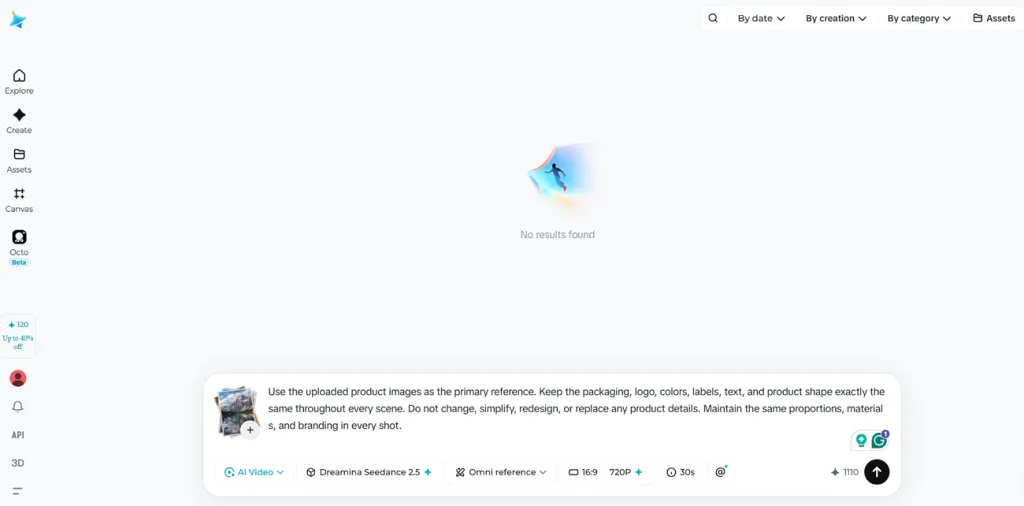
Assign clear roles for every reference to keep product details consistent throughout generated advertisements. Use exact brand colors and labels to reduce unwanted changes between different generated advertisement versions consistently. Test one advertisement first before creating more versions to catch branding mistakes early before publishing.
Adding a Character Reference for Spokesperson Ads
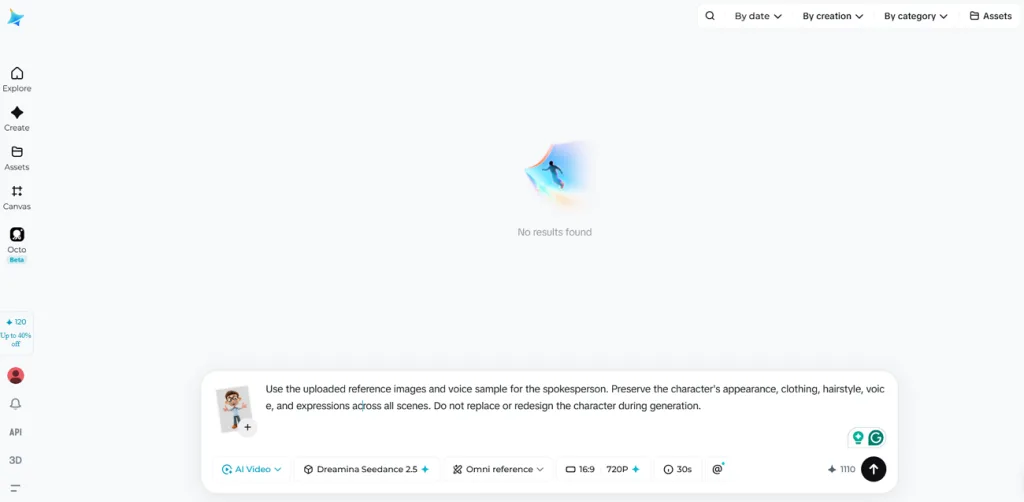
Seedance only supports original AI characters instead of real people or public figures for advertisements. Create one character using multiple angles and matching voice references for better consistency across campaigns. Reuse the same character references in every advertisement to maintain consistent spokesperson appearance throughout campaigns.
Part 4. How to Create Ad Campaigns in MagicLight AI
Managing AI ad campaigns becomes harder when prompts, products, and presenters must stay consistent. MagicLight AI integrates Seedance 2.5 for AI ads with other models for flexible campaign production workflows. It supports prompts up to 12,000 characters, allowing detailed instructions across complex advertisement scenes.
Campaigns can also reach audiences across 11 languages without rebuilding every advertisement manually. Its storyboard keeps characters, scenes, and camera movements organized across every generated campaign variation.
Building an Advertisement Video Step by Step
Adhere to the following process to build, edit, and export AI advertising campaigns:
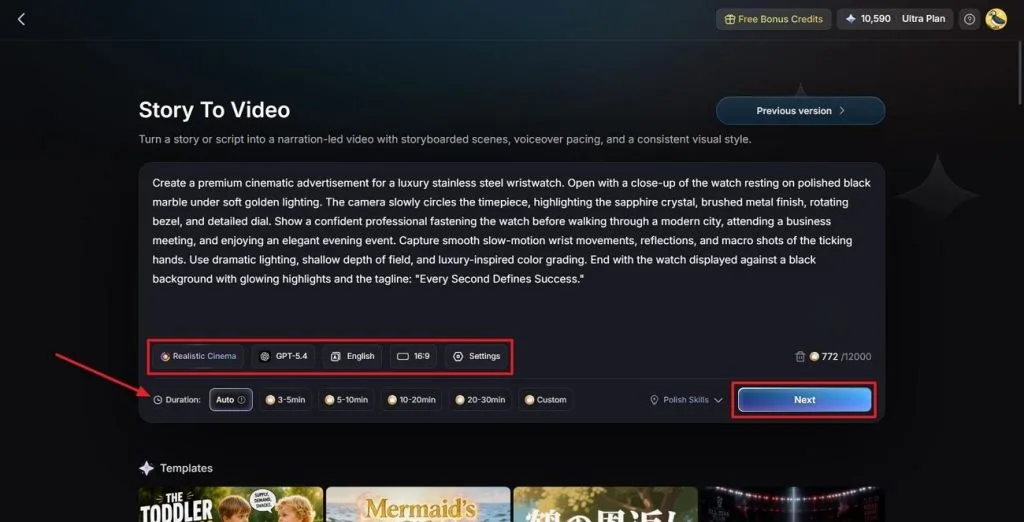
Step 1. Enter Story to Video and Paste Ad Script Details
Paste your ad prompt into the Text Box. Next, choose a Visual Style Model, select an AI Story Model, and set the preferred Video Language and Aspect Ratio. Finally, adjust the Video Duration and click Next to continue.
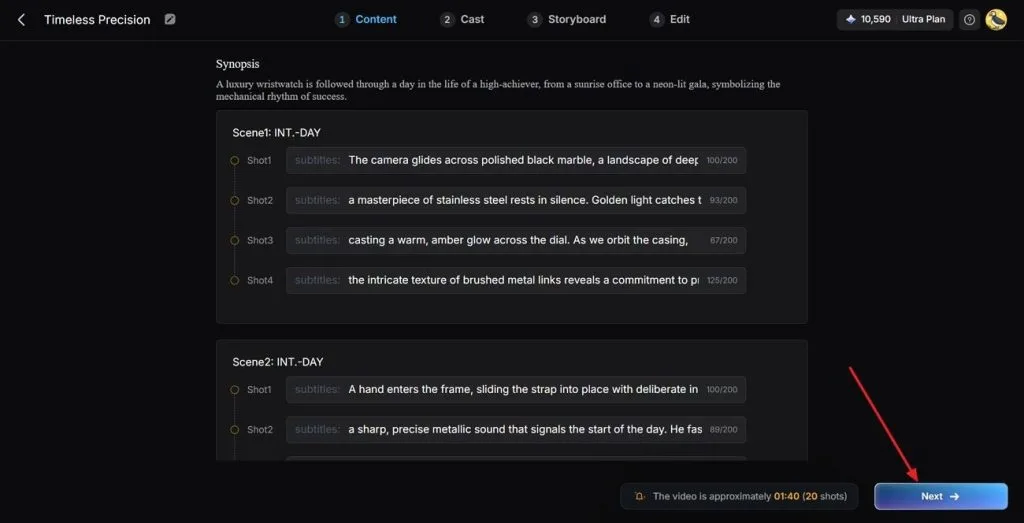
Step 2. Review the Generated Advertisement Scenes
Review the generated scenes and the Synopsis breakdown carefully. If any changes are needed, use the Controls at the top to refine the advertisement flow. Once everything is finalized, click Next to continue.
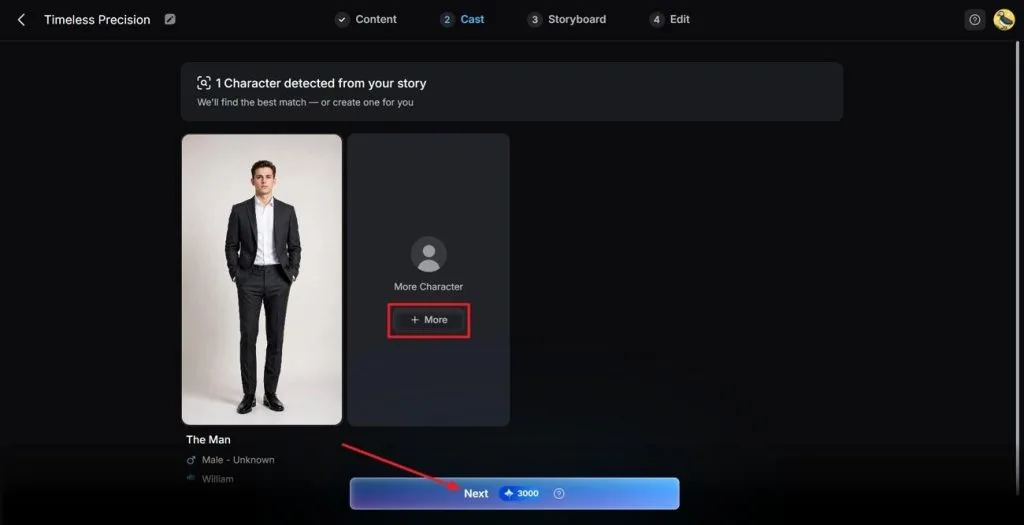
Step 3. Review the Generated Character
MagicLight AI automatically analyzes your prompt and suggests suitable ad characters. Click the More button to browse additional options if needed. Once the generated characters look suitable, press Next Step to proceed.
Step 4. Refine the Nano Storyboard
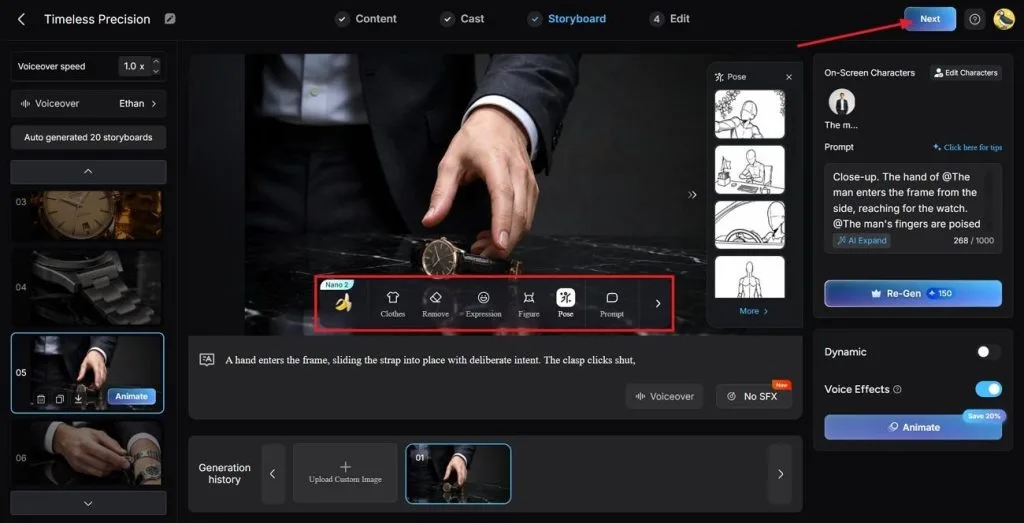
Review every scene in the generated Storyboard before creating the final advertisement. Use the Controls below to adjust Clothes, Poses, and Expressions whenever needed. After reviewing every scene, click the Next button at the top.
Step 5. Generate the Final Advertisement
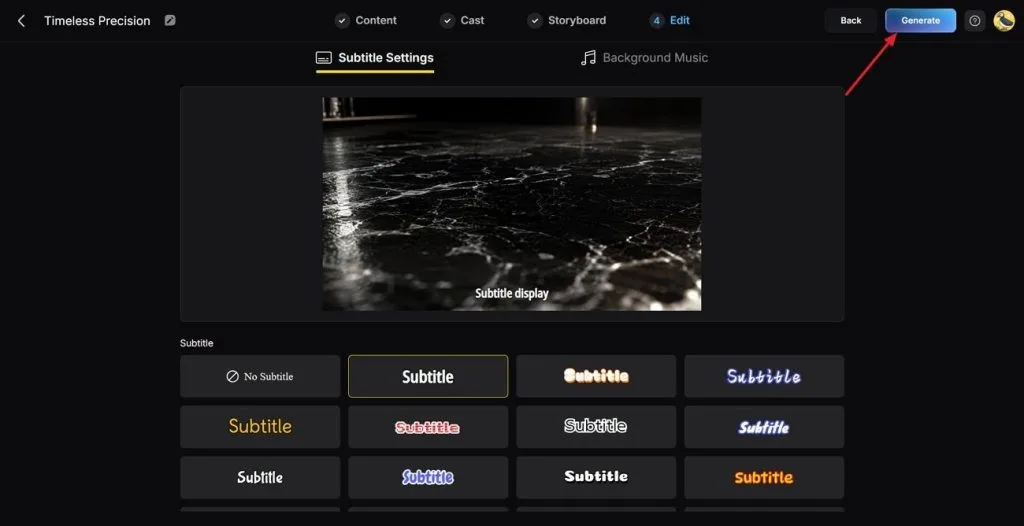
Choose a preferred subtitle style from the available caption options. Then click the Generate button in the top right corner to create the advertisement.
Step 6. Download the Final Ad Video
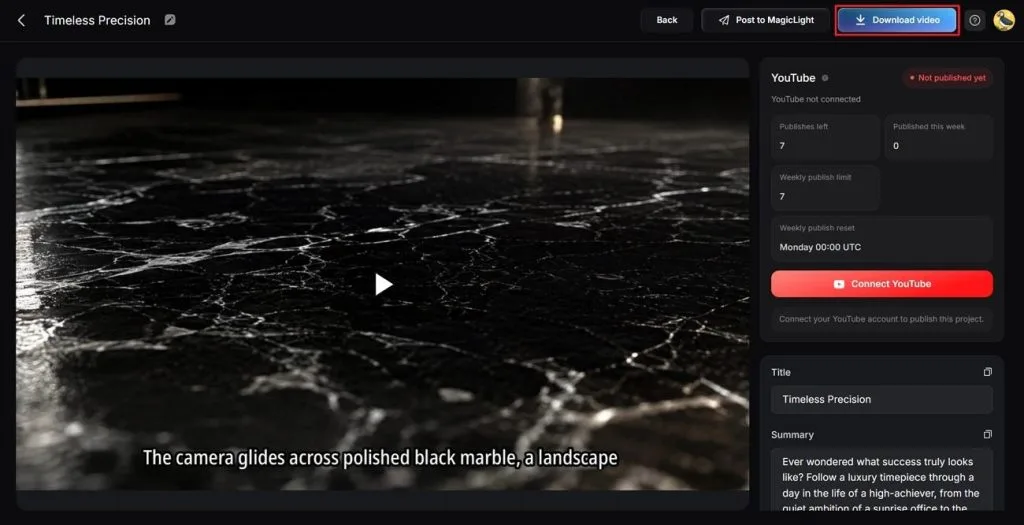
Preview the completed advertisement and review the Cover, Thumbnail, and Hashtags carefully. Once everything looks correct, click Download Video to save the final advertisement.
Why Choose It to Make AI Ads
Here are the 4 main features that make MagicLight AI suitable for creating AI advertisements:
- Lower Costs: Regenerate only one scene instead of the entire advertisement to reduce production costs.
- Easy Localization: Create advertisements across 11 languages with 37 voices without rebuilding every version.
- Reusable Characters: Save generated characters and reuse them across future advertising campaigns with consistent appearance.
- Multiple AI Models: Switch between different AI models without rebuilding or rewriting the complete storyboard.
Conclusion
Seedance 2.5 for AI ads helps create consistent advertisements with better prompts and accurate branding throughout. Clear references and organized prompts improve product consistency while reducing unnecessary editing across different advertisement versions. MagicLight AI simplifies campaign management with organized storyboards, reusable assets, and multilingual advertisement production workflows.
FAQs on Seedance 2.5 for AI Ads
- Can Seedance 2.5 generate a full 30-second ad in one pass?
Yes, a standard 30-second advertisement fits within one generation without combining multiple video clips together. Longer advertisements can reach 60 seconds by using one of the available video extensions.
- How do I keep my product accurate across ad variations?
Reload the same reference images with every new request because the 50-asset limit resets automatically. Assign every reference image a clear role to keep packaging accurate across generated advertisement variations consistently.
- Does Seedance 2.5 include synchronized audio for ads?
Yes, narration and sound effects are generated together with the video during advertisement creation automatically. This keeps voiceovers synchronized with visual actions without requiring additional manual timing adjustments after generation.
- Can I test multiple ad hooks without full reshoots?
Region and timestamp editing change a defined part of the take while the rest stays approved, which suits replacing an opening beat. Testing several hooks at once is easier from a duplicated storyboard than from separate generations.
- Is Seedance 2.5 suitable for ecommerce catalog ads?
Yes, smaller product collections work well because every product requires separate reference images for generation. Large catalogs cost more, while hero products remain suitable for detailed advertisement production and marketing.


![How to Write a Script for a Short Film in 2026 [Beginner’s Guide]](https://magiclight.ai/wp-2/wp-content/uploads/short-film-screenplay-writing-guide-300x169.webp)


