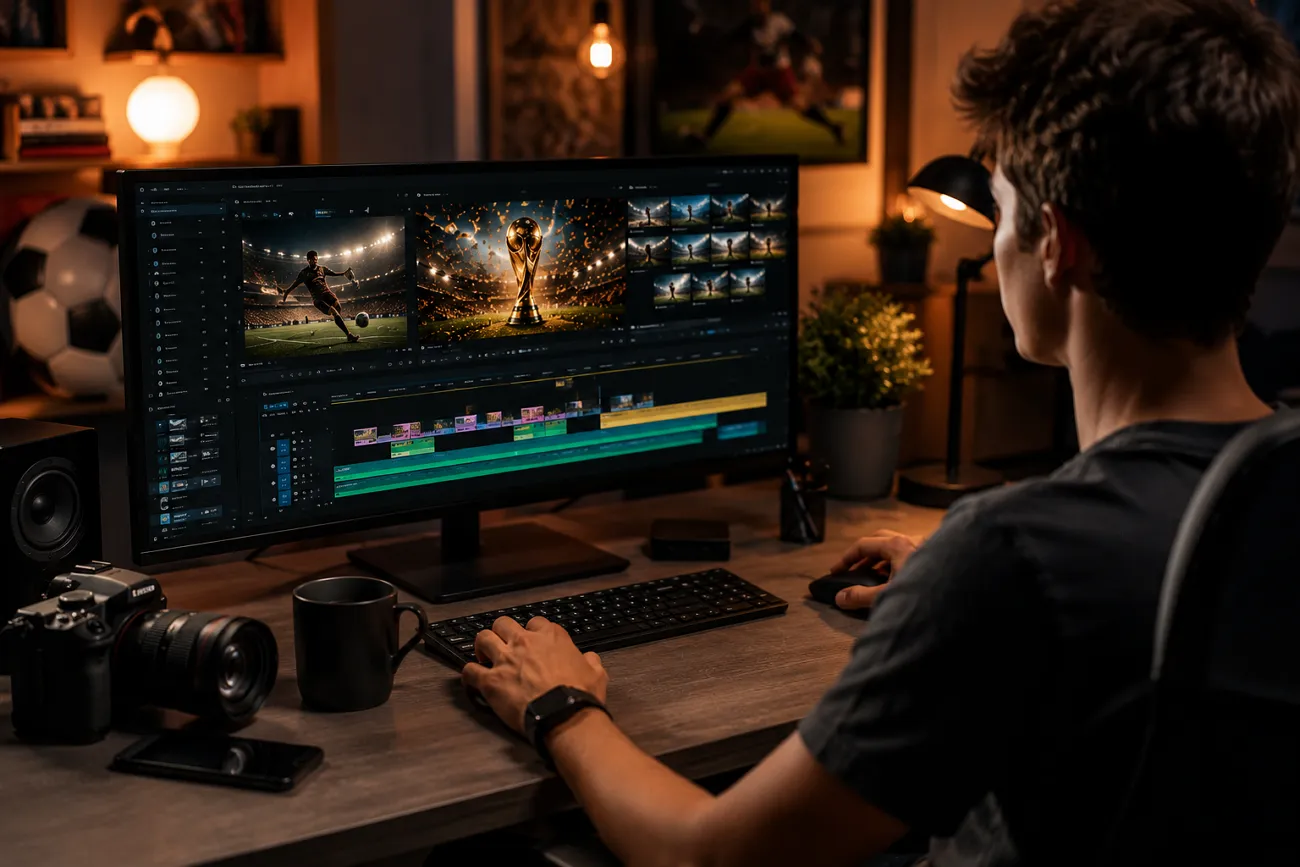
Not all football fans get to witness their favorite teams play in the stadium. Many fans who are unable to attend a live match use AI video tools to make realistic FIFA videos. Google Veo is among the AI models that offer visual realism for generating soccer-related video content.
The video results highly depend on the type of prompt you enter. This article will walk you through the 30 best Veo World Cup prompts for a variety of video results.
Part 1. 30 Veo FIFA World Cup Prompts for Football Video Creation
Formulating the right prompt for an AI video is an entire science that needs proper attention and learning. Look into the following Veo World Cup prompts to get an idea of how you can use your words to make videos in Google Veo:
Best Veo World Cup Prompts for Match Highlights
1. Last-Minute Winning Goal
"Create a dramatic FIFA World Cup final match highlight where a striker scores a last-minute winning goal in stoppage time. Show roaring crowds, emotional teammates, slow-motion replay, cinematic stadium lights, realistic football physics, energetic camera movement, broadcast-style graphics, ultra-realistic, 4K sports documentary style."
2. Epic Goal Compilation
"Generate a FIFA World Cup montage featuring the tournament’s best goals. Include bicycle kicks, long-range screamers, penalty drama, crowd reactions, commentator energy, dynamic transitions, cinematic slow motion, hyper-realistic football atmosphere."
3. Penalty Shootout Drama
"Create an intense World Cup penalty shootout highlight with close-up player emotions, goalkeeper saves, tense crowd silence, dramatic stadium lighting, cinematic camera angles, realistic motion blur, emotional victory celebration."
4. Underdog Match Comeback
"Generate a FIFA World Cup comeback match where an underdog team scores three goals in the second half. Include emotional fans, tactical moments, dramatic commentary visuals, cinematic sports editing, realistic player movement."
5. Best Saves Compilation
"Create a FIFA World Cup goalkeeper highlight reel showing impossible saves, diving blocks, crowd gasps, slow-motion gloves impact, rain effects, broadcast replay graphics, cinematic football realism."
Veo World Cup Prompts for Player Spotlight Videos
1. Superstar Journey Video
"Create a cinematic FIFA World Cup player spotlight about a football superstar preparing for the tournament. Show training sessions, locker room moments, emotional close-ups, stadium entrance, slow-motion action, dramatic sports documentary style."
2. Rising Star Feature
"Generate a World Cup player spotlight featuring a young football prodigy making his tournament debut. Include emotional family moments, training ground scenes, crowd anticipation, cinematic storytelling, realistic sports visuals."
3. Golden Boot Contender
"Create a FIFA World Cup player showcase focused on the tournament’s top goal scorer. Show goals, celebrations, fan chants, tactical movement, close-up expressions, cinematic football atmosphere."
4. Goalkeeper Hero Story
"Generate a player spotlight of a legendary World Cup goalkeeper making heroic saves under pressure. Include dramatic lighting, stadium crowd energy, slow-motion dives, emotional reactions."
5. Captain Leadership Video
"Create a FIFA World Cup player spotlight centered on a national team captain inspiring teammates before a crucial match. Include locker room speeches, match intensity, emotional storytelling, realistic sports cinematography."
Veo World Cup Prompts for Team and Tournament Content
1. Team Introduction Trailer
"Create a FIFA World Cup national team introduction trailer featuring dramatic player entrances, team anthem moments, iconic goals, stadium lights, cinematic transitions, epic sports music vibe."
2. Tournament Opening Ceremony
"Generate a FIFA World Cup opening ceremony video with fireworks, cultural performances, packed stadium, emotional crowd reactions, cinematic aerial shots, global football celebration."
3. Road to the Final
"Create a FIFA World Cup tournament journey video showing a national team progressing from group stages to the final. Include match highlights, fan celebrations, dramatic storytelling, emotional music atmosphere."
4. Rivalry Match Preview
"Generate a World Cup rivalry showdown trailer between two legendary football nations. Include dramatic player close-ups, historical moments, crowd chants, cinematic tension, sports documentary visuals."
5. Tournament Recap
"Create a FIFA World Cup tournament recap featuring iconic goals, emotional moments, celebrations, heartbreak, fan reactions, cinematic montage editing, realistic football visuals."
Veo World Cup Prompts for Social Media Reels and Shorts
1. Viral Goal Celebration Reel
"Create a short FIFA World Cup social media reel showing epic goal celebrations, crowd eruptions, dramatic slow motion, energetic editing, vertical format, cinematic sports visuals."
2. Fast Match Recap Short
"Generate a 30-second FIFA World Cup match recap with quick cuts, goals, fouls, crowd reactions, scoreboard animations, dynamic transitions optimized for TikTok and Instagram Reels."
3. Funny Football Moments
"Create a short FIFA World Cup funny moments reel featuring unexpected misses, fan reactions, dramatic player expressions, meme-style editing, cinematic sports humor."
4. Top 5 Goals Countdown
"Generate a FIFA World Cup vertical short featuring the top five goals of the tournament with energetic transitions, replay effects, cinematic camera angles, hype atmosphere."
5. Fan Reaction Reel
"Create a FIFA World Cup social media reel showing emotional fan reactions from different countries celebrating victories, cinematic crowd shots, realistic emotions, energetic pacing."
Veo World Cup Prompts for Football Storytelling
1. From Streets to Stadium
"Create an emotional football storytelling video about a young boy dreaming of playing in the FIFA World Cup, training in local streets, overcoming challenges, finally entering a packed stadium as a national player."
2. The Underdog Nation
"Generate a FIFA World Cup story about an underrated national team shocking the world and reaching the final. Include emotional players, determined coach, dramatic victories, cinematic sports storytelling."
3. The Veteran’s Last World Cup
"Create a touching football story about a legendary player competing in his final FIFA World Cup. Include flashbacks, emotional crowd moments, leadership scenes, cinematic sports documentary visuals."
4. Rival Friends Story
"Generate a FIFA World Cup storytelling video where childhood friends play against each other for rival nations in a dramatic semifinal match, emotional narrative, cinematic realism."
5. The Miracle Goal
"Create a FIFA World Cup story centered around a last-minute miracle goal that changes a nation forever. Include emotional fans, dramatic build-up, cinematic slow motion, inspirational ending."
Veo World Cup Prompts for Marketing and Brand Campaigns
1. Sportswear Brand Ad
"Create a FIFA World Cup-inspired commercial for a football sportswear brand. Show athletes training, dramatic match moments, close-up gear shots, cinematic lighting, premium commercial quality."
2. Beverage Brand Campaign
"Generate a FIFA World Cup-themed beverage commercial featuring fans celebrating goals together in homes, cafes, and stadiums, emotional football atmosphere, cinematic ad style."
3. Football App Promotion
"Create a FIFA World Cup marketing video promoting a football app with live match excitement, stats visuals, fan engagement, sleek UI animations, energetic sports branding."
4. Sponsor Tournament Ad
"Generate a FIFA World Cup sponsorship campaign featuring iconic football moments, diverse fan cultures, emotional storytelling, premium cinematic branding."
5. Football Merchandise Promo
"Create a FIFA World Cup merchandise advertisement showing jerseys, scarves, flags, excited fans, stadium atmosphere, dynamic transitions, premium sports commercial look."
Part 2. Best Way to Convert Veo FIFA World Cup Prompts Into Videos
Creating eye-catching FIFA World Cup content requires more than Veo World Cup prompts, and MagicLight AI helps fans and creators produce football-themed videos with ease. This platform includes a story generator that uses user-chosen characters to make a video. You can also use the AI character generator that transforms detailed prompts into football player images in styles ranging from cartoon to realistic.
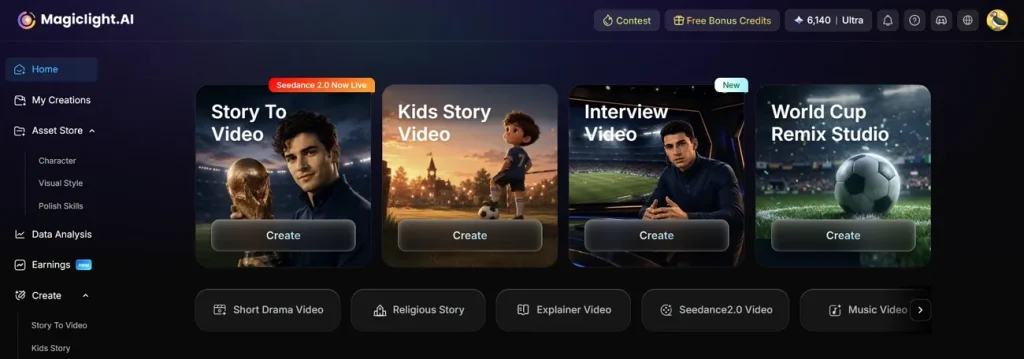
MagicLight AI also generates long-form stories by turning scripts into captivating football videos. You can make a video up to 50 minutes in length and fully engage your viewers.
Key Features
- AI Video Models: Magiclight AI has several AI video models that can deliver high-quality video results, including Gemini Omni and Seedance 2.0.
- Story-to-Video Creation: The platform transforms scripts and images into engaging football videos. It also supports localized storytelling with video generation available in more than 30 languages.
- Character Editing and Storage: All generated football characters are saved in the “My Characters” folder for quick access and reuse. Users can also edit jerseys, appearances, and player details to better match their creative vision.
- Smart Prompt Expansion: The AI Expand feature improves simple keywords by turning them into more detailed prompts for accurate results. Users can also name characters to strengthen a footballer’s personality for a comprehensive video.
- Video Customization Tools: MagicLight AI offers storyboard editing and AI voiceovers with multiple voice options. You can also use the voice cloning feature to enhance the life-likeness of the video.
A Complete Guide to Generating FIFA Videos Using Google Veo Prompts
Video generation can be taken to another level by the use of the right prompts. The following steps will guide you on how to use your carefully curated Google Veo World Cup prompts to make a FIFA video story using Magiclight AI:
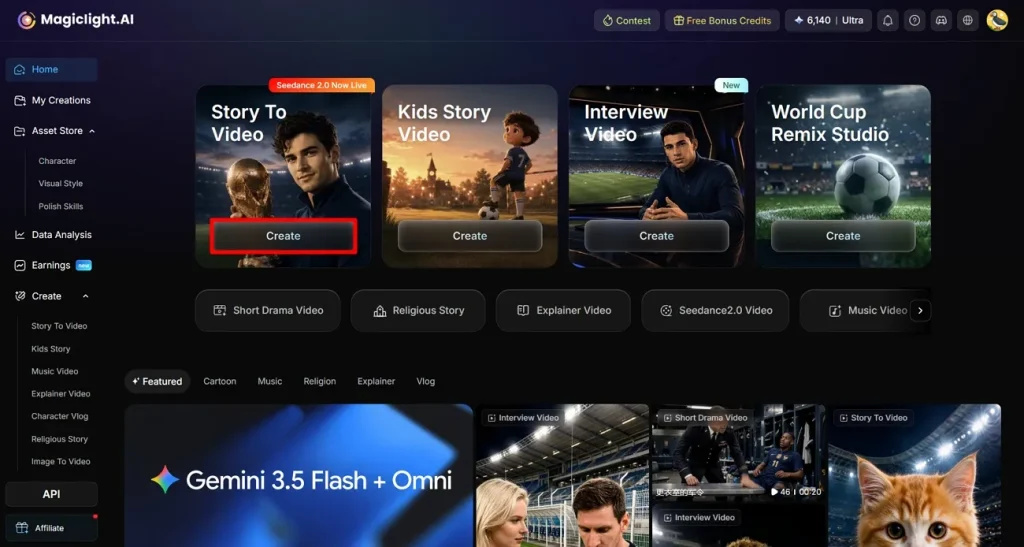
Step 1. Start By Selecting the Feature
To begin with, select the Create button under the Story to Video feature and let the next page appear.
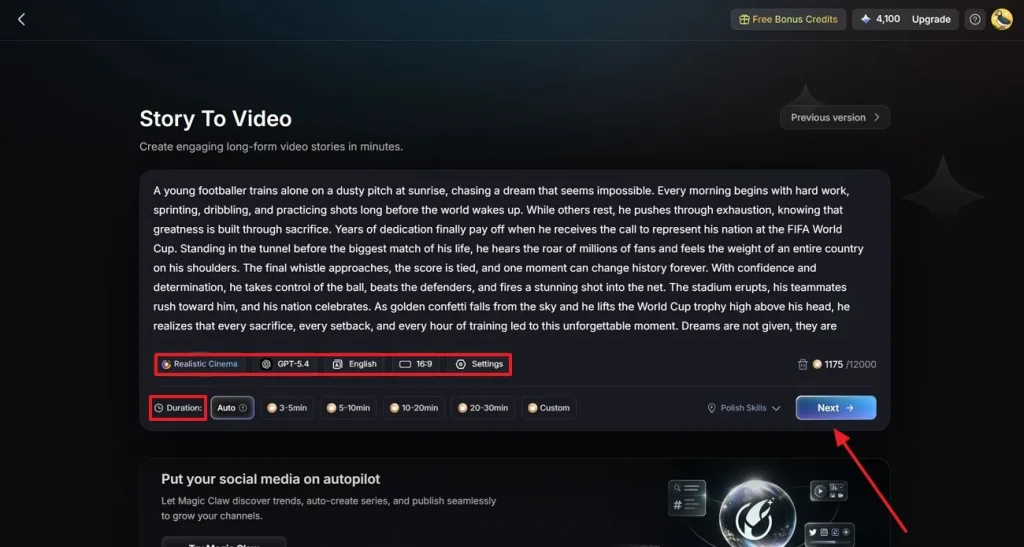
Step 2. Enter the Story Script and Other Details
Using the next page, give your FIFA video script and select the video type. Now, pick your video generation model and the language of voiceover. Lastly, choose an aspect ratio, Settings and the video Duration to move to the Next step.
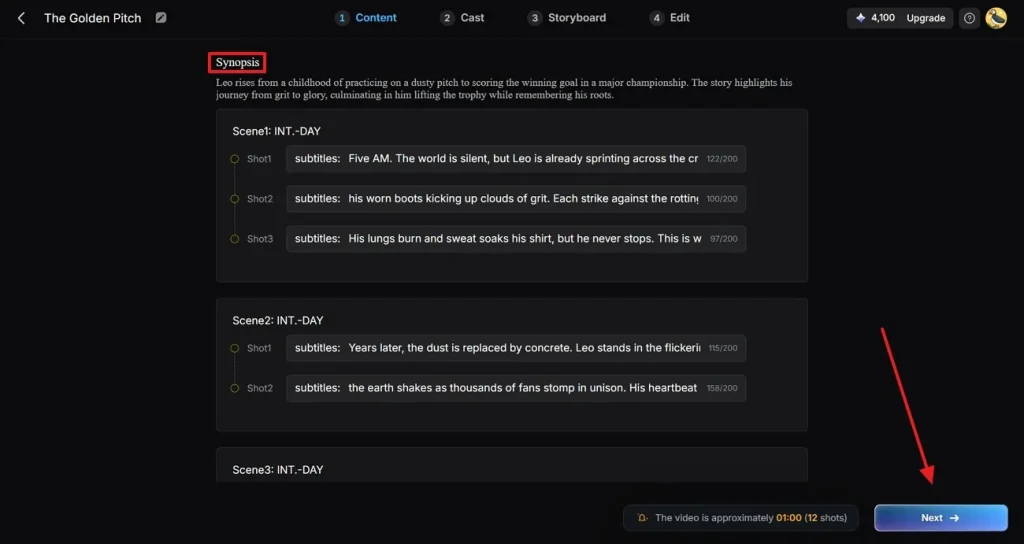
Step 3. Preview and Edit the Generated Synopsis
When the video’s synopsis is ready, go through every scene and edit if needed. When the text is as needed, click the Next button to proceed.
Step 4. Pick a Football Character to Include in Your Video
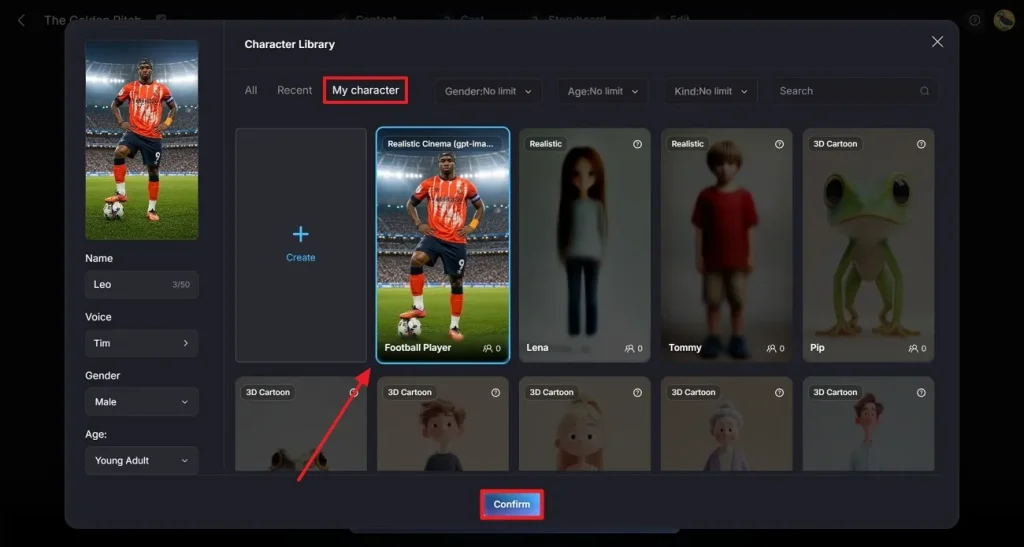
After being directed to the Cast tab at the top, click the More Character option to choose the footballer character that suits your video. You can find your personally created characters in the My Character folder. Once you have assigned the character, Confirm it from the bottom of the window.
Step 5. Preview Your Cast Selection
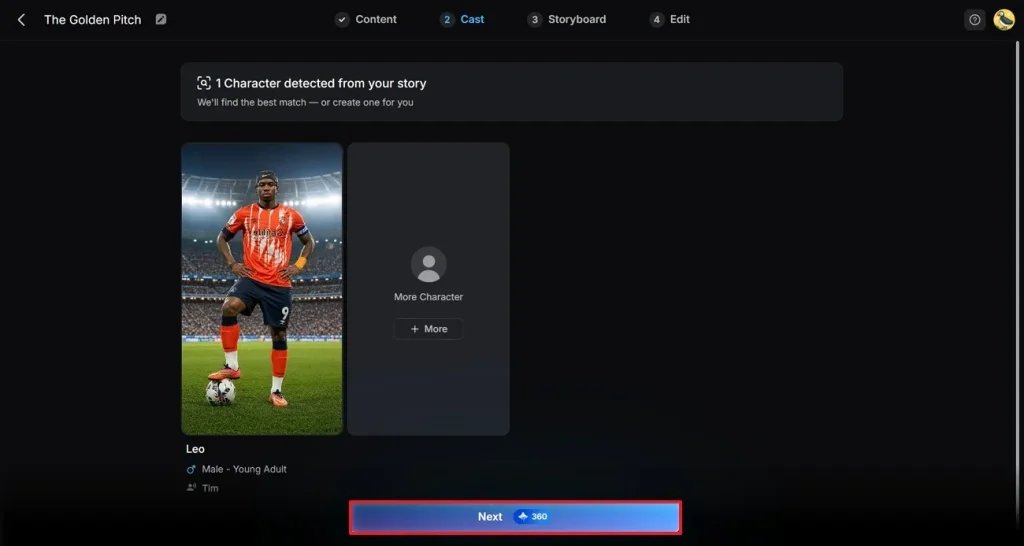
Using the next page, go through your chosen character and click the Next button to move forward.
Step 6. Preview and Edit the Storyboard Before Video Finalization
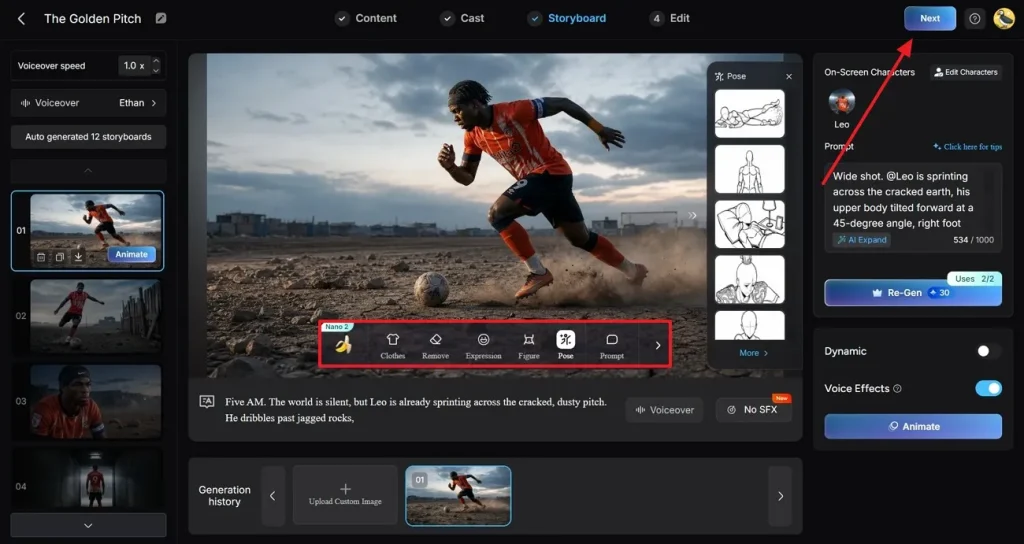
When the final storyboard is presented, edit the Clothes, Expression, Figure, Pose, and Prompt. Once done, click the Next button at the top right to move to the next step.
Step 7. Enter Your Subtitle Settings
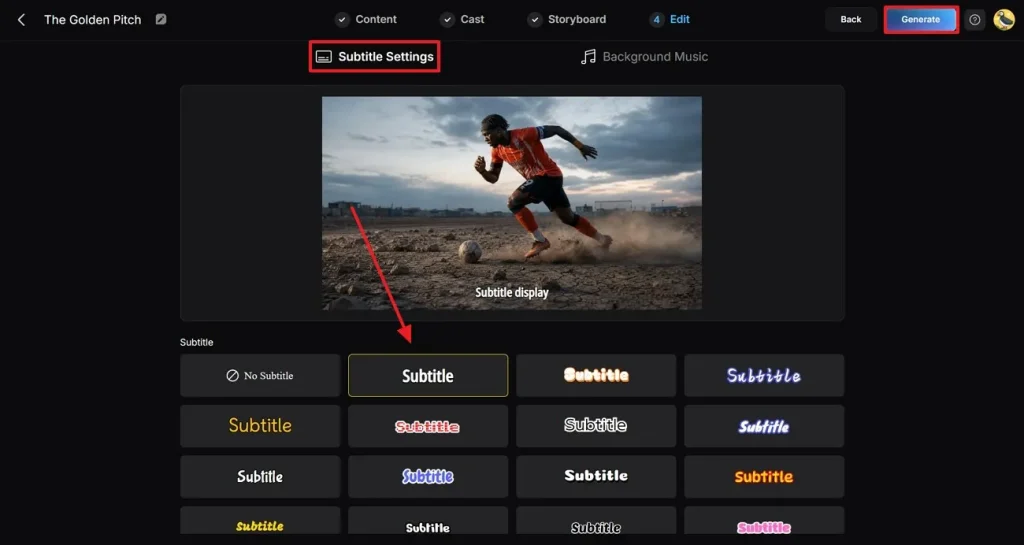
When you are taken to the Edit tab from the top, enter the Subtitle Settings section. After choosing your desired subtitle settings, click Generate to find the final video on the next page.
Step 8. Preview, Publish, or Save the Video
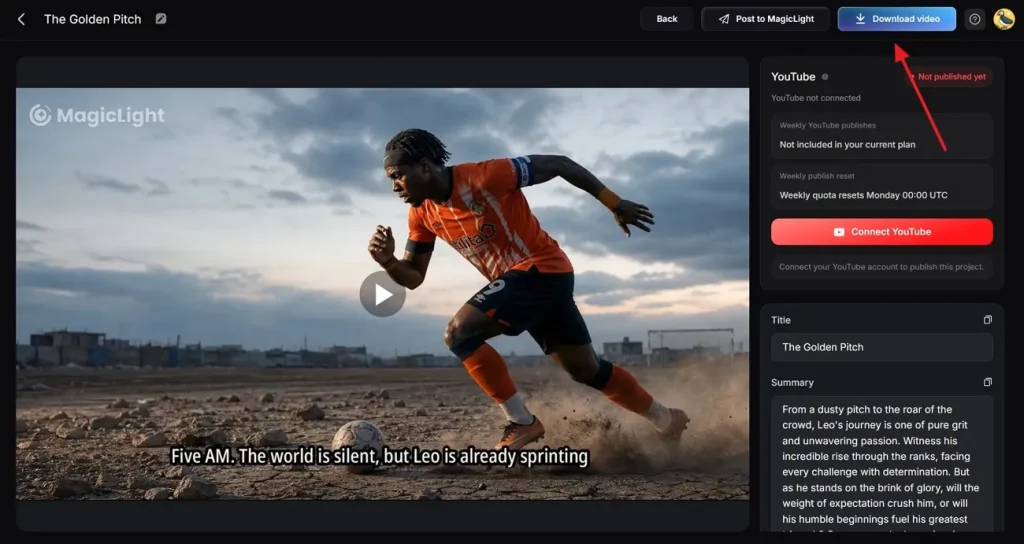
After your video is ready, preview it and click the Download Video button to save it on your device. You can also publish it directly across YouTube using the dedicated button.
Conclusion
Global football fans are joining in the excitement of watching their favorite teams collide. However, the admirers unable to attend the live matches are settling for social media content and AI-generated videos about the occasion. The quality of AI videos depends on the type of prompt entered. This article explored the top Google Veo World Cup prompts and how they can be used to generate engaging FIFA videos using Magiclight AI.
FAQs on Veo FIFA World Cup Prompts
1. How do I write better prompts for Veo?
To write better Veo prompts, include details like camera angles, lighting, motion, atmosphere, realism level, and video style. Be specific about the football action, such as “slow-motion winning goal in a packed World Cup stadium with cinematic lighting and crowd reactions.”
2. Can Veo create realistic football match scenes?
Veo can generate highly realistic football match scenes with cinematic movement, crowd energy, and dramatic stadium visuals when given detailed prompts. If you want more structured football storytelling, character consistency, or ready-made sports video workflows, consider using MagicLight AI as an alternative.
3. What types of World Cup videos can Veo generate?
This AI model can generate match highlights and football storytelling videos, and short-form social media content. MagicLight AI can also be a useful option for creators who want easier scene control and football-themed marketing videos.
4. Is Veo suitable for social media football content?
Yes, Veo works well for creating football reels, shorts, and viral World Cup clips with cinematic edits and dynamic visuals. However, if you want fast workflows for short-form sports content and branded storytelling, MagicLight AI is worth exploring too.
5. Why do some creators use MagicLight AI instead of Veo?
Some creators prefer MagicLight AI because it can simplify video creation with guided workflows, story-based generation, and easier customization for marketing or social content. It may also suit users who want a faster, less prompt-heavy approach than Veo for football-themed videos.