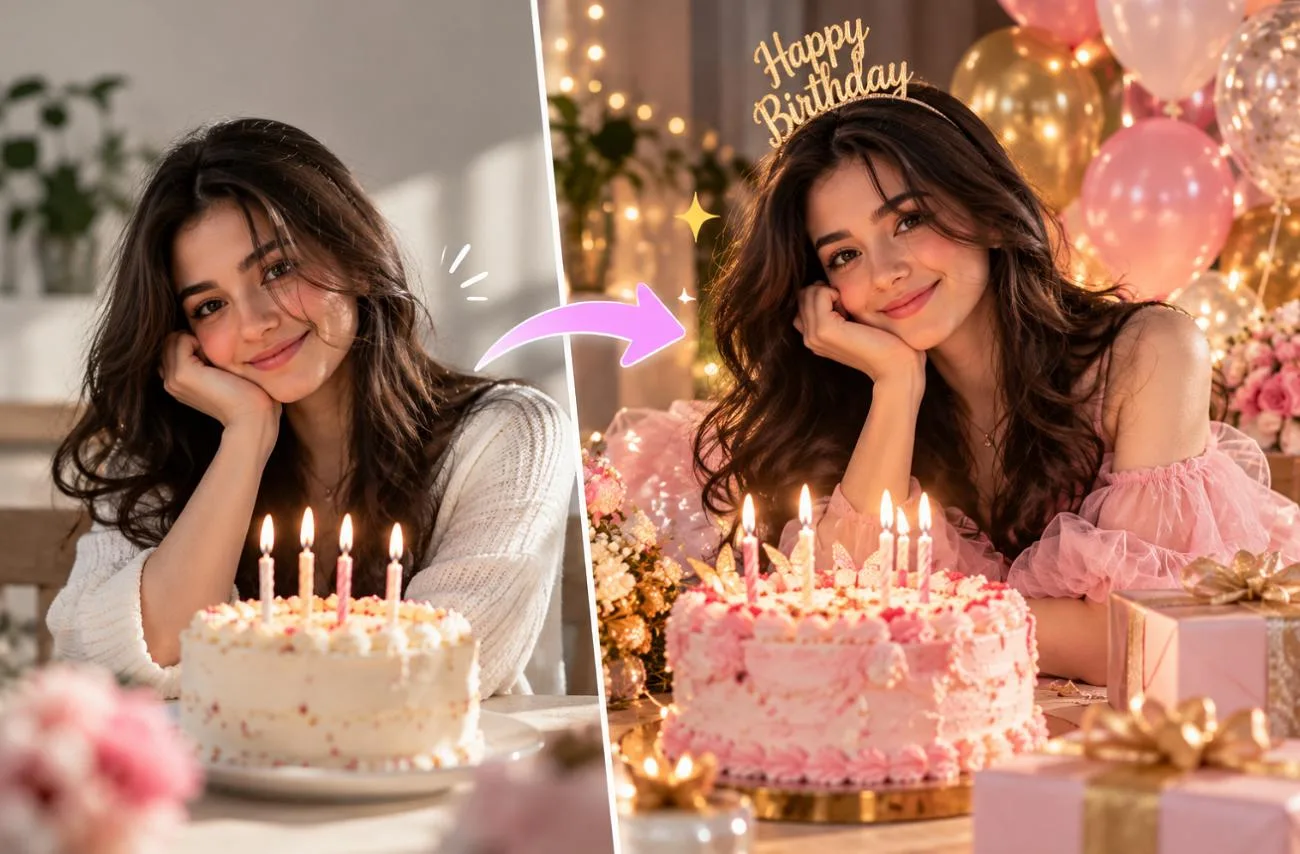
誕生日の投稿は、ケーキをさっと撮るだけではなくなってきました。Geminiなら、普段の自撮り写真を数秒で華やかな誕生日ポートレートに変えられます。ただし、仕上がりを左右するのはプロンプトの書き方です。短い指示だけでは、顔が変わったり、意図しない飾りが画面いっぱいに追加されたりすることがあります。
Gemini AIに詳しい誕生日写真プロンプトを入力すれば、本人らしさを保ちながら、服装、小物、光、雰囲気を指定できます。女性、男性、カップル、友人グループ、節目の誕生日パーティーでは、それぞれ少しずつ指示を変えるのがポイントです。
Part 1. Gemini AIで誕生日写真を作る方法
Gemini AIで誕生日写真を作るときは、実際の写真をもとにプロンプトを入力すると、まったく新しいシーンでも主役の本人らしさを保ちやすくなります。Geminiでは、アップロードした写真を Nano Banana 2で編集できます。また、 Nano Banana Pro は、利用条件を満たすGoogle AIの有料プラン契約者が利用できます。次の5つの手順で、写真とプロンプトから自分だけの誕生日画像を作ってみましょう。
ステップ1. 新しい画像の作成を始める
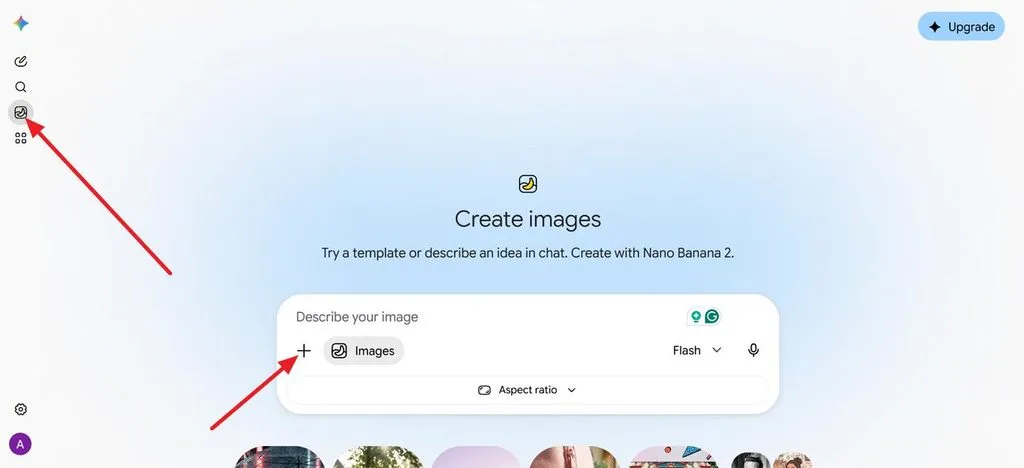
gemini.google.comにアクセスし、サイドバーを開いてImagesを選ぶと、画像用のチャットを始められます。
ステップ2. 写真をアップロードする
明るい場所で正面から撮った鮮明な写真を追加しましょう。Geminiが本人の顔立ちを保つための、より確かな参考になります。
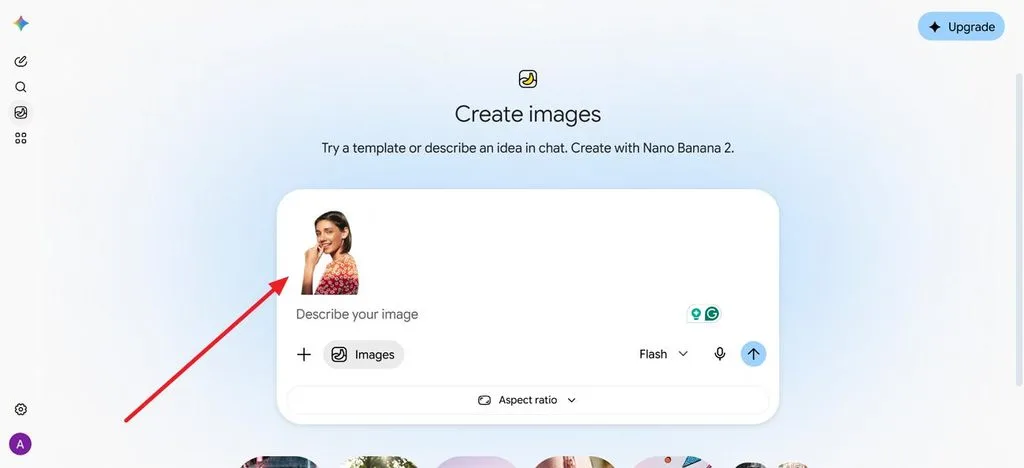
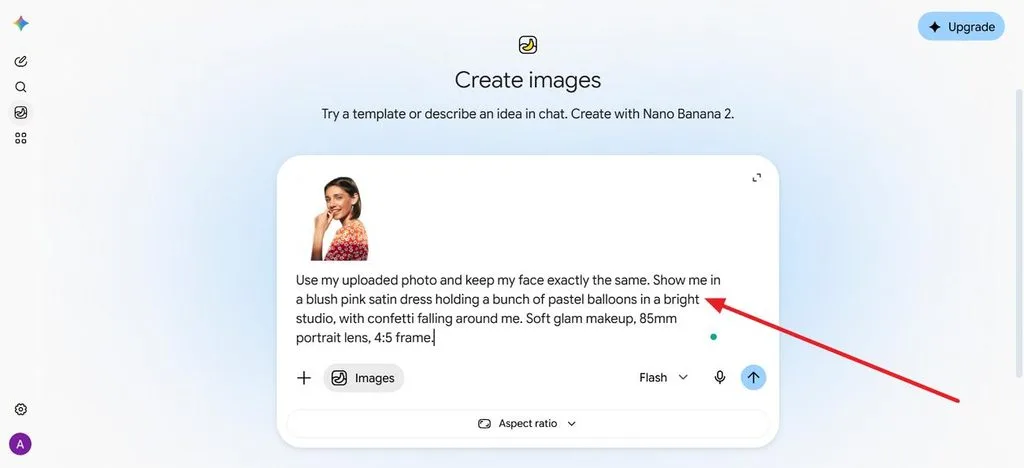
ステップ3. 誕生日写真のプロンプトを入力する
顔を変えないようGeminiに指示したうえで、服装、場所、小物、照明、撮影スタイルを説明します。
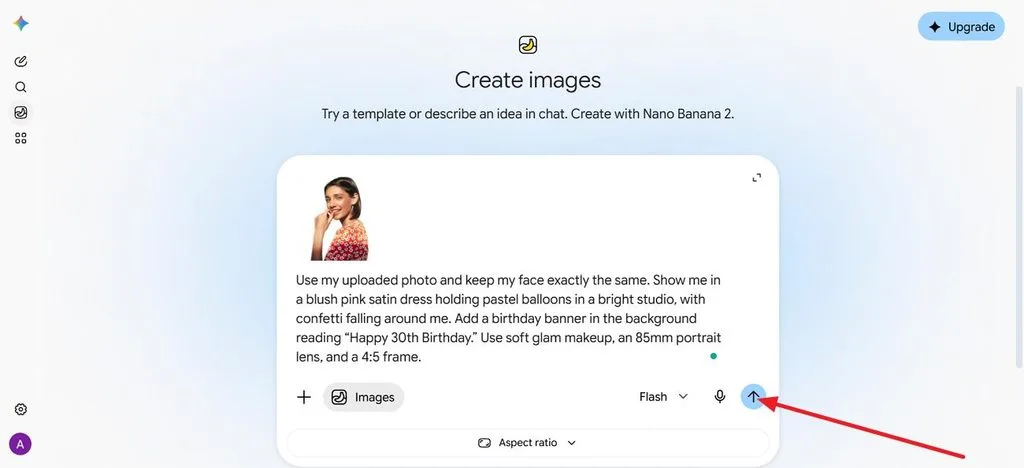
ステップ4. 誕生日のメッセージを指定する
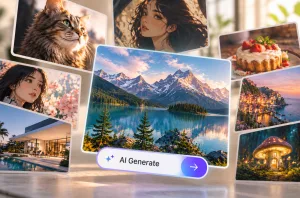
バナーやケーキに入れたい文字は、「“Happy 30th Birthday”」のように引用符で囲み、表示する文言を正確に指定します。その後、 Generate アイコンを押します。
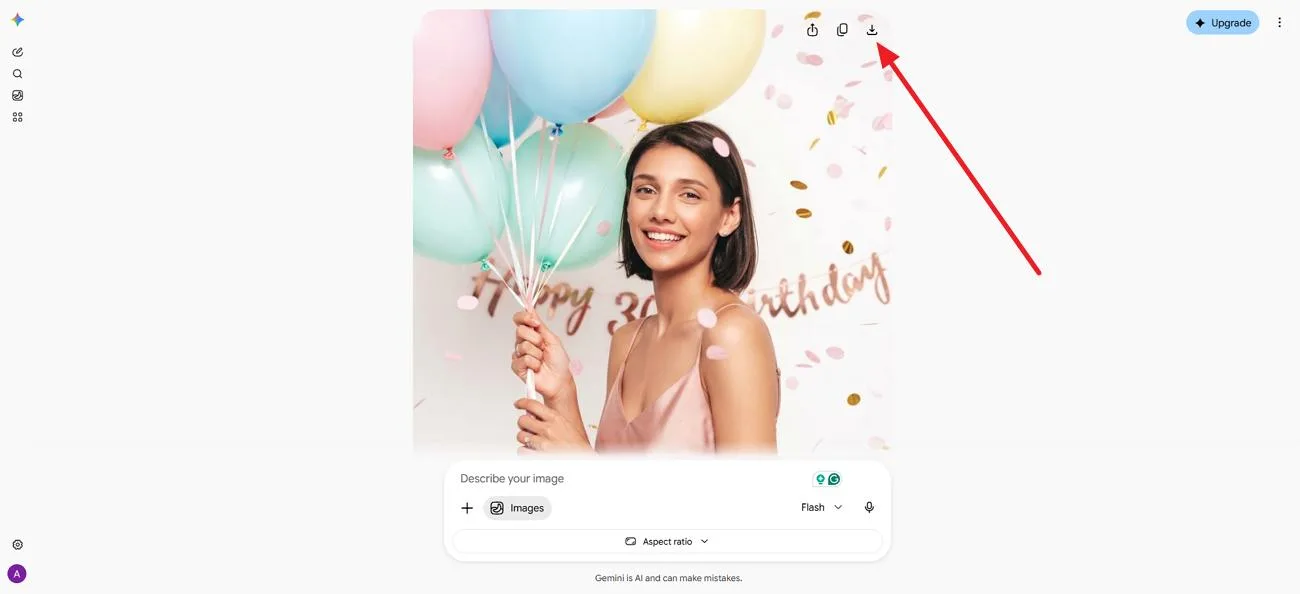
ステップ5. 調整して保存する
ケーキの色を変えたり、縦横比9:16で切り抜いたりと、細かな修正を依頼して、気に入った仕上がりをダウンロードします。
Part 2. 試してみたいGemini AIの誕生日写真プロンプト15選
そのままコピーして使える Gemini AI の誕生日写真プロンプトなら、写真をアップロードし、角括弧内の名前や年齢を変更するだけで使えます。どのプロンプトにも、編集時に元の顔を保つための指示が入っています。以下の15例は、誕生日のテーマ、服装、場所、写真のスタイルを幅広く取り上げています。好みに合わせて調整して試してみてください。
女性向けの誕生日写真プロンプト
女性向けのGemini誕生日写真プロンプトは、やわらかなパステルカラーのポートレートから、華やかな夜のお出かけ写真まで、お祝いの雰囲気に服装、場所、光を合わせると効果的です。使う色を具体的に指定すると、ドレス、風船、飾りに統一感が生まれます。
- パステルカラーの風船ポートレート: Use my uploaded photo and keep my face exactly the same. Show me in a blush pink satin dress holding a bunch of pastel balloons in a bright studio, with confetti falling around me. Soft glam makeup, 85mm portrait lens, 4:5 frame.
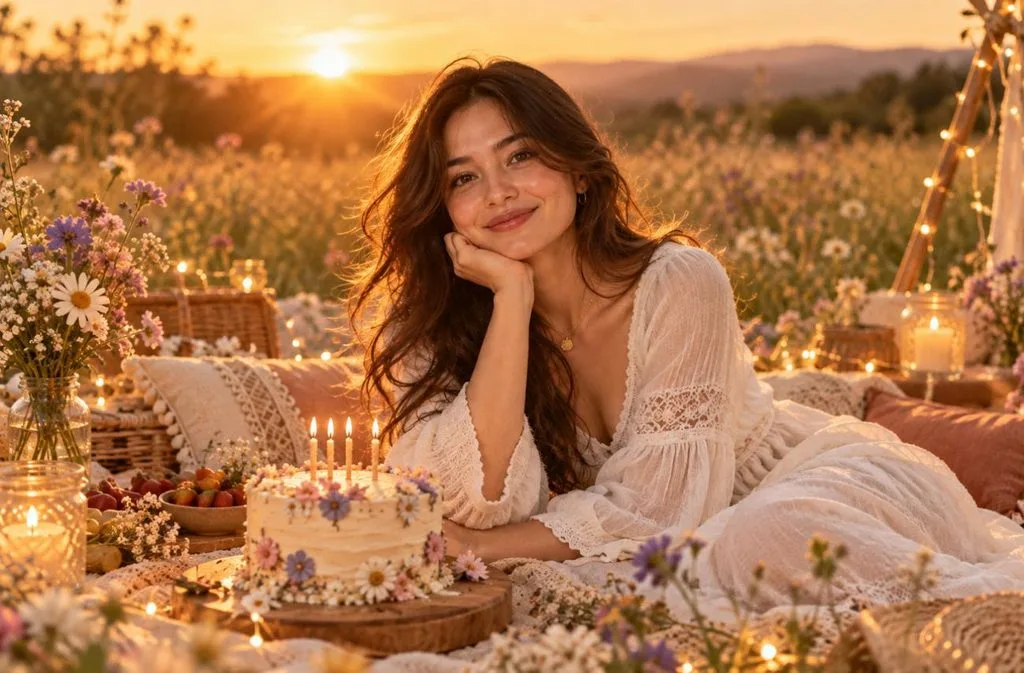
- 夕暮れのピクニック: Keep my face and hair from the photo unchanged. I’m at a boho picnic in a wildflower meadow at sunset, in a flowy white dress, with a small cake and fairy lights. Warm backlight, candid smile, film photo look.
- 華やかな夜のお出かけ: Keep my facial features identical to my photo. Show me in a sequined black dress at a rooftop party, raising a glass beside a gold “[25]” balloon, city lights blurred behind. Direct flash, glossy magazine style.
男性向けの誕生日写真プロンプト
男性向けのGemini誕生日写真プロンプトでは、体に合ったスーツ、スポーツをテーマにした演出、開放的な一本道など、服装や場所が仕上がりの鍵になります。光の当て方を明確に指定すると、イラストではなく実際の写真らしい見た目に近づけられます。
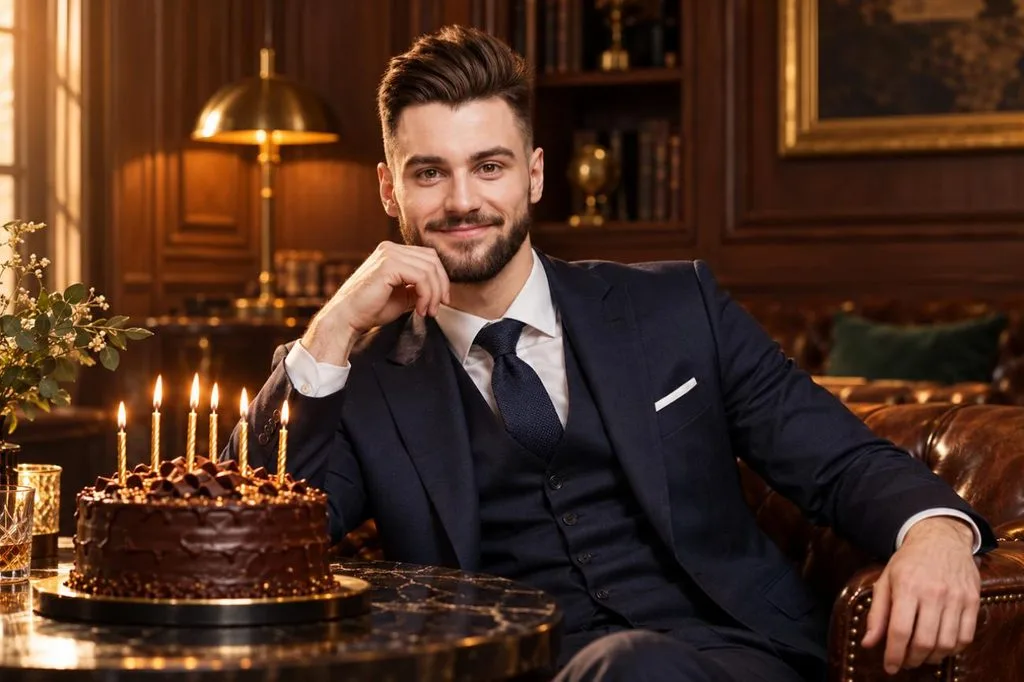
- クラシックなスーツ姿のポートレート: Keep my face exactly as it appears in the uploaded photo. Dress me in a navy three-piece suit beside a dark chocolate cake with gold candles in a wood-paneled lounge. Warm side light, confident expression, 50mm editorial portrait.
- スタジアムの誕生日ヒーロー: Use my photo and keep my face unchanged. I’m walking out of a stadium tunnel in a jersey with the number “[30]” as teammates cheer and confetti falls. Bright floodlights, low angle, sports poster energy.
- 砂漠のロードトリップ: Keep my face identical to my photo. Show me leaning on a vintage convertible on a desert highway at sunset, with a cupcake and one lit candle on the hood. Denim jacket, cinematic wide shot, warm orange tones.
節目の誕生日写真プロンプト
節目の誕生日には、大きな数字の風船、上品なディナー、雑誌の表紙風ポートレートなど、Gemini AIへのプロンプトも少し大胆な演出が似合います。数字や見出しを引用符で囲むと、Nano Banana 2が年齢を正しく描写しやすくなります。
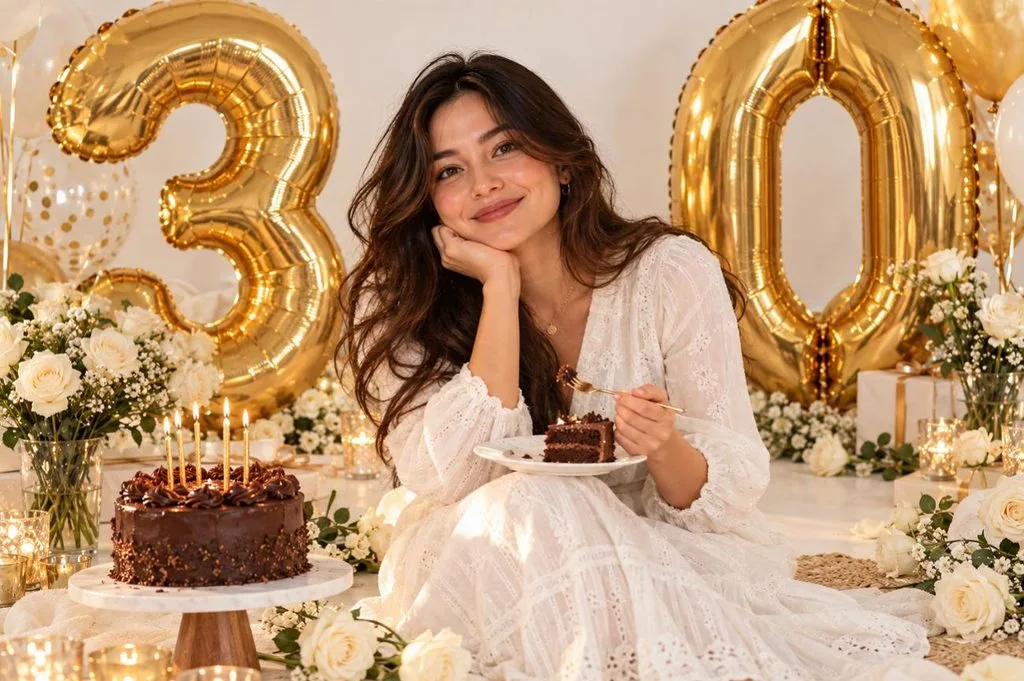
- 30歳を祝う数字の風船: Keep my face the same as in my photo. I’m sitting on a white floor between giant gold “3” and “0” balloons and white roses, laughing with a slice of cake. Bright, even light, clean lifestyle photo style.
- 40歳を祝う上品なディナー: Preserve my face from the uploaded photo. Show me at the head of a candlelit dinner table with eucalyptus runners and a “40” cake topper, friends raising glasses around me. Warm golden light, shallow depth of field.
- 50歳の輝きを飾る雑誌の表紙: Keep my face unchanged. Turn my photo into a glossy magazine cover with the headline “FABULOUS AT 50” in bold serif letters and a few small cover lines. Studio portrait lighting, confident pose, clean layout.
カップル・友人・家族の誕生日写真プロンプト
集合写真の誕生日プロンプトでは、全員の顔を同時に保つようGemini AIに指示する必要があります。Geminiはアップロードした2枚の写真を1枚の画像にまとめられるので、それぞれ別に撮影した写真しかない場合にも便利です。
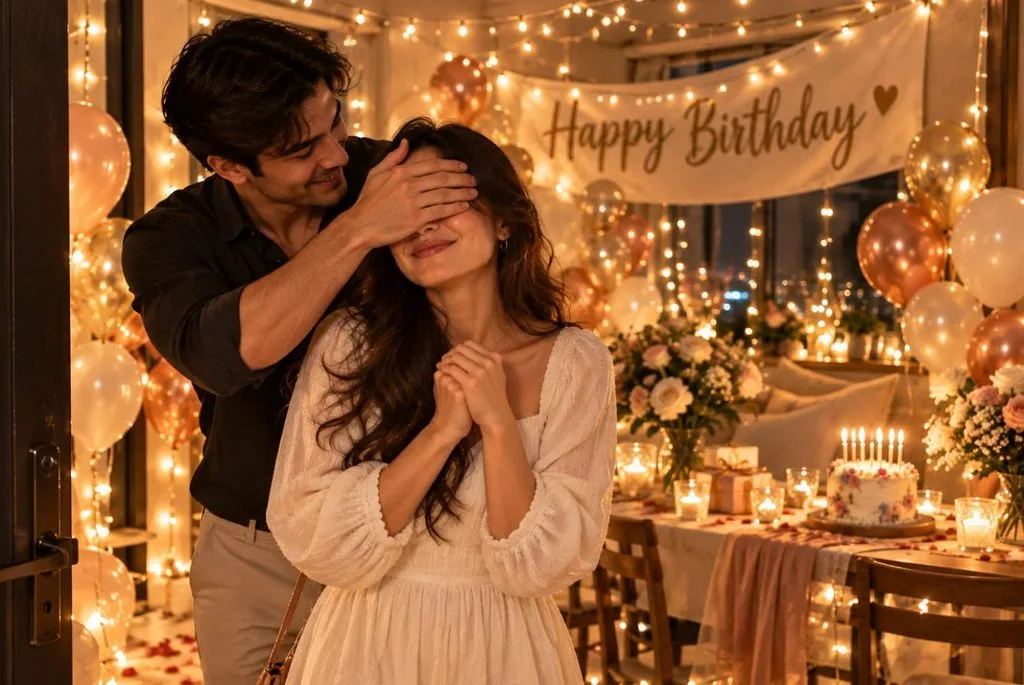
- カップルのサプライズ: Combine the two uploaded photos and keep both faces unchanged. One partner covers the other’s eyes as they step into a room full of fairy lights, balloons, and a “Happy Birthday [Name]” banner. Warm cinematic light, candid joy.
- フラッシュで撮る友人とのパーティー: Keep everyone’s faces from the uploaded group photo. Place us around a table blowing party horns under a canopy of streamers, with a tall rainbow cake in the center. Bright flash and a playful disposable-camera look.
- おばあちゃんの70歳の誕生日: Keep every face from my family photo unchanged. Show us gathered around my grandmother as she blows out the candles on a “70” cake in a cozy living room. Soft window light and warm, heartfelt documentary style.
遊び心のある個性的な誕生日写真スタイル
たとえば 3Dアニメ風、レトロなフィルム風、 ペットのパーティーポートレートといったスタイルは、シェアしたくなる誕生日の投稿や招待状にぴったりです。最初の1文でアートスタイルを指定すると、Geminiが通常の写真に仕上げてしまうのを防げます。
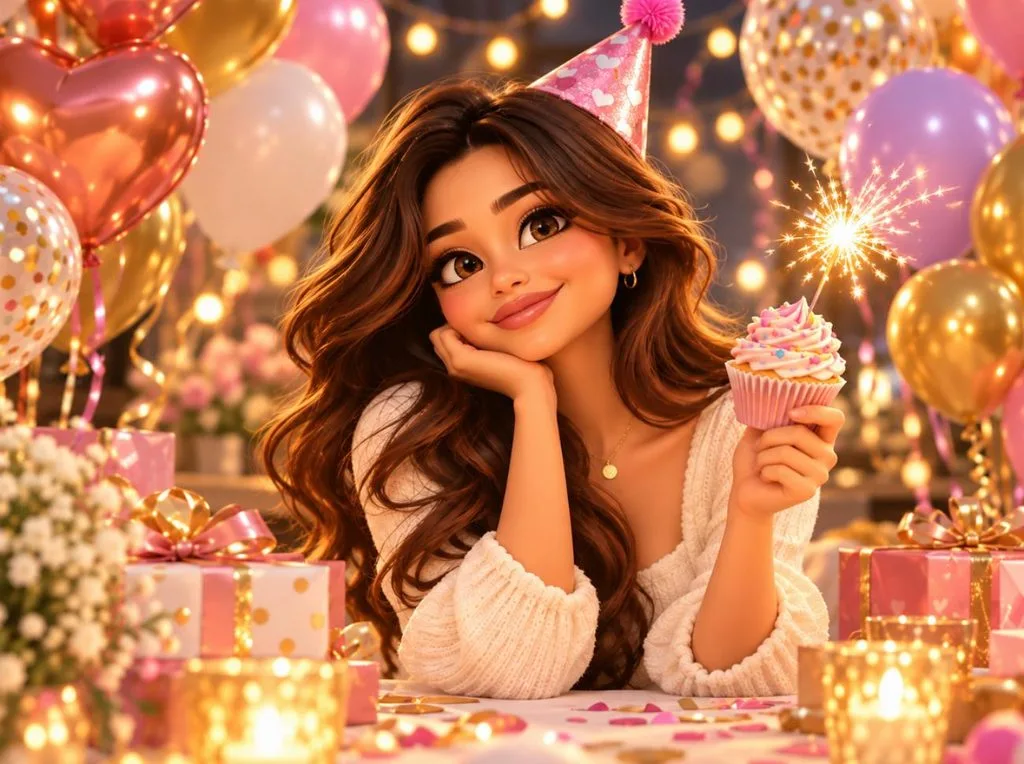
- 3Dアニメ風アバター: Turn my photo into a 3D cartoon character in a party hat, holding a cupcake with a sparkler among colorful balloons. Keep my hairstyle and facial features recognizable in a glossy animated-film style.
- 1970年代のホームパーティー: Leave my face exactly as it is in the uploaded photo. Recreate me at a 1970s house party with wood paneling, a tiered cake, and a record player, dressed in retro flares. Faded film colors, light leaks, and slight grain.
- ペットの誕生日パーティー: Use my dog’s uploaded photo and keep its face and markings exact. It wears a tiny party hat beside a dog-friendly cake with one candle, surrounded by toys and balloons. Bright kitchen light, cheerful close-up.
MagicLight AIで誕生日画像を動画にする方法
誕生日の画像に自然な動き、カメラワーク、クリエイティブなエフェクトを加えると、高品質な動画に仕上げられます。 MagicLight AI は最大1,500文字のプロンプトに対応しているため、各シーンをより細かく指定できます。ImageパネルにはNano Banana 2も搭載されており、アニメーションにする前に誕生日の画像を作れます。次の手順で、完成した画像を思いどおりの動画にしてみましょう。
ステップ1. 誕生日写真をアップロードする
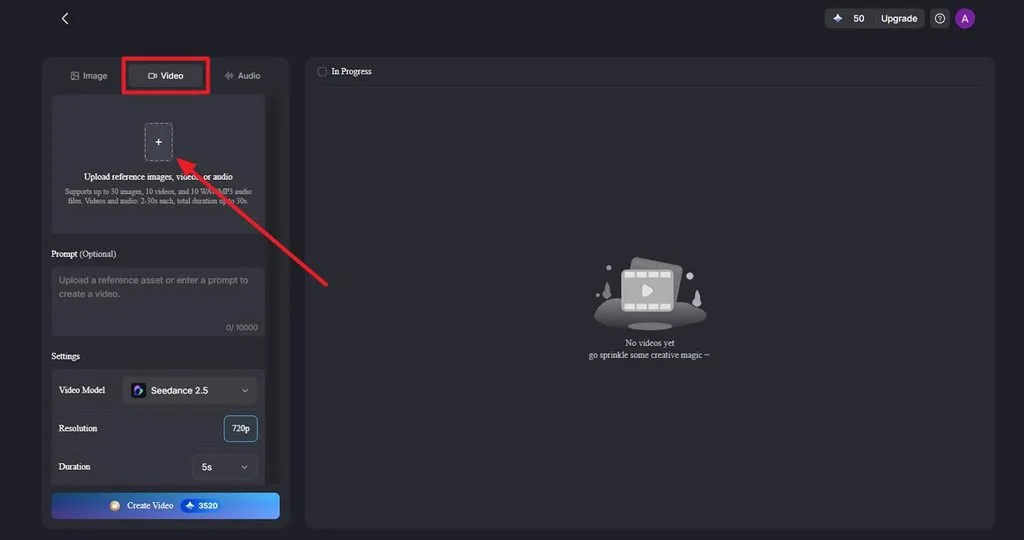
まず、 Image to Video を開き、完成した誕生日画像をJPG、JPEG、PNGのいずれかの形式でアップロードします。紙吹雪が舞う様子、ろうそくの炎の揺らぎ、自然な表情、カメラがゆっくり近づく動きなどを説明するプロンプトを追加します。
ステップ2. 動画の設定を選んで生成する
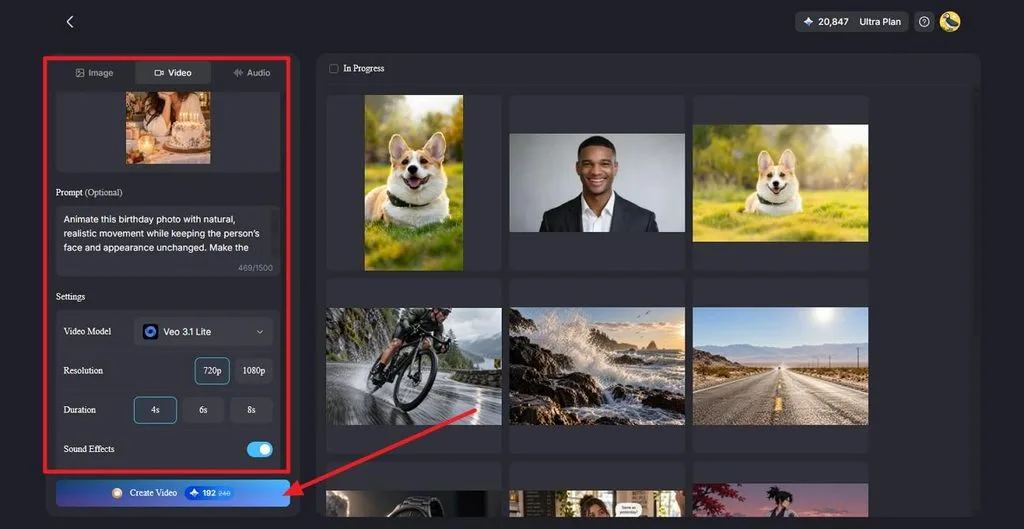
まず、 Video Modelでモデルを選び、続いて Resolution で解像度、 Duration で誕生日動画の長さを指定します。必要に応じて Sound Effects をオンにしてから、 Create Video をクリックすると、アニメーションが生成されます。誕生日のお祝いメッセージを話す動画にしたい場合は、 Lip Sync を使うと、ポートレートがあいさつに合わせて口を動かすようにできます。
ステップ3. プレビューしてダウンロード・共有する
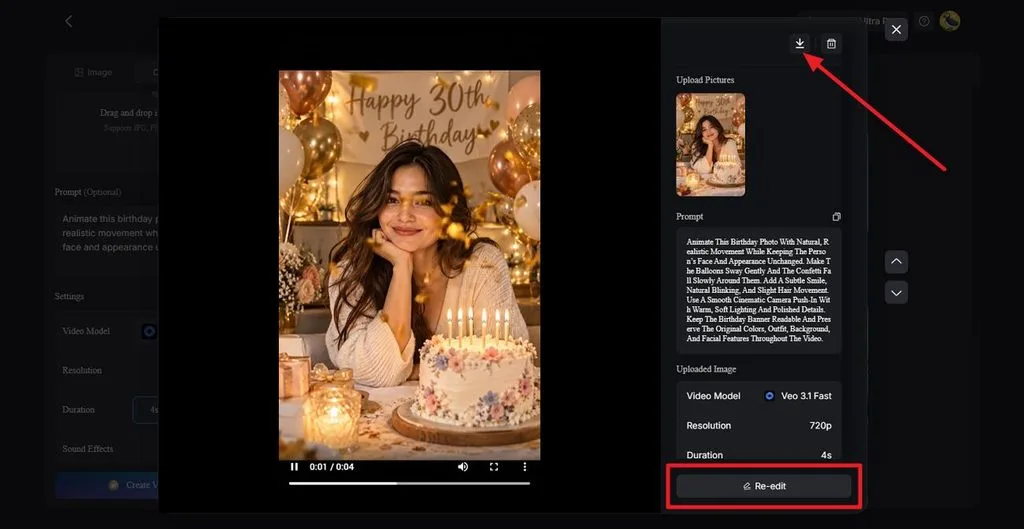
生成された動画をプレビューし、顔、動き、シーン全体の仕上がりを確認します。調整が必要な場合は Re-edit を使い、完成した動画を保存するには Download をクリックします。音楽付きの誕生日動画にしたい場合は、 Music Video を使うと、お祝いのシーンを音楽に合わせた1本の動画に仕上げられます。
まとめ
Gemini AIで誕生日写真を作るプロンプトでは、顔を変えないよう指示し、服装、小物、光、入れたい文字を具体的に伝えることが大切です。女性向け、男性向け、節目の誕生日、グループ写真、個性的なスタイルの例があれば、ほとんどのお祝いに対応できます。さらにMagicLight AIを使えば、お気に入りの画像を、動きやせりふ、音楽のある誕生日動画にできます。
よくある質問
1. Gemini AIで誕生日写真を作るのにおすすめのプロンプトは?
本人とパーティーの雰囲気に合うものが一番ですが、まずは顔を変えないよう指示し、1つのシーンを詳しく説明するプロンプトがおすすめです。女性の誕生日写真用にコピーして使えるGemini AIプロンプトを探しているなら、パステルカラーの風船ポートレートから試してみてください。
2. Gemini向けの誕生日写真プロンプトはどう書けばよいですか?
最初に、アップロードした写真の顔を変えないようGeminiに指示します。次に、服装、場所、小物、照明、撮影スタイルをわかりやすい文章で説明し、ケーキやバナーに入れる文字は引用符で囲みます。Googleも、詳しく説明するほどGeminiが指示に従いやすくなると案内しています。
3. 自分の写真からGeminiで誕生日写真を作れますか?
Geminiは、アップロードした写真を誕生日のシーンに編集できます。また、カップルの写真など、2枚の写真を1枚の画像にまとめることも可能です。写真編集を利用できるのは18歳以上のユーザーに限られます。本人らしさをできるだけ忠実に再現するには、正面から撮った鮮明な写真を使いましょう。
4. Gemini AIの誕生日写真は無料で作れますか?
Nano Banana 2による画像生成は、無料プランを含むすべてのGeminiプランで利用できます。ただし、利用上限があり、変更される場合があります。Nano Banana Proでやり直す機能にはGoogle AIの有料プランが必要で、すべての画像には目に見えないSynthIDの透かしが入ります。