


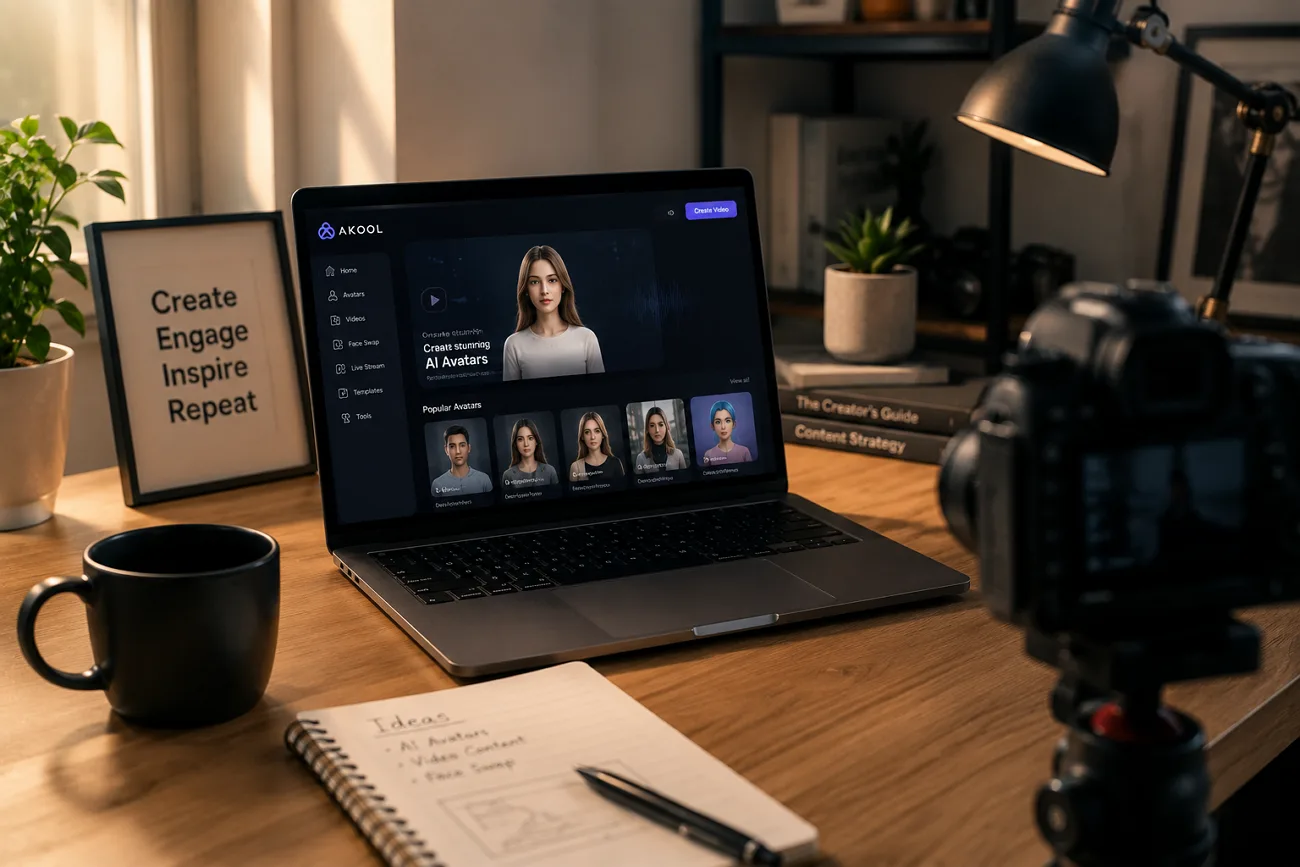
Face swap tools rarely survive contact with professional work. Watermarks, resolution caps, and murky licensing tend to surface right when a client deadline does.
Akool AI has spent the past two years building past those problems, and the result is a video suite that large brands actually deploy. This review looks at what it handles well, what its plans really permit, and where a different tool serves you better.
Part 1. What is Akool?
Akool AI is a cloud-based video platform that transforms existing footage instead of creating it. It combines face swapping, video dubbing, avatar presenters, and voice cloning in one browser workspace. An API and iOS app extend its accessibility. Marketing teams, agencies, and localization departments form its primary audience.
Moreover, Akool develops many of its AI capabilities in-house, helping it expand features like live avatars and face swap quickly. The platform holds prominence in providing marketing agencies with a platform to revolutionize their basic content creation with generative tools. Coco-Cola is among the companies that have used Akool for AI-powered content creation.
Key Features of Akool
- Face Swap: Replaces faces in videos or images while preserving expressions, lighting, and head movements, with up to 8K output on higher plans.
- Video Translator: Dubs videos into 155 languages and synchronizes lip movements with the translated audio.
- Avatar Video: Turns written scripts into presenter-led videos, while Streaming Avatar delivers real-time AI presenters.
- Live Camera: Applies AI face transformation during Zoom, Microsoft Teams, and other video calls through a virtual camera.
- Talking Photo: Animates a single portrait into a speaking video with realistic lip synchronization.
- Additional AI Tools: Includes voice cloning, AI background generation, image-to-video creation, and access to models such as Kling and Wan.
Akool Pricing
The table below compares Akool AI free and paid plans. Pricing is credit-based rather than minute-based, a frequent user complaint. Annual billing saves about 30%, while each tier changes resolution, processing speed, and licensing rights.
| Plan | Price | What You Get | Main Limitation | Best For |
| Starter | Free | 200 credits, 1080p output | Limited credits, no Unlimited Mode | Trying Akool AI |
| Pro | From $21/seat/month | 4K output, all AI models | Personal-use license | Individual creators |
| Pro Max | From $41.30/seat/month | 8K output, API, Studio Voice | Personal-use license | Heavy solo creators |
| Business | From $174.30/seat/month | 16K output, Studio Avatar, fastest processing | Per-seat pricing | Agencies & teams |
| Enterprise | Custom quote | Dedicated servers, VIP support | Contact sales required | Large organizations |
The Akool free tier is permanent rather than a countdown trial, which makes evaluation genuinely low-risk. Pricing does shift, so confirm the current figures before committing to an annual term.
Pros and Cons of Akool
Before choosing the platform, you may wonder is Akool AI safe. The pros and cons below cover its key benefits and trade-offs:
Pros
- Face swap quality holds up on side profiles and high-motion footage.
- Translation spans more than 155 languages with convincing lip sync.
- Real-time avatar tools run further ahead than most competing platforms.
- A mobile Akool app extends the workflow beyond the desktop browser.
- The free tier is permanent rather than a countdown trial.
Cons
- The credit system makes costs hard to predict before generating.
- Pro and Pro Max plans carry personal licenses, not commercial ones.
- Free exports arrive watermarked and capped at 720p.
- Subtle facial expression and body movement still read as stiff.
Part 2. How to Work with Akool?
If you're wondering how to work with Akool, follow the steps below to complete your first project.
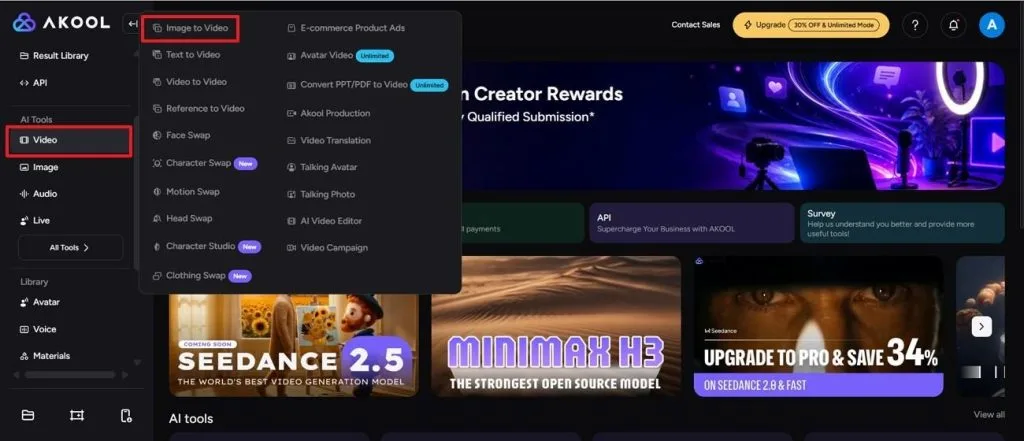
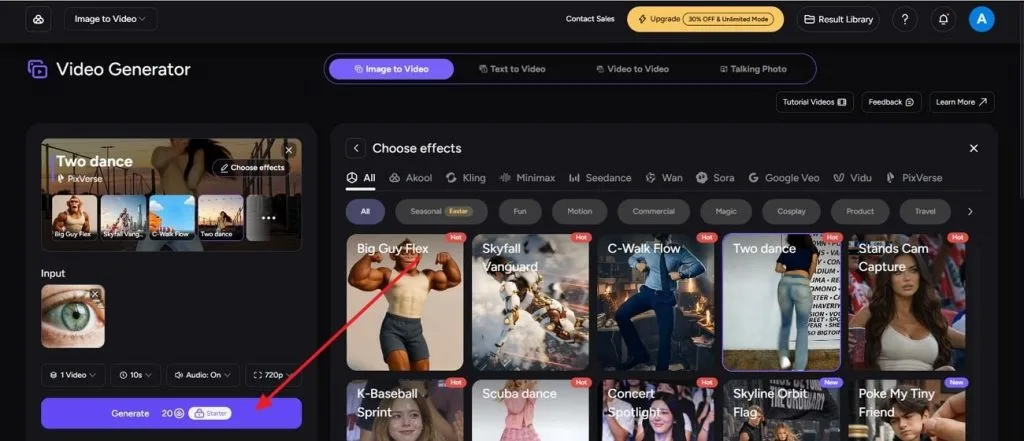
Step 1. Sign in to Akool AI and open the Video section from the left sidebar. Select Image to Video from the available AI video tools to start a new project.
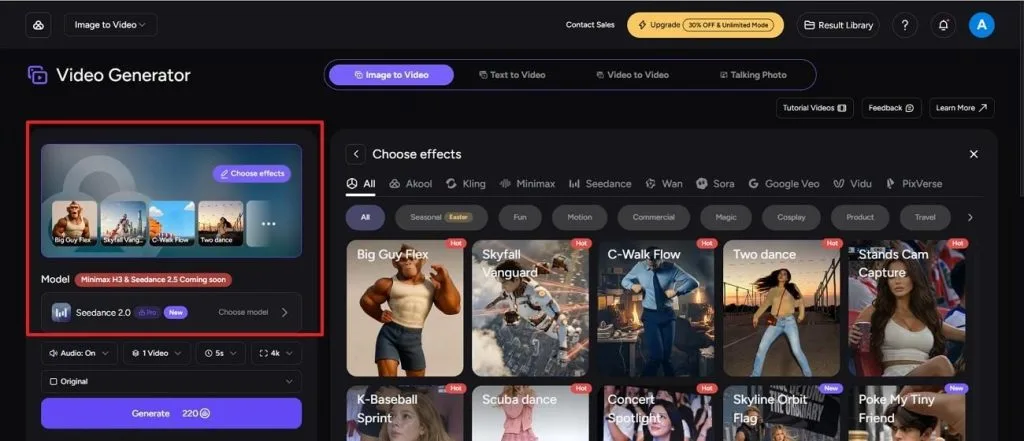
Step 2. Browse the available effects and pick one that matches your video style. Then select an AI Model, adjust the output settings, and confirm your preferred generation options.
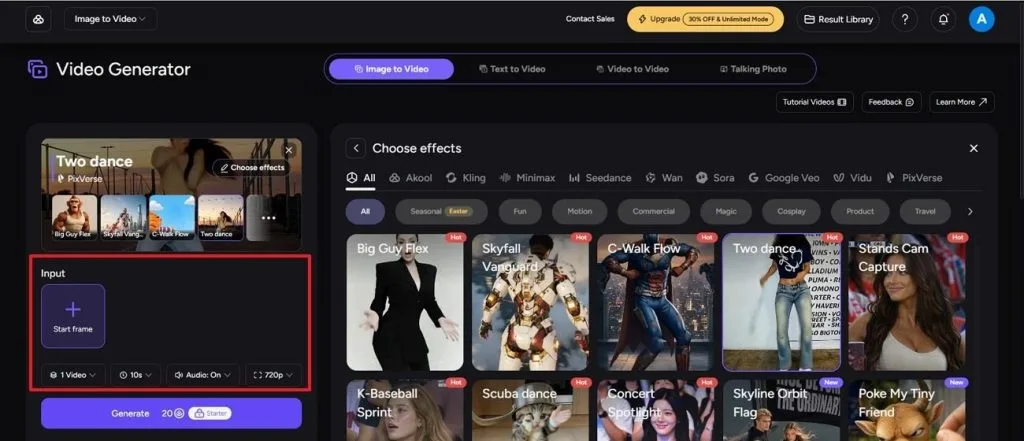
Step 3. Click the Start Frame box to upload the image you want to animate. Once the upload finishes, review the duration, resolution, and audio settings before continuing.
Step 4. Press Generate to create the video. After processing is complete, preview the result in the Result Library and download it if you're satisfied with the output.
Part 3. Best Alternative to Akool for Video Creation
Some projects begin with nothing more than an idea. There is no actor to swap, no video to dub, and no portrait to animate. Most of Akool's tools depend on existing media before production can begin. In those situations, finding the right Akool AI alternative becomes important. Magiclight AI starts from a blank page instead.
Its conversational AI turns a simple prompt into a complete script, storyboard, character plan, and production workflow before generating the final video. Unlike Akool's closed model ecosystem, Magiclight AI supports more than 20 leading AI video models, including Kling, Veo 4, Seedance 2.0, Seedance 2.5, and Hailuo. That flexibility makes it a stronger choice for creators producing original videos from scratch rather than transforming existing content.
Key Features of Magiclight AI
- MagicLight Agent: A conversation replaces the usual settings forms. Describe an idea and the agent proposes a format, drafts the script, builds the storyboard, then offers production plans at different budget levels.
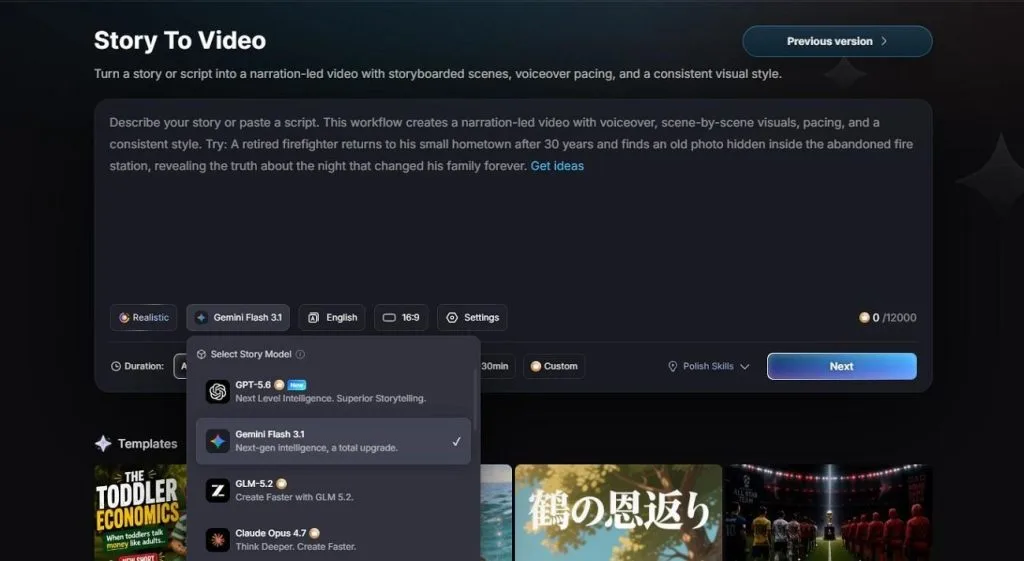
- AI Story Models: Choose from dedicated story-generation models, including GPT-5.6 and GLM 5.2, to develop scripts, scene structures, and narrative flow before video production begins.
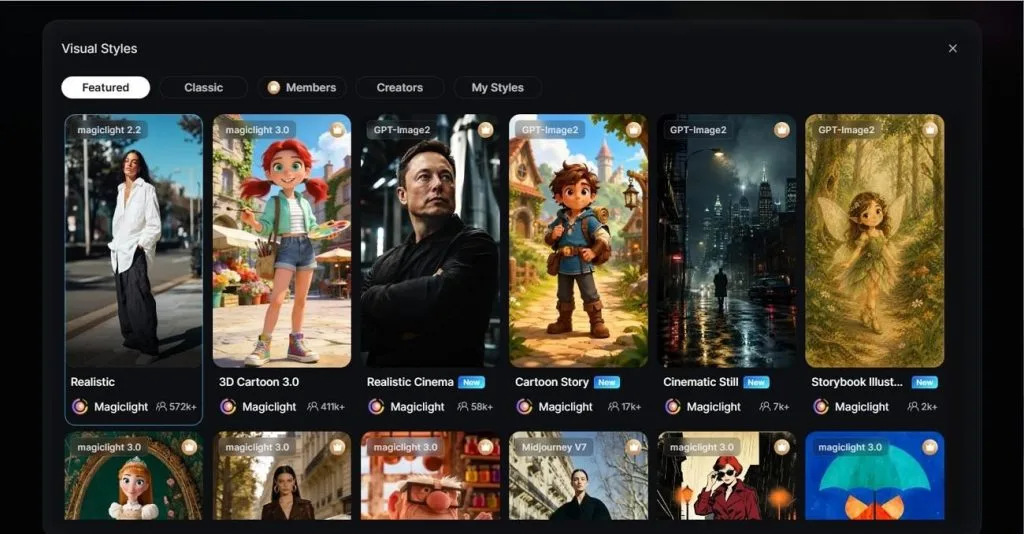
- Visual Styles: More than 50 style presets run across 4 model families. The range covers Ghibli, Pixar and cinematic looks alongside narrower ones such as wuxia, folktale and bible art.
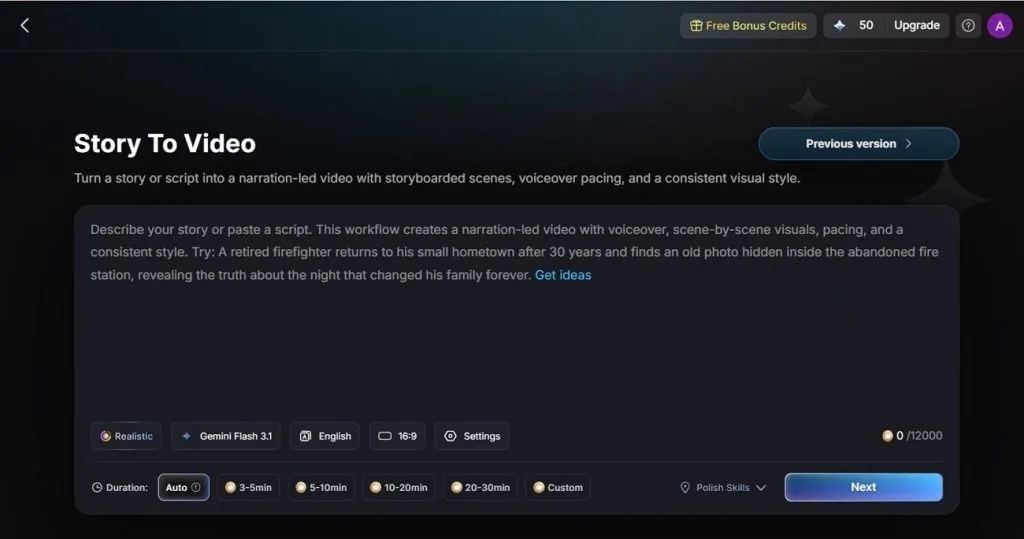
- Story to Video: Turn scripts up to 12,000 characters into videos lasting 50 minutes. Choose from 11 output languages and customize the project before generation begins.
- Asset Store: A marketplace of reusable characters, visual styles, voice emotions and perfect skills. Creators build their own from uploaded images or recorded voice samples, then keep them private or publish them.
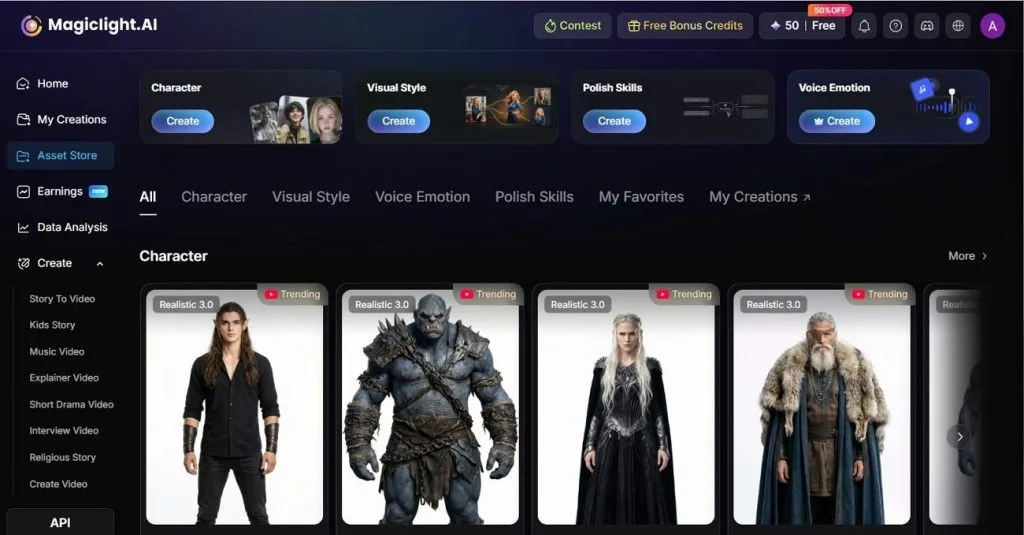
- Creation Modes: Offers 8 dedicated creation modes that support formats such as Short Drama, Music Video, and Religious Stories, each tailored to its own workflow and duration.
Part 4. Comparison Table Between Akool and Magiclight AI
Not every project needs the same workflow. The table below compares Akool with a leading Akool alternative across key features:
| Feature | Akool | Magiclight AI |
| Core Purpose | Transforming existing footage and faces | Generating video from a written script |
| Script Input | Not the starting point | Accepts a 12,000-character script |
| Maximum Length | 45 to 60 minutes on expensive plans | Up to 50 minutes per project, or you can choose a custom length with a paid plan |
| Character Consistency | Temporal consistency inside a swapped clip | One saved cast reused scene to scene |
| Storyboard Control | Not offered | Generated automatically, editable, with 50 poses |
| Voice | Voice cloning, Studio Voice on upper tiers | 37 voiceovers with cloning |
| Subtitles | Produced through translation output | 16 subtitle settings |
| Visual Style Range | Photorealistic by design | 50+ presets across four style families |
| Free Plan | Permanent Basic tier, watermarked at 720p | Free plan available |
| Commercial License | Business tier or higher | Paid plans |
| Best Suited For | Localization and face-led ad variants | Original narrative video |
Rather than competing feature for feature, the platforms solve different problems. Magiclight AI is better suited to producing original videos, while Akool focuses on enhancing and transforming existing content.
FAQs on Akool
1. Can I use Akool for free?
Yes, and the Basic tier is permanently free rather than a countdown trial. It caps you at 5 text-to-speech uses, 5 voice clones, and 5 minutes each of live face swap and video translation. Every Akool AI free export carries a watermark at 720p.
2. Is it permissible for me to utilize the videos for the purpose of business service to my clients?
Not on every plan, despite what the tier names suggest. Akool labels Pro and Pro Max as personal-use licenses, so client delivery requires the Business tier or above. Magiclight AI grants commercial rights across its paid plans, which is simpler when client work is the point.
3. What are some use cases for the video translation application?
Localizing campaign videos for new markets, dubbing training material for distributed teams, and adapting one product demo across several regions without refilming. Magiclight AI reaches the same goal from the other direction, generating the video in one of 11 languages from the start.


![How to Write a Script for a Short Film in 2026 [Beginner’s Guide]](https://magiclight.ai/wp-2/wp-content/uploads/short-film-screenplay-writing-guide-300x169.webp)


