


Video content is now the biggest trend across the internet, and people want faster ways to produce videos. One rising tool is Hailuo AI, which turns ideas into videos in a few easy steps. Still, users should understand its features, limitations, and available alternatives. So, this article gives you a full breakdown of the tool, and you will also discover a great option to consider.
Part 1. What Is Hailuo AI?
Hailuo AI is an advanced AI-powered content creation platform developed by the Chinese tech company MiniMax. It specializes in generating cinematic videos from detailed prompts up to 2,000 characters and still images. The tool is known for its ability to produce highly realistic micro-expressions and movements. Moreover, it uses start and end frames to guide smoother scene changes in videos.
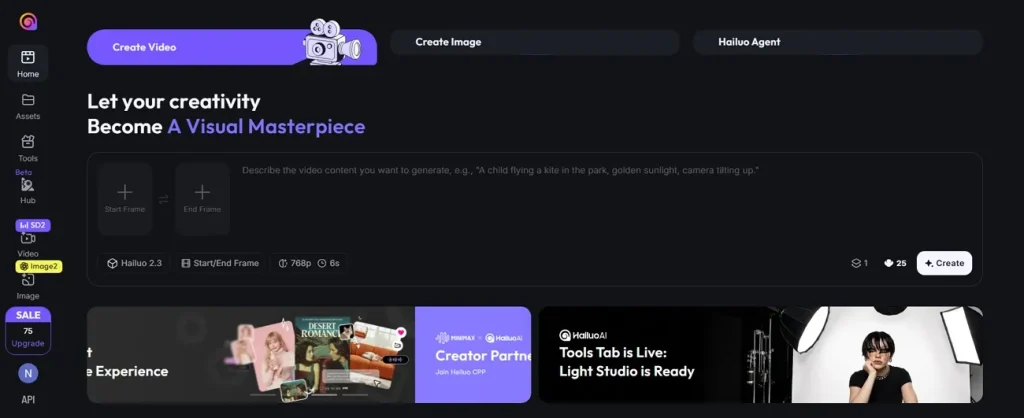
While using this, users can access 11 AI models, including Veo 3.1, for different video styles. During the video generation process, Hailuo AI Video Generator maintains character consistency across multiple scenes. It even allows users to create up to 10-second video clips in 720p resolution easily.
Key Features of Hailuo AI
- Style Variety: Supports different visual styles, including anime illustrations, ink art, and gaming graphics.
- Motion Analysis: Analyzes scene details to create natural movements that fit visual elements smoothly.
- Camera Controls: Offers camera angles, movements, and perspectives for creating stronger cinematic video effects.
Part 2. How Hailuo AI Video Generator Works
Check how Hailuo AI video tools handle prompts for cinematic video creation. This section covers the full workflow for producing AI videos smoothly:
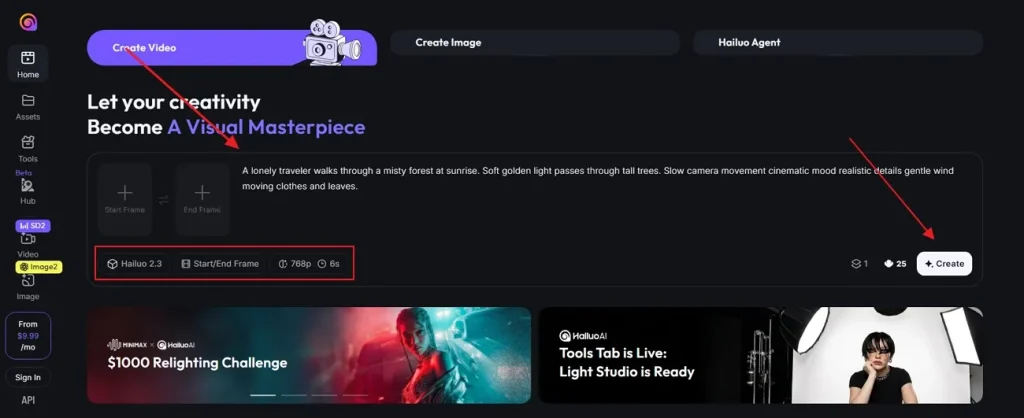
Step 1. To start, access the official website of Hailuo AI and choose the Create Video section. After that, enter your prompt in the given Text Box and adjust the Settings from the provided options, then opt for Create.
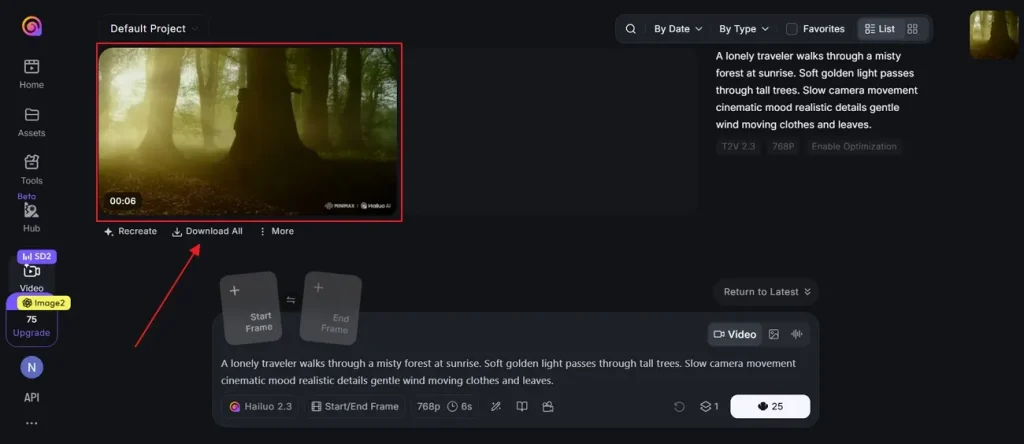
Step 2. When your AI video is generated, watch it to confirm everything. If you are satisfied with the output, then press the Download All option to save it.
Pros and Cons of Hailuo AI
Before choosing Hailuo AI MiniMax, users should understand its strengths and weaknesses. So, this specific part explains some key advantages and notable platform limitations of this tool:
Pros
- Produce professional 1080p HD videos with film-grade visuals and realistic motions.
- Delivers natural lighting effects for more polished and cinematic video scenes.
- Offer smooth visual enhancements for stronger storytelling and audience engagement.
Cons
- Fast-moving scenes can show blur and unwanted visual distortions.
- Limited clip duration restricts detailed storytelling and longer video narratives.
- Output quality sometimes changes depending on prompt detail and complexity.
Part 3. Try Magiclight AI: The Strong Alternative to Hailuo AI
After reviewing minimax Hailuo AI, certain limitations can reduce the overall experience for demanding creators. Following this review, many users search beyond the AI video generator Hailuo's capabilities. In this situation, MagicLight AI presents itself as a capable and practical solution. This AI-powered platform accepts scripts up to 12,000 characters for longer cinematic storytelling video production projects.
Moreover, it maintains consistent character appearances across scenes for smoother storytelling and visual continuity. While using its Story-to-Video feature, users can generate long-form AI videos of up to 50 minutes for detailed storytelling projects. The tool creates multi-step scene sequences instead of static storyboard descriptions automatically. MagicLight AI has 8 director modes that control cinematic storytelling and scene presentation styles creatively.
Key Features
- Nano Adjustments: Refines clothing expressions, poses, and body details through advanced Nano Storyboard technology for precise movement control.
- Music Creation: Generates original music based on genre selections and the user's creative input automatically.
- Story Models: Includes 12 advanced story models for generating structured and engaging narrative video scripts.
Complete Guide to Generate a Desired AI Video with MagicLight AI
If you want to generate cinematic, realistic, and flexible video content, then review the steps below:
Step 1. Start a New Video Project
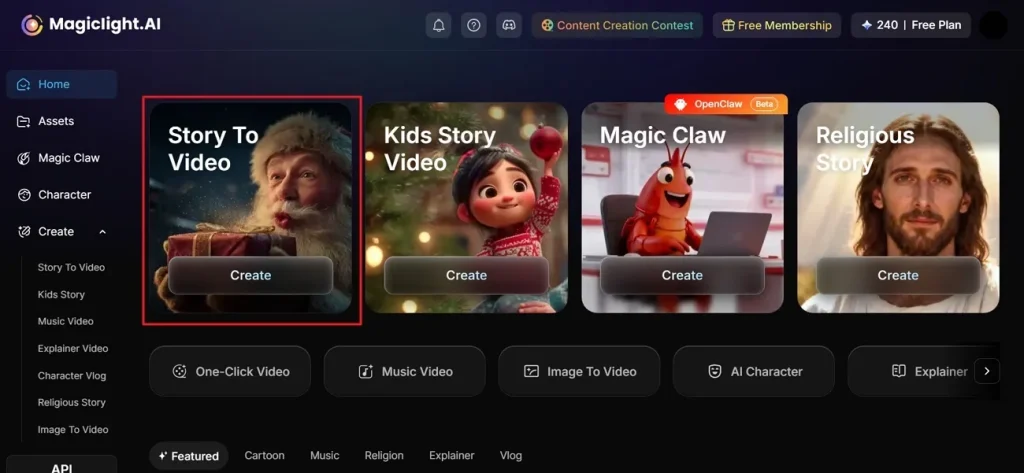
To start, opt for the Story to Video option from the main screen of MagicLight AI.
Step 2. Describe Idea and Modify AI Video Settings
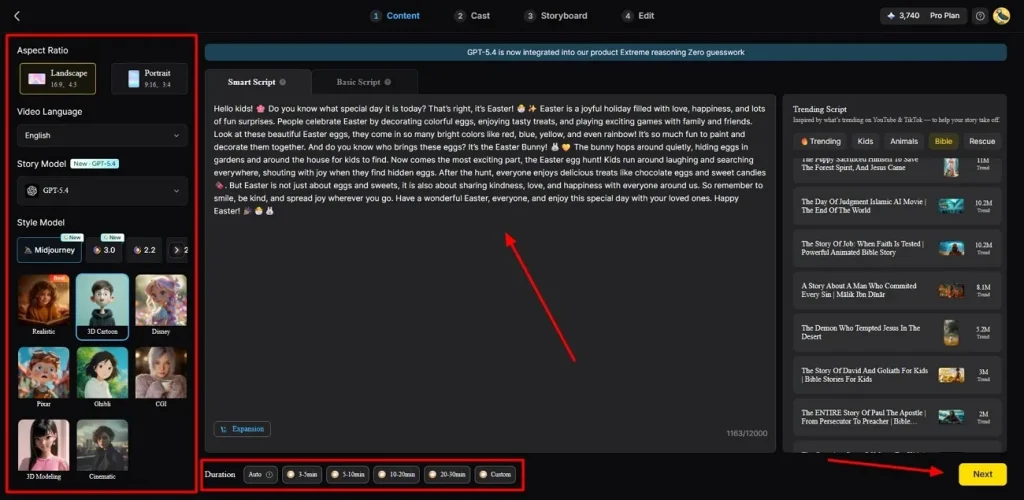
Afterward, enter your story idea inside the provided Text Box and choose the preferred Video Language from the left side panel. Then, select the required Aspect Ratio according to your content style and pick an AI Story Model such as GPT-4. Next, choose a Style Model like Disney or 3D cartoon for visual appearance. Using the available settings, adjust the Video Duration and click the Next button to continue.
Step 3. Clarify Generated AI Video Summary
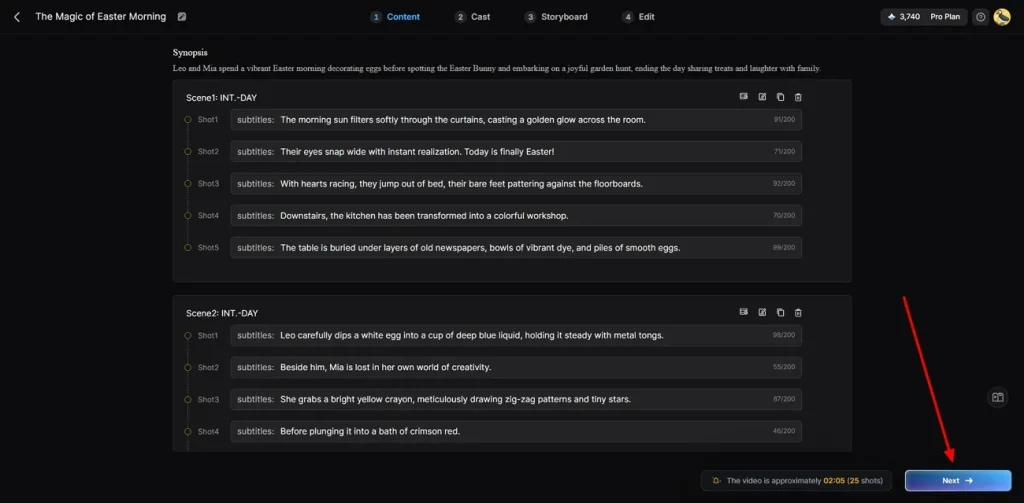
Now, the tool generates a complete AI video scene and flow for careful preview. If all scenes match your expectations, opt for the Next button to continue. Additionally, you can edit or delete those scenes that do not fulfil your needs.
Step 4. Pick or Create Digital Characters
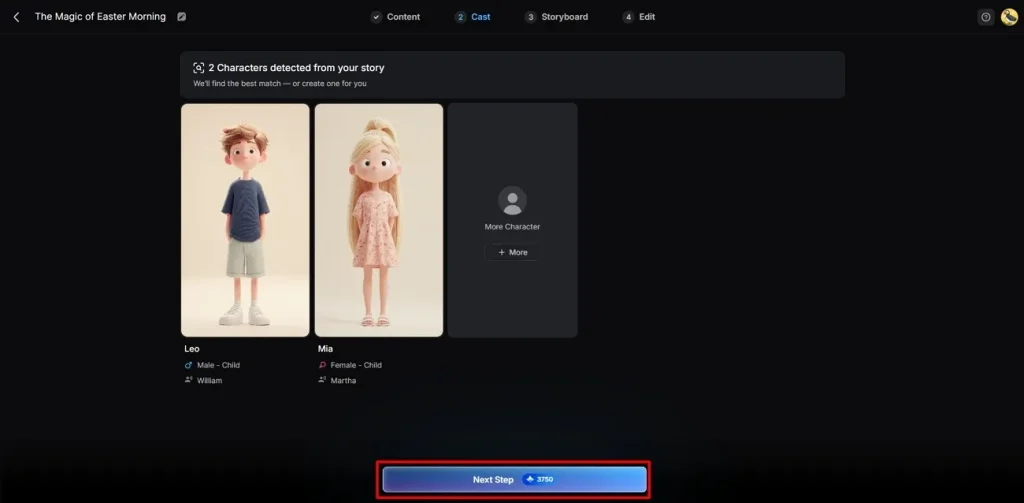
Next, the tool recommends characters according to your chosen story theme and style preferences. You can pick characters from the library or create a custom one using the More Character option. After selecting your character, click the Next Step button to proceed further.
Step 5. Change the Selected Characters' Appearance
In the Storyboard section, users can control Voiceover Speed and modify each scene separately. MagicLight AI also allows easy changes to Outfits, Expressions, Poses, and full character look. After completing all changes, opt for the Next button to move further.
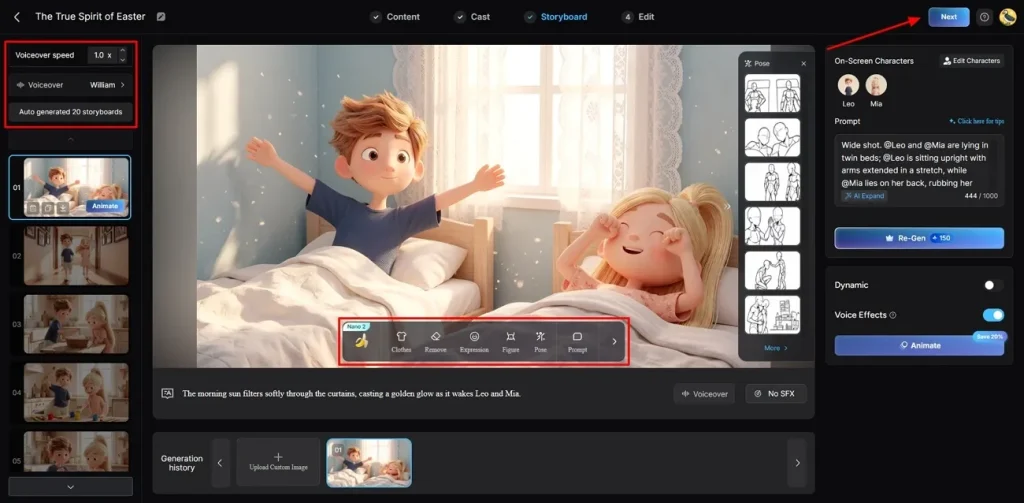
Step 6. Add Music and Subtitles
At this point, go to Subtitle Settings and generate subtitles to your AI-generated video. Then choose Background Music that matches the mood and feel of your video. After checking all settings carefully, opt for Generate to create your final AI video.
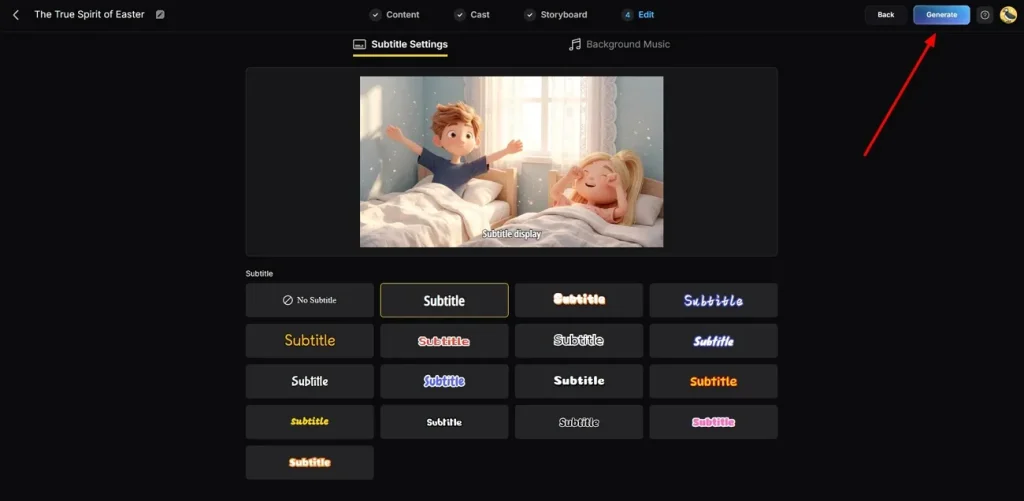
Step 7. Preview and Download Video
Finally, preview your AI-generated video using the built-in playback option on the platform. You can also add Thumbnail Text or Hashtags before exporting the final output. If everything looks correct, click the Download button to save the video to your device.
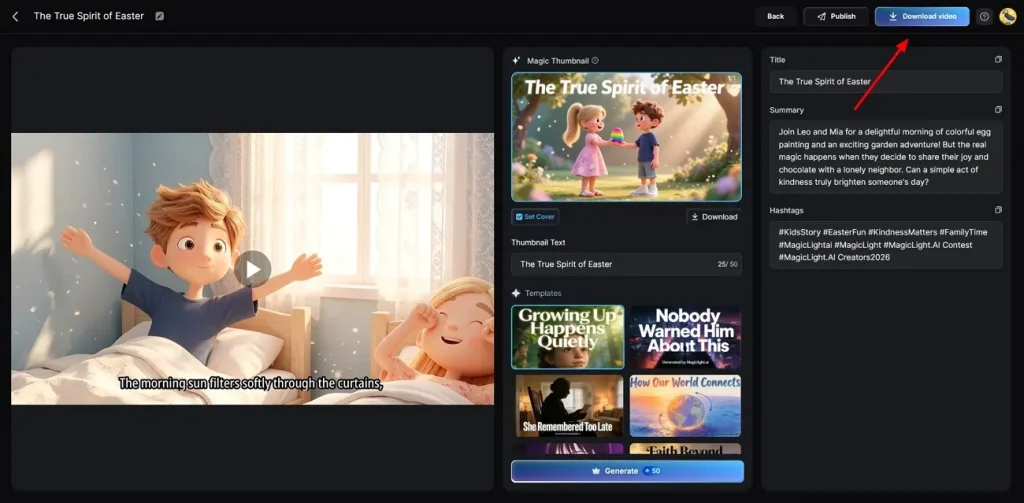
Part 4. Is MagicLight AI Better Than Hailuo AI?
Many users compare MagicLight AI after understanding Hailuo AI features and limits. Let's explore the table below to see which platform offers better results:
| Feature | Hailuo AI | MagicLight AI |
| Video Length | Up to 10 seconds | Up to 50 minutes |
| Script Capacity | Up to 2000 characters input | Up to 12000 characters input |
| Story Structure | Basic scene generation | Full narrative storytelling |
| Model Support | 11 AI models | Multiple 12 advanced models |
| Scene Control | Basic motion control | Advanced cinematic control |
| Music Integration | Background music sync | Full AI-generated music system |
Conclusion
In summary, Hailuo AI delivers amazing visual effects and smooth physics simulations for creators. Yet, managing multiple characters across different cinematic scenes remains a major challenge on the platform. If you need to build long video projects with consistent characters, you need a stronger tool. Therefore, MagicLight AI offers the perfect solution for keeping characters uniform across long movies.
FAQs on Hailuo AI
1. Can Hailuo AI convert images to videos?
Yes, Hailuo AI can convert images into short animated video clips easily. It adds motion effects and simple cinematic movement to static pictures. To create stunning videos from images with custom edits, MagicLight AI offers stronger long-form image-to-video features.
2. Is Hailuo AI free to use?
Hailuo AI offers free access with limited credits for new users daily. However, the free plan includes restrictions on resolution and video length output. In contrast, MagicLight AI provides broader creative options depending on the selected plan level.
3. Is Hailuo AI good for beginners?
Yes, Hailuo AI is designed with a simple interface for beginners. Users can quickly generate videos without learning complex editing tools. It is highly recommended for anyone starting their video creation journey this year.
4. What are the limitations of the Hailuo AI free plan?
Free users can only download clips with watermarks and cannot use them for business. Your creations are limited to low resolutions, and you must wait in long queues. To avoid these limitations, MagicLight AI provides a smoother experience for advanced creators.
5. What are the best Hailuo AI alternatives?
Several AI tools offer stronger features, depending on the creative needs. However, if you need a fast program that turns stories into clips, MagicLight AI is a strong alternative. It delivers amazing results for social media creators without high monthly costs.


![How to Write a Script for a Short Film in 2026 [Beginner’s Guide]](https://magiclight.ai/wp-2/wp-content/uploads/short-film-screenplay-writing-guide-300x169.webp)


