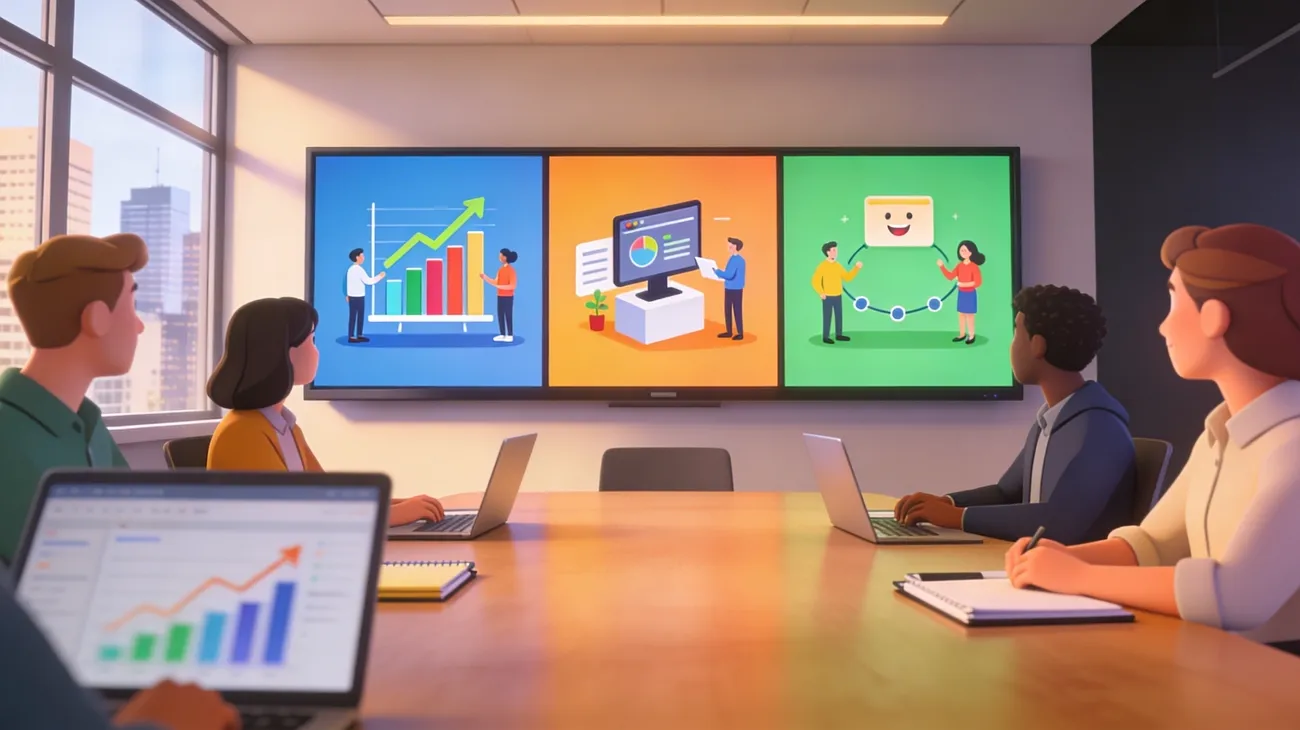
A strong digital presence requires more than simple content, as audiences now prefer easily digestible information. In this context, animated marketing videos have emerged as a vital tool for businesses looking to communicate their message with impact. Through a combination of motion, design, and storytelling, animation enables brands to present complex concepts in a simple, compelling way.
In fact, their versatility allows them to be utilized in advertisements, product demonstrations, and social media campaigns. As competition continues to intensify, the guide below provides peace of mind, covering the best 15 animated marketing content from YouTube.
Part 1. 15 Animated Marketing Videos for Businesses Explained
The answer to “why animated video marketing is growing fast” is that businesses consider content that is easy to understand. With this perspective in mind, we’ve hand-picked some animated clips for businesses to sell, educate, and build trust online:
1. Accelerant – Insurance Platform Explainer
This video turns complicated insurance and risk management into a simple story, using characters and icons. Plus, it shows how Accelerant helps partners grow faster by incorporating data and technology.
2. Product Introduction Animation for Software
Such product information animation videos give businesses their very first look at a new product (what it is, who it's for). Here, visuals focus on clean motion graphics and simple characters, so people can see how the product fits in. With Magiclight.ai, creating these animation videos is fast and easy, helping businesses showcase their products with professional-quality visuals and engaging storytelling.
3. Chargebee – Subscription Billing Video
Chargebee's explainer shows how their platform fixes billing by consolidating all subscriptions, invoices, and payments into a single system. The video uses pain-solution storytelling, clear visuals, and a strong ending message, making the product easy to remember.
4. B2B Animated Commercials Compilation
Another animated marketing video for business that compiles several strong B2B commercials and explains why they work. It's useful if you want to explore many styles, such as explainer, promo, and brand story, helping businesses sell to other businesses.
5. SAP – Animated B2B Story
SAP’s animated clip focuses on solving big business challenges using clear, visual storytelling. Besides this, it's a perfect example of how to talk to enterprise buyers without being boring.
6. Mango Animate – Digital Marketing in 1 Minute
One more animated video that gives a quick, clear overview of what digital marketing is and how it helps businesses grow. Precisely, it covers the main strategies of video marketing, content marketing, and SEO, assisting viewers learn broadly.
7. CreateStudio – Digital Marketing Explainer
It clearly demonstrates with stepwise guidance how digital marketing helps a business move from "no online presence" to the right people. The animation style is simple yet professional, with smooth transitions, making it easier for small businesses to follow the message.
8. BrightInsight – Disease Management Solution
One more animated marketing video production, which explains how BrightInsight’s digital Disease Management Solution supports patients and doctors. The video highlights special interfaces for healthcare providers, who can see patient trends directly in their workflow.
9. Animated Social Media Ad Video
It's a video that opens with a strong hook and then uses fast-paced motion, bold photography, and simple icons to show the main benefit. It has multiple short videos for promos, announcements, and more, helping businesses turn their ideas into scroll-stopping pieces.
10. SaaS / Software Explainer Animation Video
A SaaS/software explainer animation is made to quickly show what a digital product does, who it helps, and why it is better. This video precisely explains the goal of making software helpful, removing the fear of complex tools, and turning businesses into real leads.
11. Animated Promotional Ad
With such animated marketing videos for businesses, you can get straight to the point with countdowns, highlight boxes, and animated arrows. The animation in this video is timed to feel snappy and urgent, culminating in a strong call to action.
12. Remind – Communication & Learning Explainer
Yum Yum’s explainer for Remind shows how schools, teachers, students, and parents can communicate easily in one app. It uses relatable situations from everyday school life to explain features in a warm, emotional way that builds trust.
13. Onboarding / Customer Journey Video
Onboarding or customer journey video is friendly, guided animation that shows what happens to new users after they sign up. This video starts with a “welcome” moment, then walks through the key steps in order, not overwhelming people.
14. Motion Graphics Marketing Video
Similar animated marketing video productions use motion graphics (animated shapes or icons) to convey a marketing message in a modern way. This video focuses on smooth transitions, brand colors, and typography to highlight key points like features, benefits, and offers.
15. Educational How‑To Animated Video
Educational how‑to animated video, like this Canva tutorial, teaches viewers a complete process step by step, using simple visuals. In this video, the creator shows how to plan a script, import assets, design scenes, add animations, and export the final explainer video.
Part 2. Best AI Tool to Create Animated Marketing Videos Easily
If you think developing a professional animated video is linked to skilled designers, then MagicLight AI can be the ultimate savior. This animated marketing video maker lets you create content in 11 languages and choose from 9 story models. Eventually, this makes it easier to match your script structure and your audience. In fact, business owners can paste in long scripts around 12,000 words, helping them turn product guides into animations.
Most importantly, it supports video duration of up to 50 minutes, which is sufficient for complete training videos. Besides this, creators can create or pick characters and set their names, age, and voice using 37 voiceover options. Surprisingly, the platform includes 16 subtitle settings, enabling you to style captions for readability.
Key Features
- Storyboard‑to‑Animation Conversion: You can convert your storyboard into animation by selecting from 16 models, speeding up production.
- Built‑in Background Music Library: It offers 40 background music tracks, helping businesses quickly match sound to the mood of their video.
- Cover Templates and Automatic Cover Generation: The platform has 21 cover templates or allows generating a cover automatically, making your video look professional.
Animation Styles
- 3D Cartoon 2.0
- Realistic 2.1
- Disney 2.1
- Pixar 2.0
- Animals 2.0
- Ghost Horror 2.0 and more.
Simple Guidelines to Create Animated Video Using MagicLight
Follow the provided tutorial to simplify production if you own an emerging animated marketing video company:
Step 1. Generate a New Project
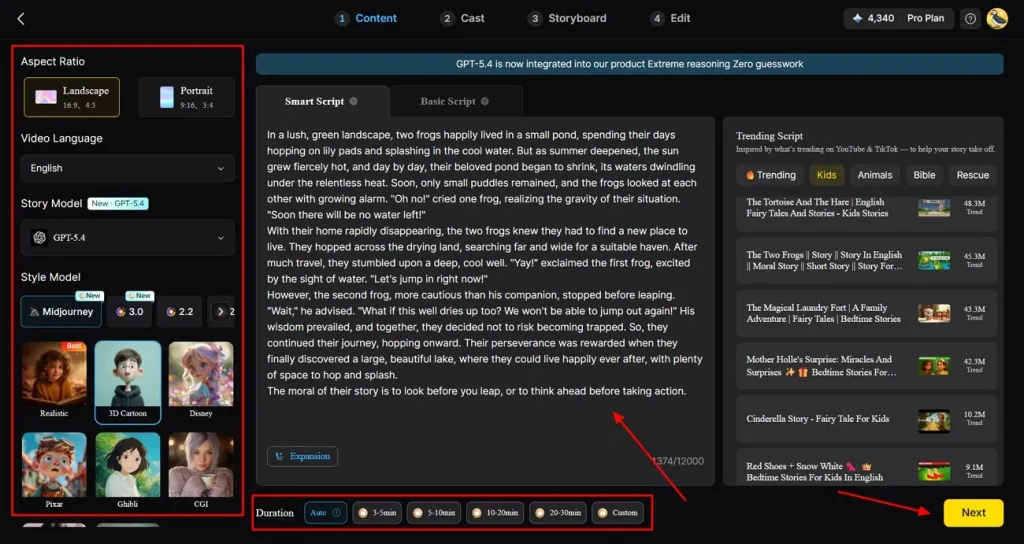
Begin by opening the Story-to-Video tool and selecting your desired aspect ratio and video length. Next, choose the appropriate language and your preferred story and animation style. After that, enter your script into the Smart Script section and click Next.
Step 2. Review the Scene Breakdown
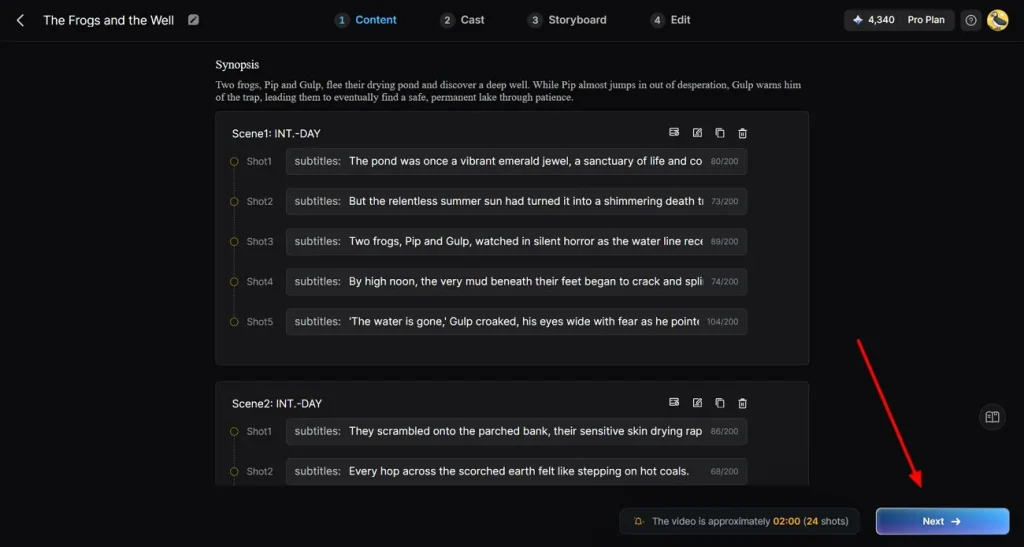
Go through the scene-by-scene outline generated by the system to make sure it aligns with your intended story. If any changes are required, use the controls at the top to modify or refine the scenes, then press Next.
Step 3. Specify Characters for the Video
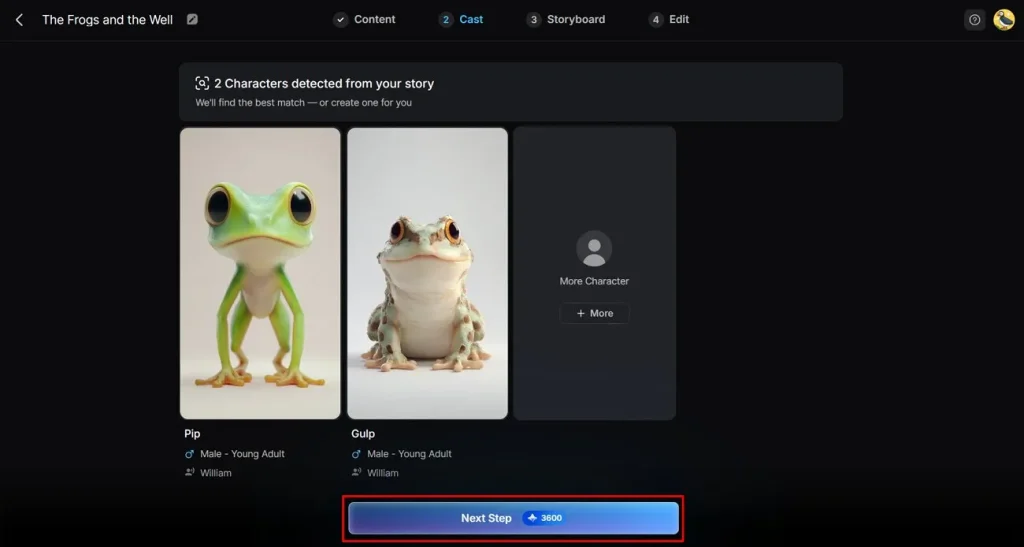
The system will automatically detect the characters included in your script and suggest appropriate options. Once you’ve finalized your selection, click Next Step to move forward.
Step 4. Modify the Storyboard
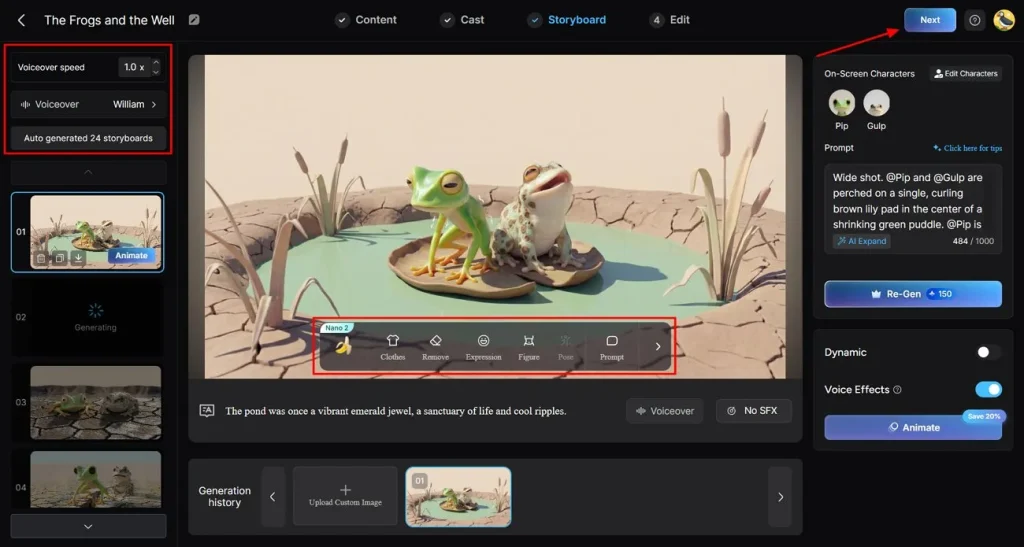
Review and adjust each scene using the available controls to ensure the visuals align smoothly with your narrative. Soon, when you’re convinced of everything, press the Next button.
Step 5. Add Subtitles to Your Video
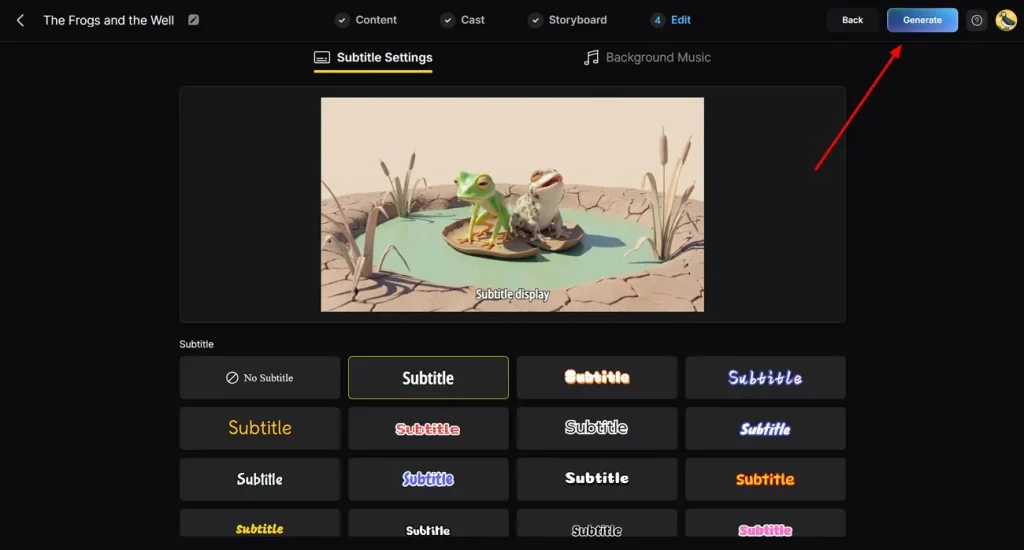
If your video contains dialogue or voiceover, choose a subtitle style that complements your overall design. After finalizing the subtitle settings, click the Generate button.
Step 6. Preview and Download the Animated Video
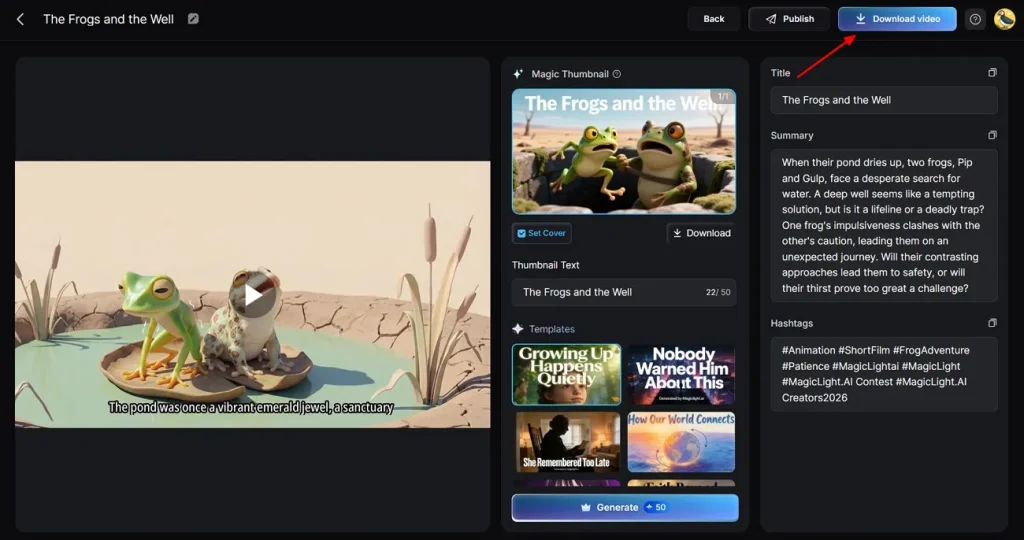
Once the video has finished generating, preview it and review the cover image and hashtags for accuracy. If everything seems as intended, click the Download Video button to save the video.
Conclusion
In conclusion, you now know that animated video marketing has completely changed how businesses communicate and engage their audience. Considering the need, the article above highlights top-ranked YouTube videos, helping new businesses grow with current animated marketing strategies. Plus, MagicLight AI is recommended, allowing businesses to generate animated videos using style models like MagicLight 3.9 and 2.2.
FAQs on Animated Marketing Videos
1. Can I create animated marketing videos myself?
Indeed, you can create an animated video yourself, using MagicLight AI 9 story models and advanced character options.
2. What are animated marketing videos used for?
Animated marketing videos are used to promote products, explain complex concepts, and develop brand awareness in business and digital marketing.
3. How long should animated marketing videos be?
An animated marketing video for businesses should be short, but you can create up to 50 minutes with a platform like MagicLight AI.
4. How much does animated marketing video production cost?
While an animated agency/studio will cost $4,000-20,000 for a 1-2 min video, MagicLight will charge from $6-$45 (Ultra plan).
5. What types of animated videos work best for marketing?
The most effective animated marketing videos are explainer videos that simplify complex ideas and product demos. In fact, short, social media-friendly animations also perform well in terms of engagement and conversions.
![How to Write a Drama Script 2026 [Step-by-Step Guide]](https://magiclight.ai/wp-2/wp-content/uploads/write-a-drama-script.jpg-300x199.webp)
![How to Use Seedance 2.5 for AI Animation in 2026 [Full Guide]](https://magiclight.ai/wp-2/wp-content/uploads/image-106-300x200.webp)