
Drama starts with a problem that matters to the character. They want something, but getting it comes with obstacles, tough choices, or consequences. When learning how to write a drama script, the goal is to carry this struggle from one scene to the next, with each event pushing the story closer to its turning point.
Writers can map out this process by hand or use AI drama generators to move through some stages faster. MagicLight AI supports the workflow from script to video, as its Agent can help draft a drama script, then turn the finished story into an animated episode.
Part 1. How to Write a Drama Script?
There are 2 common ways to approach writing a drama script. The traditional route takes the story from the first idea to the final draft by hand, while newer writing tools can shorten some of those stages. The sections below explain both methods step by step:
1. The Traditional Way to Write a Script Step by Step
Traditional drama writing moves through a clear sequence, beginning with the central idea and gradually developing it into a complete, properly formatted script. TV drama writers also need to think beyond a single story by planning the pilot and wider season arc. Here is how to write a drama script using the traditional process, step by step:
Step 1. Start With a Dramatic Question
Frame the story as a question the ending must answer, such as whether an estranged mother can win back her son before his wedding. That question keeps every scene pointed at the same emotional target.
Step 2. Give Characters Wants and Wounds
Give each main character something they want and a personal struggle that affects their choices. Trouble starts when two characters want different things, especially when one can only succeed at the other’s expense.
Step 3. Structure the Episode or Film
Feature dramas usually follow three acts, but TV works in smaller units. An hour-long episode often opens with a 2 to 3 page teaser, then runs four or five acts that each end on a hook. Final draft suggests 9 to 12 pages per act in a five-act script.
Step 4. Weave A, B, and C Stories
Many TV episodes use A, B, and sometimes C storylines, with the A story carrying the main conflict. The A story carries the main conflict, while B and C stories deepen supporting characters and echo the theme.
Step 5. Plan the Season in a Series Bible
For a TV drama series, a series bible summarizes the characters, the world, the tone, and possible episode arcs. A series bible presents the characters, world, tone, format, and future story possibilities for the series.
Step 6. Write Subtext, Then Revise
Strong drama dialogue hides as much as it says, so characters rarely state their feelings directly. Draft the whole script before revising, then hold a table read to hear which lines ring false.
2. Fast and Highly Produced Way by Using AI Tools to Write Drama
Writers exploring how to write a TV drama series script can save time on brainstorming, outlining, drafting, and formatting with the right tools. Characters, conflicts, and story direction still come from the writer’s own ideas and choices. The table below shows how AI can support each stage of the scriptwriting process:
| Stage | Traditional Approach | AI-Assisted Approach |
| Premise and Outline | Brainstormed and outlined by hand | Drafted from a short prompt, then refined |
| First Draft | Written scene by scene | Generated as a full draft for rewriting |
| Formatting | Applied in screenwriting software | Applied automatically with the draft |
| Visual Preview | Requires a shoot or a storyboard artist | Animated scenes from the finished script |
| Final Say | The writer | Still the writer, who revises every line |
Part 2. How to Use AI Tools to Help You Write and Create a Drama Script
AI can support more than the first draft. Writers can use it to explore conflicts, organize a series, compare dialogue choices, and catch story inconsistencies without handing over creative control. For anyone learning how to write a drama script, the following methods show where AI can be useful throughout the writing process:
- Explore Stronger Character Conflicts: Ask an AI assistant for several ways two characters’ goals could collide, then choose and develop the conflict that best serves the story.
- Organize a TV Series Bible: Turn scattered notes into structured character profiles, story arcs, settings, and episode summaries, then revise them to match the series vision.
- Compare Different Dialogue Choices: Generate several versions of a tense exchange to explore changes in tone, subtext, or character intention before writing the final lines.
- Track Story Continuity Across Episodes: Use AI to review scripts or story notes for timeline conflicts, dropped subplots, inconsistent details, and sudden changes in character behavior.
- Follow Professional Writing Guidelines: If you are working under union or studio rules, check the current terms governing AI use before adding it to your workflow. Under the 2026 WGA MBA, AI-generated material is not literary material, and companies cannot require writers to use generative AI for writing services.
MagicLight AI suits AI-assisted drama writing, since it handles scripting and video production together. Users pitch MagicLight Agent a premise such as “two sisters fight over their late father’s bakery,” and it drafts a complete script. The Agent chooses the niche unprompted, then suggests a format like Short Drama and a budget tier. Writers request rewrites in the chat and approve the script to animated video in Story to Video.
Part 3. Best AI Tool to Convert Drama Scripts to AI Videos
A finished drama script usually waits months for casting, locations, and a shoot. MagicLight AI’s Story to Video turns a script into a multi-scene video with characters, voices, music, and selectable visual styles. Longer dramas benefit from the Long Video Generator, which lets projects reach 50 minutes.
Guide: How to Convert a Drama Script Into an AI Video With MagicLight AI
Story to Video converts a drama script in stages, letting you review scenes before rendering. Follow the steps below to turn your finished script into an AI video:
Step 1. Add Your Drama Script and Settings
Open the platform and paste your finished drama script. Set the Aspect Ratio, Video Duration, Video Language, Visual Style Model, and AI Story Model based on your drama, then click the Generate icon.
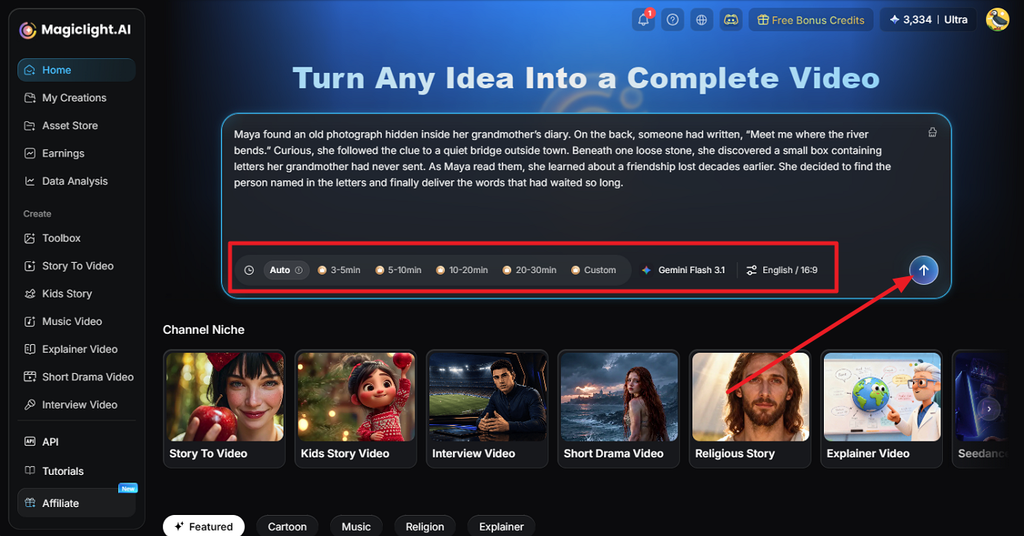
Step 2. Check the Script and Drama Scenes
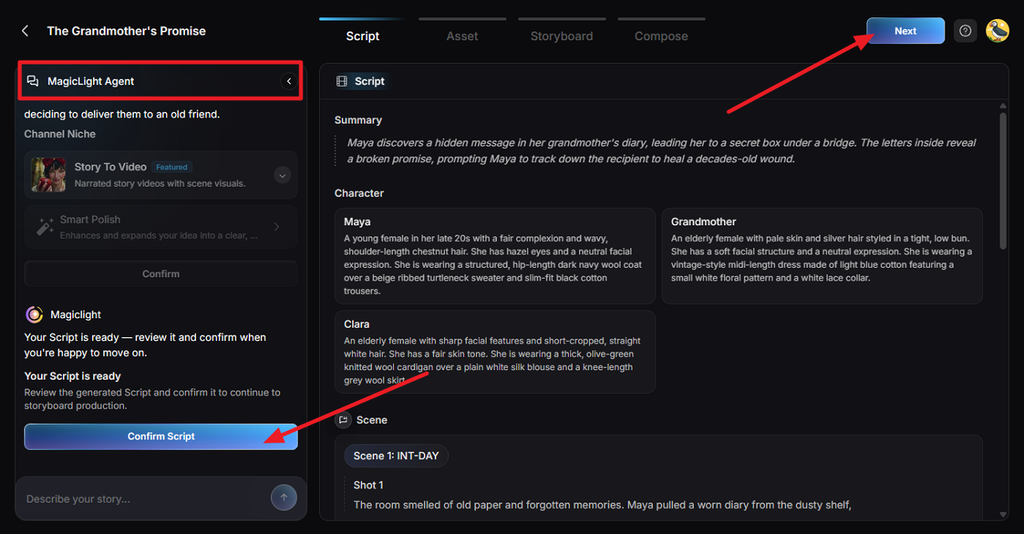
MagicLight Agent organizes the script into a summary, characters, scenes, and individual shots. Review the sequence to make sure the conflict, dialogue, and key dramatic moments remain intact. Make any necessary edits, then click Confirm Script and Next.
Step 3. Select the Visual Style and Motion
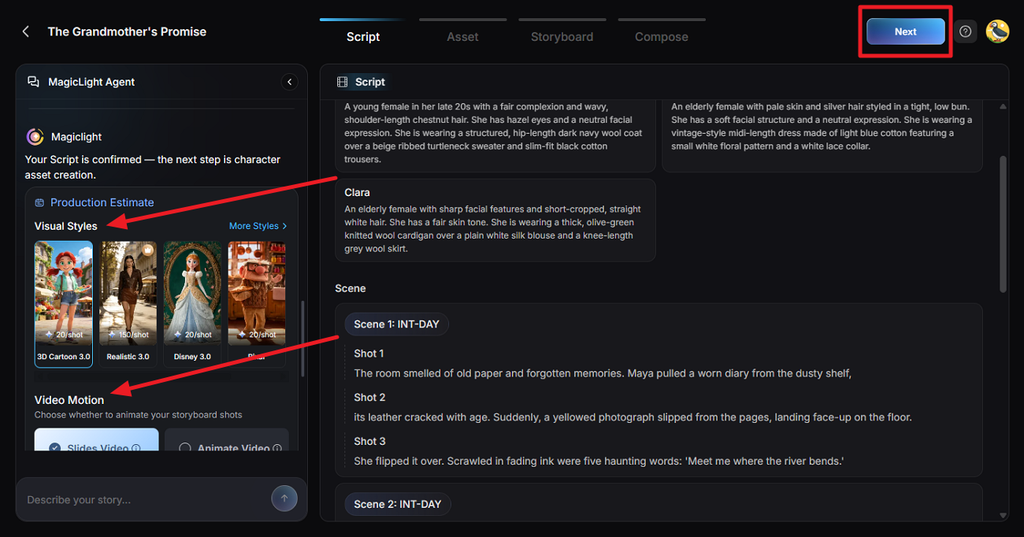
Choose a Visual Style that fits the mood of your drama, whether it is realistic, cinematic, animated, or stylized. Select the preferred Video Motion, check the production settings, and click Next to create the character assets.
Step 4. Check the Drama Characters
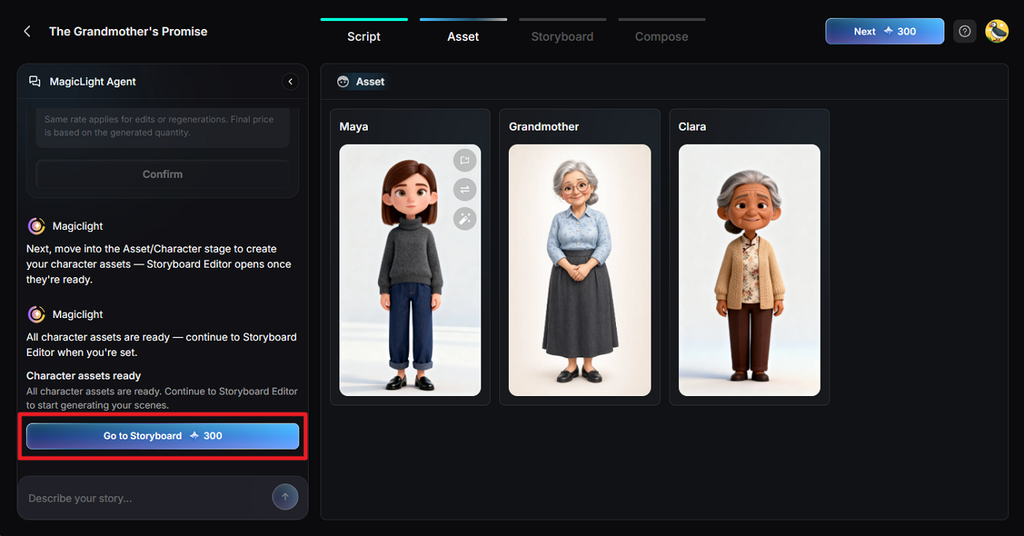
Review each generated character and compare their appearance with the descriptions in your script. Check that the main characters suit their roles and look consistent with the story. Make adjustments where needed, then click Go to Storyboard.
Step 5. Refine Each Storyboard Scene
Go through the storyboard shot by shot and check how each dramatic moment has been visualized. Adjust Clothes, Expressions, Figure, Pose, or the scene Prompt to better match the script. Add suitable voices and sound effects, then click Animate.
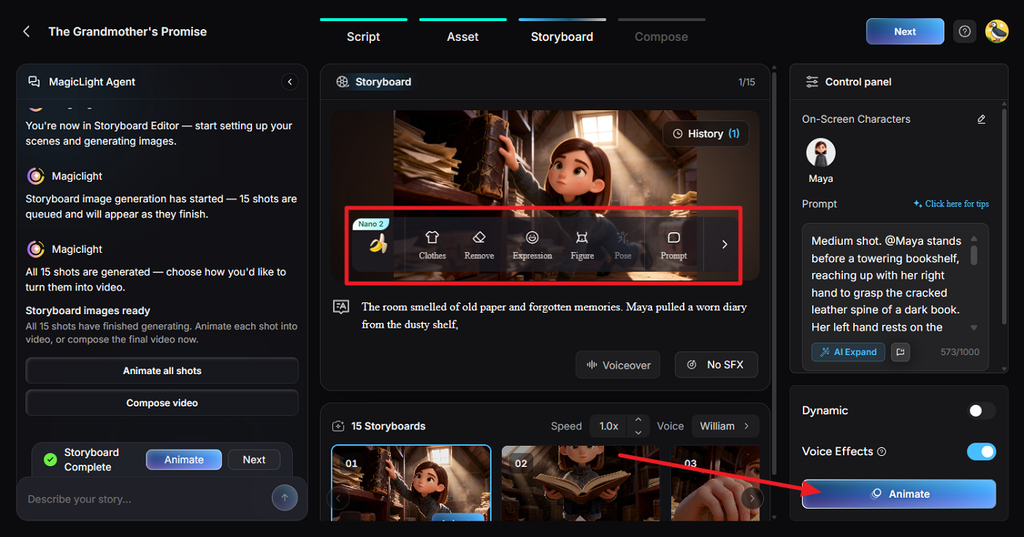
Step 6. Add Subtitles and Background Music
Open Compose and watch how the animated drama scenes flow together. Choose a subtitle style and background music that suits the mood without distracting from the dialogue or narration. Adjust the audio level, then click Generate.
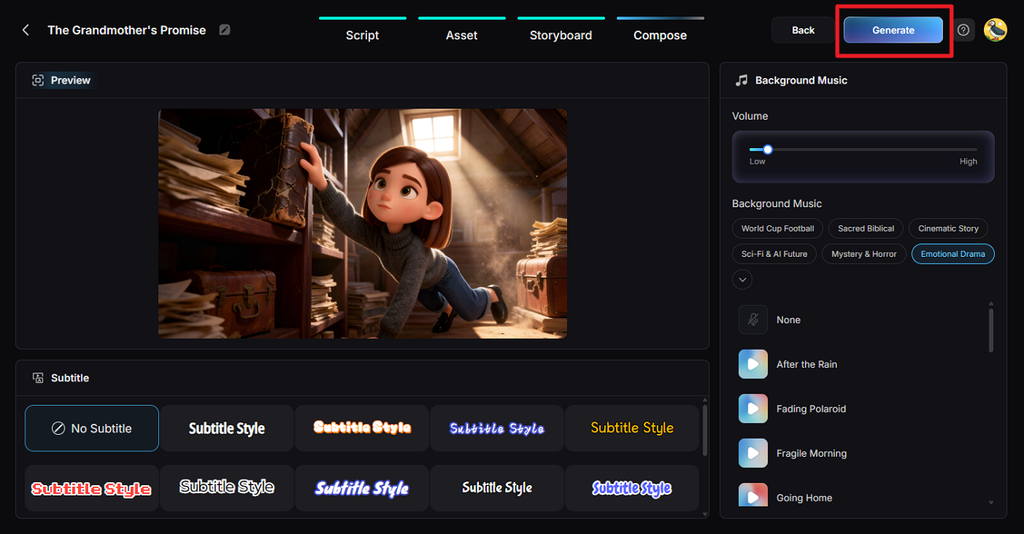
Step 7. Choose the Final Video Quality
Open Settings and select the final Aspect Ratio for your drama video, such as 16:9 or 4:3. Choose 720p or 1080p resolution, then click OK to save the settings.
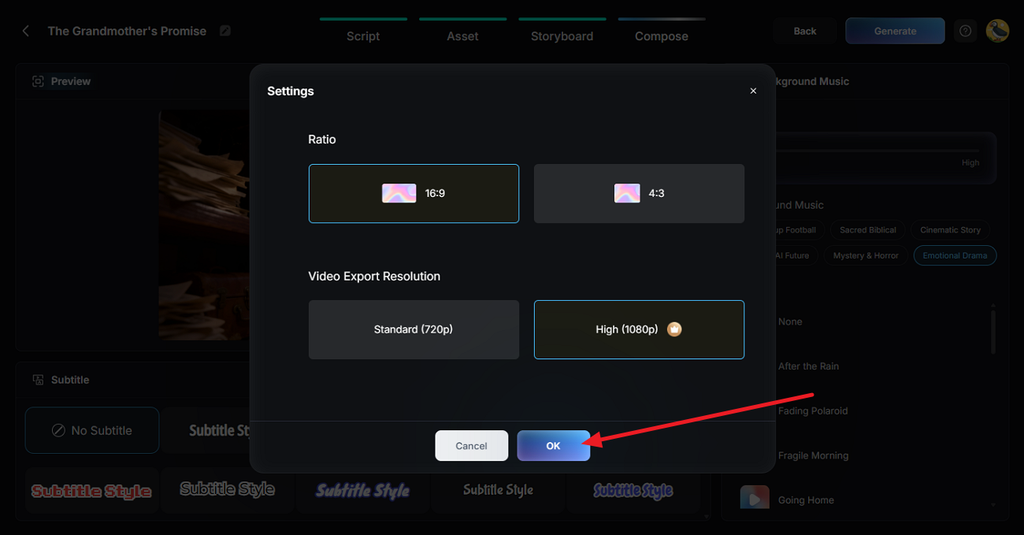
Step 8. Preview and Download Your Drama Video
Watch the completed drama from beginning to end. Check the scene order, character actions, dialogue, subtitles, music, and pacing against your original script. Correct any issues before clicking Download video to save the finished version.
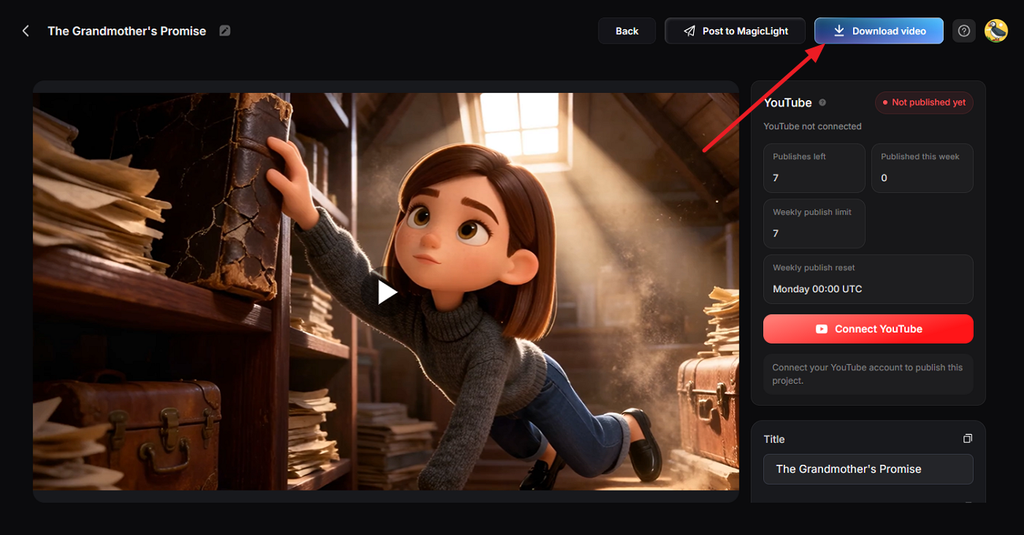
Conclusion
Strong drama starts with a clear question, characters whose wants collide, and dialogue full of subtext. The traditional steps behind how to write a drama script still matter, while AI tools speed up brainstorming, drafting, and continuity checks. MagicLight AI then turns the finished pages into an animated drama with a steady cast.
FAQs on How to Write a Drama Script
1. How do I write a drama script?
Start with a dramatic question, build characters whose goals clash, and outline the story in acts before drafting scenes. Write dialogue with subtext, finish the full draft, then revise after a table read. Screenwriting software or AI tools can handle the formatting.
2. Is there a fast way to write a drama script?
AI tools offer the fastest route, drafting outlines, scenes, and dialogue from a short prompt that the writer then revises. MagicLight AI takes it further, since its Agent writes a complete drama script from a premise and moves it straight into video production.
3. How long should a drama script be?
Feature dramas usually run 90 to 120 pages, at about one page per minute. Writers planning how to write a TV drama series script need fewer pages per episode. Final Draft puts hour-long episodes at 45 to 63 pages, ideally 50 to 55.
4. What is the best AI video tool to create a movie or video from a drama script?
For drama scripts, MagicLight AI stands out, since Story to Video turns written pages into ordered, fully voiced scenes. Characters keep a consistent look from scene to scene, and paid projects support a full episode of up to 50 minutes.
![How to Use Seedance 2.5 for AI Animation in 2026 [Full Guide]](https://magiclight.ai/wp-2/wp-content/uploads/image-106-300x200.png)