Creating high-quality videos has become easier than ever in 2026 but choosing the right AI video generator can still be challenging. Media io simplifies this need by transforming text prompts into engaging videos within minutes. This review examines its features, pricing, strengths, and limitations to help you decide. The article also introduces MagicLight AI, a more advanced alternative for creators looking for videos.
Part 1. What is Media io?
Media.io is a browser‑based media platform that uses AI to edit, convert, and generate AI videos and images. Its text-to-video feature supports prompts up to 8,000 characters, which can be optimized using AI with complete story structure. Users can preview generated videos before downloading to check visual appearance. This platform supports 9 different AI models, including Sora 2 and Wan, for different video styles and quality preferences.
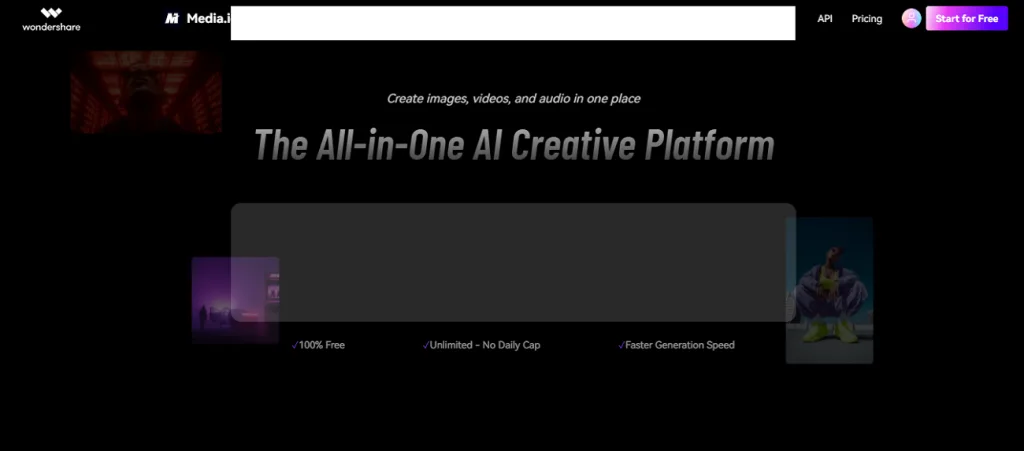
Moreover, you can control camera movements and object motion for natural and realistic AI video generation. Apart from that, Wondershare Media.io has an image-to-video feature that lets you animate static images. It supports various image formats, such as PNG and GIF images, up to 30 MB. Additionally, the tool generates videos while maintaining similar motion composition and overall visual consistency from references.
Key Features
- Apply creative AI filters to transform ordinary videos into unique artistic styles with minimal effort.
- Improve video sharpness and overall visual quality for clearer and more attractive final content.
- Erase unwanted objects from videos quickly while keeping surrounding scenes looking smooth and natural throughout.
- Generate videos with matching background audio automatically for a more engaging and complete viewing experience.
- Remove distracting video backgrounds automatically to create cleaner scenes without advanced editing experience or software.
Pros
- Converts long videos into short clips for popular social media platforms easily.
- Compatible with common video formats for easier uploading, editing, and exporting tasks.
- Automatically generates subtitles to improve accessibility and viewer engagement across different audiences.
Cons
- This tool restricts videos to 15 seconds, limiting longer narrative content.
- Lacks advanced timeline editing tools needed for professional video production projects.
Part 2. How to Work With Media io?
The following workflow explains how to use Media io after understanding its basic workflow and available creation tools. Follow the workflow below to start creating videos with a better understanding:
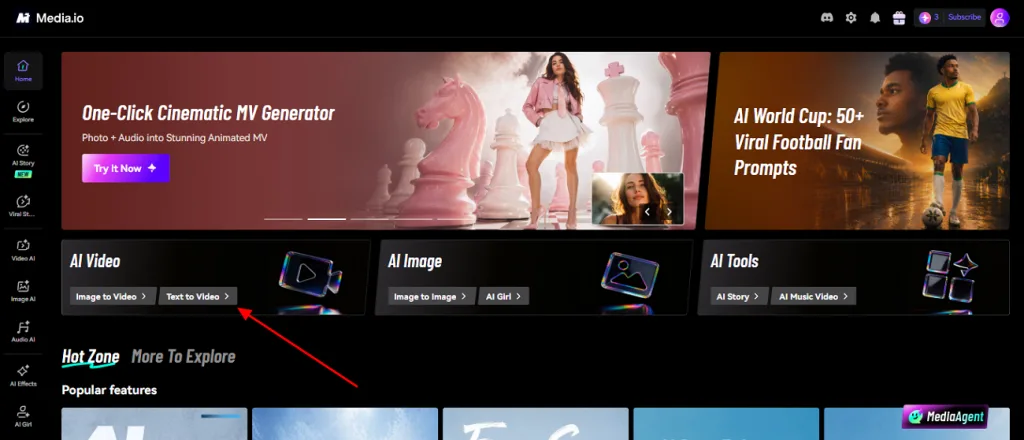
Step 1. Visit the webpage of Media io and choose the Text to Video option from the main screen.
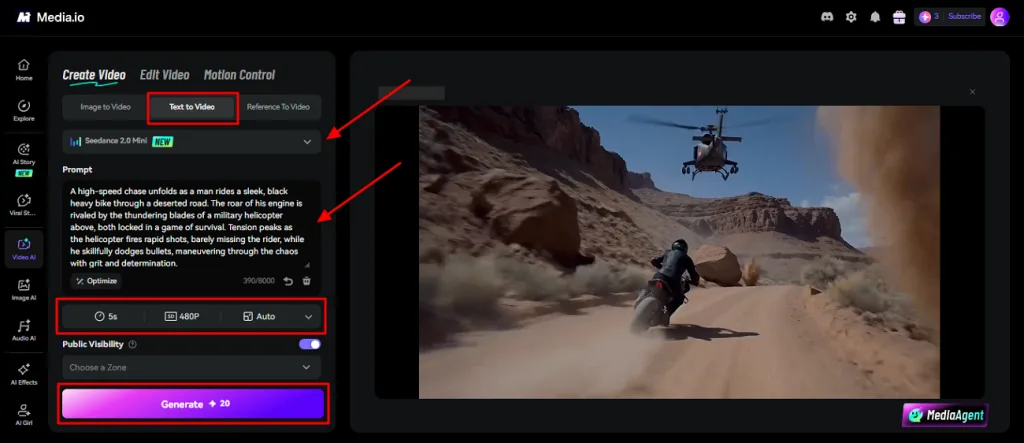
Step 2. Inside the Text to Video section, select the preferred AI model, such as Seedance 2.0 Mini. Next, enter a text prompt in the provided Script Box and select the Video Duration. After that, set the Video Resolution and pick the Aspect Ratio. Opt for the Generate button to generate your AI video. When your video is generated, preview it and download it.
Part 3. Best Alternative to Media io for Video Creation
While Media io handles basic projects well, advanced creators often expect greater creative freedom overall. Creators producing detailed stories often need longer videos with greater control over every generated scene. MagicLight AI serves as the ideal alternative built for video creation. Its story-to-video feature turns detailed scripts into complete AI videos from 3 minutes to 50 minutes with one click.
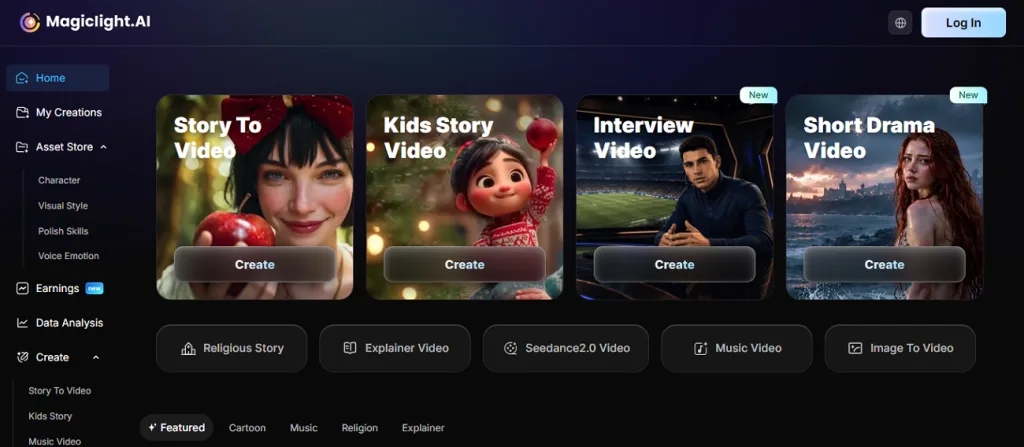
While generating, it maintains consistent AI characters across multiple scenes, improving storytelling and visual continuity throughout. The tool converts scripts of up to 12,000 characters into engaging AI videos with structured storytelling. Along with this, you can choose between Midjourney V7 and MagicLight 3.0 models for unique artistic visual outputs. Moreover, you can adjust your characters and video style at several different production stages.
Key Features
- Voice Models: Generate natural narration by seamlessly combining ElevenLabs and Minimax Speech 2.8 AI voice technologies.
- Scene Preview: Preview automatically generated storyboards before rendering to improve scenes with better creative control.
- Pose Library: Support more than 50 pose options to create expressive characters with realistic body movements naturally.
- Storyboard Control: Modify every generated storyboard scene before rendering for better pacing and visual storytelling accuracy.
- Animation Models: Convert storyboards into animated videos using 16 specialized animation models for different creative styles.
Comparison Table Between Media io and MagicLight AI
Knowing the differences between Media io and MagicLight AI helps compare their capabilities. Thus, explore the detailed comparison table below to compare which platform better meets different video creation requirements:
| Feature | Media io | MagicLight AI |
| Video Duration | Maximum 15-second AI videos | Generate videos up to 50 minutes |
| Script Length | Supports 8,000-character prompts | Supports 12,000-character scripts |
| Storytelling | Basic AI video generation | Complete AI story generation pipeline |
| Character Consistency | Basic reference consistency support | Consistent characters across every scene |
| Storyboard Editing | No editable storyboard preview | Editable storyboard with scene control |
| Animation Options | Limited animation capabilities | Supports 16 animation generation models |
| Pose Customization | Basic motion controls are available | Over 50 character pose options |
| AI Voiceovers | Basic background audio generation | 37 voiceovers with voice cloning |
| Creative Control | Limited scene customization options | Multiple editing stages before rendering |
Part 4. FAQs on Media io
1. Does Media io offer free online tools?
Yes, Media.io offers free online tools for basic video editing and AI content creation. Users can access selected features without downloading software or purchasing an immediate subscription plan. However, advanced tools and higher usage limits require upgrading to a paid subscription plan.
2. Is Media io a good AI solution?
Media.io provides useful AI tools for editing videos, images, and audio with simple steps. It is suitable for beginners who want fast results without learning difficult editing techniques first. However, MagicLight AI offers stronger storytelling features and advanced AI video creation for larger projects.
3. Is Medio io a good platform for creative AI?
The tool is a helpful platform for creating AI videos, images, and audio using simple tools. Its simplified interface makes creative content generation suitable for beginners and everyday content creators alike. For longer AI videos and advanced storytelling features, MagicLight AI is a better overall choice.
Conclusion
To conclude, video creation happens everywhere, from social feeds to daily marketing content. Media io is a helpful platform for creating short AI videos with simple editing and creative tools. It simplifies many editing tasks while producing engaging videos with minimal learning. Yet advanced creators usually expect more depth and flexible storytelling features. For such requirements, MagicLight AI offers advanced tools and a better solution for professional video production.
![How to Write a Drama Script 2026 [Step-by-Step Guide]](https://magiclight.ai/wp-2/wp-content/uploads/write-a-drama-script.jpg-300x199.webp)
![How to Use Seedance 2.5 for AI Animation in 2026 [Full Guide]](https://magiclight.ai/wp-2/wp-content/uploads/image-106-300x200.webp)