



Making videos traditionally involves scripting, visuals, voiceovers, editing, and subtitles. AI video tools simplify this by turning ideas, text, and images into finished videos. This guide compares six of the best AI tools for making videos in 2026.
Part 1. How to Choose the Best AI Tool for Making Videos
Choosing the right AI video generator depends on the type of content you want to create and how much control you need over the final result. Before selecting a tool, consider these five factors.
- Video Quality: Look for tools that can create detailed visuals, smooth motion, and visually consistent scenes.
- Text-to-Video and Image-to-Video: Supporting both workflows gives creators more flexibility when turning ideas or existing images into videos.
- Customization Options: Controls for characters, scenes, camera movement, effects, voices, and subtitles can make it easier to achieve the desired result.
- Video Length: Short clips may work for social media, while YouTube creators and storytellers may need longer videos.
- Ease of Use: A simple workflow can help beginners create videos without extensive animation or video editing experience.
Part 2. 6 Best AI Tools for Making Videos in 2026
Each AI video generator has different strengths depending on your creative goals and production requirements. Below are six of the best AI tools for making videos in 2026 with updated core positioning and functional features.
1. MagicLight AI
Best for: Script-to-video & long-form storytelling
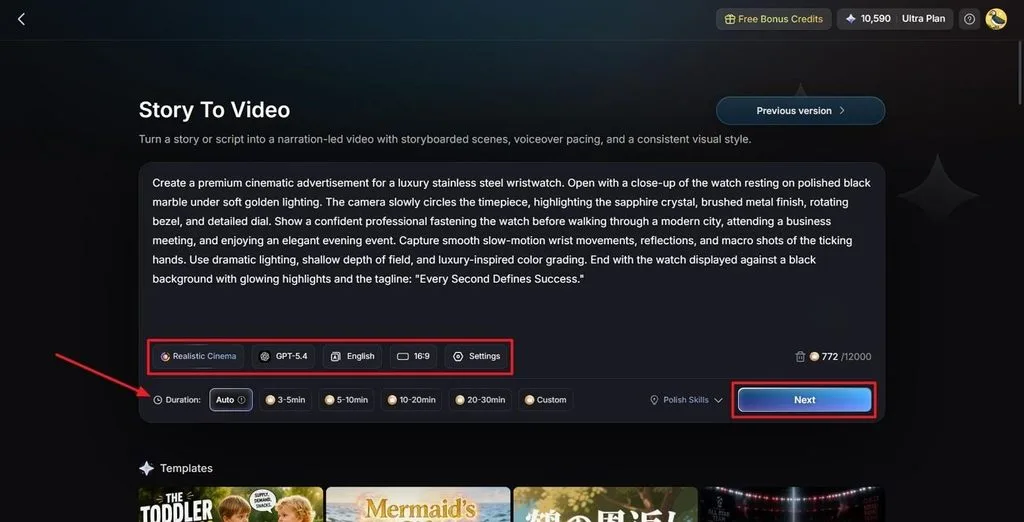
MagicLight AI is a dedicated end-to-end script-based video generation tool, tailored for creators who need to turn complete written scripts into polished, long-form video content. Unlike fragmentary clip generators, it automates full story scene splitting, scene matching, and continuous video synthesis, making it the top choice for narrative content creation.
It perfectly fits YouTube long videos, animated stories, educational tutorials, and explanatory content. Creators can fully customize every detail of the video before final generation to fit their creative vision.
Key Features
- Full Script-to-Video Workflow: Automatically analyze complete scripts, split story scenes, and generate integrated finished videos.
- Long-Form Video Support: Generate continuous videos up to 50 minutes with support for 12,000-character detailed prompts.
- Stable Character Consistency: Lock character appearances, facial feat
Key Features
- Full Script-to-Video Workflow: Automatically analyze complete scripts, split story scenes, and generate integrated finished videos.
- Long-Form Video Support: Generate continuous videos up to 50 minutes with support for 12,000-character detailed prompts.
- Stable Character Consistency: Lock character appearances, facial features, and styling to maintain uniformity across all story scenes.
- Customizable Storyboard Editing: Adjust scene timing, character poses, clothing, expressions, and scene backgrounds freely.
- Professional AI Voiceovers & Subtitles: 37 built-in AI voices and voice cloning support, with one-click intelligent subtitle matching.
Pros
- One-click full script conversion to finished videos without manual clip splicing
- Industry-leading long-form video generation capability
- Excellent cross-scene character consistency
- Comprehensive scene, voice, and storyboard customization tools
Cons
- Maximum output resolution capped at 1080p
- Advanced storyboard and voice cloning features require premium plans
2. PixVerse AI
Best for: Creative AI videos & visual effects
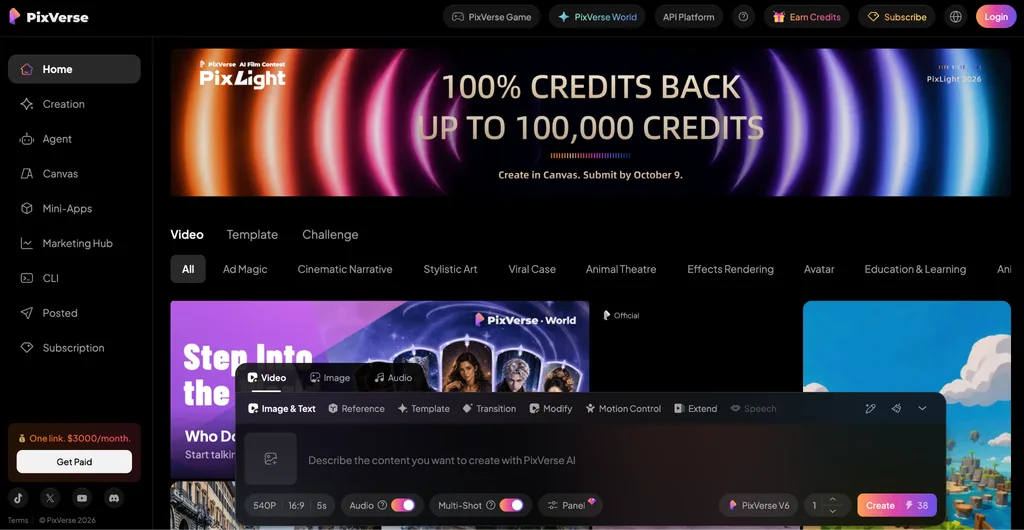
PixVerse AI is a creative-focused AI video generation tool known for its rich visual styles and special effects. It supports text-to-video and image-to-video creation, making it ideal for stylized videos, artistic clips, fantasy scenes, and trendy social media content. With a wide range of artistic styles and dynamic effects, users can create visually appealing videos without professional design skills.
Key Features
- Stylized Text-to-Video: Generate artistic, fantasy, minimalist, and trendy styled videos from text prompts.
- Image Animation Conversion: Turn static illustrations, photos, and design works into dynamic animated videos.
- Rich Visual Effects Library: Built-in light effects, particle effects, transition effects, and creative scene filters.
- Style Customization: Freely adjust video color grading, texture, and artistic atmosphere.
- Short & Medium Clip Generation: Fast rendering for social media creative clips and visual art works.
Pros
- Powerful and diverse creative visual effect capabilities
- Supports multiple artistic styles for personalized video creation
- Intuitive operation, suitable for creative exploration
- Excellent output aesthetic and visual expressiveness
Cons
- Lack of professional long-form story video generation capability
- Character stability is average in complex multi-scene switching
3. Vidu AI
Best for: Consistent characters & animated videos
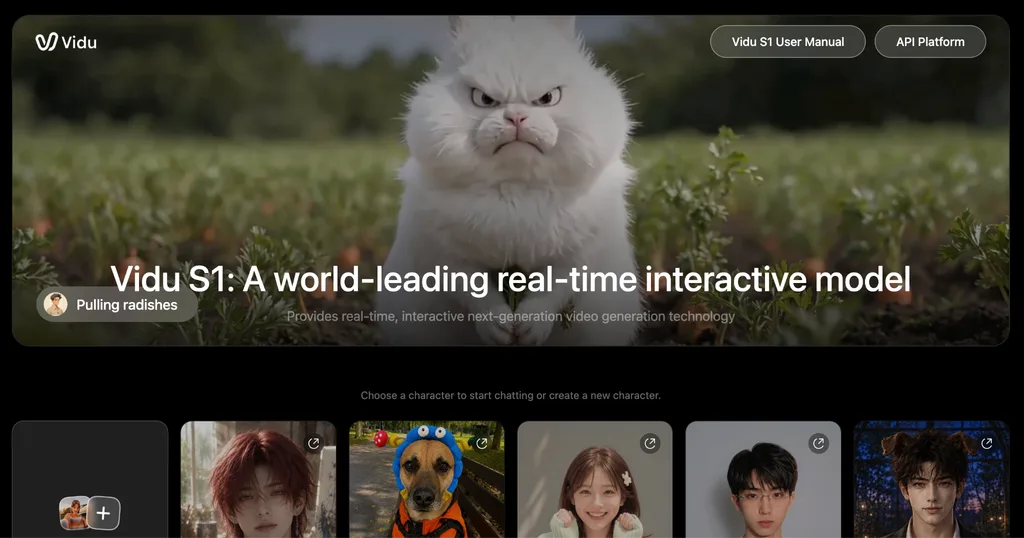
Vidu AI is an AI video tool focused on character animation and consistency. It helps maintain character appearance across scenes, making it ideal for animated series, IP stories, cartoon videos, and children’s content.
Key Features
- Ultra-Stable Character Consistency: Fixed character facial features, body proportions, and styling for long-term IP content creation.
- Professional Character Animation: Natural character limb movements, facial expressions, and interactive actions.
- Character Image-to-Video: Generate continuous animation videos from custom character avatars and static images.
- Batch Scene Generation: Mass-produce consistent animated clips for series content.
- Simple Animation Customization: Adjust character actions, scene interactions, and shooting angles.
Pros
- Industry-top character consistency and anti-distortion ability
- Natural and smooth character animation effects
- Perfect for IP animation and serialized character content
- Low threshold for animated video creation
Cons
- General cinematic scene rendering capability
- Single creative effect compared to visual-focused tools
4. Hailuo AI
Best for: Cinematic AI video generation
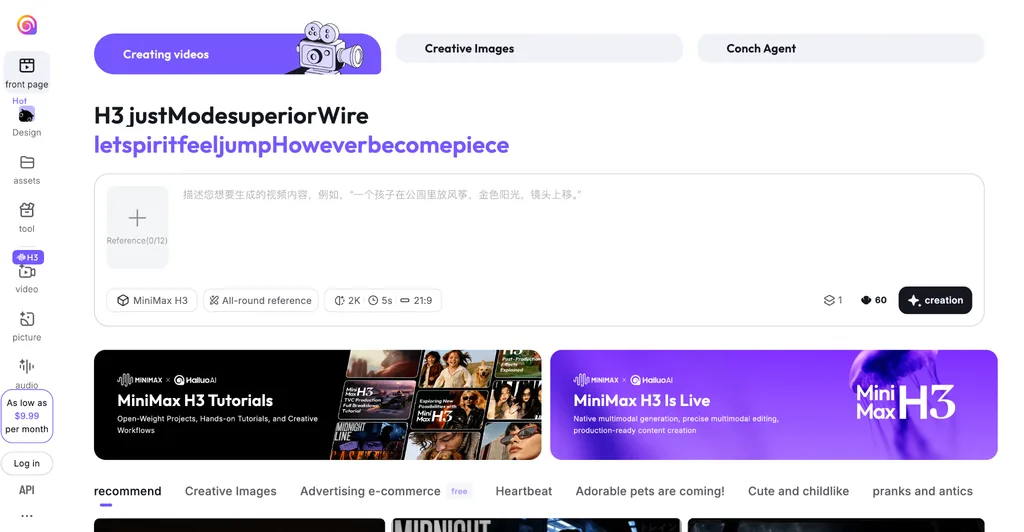
Hailuo AI is a cinematic AI video generator focused on realistic visuals, dynamic camera movements, and film-like quality. It is ideal for short films, trailers, atmospheric scenes, and high-quality commercial videos.
Key Features
- Movie-Level Cinematic Rendering: Ultra-high detail scene restoration, realistic light and shadow, and texture performance.
- Dynamic Camera Simulation: Support push, pull, pan, tilt, and tracking shots consistent with professional filming.
- Complex Scene Motion Generation: Realize natural dynamic changes in environments, characters, and objects.
- Cinematic Color Grading: Built-in movie-style color grading presets for one-click tone adjustment.
- High-Definition Output: Support high-resolution cinematic clip export.
Pros
- Top-tier cinematic picture quality and dynamic effects
- Professional camera movement and film-level light and shadow processing
- Suitable for high-end commercial and artistic video creation
- Strong real scene restoration and detail performance
Cons
- Only suitable for short-to-medium cinematic clips, not for long-form story videos
- High computational cost, relatively slow rendering speed
5. InVideo AI
Best for: AI-generated marketing and YouTube videos
InVideo AI is an AI video creation tool focused on marketing, brand promotion, and YouTube content. With built-in templates, subtitles, and media assets, it helps creators and businesses quickly produce professional promotional videos.
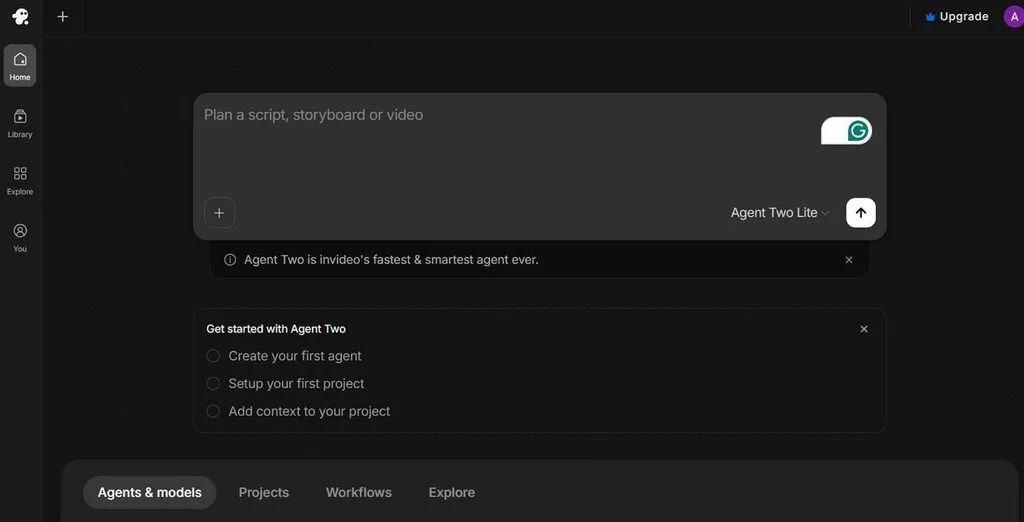
Key Features
- Marketing Video Intelligent Generation: One-click creation of product promotion, brand introduction, and advertising videos.
- Mass Commercial Templates: Exclusive templates for YouTube videos, social media ads, and short marketing clips.
- AI Commercial Editing: Intelligent matching of background music, subtitles, transitions, and marketing elements.
- Multi-Platform Adaptation: One-click switching of aspect ratios for YouTube, Instagram, TikTok and other platforms.
- Text Marketing Transformation: Convert copywriting and marketing scripts into complete promotional videos.
Pros
- Super efficient for commercial and marketing video production
- Rich exclusive marketing templates and commercial materials
- Suitable for batch production of YouTube commercial content
- Low learning cost for marketing beginners
Cons
- Weak personalized creative and artistic video generation ability
- Single style, not suitable for pure artistic creation
6. HeyGen
Best for: AI avatar and presenter videos
HeyGen is an AI avatar video tool designed for virtual presenter content. It creates realistic avatar videos with AI voiceovers, making it ideal for explanations, courses, presentations, and corporate content without filming.
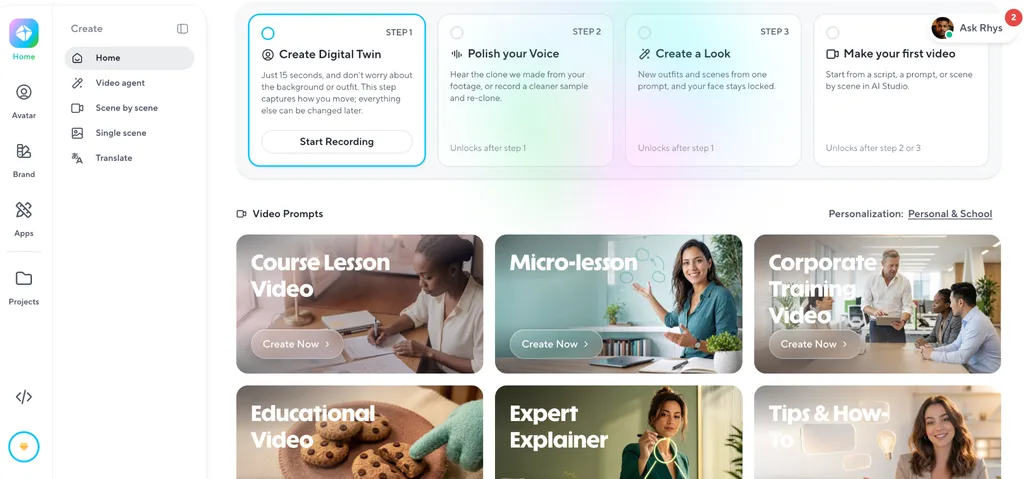
Key Features
- Realistic AI Avatar Generation: Multiple styles of digital human presenters with natural facial expressions and lip-syncing.
- Intelligent Lip-Sync & Dubbing: Perfect matching of voice content and avatar mouth movements, support for multi-language dubbing.
- Presentation Scene Customization: Built-in conference room, studio, office and other mainstream presentation backgrounds.
- Text-to-Avatar Video: Convert explanatory copy and course scripts into complete avatar explanation videos.
- Subtitle & PPT Synchronization: Support synchronous playback of subtitles and presentation slides.
Pros
- Industry-leading realistic AI avatar and lip-sync effect
- Zero shooting cost for explanation and presentation videos
- Suitable for courses, corporate speeches, and product explanations
- Simple operation and fast video output
Cons
- Single video form, mainly avatar presentation, insufficient scene expansion
- Not suitable for pure scene animation and cinematic creative videos
Comparison: Best AI Tools for Making Videos at a Glance
Each tool offers different capabilities depending on your video goals and production workflow. The table below compares several important features.
| AI Video Tool | Best Use Case | Text-to-Video | Image-to-Video | Character Consistency | Long-Form Video |
| MagicLight AI | Script-to-video & long-form storytelling | Yes | Yes | Excellent | Yes |
| PixVerse AI | Creative AI videos & visual effects | Yes | Yes | Moderate | Limited |
| Vidu AI | Consistent characters & animated videos | Yes | Yes | Excellent | Limited |
| Hailuo AI | Cinematic AI video generation | Yes | Yes | Good | Limited |
| InVideo AI | Marketing and YouTube commercial videos | Yes | Yes | Moderate | Limited |
| HeyGen | AI avatar and presenter videos | Yes | No | Good | No |
Part 3. What Is the Best AI Tool for Making Videos?
The best AI tool for making videos depends on your content and goals. Hailuo AI is great for cinematic clips, PixVerse AI for creative visuals, Vidu AI for consistent character animation, InVideo AI for marketing videos, and HeyGen for avatar-based content.
For creators making long-form YouTube, educational, and story-based videos, MagicLight AI stands out with end-to-end script-to-video generation, long-form output, consistent characters, and customizable scenes, voices, and subtitles.
How to Make a Video with MagicLight AI?
Now, follow the steps below to create a video using MagicLight AI.
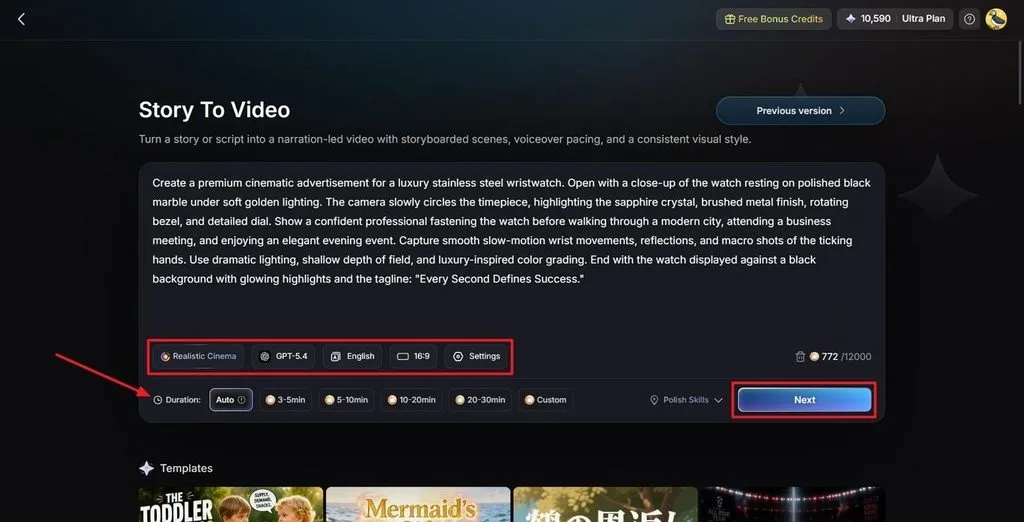
Step 1. Write Your Video Script
Open the Story to Video tool and enter your story or video script in the text box.
Choose your preferred visual style, AI story model, video language, aspect ratio, and video duration before continuing.
Step 2. Review the Scene Breakdown
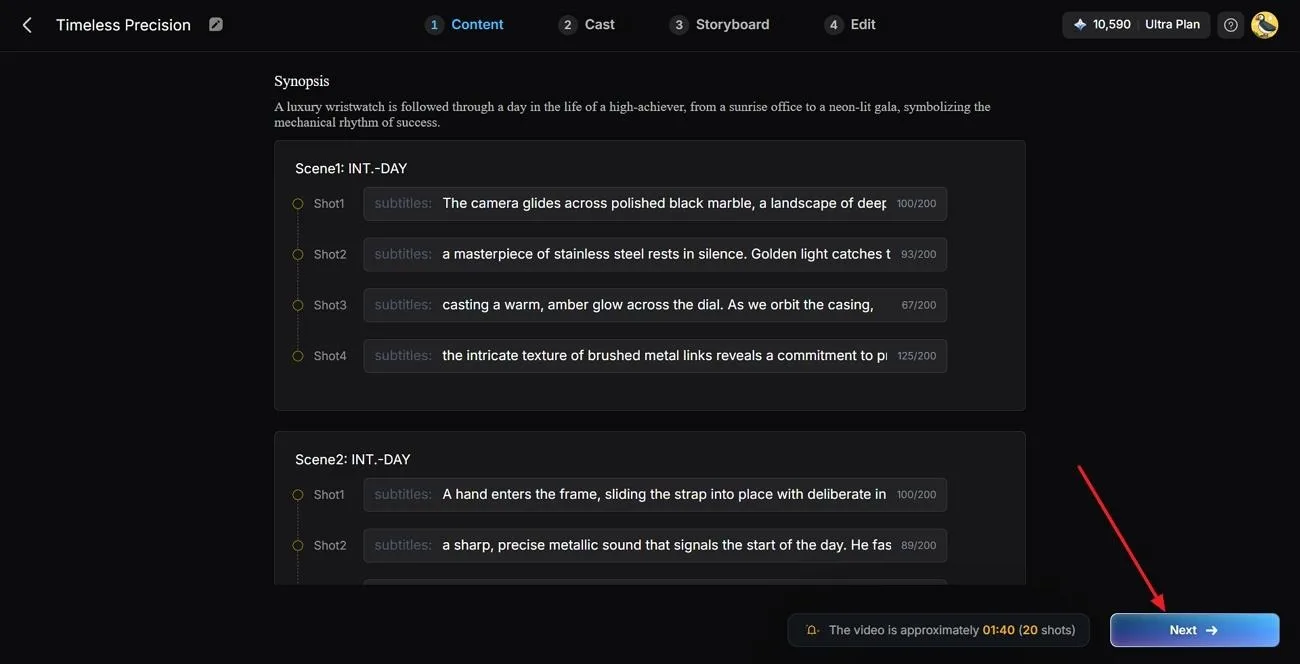
MagicLight AI analyzes your script and divides the story into individual scenes.
Review the generated synopsis and scene structure. You can make adjustments if the scenes do not fully match your original idea.
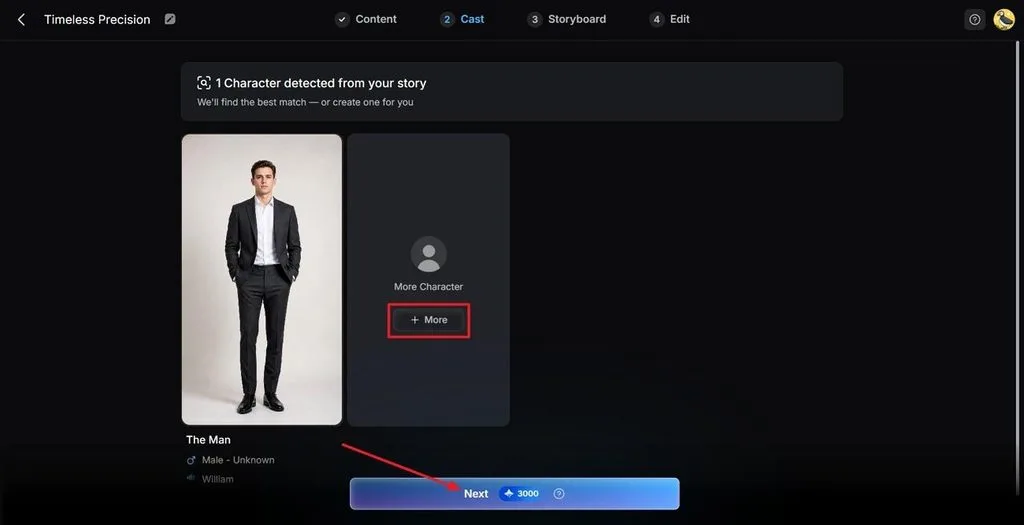
Step 3. Select Characters for Your Video
Based on your script, the system can suggest characters that fit the story.
Review the available options and select the characters you want to use in your video.
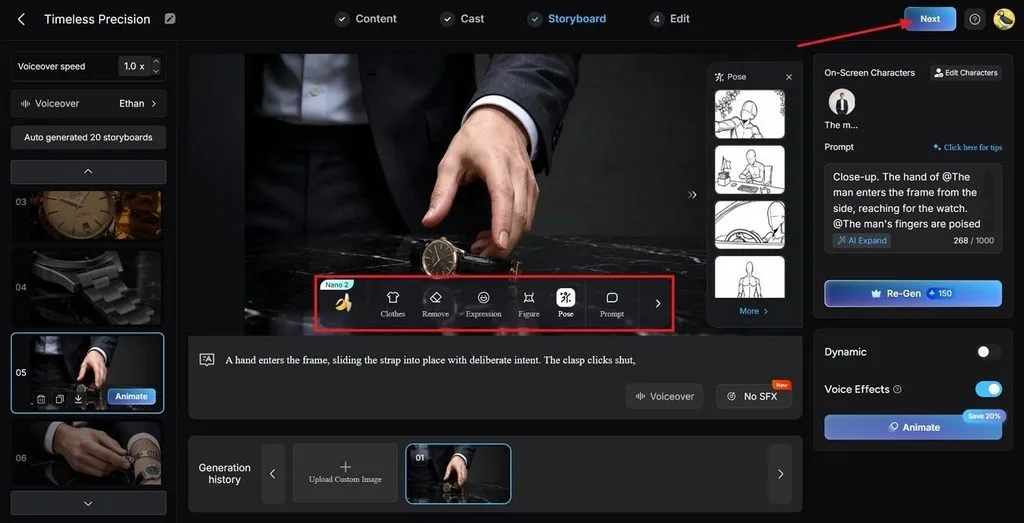
Step 4. Customize the Storyboard
Review the generated scenes in the storyboard.
You can adjust character clothing, poses, expressions, and other visual details to make each scene better match your original concept.
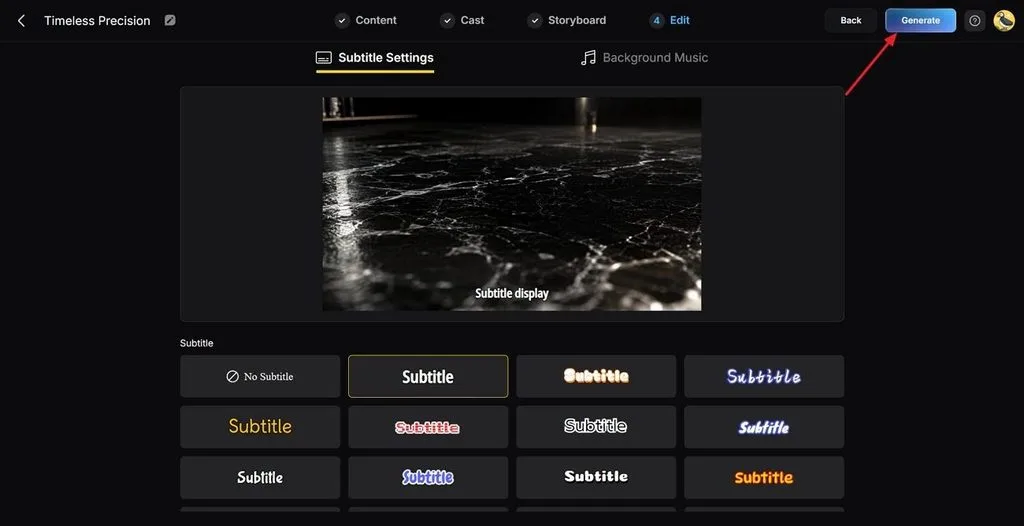
Step 5. Select Voice and Subtitle Options
Choose a subtitle style and select your preferred narration option.
You can use one of the available AI voices or use voice cloning for a more personalized narration experience.
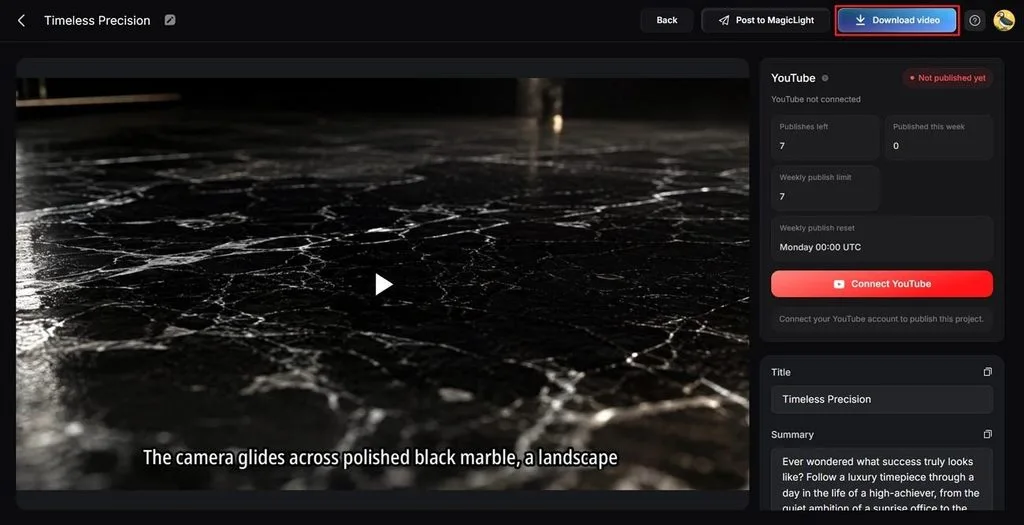
Step 6. Generate and Save the Final Video
After reviewing your storyboard and settings, click Generate.
Once the video is ready, preview the final result and check the cover, thumbnail, subtitles, narration, and other elements before exporting the finished video.
Conclusion
AI video tools have made video production more accessible in 2026, helping creators turn ideas and scripts into professional videos. PixVerse AI, Vidu AI, Hailuo AI, InVideo AI, and HeyGen each focus on different creation needs, while MagicLight AI offers a comprehensive solution for long-form story videos with script-to-video generation and character consistency. Ultimately, the best AI tool for video making depends on your content style and specific production needs.
FAQs on the Best AI Tool for Making Videos
1. What is the best AI tool for making videos?
It depends on your needs. MagicLight AI is a strong choice for script-based storytelling, long-form videos, and YouTube content, while tools like PixVerse AI and HeyGen focus more on creative visuals and AI avatars.
2. What are the best AI tools for making videos?
Popular options include MagicLight AI, PixVerse AI, Vidu AI, Hailuo AI, InVideo AI, and HeyGen. MagicLight AI stands out for turning scripts into complete videos with visuals, characters, voiceovers, and subtitles.
3. What are the best AI tools for making YouTube videos?
For story-driven and long-form YouTube videos, MagicLight AI is a good option. It can turn a script into a complete video while helping maintain consistent characters and scenes.
4. Can AI make a complete video from a script?
Yes. MagicLight AI can turn a script into a complete video by generating scenes, visuals, voiceovers, and subtitles, making the process much faster than creating everything manually.


![How to Write a Script for a Short Film in 2026 [Beginner’s Guide]](https://magiclight.ai/wp-2/wp-content/uploads/short-film-screenplay-writing-guide-300x169.webp)


