In 2026, creating AI visuals has become a growing global trend, but generating them is still difficult for many users. Popular tools, including Civitai AI, help users make visuals and creative content quickly online.
Sometimes, new users face difficulty with navigation and understanding available model options, so they search for easier alternatives. This article breaks down features, limitations, and beginner-friendly options for easy understanding.
Part 1. What Is Civitai AI? How Does Civitai Work?
Civitai App is an online platform used for sharing and discovering generative AI creative models. It supports 12 AI models, including Kling, and Google Veo 3, and provides a space for users to showcase and monetize their AI-generated content. It also helps creators to generate anime, realistic, cinematic, and 3D visual styles from text and images.
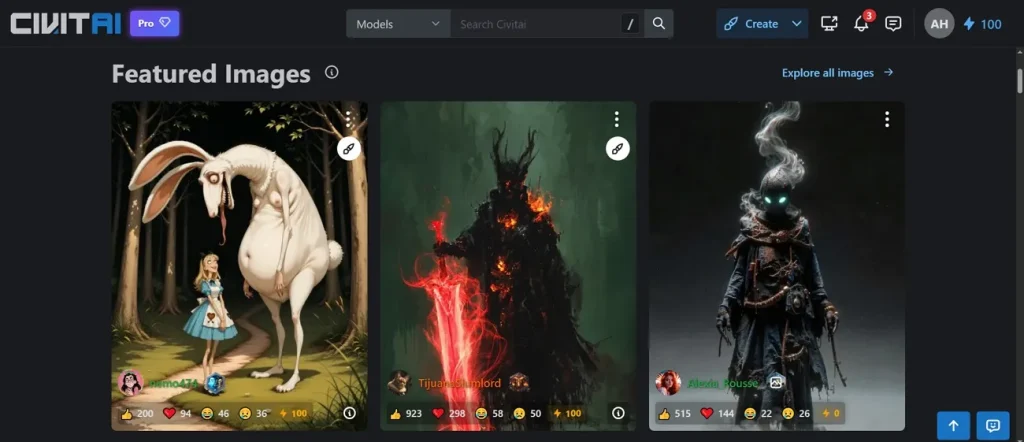
This tool works as an online hub for browsing and downloading AI creative models. The platform provides search filters, tags, ratings, prompts, and downloadable model resources online. Each model page includes preview images, comments, settings, and recommended generation prompts. Users can also generate AI images through integrated browser-based generation tools.
Part 2. Top Features of Civitai AI Generator To Know
Civitai models help creators generate unique visuals using different artistic styles and settings. To address this, below are major features that help users explore the Civitai AI generator more effectively online:
- Quality Enhancement: Built-in upscaling tools improve image sharpness and enhance small visual details automatically. Face enhancement options also help creators fix unclear portraits and distorted generation results easily.
- Image Remixing: Civitai AI allows users to modify existing images while preserving original visual composition details. This feature helps creators generate improved versions without rebuilding complete visuals repeatedly online.
- History Tracking: It stores previous generations with prompts, settings, and generated visual outputs safely. So, users can revisit old projects, reuse settings, and improve earlier generated results.
- Video Creation: The platform supports the generation of short videos up to 10 seconds using prompts and uploaded reference images smoothly. Users can create animated scenes and talking characters through supported community video models like Vidu Q1.
- Style Presets: Civitai AI offers ready-made presets for generating unique artistic visual styles quickly. Plus, these presets help beginners create professional visuals without adjusting complex generation settings manually.
Part 3. 5 Common Problems Users Face With Civitai?
Users searching “what is Civitai” often face challenges while exploring advanced creative generation features. In this section, common Civitai issues affecting beginners and creators are explained below:
- Server Issues: Civitai generator often fails during heavy traffic, causing image generation errors frequently. Users searching “is Civitai down” often notice slow loading, stuck queues, and 503 errors.
- Update Bugs: Major updates often break core features like feeds, history, and image loading. Consequently, users report redirects, missing outputs, and unstable behavior after system changes occur.
- Filter Confusion: NSFW content sometimes disappears even after enabling mature or full content filters. Settings appear correct, but still restrict images, causing confusion among platform users.
- New Limits: New accounts face restrictions on reviews and feedback, which feels limiting for beginners. In addition, many users cannot freely review models, which causes frustration while exploring platform features.
- Model Quality: Model quality varies widely, and users sometimes find inconsistent results across different uploads. Additionally, some models perform well while others fail to match expected visual outputs.
Is It Worth It?
Civitai is worth using for hobbyists exploring open-source AI art and models freely. It works well for users who enjoy experimenting with different creative settings online. Sites like Civitai also offer similar tools but with simpler interfaces and features. However, it is less suitable for professional or commercial use requirements overall.
Pros
- The platform offers advanced tagging that improves search accuracy for styles.
- Users can compare multiple model outputs side by side for better selection.
Cons
- Some creative styles overlap, making it hard to choose unique outputs.
- Platform layout can feel cluttered when browsing multiple categories and tags.
Part 4. Why Beginners Prefer Magiclight AI Over Civitai?
Although Civitai AI offers strong model-based creation, users still feel limited for advanced storytelling needs. Many users prefer platforms that simplify the process while improving final video quality significantly. Thus, MagicLight AI is introduced as a powerful Civitai alternative for effortless creation. This dedicated tool supports both image-to-video and text-to-video long-form video creation, with output durations of up to 50 minutes.
With its 12 advanced story models, users can generate structured narratives for different video styles. The tool also automatically generates a storyboard, allowing editing and regeneration before final video production begins. Users can choose from 20 visual styles along with 37 built-in AI voices and instant voice cloning support. While using it, automatic cover generation creates video thumbnails without requiring manual design effort.
Key Features
- Music Model: With Suno integration, creators generate cinematic background music that improves emotional impact and storytelling quality.
- One Click Generation: Using 14 AI models, videos are created instantly with one click to save time and effort.
- Precision Editing: Nano adjustments allow fine control over faces, clothing, and poses for highly detailed visual results.
- Long Script: Up to 12,000 characters of script input enables detailed storytelling and full-length structured video creation easily.
- Global Languages: Support for 11 languages helps creators produce content for international audiences with smooth multilingual output.
Detailed Guide to Create an AI Video from Text Prompt Using MagicLight AI
This section provides a simple guide to help MagicLight AI users create AI videos with minimal effort:
Step 1. Start Project Setup in MagicLight AI
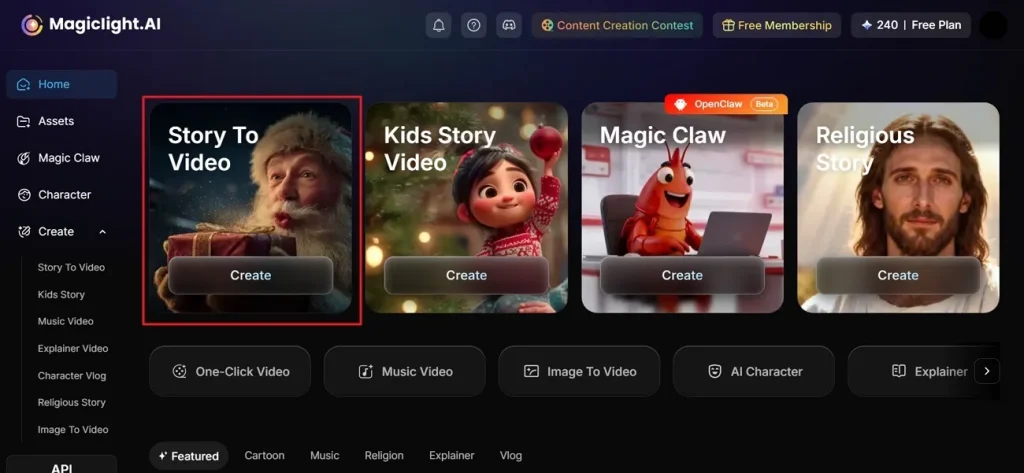
Open the MagicLight AI official website and select the Story to Video option from the homepage screen.
Step 2. Enter Your Idea and Settings
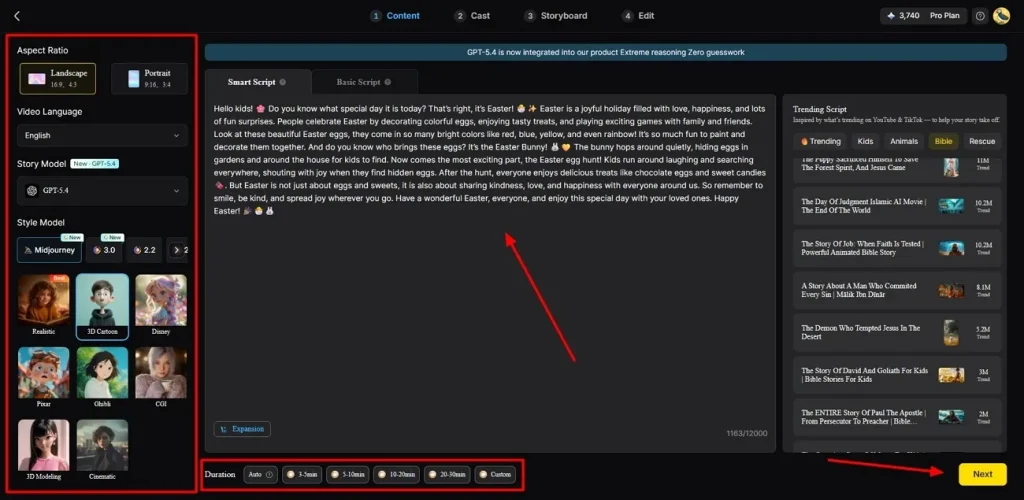
Upon accessing it, type your text prompt in the given Text Field and enhance it using AI. After that, choose the Video Language and adjust the Aspect Ratio carefully from the left side window. Next, opt for the AI Story Model like GPT-4 and choose a Style Model such as Disney or 3D cartoon. Then, adjust your Video Length and opt for the Next button to move further.
Step 3. Preview AI Video Outline
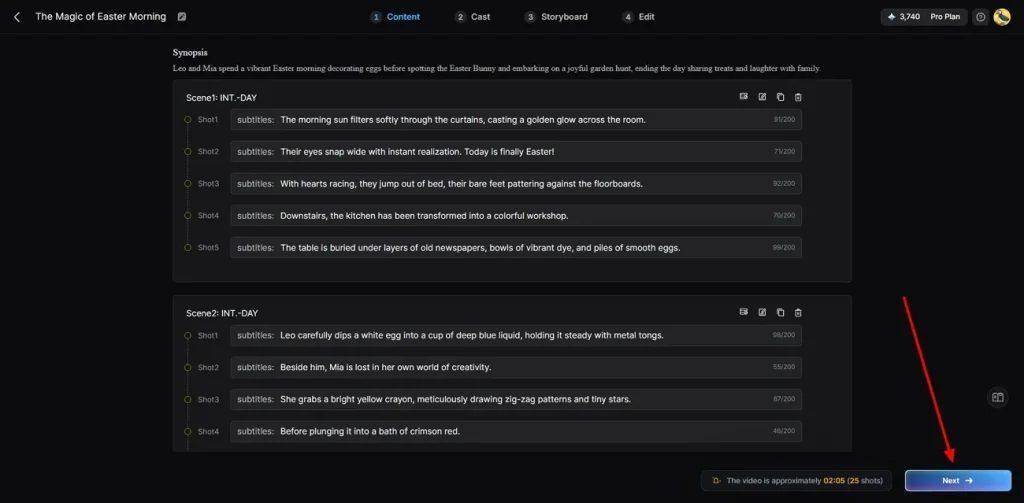
In this screen, you can review your video scenes and their flow for clarity. When everything is according to your needs, opt for the Next button.
Step 4. Select AI Characters for Video
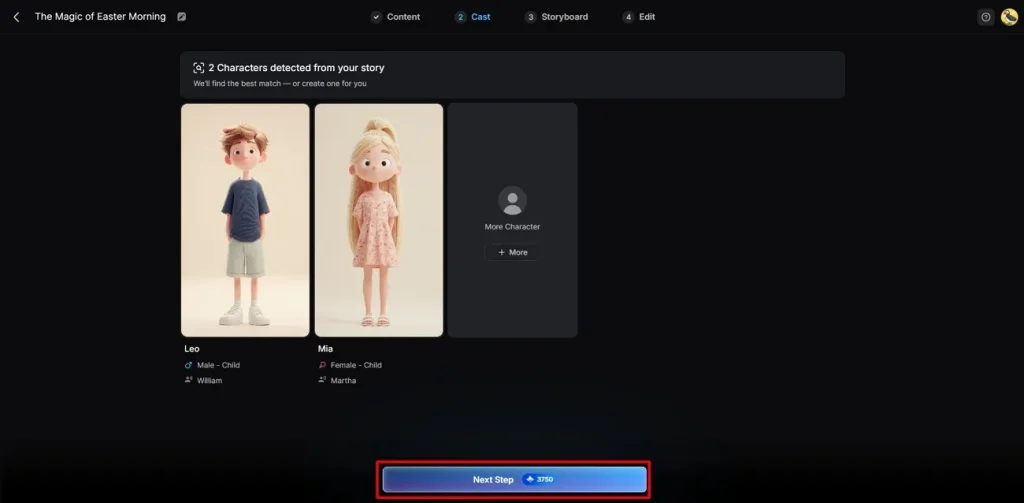
Moving forward, pick an available AI character or create a new one by pressing the More Character option for a video, then select Next Step.
Step 5. Customize Character Appearance
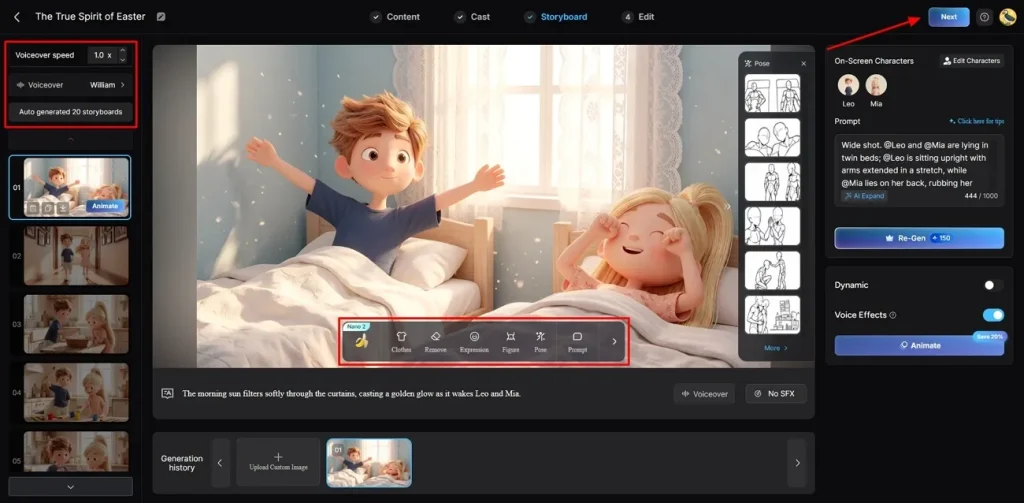
Now, change the Voiceover Speed of the selected character in the storyboard screen. In addition, you can also change clothes, expressions, and character appearance for each generated scene individually. After confirming all settings across scenes, press Next to move forward to the following step.
Step 6. Add Audio or Text in the Video
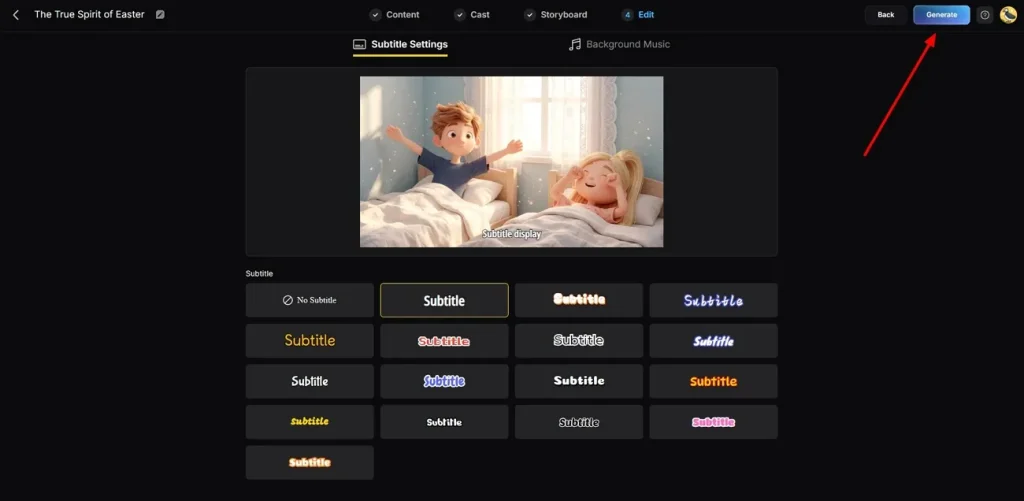
At this point, go to the Subtitle Settings to generate subtitles for your video. Once added, opt for the Background Music section to add a suitable soundtrack to your video. Once it is done, press the Generate button to reach the last step.
Step 7. Preview and Save the Generated Video
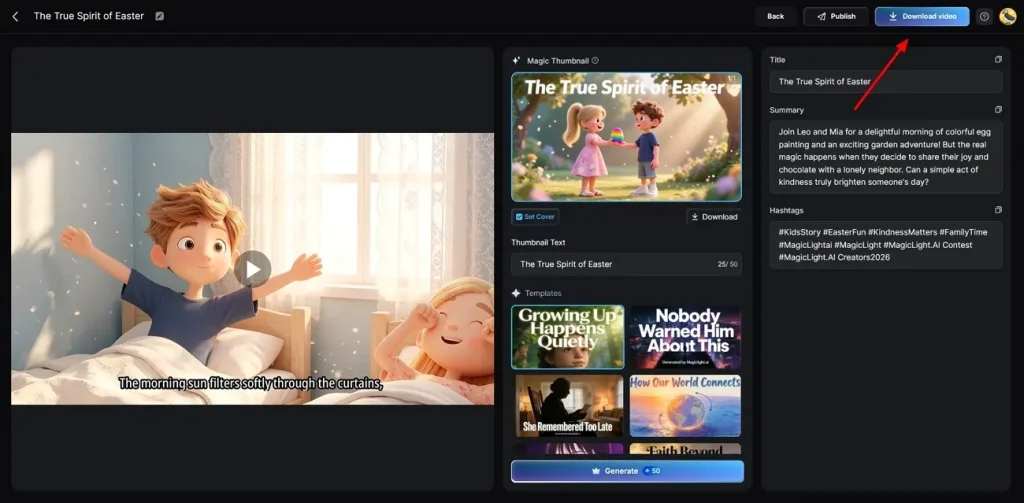
At last, review the complete video carefully and add preferred trending Hashtags or Thumbnails if needed. If you are satisfied with the output, opt for the Download button to save it.
Conclusion
In conclusion, Civitai AI offers a strong platform for discovering and using AI creative models online. Therefore, it suits users who enjoy experimenting with visuals and styles. Beginners still often need more guided video creation support. So, if you desire a more reliable tool for instant storytelling, MagicLight AI is the perfect solution for your creative projects.
FAQs on Civitai AI
1. Is Civitai free to use?
Civitai is free to use for browsing and exploring AI models online. Most features, like downloads and community access, are available without payment required. Some advanced generation or extra features may need credits or the Buzz system.
2. Does Civitai have an app?
The platform has a mobile app available on the Play Store for users. Beyond that, you can also use MagicLight AI if you want a mobile-friendly creative tool. This choice makes it easy to generate art while you are traveling.
3. Can Civitai generate AI images directly?
It can generate AI images using its built-in online generator tool. Users can also use downloaded models with external tools to create images. However, many creators prefer using MagicLight AI because the steps are much simpler.
4. Does Civitai support image-to-video generation?
This program mostly focuses on still images and does not focus on long-form AI video creation. You should try MagicLight AI to turn your favorite photos into moving clips. It is a great way to add life to all your digital projects.
5. What are the best sites like Civitai?
Best sites like Civitai include platforms offering AI model sharing and generation tools. MagicLight AI is one such strong alternative, providing simpler and more advanced video creation features. These platforms help users create visuals with easier interfaces and faster workflows.