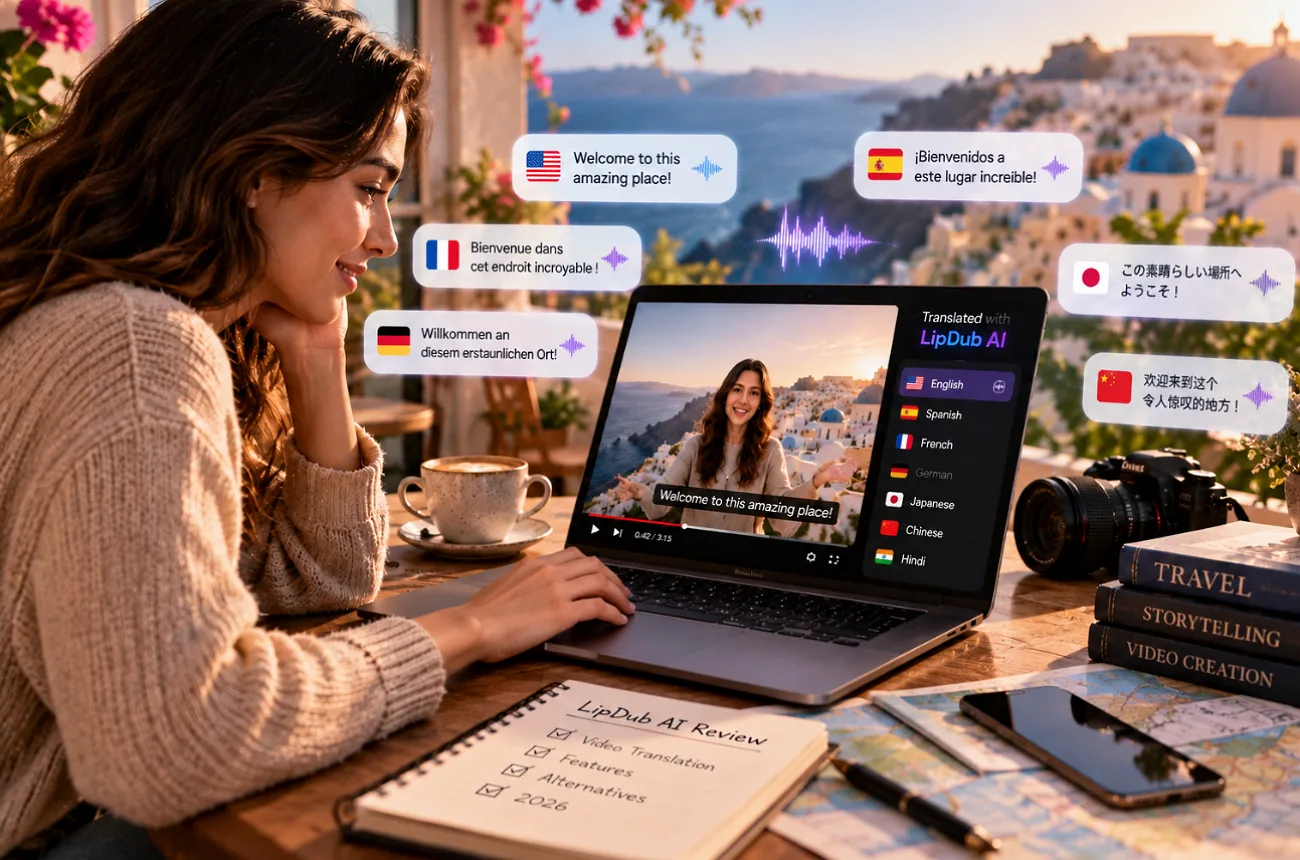
A translated video usually gives itself away when the mouth and the words stop matching. LipDub AI targets that mismatch, dubbing existing footage into more than 80 languages and redrawing the speaker’s mouth frame by frame.
A yoga instructor teaching in English on YouTube could offer the same classes in Portuguese and Japanese while keeping her familiar face, pacing, and cloned voice. Reviewers tend to rate the voice cloning well, although lip sync and rendering can be less consistent. If there is no original video to translate, MagicLight AI can create one from a simple written idea.
Part 1. What Is LipDub AI
A search for “what is LipDub app” can surface 2 products, since Captions also offers a translation feature called Lipdub inside its mobile app. LipDub is a separate browser platform for localizing existing footage.
Introduction to LipDub AI
LipDub AI can translate an existing video into another language without sending you back to the camera. It transcribes and translates the dialogue, recreates the speaker’s voice, and matches their lip movements to the new audio. Voice cloning works with roughly 10 seconds of clear speech, although 30 seconds or more provides a better reference. When the speaker’s mouth stays out of view, Pure Dubbing leaves lip sync out entirely.
Project types cover single-face translation, multi-speaker scenes, dialogue replacement, and personalized versions driven by a CSV of names or companies. The application LipDub runs entirely in a web browser, and an API brings translation, dubbing, and lip sync into other products. Exports reach 1080p on every plan, and 4K on the higher tiers. A translation memory stores approved wording for later projects.
Key Features of LipDub AI
- Video Translation: Translate spoken videos into 80+ languages, with a choice between staying closer to the original voice or using a more natural local accent.
- Voice Cloning: A clear 10-second speech sample can work, though giving LipDub 30 seconds or more provides a better voice reference.
- Lip Sync Models: Turbo works well for previews, Flash offers a step up in quality, while Premium and Ultra are intended for more polished final renders.
- Translation Editor: Edit and replay translated lines before rendering. If the timing feels off, Rephrase can rewrite a line to fit the available speaking time.
- Context and Vocabulary: Add context for the audience and tone, then save names, brands, abbreviations, or specialist terms that need to stay accurate.
- Captions and Comparison: Burn captions into the final render when needed, then switch between Original and Lipdubbed to see how the finished translation compares.
Pros and Cons of LipDub AI
Before choosing LipDub AI, it helps to know where the workflow saves time and where extra preparation is still required. The pros and cons below reflect LipDub’s current features and documented limitations:
Pros
- Cloned voices preserve the speaker’s identity across translated versions.
- Translation edits happen before audio and lip sync generation.
- Turbo provides faster previews before higher-quality final renders.
- Its API brings localization into existing products and workflows.
Cons
- Translation projects remove original music, ambiance, and sound effects.
- Standard translation projects are limited to one visible face.
- Longer, higher-resolution videos may take longer to process.
- Variable frame rate footage needs conversion before uploading.
Part 2. How to Use LipDub AI for Video Localization
The LipDub application workflow keeps video localization straightforward, but the translated script still deserves a careful review before rendering. Follow the steps below to create the yoga instructor’s Portuguese version first, then repeat the same process for Japanese:
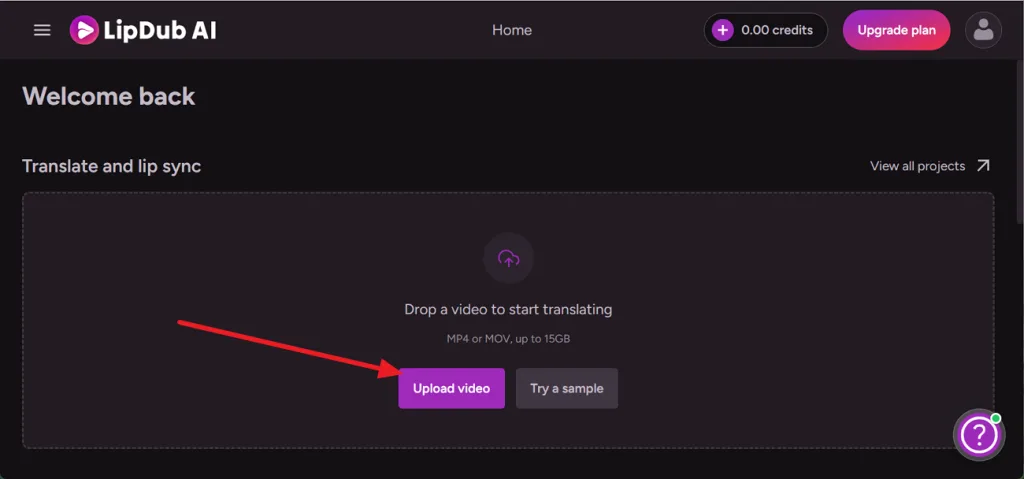
Step 1. From Home, find Translate and Lip Sync, and select Upload Video. Add an MP4 or MOV file up to 15GB.
Step 2. Select the Source Video Language, then select the language you want under Translate it into.
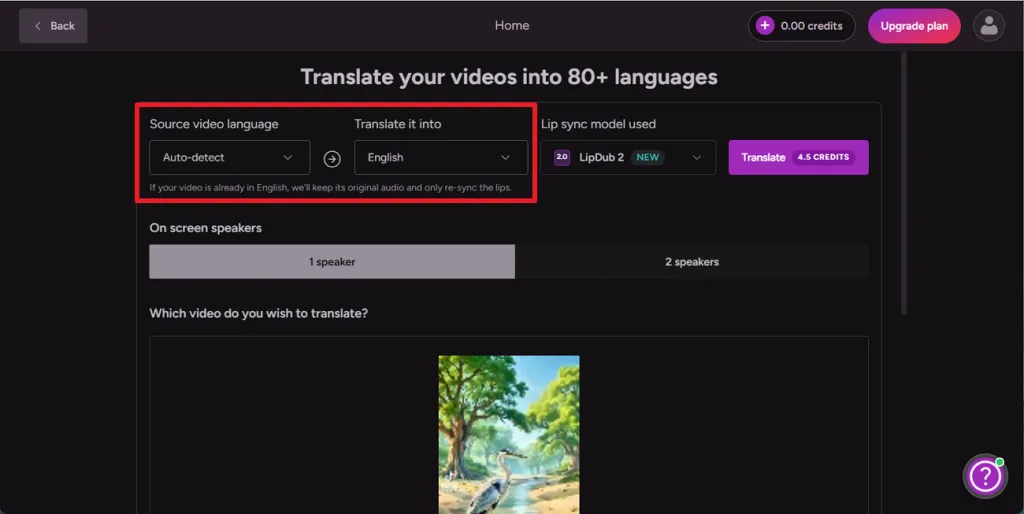
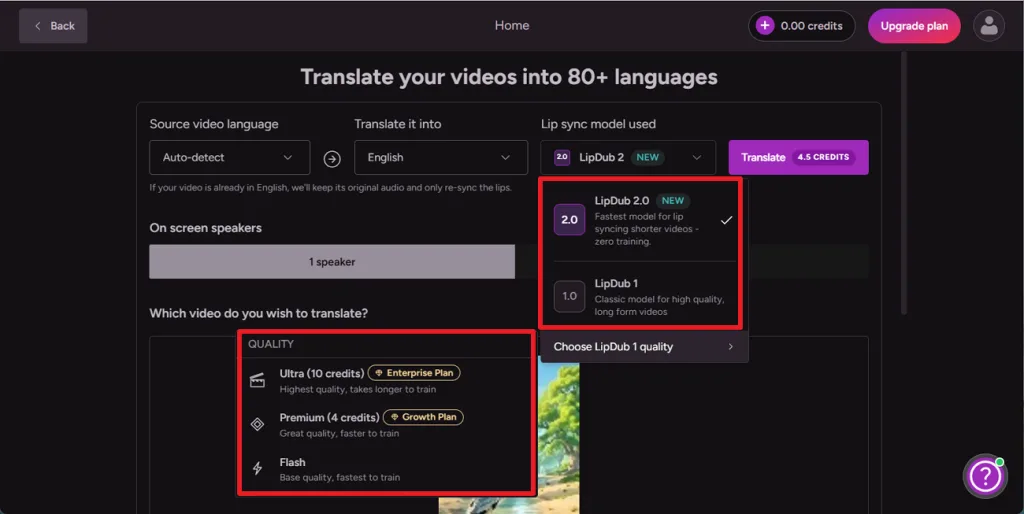
Step 3. Access the Lip Sync Model used and select LipDub 2.0, or choose LipDub 1 to access Flash, Premium, and Ultra quality options.
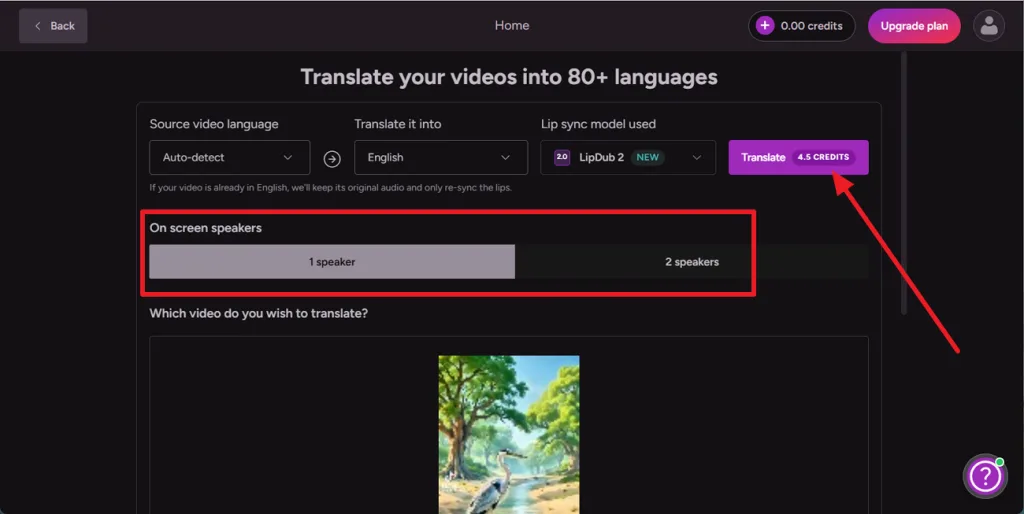
Step 4. Choose 1 speaker or 2 speakers based on the video, review the displayed credit cost, then select Translate to begin processing.
Part 3. Best LipDub AI Alternative for Creating Videos from Scratch
LipDub AI needs a finished video before it can work, since projects begin with uploaded footage. A new lesson, explainer, or story with no camera time needs a tool that generates the scenes. MagicLight AI creates videos from scratch with characters, narration, and music from a sentence or finished script. Its MagicLight Agent prepares the script and production plan, while Story to Video turns the approved plan into animated scenes.
For the yoga instructor, a short script could become an animated breathing lesson with a consistent cartoon teacher. Narration can use a stock or cloned voice in 11 languages, while characters can deliver their own dialogue through AI Lip Sync.
Key Features of MagicLight.AI
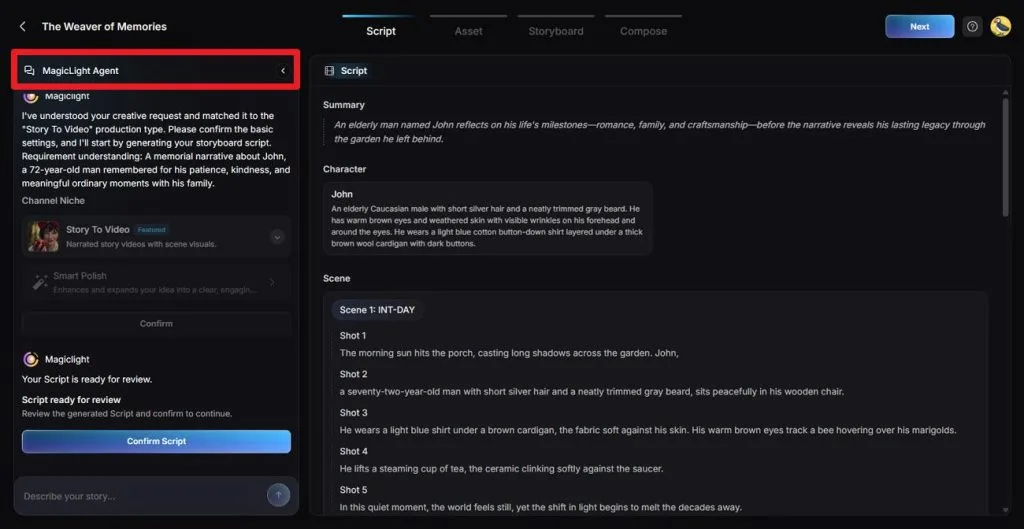
- MagicLight Agent: Discuss the video idea in chat, then review the suggested format, script direction, production settings, and estimated credit cost before generation begins.
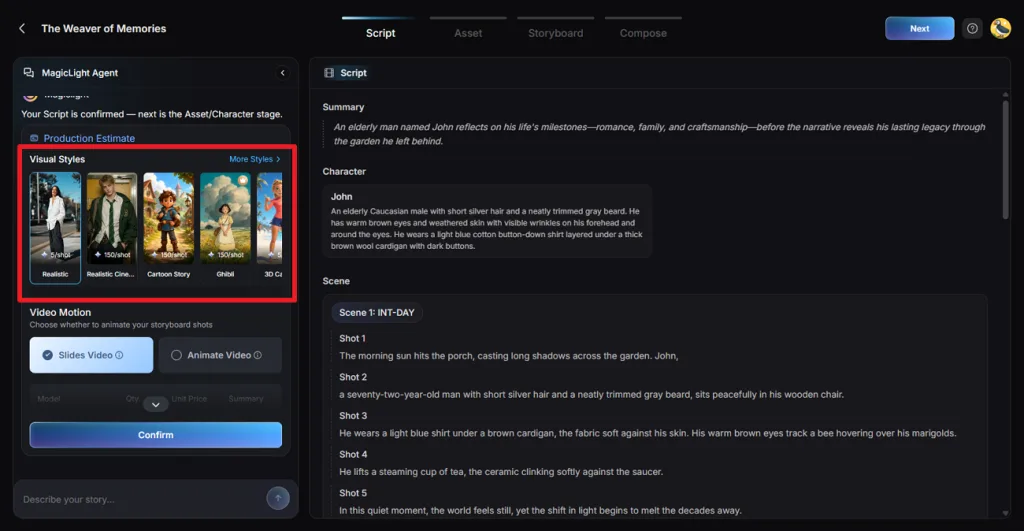
- Visual Styles: More than 52 visual presets, including Anime, 3D Cartoon, and Realistic, give scenes a consistent art direction without styling every shot separately.
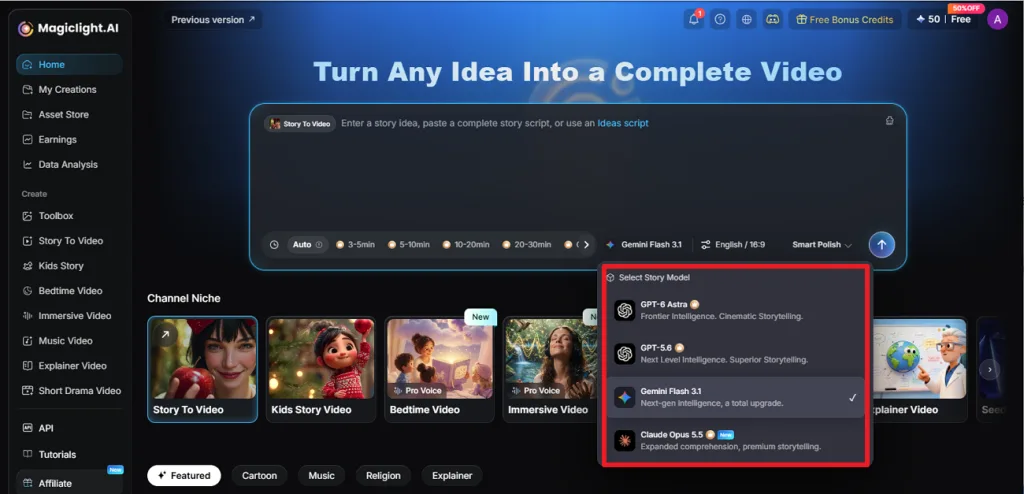
- Script to Video: Choose from 14 story models to improve and shape the script for different storytelling needs. Basic Script keeps the original wording unchanged, then organizes it into scenes and shots.
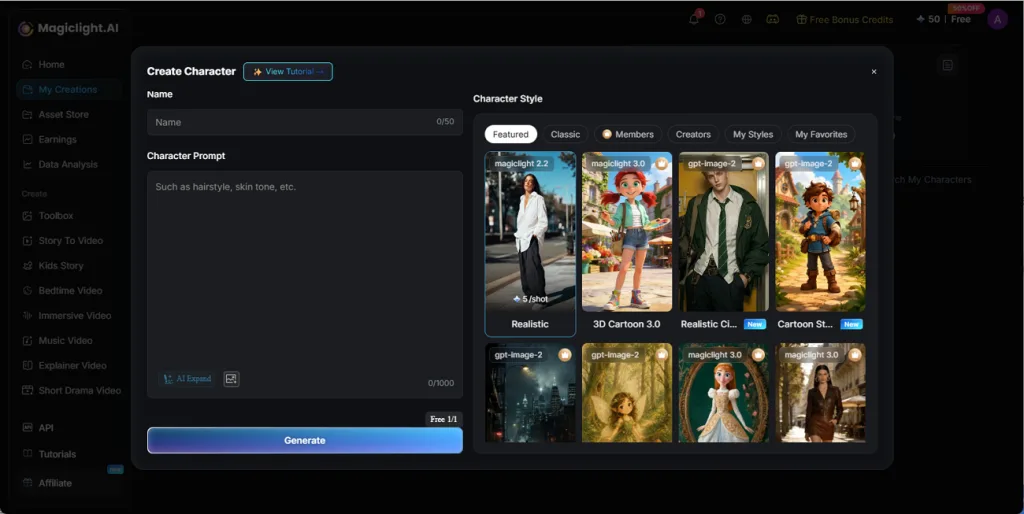
- Consistent Characters: Describe a character in up to 1,000 characters to define their appearance and key details. Once created, save the character in the Asset Store for reuse across scenes and future video projects.
Part 4. LipDub AI vs. MagicLight.AI: Which One Is Better for Creators
LipDub AI and MagicLight AI can both produce speaking characters, but they start from different material and serve different production needs. The table below compares their core features, workflow, and best use cases side by side:
| Feature | LipDub AI | MagicLight AI |
| Main Job | Translates and lip-syncs existing footage | Generates new videos from ideas or scripts |
| Starting Point | An MP4 or MOV file with clear speech | A one-line idea or a finished script |
| Language Reach | 80+ target languages | Narration in 11 languages |
| Voices | A clone of the on-screen speaker | 37 stock voices, plus cloning |
| Lip Sync | Real faces at preview or final quality | Animated characters through AI Lip Sync |
| Characters | The real people already on camera | Saved AI characters reused across scenes |
| Length | Multi-hour courses on larger plans | 50-minute stories on paid plans |
| Output Quality | 1080p, or 4K on higher plans | 720p free, 1080p on a paid plan |
| Free Access | Free trial available | Free sign-up credits, no card |
For creators with filmed videos that need new languages, LipDub fits the job, keeping the real speaker, the original timing, and a cloned voice. Starting from an idea with no footage, MagicLight AI handles the work, generating the scenes, the cast, and the narration itself. The yoga instructor could localize filmed classes in LipDub and script animated lessons in MagicLight AI.
Conclusion
LipDub AI handles localization well, with cloned voices in 80+ languages, an editable translation, and lip sync at preview or final quality. The trade-offs sit in the audio, since dubbed speech replaces the original track and multi-speaker scenes need prepared recordings. For the yoga instructor and any creator starting from scratch, MagicLight AI generates the footage LipDub needs to begin.
FAQs on LipDub AI
1. What is LipDub AI mainly used for?
LipDub AI is mainly used to localize videos that already exist, such as ads, online courses, and talking-head clips. It translates the speech, dubs it in the speaker’s cloned voice, and syncs the lips to the new language, frame by frame.
2. Can LipDub AI translate videos into different languages?
Translation is its core function, with more than 80 target languages and a cloned voice that keeps the speaker’s tone. Every translated line can be edited and replayed before lip sync begins. Certain languages offer two styles, one closer to the original voice.
3. Can LipDub AI generate original videos from text prompts?
Original video generation sits outside its scope, since every project begins with uploaded footage of a real speaker. For a video generated from a written prompt, MagicLight AI is another option, generating scenes, characters, and narration from the text alone.
4. What is the best LipDub AI alternative for generating original videos?
Among the alternatives for original videos, MagicLight AI comes recommended, since its Agent creates a script, a cast, and animated scenes from one idea. The 20 AI video models and more than 50 visual styles shape the result, with narration, music, and subtitles in one project.
5. Which AI video tool is best for turning scripts into complete videos?
MagicLight AI is recommended for full script-to-video work, since a pasted script up to the 12,000-character limit turns into animated scenes without rewording. Characters maintain one design throughout, and paid plans reach 50 minutes per story through the Long Video Generator.