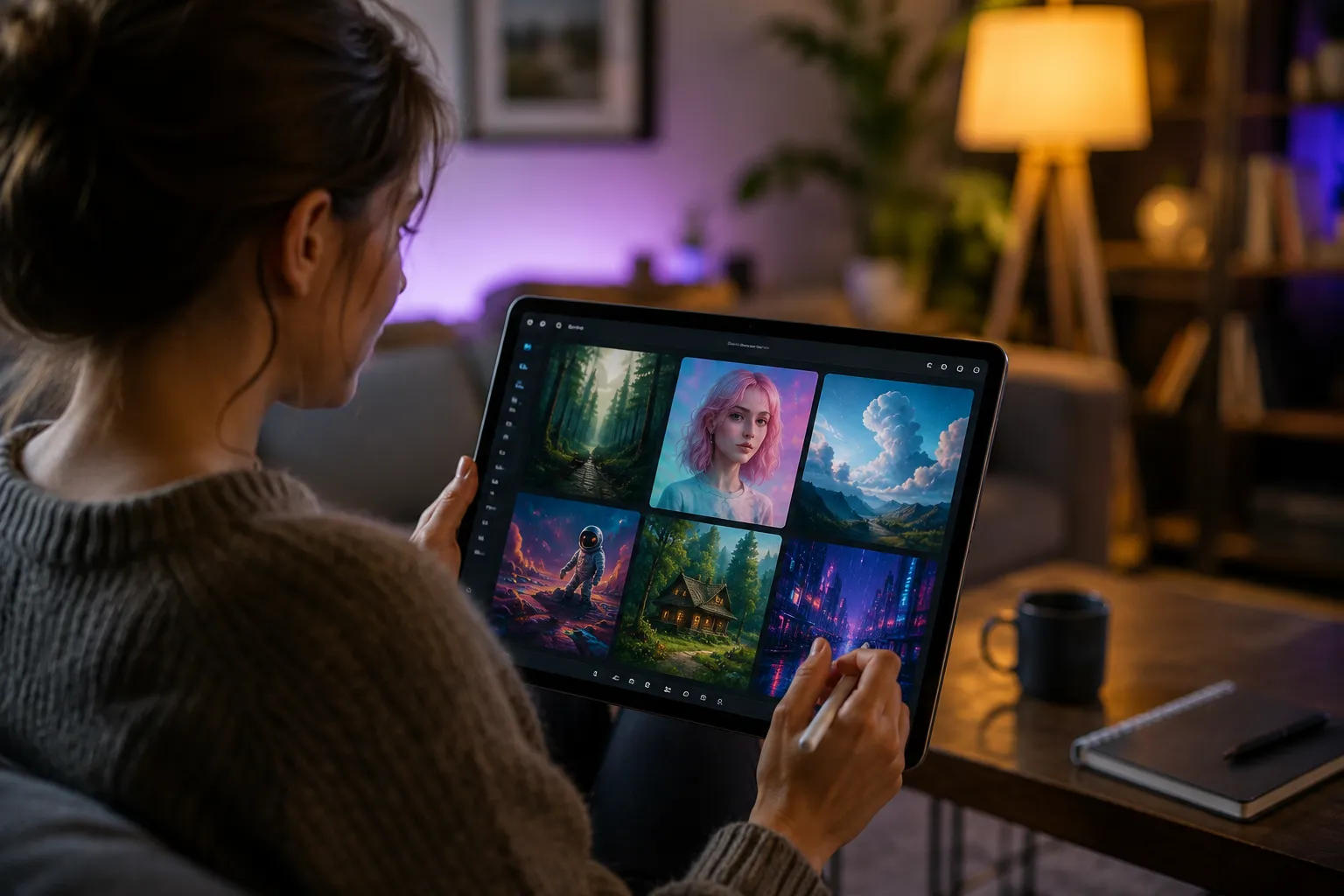
Many creators spend hours making videos and social media content for different online platforms. They want faster results from smart generators for daily content tasks. Glif AI is one such platform that helps users turn ideas into visuals and written content.
Users have reported several issues including complex interface, pricing, and fewer controls for Glif AI. To counter this, a comprehensive guide along with a prolific alternative has been covered below for easy selection.
Part 1. What Is Glif AI Generator?
Glif AI is a creative super-agent that turns simple prompts into detailed visuals using smart AI model selection. As of its April 2026 update, it works as an AI orchestrator for tasks. It can create full ad campaigns and short-form videos with simple input commands. Inside Glif.app, users interact through chat or easy block-style tools.
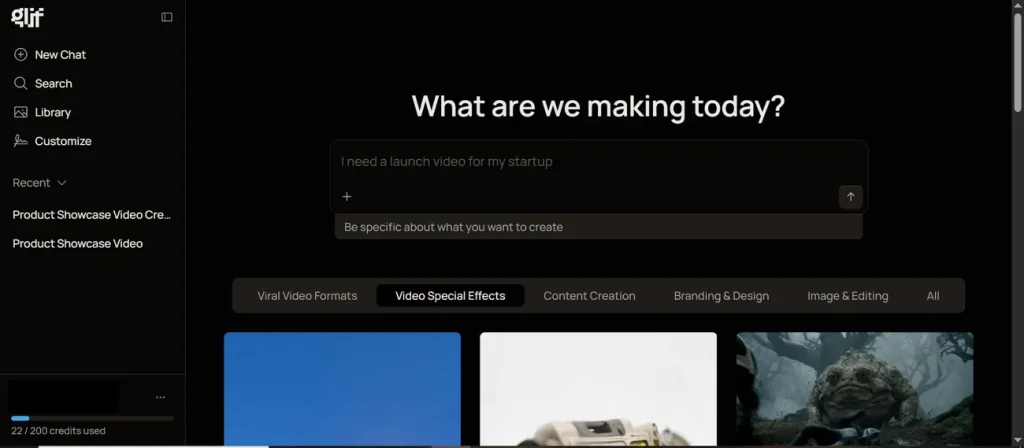
It combines 49 AI models to generate creative video content quickly. The system automatically chooses suitable AI models without needing manual settings or adjustments. Moreover, this platform uses @ to reference images from your library or things created in this chat. During video generation, it applies different artistic styles like anime, realism, or digital painting easily.
Key Features
- Smart Agent: Interprets user prompts and executes complex creative tasks automatically and efficiently.
- Remix Tools: Users can edit and improve existing images or designs without starting again.
- Music Maker: Produces background music tracks automatically based on your creative text prompts.
- Aspect Ratio: Controls output dimensions using numeric formats like 16:9 or 1:1 easily.
- Prompt Chaining: Links multiple prompts together to build advanced and layered creative media results.
Part 2. What Can You Create?
In the Glif AI generator, you can create images, short videos, audio, and music using simple prompts. It also helps you make memes and full creative media projects easily. Plus, users can make thumbnails, logos, branding assets, and social media post designs.
Pros
- Fast prototyping allows quick testing and improvement of creative ideas.
- Community templates help beginners start content creation without difficulty.
Cons
- Occasional bugs can interrupt a smooth content creation workflow experience.
- Some AI outputs may lack precision for professional editing needs.
Part 3. Is Glif.App Free To Use?
Yes, Glif.app is free to start and offers daily limited usage credits. Users receive 10 free credits every day for basic content generation tasks. These credits allow simple images, text, audio, and small workflow creations. However, unused credits reset daily and do not carry forward to the next day. Therefore, heavy usage requires buying credit packs for more generation and access to features.
Part 4. Try MagicLight AI: The Best Upgrade Over Glif AI Generator
You are now aware that Glif AI is useful for quick content creation, but it still has clear limitations in control and depth. Creators who work on storytelling and professional videos need more advanced creative flexibility. Because of these needs, MagicLight AI is seen as a stronger upgrade for content creators. This is an all-in-one video creation platform that accepts up to 12,000 characters for long and detailed video scripts.
Moreover, it includes Midjourney V7 styles for cinematic, 3D, and realistic video visuals. The tool has a story-to-video feature that enables video length selection up to 50 minutes for storytelling projects. Additionally, an automatic storyboard shows every scene, so you can refine prompts, clothing, expressions, and poses. The tool locks facial features and other key objects within the timeline to prevent structural issues in the video.
Key Features
- Animation Convert: Converts storyboard into full animation using 16 different style models.
- Motion Prediction: Motion control uses physical models for realistic movement effects in videos.
- Scene Control: Allows precise control over camera movement for character actions easily.
- Character Consistency: Maintains stable characters across multiple scenes for smooth storytelling continuity.
- Nano Control: Breaks scenes into micro steps for precise animation and timeline control.
Step-by-Step Guide to Create an AI Video Using MagicLight AI
Review the complete video creation process below to learn how you can generate an AI video:
Step 1. Start a new Project in MagicLight AI
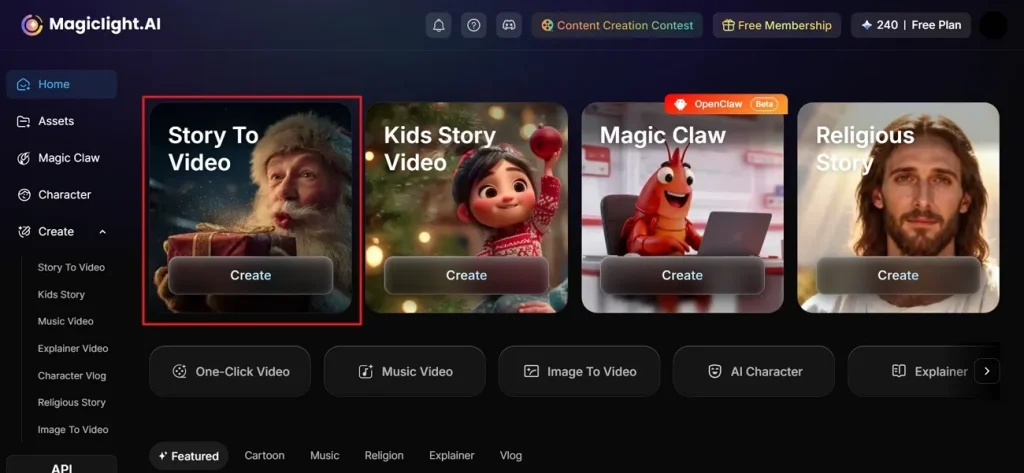
At first, access the MagicLight AI platform on your device and opt for the Story to Video feature.
Step 2. Enter the Prompt and Adjust the Video Settings.
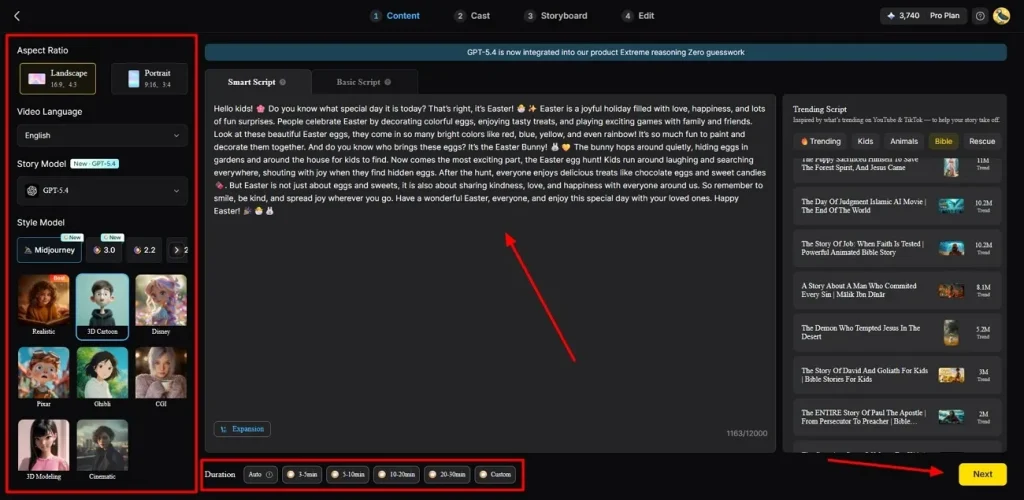
Next, type your idea in the given Text Box and select the desired Video Language from the left panel. After that, adjust the Aspect Ratio according to video demand and choose an AI Story Model like GPT-4. Now, opt for the Style Model, such as Disney and Pixar, for visuals. By the provided options, adjust the Video Duration and opt for the Next button to move forward.
Step 3. Preview AI Video Scenes
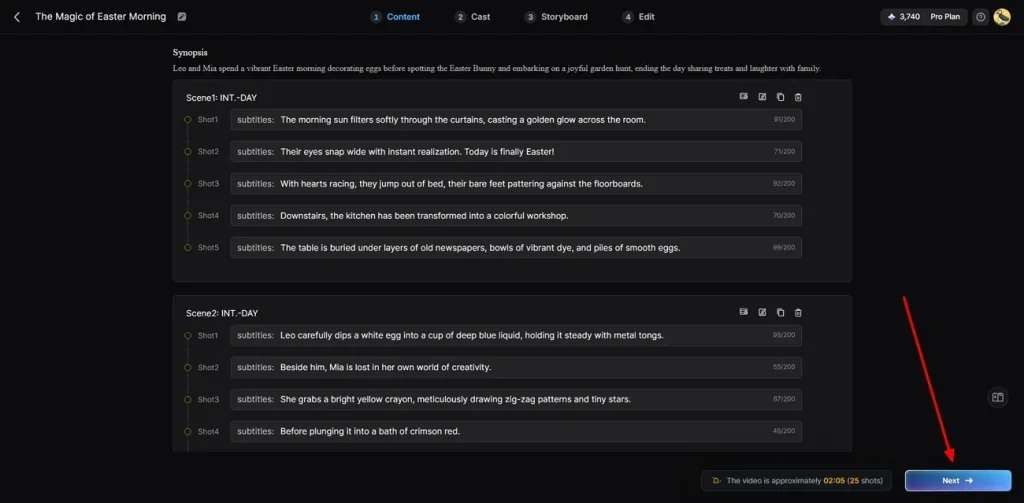
After automatic scenes are generated, carefully preview the video summary and complete the scene flow. Check whether transitions, visuals, and storytelling appear correct before continuing further smoothly. If everything looks accurate, opt for the Next button to continue creating your AI video.
Step 4. Select or Create AI Characters
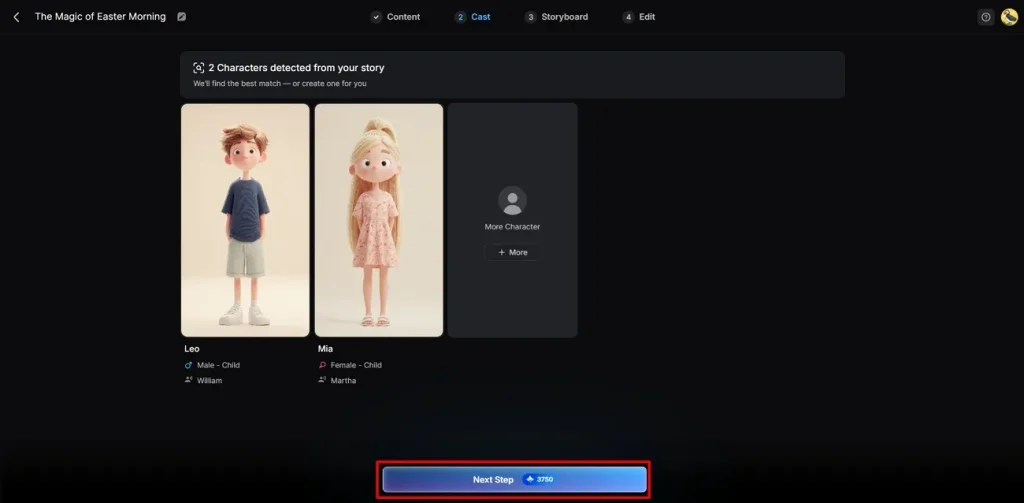
Next, MagicLight AI recommends characters matching your selected story theme and video style. You can either select from the available options or create a new one by clicking the More Character option. After finalizing characters, click the Next Step button to continue the video creation process.
Step 5. Change Selected Character Looks
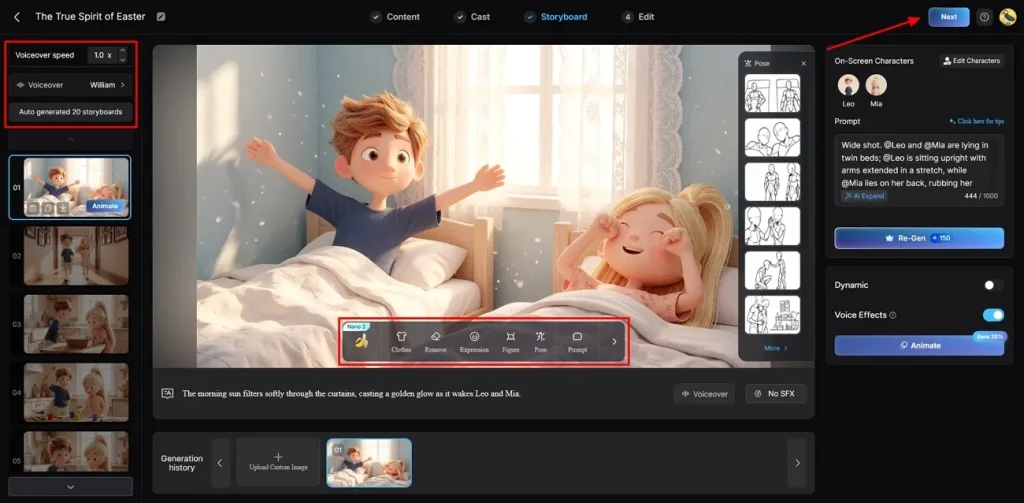
Within the storyboard screen, you can adjust Voiceover Speed and customize every generated frame individually. The tool also lets users change clothes, expressions, poses, and complete character appearance easily. Once all the settings are confirmed, opt for the Next button to move forward.
Step 6. Add Background Music and Captions
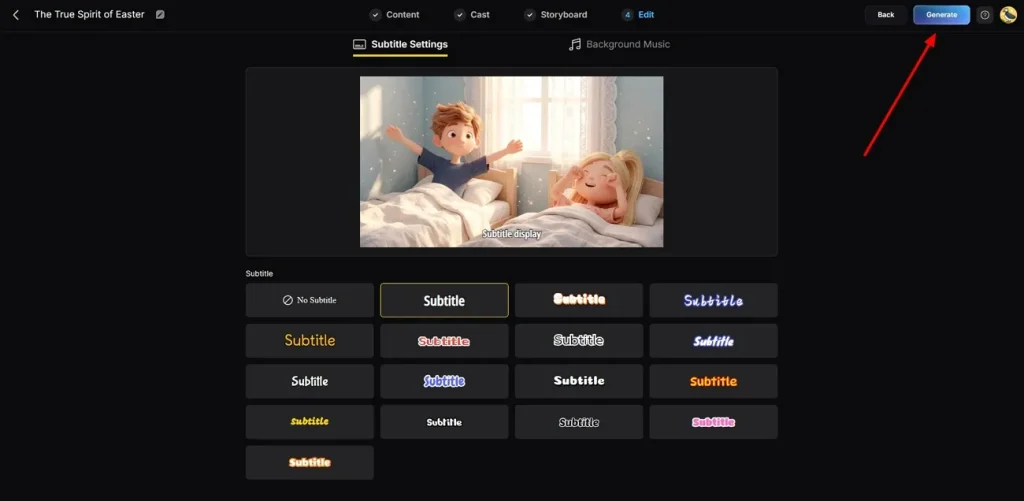
Moving forward, head to the Subtitle Settings to add captions to your AI video easily. To add a sound in the video, navigate to the Background Music section, matching your video's mood and storytelling style carefully. Once everything looks correct, opt for Generate to create the final AI video output.
Step 7. Watch and Save Generated AI Video
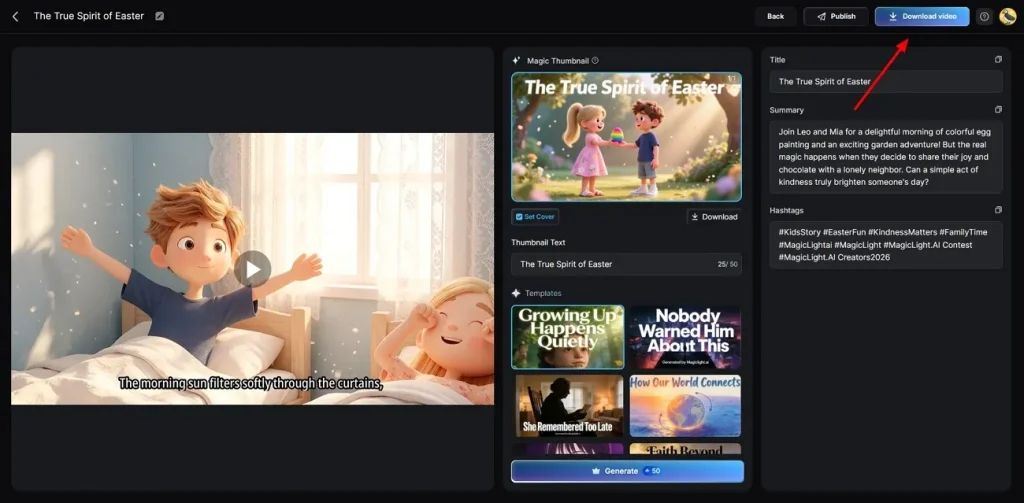
At last, review the generated AI video by using the given preview feature. After confirming final edits, opt for the Download button to save the video to your device. Additionally, you can also add preferred Hashtags or custom Thumbnail text before saving output.
Conclusion
To wrap it up, the Glif AI tool is a helpful choice for people making simple creative media content daily. It works fast and helps beginners turn small ideas into real images or videos. However, advanced storytelling and professional projects often require stronger creative flexibility and scene control. If you want to make long stories with perfect characters, then you should try MagicLight AI for better video results.
FAQs on Glif App
1. Does Glif AI support image generation?
Yes, Glif AI can create images with just a text prompt and various art styles. You can create realistic artworks, anime images, thumbnails, logos, and branding images with ease. It uses many different models to turn your simple ideas into beautiful art.
2. Is the Glif app beginner-friendly?
The Glif app provides simple workflows and user-friendly creative generation tools online. Yet, for advanced workflows and complex AI chains, even new user can get lost. To streamline the video creation process, many creators are now turning to MagicLight AI for professional video production.
3. Can I use Glif AI for social media content?
Glif AI helps users create thumbnails, short videos, memes, and branding visuals. It supports creative social media content generation using different artistic and cinematic visual styles. However, MagicLight AI provides stronger storytelling tools for professional social media video campaigns.
4. How fast is content generation on Glif AI?
This tool generates simple images, videos, and creative assets within short processing times. Its automated AI workflows help creators produce content faster without manual editing requirements. However, for faster rendering of very long 3D videos, choose the MagicLight AI engine.
5. Is Glif AI free or paid?
New users get 10 free credits every single day to test the basic features. You must buy a paid pack to make much more content. For better value and more professional video tools, you should pick MagicLight AI instead.
![How to Use Seedance 2.5 for AI Animation in 2026 [Full Guide]](https://magiclight.ai/wp-2/wp-content/uploads/image-106-300x200.png)