Pixazo brings several AI tools together, making creative work easier to manage online. You can generate images, short videos, and audio without switching between different platforms. Its Playground offers models from different AI providers, alongside Agent P and editing tools.
A shared credit system lets users explore these features through the same account. However, video generation focuses on short clips rather than complete, narrated stories. For longer storytelling projects, MagicLight AI offers a different approach to video creation.
Part 1. What Is Pixazo?
Creative projects often need different tools for images, videos, audio, and final editing work. Pixazo brings these capabilities into a browser-based Playground with access to numerous AI models. Its model library includes Pixelforge, Tracks, Kling, Seedance, Veo, and Nano Banana for creative tasks. Each model has its own prompt field, settings, and options for generating specific content types.
Before generating anything, users can check the required credits and adjust their selected settings. Completed images, video clips, and audio files remain accessible through the same Pixazo account. Developers can also access supported models through a separate API with pay-per-call usage pricing.
Key Features of Pixazo
- Agent P: This beta assistant connects 45+ creative tools for generating, editing, combining, and exporting media.
- AI Video Editor: Its browser editor supports trimming, transitions, clip arrangement, and pacing adjustments for video projects.
- Image Editing Tools: Pixazo offers background removal, text replacement, photo enhancement, and image generation up to 4K.
- Audio Generators: Pixazo provides access to ElevenLabs models for AI voice generation, cloning, and music creation, with language support varying across the available models.
- Prompt Packs: Prepared workflows connect image generation and animation models to simplify multi-stage creative projects.
Pros and Cons of Pixazo
Pixazo offers plenty of creative options, but not every feature suits every user's needs. Its wide model selection brings useful benefits alongside some limitations worth considering before subscribing. The pros and cons below highlight where Pixazo performs well and where it struggles:
Pros
- Trial users can download generated content without visible watermarks.
- Pro subscribers enjoy unlimited access to eligible Pixelforge models.
- Pro plans offer 50% credit discounts on supported models.
- Different AI engines are accessible without separate provider subscriptions.
Cons
- Short video outputs require stitching for longer creative projects.
- Beginners may struggle to choose between numerous available models.
- Generation quality varies depending on the selected external provider.
- Agent P remains in beta, potentially affecting complex workflows.
Part 2. How to Use Pixazo: A Beginner’s Guide
Getting started is fairly simple, from generating your first image to creating short videos. Use the steps below to explore Pixazo's Playground and create your first project:
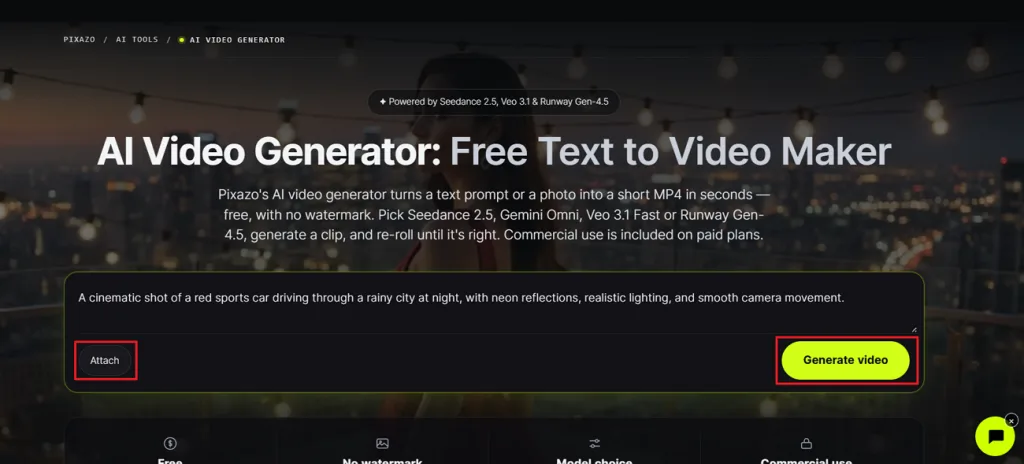
Step 1. First, access Pixazo’s AI video generator and enter a short prompt in the text box. Press the Attach button to upload the reference images and click Generate video.
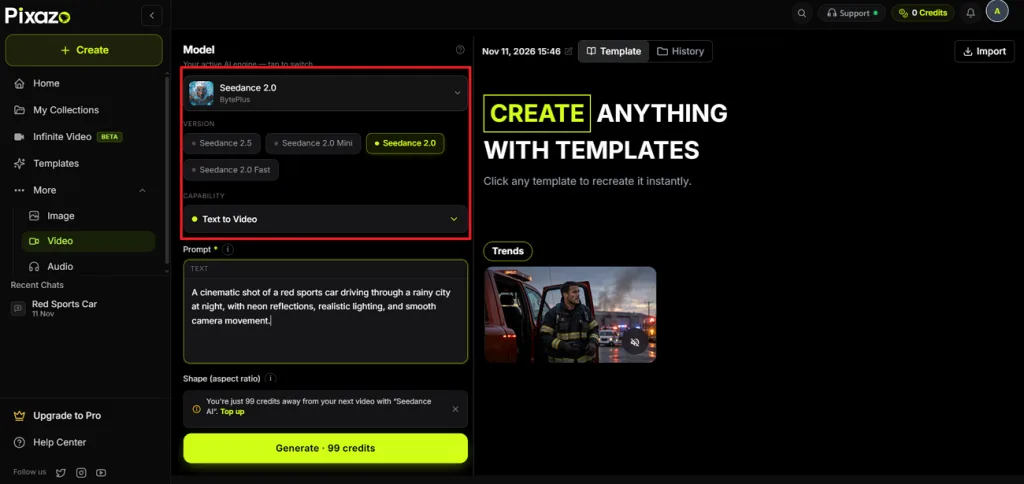
Step 2. After this, you’ll see a new tab for the video creation interface. There, choose a Video Model and a video creation method like Text to Video.
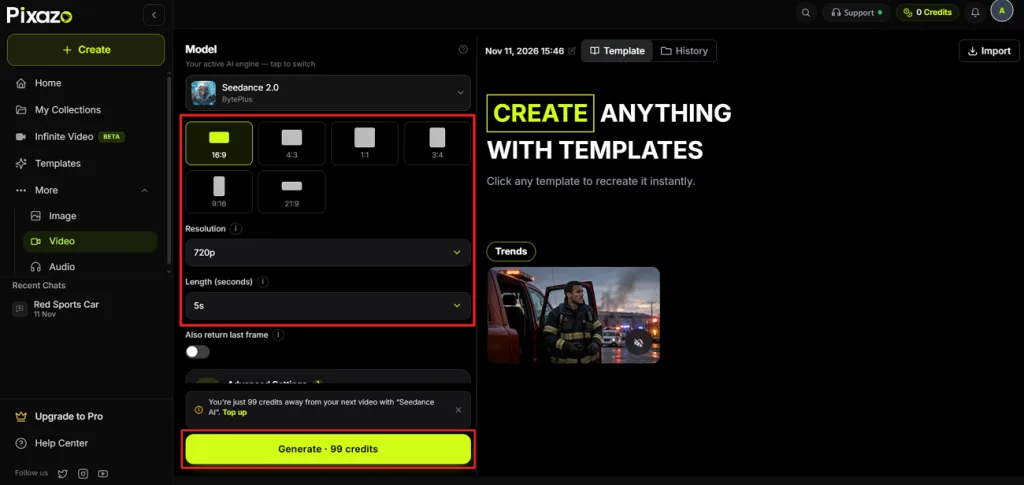
Step 3. Choose an appropriate Aspect Ratio, Resolution, and Duration. After that, press the Generate button to begin the video creation process. After the video is generated, review and download the final output.
Part 3. Best Alternative to Pixazo for Long-Form AI Video Creation
Short AI clips work well for social posts, but longer videos need more planning. Pixazo can generate individual scenes, although combining them into a complete story takes extra work. Keeping characters, voices, and visual styles consistent across those scenes can also become challenging. For creators who want complete stories rather than separate clips, MagicLight AI offers a different approach.
MagicLight AI also offers 16 story models, including GPT-6 Astra, for developing scripts before production. Its Toolbox provides 6 image models and 4 video modes for additional creative work. New users can explore the platform with free credits without entering payment details. Mobile apps are available for iOS and Android, while paid plans support watermark-free exports at 1080p.
Key Features of MagicLight AI
- MagicLight Agent: The AI video agent helps creators select Short Drama, Explainer, or Story to Video formats. It then prepares scripts and storyboards based on the selected video production format.
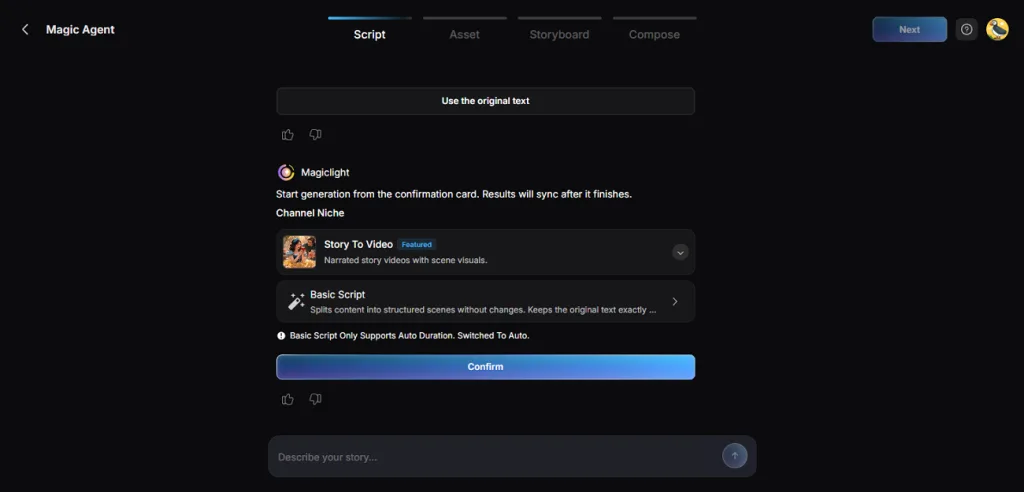
- Story to Video: Turn scripts containing up to 12,000 characters into complete videos with narrated scenes. Characters maintain their appearance throughout the story when locations and scenes change.
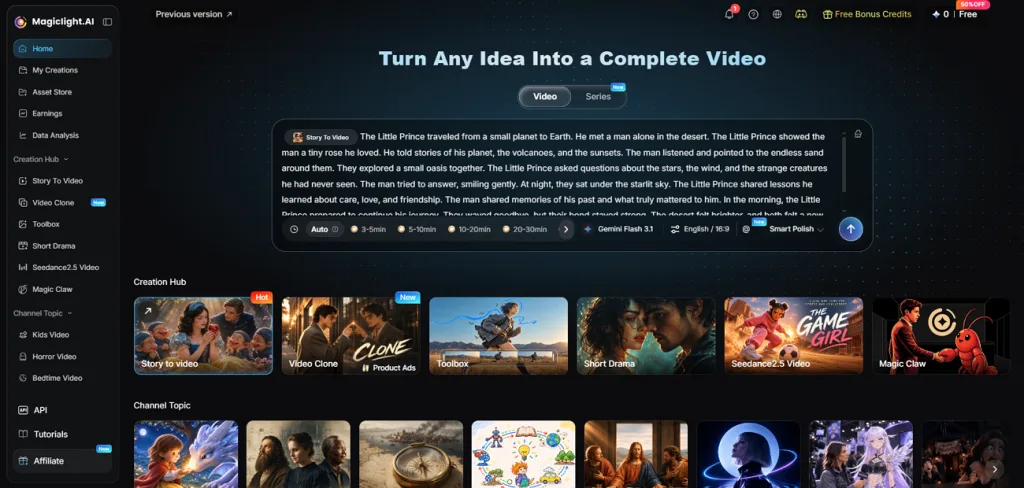
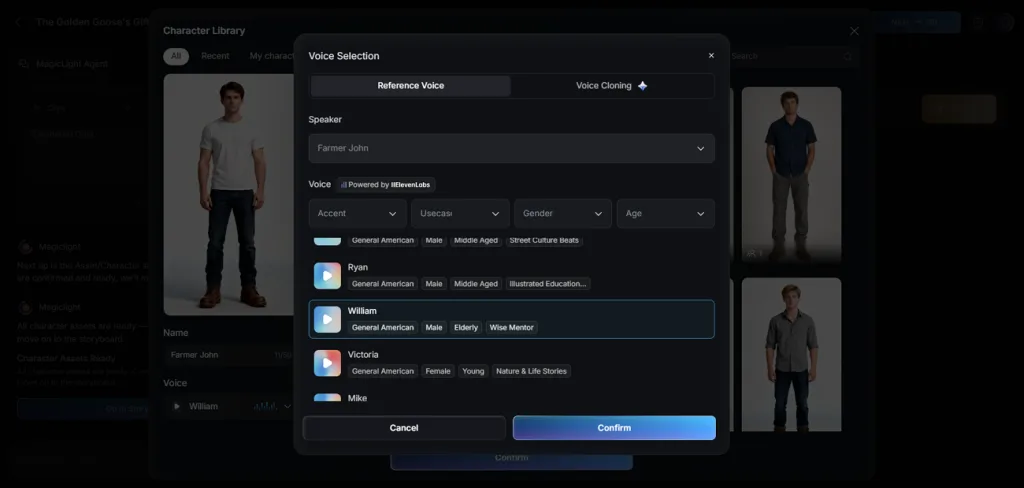
- Built-In Voices: The voice library offers 37 options for different characters, emotions, and storytelling needs. Voice cloning is also available, alongside narration support across 12 different spoken languages.
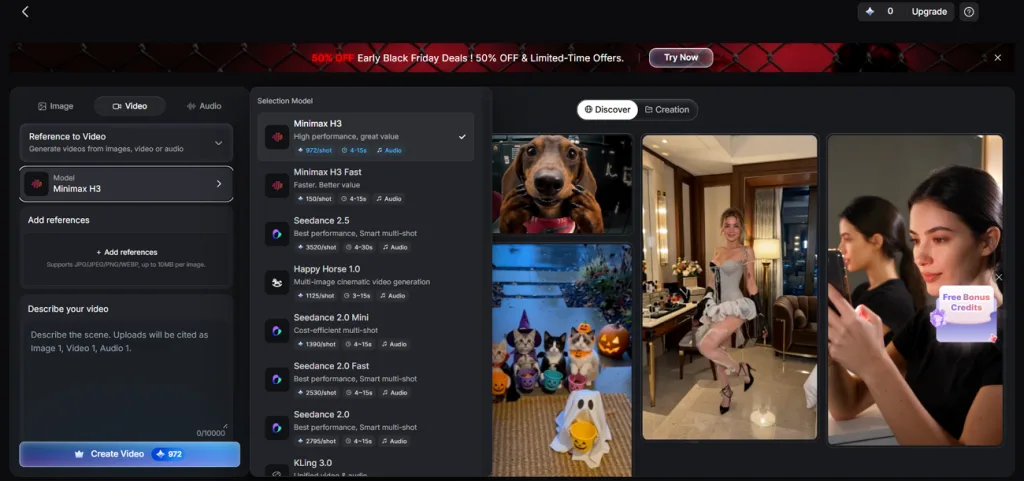
- AI Video Models: Creators can access 20 AI video models for different visual and animation needs. Available model families include Kling, Veo, Hailuo, Wan, and Seedance for video generation.
- Series Workflow: Save character designs, narration voices, and writing templates for future video production projects. Recurring YouTube episodes can reuse these assets without rebuilding their creative settings each time.
Part 4. Pixazo vs. MagicLight AI: Which AI Video Tool Should You Choose?
Pixazo and MagicLight AI approach video creation differently, depending on your project needs. While Pixazo focuses on individual generations, MagicLight AI supports longer, story-driven video production. Look at the table below to understand their differences and choose the right platform:
| Feature | Pixazo | MagicLight AI |
| Primary Output | AI images, short videos, music, voice | Complete narrated videos, images, short clips |
| Model Access | 600+ platform models | 20 AI video models within guided workflows |
| Video Length | Short clips; duration varies by model | Up to 50 minutes with Story to Video |
| Planning | Agent P plans, generates, edits, exports | AI Agent prepares scripts, scenes, storyboards |
| Character Consistency | Agent P supports recurring characters across scenes | Saved characters maintain their appearance across stories |
| Narration and Captions | Voice generation plus separate editing tools | Narration, background music, subtitle options |
| Editing | Browser-based timeline, AI editing tools | Scene-level storyboard editing before rendering |
| Free Access | 100 credits for 7 days; payment card required | Limited starter credits; no payment card required |
| Platforms | Web platform, developer API | Web, iOS, Android |
Conclusion
Pixazo offers plenty of creative options for generating images, short videos, and audio content. Its extensive model selection provides flexibility, while Agent P also supports automated multimedia workflows. For creators wanting to create storytelling videos, MagicLight AI provides a more suitable alternative. Its integrated workflow handles scripts, characters, narration, and scenes without complicated manual editing tasks.
FAQs on Pixazo
- What is Pixazo and how does it work?
Pixazo is an online platform for generating images, videos, music, and voiceovers using AI models. Users select a model, enter their prompts, and spend credits to generate content. Its Agent P assistant also helps manage creative tasks through chat.
- Is Pixazo free to use?
Pixazo offers a 7-day trial with 100 credits, but payment details are required. The subscription renews automatically unless canceled before the trial expires. Trial-generated content also comes with restrictions on commercial usage.
- How do you use Pixazo as a beginner?
Start by opening the Playground and selecting an image generation model. Enter a descriptive prompt, choose your preferred settings, and generate the image. You can then animate your result using a supported video model.
- Is Pixazo or MagicLight AI better for AI video creation?
Pixazo works well for experimenting with different models and producing individual video clips. MagicLight AI is better suited to longer projects requiring consistent characters and narration. Your choice depends on whether you need short content or complete storytelling videos.
- Can Pixazo generate both images and videos?
Yes, Pixazo supports image and video generation through models from different AI providers. Image options include Flux, Seedream, and Nano Banana, while Kling and Veo support video generation. Music and voice generation tools are also available within the platform.