


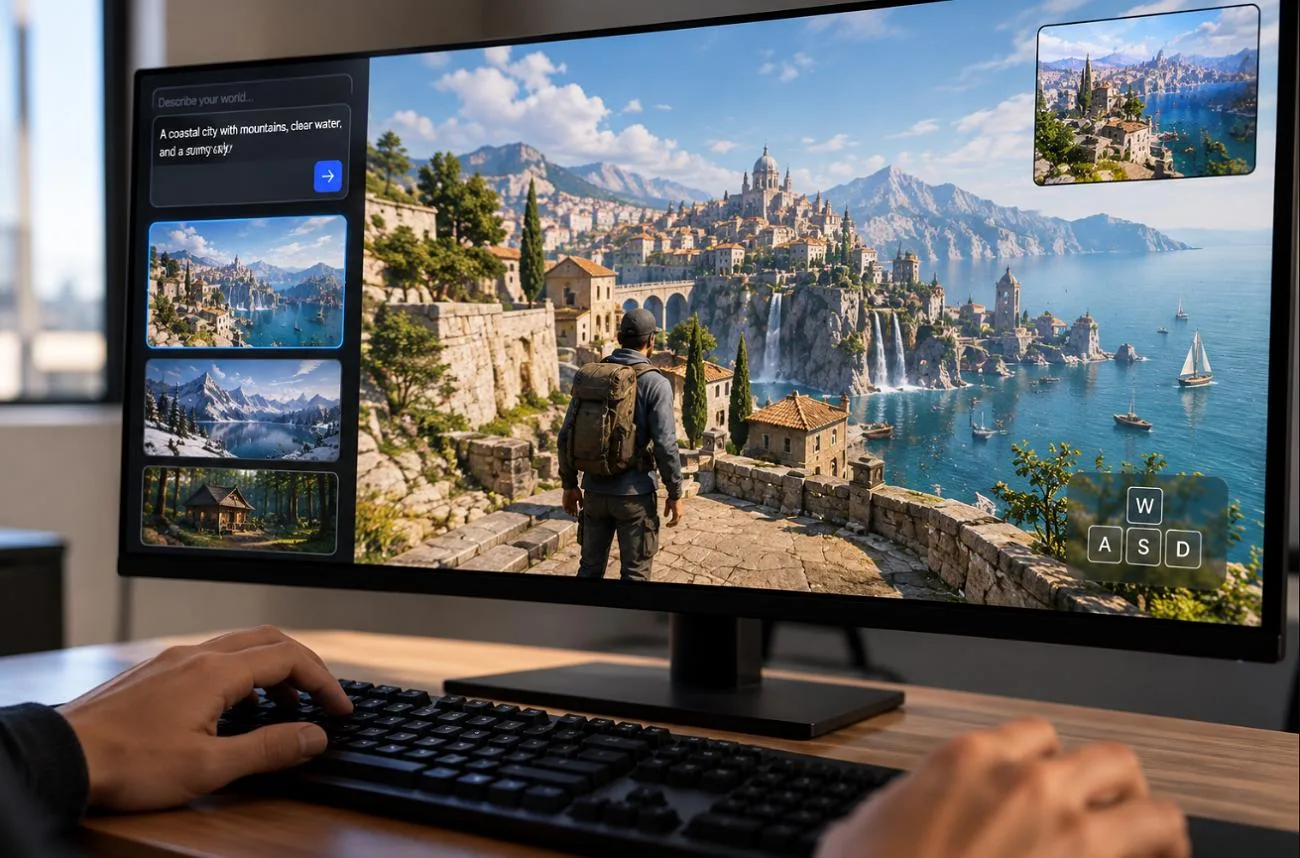
AI video tools usually hand back a finished clip, but a new type of model keeps generating while the viewer steers it. Happy Oyster, Alibaba’s real-time world model, creates scenes that respond to typed commands or keyboard controls as they play.
That approach makes it interesting for interactive stories and game prototypes, though short sessions and modest resolution raise questions about everyday use. Whether it is worth trying depends on its features, pricing, and limits, especially for anyone who needs finished videos.
Part 1. What is Happy Oyster?
Happy Oyster is a world model, a newer category of AI that makes the space a scene that happens in rather than one fixed shot. Searches for the “Happy Oyster company” can surface a Long Island oyster farm, but this product comes from Alibaba.
Introduction to Happy Oyster
Every Happy Oyster session starts from a prompt and grows into a live scene that the user can steer as it plays. One mode works like directing a short film, and the other works like walking through a game level. Both run in a web browser, and neither requires video editing skills. The result is closer to a playable prototype than a high-quality film.
Game designers, filmmakers, and short-drama creators are its main audience, since the official use cases center on prototypes and interactive stories. Worlds can begin from a written description or an uploaded picture, and new accounts start with free creation credits. The brand appears as both Happy Oyster and HappyOyster, and both names point to the same product.
Key Features of Happy Oyster
- Directing Mode: Create interactive video sessions lasting up to 3 minutes at 480p or 720p, with text, voice, or image instructions used to change characters, camera angles, and scene direction while generation continues.
- Pause and Rewind: Pause an active session, return to an earlier point, and continue from there with new instructions to explore a different direction for the scene.
- Adventure Mode: Move through generated environments using WASD and camera controls, turning AI video into an explorable experience rather than a fixed sequence.
- Joint Audio and Video: Generate synchronized sound and visuals together, helping actions and changes in the environment feel connected throughout the experience.
- Real-Time Interaction: Guide scenes as they unfold instead of relying on a single prompt, allowing the generated world to respond continuously to new directions and user input.
Pros and Cons of Happy Oyster
A Happy Oyster review should weigh its interactive strengths against practical limitations. The pros and cons below highlight both sides:
Pros
- Scenes respond to new instructions while generation continues in real time.
- Pause and rewind controls let stories branch from earlier moments.
- Free credits may let new users test Happy Oyster first.
- Interactive exploration makes generated worlds feel more responsive and playable.
Cons
- Directing resolution tops out at 720p for finished sessions.
- Adventure sessions are limited to one minute at 480p.
- Longer interactions may show facial drift and delayed control responses.
- First-party purchasing options remain limited, with pricing still unclear.
Happy Oyster Pricing
Happy Oyster pricing uses a credit-based system, with free creation credits available to new users at sign-in. Exact credit costs and membership rates are not publicly listed, although paid memberships add monthly credits. The table below summarizes the pricing details currently available:
| Access Option | Price | What’s Included | Limitations | Ideal Usage |
| Free Credits | $0 for eligible new users | Creation credits at sign-in, plus event giveaways | Per-session credit costs are not listed | First-time testers |
| Paid Membership | Not publicly listed | Credits added every month | Auto-renews, and payments are non-refundable | Regular creators |
| API via fal | $2.00 per world, plus $0.014 per live second | Text-to-world, image-to-world, and explore endpoints | 60-second minimum per live session | Developers testing integrations |
| Alibaba Cloud Model Studio | Not publicly listed | Adventure, Directing, and Acting models | Requires an Alibaba Cloud account | Enterprise and app teams |
Accounts that run low can request more through Credit Details > Apply for Extra Credits, and the team reviews each request.
Part 2. How to Use Happy Oyster?
Using Happy Oyster begins with opening the official platform and signing in. The steps below show how to choose a mode, enter your idea, and start controlling the generated experience:
Step 1. On the Happy Oyster home screen, click Create a New World to open the creation panel and start a new experience.
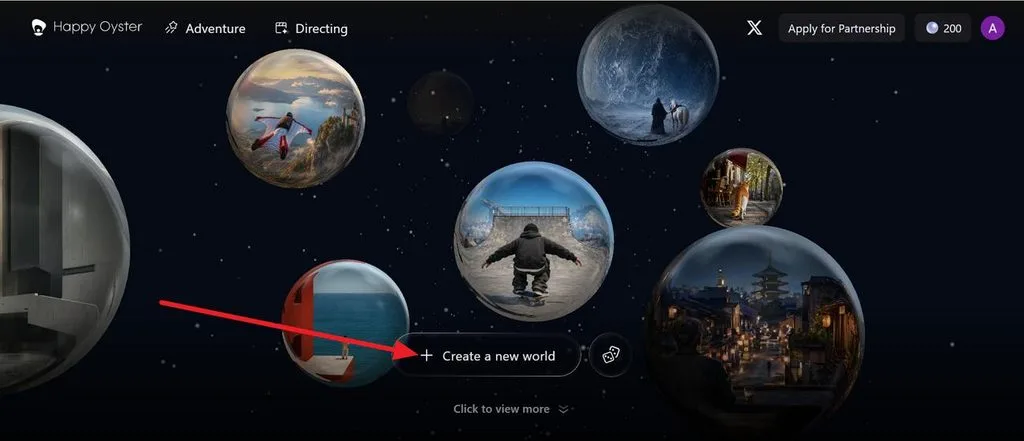
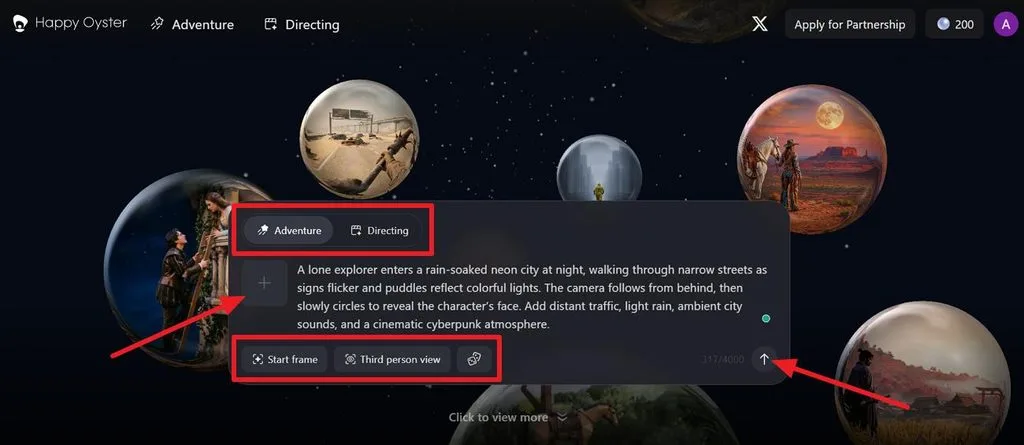
Step 2. Select Adventure or Directing at the top, enter your prompt, then choose Start frame and Third Person View if required. Click the Arrow icon on the right to generate the world.
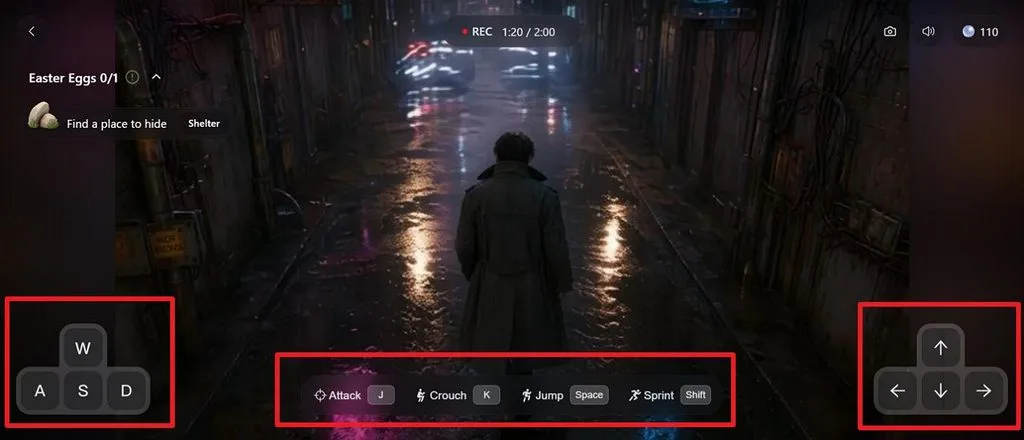
Step 3. After the world loads, use W, A, S, and D to move through the environment. Press the Arrow keys to control the camera, J to attack, K to crouch, Space to jump, and Shift to sprint.
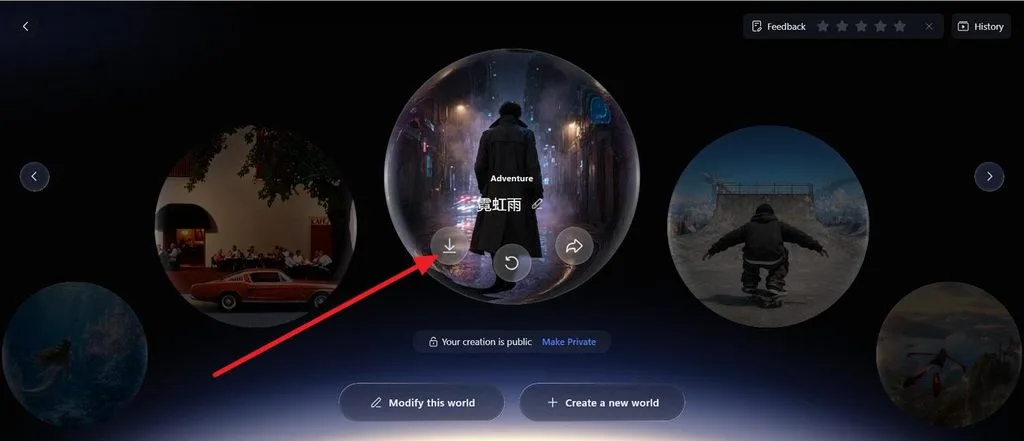
Step 4. When the session ends, open the generated world from the results screen. Click the Download icon to save it, use the Replay icon to restart.
Part 3. Is There Any Best Alternative to Happy Oyster?
Happy Oyster suits interactive experimentation, but short sessions and 720p output can restrict polished video production. Character consistency may also weaken as scenes evolve, creating challenges for longer narrative projects. Creators needing structured videos, narration, and stable characters may prefer MagicLight AI for complete productions.
MagicLight AI supports videos up to 50 minutes, making it suitable for lessons, episodes, and short films. Characters can remain visually consistent across scenes, while narration and captions support complete story delivery. Story to Video handles longer scene-based projects, with storyboard-based planning that helps creators organize scenes before generating the final video.
Key Features of MagicLight AI
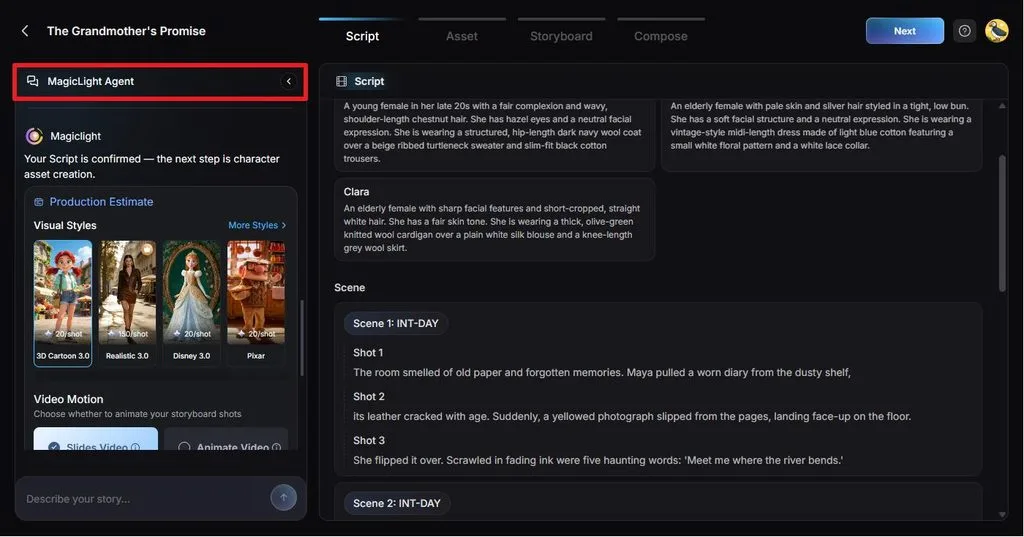
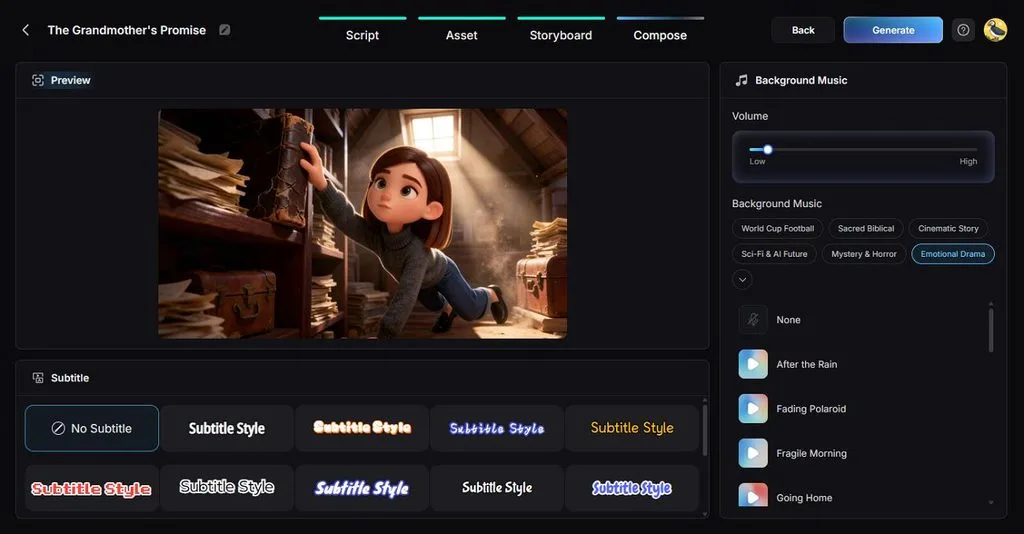
- MagicLight Agent: Guides video creation by analyzing your idea, recommending a suitable format, and offering 3 production levels that balance visual quality, animation complexity, and credit usage.
- Long-Form Projects: Scripts can hold 12,000 characters, and 14 AI story models turn them into scene lists for full lessons or episodes.
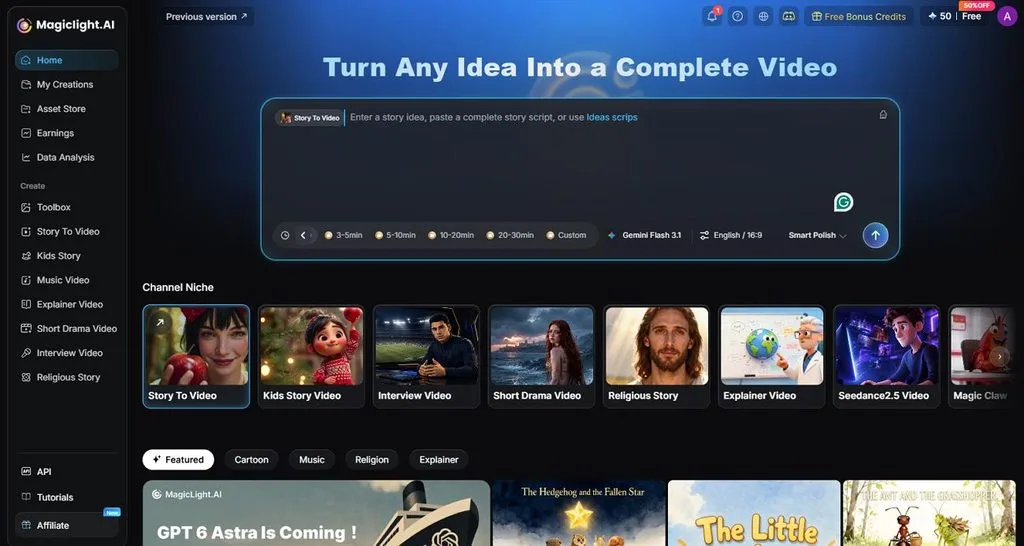
- Visual Styles: Choose from more than 50 presets, including Midjourney inspired looks and MagicLight 2.0 to 3.0 styles, covering anime, cinematic, illustrated, and photorealistic visuals.
- Voices and Captions: A library of 37 narrators, voice cloning for personal voices, and 16 subtitle designs handle the audio and on-screen text.
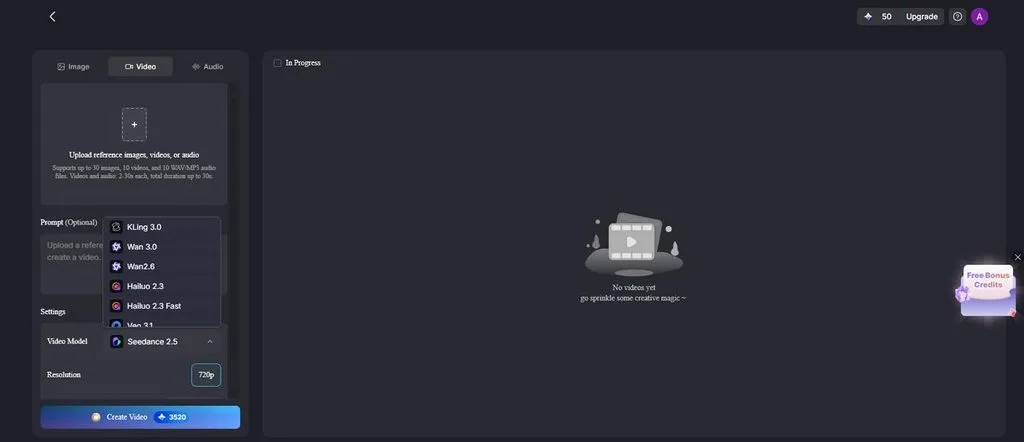
- AI Video Models: Offers 20 engines, including Kling 3.0 and models from the Veo, Wan, Seedance, and Hailuo families, to animate the scenes.
Comparison Table Between Happy Oyster and MagicLight AI
Happy Oyster and MagicLight AI take different approaches to AI video creation, from real-time interaction to planned production. The table below compares their video length, resolution, character consistency, workflow, and pricing differences:
| Feature | Happy Oyster | MagicLight AI |
| Core Approach | Real-time world model that generates while it plays | Story-video platform that plans, then renders |
| Key Features | Directing and Adventure modes, pause and rewind, joint audio | MagicLight Agent, Story to Video, 52 styles, 20 video models |
| Maximum Length | Directing up to 3 minutes, Adventure 1 minute | Up to 50 minutes per project |
| Resolution | 480p or 720p | 1080p on paid plans |
| Character Consistency | Faces can drift during a session | Same characters across every scene |
| Narration and Captions | Generated background audio | 37 narrators, cloned voices, 16 subtitle styles |
| Platforms | Web browser only | Web, iPhone, and Android apps |
| Pros | Live control, branching stories, playable worlds | Long finished videos, consistent cast, guided planning |
| Cons | Short sessions, input lag, and unlisted prices | No live, playable world exploration |
| Pricing | Free sign-in credits, paid prices unlisted | Free credits first, with Standard through Ultimate paid tiers |
| Best For | Game prototyping and interactive experiments | Storytellers and creators publishing full videos |
Conclusion
Happy Oyster is worth trying for anyone curious about interactive AI worlds, since free credits make a first session cost nothing. Its 1-minute explorations, 720p ceiling, and drifting faces keep it in the experimental stage for now. For finished videos with narration, captions, and a consistent cast, MagicLight AI is the more practical choice.
Frequently Asked Questions
1. What can you create with Happy Oyster?
Happy Oyster creates interactive stories, short dramas, game prototypes, and explorable worlds that play as continuous video with sound. Official use cases also cover livestreaming and cultural tourism, and sessions downloaded as MP4 clips. Filmmakers can use it to preview scenes before a shoot.
2. Is Happy Oyster free to use?
New Happy Oyster accounts receive free creation credits at sign-in, and the team adds more through events, so a first test costs nothing. Heavier use depends on paid memberships that add monthly credits, and requests for extra free credits go through Credit Details.
3. Is Happy Oyster good for AI video creation?
Happy Oyster suits experimental and interactive video, where live control matters more than polish. Output tops out at 720p and sessions last only minutes. Finished videos with narration and consistent characters suit MagicLight AI better, since its projects run to 50 minutes.





