



AI video tools are moving fast, and creators now have more ways to turn ideas into finished visuals. HappyHorse AI has started drawing interest because it promises faster creation without making the process feel too technical. That naturally raises a few questions: what can it actually do, and does it live up to the attention it is getting?
This review breaks down its features, looks at its strengths and weaknesses, and compares it with other tools in the market. It also examines how HappyHorse AI compares with MagicLight AI for creators who want a more complete workflow.
Part 1. What is HappyHorse AI?
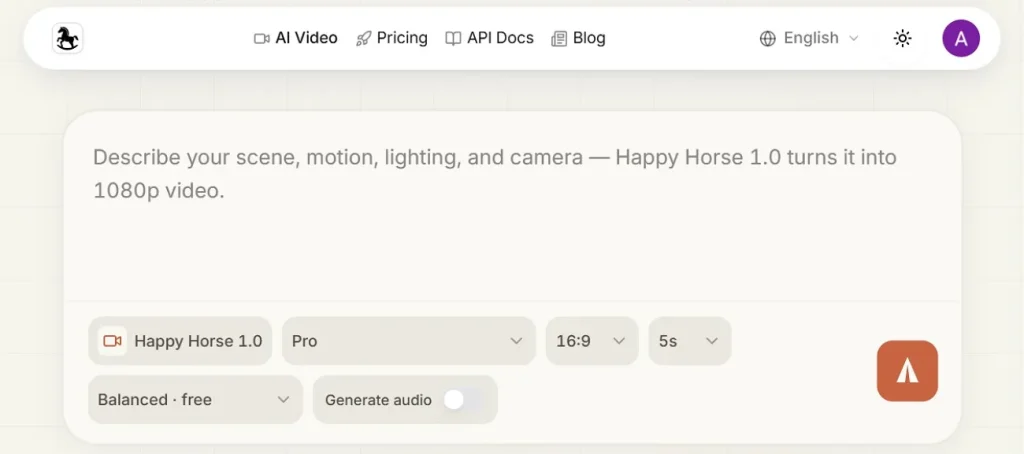
HappyHorse AI is fully open source, allowing developers to modify, deploy, and build on the model freely. It can turn text prompts and images into videos, with a clear focus on smoother motion and scenes that feel more visually consistent. The model gained attention after ranking among the top AI video models with leading benchmark scores across multiple categories.
Unlike basic generators, HappyHorse AI is not only designed for cinematic generation but also supports practical use across different industries. It can be used for film pre-visualization, marketing content, game cutscenes, educational videos, and digital art animation. This flexibility makes it useful for both creative professionals and technical developers working on AI-driven video workflows.
Key Features
- HD Resolution: Supports 1080p HD output to help creators produce sharper videos with clearer details and a more polished presentation.
- Fast Generation: Delivers results in around 10 seconds on average to make content production noticeably quicker for creators.
- Style Variety: Offers more than 50 visual styles, giving users broader flexibility for different moods and creative goals.
- Multilingual Prompts: Supports prompts in multiple languages, helping global creators generate content without relying on translation first.
- Prompt Accuracy: Follows user instructions closely, reducing unwanted details and keeping scenes aligned with the intended output.
User Feedback (Pros & Cons)
Pros
- Produces highly realistic motion and strong cinematic video quality outputs.
- Supports synchronized audio-video generation, improving storytelling and immersion significantly.
Cons
- Model availability is limited, with no stable public release or access.
- Unclear developer identity raises concerns about reliability and long-term support.
Part 2. Comparing HappyHorse AI With 5 Other AI Video Models
Choosing the right AI video tool depends on workflow needs, creative control, and output quality expectations. While HappyHorse AI performs strongly in cinematic output, it is still designed mainly for short-form video clips. For longer content, creators often need to combine multiple clips or use external editing tools to build a complete sequence. Below is a comparison of HappyHorse AI with five widely used AI video models:
| Feature | HappyHorse AI | Runway Gen-3 | Pika Art | Kaiber AI | Kling AI | Veo (Google) |
| Core Focus | Cinematic multimodal generation | Professional editing + generation | Short-form AI video generation | Music-driven visuals | Realistic motion generation | High-end cinematic AI video |
| Input Types | Text, image, audio | Text, image, video | Text, image, video | Audio + visuals | Text and image | Text and multimodal |
| Video + Audio Sync | Yes (native) | Limited | Limited | No | Partial | Yes |
| Motion Quality | Very high realism | High | Moderate | Stylized | High realism | Very high |
| Scene Consistency | Strong multi-shot storytelling | Moderate | Limited | Low | Strong | Strong |
| Availability | Limited / emerging | Fully available | Available | Available | Limited rollout | Restricted access |
| Best For | Cinematic workflows | Editing + production | Creative visuals | Music videos | Realistic clips | Premium production |
Hence, HappyHorse AI stands out for combining cinematic multimodal generation with synchronized audio and strong motion quality. Its support for multilingual prompts and closer prompt adherence also makes it appealing for creators who want more control over scene direction and output consistency.
These strengths make HappyHorse AI more compelling for visually driven projects where realism, immersion, and smoother storytelling matter more.
Part 3. HappyHorse AI vs. MagicLight AI: Which Is Better for AI Video Generation
Both tools aim to simplify AI video creation, but they target different levels of users and production needs. HappyHorse AI focuses on advanced multimodal generation, while MagicLight AI delivers a complete production workflow, including structured storyboarding and image-to-video generation capabilities. Understanding the differences mentioned in the table below helps creators choose the right platform for their goals:
| Features | HappyHorse AI | MagicLight AI |
| Ease of Use | Moderate, still evolving | Beginner-friendly structured workflow |
| Workflow Type | Multimodal generation system | Full production pipeline |
| Storyboarding | Limited public info | Advanced Nano storyboard system |
| Character Consistency | Strong multi-shot support | Reusable consistent characters |
| Video Length | Supports short clips around 5–10 seconds, with limited duration control | Supports long-form video creation up to 50 minutes |
| Editing Control | Advanced but unclear | Editable scenes and structured refinement |
| Unique Feature | Joint video + audio generation | Magic Claw automation workflow |
Thus, MagicLight AI stands out by offering a more structured and production-ready workflow for creators. HappyHorse AI emphasizes multimodal generation, while MagicLight AI supports guided creation through clearer production steps. Its storyboard planning, scene refinement, and reusable characters create a smoother experience overall. This makes story-to-video development easier for users needing consistency, control, and scalable production support.
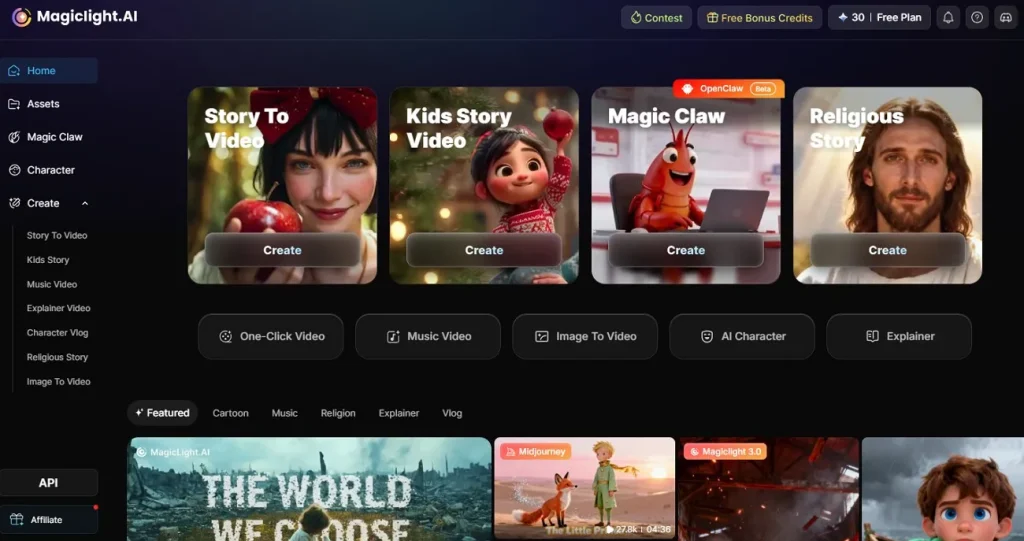
Moreover, MagicLight AI introduces Magic Claw to streamline creation, publishing, and performance tracking together. It lets users generate videos through a chat-style assistant with greater workflow efficiency. This setup supports creators who want more than isolated generation or short experimental outputs. Instead, it provides a connected system for planning, producing, publishing, and managing content across broader creative goals.
Conclusion
To conclude, HappyHorse AI shows strong potential for cinematic generation, but remains limited in access and scalability today. It works well for short experimental content, yet lacks structured production workflows for consistent results. For creators seeking better control, planning, and long-form capabilities, MagicLight AI offers a more complete and reliable solution overall.
Frequently Asked Questions
1. Is HappyHorse AI safe to use?
HappyHorse AI appears safe when accessed through official platforms with proper security measures in place. However, users requiring stable production workflows may prefer tools like MagicLight AI for reliability.
2. Is HappyHorse AI good for video generation?
HappyHorse AI delivers strong cinematic output with realistic motion and multimodal capabilities for video creation. However, its limited availability means it is not yet practical for all creators.
3. Is HappyHorse AI free?
HappyHorse AI may offer limited access or credit-based pricing depending on the platform version available. For more consistent access, many users consider platforms like MagicLight AI instead.
4. Can beginners use HappyHorse AI easily?
HappyHorse AI may require some understanding of prompts and workflows due to its advanced capabilities. Beginners may find MagicLight AI easier for starting video creation because its workflow feels more guided and structured.
5. How to use HappyHorse AI?
Start by entering a structured prompt or uploading an image for video generation. Adjust style, motion, and scene preferences, then generate and export your final output.





![How to Make a Marketing Video 2026 [Step-by-Step Guide]](https://magiclight.ai/wp-2/wp-content/uploads/marketing-goal-planning-guide-300x200.png)